
That moment of panic when you turn around and your tablet is gone from a coffee shop table or retail counter is exactly why physical security matters more than software passcodes. Whether you are kiosk-mounting for customer check-in, securing a classroom iPad, or tethering your personal tablet in a co-working space, a cable lock or locking enclosure is the only real deterrent against grab-and-run theft. Without one, a tablet is simply a tempting target sitting in the open.
I’m Min — the co-founder and writer behind Gadgets Feed. I spend hours cross-referencing technical specs, adhesive shear strength measurements, cable gauge ratings, and compatibility matrices to identify which tablet security solutions actually deliver on their promises.
After analyzing seven different approaches to tablet security — from adhesive anchor kits to heavy-duty floor kiosks — this guide breaks down exactly what you need to know before buying the best anti theft device for tablets for your specific situation.
How To Choose The Best Anti Theft Device For Tablets
The right security solution depends entirely on where and how the tablet is used. A retail POS kiosk needs something fundamentally different from a laptop lock used by a single remote worker. Your choice hinges on four factors: mounting method, enclosure style, cable strength, and accessibility needs.
Mounting Method: Adhesive vs. Slot vs. Enclosure
Adhesive anchor plates use industrial-grade 3M tape to bond a metal plate to the back of your tablet, which then accepts a cable lock. These work on any device but rely completely on the adhesive bond holding against a sharp pull. Kensington slot locks insert directly into a dedicated security slot built into many laptops and some tablets — no adhesive required, but the tablet must have the slot. Full enclosures surround the entire tablet in a rigid frame (aluminum or acrylic) that locks shut with a key, providing the highest level of physical tamper resistance.
Cable Strength and Cut Resistance
Not all cables are equal. A 5mm carbon steel cable twisted from multiple wire strands offers meaningful resistance against bolt cutters, while a thinner 3mm cable with a plastic sheath is more of a visual deterrent. Check whether the cable is sheathed (protects surfaces from scratching) and whether the lock head itself is reinforced — some budget locks have the male end snap off under lateral force, rendering the cable useless.
Enclosure Material and Build Quality
For kiosk-style installations, enclosure material determines longevity. Aluminum enclosures dissipate heat better, resist impact, and feel premium, but can dent. Acrylic enclosures look sleek and are lighter, but may crack under repeated abuse. The locking mechanism matters too — pin tumbler locks offer more key variations than basic cam locks, and security screws (Torx or proprietary) prevent casual removal with standard tools.
Quick Comparison
On smaller screens, swipe sideways to see the full table.
| Model | Category | Best For | Key Spec | Amazon |
|---|---|---|---|---|
| CTA Digital PAD-DASB109 | Premium | POS / Retail Kiosk | Aluminum Enclosure, 360° Rotation | Amazon |
| Mount-It! MI-3786 | Premium | Freestanding Floor Kiosk | Height Adjustable 24.8″–42.5″ | Amazon |
| AboveTEK iPad Kiosk Stand | Mid-Range | Countertop Retail Display | Heavy-Duty Metal Base, 75° Tilt | Amazon |
| TABcare Acrylic Enclosure | Premium | Wall-Mounted Kiosk | VESA 75x100mm Compatible | Amazon |
| Kensington K65035AM | Mid-Range | Laptop/Tablet with Slot | 6ft Carbon Steel Cable | Amazon |
| AboveTEK TL-180K | Budget | General Tablet Tethering | 6ft Galvanized Steel Cable | Amazon |
| I3C 2-Pack Cable Lock | Budget | Multiple Device Security | 5mm Thick Carbon Steel | Amazon |
In‑Depth Reviews
1. CTA Digital PAD-DASB109

The CTA Digital PAD-DASB109 is the most refined all-in-one kiosk solution on this list, pairing a locking aluminum enclosure with a fully adjustable base. The aluminum body offers superior heat dissipation compared to acrylic, and the enclosure flips 180 degrees front-to-back — letting you switch between customer-facing and staff-facing orientations without removing the tablet. The 360-degree swivel base and included EVA adapters ensure a custom fit for iPad 10th Gen, Air 4/5, and 11-inch Pro models.
Out of the box, you get two keys, a stylus with tether, anti-slip grips, and mounting hardware. The lock-and-key mechanism uses a tubular key design that is significantly harder to pick than a standard cam lock. The bottom grips are aggressive enough to prevent the stand from sliding on smooth countertops, and the optional cable anchor loop adds an extra layer of physical security if bolting is not feasible. Users report the camera cutout aligns perfectly, and the build quality feels substantial at 2.7 pounds.
The main compromise is the absence of compatibility with 12.9-inch iPad Pro models. Additionally, the metal home button cover is optional and must be installed separately. For any retail, hospitality, or office environment where the tablet needs to be accessed by both customers and staff, this is the most balanced option combining security with everyday usability.
Why it’s great
- Aluminum enclosure resists impact and dissipates heat better than acrylic
- 180-degree flip support for customer and staff sides
- Aggressive anti-slip base grips prevent desk movement
Good to know
- Not compatible with 12.9-inch iPad Pro models
- Stylus holder is behind the tablet and hard to see at a glance
2. Mount-It! MI-3786
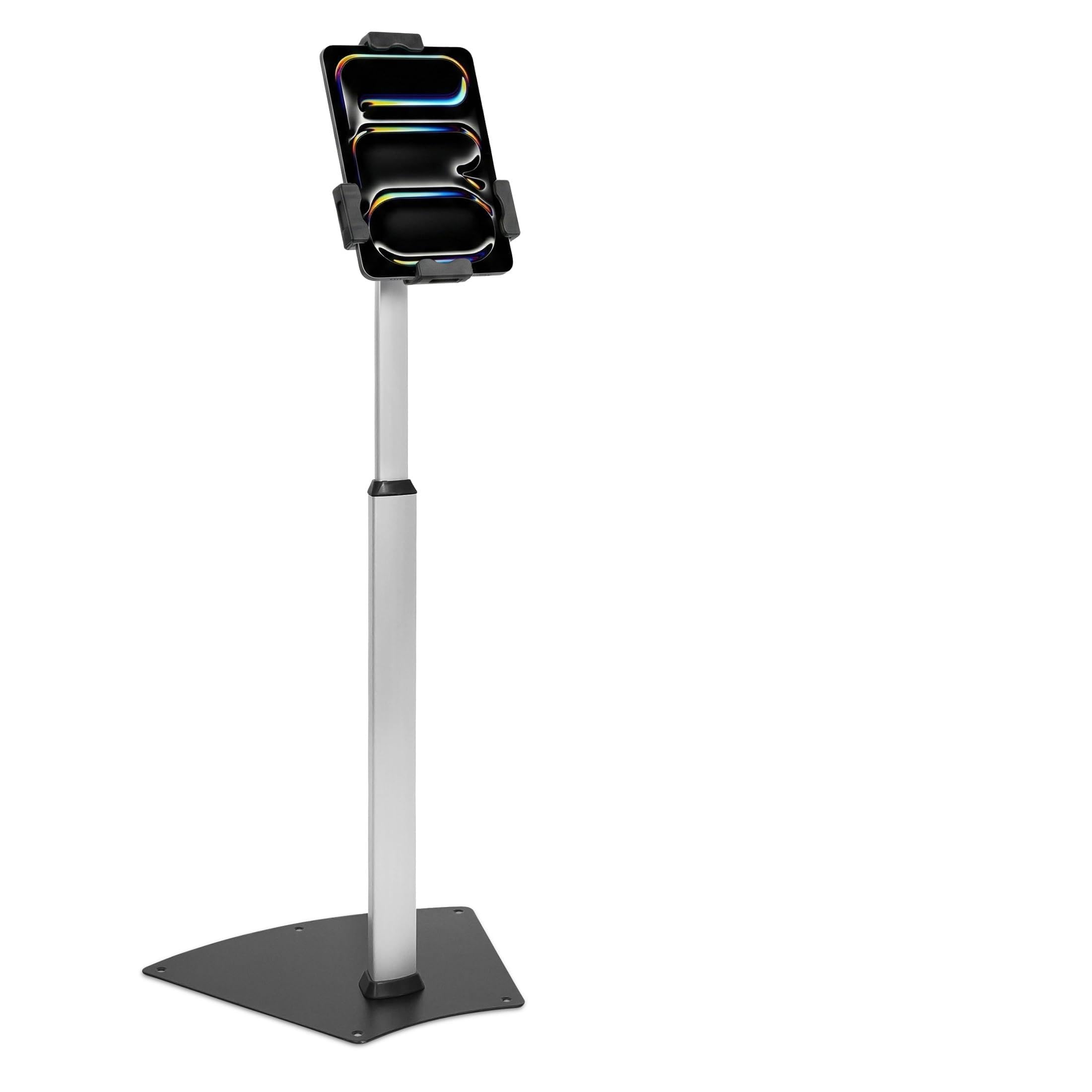
If you need a floor-standing solution that works with Square and PayPal audio-jack card readers, the Mount-It! MI-3786 is the only option here that keeps the tablet’s audio port fully accessible. Unlike enclosed kiosk stands that bury the tablet in a box, the adjustable locking clamp uses a keyed mechanism that holds the tablet by its edges — leaving the entire front, back, and all ports exposed. The pole adjusts from 24.8 to 42.5 inches, making it suitable for both seated and standing users.
The clamp accommodates tablets from 7.9 to 11 inches, including iPad Air, iPad Pro 11-inch, and Samsung Galaxy Tab models, and the cradle supports 360-degree rotation and +80/-65 degree tilt. Cable alignment clips on the back of the pole keep charging and data cables organized. The base is freestanding but includes pre-drilled holes for permanent floor bolting — recommended for high-traffic environments. Mount-It! backs this with a lifetime warranty and US-based support.
Some users report the key lock mechanism can be finicky, requiring precise alignment to engage. The pole height cannot be adjusted without tools (an L-key is needed), and the freestanding base can wobble slightly on uneven flooring. For trade shows, retail floors, and hospitality check-in desks where a permanently mounted kiosk is impractical, the flexibility here justifies the minor inconveniences.
Why it’s great
- Open clamp design keeps audio jack accessible for Square/PayPal readers
- Height adjustable over a wide range for standing or seated use
- Lifetime warranty with US-based technical support
Good to know
- Key lock mechanism can require precise alignment to operate smoothly
- Height adjustment requires tools; not tool-free
3. AboveTEK iPad Kiosk Stand

The AboveTEK Anti-Theft iPad Kiosk Stand hits the sweet spot between a full kiosk system and a simple cable lock. It includes a metal locking enclosure that surrounds the tablet, a heavy-duty base with pre-drilled holes for countertop installation, and a 360-degree swivel with 75-degree tilt. The cable management system routes charging cables neatly through the base, keeping your workspace clean and professional.
Compatibility covers iPad 9.7-inch through 10.5-inch models — including iPad 6th-9th gen, iPad Air 1-3, and iPad Pro 9.7/10.5 — but excludes 11-inch and 12.9-inch Pro models. The enclosure is made from high-grade aluminum and metal, weighing 4.1 kg (9 lbs), which gives it a planted feel that resists tipping. The lock-and-key system uses a standard keyed mechanism that is simple but effective for most retail environments.
A few users noted that the enclosure can be difficult to open with the key, and one unit reportedly shipped without threaded screw holes in the base. For a small retail shop, restaurant host stand, or event check-in counter that needs a permanent but non-floor-standing solution, this delivers professional-grade security at a price point well below the premium kiosk alternatives.
Why it’s great
- Heavy 9-pound metal base prevents tipping in high-traffic areas
- Integrated cable management keeps charging cords organized
- Works with Square reader via maintained audio jack access
Good to know
- Not compatible with 11-inch or 12.9-inch iPad Pro
- Some units may have inconsistent threading on base screw holes
4. TABcare Acrylic Enclosure

The TABcare Anti-Theft Acrylic Enclosure is purpose-built for wall-mounted tablet kiosks. It supports VESA 75x75mm and 100x100mm standards, meaning it can attach to any standard VESA wall mount, monitor arm, or desk mount. The museum-grade acrylic construction is transparent, giving the iPad a floating-glass look that blends into modern interiors. Security screws (not standard Phillips) prevent casual removal.
Compatibility is specific to iPad 7th (2019), 8th (2020), and 9th (2021) generations at 10.2 inches. The enclosure comes with a free wall mount kit and a 90-degree angle Lightning charging cable that exits cleanly from the bottom. The design supports both landscape and portrait orientation, and all buttons, cameras, and I/O ports remain accessible. At just 1.2 lbs without the tablet, it is the lightest enclosure option here.
The main drawbacks are the difficulty of assembly — the security screws require careful alignment and needle-nose pliers may be needed to plug in the charging cable after the tablet is enclosed. Additionally, the sides, top, and bottom are not fully sealed, meaning the tablet edges remain exposed. For Home Assistant dashboards, kitchen command centers, or retail wall displays where aesthetics matter as much as security, this is the most visually refined choice.
Why it’s great
- VESA standard compatible — mounts on any VESA arm or wall bracket
- Museum-grade acrylic looks clean and modern
- Included 90-degree Lightning cable keeps the install tidy
Good to know
- Assembly is fiddly; charging cable connection requires pliers after enclosure is sealed
- Only compatible with iPad 7/8/9 10.2-inch models
5. Kensington K65035AM
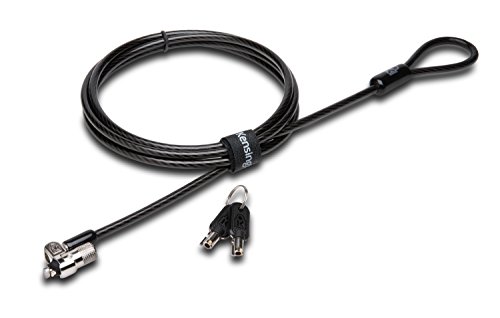
Kensington T-Bar locks are the gold standard for devices with built-in security slots, and the K65035AM is a straightforward, reliable implementation. It uses Kensington’s T-Bar locking technology with a 10mm pivoting lock head that fits even thin modern tablets and laptops. The 6-foot carbon steel cable is sheathed in plastic to prevent surface scratches, and the pin tumbler lock cylinder offers better key duplication resistance than basic wafer locks.
The lock head pivots to eliminate awkward angles during installation, and the key includes a raised tab that helps align the lock before turning — a thoughtful ergonomic touch. Kensington backs this with a limited lifetime warranty and 8 years of technical support. The cable feels substantial without being overly stiff, and at 0.39 inches in diameter, it fits through most anchor loops and desk grommets.
Compatibility is where this gets tricky. This model does NOT work with 2016 and newer Dell laptops using Dell’s wedge lock slot, nor does it fit current Lenovo ThinkPad and Yoga models due to internal slot obstructions. Some HP EliteBook X2 tablets also require Kensington’s Nano saver lock slot. Always check Kensington’s lock selector tool before buying. For users with compatible devices (HP Envy, Acer 5, older MacBooks), this remains the most trusted slot-based lock on the market.
Why it’s great
- Industry-leading T-Bar locking technology with anti-pick pin tumbler cylinder
- Pivoting 10mm lock head fits ultra-thin devices
- Limited lifetime warranty with 8 years of technical support
Good to know
- Incompatible with Dell wedge lock slots and many Lenovo models
- Does not work with devices lacking a Kensington security slot
6. AboveTEK TL-180K

The AboveTEK TL-180K is a complete security kit designed for maximum compatibility — it works with tablets, phones, laptops, monitors, and any device with a flat back surface. The kit includes two adhesive anchor plates with industrial-grade 3M adhesive, a 6-foot galvanized steel cable, and two keys. The adhesive anchors bond to the back of your device and then accept the cable lock, creating a secure tether without requiring a dedicated security slot.
The adhesive is surprisingly strong — users have reported using it to secure projectors outdoors and tablets in ride-share vehicles. The cable is cut-resistant galvanized steel, and the lock mechanism is a simple keyed design that is easy to operate. Installation takes seconds: peel the adhesive backing, press onto a clean flat surface, wait 24 hours for full bond strength, then attach the cable. The kit includes two complete sets, so you can secure two devices or have a spare.
The adhesive approach has one clear limitation: the bond is only as strong as the surface it sticks to. Textured cases, curved backs, or dirty surfaces will compromise adhesion. Some users also note that removing the anchor later can be difficult without damaging the device’s finish. For co-working spaces, libraries, and home offices where you need a simple, reversible security solution, this is the most versatile entry-level option.
Why it’s great
- Works with any device with a flat back — no security slot needed
- Industrial 3M adhesive provides strong, reliable bond
- Two complete sets included for multi-device or backup use
Good to know
- Adhesive requires 24 hours to reach full bond strength
- Removing the anchor may damage device finish
7. I3C 2-Pack Cable Lock
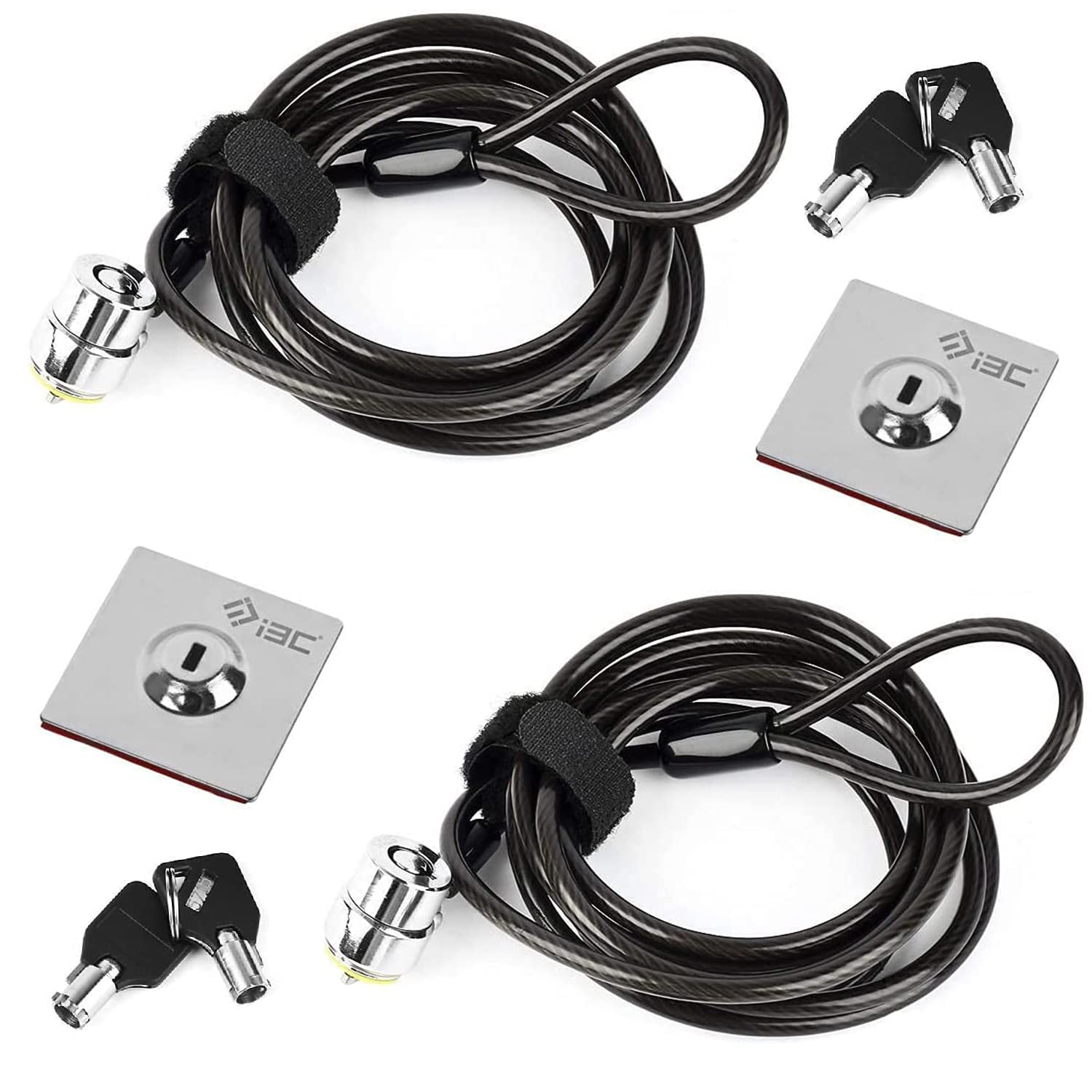
The I3C 2-Pack Cable Lock offers the lowest per-unit cost while still using a 5mm thick carbon steel cable — thicker than many single-pack competitors. Each lock includes a self-adhesive anchor plate for devices without security slots, plus the cable and two keys. The cable is made from multiple twisted steel wires encased in a plastic sheath, providing genuine cut resistance against casual theft attempts.
The anchor plates work well on printers, monitors, tablets, and even non-electronic items like Starlink receivers. Users report the adhesive bonds effectively out of the package, and the key system is straightforward. The lock interface rotates freely, preventing cable tangling. Being a 2-pack, it suits small businesses needing to secure two workstations, or users who want one lock at home and one in the office.
The quality control concern here is real: at least one customer reported the male end of the lock snapping off under minimal force, suggesting batch inconsistency in materials. The female end (anchor plate) was reportedly fine, but the locking mechanism itself failed. For budget-conscious buyers who can tolerate some variance, the value proposition is strong — just inspect the lock mechanism immediately upon arrival.
Why it’s great
- 5mm carbon steel cable is thicker than most budget options
- Two complete locks in one package for multi-device security
- Adhesive anchor plates work on devices without security slots
Good to know
- Some units have quality issues with the male locking end snapping
- Not suitable for devices larger than typical tablet footprint
FAQ
Can I use an adhesive anchor plate on a tablet with a textured or silicone case?
How do I check if my tablet has a Kensington security slot?
Will a cable lock prevent theft by someone with bolt cutters?
What is the difference between a keyed lock and a combination lock for tablet security?
Final Thoughts: The Verdict
For most users, the best anti theft device for tablets winner is the CTA Digital PAD-DASB109 because its aluminum enclosure provides maximum physical protection with the flexibility of a 360-degree rotating base usable by both customers and staff. If you need a freestanding floor kiosk that works with Square card readers, grab the Mount-It! MI-3786. And for a simple, universal, budget-friendly tether that works with any device, nothing beats the AboveTEK TL-180K.