
Our readers keep the lights on and my morning glass full of iced black tea. As an Amazon Associate, I earn from qualifying purchases.
Specs are compiled from manufacturer listings and verified buyer reviews and can change over time — please confirm the key details on the product page before buying.
Picking a printer for your office means balancing speed, running costs, and paper handling without getting trapped in a subscription you did not read. Two kinds of machines dominate — laser, which uses toner powder and heat for crisp text and a low cost per page, and inkjet, which sprays liquid ink for vivid color on brochures and presentations. This guide lays out honest trade-offs for six solid all-in-ones so you can match a machine to your actual workload.
I’m Min — the founder and writer behind Gadgets Feed. This guide is built by comparing the manufacturers’ published specifications and the patterns across verified customer reviews, so you get each pick’s real strengths and trade-offs instead of marketing spin.
If you need to move paper fast without nickel-and-diming you on ink or toner, the right business all in one printer can be the most valuable desk in your office — but the wrong one can become a silent budget sink that wastes hours of your team’s time.
Quick Picks
- Canon Color imageCLASS MF753Cdw II — Top Performer
- Canon Color imageCLASS MF665Cdw — Solid All‑Around
- Canon MegaTank MAXIFY GX2020 — Cost‑Saving Workhorse
- HP OfficeJet Pro 9730 — Wide‑Format Specialist
- Canon imageCLASS MF275dw — Budget B&W Laser
- HP OfficeJet Pro 9125e — Entry-Level Color
How To Choose The Best Business All In One Printer
Office printers are a long-term investment — the wrong pick can cost you more in supplies than the machine itself within a year. Here are the key specs that actually separate a workhorse from a paperweight.
Laser vs. Inkjet: Which fits your workload?
Laser printers fire toner powder (a fine dry plastic) onto the page using heat. They produce sharp, water-resistant text that does not smudge and can sit unused for weeks without clogging — great for offices that mostly print black-and-white documents, contracts, and labels. Inkjets spray liquid ink and excel at vibrant color graphics, photos, and marketing materials, but the cartridges cost more per page and can dry out if you do not print often.
Speed: Pages per minute and first-page out time
Pages per minute (ppm) tells you how fast the printer runs once it gets going. But the real-world wait time depends on the first print out time — how many seconds before the first page lands in the output tray. A machine with a 5-second first print feels much faster in a small office than one taking 10 seconds, even if the steady-state ppm is similar.
Paper handling: Auto-duplex and the automatic document feeder
Auto-duplex (automatic two-sided printing) lets the printer flip the page and print on the back automatically — essential in any business setting because it cuts paper use roughly in half. The automatic document feeder (ADF) lets you stack a pile of originals and scan, copy, or fax them without standing at the machine feeding one page at a time. An ADF that supports duplex scanning (scanning both sides in one pass) is a major time-saver for multi-page contracts.
Running costs: Toner yield and ink subscription traps
The front-page cost is the machine; the real expense lives in the consumables. For lasers, check the toner page yield — the high-capacity cartridge often cuts cost-per-page by half over the starter toner. For inkjets, be wary of subscription programs that lock the printer to only work with specific cartridges; a “free trial” can turn into a monthly fee that does not align with your actual print volume.
Connectivity and mobile support
Modern offices mix Windows PCs, Macs, iPhones, and Android devices. Look for a printer that supports Apple AirPrint and Mopria Print Service from the start, plus a reliable dual-band Wi-Fi or Ethernet for static network placement. A strong mobile app makes scanning directly to your phone or cloud storage easy — a bad one can make the whole printer feel unusable.
Quick Comparison
On smaller screens, swipe sideways to see the full table.
| Model | Best For | Print Speed | ADF Capacity | Paper Capacity | Amazon |
|---|---|---|---|---|---|
| Canon MF753Cdw II | High‑volume color | 35 ppm color & B&W | 50 sheets | 250 + 50 | $494.42$702.99Amazon |
| Canon MF665Cdw | Reliable color laser | 26 ppm color & B&W | 50 sheets | 250 + 1 | $409.99$549.99Amazon |
| Canon MegaTank GX2020 | Ultra‑low ink cost | 15 ppm B&W / 10 ppm color | 35 sheets | — | $329.99$410.99Amazon |
| HP OfficeJet Pro 9730 | Wide‑format printing | 22 ppm B&W / 18 ppm color | Auto duplex | 500 (two trays) | $439.99Amazon |
| Canon imageCLASS MF275dw | Budget B&W laser | 30 ppm B&W | 35 sheets | 150 | $229.99Amazon |
| HP OfficeJet Pro 9125e | Entry‑level color inkjet | 22 ppm B&W / 18 ppm color | Auto duplex | 250 | $199.89$309.99Amazon |
In‑Depth Reviews
1. Canon Color imageCLASS MF753Cdw II

The speed leader that makes color printing feel as fast as black‑and‑white used to.
The MF753Cdw II rips through both color and monochrome documents at 35 pages per minute — notably faster than the 26 ppm of the MF665Cdw below, which saves real minutes on a 20-page color report. A 7-second first print out time means you are not drumming your desk waiting for the first page. The 50-sheet dual-pass automatic document feeder scans both sides of a stack in one pass, cutting your multi-page scanning time roughly in half.
It uses Canon Genuine Toner 069 cartridges, with the starter set rated at 1,100 pages for color and 2,100 for black. Buyers report setup via Ethernet is quick, and the 5-inch color touchscreen with Application Library gives you one-tap access to common jobs. The optional PF-K1 cassette adds 550 sheets of paper capacity, which turns this into a true workgroup printer. One reviewer noted the replacement toner is expensive, and a few report occasional network disconnects requiring a reboot.
Why it wins
- Print speed of 35 ppm in both color and B&W — no slowdown for color jobs
- 50-sheet duplex ADF scans both sides automatically
- Expandable paper capacity with optional cassette (up to 850 sheets)
- Three-year limited warranty covers you for the long haul
The trade-offs
- Starter toner yields are moderate — plan for 069 high-capacity replacements
- Occasional network disconnects reported that need a reboot
- Canon software on Windows 11 can be clunky for offline driver installation
The speed-king’s choice: This is the pick for a small workgroup printing dozens of color pages daily — speed and paper handling are top-tier here.
One honest drawback: Toner replacements at high volume add up; check your monthly page count before buying to see whether the per-page cost fits your budget.
2. Canon Color imageCLASS MF665Cdw

A 26‑ppm color laser that delivers reliable output without the speed premium of the top pick.
The MF665Cdw prints color and black-and-white at 26 pages per minute, versus 18 ppm color for the HP OfficeJet Pro 9125e, which means waiting noticeably less for a stack of presentation handouts. Its first print out time is 10.3 seconds, a touch slower than the MF753Cdw II but perfectly acceptable for a busy desk. The 50-sheet duplex ADF scans both sides in one pass, and the 250-sheet cassette plus a 1-sheet multipurpose tray handles most jobs.
Owners mention the machine is heavy and well-built, with good color reproduction on prints, scans, and copies. The 5-inch color touchscreen uses Application Library for quick access to features, though some reviewers find the interface a little clunky. A few Mac users struggled with Canon’s software, experiencing random stops and errors even after installing the Canon driver. The three-year warranty covers you if things go wrong.
What works well
- Fast 26 ppm speed in both color and black-and-white
- 50-sheet dual-pass duplex ADF handles multi-page scans efficiently
- Print quality described as crisp with good color reproduction
- Three-year limited warranty for confidence
What to watch
- Mac software can cause random print errors and stops
- Touchscreen UI is slow and lacks customization options
- Color vibrancy reported as less punchy than some HP models
Right for you if: You want a color laser that keeps up with a small office’s daily mix of text and graphics without the top-tier price of a 35-ppm machine.
Look elsewhere if: Your office runs primarily on Macs — the software friction could be a daily annoyance.
3. Canon MegaTank MAXIFY GX2020

The refillable tank that slashes ink costs while printing business‑quality color — a different value proposition from the laser speed of the MF753Cdw II.
Where other inkjets drain your wallet one cartridge at a time, the MegaTank system lets you print up to 3,000 black-and-white and 3,000 color pages from a single set of GI-25 pigment-based ink bottles. That radically changes the math for an office that prints a few hundred color pages a month — you are not constantly nickel-and-dimed on cartridges. Print speed is 15 ppm for black and 10 ppm for color, which is slower than laser options, but the savings on consumables can justify the wait.
The 2.7-inch color touchscreen and 35-sheet automatic document feeder handle daily scanning and copying without fuss. Auto-duplex printing saves paper on drafts. Customers note the print quality is excellent for text and vibrant for colors, and the ink level barely drops even after hundreds of pages. One buyer mentioned cardstock prints curl after six months — resolved by printing single-sided — and the machine can be loud with odd noises.
Why it saves money
- Up to 3,000 color pages per set of ink bottles — far fewer supply trips
- Pigment-based inks produce crisp text and vibrant business graphics
- Auto-duplex printing cuts paper usage by half on multi-page jobs
- Compact desktop footprint fits small offices
Speed and quirks
- Max 10 ppm color is slower than laser alternatives
- Cardstock curl after months of use — requires single-sided printing
- Some reviewers point out loud operation and odd mechanical noises
Your move: Grab the GX2020 if you print color frequently but hate throwing money at cartridges — the refillable tanks flip the economics in your favor within months.
Better to skip if: Speed is your priority, or if you regularly need to print on thick cardstock for marketing materials.
4. HP OfficeJet Pro 9730

The machine that prints tabloid‑sized floorplans, mood boards, and spreadsheets in color — no other pick here handles 11×17.
Most all-in-ones stop at letter or legal size — the 9730 handles paper up to 11 x 17 inches, making it the pick for offices that need wide-format color prints. It uses HP’s P3 color gamut, which the company claims delivers “a wider color gamut vs. sRGB,” so outputs match screen colors more accurately. Black-and-white speed is 22 ppm, color is 18 ppm, and the two 250-sheet input trays keep paper loaded for different sizes.
The auto-duplex printing and auto document feeder with single-pass two-sided scanning mean you can send a stack of tabloid-size originals through and get back double-sided digital copies. The 4.3-inch color touchscreen and HP app control print, scan, copy, and fax from your phone or PC. Buyers praise the ease of setup, the print quality, and the solid reliability. One caution: shoppers say the HP Smart app setup can fail with error EBS00P0007, requiring a call to HP customer service (who resolved it after three hours).
Why it stands out
- Wide-format support up to 11×17 — essential for plans, posters, charts
- Two 250-sheet trays let you keep letter and tabloid paper loaded
- P3 color gamut delivers more screen-accurate color prints (per HP claim)
- Auto duplex scanning saves time on multi-page wide-format documents
Reality check
- Large size: 22.9″D x 15.2″W x 18.4″H — needs dedicated desk space
- HP Smart app setup can hiccup with registration errors
- Instant Ink subscription runs monthly after the 3-month trial unless cancelled
Best fit: Architecture, engineering, or marketing offices that regularly print large-format color documents — the 9730 is the only pick here that handles 11×17 without a separate plotter.
skip it if: You only print letter-size pages; the footprint is bigger than you need, and the wide-format capability adds cost you will not use.
5. Canon imageCLASS MF275dw

A monochrome laser that prints 30 pages per minute, versus 22 ppm black for the HP OfficeJet Pro 9125e, for text-heavy offices.
The MF275dw trades color for speed and rock-bottom operating costs. At 30 pages per minute black and white, compare that to the 22 ppm of the HP OfficeJet Pro 9125e for text-heavy offices. The first print out time is approximately 5.3 seconds, so it feels snappy from the first click. The 35-sheet automatic document feeder and auto-duplex printing handle multi-page contracts efficiently, though buyers report it lacks duplex scanning (it only scans one side at a time).
Cartridge 071 starter yields about 700 black pages; replacement cartridges are inexpensive and widely available, including third-party options. The 6-line adjustable LCD touchscreen is simple compared to fancier color panels, but owners mention setup is easy, wireless reliability is strong, and prints are “crisp and fast.” One owner reported that color scans look crisp but black-and-white scans appear a bit faded — a minor quirk if you primarily scan text documents. The 150-sheet cassette is smaller than other picks, so you will refill more often in a busy office.
Pros on a budget
- 30 ppm B&W speed is noticeably faster than inkjet alternatives in its price range
- First print out in ~5.3 seconds — near-instant for small jobs
- Low cost per page with inexpensive 071 toner, including third-party cartridges
- Reliable wireless and easy setup via Canon PRINT Business app or Apple AirPrint
Limitations to know
- Monochrome only — can not print color for brochures or charts
- 150-sheet cassette is small; expect to refill often under moderate volume
- No duplex scanning: the ADF only scans one side per pass
Grab it if: Your office prints mostly text documents, contracts, and forms — the speed and low running costs beat anything in its price bracket for B&W work.
Send it back if: You need color, duplex scanning, or a large paper tray — this machine covers basic B&W all-in-one functions with few frills.
6. HP OfficeJet Pro 9125e
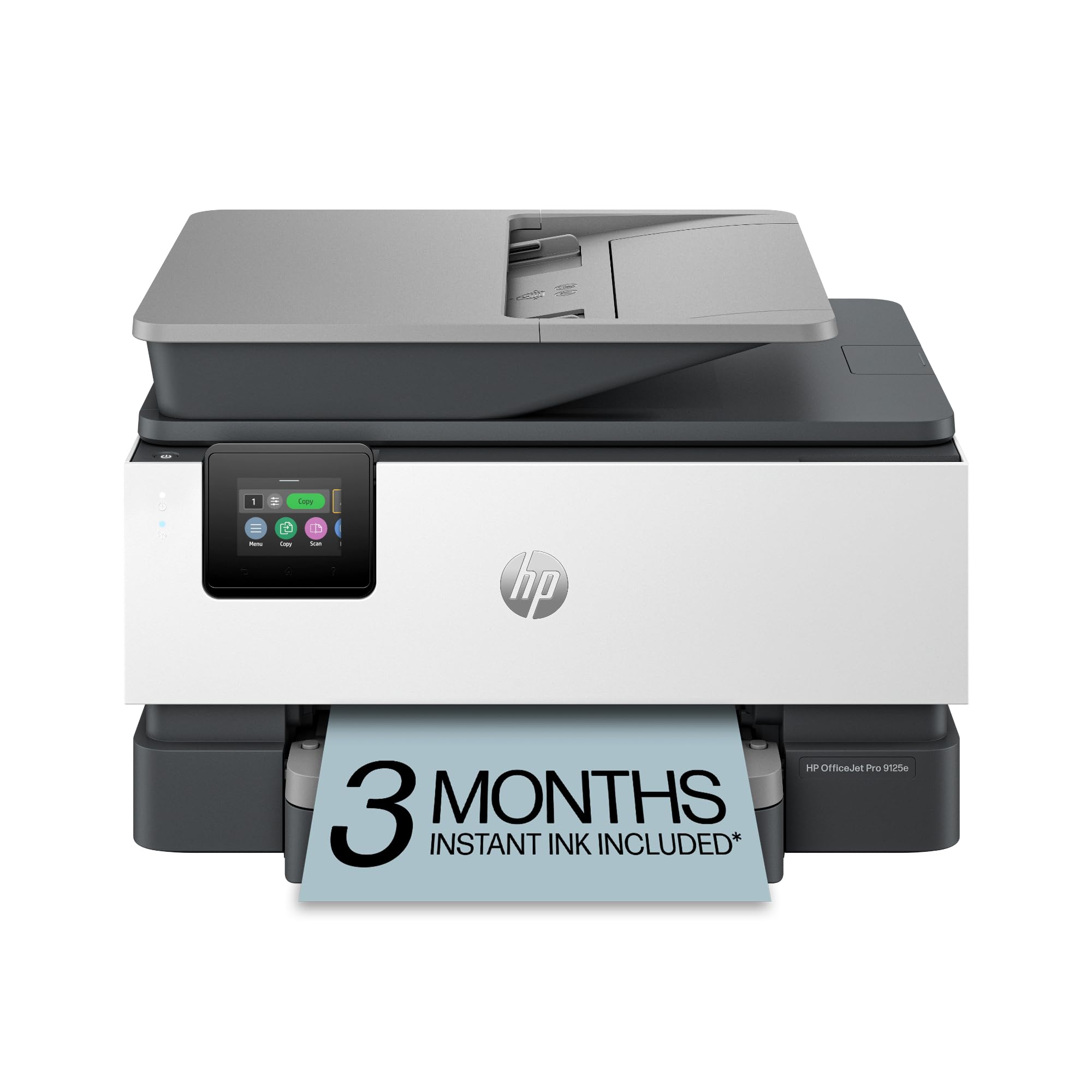
A color inkjet with HP’s AI-powered print formatting — but a printer subscription that can lock you in after the trial.
The 9125e prints up to 22 ppm black and 18 ppm color, with HP’s AI tool that automatically removes unwanted content from web pages and emails so you do not waste paper on ads or navigation bars. The 2.7-inch color touchscreen handles navigation, and the auto-duplex plus auto document feeder cover the basics for a small office. It includes built-in HP Wolf Pro Security to protect your network from threats.
This printer is designed to work only with cartridges that have HP chips or circuitry, and periodic firmware updates are meant to block non-HP cartridges. The 3-month trial of Instant Ink delivers ink before you run out, but one customer observed: “Paid over 1.5 years for cartridges worth; only received one replacement.” After the trial, monthly fees apply and cancelling the service locks the printer, making paid cartridges unusable. Setup can be frustrating, with some users needing 7 attempts over WiFi and ethernet. When it works, print quality is sharp and smudge-free.
Smart features
- HP AI removes clutter from web page and email prints automatically
- 22 ppm B&W / 18 ppm color is solid for a small office inkjet
- HP Wolf Pro Security provides basic network threat protection
- 2.7-inch touchscreen and HP app for mobile scanning/printing
The big problem
- Instant Ink subscription can cost more than cartridges — cancelling locks the printer
- Setup over WiFi/ethernet is notoriously difficult, often needing many attempts
- Loud operation reported — printer shakes during printing, ADF is very loud
- Non-HP cartridges are firmware-blocked; you are locked into HP ink
Consider this if: You want HP’s AI formatting tool and you are comfortable with HP’s cartridge ecosystem — the entry price is reasonable for a color all-in-one.
Hard pass if: You want to keep long-term ink costs predictable, or you dislike printer subscriptions that get expensive after the trial.
Understanding the Specs
Pages per minute (ppm)
Ppm tells you the steady-state speed once the first page has already printed. For a 30-page contract, a 30 ppm machine finishes in about one minute; a 15 ppm machine takes two. The first print out time (how many seconds before the first page lands) matters more for one-off print jobs. A spec like “10.3 seconds first print” means you wait about ten seconds for that first page to appear.
Automatic Document Feeder (ADF)
An ADF lets you stack a pile of originals — typically 35 or 50 sheets — and the printer pulls them through one by one to scan, copy, or fax. A “duplex ADF” flips each page automatically to scan both sides in a single pass, which roughly doubles your scanning speed for double-sided documents. Without duplex scanning, you have to flip every page manually or scan twice.
FAQ
What size paper can a business all-in-one printer handle?
Do I need a color laser printer for my office?
How long do toner and ink cartridges last before needing replacement?
What is auto-duplex printing and why does it matter?
Can I print directly from my smartphone or tablet?
What does a 50-sheet automatic document feeder mean in real use?
Is a wireless printer fast and reliable enough for a business network?
How many sheets of paper can the input tray hold?
What does HP Wolf Pro Security actually protect?
Is it worth paying more for a laser printer over an inkjet printer for a business?
Final Thoughts: The Verdict
For most small to medium offices, the business all in one printer winner is the Canon Color imageCLASS MF753Cdw II because its 35 ppm speed, 50-sheet duplex ADF, and expandable paper capacity handle the highest workload without breaking the workflow. If you want ultra-low ink costs and print color frequently, grab the Canon MegaTank MAXIFY GX2020. And for wide-format drawings, posters, or spreadsheets up to 11×17, the HP OfficeJet Pro 9730 is the only smart choice.
How We Picked
We do not accept paid placement, and we did not hands-on test every unit. Instead, we match each pick to a real buyer and use-case by comparing the manufacturers’ published specifications against the patterns in verified customer reviews — so you get each pick’s real strengths and trade-offs instead of marketing copy.
Sources & Methodology
Specifications: manufacturer listings and product documentation. Review insights: verified customer reviews, as of July 2026. Pricing: not shown on this page (it changes often); check the current price via the retailer link.
As an Amazon Associate, Gadgets Feed earns from qualifying purchases. This does not affect which products we feature.
Product prices and availability are accurate as of the date/time indicated and are subject to change. Any price and availability information displayed on Amazon at the time of purchase will apply to the purchase of this product. As an Amazon Associate I earn from qualifying purchases.
CERTAIN CONTENT THAT APPEARS ON THIS SITE COMES FROM AMAZON. THIS CONTENT IS PROVIDED "AS IS" AND IS SUBJECT TO CHANGE OR REMOVAL AT ANY TIME.
Amazon and the Amazon logo are trademarks of Amazon.com, Inc. or its affiliates.