
Our readers keep the lights on and my morning glass full of iced black tea. As an Amazon Associate, I earn from qualifying purchases.
Specs are compiled from manufacturer listings and verified buyer reviews and can change over time — please confirm the key details on the product page before buying.
You want a laptop that flips into a tablet for sketching, reading, or watching movies, but you also need it to handle real work without slowing down. The problem is that many models promise fast processors and long battery life but don’t deliver consistently. This guide compares seven 14-inch convertibles across different price ranges, focusing on the specs that actually affect your daily use — processor speed, memory, storage, battery life, and screen quality — so you can choose the one that matches your tasks and your budget.
I’m Min — the founder and writer behind Gadgets Feed. This guide is built by comparing the manufacturers’ published specifications and the patterns across verified customer reviews, so you get each pick’s real strengths and trade-offs instead of marketing spin.
We will look at seven different 14 inch convertible laptop options, from budget-friendly detachables to premium dual-screen workhorses, highlighting what real buyers loved and where each model fell short.
Quick Picks
- HP Envy x360 2-in-1 14″ FHD Touchscreen Laptop — Best Overall
- LG gram 14-inch 2in1 Lightweight Laptop — Premium Pick
- ASUS Zenbook Duo Dual 14″ OLED Notebook — Unique
- ASUS Vivobook 14 Flip Laptop Copilot+ PC — Best Value
- HP OmniBook 5 Flip 2-in-1 14″ Laptop — Versatile
- Lenovo IdeaPad Flex 5i 14″ 2-in-1 Laptop — Budget Choice
- FUNYET 2 in 1 Laptop Touchscreen, 14 Inch Tablet Laptop — Entry Level
How To Choose The Best 14 Inch Convertible Laptop
Buying a convertible laptop means you are trading some traditional laptop features for flexibility. The most important thing is to figure out what you will actually do with it — heavy typing, note-taking with a pen, or mostly consuming media — and then match the specs to that use case.
Processor and Performance
The processor (the chip that runs everything) decides how snappy your laptop feels. For a 14-inch convertible, focus on the generation of the Intel Core chip. A 13th-gen or newer i5 or i7 handles multitasking and creative apps better than an older 12th-gen model. The RAM (random access memory, which holds data for active programs) matters too — 16GB lets you run many programs at once smoothly, while 8GB works fine for light browsing and office tasks.
Display and Touch Quality
A convertible’s screen is its main feature. A higher resolution like 1920 x 1200 or 2880 x 1800 gives you sharper text, and OLED panels offer much richer colors and deeper blacks than standard IPS screens. If you plan to use the stylus for drawing or note-taking, look for a display that supports active pen technology, not just a basic capacitive touch layer.
Build and Battery Life
Because you will handle this laptop in different modes — tent, tablet, laptop — you want a sturdy hinge and a solid build. MIL-STD-810H certification (a military-grade durability standard) is a good sign. Battery life is often overstated by manufacturers, so read real user reviews to get a realistic idea. A battery that lasts through a full workday (8 hours or more) is a strong plus.
Quick Comparison
| Model | Best For | Processor | RAM | Battery Life | Amazon |
|---|---|---|---|---|---|
| HP Envy x360 14″ | Overall Performance | Intel i7-1355U | 16GB DDR4 | 12 Hours | $719.99Amazon |
| ASUS Vivobook 14 Flip | Best Display Value | Intel Core Ultra 5 226V | 16GB | 25 Hours | $888.00$999.99Amazon |
| LG gram 14″ 2in1 | Ultra Lightweight | Intel Core Ultra 7 155H | 16GB | 72Wh | Amazon |
| ASUS Zenbook Duo | Dual Screen Productivity | Intel Core Ultra 9 185H | 32GB | 13.5 Hours | $1,699.99$1,859.99Amazon |
| HP OmniBook 5 Flip | Mid-Range Versatility | Intel Core 5 120U | 8GB DDR5 | — | $759.99Amazon |
| Lenovo IdeaPad Flex 5i | Budget with Stylus | Intel Core i5-1235U | 8GB LPDDR4X | 9 Hours | $649.99Amazon |
| FUNYET 2 in 1 Laptop | Entry-Level Detachable | 12th Gen N100 | 16GB DDR5 | 8 Hours | $599.99Amazon |
In‑Depth Reviews
1. HP Envy x360 2-in-1 14″ FHD Touchscreen Laptop
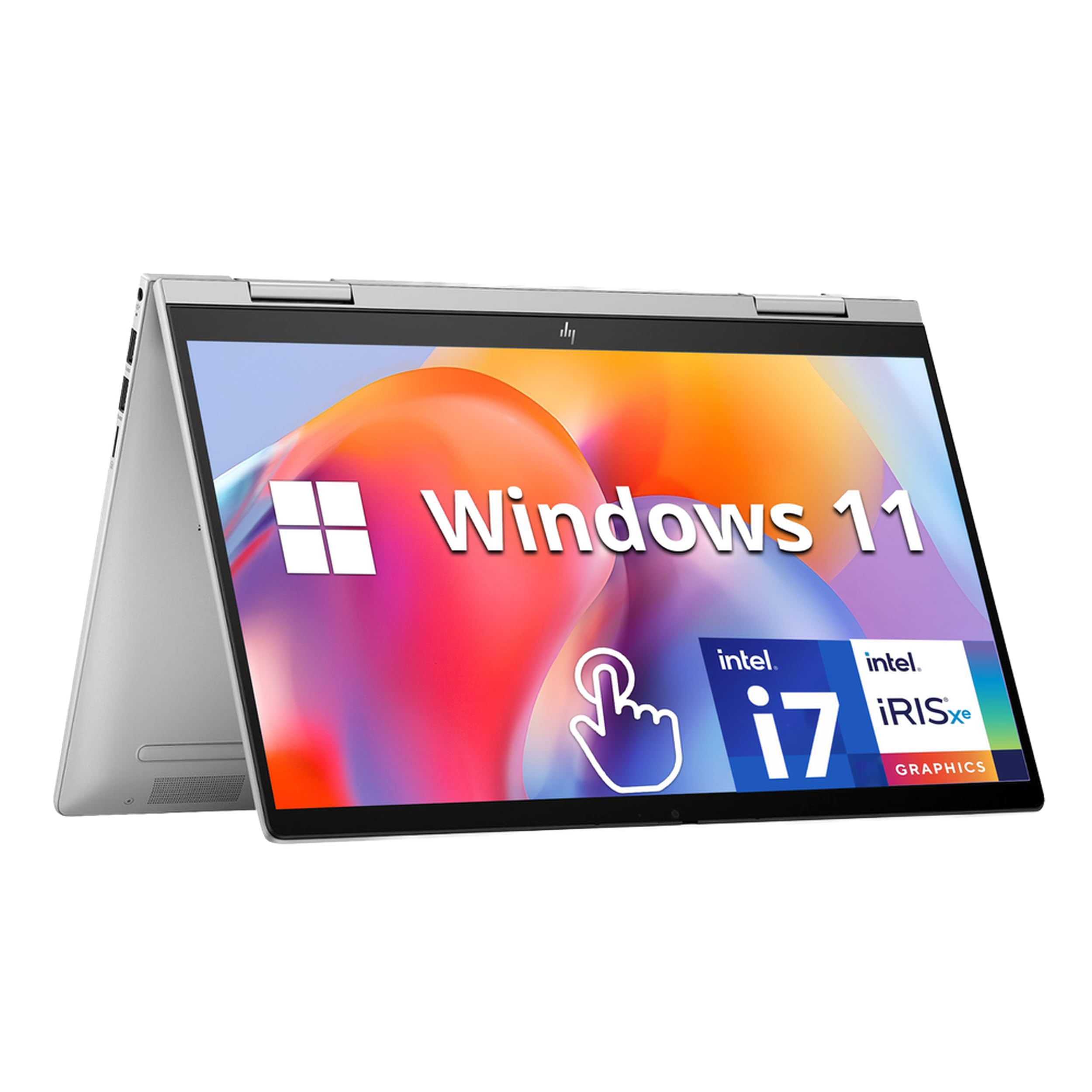
The all-rounder that balances power, battery, and build for everyday work and play.
If you want one laptop that handles everything from video calls to light photo editing without slowing down, the HP Envy x360 is a top contender. It packs a 13th Gen Intel Core i7-1355U processor (a 10-core CPU designed for demanding multitasking) and a whopping 16GB of DDR4 RAM, so you can breeze through spreadsheets, browser tabs, and even some creative software. The 1TB SSD (solid-state drive) gives you plenty of fast storage for files and media, and the 12-hour battery life means you can leave the charger at home for a full workday.
The 14-inch FHD (1920 x 1080) IPS touchscreen is responsive, and the 360-degree hinge lets you flip it into tent, stand, or tablet mode easily. It also includes a fingerprint reader for quick logins and a 5MP IR camera for video calls. Buyers report that after almost a year of college use, it has been “fantastic” — fast, lightweight enough to cart around, and still full of storage space.
What stands out
- Blazing 10-core i7 processor handles heavy multitasking
- 16GB RAM compared to the HP OmniBook 5 Flip’s 8GB
- 12-hour battery life — compared to the FUNYET’s 8 hours
A few caveats
- Uses DDR4 RAM, not the newer DDR5 found in some competitors
- Some buyers reported BIOS issues after the warranty period
- Only one USB-C port for charging and data
Best for the busy user: Students, professionals, or anyone who needs a reliable high-performance machine that does not need constant charging.
A word on warranty: A few buyers noted BIOS problems after the warranty expired, so consider an extended service plan if you plan to keep it for years.
2. LG gram 14-inch 2in1 Lightweight Laptop

Featherlight construction that feels like a tablet but works like a full workstation.
The LG gram line has always been about cutting weight without cutting corners, and this 14-inch 2in1 is no exception. It is powered by an AI-enabled Intel Core Ultra 7 155H processor (a high-performance chip with dedicated AI acceleration) and comes with 16GB of RAM and a 1TB SSD. The real headline is the 72Wh battery — a massive capacity that LG says powers your work, play, and streaming without the cord. The 14-inch IPS touchscreen covers up to 99% of the DCI-P3 color gamut (a wide color standard used in film), making it great for photo editing and design work.
It also includes an LG Stylus Pen with Wacom AES 2.0 technology, which gives you 4,096 levels of pressure sensitivity for natural writing and drawing. Owners mention it is “fast, light, great to work with,” though one reviewer noted the battery life was drastically overpromised — claiming 28 hours but getting under 8 hours in real use. It passed seven MIL-STD-810H durability tests, so it can handle bumps and temperature swings.
Why it stands apart
- Extremely lightweight for a 2in1 with a large battery
- 72Wh battery offers excellent stamina for all-day work
- MIL-STD-810H certified for durability and travel
Points to consider
- Real-world battery is much lower than advertised claims
- Some users reported a faulty right-click function
- Stereo speakers are basic, not premium
For the traveler and creator: If you value portability above all else and need a laptop that is light enough to carry all day, this is the one.
Battery reality check: Do not expect the full 28 hours LG mentions — real-world use is closer to half that for demanding tasks.
3. ASUS Zenbook Duo Dual 14″ OLED Notebook

Two brilliant OLED screens that redefine what a portable workstation can look like.
If your workflow involves juggling spreadsheets, code, or design references, the ASUS Zenbook Duo is unlike any other laptop on this list — it has two full 14-inch OLED touch displays. Each screen boasts a 2880 x 1800 resolution, a smooth 120Hz refresh rate, and 100% DCI-P3 color accuracy. You can use them stacked in Dual Screen mode or detach the keyboard and use both screens for a massive desktop-like workspace. It is powered by an Intel Core Ultra 9-185H processor (a top-tier 16-core chip clocked up to 5.1 GHz) with 32GB of LPDDR5x RAM and a 1TB SSD.
The detachable Bluetooth keyboard is sturdy, and the built-in kickstand lets you use it anywhere. Buyers call it “the greatest laptop ever made” for productivity, though one noted the keyboard battery lasts only about 45 minutes with the backlight on. The 75Wh battery provides up to 13.5 hours of video playback in laptop mode, but real-world heavy use may be closer to 8 hours.
The dual-screen advantage
- Two 14″ 120Hz OLED displays for class-leading multitasking
- 32GB RAM and Ultra 9 processor handle any workload
- Fast-charge via Thunderbolt 4 USB-C ports
Trade-offs
- Slightly thicker and heavier than single-screen convertibles
- Detachable keyboard has a short battery life with backlight
- Some users reported spontaneous screen cracking issues
For the productivity power user: If you want a laptop that can genuinely replace a dual-monitor desk setup, this is it.
A caution on early failures: A small number of buyers experienced screen defects — check the return policy before buying.
4. ASUS Vivobook 14 Flip Laptop Copilot+ PC
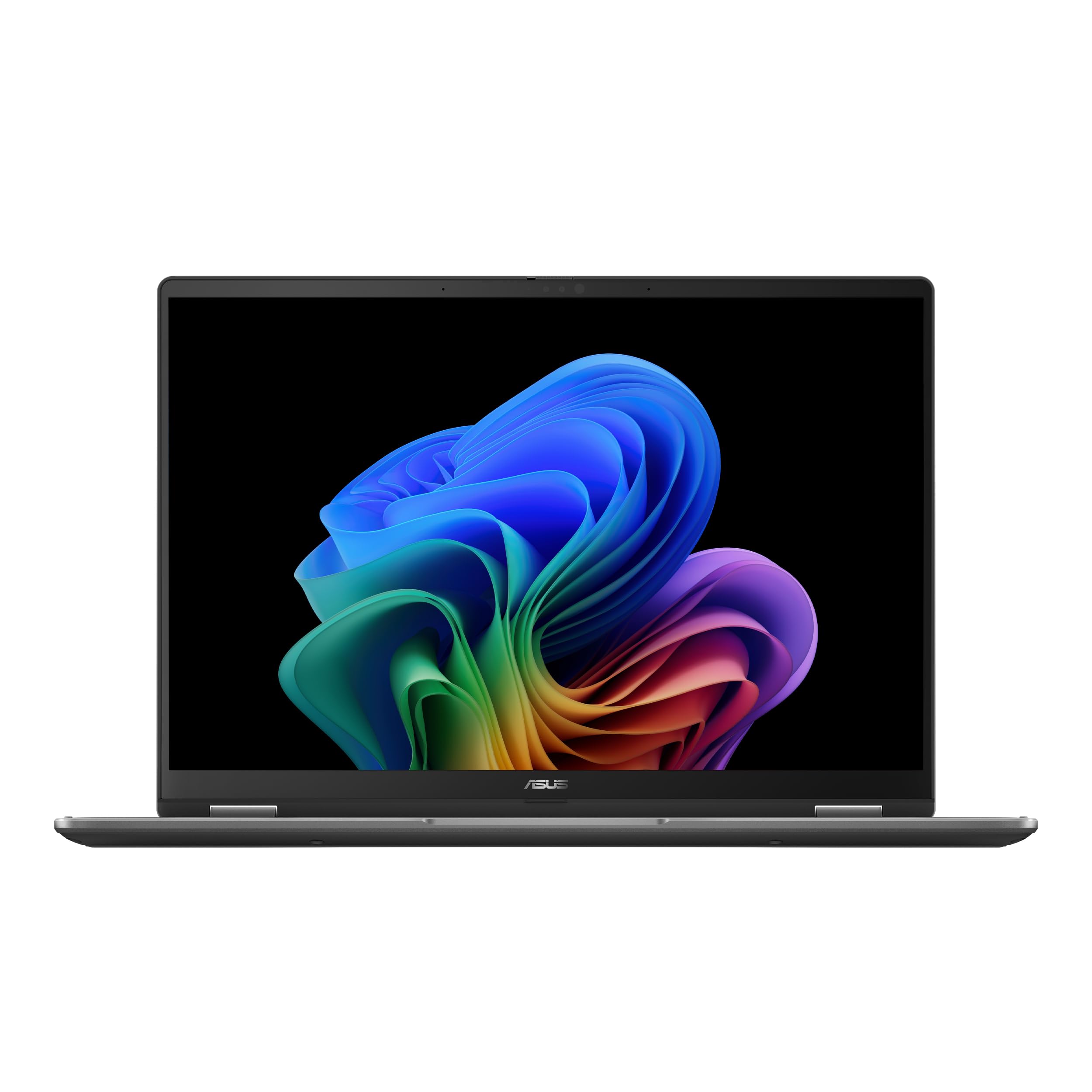
An OLED screen at a mid-range price that punches far above its weight class.
The ASUS Vivobook 14 Flip gives you a premium feature at a lower price: a 14-inch glossy OLED touchscreen. The display has a 1920 x 1200 resolution and a 500-nit peak HDR brightness (so it stays visible even in bright rooms), with vivid colors that make movies and photo editing look great. Inside, it runs an Intel Core Ultra 5 226V processor with an AI Boost NPU (a neural processing unit that speeds up AI tasks like photo editing and live captions) and Intel Arc Graphics, which the brand claims can run Cyberpunk 2077 at 60fps on low settings.
With 16GB of memory and a 512GB SSD, it handles everyday multitasking and creative work smoothly. Customers note it is “powerful for gaming” and “lightweight, flexible 2-in-1,” though the battery ranges from about 3 hours under heavy use to a full day of light tasks. The 360-degree hinge lets you flip it into any mode, and it comes with a stylus pen included in the box.
The highlights
- Stunning OLED display with deep blacks and vibrant colors
- Intel Arc Graphics capable of light gaming
- Copilot+ AI features for live captions and image generation
Things to know
- Plastic build feels less premium than rivals
- Battery life varies widely — heavy gaming drains it in ~3 hours
- Fan is disabled in tablet mode when plugged in
For the media lover and casual gamer: If you want a beautiful screen for movies and don’t mind a plastic chassis, this is the best value on the list.
Battery warning: The claimed 25-hour battery is only achievable with very light use — expect 5-6 hours under normal mixed workloads.
5. HP OmniBook 5 Flip 2-in-1 14″ Laptop

A new-generation mid-range chip in a familiar, reliable convertible design.
The HP OmniBook 5 Flip is a solid mid-range option that brings Intel’s newer Core 5 120U processor (a Raptor Lake-U Refresh chip with 10 cores) to the convertible space. It has 8GB of DDR5 RAM, which is faster than the older DDR4 standard, and a 512GB SSD for storage. The 14-inch 2K touch display (1920 x 1200 resolution) with 178-degree viewing angles is easy to see from any angle, and the 360-degree hinge lets you swap between laptop and tablet modes.
It comes bundled with a capacitive stylus pen (one that needs no battery or Bluetooth pairing) with a magnetic cap. Reviewers point out it is “lightweight” and “works very fast” from the start, though one buyer mentioned the stylus was missing from the box. Compared to the HP Envy x360 above, the 8GB RAM is a noticeable step down — the Envy offers 16GB RAM versus 8GB — so heavy multitaskers may want to look at the higher-tier model.
What works
- Modern DDR5 RAM for faster data transfer
- 2K resolution display is sharp and bright
- Includes a capacitive stylus pen (no charging needed)
What to watch for
- 8GB RAM may feel limiting with many programs open
- Some buyers reported the stylus was missing from the package
- A few units had charging issues shortly after purchase
Reach for this if: You want a fresh processor and a sharp display without paying a premium, and your daily tasks are light to moderate.
Look elsewhere if: You often run multiple heavy applications or need more than 8GB of memory.
6. Lenovo IdeaPad Flex 5i 14″ 2-in-1 Laptop

A well-rounded convertible that keeps costs down while including a stylus and Thunderbolt 4.
The Lenovo IdeaPad Flex 5i is a budget-friendly option that still gives you a real 2-in-1 experience. It runs a 12th Gen Intel Core i5-1235U processor with 10 cores, paired with 8GB of LPDDR4X memory and a 512GB PCIe SSD. The 14-inch FHD (1920 x 1200) IPS touchscreen is sharp, and the 360-degree hinge lets you flip it into any mode. It also comes with a stylus pen for note-taking and sketching, which is a nice bonus at this price.
Port selection is decent for the price, including a Thunderbolt 4 USB-C port (which supports fast data transfer, power delivery, and video output), two USB 3.2 ports, HDMI 1.4b, and a 4-in-1 card reader. Shoppers say it comes as advertised with the touchscreen and stylus, but one owner reported a critical issue: “It stopped taking a charge after 5 weeks, one week after return period-“. Another noted it ships in S Mode (a restricted version of Windows) without clear indication.
Why it appeals
- Thunderbolt 4 port at a budget price point
- FHD touchscreen with stylus included
- 9-hour battery life for a full workday
Potential dealbreakers
- Some units failed to charge after a few weeks
- 8GB RAM may limit multitasking
- Frequent updates and S Mode restrictions reported
For the cautious budget buyer: If you need a convertible with a stylus and a good port selection but are okay with an older processor and limited RAM, this fits the bill.
The honest warning: The charging issue reported by some is a real risk — consider buying with a credit card that extends warranty protection.
7. FUNYET 2 in 1 Laptop Touchscreen, 14 Inch Tablet Laptop

A lightweight Windows tablet that doubles as a laptop, with surprisingly modern specs for the price.
The FUNYET 2 in 1 is a fully detachable laptop — the screen lifts off completely from the keyboard to become a standalone tablet. It runs a 12th Gen N100 processor with 16GB of DDR5 RAM (double data rate 5 memory, which is faster than older DDR4) and a 1TB SSD (solid-state drive, which loads files quickly) — generous storage and memory for a budget model. The 14-inch touchscreen has a 1920 x 1200 resolution and covers 100% of the sRGB color space (a standard for accurate color reproduction), so colors look true. It weighs just 2 pounds and is only 0.4 inches thick, making it among the most portable options here.
The detachable backlit keyboard connects magnetically and turns off automatically when separated. It has four HiFi speakers, Wi-Fi 6, and Bluetooth 5.2. Buyers report it is great value and the “detachable screen is great,” though one noted the battery gets more like 6-7 hours rather than the claimed 10 hours. You also have to charge the keyboard separately from the tablet, which is a minor hassle.
Strengths of this model
- Fully detachable design gives you a true tablet experience
- 16GB DDR5 RAM and 1TB SSD are excellent for the price
- Very lightweight at 2 lbs
Limitations noted
- Battery life is about 6-7 hours in real use, not the claimed 8-10
- Keyboard must be charged separately
- Some users reported initial unit defects (resolved with replacement)
Best for the budget-conscious student: If you want a Windows tablet for note-taking, streaming, and light productivity, and you are willing to accept a few quirks, this is tough to top on specs per dollar.
A note on reliability: A small number of units had defects on arrival — the trade-off for the low price, but the replacement program seems effective.
Understanding the Specs
Processor (CPU) Generation
The processor is the brain of your laptop. A newer generation, like Intel’s 13th Gen or Core Ultra series, means better performance and energy efficiency than an older 12th Gen chip. For example, the HP Envy x360’s Intel i7-1355U (13th Gen) will handle intensive tasks like video editing faster than the Lenovo IdeaPad Flex 5i’s i5-1235U (12th Gen), even though both have 10 cores. If you want a laptop that stays fast for years, aim for at least a 13th Gen processor.
RAM and Storage
RAM is your computer’s short-term memory — more RAM (16GB vs 8GB) means you can run more programs at once without slowdowns. The type matters too: DDR5 RAM is faster and more power-efficient than DDR4. Storage (SSD) determines how many files, programs, and games you can install. A 512GB SSD is fine for most users, but a 1TB drive gives you much more breathing room for media and large software.
FAQ
What is the difference between a 360-degree hinge and a detachable keyboard?
Will a 14-inch convertible laptop fit in a standard backpack?
How much RAM do I need in a 14-inch convertible laptop?
Can I use a stylus with any 14-inch convertible laptop?
Which processor is best for gaming on a convertible laptop?
What does “Windows 11 in S Mode” mean on these laptops?
How long does a typical 14-inch convertible laptop battery last in real use?
Are 14-inch convertible laptops durable enough for daily travel?
What ports should I look for on a 14-inch convertible laptop?
Will a 14-inch convertible laptop overheat in tablet mode?
Final Thoughts: The Verdict
For the majority of shoppers, the best 14 inch convertible laptop is the HP Envy x360 2-in-1 because it delivers a 13th Gen i7 processor, 16GB of RAM, and a true 12-hour battery life at a mid-range price. If you want the best display for media consumption and occasional gaming, grab the ASUS Vivobook 14 Flip with its OLED screen. And for those who need the ultimate productivity setup with dual screens, the ASUS Zenbook Duo is the pick.
How We Picked
We do not accept paid placement. Every pick is matched to a real buyer and a real use-case; we do not hands-on test units.
Sources & Methodology
Specifications: manufacturer listings and product documentation. Review insights: verified customer reviews, as of July 2026. Pricing: not shown on this page (it changes often); check the current price via the retailer link.
As an Amazon Associate, Gadgets Feed earns from qualifying purchases. This does not affect which products we feature.
Product prices and availability are accurate as of the date/time indicated and are subject to change. Any price and availability information displayed on Amazon at the time of purchase will apply to the purchase of this product. As an Amazon Associate I earn from qualifying purchases.
CERTAIN CONTENT THAT APPEARS ON THIS SITE COMES FROM AMAZON. THIS CONTENT IS PROVIDED "AS IS" AND IS SUBJECT TO CHANGE OR REMOVAL AT ANY TIME.
Amazon and the Amazon logo are trademarks of Amazon.com, Inc. or its affiliates.