
Our readers keep the lights on and my morning glass full of iced black tea. As an Amazon Associate, I earn from qualifying purchases.
Specs are compiled from manufacturer listings and verified buyer reviews and can change over time — please confirm the key details on the product page before buying.
Shuffling between two computers at your desk means one thing: a second keyboard, or worse — unplugging and replugging a single one every time you switch screens. Jumping between a work laptop and a personal desktop is the exact reason multi-device keyboards exist, and the best ones let you tap a single button to move your typing from one machine to the other without touching a cable or a receiver.
I’m Min — the founder and writer behind Gadgets Feed. This guide is built by comparing the manufacturers’ published specifications and the patterns across verified customer reviews, so you get each pick’s real strengths and trade-offs instead of marketing spin.
A good keyboard for 2 computers keeps your workflow smooth, saving you from messy cables and wasted time hunting for the right connection.
Our Picks at a Glance


How To Choose The Best Keyboard For 2 Computers
A keyboard that works across two computers is not just about convenience — it is about keeping your desk neat and your focus sharp. Before you pick one, check what connectivity options your computers have. A Bluetooth keyboard pairs quickly with both, but some older desktops lack Bluetooth and need a small USB receiver instead. Look for a model that supports both Bluetooth and a 2.4GHz receiver for the most flexibility.
Connection Count and Switching Method
Most dual-computer keyboards connect to at least three devices total, but you want at least two simultaneous connections. The good ones let you swap between them with a single tap or a dedicated button — no digging into settings menus. If you hate waiting, pick a keyboard that switches instantly between connections without a lag.
Battery Life Matters More Than You Think
A keyboard used across two computers is on and active more often. Rechargeable models save you money on batteries, but check if they last days or months. Some premium keyboards run for weeks on a charge even with the backlight on, while budget-friendly ones might need topping up every few days. Auto-sleep features help stretch power between charges.
Quick Comparison
| Model | Best For | Button Qty | Connectivity | Battery Type | Amazon |
|---|---|---|---|---|---|
| Logitech MX Keys S★ Best Overall | Premium Typing Quality | 104 | Bluetooth + Logi Bolt | USB-C Rechargeable | Amazon |
| Logitech MX MechanicalPerformance Pick | Mechanical Switch Feel | 110 | Bluetooth + Logi Bolt | USB-C Rechargeable | Amazon |
| Logitech MK955 Slim Combo | Quiet Office Combo | — | Bluetooth + Logi Bolt | Battery Required | Amazon |
| Logitech MK850 Performance | Ergonomic Full-Size Set | — | Bluetooth + 2.4GHz | Battery Required | Amazon |
| Samsers Dual-Mode Combo | Budget Multi-Device Set | 110 | 2.4GHz + Bluetooth 5.0 x2 | USB-C Rechargeable | Amazon |
| ProtoArc KM60 Combo | Comfort with Wrist Rest | 109 | Bluetooth + 2.4GHz | USB-C Rechargeable | Amazon |
| UBOTIE Retro Keyboard | Vintage Style on a Budget | 109 | Bluetooth + 2.4GHz | Battery Required | Amazon |
In‑Depth Reviews
1. Logitech MX Keys S Wireless Keyboard
Our pick — over 4★ from 3,500+ verified ratings; the strongest balance of quality and price.
The best feel for typing, period, and it switches between your two computers without a second thought.
The MX Keys S is what you reach for when you want a typing experience that rivals a good laptop keyboard — the spherically-dished keys shape your fingertips for a fast, fluid, and quieter stroke. It pairs with up to three devices via Bluetooth Low Energy or the included Logi Bolt USB receiver, covering both your computers and maybe a tablet too. The 104-button layout gives you a full number pad, and the backlighting senses your hands approaching, lighting up only when you need it — which saves battery.
Speaking of battery, this keyboard runs for up to 10 days on a full charge with the backlight on, or up to 5 months if you turn the backlighting off. The USB-C cable charges it quickly, so you are not stuck tethered for long. Buyers report the build quality feels solid and the low-profile angle helps wrist posture during long work sessions — a real plus when you are splitting time between two screens. Compared to the MX Mechanical below, the MX Keys S is quieter and more compact at 17.74 inches long by 5.81 inches deep, but the MX Mechanical has a more tactile mechanical feel.
What We Like
- Automatic backlighting that adapts to room light
- Supports three devices across Windows, macOS, and Linux
- Solid, premium build with a comfortable typing angle
Trade-Offs
- No included mouse — you buy that separately
- More expensive than many multi-device keyboards
Who It Works For: Anyone who types all day across two computers and wants the smoothest, quietest membrane-key experience with smart backlighting.
The One Caveat: If you need a mechanical click or a bundled mouse, look down the list at the MX Mechanical or the MK850.
2. Logitech MX Mechanical Wireless Illuminated Performance Keyboard
The same three-device switching magic, but with a satisfying mechanical click under each finger.
The MX Mechanical brings linear mechanical switches to the multi-device game — meaning uninterrupted key travel and minimal spring force for fast responses. It connects to up to three devices via Bluetooth Low Energy or the Logi Bolt receiver, so you can jump between your work PC and home Mac without unplugging a thing. The low-profile keycaps and full-size layout keep it familiar, while the backlit keys light up as your hands approach and adjust to your room’s brightness.
Battery life is a standout here: up to 15 days with the backlight shining, or up to 10 months with it turned off — far longer than the MX Keys S. It uses a USB-C cable for charging. Reviewers call the typing feel ultra-smooth and reactive, though the mechanical switches are louder than the MX Keys S. At 110 buttons, it matches the Samsers combo in count but beats it in build quality and wireless range. The metal enclosure gives it a premium weight, and the 45% post-consumer recycled plastic in the Graphite variant feels good for the planet too.
Perfect For: Mechanical-switch fans who want the same multi-device ease as the MX Keys S but with faster key travel and longer battery life.
Downside: The click is noticeable — not ideal for a shared office or quiet library.
Reach For This If: You love mechanical switches and need to swap between two computers without losing the clicky feel under your fingers.
Consider Skipping If: You want a silent typing experience or a bundled mouse — this keyboard stands alone.
3. Logitech MK955 Signature Slim Wireless Keyboard and Mouse Combo

A quiet, sleek keyboard and mouse combo that slides between your desk computers without a peep.
The MK955 Signature Slim Combo is built for focus — the keyboard delivers familiar laptop-style typing, and the M750 L mouse uses SilentTouch technology for 90% less click noise. Switching between your personal and work computers takes a single tap on the K950 keyboard, which pairs with up to three devices via Bluetooth or Logi Bolt. The mouse is contoured for larger hands and includes a SmartWheel that lets you scroll line by line or spin through long web pages easily.
Customizable keys via the Logi Options+ app let you assign shortcuts for extended workflows. The keyboard is made from at least 48% certified post-consumer recycled plastic, and the mouse uses 25%. Buyers appreciate the quiet experience — it is a genuine upgrade if your current setup clicks loudly during calls. Unlike the MK850 below, the MK955 is slimmer and quieter, but it lacks the cushioned palm rest of the older model. It works on Windows, macOS, Chrome OS, Linux, iPadOS, iOS, and Android, so whichever two computers you use, it fits.
Why It Stands Out
- 90% less click noise than standard mice
- SmartWheel for fast or precise scrolling
- High recycled plastic content (48% keyboard)
What It Lacks
- No included wrist rest
- Requires batteries (not rechargeable)
Ideal For: Office workers who split time between a home desktop and work laptop and need a quiet, modern combo that does not disturb colleagues.
The Catch: You will need to keep spare AA or AAA batteries handy since it is not rechargeable.
4. Logitech MK850 Performance Wireless Keyboard and Mouse Combo

A cushioned palm rest and a hyper-fast scroll wheel make this the ergonomic choice for two-computer workers.
The MK850 is designed for long stretches at the desk — the full-size keyboard includes a cushioned palm rest, and the contoured right-handed mouse has a hyper-fast scroll wheel that flies through documents and web pages. Both keyboard and mouse connect via Bluetooth or a 2.4GHz USB receiver, and each can pair with up to three devices. You start typing on your computer, then switch to your tablet or second computer wirelessly. The Logitech DuoLink software links the mouse and keyboard for custom navigation.
This combo runs on batteries — you will need a couple of AAAs or AAs depending on the device. The membrane keyboard is quiet enough for shared spaces, and the mouse fits the right hand only. Reviewers mention the comfortable wrist rest as a standout, but note the combo is bulkier than slimmer options like the MK955. At a lower price than the MK955, it trades rechargeability for ergonomic comfort. If wrist fatigue is your main pain point across two computers, this is the pick.
Ergonomic Winner: The cushioned palm rest reduces strain, and the hyper-fast scroll wheel speeds up document navigation.
Trade-Off: Batteries instead of rechargeable, and the mouse is right-handed only.
Choose This If: You type for hours across two computers and need wrist support plus a fast-scrolling mouse.
skip it if: You want a rechargeable, lefty-friendly, or slim setup.
5. Samsers Wireless Keyboard and Mouse Combo

Three simultaneous connections, a rechargeable battery, and a slim profile at a price that is hard to argue with.
The Samsers combo connects up to three devices at once using one 2.4GHz receiver and two Bluetooth 5.0 channels — so your two computers plus your phone are always just one tap away. The ultra-slim gray matte keyboard is made from ABS and PC material, giving it a stable yet lightweight feel. The mouse offers four adjustable DPI levels to match your cursor speed preference.
A built-in 280mAh keyboard battery and 300mAh mouse battery recharge via USB-C. Two hours of charging gives you 90 hours of continuous typing on the keyboard and 60 hours on the mouse, with standby times of 190 days and 330 days respectively. The auto-sleep function kicks in after inactivity, helping preserve charge. Buyers appreciate the smooth switching and the all-day battery life, though some note the build feels less premium than the Logitech options. At 17.1 inches wide and 0.91 inches tall, it is noticeably slimmer than the 1.56-inch MX Keys S.
Smart Features
- Three simultaneous connections (2.4GHz + dual Bluetooth 5.0)
- Fast USB-C charging with long runtime (90 hours keyboard)
- Ultra-slim and lightweight for easy packing
Limitations
- Build quality not as premium as Logitech
- Key travel may feel shallow for some typists
Best For: Budget-conscious users who need a slim, rechargeable keyboard and mouse set that switches among up to three devices without fuss.
The Limitation: The lighter build and shallower keys lack the solid feel of pricier options.
6. ProtoArc KM60 Wireless Ergonomic Keyboard Mouse Combo
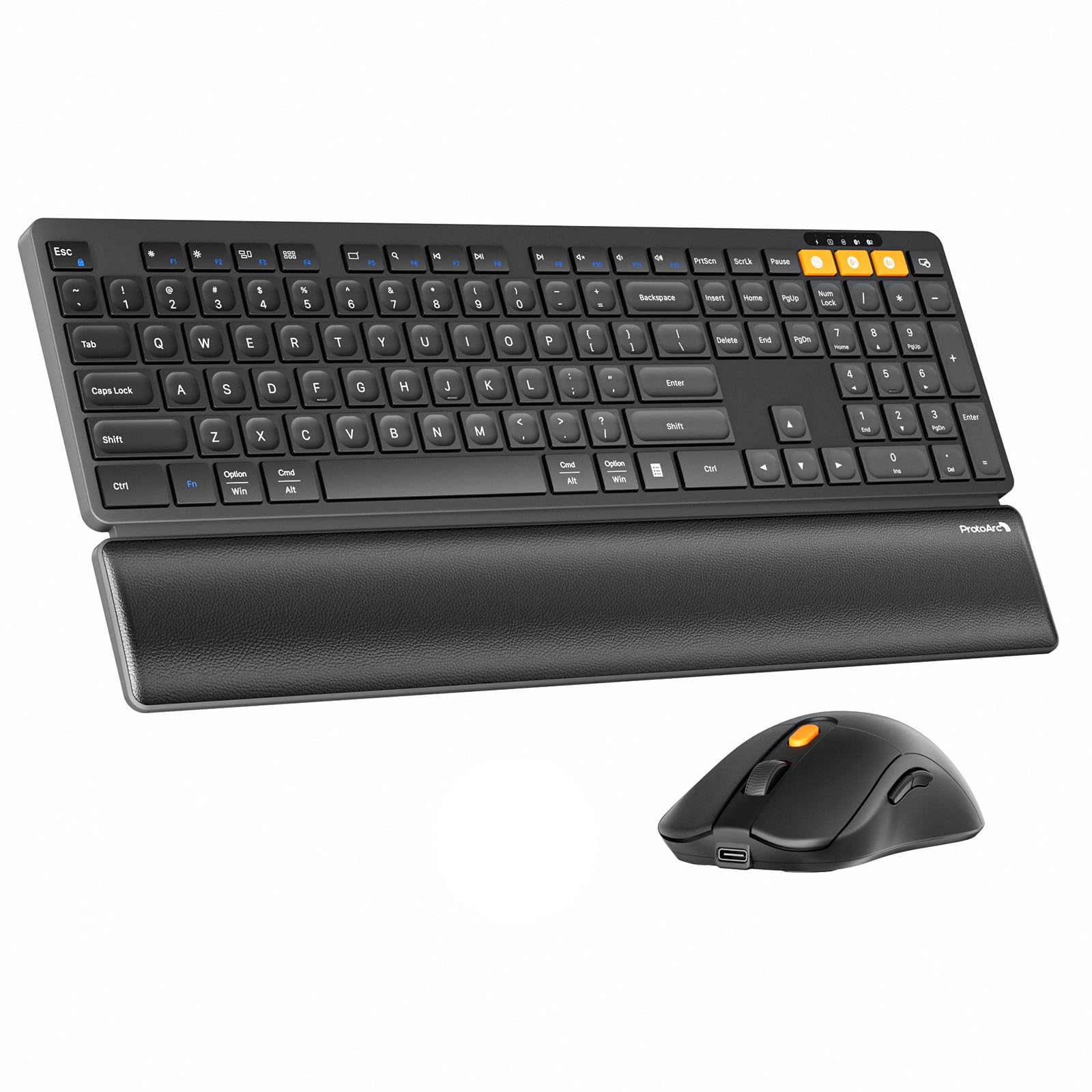
A leather-textured wrist rest and a 63-gram mouse make this combo the comfort king for multi-device typing.
The ProtoArc KM60 is built around long sessions at the desk — the leather-textured wrist rest supports a more natural typing position, and the adjustable stand lets you tilt the keyboard to your preferred angle. It switches among up to three devices using dual Bluetooth and a 2.4GHz connection, so moving between your work computer and personal laptop takes one button press. The full-size US QWERTY layout includes 109 keys, a number pad, and 12 multimedia keys for quick access to browser and media controls.
The mouse weighs just 63 grams, cutting hand fatigue during long workdays while offering 1000/1600/2400 DPI settings for different cursor speeds. The quiet scissor keys keep typing noise down. A built-in 500mAh battery in the keyboard and a 300mAh battery in the mouse recharge via USB-C, with auto-sleep activating after 60 minutes. Owners mention the wrist rest makes a real difference for comfort, though the scissor switches lack the tactile depth of a mechanical board. Compared to the Samsers combo, the ProtoArc includes a wrist rest but has a slightly smaller battery.
Comfort First: The leather wrist rest and ultralight mouse directly address wrist strain during two-computer workflows.
One Miss: The scissor keys are quiet but feel less responsive than more expensive switches.
Pick This For: People who type across two screens and want wrist support and a lightweight mouse without blowing the budget.
Pass On It If: You prefer a mechanical typing feel or want a backlit keyboard.
7. UBOTIE Dual Mode Colorful Wireless Keyboard

A colorful retro typewriter look that connects to two computers and stands out on any desk.
The UBOTIE keyboard brings a splash of personality to your dual-computer setup — its multicolor design and round typewriter-style keycaps evoke a classic feel while offering dual-mode connectivity. It connects via Bluetooth or a 2.4GHz USB nano receiver, letting you switch between your two computers easily. The 109-key layout covers everything you need, and the QWERTY arrangement keeps it familiar. A power switch helps conserve batteries when you are away from the desk.
Compatibility stretches across Windows, Mac, Android, and even Amazon Fire tablets — so it works with nearly any two devices you pair. The rounded keycaps have a distinct retro feel, though they take some adjustment if you are used to flat laptop keys. Reviewers love the unique look and the colorfast design that does not fade. However, unlike the rechargeable Samsers or ProtoArc, this keyboard runs on batteries, so you will need replacements. At 17.4 inches wide, it is similar in size to the Samsers but thicker at 1.06 inches.
Standout Feature
- Unique retro typewriter design with fade-resistant colors
- Dual connectivity (Bluetooth + 2.4GHz) for two devices
- Broad OS compatibility including Amazon Fire tablets
Downsides
- Battery-powered, not rechargeable
- Round keycaps feel different from standard keyboards
Great For: Anyone who wants a fun, eye-catching keyboard that pairs with two computers and does not look like every other peripheral on the shelf.
Think Twice If: You type fast and prefer a standard key shape, or you hate swapping batteries.
Understanding the Specs
How Multi-Device Switching Works
Most keyboards for two computers use either Bluetooth or a 2.4GHz USB receiver, sometimes both. Bluetooth lets you pair without a dongle — great for laptops that have it built in. A 2.4GHz receiver plugs into a USB port and offers a more stable connection with less lag, ideal for desktop computers. The best keyboards let you use both, so you can switch between your work laptop (Bluetooth) and home desktop (receiver) with one tap.
Battery Life and Charging
Rechargeable keyboards save you money on batteries, but check how long they last. A full charge that lasts 10 days with backlighting on is typical for premium models, while some budget-friendly ones need charging every few days. Auto-sleep features help extend battery life by turning off the keyboard after a set time of inactivity. If you prefer not to plug in, look for a model that uses standard AA or AAA batteries instead.
FAQ
Can I use the same keyboard for a PC and a Mac at the same time?
Do I need two separate USB receivers for two computers?
How do I switch between computers on a multi-device keyboard?
Will a Bluetooth keyboard work with both a Windows PC and an iPad?
Are mechanical keyboards better for multi-device use than membrane ones?
Can I use a keyboard and mouse combo wired to two computers at once?
How long do rechargeable keyboards last on a full charge?
Is it safe to leave a wireless USB receiver plugged in all the time?
Final Thoughts: The Verdict
For most buyers, the best keyboard for 2 computers winner is the Logitech MX Keys S because it combines premium typing feel, smart backlighting, and smooth three-device switching in a solid build. If you want a mechanical feel with longer battery life, grab the Logitech MX Mechanical. And for a quiet, complete combo that works across your work and home computers, the standout is the Logitech MK955 Signature Slim Combo.
How We Picked
We do not accept paid placement. Every pick is matched to a real buyer and a real use-case; we do not hands-on test units.
Sources & Methodology
Specifications: manufacturer listings and product documentation. Review insights: verified customer reviews, as of July 2026. Pricing: not shown on this page (it changes often); check the current price via the retailer link.
As an Amazon Associate, Gadgets Feed earns from qualifying purchases. This does not affect which products we feature.