
The choice between a stationary powerhouse and a portable machine isn’t about desk space — it’s about what you’re willing to trade for mobility. A desktop delivers raw performance, thermal headroom, and upgradeability that no laptop can match, but only if your computing habits keep you tethered to one spot.
I’m Min — the co-founder and writer behind Gadgets Feed. I’ve spent thousands of hours comparing processor architectures, GPU thermals, and real-world benchmarks to cut through the marketing noise and map the exact trade-offs in this category.
Whether you need raw rendering power for work or uncompromised performance for AAA gaming, this guide answers the question are desktops better than laptops by stacking them head-to-head on every spec that actually matters.
How To Choose Between A Desktop And A Laptop
The desktop-versus-laptop decision comes down to three things: your tolerance for thermal throttling, your upgrade expectations, and whether you move your workspace daily. A desktop gives you a full-power CPU and GPU that can sustain peak loads indefinitely because its cooling system has room to breathe. A laptop packs the same chip families but at lower power limits — the same processor model runs slower in a laptop because the chassis can’t shed heat fast enough.
Performance Ceiling And Thermal Headroom
Desktop processors typically ship with a 65W to 125W thermal design power (TDP), while their laptop equivalents cap out around 15W to 45W. That difference translates directly to sustained clock speeds. A desktop Intel Core i5-14400F with a tower air cooler can boost all six performance cores indefinitely without hitting thermal limits. The same chip architecture in a laptop would throttle within minutes under a sustained all-core load, dropping clock speeds by 20 to 30 percent.
Upgradeability And Longevity
A desktop’s motherboard provides replaceable RAM slots, multiple M.2 and SATA storage bays, a discrete GPU slot, and often an accessible CPU socket. You can drop in a new graphics card three years from now without replacing the entire system. Most laptops solder the RAM and CPU directly to the board, locking your configuration the day you buy it. If you plan to keep the machine for more than four years, a desktop’s upgrade path gives it a significantly longer usable life.
Form Factor And Portability Trade-Offs
A desktop tower plus monitor, keyboard, mouse, and peripherals is a fixed installation. If you need to work between a home office, a coffee shop, and a client site, a desktop simply cannot do that. But if your workspace is stationary — a dedicated desk or home office — the desktop’s drawbacks disappear. The question are desktops better than laptops becomes about whether you value raw performance per dollar or the ability to pick up and leave.
Quick Comparison
On smaller screens, swipe sideways to see the full table.
| Model | Category | Best For | Key Spec | Amazon |
|---|---|---|---|---|
| Skytech Gaming Shadow 5 | Premium Gaming | High-FPS 1080p Gaming | RTX 5060 Ti 16GB + Ryzen 7 9700X | Amazon |
| Alienware Aurora ACT1250 | Premium Gaming | AAA Gaming & Streaming | RTX 5070 + 1000W Platinum PSU | Amazon |
| MSI Codex Z2 | High-End Gaming | Ray Tracing & VR | RTX 5070 + 32GB DDR5 | Amazon |
| YAWYORE Gaming PC | Mid-Range Gaming | 1080p High Settings | RTX 5060 + Ryzen 7 5700X | Amazon |
| CyberPowerPC Gamer Master | Mid-Range Gaming | DDR5 & AM5 Upgrade Path | RTX 5060 Ti + 16GB DDR5 | Amazon |
| Thermaltake LCGS Quartz i1460 | Mid-Range Gaming | Entry-Level 1080p Gaming | RTX 5060 + i5-14400F | Amazon |
| Apple iMac M4 24-Inch | All-in-One Premium | Creative & Office Work | M4 8-Core + 24-Inch Retina | Amazon |
| Dell Tower ECT1250 | Business Mid-Range | Productivity & Multi-Monitor | Core Ultra 7 + 32GB RAM | Amazon |
| HP Pro Tower 290 G9 | Business Value | Office & Dual-Monitor Setup | i5-12500 + 16GB RAM | Amazon |
| Dell Slim Desktop ECS1250 | Business Entry-Level | Home Office & Web Browsing | Core Ultra 5 + 16GB RAM | Amazon |
| STGAubron Prebuilt Gaming PC | Budget Entry | Entry-Level Gaming | RX 550 4G + i5 3.6GHz | Amazon |
In‑Depth Reviews
1. Skytech Gaming Shadow 5 Gaming PC
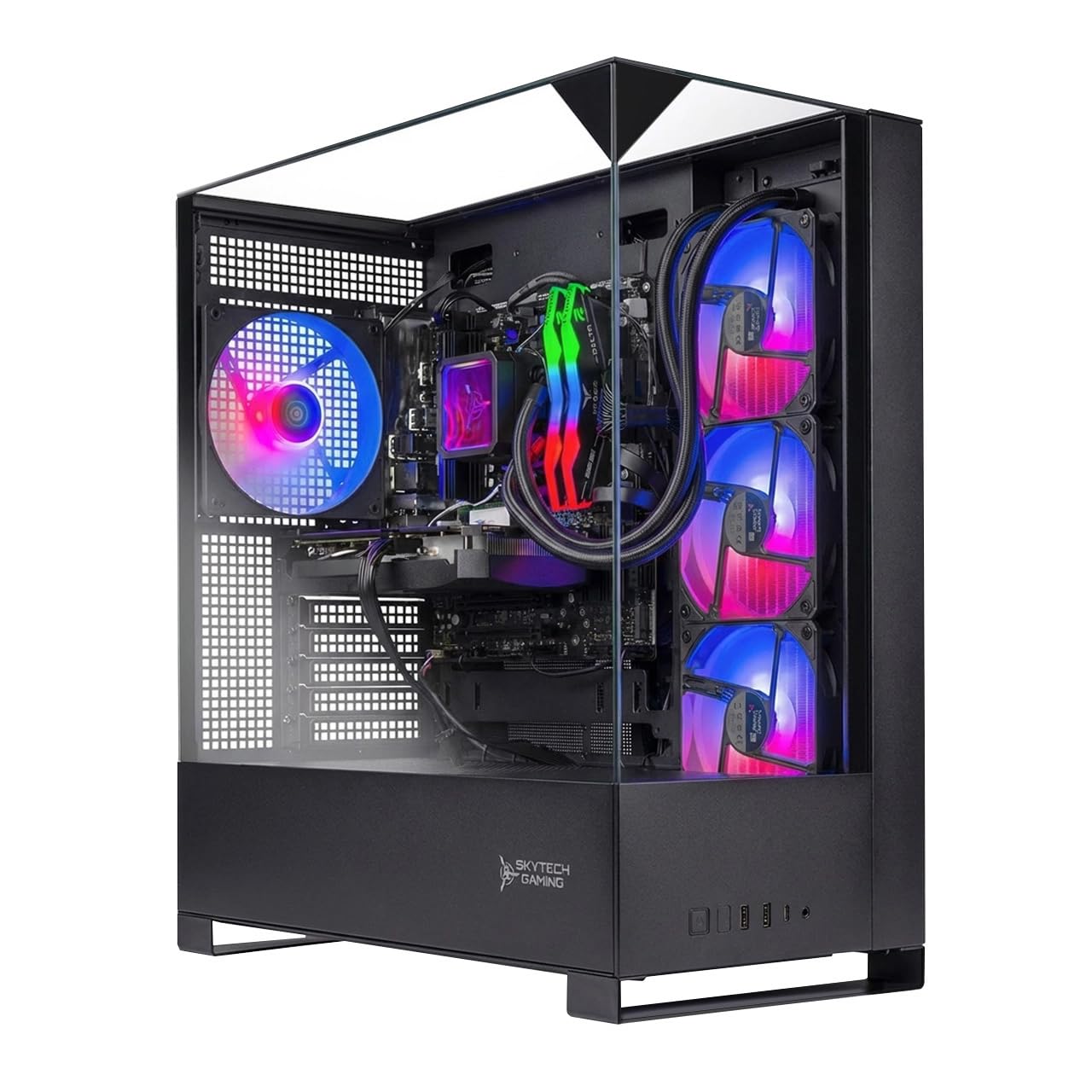
The Shadow 5 packs a Ryzen 7 9700X with a 5.5GHz boost clock paired with an RTX 5060 Ti carrying 16GB of GDDR7 VRAM — a combination that crushes 1080p titles at ultra settings while leaving headroom for 1440p. The 360mm AIO liquid cooler keeps the CPU well below throttle thresholds even during extended Cyberpunk 2077 sessions, which is something a laptop cooling solution simply cannot sustain.
With 16GB of DDR5 RAM clocked at 6000MHz and a 1TB NVMe SSD, boot times sit under 15 seconds and game load times are negligible. The 750W Gold-rated PSU provides clean power delivery for the RTX 5060 Ti’s transient spikes, and the tempered glass side panel shows off the ARGB fans without impeding airflow. Skytech also includes a gaming keyboard and mouse, making this a true out-of-box experience.
User reports confirm zero crashes over six months of heavy use, with smooth performance on Elden Ring, Baldur’s Gate 3, and Forza Horizon 5 at max settings. The only minor caveat is that the 1TB SSD fills quickly if you install multiple modern titles, but the motherboard supports additional NVMe and SATA drives for expansion.
Why it’s great
- 16GB GDDR7 VRAM future-proofs texture-heavy titles at 1440p
- 360mm AIO liquid cooling eliminates thermal throttling risk
- Assembled in the USA with a 1-year warranty and free tech support
Good to know
- 1TB storage fills quickly with modern games; plan for an extra drive
- Fans are audible under heavy load and may pick up on open mics
2. Alienware Aurora Gaming Desktop ACT1250

The Aurora chassis pairs an Intel Core Ultra 7 265F (boosting to 5.3GHz) with an RTX 5070 on the Blackwell architecture, delivering a massive generational leap in ray tracing throughput. The 1000W Platinum-rated PSU provides rock-solid power delivery for sustained loads, and the dedicated Alienware Command Center lets you tune fan curves and performance states across six distinct profiles.
The 32GB of DDR5 RAM and 1TB SSD handle multitasking with ease — you can stream to Twitch, run Discord, and play Ghost of Tsushima at high settings simultaneously without stutter. The matte basalt black finish with customizable AlienFX lighting zones makes this a statement piece on any desk. Dell backs it with a 1-year onsite service, meaning a technician comes to your location if a hardware issue can’t be resolved remotely.
User feedback notes the machine runs nearly silent under normal use, with the fans only spooling up under sustained gaming loads. Some buyers report occasional boot issues that require a full power drain to resolve, but these appear to be firmware-related and are addressed via Alienware updates. The RTX 5070 handles 4K output at playable frame rates, and the 12GB VRAM buffer handles texture-heavy titles with ease.
Why it’s great
- RTX 5070 with Blackwell architecture delivers top-tier ray tracing performance
- 1000W Platinum PSU provides clean power for sustained high loads
- 1-year onsite service means in-home repairs without shipping the tower
Good to know
- Occasional boot failures may require a full power drain to reset
- Proprietary Dell components limit some aftermarket upgrade paths
3. MSI Codex Z2 Gaming Desktop

The Codex Z2 combines an AMD Ryzen 7 8700F (8 cores, 5.0GHz boost) with an RTX 5070 and a generous 32GB of DDR5 RAM, making it one of the most balanced high-end prebuilts on the market. The 2TB M.2 NVMe SSD is a standout feature — you can install the entire Call of Duty franchise plus a dozen AAA titles without worrying about storage space. Four system fans (three intake, one exhaust) maintain positive pressure inside the chassis, keeping dust buildup minimal.
MSI includes their Center software for fine-tuning RGB lighting and fan curves, and the front-panel LED button lets you cycle through lighting presets without opening the app. The VR-ready designation is earned — the RTX 5070 handles SteamVR titles at full resolution without reprojection artifacts. Overclocking headroom is limited by the air cooler, but the 8700F runs cool enough at stock that you won’t need more.
Reviews indicate smooth performance on Frostpunk 2 and other CPU-intensive sim games, with the system staying cool even during extended sessions. The Bluetooth module is known to be weak; several users upgraded to a separate PCIe Bluetooth card for stable controller connectivity. The 12GB VRAM buffer on the RTX 5070 handles triple 4K monitor setups for productivity without breaking a sweat.
Why it’s great
- 2TB NVMe SSD eliminates storage anxiety for AAA game libraries
- Four-fan chassis layout maintains positive pressure and low dust levels
- VR-ready with smooth performance at full resolution
Good to know
- Stock Bluetooth module has limited range; consider a PCIe upgrade
- Fans become audible under load, typical for an air-cooled system
4. YAWYORE Gaming PC (Ryzen 7 + RTX 5060)

With a Ryzen 7 5700X and an RTX 5060 8GB (GDDR7) paired with 32GB of DDR4 RAM, the YAWYORE delivers a price-to-performance ratio that undercuts most name-brand competitors. The MSI B550M-A PRO motherboard provides a solid foundation with PCIe 4.0 support for the GPU and NVMe drive, and the 650W 80+ Bronze PSU is adequate for the 5060’s power draw. The ARGB fans and remote control add a layer of customization that appeals to builders who want control over their rig’s aesthetics.
The 1TB M.2 NVMe SSD provides snappy boot and load times, and the 32GB RAM capacity is genuinely useful for multitasking — you can keep a browser with dozens of tabs open while running a game and a Discord stream. The chassis includes shock-absorbing foam for shipping, but you must remove it before first use or the airflow will be severely restricted.
Buyers report excellent performance on CSGO, RDR2, and Valorant at high settings, with the system running quietly thanks to the included air cooler. The DDR4 platform is a generation behind, but the Ryzen 7 5700X remains a capable eight-core chip that won’t bottleneck the RTX 5060 in most scenarios. The no-name brand reputation gives some buyers pause, but user reviews consistently show the hardware matches the advertised specs.
Why it’s great
- 32GB DDR4 RAM provides generous multitasking headroom
- MSI B550M motherboard offers PCIe 4.0 and solid build quality
- Remote-controlled ARGB fans and lighting add customization
Good to know
- DDR4 platform limits future CPU upgrade paths within same motherboard
- Brand unfamiliarity may concern some buyers despite positive reviews
5. CyberPowerPC Gamer Master GMA2900A3

The Gamer Master rides the AM5 platform with a Ryzen 7 8700F and a B850 chipset, delivering native PCIe 5.0 support for future GPU upgrades. The RTX 5060 Ti 8GB with GDDR7 memory handles modern titles at 1080p ultra without breaking a sweat, and the 16GB of DDR5 RAM at 6000MHz ensures the CPU is fed data without bottleneck. The 1TB PCIe 4.0 NVMe SSD provides read speeds over 5000MB/s, making game level loading nearly instant.
CyberPowerPC includes a tempered glass side panel, custom RGB lighting, and a wired keyboard and mouse. The front I/O panel offers two USB-C 3.2 ports and four USB-A 3.2 ports, making peripheral connectivity straightforward. The Wi-Fi 6 and Bluetooth 5.3 support keep wireless connections current, and the 7.1 channel audio provides decent positional audio for competitive shooters.
User reports highlight the quiet operation and effective cooling, with the system maintaining low noise even during extended gaming sessions. Some users experienced USB power issues that were resolved by disabling Deep Sleep in the BIOS, and one report of random restarts was traced to a Windows update. CyberPowerPC includes a 1-year parts and labor warranty with free lifetime tech support, which adds confidence for buyers who may not want to troubleshoot alone.
Why it’s great
- AM5 B850 chipset supports PCIe 5.0 for future GPU upgrades
- DDR5 6000MHz memory matches the Ryzen 7’s Infinity Fabric for optimal performance
- Two front USB-C 3.2 ports make high-speed peripheral connectivity easy
Good to know
- Some units require BIOS tweaks (Deep Sleep disable) to fix USB dropout
- Only 16GB RAM may need an upgrade for heavy multitaskers
6. Thermaltake LCGS Quartz i1460

Thermaltake’s LCGS lineup brings the build quality of a DIY-focused company to the prebuilt space. The i1460 pairs an Intel Core i5-14400F with an RTX 5060 8GB, offering solid 1080p performance at a price point that undercuts comparable CyberPowerPC and Skytech models. The DDR4 3600MHz RGB memory (16GB) keeps latency low, and the 1TB NVMe M.2 SSD provides fast asset streaming for open-world games.
The chassis features a 3mm thick tempered glass side panel, a full-length PSU power cover for cable management, and an ARGB tower air cooler that keeps the i5-14400F well within its thermal limits. Thermaltake uses their own ToughRAM modules, which match the motherboard’s RGB ecosystem through the software. The included Wi-Fi support covers wireless connectivity, though Ethernet is recommended for competitive gaming.
Buyers consistently praise the build quality and quiet operation, noting that the system handles Fallout 76 at max settings with stable frame rates. The RTX 5060 is a capable card for its tier, but the 8GB VRAM buffer may become a limitation in VRAM-intensive titles at 1440p. The i5-14400F is a solid mid-range CPU that won’t bottleneck the 5060 in most scenarios, making this a balanced entry-level gaming rig.
Why it’s great
- Thermaltake’s DIY heritage results in clean cable management and strong build quality
- DDR4 3600MHz RAM provides low latency at a cost savings over DDR5
- ARGB tower cooler keeps the i5-14400F cool with minimal noise
Good to know
- 8GB VRAM on the RTX 5060 may struggle with VRAM-heavy titles at higher resolutions
- No liquid cooling option; air cooler is adequate but limits overclocking headroom
7. Apple iMac M4 24-Inch

The iMac M4 redefines the all-in-one desktop category with Apple’s integrated architecture. The M4 chip’s 8-core CPU and 8-core GPU share a unified memory pool of 16GB, allowing the GPU to access system RAM as VRAM without the latency penalties of discrete graphics. The 24-inch 4.5K Retina display at 500 nits brightness covers the P3 wide color gamut, making this the clear choice for photographers, video editors, and designers who prioritize color accuracy.
The minimalist design hides all components behind the display — no tower, no cable clutter. The 12MP Center Stage camera keeps you framed during video calls, and the six-speaker array with Spatial Audio provides genuinely impressive sound for a desktop. Wi-Fi 6E and Bluetooth 5.3 handle wireless connectivity, and the four Thunderbolt 4 ports support up to two external 6K displays. The M4’s neural engine accelerates AI workloads within Apple Intelligence, handling tasks like image upscaling and real-time speech recognition locally.
Users consistently praise the fluid multitasking experience, with the M4 handling complex Canva projects, video calls, and heavy browser tabs without slowdown. The SSD starts at 256GB, which fills quickly for media professionals — consider the 512GB upgrade if your workflow involves large files. The soldered RAM and storage mean no upgrades later, so buy the configuration you’ll need for the next five years.
Why it’s great
- M4 chip’s unified memory architecture eliminates VRAM bottlenecks
- 24-inch 4.5K Retina display with P3 color gamut is class-leading for creative work
- Zero cable clutter with all components integrated into the display
Good to know
- Soldered RAM and storage mean zero upgradeability after purchase
- 256GB base SSD is small for media work; budget for the upgrade
8. Dell Tower Desktop ECT1250

The ECT1250 brings an Intel Core Ultra 7-265 processor (20 cores, 5.3GHz boost) with 32GB of DDR5 RAM and a 1TB NVMe SSD to the business desktop category. The integrated UHD Graphics 730 handles up to four FHD monitors or two 4K displays via HDMI 2.1 and DisplayPort 1.4a, making this a serious multi-monitor productivity machine. The tool-less entry and removable side panel let you access internal components for upgrades without special tools.
TPM 2.0 security chip, a lock slot, and a padlock loop keep the physical system secure, and the 1-year onsite service means Dell will come to your location for hardware repairs. The chassis is built from recycled materials and features sleek rounded corners that fit discreetly in a home office. The 180W power supply is adequate for the integrated graphics configuration, but limits the ability to add a discrete GPU without a PSU swap.
Buyers in stock trading report running three monitors with charts, scans, and trading software simultaneously without any lag. The system boots in under 30 seconds and is nearly silent in operation. Some users note that the single RAM stick (32GB) leaves one DIMM slot open for future upgrades, but the PSU limitation means significant GPU upgrades require a power supply replacement. The included keyboard and mouse are basic but functional for office work.
Why it’s great
- 20-core Core Ultra 7 handles heavy multitasking and VM workloads easily
- Tool-less chassis design makes RAM and storage upgrades straightforward
- 1TB NVMe SSD provides fast boot times and ample project storage
Good to know
- 180W PSU limits GPU upgrades without a power supply replacement
- Only a single audio jack on the front; no rear line-in/out ports
9. HP Pro Tower 290 G9

The Pro Tower 290 G9 delivers a 12th Gen Intel Core i5-12500 with 6 performance cores boosting to 4.6GHz, paired with 16GB of DDR4 RAM and a 512GB PCIe NVMe SSD. The integrated UHD Graphics 770 supports dual displays via HDMI and VGA outputs, making this a natural fit for office workers who need a two-monitor setup for spreadsheets, documentation, and web research. The 80 Plus Gold 180W power supply provides efficient power delivery for the office workload profile.
The compact tower dimensions (11.92 x 6.1 x 13.27 inches) fit easily on a desk or in a small cubby, and the front panel offers four USB 3.0 ports for fast file transfers. TPM 2.0 security is included for BitLocker encryption and enterprise compliance. HP includes a wired keyboard and mouse, and Windows 11 Pro comes pre-installed for business features like Remote Desktop and Hyper-V virtualization.
Users replacing older PCs note the dramatic speed improvement in boot times and multitasking, with the system handling dozens of browser tabs and office applications without slowdown. Some users experienced Bluetooth connectivity quirks that required driver updates to resolve. The integrated graphics are not suitable for gaming beyond very casual titles, but the CPU itself is powerful enough for demanding business applications and data analysis work.
Why it’s great
- 12th Gen i5 with 6 P-cores provides snappy multitasking for office apps
- Dual monitor support via HDMI + VGA covers common office setups
- Compact tower footprint saves desk space without sacrificing performance
Good to know
- Integrated graphics are unsuitable for gaming beyond casual 2D titles
- 512GB storage may fill quickly for users with large media libraries
10. Dell Slim Desktop ECS1250

The ECS1250 features an Intel Core Ultra 5-225 processor with built-in AI acceleration for tasks like background blur in video calls and real-time language translation. The 16GB of DDR5 RAM and 512GB M.2 SSD provide snappy boot and application load times, and the integrated UHD Graphics 730 supports up to four FHD monitors via DisplayPort 1.4a daisy chaining or two 4K displays via HDMI 2.1. The slim profile saves desk space while maintaining full desktop expandability.
The tool-less side panel gives easy access to internal components, and the hardware TPM security chip supports enterprise-grade data protection. Dell includes a 3.0 SD card reader on the front panel, which is useful for photographers who need to import images directly. The 1-year onsite service covers hardware issues at your location, and the 6-month Dell Migrate tool helps transfer files from an old PC to the new one.
Buyers replacing ten-plus-year-old Dells report dramatic speed improvements, with the system being virtually silent in operation. The Core Ultra 5 handles spreadsheet-heavy workloads and web browsing without any lag. Some users note the slim chassis limits internal expansion — there’s only one M.2 slot and space for one 2.5-inch drive. The included keyboard and mouse are basic but functional for office tasks.
Why it’s great
- Core Ultra 5 with AI acceleration improves video call quality and translation
- Four FHD monitor support via DisplayPort daisy chaining is ideal for power users
- Included SD card reader saves photographers from needing a separate adapter
Good to know
- Single M.2 slot limits internal storage expansion options
- Slim chassis restricts GPU upgrade to low-profile cards only
11. STGAubron Prebuilt Gaming PC Desktop

The STGAubron is the entry-level option for buyers who need a functional desktop on a tight budget. It pairs an Intel Core i5 (up to 3.6GHz) with an AMD Radeon RX 550 4GB and 16GB of DDR4 RAM, plus a 512GB SSD. The RX 550 is an entry-level GPU from the Polaris era, capable of running Fortnite, Valorant, and CSGO at playable frame rates at 1080p low settings, but it will struggle with modern AAA titles. The included RGB keyboard and mouse add a gaming aesthetic that appeals to younger users.
Connectivity covers Wi-Fi 6, Bluetooth 5.0, and a range of video outputs (HDMI, DisplayPort, DVI). The two RGB fans provide basic airflow, and the 512GB SSD keeps boot times reasonable. STGAubron includes a 1-year parts and labor warranty with free lifetime tech support, which is a welcome safety net for a budget build. The system runs Windows 11 Home out of the box.
User reviews are mixed. Many buyers report a smooth experience with small games and everyday tasks, praising the customer service for resolving issues quickly. However, several users report component failures after a few months — the RX 550, PSU, and fans are all generic parts with inconsistent quality control. This machine is best viewed as a disposable entry point: it works for basic gaming today, but don’t expect it to run demanding titles or last beyond a couple of years without component failures.
Why it’s great
- 16GB RAM and 512GB SSD provide a solid baseline for everyday computing
- Wi-Fi 6 and Bluetooth 5.0 keep wireless connectivity current
- Free lifetime tech support helps first-time PC buyers troubleshoot issues
Good to know
- RX 550 is an outdated entry-level GPU that struggles with modern AAA titles
- Inconsistent component quality leads to some units failing within months
FAQ
Do desktops always outperform laptops at the same price?
How much longer does a desktop typically last than a laptop?
Final Thoughts: The Verdict
For most users, the answer to are desktops better than laptops comes down to whether portability is negotiable. If your workspace is fixed and raw performance per dollar is your priority, the Skytech Gaming Shadow 5 wins because it pairs an overclockable Ryzen 7 with a 16GB RTX 5060 Ti and liquid cooling — a configuration that no laptop at its price tier can match in sustained performance. If you need an all-in-one with a gorgeous display for creative work, the Apple iMac M4 is the clear choice. And for budget-minded buyers who just need a functional desktop for everyday tasks, the STGAubron Prebuilt gets the job done, but the Dell Slim Desktop ECS1250 offers more reliability for just a bit more.