
Our readers keep the lights on and my morning glass full of iced black tea. As an Amazon Associate, I earn from qualifying purchases.
Specs are compiled from manufacturer listings and verified buyer reviews and can change over time — please confirm the key details on the product page before buying.
You need plastic badges that look professional and work the first time — no purple blues, no wasted ink, no jammed cards. A single-sided ID card printer is the simplest tool for the job, but the wrong one will drain your budget on ribbons and software headaches. The right machine prints crisp, accurate color without fighting you.
I’m Min — the founder and writer behind Gadgets Feed. This guide is built by comparing the manufacturers’ published specifications and the patterns across verified customer reviews, so you get each pick’s real strengths and trade-offs instead of marketing spin.
This breakdown of the best 1 sided id card printer options will help you match the right machine to your real-world volume and color demands.
Quick Picks
- Magicard 300 Single Side ID Card Printer — Long-Term Pick
- Fargo DTC1250e Single Sided Desktop Printer — Pro Grade
- IDP SMART-31S Simplex Printer Kit — High-Volume Value
- Bodno Magicard Pronto ID Card Printer & Complete Supplies Package — Quality Champion
- Bodno Fargo DTC1250e Single Sided ID Card Printer Bundle — Data Import Pro
- Badgy100 Color Plastic Card Printer — Mac Friendly
- IDP SMART-21S Simplex Printer Kit — Budget Starter
How To Choose The Best 1 Sided ID Card Printer
Picking a single-sided ID card printer involves more than just comparing prices. Your volume, software needs, and willingness to troubleshoot will decide which model actually works for you.
Print Speed and Ribbon Yield
The number of color cards per hour tells you if the machine can keep up with your peak times. A printer that makes 150 color cards per hour is fine for a small office, while one pushing 180 or more suits a busier environment. The ribbon’s print count — 100, 250, or more — determines how often you must buy supplies.
Software and Compatibility
Many of these printers only work with Windows. If you use a Mac or Linux system, check compatibility before you buy. The included software can range from a basic template tool to a powerful database-driven program that pulls employee data from Excel or CSV files — a huge time saver for larger organizations.
Print Quality and Color Accuracy
Edge-to-edge printing is a common feature claim, but some models leave a white border. If your badges need full bleed color, look for models where reviewers confirm true edge-to-edge output. Accurate color reproduction is also critical — some printers shift blues toward purple or produce dull gradients that look unprofessional.
Quick Comparison
On smaller screens, swipe sideways to see the full table.
| Model | Best For | Print Speed (Color) | Ribbon Yield | Dimensions | Amazon |
|---|---|---|---|---|---|
| Magicard 300 | Reliability & Warranty | — | Included | — | $1,695.63Amazon |
| Fargo DTC1250e | Speed & Security | — | YMCKO Ribbon | 13.7″W x 7.9″D x 8.8″H | $980.00Amazon |
| IDP SMART-31S | High Volume Color | 180 cards/hr | 250 prints | 6.8″ x 14.2″ x 7.5″ | $899.00Amazon |
| Bodno Magicard Pronto | Print Quality | ~35 sec per card | MA100YMCKO | — | $899.99$999.99Amazon |
| Bodno Fargo DTC1250e Bundle | Data Import | — | 250-print ribbon | — | $1,999.99Amazon |
| Badgy100 | Mac Compatibility | 45 sec per card | 50 prints claimed | — | $599.00$649.00Amazon |
| IDP SMART-21S | Budget Starter Kit | 150 cards/hr | 100 prints | 6.6″ x 10.2″ x 7″ | $549.95Amazon |
In‑Depth Reviews
1. Magicard 300 Single Side ID Card Printer

The 3-year warranty is the longest of any model here, and a built-in LCD screen (a small display panel) helps you troubleshoot errors without a computer.
The Magicard 300 comes with a color ribbon, 100 PVC cards (plastic card stock), and Card Imaging design software right in the box, so you can start printing badges minutes after unboxing. Its 300 DPI (dots per inch — a measure of sharpness) print quality is clear enough for logos, micro-text, and photos, and it handles thicker RFID cards (radio-frequency identification, used for access badges) without jamming. One fire department reviewer noted it was very easy to use and quick to print cards for their volunteers, while another buyer said its color quality is great and it has not jammed at all.
A clear trade-off: this is a single-sided printer only, so you cannot print barcodes on the back of a card. Some users also report minor scratches on a small percentage of cards. The included software is serviceable but could be better for advanced layouts.
Solid Reasons
- 300 DPI dye-sublimation (a heat-based process that bonds dye to the card) produces professional-looking, sharp images and text
- Three-year warranty is top-tier for this price tier
- Easy USB setup works with existing security access systems
One-Sided Limits
- Single-sided only — no option to print barcodes or data on the card back
- A few users saw minor scratches on about 10% of cards
- Setup requires installation under the user account that will print, which can trip up IT novices
Organizations that want low-maintenance support get the most out of this printer. If you need to print a barcode or a logo on the reverse side, you will need the dual-sided version of this same model.
2. Fargo DTC1250e Single Sided Desktop Printer

AES-256 encryption (an advanced security standard that scrambles data so only the printer can read it) protects sensitive badge data — a serious pick for secure environments.
The Fargo DTC1250e is known as a workhorse in the ID card printing world. One reviewer who upgraded from the older DTC1000 because of Windows 10 compatibility issues reports the 1250e has kept up the pace and continues to hold the Fargo flag high. It is also the fastest printer in its class according to the manufacturer, minimizing wait time when you are printing batches of cards. Its earth-friendly design includes GreenCircle certification and support for eco-friendly refill ribbons.
The catch here is compatibility: this printer ships with a CD-ROM for drivers, and Mac users may struggle because the available Mac drivers date back to 2015. Additionally, two out of five units in one deployment failed within three weeks, and the return process required multiple emails. If you are on a PC and want a secure, fast printer, this is a strong contender — just expect a more involved setup.
Security First
- AES-256 encryption keeps your card data safe during printing
- Fast color output, great for high-volume badge runs
- Eco-friendly ribbon options reduce waste
Compatibility Hurdles
- No Mac support — Windows and CD-ROM installation only
- Some units failed early, and RMAs are tedious
- No built-in LCD; relies on software controls
Windows-based offices that need secure, fast ID printing and do not mind a slightly finicky setup will get the most from this printer. skip it if you use a Mac or want simple plug-and-play from the start — the Badgy100 below is the one for you.
3. IDP SMART-31S Simplex Printer Kit

Pumps out 180 color cards per hour — that is 20% faster than the SMART-21S, making it the speed leader in this lineup.
The IDP SMART-31S produces 180 color cards per hour and 720 monochromatic (single-color) cards per hour. The larger 250-print YMCKO ribbon (Yellow, Magenta, Cyan, Black, and Overcoat — the five-panel ribbon that prints one full-color card per pass) means you swap supplies less often. The printer measures 6.8 in x 14.2 in x 7.5 in, just slightly larger than the SMART-21S, so it still fits on most desktops. A print shop owner said the print quality is good, setup was easy, and it runs without problems for everyday ID card jobs.
Buyers report a recurring software headache: frequent print errors caused by spooler issues (the spooler is the part of Windows that manages print jobs), requiring a restart of the spooler after each print to continue. The included Smart ID Software also lacks basics like word wrap. If you can work around the software quirks, the hardware itself is fast and reliable.
Speed Leader
- 180 color cards per hour — fastest in this lineup
- 250-print ribbon reduces per-card supply cost
- Edge-to-edge and full-color printing with FINE image technology
Software Snags
- Spooler errors require manual restart after each print job
- Software lacks word wrap and feels barebones
- No Mac or native Linux driver support from the start
Reach for this if you push high daily volumes and can tolerate software quirks for raw print speed. Look elsewhere if you want a smooth software experience or need to print both sides of a card.
4. Bodno Magicard Pronto ID Card Printer & Complete Supplies Package

Delivers excellent 300 DPI dye-sublimation prints with sharp text and vibrant, edge-to-edge color — reviewers confirm it prints right to the card border.
The Bodno Magicard Pronto package includes everything: the printer, a MA100YMCKO color ribbon, 100 PVC cards, and the Bronze Edition software with pre-made templates and drag-and-drop design. A verified buyer raves about its “excellent print quality (300 dpi dye-sublimation), sharp text, vibrant colors, edge-to-edge printing” and says the speed — about 35 seconds per full-color card — is fast enough for a busy office or school. The user-friendly features and clear instructions mean you can be printing professional cards in minutes.
The honest downside is reliability. One reviewer noted poor print quality with magenta ghosting (a faint duplicate image in a different color), constant jams that waste 3-4x the cards, and a Bodno software license key that disconnects mid-use. The ribbons are also pricey to replace. The split between glowing reviews and nightmare experiences is wide, so your mileage may vary significantly.
Stunning Output
- True edge-to-edge, 300 DPI dye-sublimation printing
- Fast ~35 second color card speed
- Includes software with templates and drag-and-drop
Reliability Gamble
- Some units jam constantly and waste cards
- Software license can disconnect mid-use
- Expensive replacement ribbons
Someone who prioritizes print quality above all else and is willing to gamble on reliability for the best-looking badges. Avoid it if you cannot afford downtime or wasted supplies — the failure rate seems real. For a safer bet on reliability, go with the Magicard 300 instead.
5. Bodno Fargo DTC1250e Single Sided ID Card Printer Bundle
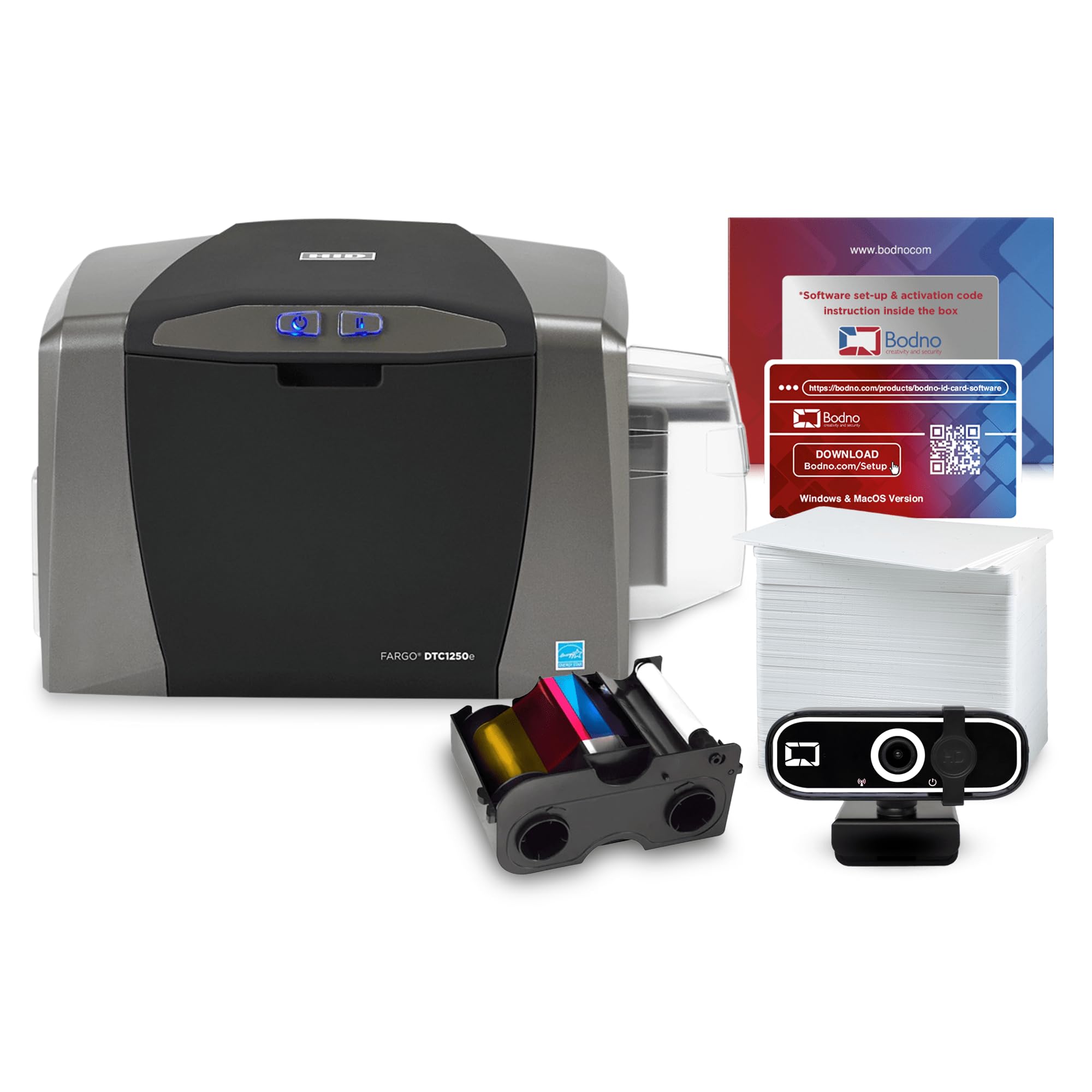
The Silver Edition software auto-creates cards from Excel or CSV (comma-separated values) files — a lifesaver for batch badging.
This bundle pairs the reliable Fargo DTC1250e printer with Bodno’s Silver Edition software, which adds the ability to pull data from spreadsheets to automatically generate cards. A small school district printed 130 ID cards without any issues, finding the system problem-free and user-friendly. The package includes a 250-print YMCKO ribbon, PVC cards, and a webcam, making it truly ready to run from the start. The 3-year warranty adds confidence for ongoing use.
The catch is color accuracy. One reviewer notes the print quality is good for solid colors but poor for gradients (smooth blends between colors) and multi-shade patterns, and not color-accurate. Another warns that the bundle falsely advertised encoding (writing data to a smart chip on the card) capability, requiring a extra part for that feature. While the basic printing works well, be careful about what the bundle promises versus what you actually need.
Batch Badging Hero
- Silver Edition software imports Excel/CSV for bulk card creation
- 250-print ribbon lasts longer than standard 100-print ribbons
- All-inclusive package: printer, ribbon, cards, webcam, software
Color Caveats
- Gradients and multi-shade patterns print poorly
- Encoding feature requires a add-on, not included
- Software license eventually expires and costs to renew
Administrators who need to batch-print hundreds of cards from a spreadsheet will find the Silver software a real time-saver. It will frustrate anyone expecting accurate gradient printing or built-in card encoding — for that, you need a different machine with the encoder part already installed.
6. Badgy100 Color Plastic Card Printer

One of the few Mac-compatible single-sided ID printers — and it prints a color badge in 45 seconds.
The Badgy100 sets itself apart with cross-platform software that works on both Windows and Mac, a rare find in this category. It prints with a 1.35mm margin (near edge-to-edge) and is designed for easy setup, even for beginners. One small business owner found it “a great option for small businesses,” affordable and easy to use. Another reviewer updated the driver and got great quality output without further issues.
Reviewers report some serious gripes, though. The ink cartridge is claimed for 50 prints, but one buyer only got 39 for simple ID cards. The printer also requires unplugging if idle for more than 15 minutes and can throw overheating warnings.
Mac Advantage
- Works with Mac and PC — rare for the category
- Fast 45-second print time for a single color card
- Easy setup for beginners
Low Volume Limits
- Ink yield lower than advertised — one user got only 39 out of 50 prints
- Overheating warnings and idle timeouts require unplugging
- Not suitable for more than a few dozen cards per week
Grab it if you are on a Mac and need a low-volume, affordable entry point into plastic card printing. pass on it if you need to print more than 50 cards a week or want reliable high-volume operation — the IDP SMART-31S is a better fit for that.
7. IDP SMART-21S Simplex Printer Kit

The most affordable way to start printing plastic ID cards — but owners mention blue prints as purple, so color accuracy is a real gamble.
The IDP SMART-21S is an entry-level single-sided printer that ships with a 100-print YMCKO ribbon and 100 PVC cards, so you get everything in one box. It can produce over 150 color cards and 600 monochromatic (single-color) cards per hour, and its compact 6.6 in x 10.2 in x 7 in size slides onto any desktop. One reviewer says it “works great for me replacing paper cards with a very professional and colorful plastic card” and appreciates the ability to add QR codes and images.
The major red flag is color accuracy. A verified buyer reports it “fails full edge-to-edge printing despite advertising; blue prints as purple,” and the helpdesk confirmed this is a model limitation. For any badge requiring accurate blue or full bleed (edge-to-edge) coverage, this printer will disappoint. Also, finding replacement ribbons is tricky — they are bundled with unneeded PVC cards, and Amazon’s labeling between the S21 and S31 ribbons is confusing.
Lowest Barrier
- Most affordable entry point for a full printing kit
- Compact footprint fits any desk
- Produces over 150 color cards per hour
Color Issues
- Blue prints as purple — helpdesk confirmed the limitation
- No true edge-to-edge printing despite claims
- Replacement ribbon hard to find and often bundled with unnecessary cards
Budget-conscious buyers who need simple badges and can accept slight color shifts will find this the cheapest way in. it’s not for you if your corporate logo includes a specific blue or you need full-edge printing — in that case, spend the extra on the Magicard 300 for accurate color.
Understanding the Specs
Print Speed (Cards per Hour)
This number tells you how many full-color or monochrome cards the machine can produce in an hour of steady use. For a small office printing a handful per day, 150 color cards per hour is plenty. For a print shop or large corporation, 180 or more per hour keeps the line moving. Compare this to your busiest day — if you need 50 badges done in one sitting, even a slower printer will finish in under 20 minutes.
Ribbon Yield and YMCKO
YMCKO stands for Yellow, Magenta, Cyan, Black, and Overcoat — the five panels on a standard color ribbon that print one full-color card in one pass. Ribbon yield (100, 250, or 250 prints per ribbon in these models) determines your per-card supply cost. A 250-print ribbon roughly halves the cost per card compared to a 100-print ribbon. Always check replacement ribbon prices and availability before committing to a printer brand.
FAQ
What does “simplex” mean on an ID card printer?
Will this printer work with my Mac?
What is a YMCKO ribbon?
How many cards can I print before replacing the ribbon?
Can I print edge-to-edge on these single-sided printers?
What software is included with these ID card printers?
Do I need a special card to use these printers?
How long does a single card take to print?
What is the difference between dye-sublimation and thermal transfer printing here?
Final Thoughts: The Verdict
For most buyers, the 1 sided id card printer winner is the Magicard 300 because it combines a strong 3-year warranty, great 300 DPI print quality, and easy USB setup in one reliable package. If you need sheer speed and high color volume per hour, grab the IDP SMART-31S. And for Mac users or those on a tight budget, the Badgy100 offers the most affordable entry point with cross-platform support.
How We Picked
We do not accept paid placement, and we did not hands-on test every unit. Instead, we match each pick to a real buyer and use-case by comparing the manufacturers’ published specifications against the patterns in verified customer reviews — so you get each pick’s real strengths and trade-offs instead of marketing copy.
Sources & Methodology
Specifications: manufacturer listings and product documentation. Review insights: verified customer reviews, as of July 2026. Pricing: not shown on this page (it changes often); check the current price via the retailer link.
As an Amazon Associate, Gadgets Feed earns from qualifying purchases. This does not affect which products we feature.
Product prices and availability are accurate as of the date/time indicated and are subject to change. Any price and availability information displayed on Amazon at the time of purchase will apply to the purchase of this product. As an Amazon Associate I earn from qualifying purchases.
CERTAIN CONTENT THAT APPEARS ON THIS SITE COMES FROM AMAZON. THIS CONTENT IS PROVIDED "AS IS" AND IS SUBJECT TO CHANGE OR REMOVAL AT ANY TIME.
Amazon and the Amazon logo are trademarks of Amazon.com, Inc. or its affiliates.