
Our readers keep the lights on and my morning glass full of iced black tea. As an Amazon Associate, I earn from qualifying purchases.
Specs are compiled from manufacturer listings and verified buyer reviews and can change over time — please confirm the key details on the product page before buying.
If you play competitive shooters, the gap between clicking and seeing the shot land is a real, measurable thing. A 1000Hz polling rate sends your mouse’s position to your PC every 1 millisecond, cutting input lag to the point where a clean headshot feels instant. This guide cuts through the specs to show you which 1000Hz gaming mice are actually worth your money, covering everything from featherweight wireless options to silent, button-packed wired models.
You want a mouse that responds instantly, feels light, and lasts through long gaming sessions. I’m Min, founder of Gadgets Feed, and I’ve compared the manufacturers’ published specs and verified customer reviews to give you each pick’s real strengths and trade-offs. I focus on the numbers that matter — polling rate, weight in grams, battery life in hours, and DPI — so you can find a mouse that disappears in your hand and never makes you think about the hardware.
Whether you’re upgrading from a basic office mouse or hunting for a pro-level esports edge, the right 1000hz mouse balances a sub-millisecond response with a weight and shape you can actually play on for hours without fatigue.
Our Picks at a Glance


How To Choose The Best 1000Hz Mouse
Choosing a gaming mouse boils down to three specs: polling rate, weight, and battery life. A 1000Hz polling rate (how often the mouse reports its position to your PC, measured in hertz) is the modern baseline for competitive play, and almost every mouse here meets or beats it — so your real job is weighing the other specs against how you actually game.
Polling Rate: More Than Just a Number
Polling rate is how often the mouse reports its position to your computer each second. At 1000Hz, that’s every 1 millisecond, which feels instant to most people. Several mice here push that to 8000Hz, reporting 8 times per millisecond — a spec that only matters if you have a high-refresh-rate monitor and reflexes to match. For most players, 1000Hz is already smooth; the higher rate is a bonus, not a requirement.
Weight: The Hidden Aiming Tool
A lighter mouse flicks, stops, and re-aims faster, which is why competitive models keep shaving grams. Some of the picks here weigh as little as 49g, while a heavier, button-loaded mouse might sit around 127g. If you play fast-paced FPS games, a sub-60g mouse can genuinely reduce wrist fatigue during a long tournament session.
Battery Life and Connectivity
Wireless freedom dies with a dead battery mid-match. Look at the battery life in hours at the 1000Hz polling rate — some mice here last 120 hours, others stretch to 750 hours. Also check connection modes: a tri-mode mouse (wired, 2.4GHz wireless, and Bluetooth) gives you the flexibility to switch between a desktop PC, a laptop, and even a tablet without needing a new mouse.
Quick Comparison
| Model | Best For | Polling Rate | Weight | Battery Life | Amazon |
|---|---|---|---|---|---|
| DAREU A950★ Best Overall | All-round wireless value | 1000Hz | 88g | 120 hours | Amazon |
| MechLands AJAZZ AJ139 V2 MCPrecision Pick | Precision on a budget | 1000Hz | 66g | 500mAh | Amazon |
| Rapoo VT7Battery King | Extreme battery endurance | 8000Hz | 53g | 750 hours | Amazon |
| HyperX Pulsefire Haste 2 | Wired reliability without the weight | 8000Hz | 53g | — | Amazon |
| MOJO Pro Performance | Silent, button-heavy gameplay | 1000Hz | 127g | — | Amazon |
| GravaStar Mercury X | Ultra-light magnesium build | 1000Hz | 49g | — | Amazon |
| GravaStar Mercury X Pro | 8K performance in a light frame | 8000Hz | 49g | — | Amazon |
| Razer DeathAdder V4 Pro | Flagship ergonomics and speed | 8000Hz | 56g | 150 hours | Amazon |
In‑Depth Reviews
1. DAREU A950 Wireless Gaming Mouse
Our pick — over 4.5★ from 250+ verified ratings; the strongest balance of quality and price.
The all-rounder that drops the cable without dropping the ball, at a crowd-pleasing price.
The DAREU A950 is the pick that checks every box a competitive player ticks off: it runs at a 1000Hz polling rate for that 1ms response (the time it takes for your click to register), weighs a light 88g, and packs a 120-hour battery. The big selling point is the charging dock with a magnetic suction design — drop the mouse on it for 10 minutes and you get 10 hours of uninterrupted play, so a quick break between matches tops you up for the whole night.
What wins people over here is the build quality, with owners consistently praising how solid it feels for the price. The DAREU EXCLUSIVE KBS II button system is designed to avoid debouncing delay (the tiny lag between a click and the signal) and unintended misclicks, and the six programmable keys can be remapped via the DAREU software to run macros and adjust DPI (dots per inch, or cursor sensitivity) up to a max of 12000.
It connects three ways — wired, 2.4G wireless, and Bluetooth — so it slides between a PC, laptop, or even a tablet without fuss. The skin-like surface and gloss finish feel comfortable for long sessions, and the RGB lighting is customizable. The honest trade-off is the mixed reliability feedback: a few buyers report the side buttons breaking after a few months of use. It is a 4.6-star pick across 297 ratings, making it the highest-rated and most-reviewed option on this list — a rare combo of price, performance, and proven owner satisfaction.
Why it wins the desk
- 10-minute dock charge gives 10 hours of play
- Tri-mode: wired, 2.4G, and Bluetooth
- Six programmable keys with macro support
- Ultra-light 88g with a skin-like grip
What to watch
- Side buttons have a mixed reliability record
- Software has a slight learning curve
The pick for: anyone who wants a single wireless mouse for both serious FPS gaming and daily office work, with a dock that keeps it always charged.
Think twice if: you hammer your side buttons constantly — a small number of owners saw them fail after a few months, so treat them with care.
2. MechLands AJAZZ AJ139 V2 MC Gaming Mouse
A budget-friendly precision machine that tracks fast flicks without breaking a sweat.
The AJAZZ AJ139 V2 MC is built around the PAW3311 optical sensor (a chip that tracks movement), which delivers up to 12,000 DPI along with a 300 IPS high-speed capability (inches per second, or how fast you can move the mouse without losing track) and 35G of acceleration — specs that let you whip the mouse across the pad for quick turns and still land precisely. At just 66g it is light enough to minimize wrist strain, yet owners say it feels solid and smooth in the hand rather than flimsy.
The responsiveness earns consistent praise, and the battery life holds up for days between charges, with the magnetic charging base and RGB lights making it easy to top up. One owner’s verdict was blunt: “Battery life 100%🔋Functionality 100%Nice size 😀Nice weight too” — naming the value for money as the real reason it was worth it. The micro-switches are rated for up to 80 million clicks, so the buttons are built to outlast heavy sessions of spamming skills in MOBAs.
You get three connection modes — Bluetooth, 2.4GHz wireless, and USB-C wired — which makes it a flexible travel companion for both your desktop and laptop. It is a right-handed design, so lefties will want to look elsewhere. One honest note: opinions split on the weight, with some owners finding it lighter than they expected, which for a competitive mouse is usually a compliment. Across 256 ratings it holds a solid 4.5-star average, and the quality and value-for-money chatter is consistently positive.
Built for fast games
- 12,000 DPI with 300 IPS tracking
- 80-million-click micro-switches
- 66g weight reduces wrist fatigue
- Magnetic RGB charging dock included
Worth knowing
- Right-handed shape only
- Weight feels lighter than some expect
Reach for this if: you want a precise, light wireless mouse for FPS and MOBA games without spending premium money — the sensor and build overdeliver at this price.
Look elsewhere if: you need an ambidextrous shape or prefer a heavier, more substantial feel in hand.
3. Rapoo VT7 Wireless Gaming Mouse
The endurance monster that charges once a month and still delivers pro-level speed.
The Rapoo VT7 is the mouse that makes battery anxiety disappear entirely. At the standard 1000Hz polling rate it runs for up to 750 hours, compared to the DAREU A950’s 120 hours. The Nordic nRF54L15 MCU integrates ultra-low-power wireless tech to make that possible, so you can game daily for weeks without hunting for the charging cable.
It pushes past the 1000Hz baseline with a native 8000Hz wireless polling rate, meaning it reports to your PC 8 times per millisecond without needing extra dongles or software tricks — built for noisy tournament environments. The 26K DPI sensor delivers 99.6% resolution accuracy, and you can set independent X and Y axis DPI values for your display size, then switch levels on the fly with the DPI buttons. Owners are genuinely surprised by the performance for the price, with one calling it their favorite mouse ever and crediting an immediate improvement in aim training scores.
It is a right-handed design at just 53g — noticeably lighter than the DAREU’s 88g — and the 8-button layout with 10 programmable buttons via Rapoo’s A HUB software covers macros and remaps. The trade-off is the build: feedback is mixed, with some owners reporting slight creaking and a few finding the plastic less reassuring than premium rivals. It also has no Bluetooth — you are on wired or 2.4GHz only. It carries a 4.5-star average across 124 ratings, and the value-for-money praise is loud.
The endurance edge
- 750-hour battery at 1000Hz
- Native 8000Hz wireless polling
- Ultra-light 53g frame
- 10 programmable buttons
Accept the limits
- No Bluetooth connection mode
- Build quality gets mixed feedback
Grab it if: you are tired of charging your mouse weekly and want top-tier wireless speed — the 750-hour battery is the defining reason to choose this one.
skip it if: you want Bluetooth for a tablet or laptop, or you demand the reassuring heft of a heavier flagship shell.
4. HyperX Pulsefire Haste 2 Wired Gaming Mouse

A cable that feels wireless, with 8000Hz reporting for players who hate charging.
The HyperX Pulsefire Haste 2 proves a wired mouse still has a place at the competitive table. It reports up to 8 times per millisecond with an 8000Hz polling rate — a signal every 0.125 milliseconds — so you never lose a duel to input lag, and you never have to think about a battery. Weighing just 53g with a solid shell, it is designed to move quicker and reduce fatigue, and the HyperFlex 2 Cable uses paracord material to stop it snagging during flicks.
The HyperX 26K Sensor tracks up to 26,000 DPI natively at speeds up to 650 IPS, and the 100% virgin-grade PTFE skates glide so smoothly that owners describe them as gliding like butter. The six programmable buttons are handled through HyperX NGENUITY Software for macros, DPI levels, and RGB lighting, and 4 pieces of custom grip tape let you tune the sides and buttons to your hold. The HyperX switches are rated for up to 100 million clicks, giving solid tactile and audible feedback on every press.
Shape-wise it suits palm, claw, and fingertip grips, and owners praise the stiffer, clicky buttons as good for long-term durability. The honest downside is the scroll wheel: enough owners mention the wheel skipping steps or failing over time that it is the most-discussed issue, alongside mixed durability feedback that includes an occasional unit dying after months of heavy use. It holds a 4.2-star average across 868 ratings — the most-reviewed mouse here — and the weight and value-for-money praise is strong from those who got a good unit.
Why go wired
- 8000Hz polling for near-zero input lag
- 53g ultra-light solid shell
- 100-million-click rated switches
- Paracord cable resists snags
The catch
- Scroll wheel reliability gets mixed reviews
- Durability is a concern for some units
Choose this if: you want the absolute lowest input latency and hate managing battery levels — the wired design plus 8000Hz is a pure performance play.
Consider carefully if: you depend heavily on your scroll wheel for weapon switching, since that is the component most likely to cause trouble over time.
5. MOJO Pro Performance Silent Gaming Mouse

All the click feedback, none of the clatter — built for night-owl gamers.
The MOJO Pro is the answer to a very specific problem: you want a serious gaming mouse but you game while others sleep. Every button is silent — the single biggest reason owners buy it, and the thing everyone raves about. The PMW3336 sensor delivers up to 12000 DPI with a 1000Hz polling rate, so the quiet clicks do not come at the cost of responsiveness.
what separates it from every other mouse here is the 9 programmable buttons, including a dedicated sniper key for holding a steady aim in shooters. The downloadable software lets you remap buttons, set macros, adjust DPI, and build custom gamer profiles. At 127g it is the heaviest mouse on this list — a deliberate choice for players who prefer a more planted, substantial feel rather than a featherweight. The ergonomic shape fits medium-sized hands well, and owners consistently praise the solid build and comfortable grip.
The trade-offs are real: the side buttons can be tricky to get working in the software, and durability feedback is mixed, with a few owners reporting the scroll wheel failing after a few months. It is a wired-only design with a 1.8m cable, so no battery concerns. Across 507 ratings it sits at a 3.9-star average, but if your priority is dead-quiet clicking and a button-rich layout, this is the only mouse on the list built precisely for that.
The quiet advantage
- All silent buttons, ideal for shared spaces
- 9 buttons including a sniper key
- Up to 12000 DPI at 1000Hz
- Ergonomic fit for medium hands
Know the limits
- Side buttons require software setup
- Heaviest pick here at 127g
- Scroll wheel durability is a mixed note
Best for: night-shift gamers, streamers, or anyone sharing a room who needs silent clicks but still wants nine programmable buttons and macro support.
A fair warning: if you want the lightest possible mouse for fast flick shots, the 127g weight will feel heavy next to the other picks here.
6. GravaStar Mercury X Wireless Gaming Mouse
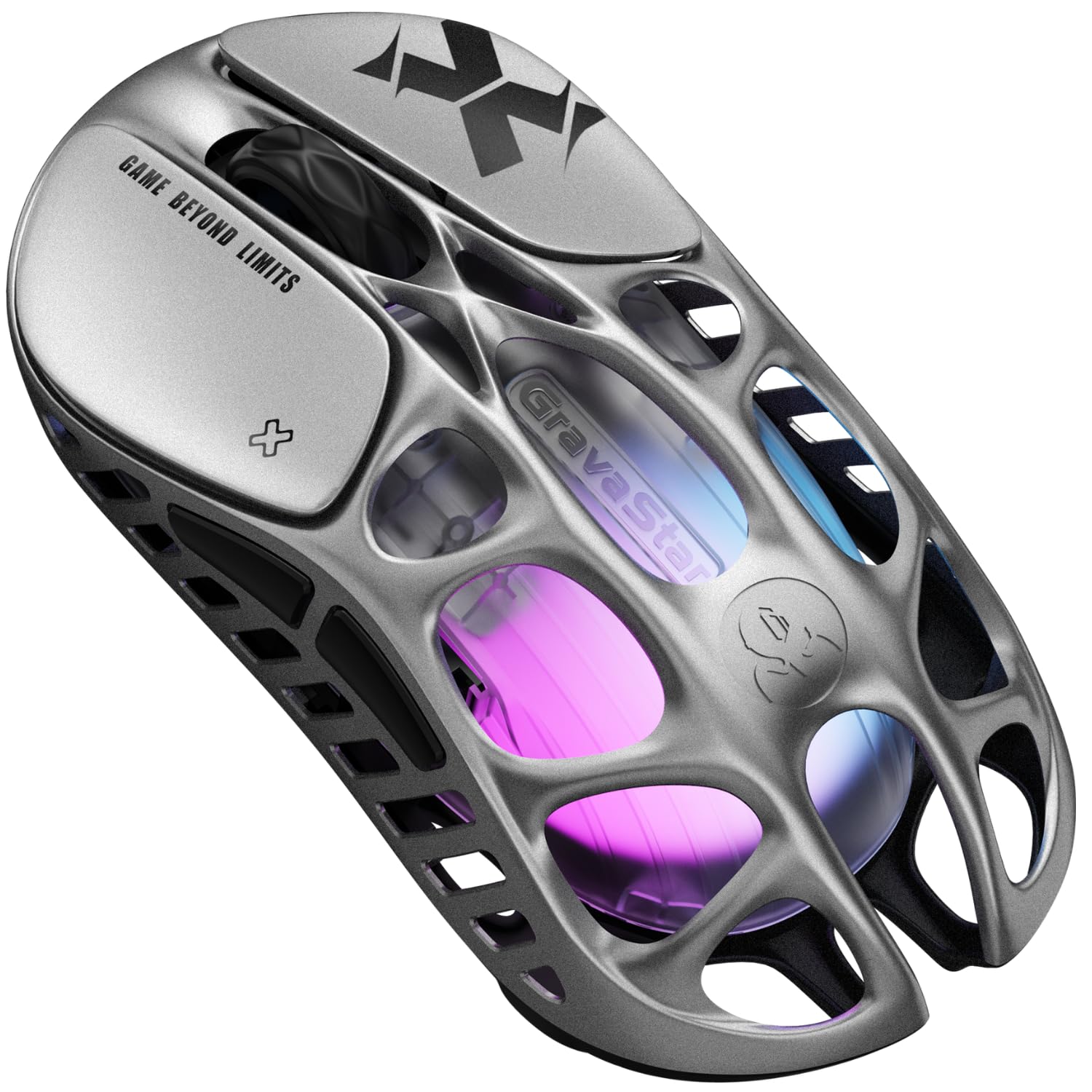
A magnesium skeleton at 49g that keeps your hand cool through marathon sessions.
The GravaStar Mercury X takes lightweight design to its logical extreme: a hollow magnesium alloy frame that weighs just 49g — the lightest mouse on this list. The hollowed-out structure is not just for weight savings; it boost airflow to reduce hand sweat and fatigue during long gaming sessions. The magnesium build also means durability, with owners noting it holds up to multiple drops without issue.
Under the hood sits the PAW3950 optical sensor, capable of up to 32,000 DPI with a 1000Hz polling rate — pixel-perfect accuracy for FPS, MOBA, and Battle Royale titles. It connects three ways via Bluetooth, ultra-low-latency 2.4GHz wireless, and USB-C wired, so it moves between PC, laptop, console, or mobile setups. The five programmable buttons are configured through a web-based software that needs no downloads, which owners appreciate for avoiding PC bloat.
What wins people over is the build quality and the weight — the combination of a premium-feeling alloy shell with featherlight handling is the standout. One owner’s review sums it up: “It’s so light and responsive that you forget it’s even there.” The battery life gets positive marks, and the RGB lighting is customizable. The honest caveat is connectivity: some owners note the wireless has input lag unless the receiver is close, and it performs best in wired mode. It holds a 4.4-star average across 186 ratings, making it a solid mid-range choice for players who want the lightest possible frame without going full flagship.
The lightest edge
- Only 49g with a durable magnesium frame
- Hollow design reduces hand sweat
- 32,000 DPI with PAW3950 sensor
- Web-based config, no software install
Be aware
- Wireless needs receiver close to avoid lag
- Right-handed design only
Pick this if: you want the absolute lightest mouse possible with a premium alloy feel and don’t need the extreme 8000Hz polling of the Pro version.
Consider the caveat: plan to keep the 2.4GHz receiver close or use the USB-C wired mode, since wireless performance dips when the receiver is far.
7. GravaStar Mercury X Pro Wireless Gaming Mouse

The featherweight frame, upgraded to tournament-grade 8000Hz reporting with the included dongle.
The Mercury X Pro takes everything the standard Mercury X does well and pushes the polling rate to the top tier. It ships with a dedicated 8K dongle that delivers a true 8000Hz polling rate — reporting 8 times per millisecond for instant, lag-free input. The PAW3950 sensor still offers up to 32,000 DPI, and the 49g magnesium alloy hollow frame keeps it ultra-light and durable. Owners playing Apex, COD, and Fortnite call the precision and responsiveness a real competitive edge.
The design is a big part of the appeal — the alien-like hollow skeleton boost airflow and fits small to medium hands particularly well, with one owner noting it fits their smaller grip perfectly with the palm rest. The five programmable buttons and RGB lighting are configured via easy-to-navigate software, and the tri-mode connectivity (Bluetooth, 2.4G wireless, or wired) covers every setup. Battery life is strong — one owner reports 3+ days of heavy 8-hour daily play with the lights on.
What stands out across owner feedback is the performance, with players finding it hyper-reactive and well-built for the price. The scroll wheel gets a softer, squishier feel note that some may not love, and the premium price reflects the extra coolness and speed. Battery life experiences are mixed, with some owners finding it great and others finding it worse than expected. Across 523 ratings it holds a 4.5-star average, with the performance being the single most-praised aspect.
The speed tier
- True 8000Hz polling with included 8K dongle
- 49g magnesium alloy, ultra-durable
- 32,000 DPI PAW3950 sensor
- Tri-mode: Bluetooth, 2.4G, wired
It is not perfect
- Scroll wheel feels soft and squishy
- Battery life experiences are mixed
- Premium price for the extra speed
Go with this if: you want the full 8000Hz tournament speed in a 49g frame that handles marathon sessions without fatigue, and you like a unique, head-turning design.
Weigh the cost: you pay a clear premium for the 8K dongle and the cool factor — the standard Mercury X gives you the same weight and sensor at a gentler price if 8000Hz is not essential.
8. Razer DeathAdder V4 Pro Wireless Gaming Mouse

The legendary ergonomic shape, rebuilt to 56g with a 45K sensor and 8K speed.
The Razer DeathAdder V4 Pro is the flagship pick for players who love the DeathAdder shape and want the latest speed tech. It weighs just 56g with a re-engineered ergonomic design that owners say fits larger hands beautifully, enabling faster swipes and precise tracking. Razer HyperSpeed Wireless Gen-2 delivers lower latency with up to 8000Hz polling, so competitive input in high-stakes matches feels instant — and you can switch to USB-C wired while maintaining that 8000Hz.
The Focus Pro 45K Optical Sensor Gen-2 pushes tracking to 45K DPI with 900 IPS and 99.8% accuracy, ensuring reliable tracking across surfaces for shooters and MOBAs (multiplayer online battle arenas). The optical scroll wheel and Gen-4 optical switches give tactile feedback rated for up to 100 million clicks. Battery life is a strong point: up to 150 hours at 1000Hz lets you game through marathon sessions, and owners note it barely needs charging — one reported 3-5 hours of daily gaming for 2 weeks at 1000Hz before topping up.
Quality is the most praised aspect here, with owners consistently calling it a high-quality, comfortable, responsive pick — one long-time player called it “my current favorite mouse” after 20-plus years of gaming. The Synapse software lets you fine-tune DPI, lift-off distance, and polling rate, with features like Dynamic Sensitivity and Smart Tracking. The honest trade-offs: it is a premium price, it is too large for small hands, and the clicks are loud. It holds a 4.4-star average across 467 ratings, and the clicking sound is the one recurring negative note.
The flagship case
- 56g with iconic ergonomic shape
- 45K DPI sensor with 99.8% accuracy
- Up to 150-hour battery at 1000Hz
- 8000Hz wireless via HyperSpeed Gen-2
The premium reality
- Too large for smaller hands
- Clicks have a loud, audible tone
- Premium price tag
Buy this if: you have medium-to-large hands and want the benchmark ergonomic shape combined with flagship sensor and wireless speed — the quality is the defining reason.
Pass it over if: you have smaller hands or you game in a shared space where loud, tactile clicks would be a problem.
Understanding the Specs
Polling Rate Explained
This is how many times per second the mouse tells your PC where it is. A 1000Hz rate means a report every 1 millisecond, which feels instant to almost everyone. The 8000Hz mice here report 8 times per millisecond — a spec that only truly matters if you have a high refresh-rate monitor. For most players, 1000Hz is already perfectly smooth; the higher rate is a bonus.
Weight and DPI in Real Terms
A lighter mouse (49g to 66g) is easier to flick and stop precisely, which is why competitive models are obsessed with grams. DPI is how far the cursor moves per inch of mouse movement — a 32,000 DPI sensor lets you use a tiny physical movement for a huge screen sweep, useful on high-resolution monitors. Pair a comfortable weight with a DPI you can adjust on the fly, and you have a mouse that disappears in your hand.
FAQ
Is a 1000Hz polling rate good enough for competitive gaming?
What is the difference between 1000Hz and 8000Hz polling?
Does a lighter mouse actually improve my aim?
Which connection mode should I use for the lowest latency?
How long should a wireless gaming mouse battery last?
Will these mice work with a Mac or laptop?
What is the sniper button on the MOJO Pro for?
Is a wireless gaming mouse as reliable as a wired one?
Final Thoughts: The Verdict
For most players, the 1000hz mouse winner is the DAREU A950 because it delivers a 1ms response, a 120-hour battery, and a convenient magnetic charging dock at a price that punches well above its weight — it even leads the whole list on owner satisfaction with a 4.6-star average across a large review base. If you want extreme battery endurance so you barely ever charge, the Rapoo VT7 is the one to reach for, stretching to 750 hours at 1000Hz. And if your priority is the latest wireless speed, the Razer DeathAdder V4 Pro delivers flagship ergonomics with 8000Hz polling and a 150-hour battery for those who want the best of everything.
How We Picked
We do not accept paid placement. Every pick is matched to a real buyer and a real use-case; we do not hands-on test units.
Sources & Methodology
Specifications: manufacturer listings and product documentation. Review insights: verified customer reviews, as of July 2026. Pricing: not shown on this page (it changes often); check the current price via the retailer link.
As an Amazon Associate, Gadgets Feed earns from qualifying purchases. This does not affect which products we feature.