
Our readers keep the lights on and my morning glass full of iced black tea. As an Amazon Associate, I earn from qualifying purchases.
Specs are compiled from manufacturer listings and verified buyer reviews and can change over time — please confirm the key details on the product page before buying.
That flickering Wi-Fi signal on your desktop or old laptop can mean video calls that freeze and downloads that crawl. You do not have to open the computer — a tiny USB adapter that uses the 802.11ac (Wi-Fi 5, the fifth-generation standard) plug is often all you need to fix it.
I’m Min — the founder and writer behind Gadgets Feed. This guide is built by comparing the manufacturers’ published specifications and the patterns across verified customer reviews, so you get each pick’s real strengths and trade-offs instead of marketing spin.
This roundup of four best 11ac wifi adapter models covers a nano dongle that stays hidden and a high-speed stick for streaming and gaming. You can upgrade your connection in minutes.
Quick Picks
- NETGEAR AC1200 Wi-Fi USB 2.0 Mini Adapter (A6150) — Top Performer
- Edimax EW-7822ULC AC1200 Nano Adapter — Invisible Power
- Panda Wireless PAU0A AC600 Dual Band Adapter — Linux Champion
- StarTech.com USB433ACD1X1 AC600 Nano Adapter — Budget Lifeline
How To Choose The Best 11Ac WiFi Adapter
Picking the right dongle for your desktop or laptop depends on matching a few key specs to your situation. Here is what to think through before you click add to cart.
Speed Tier: AC600 vs AC1200
The first number you will see is the combined theoretical speed (the maximum possible data rate on paper). AC600 tops out at 433 Mbps on the 5GHz band, while AC1200 reaches up to 867 Mbps on the 5GHz band plus 300 Mbps on the 2.4GHz band. For streaming HD video or joining video calls all day, the AC1200 step gives you more headroom. For occasional web browsing and email, the AC600 tier handles that load just fine.
The USB Interface Bottleneck
Nearly every adapter here uses USB 2.0, which has a real-world throughput ceiling (the practical data-moving limit) around 300-350 Mbps no matter what the box claims. That means an AC1200 adapter will still outperform an AC600 one in many situations, but you will never hit the full 867 Mbps through a USB 2.0 port. It is a common trade-off to keep the adapter small and compatible with older computers.
Operating System Compatibility
Some adapters are truly plug-and-play on Windows 10 and 11. Others, especially those targeting Linux users, rely on drivers (software that tells the OS how to talk to the hardware) baked into the kernel itself. macOS support gets trickier with newer releases like Catalina (version 10.15) and later. Always check the OS version list in the specs — a dongle that “works with Mac” might stop working after the next big update if the manufacturer stops providing drivers.
Size and Port Placement
A nano-sized adapter (about 0.7 inches long) can live in a USB port without blocking the neighboring port or sticking out far enough to get snapped off by accident. A larger “stick” style often has a slightly better antenna inside but may crowd other cables. Think about whether your USB ports are on the front, back, or side of your computer case.
Extra Features: Beamforming and MU-MIMO
Beamforming (found on the NETGEAR AC1200) focuses the Wi-Fi signal toward your router rather than broadcasting in all directions, which can boost range. MU-MIMO (Multi-User, Multiple Input, Multiple Output) lets the adapter talk to multiple devices at once instead of waiting in line, but both features require a router that also supports them to work fully. You still get a speed benefit from just having a newer adapter even with an older router.
Quick Comparison
On smaller screens, swipe sideways to see the full table.
| Model | Best For | Speed Rating | Weight | Dimensions (LxWxH) | Amazon |
|---|---|---|---|---|---|
| NETGEAR AC1200 (A6150) | High-speed streaming & gaming | 1200 Mbps | 0.2 Pounds | 4″ x 2″ x 8″ | $29.99$54.99Amazon |
| Edimax EW-7822ULC | Ultra-compact plug-and-forget | 867 Mbps (5GHz) / 300 Mbps (2.4GHz) | 0.01 Pounds | 0.8″ x 0.6″ x 0.25″ | $24.99Amazon |
| Panda Wireless PAU0A | Linux and multi-OS users | 433 Mbps | 0.05 Kilograms | 5.6″ x 4″ x 0.75″ | $29.99Amazon |
| StarTech.com USB433ACD1X1 | Budget-friendly basic upgrade | 433 Mbps (5GHz) / 150 Mbps (2.4GHz) | — | 0.7″ x 0.9″ x 0.3″ | $21.00$26.99Amazon |
In‑Depth Reviews
1. NETGEAR AC1200 Wi-Fi USB 2.0 Mini Adapter (A6150)
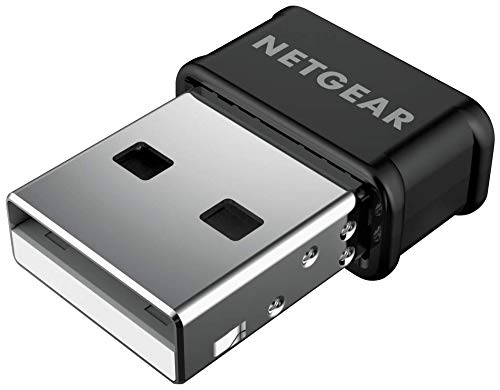
The speedy upgrade that rescued a laptop from 30 Mbps despair.
You need real bandwidth for HD streaming or online gaming — the NETGEAR AC1200 (A6150) delivers up to 1200 Megabits Per Second (Mbps) on paper. That theoretical data rate is 1200 Mbps on paper, versus the StarTech.com AC600 adapter at 433 Mbps on the 5GHz band and 150 Mbps on the 2.4GHz band. Unlike the Edimax nano, which weighs 0.01 Pounds (about 4.5 grams), this NETGEAR weighs 0.2 Pounds (about 90 grams). The extra heft comes from its Beamforming+ feature — a technology that focuses the signal toward your router for better range (aiming the antenna pattern so number plates stay readable at night, so to speak).
A verified buyer reported: “Netgear USB wifi adapter increased speed from 30 to 197 mbps on HP laptop with limited bgn 1×1 card.” That same user noted that after switching DNS (the phonebook of the internet) to Google’s server (8.8.8.8 and 8.8.4.4), the speed jumped to 390 Mbps. It works with Windows 7, 8, and 10 and macOS up through 10.15.7 (Catalina).
Setup requires manually downloading the driver from NETGEAR’s site — the included “Genie” software sometimes fails. The adapter is certified for WPA2 and WPA3 encryption (your connection stays secure). It supports MU-MIMO technology (Multi-User, Multiple Input, Multiple Output — handling multiple devices at once) and plugs into any USB 2.0 port without blocking the adjacent slot thanks to its nano design.
Why It Leads
- 1200 Mbps top speed delivers smooth 4K streaming and gaming.
- Beamforming+ improves range compared to a standard adapter.
- MU-MIMO handles multiple devices without lag.
- Proven real-world jump from 30 Mbps to nearly 390 Mbps.
One Annoyance
- Driver must be downloaded separately — not fully plug-and-play.
- USB 2.0 interface caps real-world speed below the marketed maximum.
Grab it for: anyone whose slow internal card is choking their internet plan, especially if you stream or game on a desktop.
Think twice if: you want a zero-setup dongle that works the second you plug it in without any driver download.
2. Edimax EW-7822ULC AC1200 Nano Adapter

The world’s smallest AC1200 adapter that you plug in and never think about again.
If disappearing into the USB port is your priority, the Edimax EW-7822ULC is your match. It weighs just 0.01 Pounds (4.5 grams), while the NETGEAR AC1200 weighs 0.2 Pounds — you might forget the Edimax is there. Despite that tiny footprint, it packs AC1200 dual-band speed: up to 867 Mbps on the 5GHz band and up to 300 Mbps on the 2.4GHz band. It also uses MU-MIMO technology to handle multiple data streams at once.
Buyers report this adapter is fast and reliable. One verified user noted, “over 200 Mbps speed sufficient,” while another confirmed it “worked with Ubuntu no problem.” The adapter supports Windows 7, 8, 8.1, 10, and 11 with plug-and-play ease, plus macOS 10.9 through 10.15 and Linux distributions like Ubuntu and Fedora. It features a software WPS button (Wi-Fi Protected Setup — a one-click secure connection method) for easy wireless connection.
The catch is the USB 2.0 connection. One detailed review points out that USB 2.0’s real-world limit is around 175 Mbps, so your actual throughput (the data you actually send and receive) will stay below the theoretical 867 Mbps. A few owners mention that the adapter can stop working when it gets too warm, requiring a quick unplug and replug to fix it. Windows 7 users may also need to disable the built-in Wi-Fi to avoid conflicts, and macOS Catalina users should note compatibility ends at 10.15.
Why It Shines
- World’s smallest AC1200 design — fits flush and stays out of the way.
- Beamforming technology improves signal focus toward the router.
- Great Linux support from the start.
The Heat Issue
- USB 2.0 cap keeps real speed under 200 Mbps.
- Occasional heat-related disconnects require a reset.
- Needs built-in Wi-Fi disabled on some laptops for stable operation.
Reach for this if: you want the smallest possible adapter for a laptop you travel with, and 175 Mbps is plenty for your daily browsing and email.
Look elsewhere if: you need to push past 200 Mbps or want a dongle that never stutters during a hot afternoon work session.
3. Panda Wireless PAU0A AC600 Dual Band Adapter

The go-to dongle for Ubuntu, Kali, and Qubes users who hate wrestling with drivers.
The Panda Wireless PAU0A runs on an enormous list of Linux distributions — Ubuntu, Mint, Fedora, Debian, Arch Linux, Kali Linux, and even Tails and Raspbian — and the driver is built into the latest kernel (the core of the operating system). Owners mention it “works with Ubuntu 22.04 and Qubes 4.3; driver built into latest kernel; very small footprint.” For Windows users, it handles 7, 8, 10, and 11 on supported Intel/AMD-based PCs. There is no Mac support — this adapter skips macOS entirely.
Speed sits at the AC600 tier: a maximum wireless connection speed of 433 Mbps on the 5GHz band. The NETGEAR AC1200 is rated at 1200 Mbps on paper, but for most web browsing and standard-definition streaming this is enough. The adapter’s physical dimensions are 5.6 inches long by 4 inches wide by 0.75 inches tall — it comes as a larger puck-style device rather than a nano stick. One reviewer noted that the “very small footprint” of the adapter itself is a plus, but the packaging accounts for the larger box size.
A word about compatibility: this adapter works with Intel/AMD-based PCs and Raspberry Pi 0 through 5 (a small single-board computer), but it does not work with digital media players, DVRs, NAS devices, Playstations, or security cameras. It also does not support any guest OS inside a virtual machine without contacting Panda tech support first. A few Linux users noted signal range is limited compared to a larger antenna-based adapter.
Linux Superpower
- Driver built into the latest Linux kernel — truly plug-and-play on supported distros.
- Works with Raspberry Pi 0/1/2/3/4/5 easily.
- Supports both infrastructure (standard router) and ad-hoc (direct device-to-device) network modes.
The Catch
- No Mac support at all.
- AC600 tier is slower than the AC1200 competition.
- Larger puck shape may block adjacent USB ports on a laptop.
- Not compatible with game consoles or media players.
Made for: Linux desktop users and Raspberry Pi tinkerers who want an adapter recognized by the kernel with zero extra effort.
skip it if: you own a Mac or need AC1200-level speed for heavy streaming and gaming.
4. StarTech.com USB433ACD1X1 AC600 Nano Adapter

A tiny, budget-friendly stick that brings Wi-Fi 5 to grandma’s old desktop.
The StarTech.com USB433ACD1X1 is the entry-level option for anyone who just needs internet access without bells and whistles. Its AC600 chip delivers up to 433 Mbps on the 5GHz band and 150 Mbps on the 2.4GHz band — enough for web browsing, email, and standard-definition video. It is also the most compact adapter here at just 0.7 inches long, 0.9 inches wide, and 0.3 inches high, so it disappears into a USB port completely.
One thing to know: “Windows 7 cannot see this with the drivers loaded,” as one buyer mentioned. Switching to Windows 10 resolved the issue immediately. Other users confirm it works “great from the start” on Windows 10 and is “very handy/reliable for a wifi network connection.” The adapter is also compatible with macOS and supports WEP, WPA, and WPA2 wireless security standards. It is IEEE 802.11a/b/g/n/ac compliant, meaning it works with any Wi-Fi 5 router.
The main trade-off here is speed. It is rated for 433 Mbps on the 5GHz band and 150 Mbps on the 2.4GHz band, while the NETGEAR AC1200 is rated at 1200 Mbps on paper. The included driver CD is a throwback — you will likely need to download drivers online instead. A few users also had to disable USB power saving in Windows Device Manager to fix occasional disconnects. If your internet plan is over 200 Mbps, this budget dongle will become the bottleneck in your network.
Where It Wins
- Nano form factor — smallest dimensions in this list at 0.7 x 0.9 x 0.3 inches.
- Truly plug-and-play on Windows 10 and newer.
- Effective upgrade for a very old computer with no built-in Wi-Fi.
The Trade-Off
- 433 Mbps maximum speed is the lowest of all four picks.
- Windows 7 users may find it unusable with the provided drivers.
- Disable USB power saving or you might get random disconnects.
Best pick for: the one-off upgrade for a relative’s old PC that has zero Wi-Fi capability and only needs basic internet.
Not for: anyone on a 200+ Mbps plan or who still runs Windows 7 as their daily system.
Understanding the Specs
AC600 vs AC1200 Speed Rating
This is the combined theoretical maximum speed (the data rate on paper) of the adapter across both frequency bands. AC600 means roughly 433 Mbps on 5GHz plus 150 Mbps on 2.4GHz. AC1200 means roughly 867 Mbps on 5GHz plus 300 Mbps on 2.4GHz. Higher is better for streaming and gaming, but your USB port and router also affect the real speed you will see.
USB 2.0 Interface
All the adapters in this roundup connect through USB 2.0, which has a practical throughput limit (the data you can actually move) of around 300-350 Mbps. That means even an AC1200-rated stick cannot deliver its full theoretical speed through a USB 2.0 port. For most internet plans under 300 Mbps this does not matter, but it is worth knowing if you are paying for gigabit service.
Beamforming and MU-MIMO
Beamforming shapes the Wi-Fi signal toward your router instead of spraying it everywhere, which can improve range. MU-MIMO (Multi-User, Multiple Input, Multiple Output) lets the adapter communicate with multiple devices at the same time. Both features require a modern router that also supports them to work their best, but they still help even with an older router.
Dual Band Support
Every adapter here works on both the 2.4GHz band (better range, more interference from neighbors like a crowded radio channel) and the 5GHz band (faster speeds, shorter range). Using the 5GHz band is best when you are near your router, while 2.4GHz is useful for rooms farther away.
FAQ
Will an 11ac WiFi adapter work with my older router?
Can I use an 11ac adapter on a desktop PC without built-in Wi-Fi?
Why does my adapter sometimes disconnect after a few hours?
Does the Edimax EW-7822ULC work with macOS Catalina?
Is it worth paying for an AC1200 adapter over an AC600 one?
Can I use the Panda Wireless adapter with a virtual machine?
Does the NETGEAR A6150 work on a Raspberry Pi?
What is the difference between a “nano” adapter and a “puck” adapter?
Will these adapters work on Windows 11?
How do I know if my USB port is 2.0 or 3.0?
Final Thoughts: The Verdict
Across the board, the best 11ac wifi adapter winner is the NETGEAR AC1200 (A6150) because it delivers the highest real-world speed boost — verified by a buyer who jumped from 30 Mbps to 197 Mbps — and includes beamforming technology for better range. If you want something that disappears into the port and never gets in your way, grab the Edimax EW-7822ULC. And for Linux users who need a plug-and-play adapter that works with the kernel’s built-in drivers, the Panda Wireless PAU0A is the clear choice.
How We Picked
We do not accept paid placement, and we did not hands-on test every unit. Instead, we match each pick to a real buyer and use-case by comparing the manufacturers’ published specifications against the patterns in verified customer reviews — so you get each pick’s real strengths and trade-offs instead of marketing copy.
Sources & Methodology
Specifications: manufacturer listings and product documentation. Review insights: verified customer reviews, as of July 2026. Pricing: not shown on this page (it changes often); check the current price via the retailer link.
As an Amazon Associate, Gadgets Feed earns from qualifying purchases. This does not affect which products we feature.
Product prices and availability are accurate as of the date/time indicated and are subject to change. Any price and availability information displayed on Amazon at the time of purchase will apply to the purchase of this product. As an Amazon Associate I earn from qualifying purchases.
CERTAIN CONTENT THAT APPEARS ON THIS SITE COMES FROM AMAZON. THIS CONTENT IS PROVIDED "AS IS" AND IS SUBJECT TO CHANGE OR REMOVAL AT ANY TIME.
Amazon and the Amazon logo are trademarks of Amazon.com, Inc. or its affiliates.