
Finding a laptop that balances smooth multitasking, responsive app loading, and long-term usability without forcing you into a premium price bracket is the real challenge. The sweet spot for most users—students, remote workers, and business professionals—is a machine with enough memory to handle dozens of browser tabs, office suites, and light creative tools simultaneously.
I’m Min — the co-founder and writer behind Gadgets Feed. I spent hundreds of hours cross-referencing processor benchmarks, memory bandwidth tests, storage read/write speeds, and real-world user feedback to separate the genuinely capable machines from the overpriced underperformers.
Every model in this guide was selected because it delivers the specific performance jump that defines a true 12 gb ram laptop — the critical shift from adequate to genuinely fluid multitasking.
How To Choose The Best 12 GB RAM Laptop
Not all 12GB RAM configurations perform equally. The memory type (DDR4 vs DDR5), the processor generation, the storage interface, and even the thermal design all influence whether that 12GB translates to actual fluidity or just looks good on a spec sheet. Here is what you need to evaluate.
Processor Generation and Cores
Your laptop’s brain determines how efficiently it uses the available memory. A 12GB machine with a recent-gen Intel Core i5 or AMD Ryzen 7 processor will outpace an older i7 with the same RAM because of better memory controllers and higher IPC throughput. Look for CPUs with at least 8 cores and a boost clock above 4.5 GHz for sustained performance under load.
Storage Speed Matters More Than You Think
When 12GB fills up, the system relies on the SSD for virtual memory swap. A Gen4 NVMe SSD with read speeds above 5000 MB/s prevents lag spikes when you switch between heavy applications. Avoid any machine still using a SATA SSD or eMMC storage—those will bottleneck even the best processor.
Display Quality for Extended Sessions
If you are spending hours staring at a screen, resolution and brightness directly affect eye fatigue. A 1080p IPS panel with 250 nits minimum is the baseline. For creative work, target 2.5K resolution and 100% sRGB coverage. A 16:10 aspect ratio gives extra vertical workspace for documents and code without adding bulk.
Port Selection and Upgradeability
A modern laptop should offer at least one USB-C port with Power Delivery, an HDMI output, and a headphone jack. If the RAM is soldered (common in thin-and-light designs), you cannot upgrade later. For future flexibility, choose models with accessible SO-DIMM slots, though 12GB is usually sufficient for the machine’s lifetime.
Quick Comparison
On smaller screens, swipe sideways to see the full table.
| Model | Category | Best For | Key Spec | Amazon |
|---|---|---|---|---|
| Apple MacBook Air 15 M4 | Premium Ultraportable | Creative workflows, long battery life | M4 chip, 16GB Unified Memory, 18h battery | Amazon |
| GEEKOM GeekBook X16 Pro | Premium Thin-and-Light | Photographers, mobile power users | Ultra 9 185H, 32GB LPDDR5x, 2.8 lbs | Amazon |
| Microsoft Surface Laptop 2024 | Copilot+ PC | Travel, productivity in ARM ecosystem | Snapdragon X Elite, 20h battery | Amazon |
| Dell 14 Plus DB14250 | Premium AI Laptop | Creators, AI-assisted productivity | Ultra 7-258V, 32GB LPDDR5X, 2.5K display | Amazon |
| Lenovo Legion 5i 16 | Gaming Beast | AAA gaming, content creation | RTX 5060, 64GB RAM, 240Hz display | Amazon |
| LG gram Pro 17 | Ultra-Light Flagship | Portability + discrete GPU power | Intel Ultra 9 285H, RTX 5050, 3.3 lbs | Amazon |
| Dell 15 DC15250 | Mainstream Performer | Everyday computing, home office | Core i7-1355U, 16GB DDR5, 120Hz display | Amazon |
| HP 255 G10 | Business Workhorse | Spreadsheets, remote work, security | Ryzen 7 7730U, 32GB RAM, Win 11 Pro | Amazon |
| NIMO N15A | Light Gaming Hybrid | Budget gaming, STEM students | Ryzen 7 6850U, Radeon 680M, 9h battery | Amazon |
| Lenovo V15 Gen 4 | Budget Business | Office work, remote meetings | Core i5-13420H, 16GB RAM, RJ45 | Amazon |
| ASUS Vivobook 14 | Budget All-Rounder | Students, everyday productivity | Core 5 120U, 12GB RAM, 1TB SSD | Amazon |
In‑Depth Reviews
1. Apple MacBook Air 15-inch M4

The M4 chip in this MacBook Air delivers single-core and multi-core performance that outpaces most Windows laptops in this price tier, with a 16-core Neural Engine purpose-built for Apple Intelligence tasks like live audio transcription and image generation. Unified memory architecture means the 16GB of RAM operates at blistering bandwidth, so switching between Final Cut Pro, 100 Chrome tabs, and Slack introduces zero perceptible latency. The fanless design also means silent operation under sustained loads, a rarity for any performance laptop.
The 15.3-inch Liquid Retina display supports 1 billion colors at 500 nits peak brightness, making HDR content look punchy and text razor-sharp for long coding or writing sessions. The six-speaker array with Spatial Audio and Dolby Atmos creates an immersive soundstage that actually fills a room, which is unusual for a sub-3.5-pound chassis. Thunderbolt 4 ports provide 40Gbps transfer speeds and external display support for up to two 6K monitors.
Battery life is the real headline here—expect a full work day plus an evening of streaming without reaching for the MagSafe charger. The 12MP Center Stage camera keeps you framed during video calls, and Touch ID provides instantaneous, secure login. The aluminum unibody construction feels dense and premium, with zero flex in the keyboard deck.
Why it’s great
- M4 chip delivers desktop-class performance in a fanless design
- 18-hour battery life obliterates the competition
- Brilliant 15.3-inch Liquid Retina display with 500 nits brightness
Good to know
- macOS may require adaptation if you are coming from Windows
- No touchscreen and limited port selection (only 2x Thunderbolt 4)
- Premium pricing compared to mid-range Windows alternatives
2. GEEKOM GeekBook X16 Pro

The GeekBook X16 Pro packs Intel’s Meteor Lake Core Ultra 9 185H processor with 16 cores and 22 threads, a dedicated NPU for on-device AI acceleration, and Intel Arc graphics with hardware ray tracing and XeSS upscaling. The 32GB of LPDDR5x RAM running at 7500MHz provides memory bandwidth that rivals desktop-grade systems, while the 2TB PCIe Gen4 NVMe SSD delivers sequential read speeds above 6500 MB/s for instant application launches.
The 16-inch IPS display with a 2560×1600 resolution and 16:10 aspect ratio gives you an extra 10% vertical workspace compared to standard 16:9 panels—critical for editing timelines in Premiere Pro or reviewing long spreadsheets. The 120Hz refresh rate makes scrolling through dense web pages and documents feel silky smooth, while 100% sRGB coverage ensures accurate color reproduction for photo editing. At just 2.8 pounds with an aerospace-grade magnesium alloy chassis, it is lighter than many 13-inch ultrabooks while offering a significantly larger screen.
The IceBlade 2.0 cooling system with dual fans and two copper heat pipes maintains steady clock speeds under prolonged CPU loads without aggressive fan noise. Connectivity is comprehensive: a 40Gbps USB4 port with Power Delivery and DisplayPort 2.1, HDMI 2.1, two USB 3.2 Type-A ports, a microSD card slot, and Wi-Fi 6E with Bluetooth 5.4. The 77Wh battery delivers up to 17 hours of video playback, and the compact 65W GaN charger reaches 80% in about an hour.
Why it’s great
- Ultra 9 185H with NPU for AI tasks and Intel Arc graphics
- 2.8-pound chassis with a 16-inch 2.5K 120Hz display
- 32GB LPDDR5x 7500MHz RAM and 2TB Gen4 SSD
Good to know
- RAM is soldered and non-upgradeable
- Touchpad only clicks at the corners
- Fans can become audible under sustained CPU stress
3. Microsoft Surface Laptop 2024

The Surface Laptop represents Microsoft’s boldest ARM shift yet, powered by the Snapdragon X Elite processor with 12 high-performance Oryon cores and a 45 TOPS NPU that qualifies it as a Copilot+ PC. The 16GB of LPDDR5x RAM is tightly integrated with the SoC to minimize latency, delivering instant app launch times under 2 seconds for native ARM64 applications. The claimed 20-hour battery life holds up remarkably well in real-world mixed usage—expect 10-12 hours of actual work with the display at 60% brightness.
The 13.8-inch PixelSense touchscreen display runs at a 2304×1536 resolution with a 3:2 aspect ratio that provides significantly more vertical real estate than a 16:9 panel of the same width. The 120Hz adaptive refresh rate makes scrolling and inking feel fluid, while the 600-nit peak brightness ensures excellent readability in direct sunlight. The haptic touchpad is genuinely best-in-class on Windows, providing precise tactile feedback without any mechanical travel.
The all-day battery life and instant-on Windows Hello via IR camera make this the definitive travel companion for professionals. The magnesium-aluminum unibody construction feels exceptionally rigid while keeping weight under 2.9 pounds. Port selection includes two USB-C with USB4 support, a USB-A port, a Surface Connect port, and a 3.5mm headphone jack—surprisingly generous for a machine this thin.
Why it’s great
- 20-hour battery life with Snapdragon X Elite efficiency
- 120Hz 3:2 touchscreen with 600 nits brightness
- Premium haptic touchpad and instant-on Windows Hello
Good to know
- ARM architecture limits compatibility with some x86 software and games
- 256GB base storage fills up quickly
- No Bluetooth listed in official specs
4. Dell 14 Plus DB14250

Dell’s 14 Plus is purpose-built for AI-enhanced productivity, featuring Intel’s Core Ultra 7-258V processor with a dedicated NPU capable of running local AI models like Stable Diffusion and real-time language translation. The 32GB of LPDDR5X RAM at 6400MHz provides ample headroom for running multiple containerized development environments or heavy data analysis. Intel Arc Graphics with 8 Xe cores supports AV1 encoding and hardware-accelerated ray tracing for moderate creative workloads.
The 14-inch IPS display is the standout feature—2560×1600 native resolution in a 16:10 aspect ratio delivers a pixel density of 216 PPI, making text appear print-quality sharp. The 400-nit brightness and anti-glare coating allow comfortable use near bright windows, while the 100% sRGB coverage ensures consistent color for photo editing and design work. The Ice Blue aluminum chassis feels premium and rigid, with a military-grade MIL-STD-810H certification for durability.
Connectivity is forward-looking with Wi-Fi 6E, Bluetooth 5.4, dual Thunderbolt 4 ports, HDMI 2.1, a USB-A port, and a headphone jack. The 65W Type-C adapter provides fast charging, and the 54Wh battery holds up for about 8-10 hours of mixed productivity work. The backlit keyboard with a Copilot key offers comfortable key travel and a spacious layout, though the lack of a fingerprint reader feels like a minor miss for the price tier.
Why it’s great
- Sharp 2.5K 16:10 display with 100% sRGB and 400 nits
- Intel Ultra 7 with NPU for on-device AI acceleration
- Thunderbolt 4, Wi-Fi 6E, and military-grade build quality
Good to know
- No fingerprint reader for biometric login
- RAM is soldered and cannot be upgraded
- Some units reported keyboard reliability issues
5. Lenovo Legion 5i 16
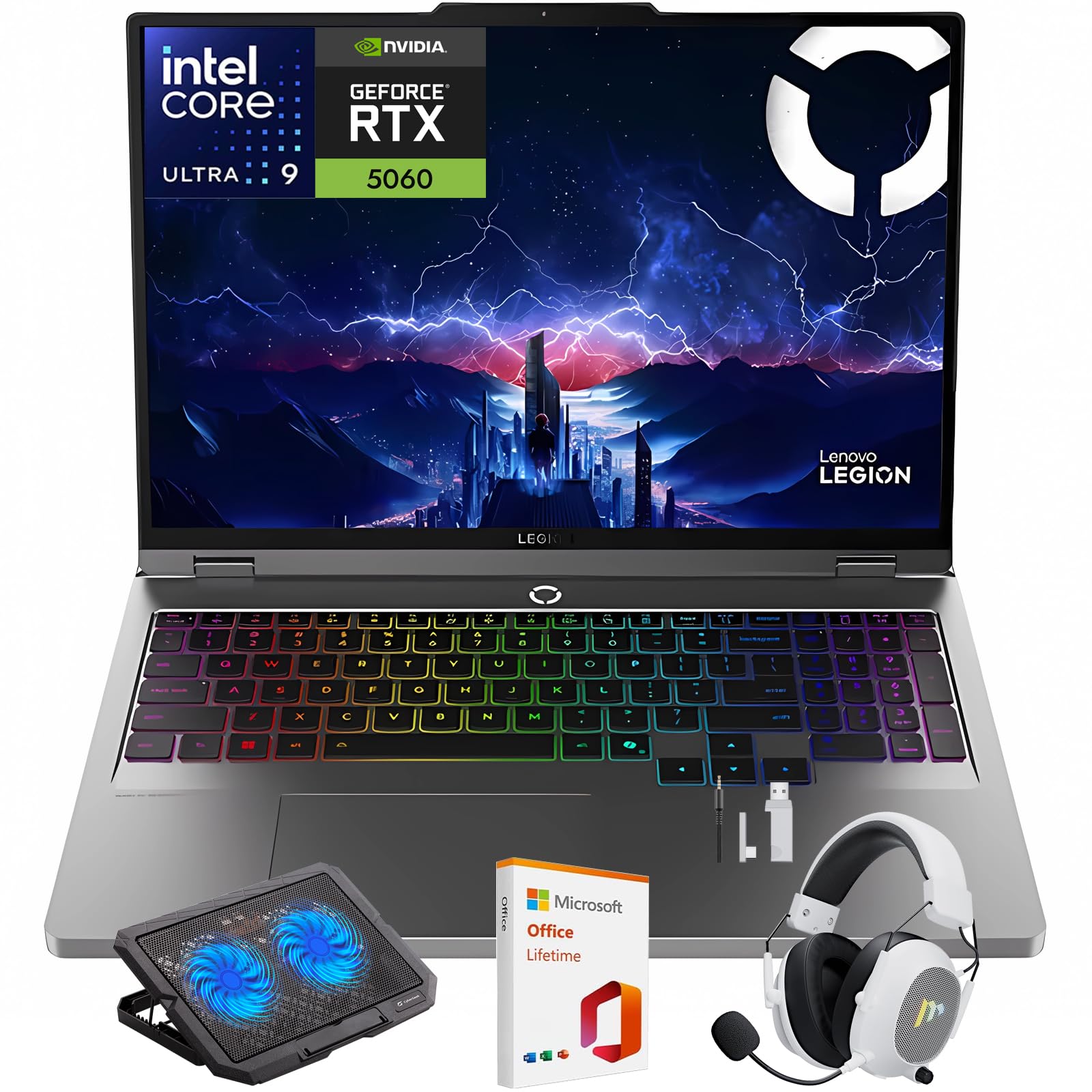
The Legion 5i is a desktop-replacement gaming laptop built around the Intel Core Ultra 9-275HX processor with 24 cores (8 performance + 16 efficiency) and a max turbo frequency of 5.4 GHz—capable of handling the most CPU-intensive strategy and simulation titles without bottlenecking. The NVIDIA GeForce RTX 5060 GPU with DLSS 4 and full ray tracing support delivers high-fidelity gaming at 2560×1600 native resolution, with frame rates exceeding 100 fps in esports titles at competitive settings.
The 16-inch WQXGA IPS display with a 240Hz refresh rate and 3ms response time offers a significant competitive edge in fast-paced shooters and racing games. The 500-nit brightness with 100% DCI-P3 color gamut and DisplayHDR 400 certification ensures that HDR content looks vibrant and contrast-rich. The Legion Coldfront Hyper cooling system uses dual 75mm fans, multi-heatpipe copper heat sinks, and quad exhaust vents to maintain sustained clock speeds while keeping fan noise below 30 dBA during light loads.
The 64GB of DDR5 RAM and 2TB PCIe Gen4 SSD eliminate any storage or memory bottlenecks, allowing you to keep your entire game library installed and ready to launch. The full per-key RGB backlit keyboard with 1.5mm travel offers satisfying tactile feedback for both gaming and typing. Wi-Fi 7 support ensures the fastest wireless throughput for cloud gaming and large downloads, and the bundle includes a wireless gaming headset and cooling pad to complete the setup.
Why it’s great
- RTX 5060 GPU and Core Ultra 9 deliver high-fidelity gaming
- 240Hz WQXGA display with 500 nits and 100% DCI-P3
- 64GB DDR5 RAM and 2TB Gen4 SSD with Wi-Fi 7
Good to know
- Battery life is under 1.5 hours under gaming load
- Heavy and bulky—not designed for frequent travel
- Bundled accessories may have separate warranty terms
6. LG gram Pro 17

The LG gram Pro 17 achieves something that sounds contradictory: a 17-inch laptop with a discrete NVIDIA RTX 5050 GPU that weighs just 3.3 pounds. The Intel Core Ultra 9 285H processor (Series 2) with 16 cores and a 5.4 GHz boost clock pairs with 32GB of DDR5 RAM to handle video rendering, 3D modeling, and data analysis workflows that would choke lesser systems. The RTX 5050 with 4GB GDDR6 VRAM supports DLSS 3.5 and ray tracing, enabling smooth 1080p gaming and hardware-accelerated creative apps.
The 17-inch WQXGA (2560×1600) IPS display offers a 144Hz variable refresh rate that adapts from 31Hz to 144Hz, saving power during static tasks while keeping games fluid. The 99% DCI-P3 color gamut and 400-nit brightness deliver professional-grade color accuracy for photo and video work. The chassis is MIL-STD-810G certified for resilience despite its featherweight construction, and the 90Wh battery provides up to 25 hours of video playback—enough for transcontinental flights.
LG gram AI integrates on-device and cloud-based intelligence for smart hard drive searches, document summarization, and system optimization. The port selection is generous for such a thin machine: two Thunderbolt 4 ports, HDMI 2.1, two USB-A ports, a microSD slot, and a headphone jack. The dual internal cooling fans with Smart AMP technology keep thermals in check while maintaining a slim 0.6-inch profile.
Why it’s great
- 3.3-pound chassis with a 17-inch display and discrete RTX 5050 GPU
- 25-hour video playback battery life with 90Wh capacity
- 144Hz WQXGA display with 99% DCI-P3 color accuracy
Good to know
- Very expensive—clear premium pricing for the weight-to-power ratio
- No Ethernet port; requires USB-C dongle for wired networking
- RAM is soldered and non-upgradeable
7. Dell 15 DC15250
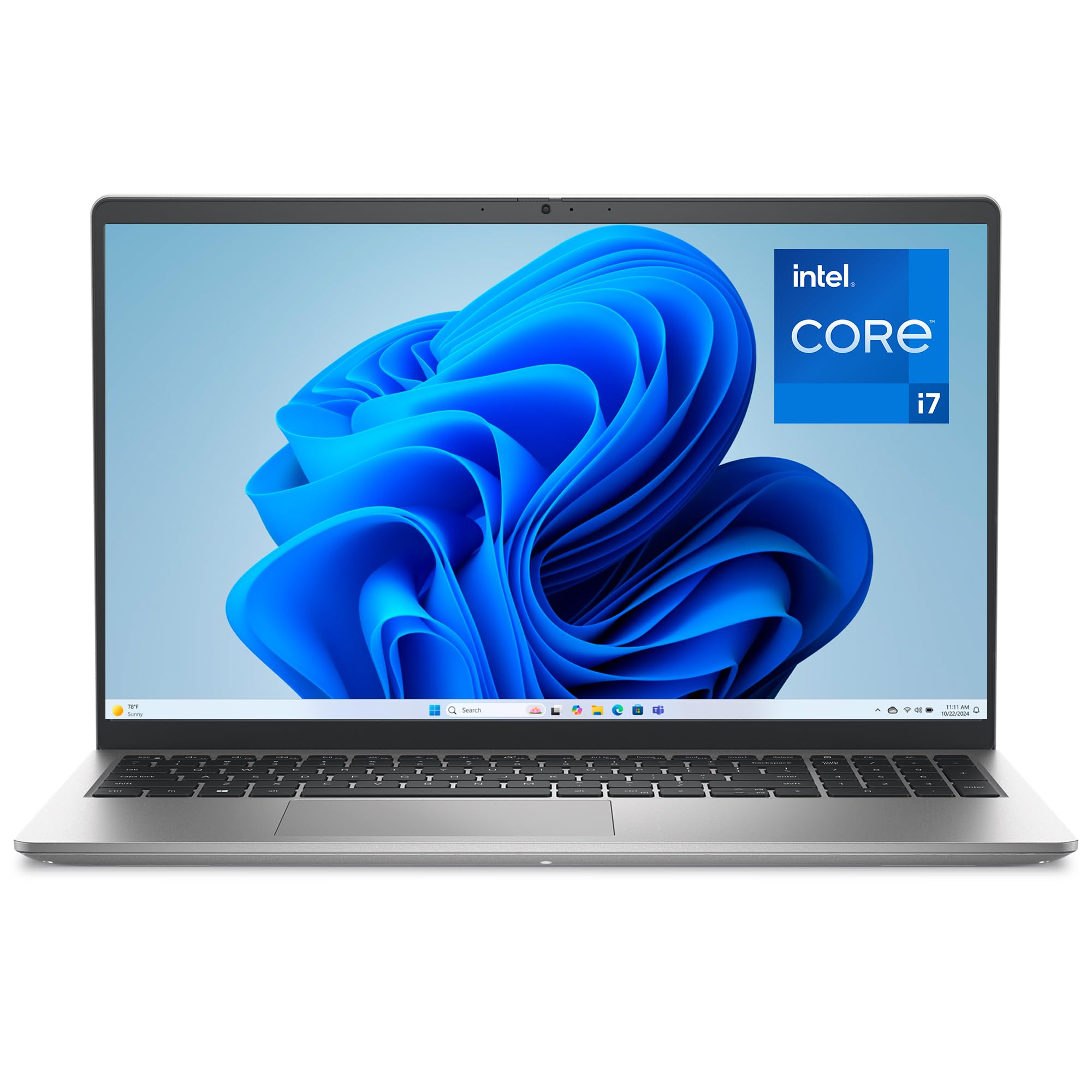
The Dell 15 delivers a surprisingly premium feature set at a mid-range price point, headlined by a 15.6-inch FHD display with a 120Hz refresh rate—uncommon in this segment and beneficial for smoother scrolling and reduced motion blur during everyday use. The Intel Core i7-1355U processor with 10 cores and a 5.0 GHz turbo clock provides enough horsepower for demanding office tasks and moderate multitasking, while the 16GB of DDR5 RAM ensures snappy performance with dozens of browser tabs and productivity apps open simultaneously.
Dell’s ComfortView software reduces harmful blue light emissions without washing out the display, making extended work sessions less taxing on the eyes. The lifted hinge design creates an ergonomic typing angle that reduces wrist strain during long document sessions. The separate numeric keypad and calculator hotkey are concrete productivity boosters for anyone working with spreadsheets or financial data.
Dell includes a 1-Year Basic Onsite Service warranty, meaning a technician will visit your home or office for hardware repairs covered under the limited warranty—significantly better than the standard mail-in-only support from most competitors at this price. The 512GB PCIe NVMe SSD provides fast boot times and ample storage for business files, and the 65W AC adapter supports Express Charge for rapid battery top-ups.
Why it’s great
- 120Hz FHD display for smooth daily scrolling
- 13th Gen Core i7 with 16GB DDR5 RAM
- 1-Year Onsite Service warranty included
Good to know
- No fingerprint reader for biometric login
- Battery type is not a standard lithium-ion specification
- Fan can be audible under sustained load
8. HP 255 G10

The HP 255 G10 is a purpose-built business laptop that prioritizes reliability and security over design frills. The AMD Ryzen 7 7730U processor with 8 Zen+ cores and 16 threads provides consistent performance for office suites, video conferencing, and data analysis, while the 32GB of DDR4 RAM ensures you can run multiple virtual machines or hundreds of browser tabs without hitting memory limits. Windows 11 Pro includes enterprise-grade features like BitLocker encryption, remote desktop, and group policy management.
The 15.6-inch FHD IPS display uses an anti-glare, micro-edge design with 250 nits brightness—not the brightest panel, but the matte finish eliminates reflections in bright office environments. The full numeric keypad is a must-have for accountants and data entry professionals, and the dedicated number row speeds up numeric input. The Wi-Fi 6 and Bluetooth 5.2 combo provides reliable wireless connectivity, while the HDMI 1.4b port supports external displays up to 4K at 30Hz.
The 1TB PCIe M.2 SSD provides generous local storage for large project files, and the single available M.2 slot allows for future upgrades if needed. Users report consistent reliability over months of daily use, with the lower-cost chassis construction being the primary compromise. The lack of biometric recognition means you will rely on password-based login, which is standard for this tier of business machine.
Why it’s great
- 32GB RAM at an aggressive price point for business users
- Windows 11 Pro with enterprise security features
- Reliable daily performance with Ryzen 7 processor
Good to know
- Display brightness limited to 250 nits and 45% NTSC color
- No fingerprint or face recognition for biometric login
- Keyboard layout requires some adjustment period
9. NIMO N15A

The NIMO N15A challenges the assumption that serious gaming performance requires a premium budget. The AMD Ryzen 7 6850U processor with 8 cores and a 4.7 GHz boost clock combines with the integrated Radeon 680M graphics—capable of running Elden Ring and Baldur’s Gate 3 at high settings with acceptable frame rates. The 32GB of DDR5 RAM eliminates any memory bottleneck, and the 1TB NVMe SSD ensures fast load times for game assets and large project files.
The 15.6-inch FHD display with anti-glare coating and a 175° flexible hinge allows the screen to lie nearly flat for collaborative presentations or sharing content with colleagues. The backlit keyboard is genuinely useful for late-night study sessions or working in dim environments. The physical camera privacy shutter and integrated fingerprint reader provide a level of security typically reserved for higher-tier business laptops.
The full I/O suite includes dual full-function USB-C ports with Power Delivery and DisplayPort support, HDMI 2.0, three USB-A ports, and a headphone jack—eliminating the need for a dongle in most conference room scenarios. The compact 100W Type-C PD charger keeps the 67Wh battery topped up quickly, and the laptop is partially assembled in the USA, which may appeal to buyers concerned about supply chain transparency. The 2-year warranty and 90-day return window add peace of mind for a budget-conscious purchase.
Why it’s great
- Radeon 680M delivers solid 1080p gaming performance on a budget
- 32GB RAM and 1TB SSD for ample headroom and storage
- Physical privacy shutter, fingerprint reader, and 100W PD charging
Good to know
- Build quality uses cheaper plastics and a slow trackpad
- RAM settings may require manual BIOS adjustment
- No Ethernet port; 9-hour battery is shorter than some competitors
10. Lenovo V15 Gen 4

The Lenovo V15 Gen 4 is a no-frills business machine that focuses on the fundamentals: a reliable Intel Core i5-13420H processor with 8 cores and a 4.6 GHz turbo clock, 16GB of DDR4 RAM for smooth multitasking, and a 512GB PCIe NVMe SSD for fast boot and app loading times. The 15.6-inch FHD display provides adequate real estate for office productivity, and the inclusion of a numeric keypad and USB-C connectivity makes it suitable for professional environments.
One of the key differentiators at this price point is the RJ45 Ethernet port—a feature disappearing from most consumer laptops that remains essential for IT administrators, network engineers, and anyone working in environments with unreliable Wi-Fi. The HDMI port supports external displays, and the 720p webcam with a physical privacy shutter addresses security concerns for remote meetings. Windows 11 Pro includes advanced business features like BitLocker encryption and remote desktop capabilities.
The build quality is functional rather than premium—users report that the chassis feels like plastic—but the laptop is rated for reliable daily use and arrives well-packaged with minimal setup required. The battery life is adequate for a workday of moderate use, and the keyboard includes the Trusted Platform Module (TPM) 2.0 for enhanced security. For organizations deploying multiple machines, the consistent internals and easy setup process are valuable logistical advantages.
Why it’s great
- RJ45 Ethernet port for wired network reliability
- Windows 11 Pro with enterprise security and management tools
- Reliable performance from 13th Gen Core i5 and 16GB RAM
Good to know
- Plastic chassis may feel less durable than metal alternatives
- Display is standard FHD with limited color accuracy
- Some users report minor sluggishness compared to higher-end ThinkPads
11. ASUS Vivobook 14

The ASUS Vivobook 14 delivers an exceptional storage-to-price ratio by pairing a 10-core Intel Core 5 120U processor with 12GB of DDR4 RAM and a 1TB PCIe SSD—providing significantly more local space than similarly priced competitors. The 14-inch FHD IPS display with anti-glare coating and 250 nits brightness is adequate for document editing, web browsing, and streaming, while the compact form factor makes it genuinely portable for daily commuting between classes or offices.
The port selection covers most needs without requiring dongles: USB-C 3.2, HDMI, two USB-A 3.2 ports, a USB-A 2.0 port, and a headphone jack. Wi-Fi 6 provides faster wireless throughput than the older Wi-Fi 5 standard still found on some budget machines. The included PLUSERA 8-in-1 Hub adds microSD/SD card readers and additional USB-A ports, extending connectivity for photographers or users with multiple peripherals.
The SonicMaster speakers deliver acceptable audio for video calls and media consumption, and the physical camera privacy shutter provides a simple but effective security measure. The Quiet Blue color scheme looks more refined than the standard black or gray found in this price segment. While the 12GB RAM config is non-standard, it provides a genuine performance uplift over the common 8GB baseline for multitasking-heavy student and home office workloads.
Why it’s great
- 1TB SSD provides massive storage for the budget class
- 12GB RAM and Core 5 processor handle daily multitasking smoothly
- Includes 8-in-1 USB hub for expanded connectivity
Good to know
- Display brightness limited to 250 nits—not ideal for bright environments
- 12GB non-standard RAM config may limit future upgradeability
- 720p webcam is basic compared to higher-tier options
FAQ
Is 12GB RAM enough for heavy multitasking in 2025?
Can I upgrade the RAM in a 12GB laptop later?
Does a 12GB RAM laptop with DDR4 perform the same as one with DDR5?
Is 12GB RAM enough for gaming on a laptop?
Should I buy a 12GB RAM laptop or a 16GB RAM laptop?
Final Thoughts: The Verdict
For most users, the 12 gb ram laptop winner is the Apple MacBook Air 15-inch M4 because its unified memory architecture and M4 chip deliver truly fluid multitasking with 18 hours of battery life. If you want the best Windows alternative with a gorgeous 2.5K display and powerful AI acceleration, grab the GEEKOM GeekBook X16 Pro. And for the best pure value in a portable package, the ASUS Vivobook 14 offers a massive 1TB SSD and reliable performance at a entry-level price.