
Our readers keep the lights on and my morning glass full of iced black tea. As an Amazon Associate, I earn from qualifying purchases.
Specs are compiled from manufacturer listings and verified buyer reviews and can change over time — please confirm the key details on the product page before buying.
You plug it in, run it behind the entertainment center, sit back — and the screen flickers, the audio drops, or your gaming console stubbornly refuses to hit 4K at a smooth frame rate. The right cable eliminates flicker and dropouts, delivering a clean signal from source to screen at 12 feet.
I’m Min — the founder and writer behind Gadgets Feed. This guide is built by comparing the manufacturers’ published specifications and the patterns across verified customer reviews, so you get each pick’s real strengths and trade-offs instead of marketing spin.
For a cable that simply works, you need to know which specs matter for your setup at this exact length; here is the best 12ft hdmi cable for handling high-bandwidth video and audio without headaches or hidden catches.
Quick Picks
- Stouchi 8K HDMI Cables 12FT — Best Overall
- KontrolFreek 12FT HDMI 8K Ultra Gaming Cable — Flicker Fixer
- Highwings 8K HDMI Cable 12FT — Drop Stopper
- StarTech.com 12ft HDMI Cable — Office Workhorse
- SIIG Ultra High Speed HDMI Cable 12ft — Premium Shielded
- Monster 8K HDMI Cable 12 FT — Heritage Build
How To Choose The Best 12Ft HDMI Cable
At 12 feet, you are past the short-cable zone where any cheap cord works. Length introduces signal resistance, so picking the right specs matters. Here are the three things to check.
Data Transfer Rate and HDMI Version
The data transfer rate (measured in Gigabits Per Second, or Gbps) is the pipe size for video and audio. A basic High-Speed HDMI cable runs at 10.2 Gbps and works for 1080p or 4K at 30Hz. An Ultra High-Speed HDMI 2.1 cable runs at 48 Gbps — enough for 4K at 120Hz or even 8K at 60Hz. If you own a PS5, Xbox Series X, or a 4K TV that supports 120Hz, you want the 48 Gbps pipe.
Refresh Rate (Hz) and Your Device
The refresh rate (Hz) tells you how many times per second the image updates. Standard 4K movies use 30 Hz or 60 Hz. Modern gaming consoles and PCs need 120 Hz or 144 Hz for smooth motion. A cable that only supports 30 Hz at 4K will cause noticeable stutter in fast games. Check your source device’s output capability and match it to the cable’s frequency spec.
Build Quality and Shielding
A 12-foot cable takes more physical stress than a 3-footer. Look for braided nylon jackets, gold-plated connectors, and reinforced strain relief at the plug ends. A thicker gauge (lower AWG number) generally reduces signal loss over distance. 26 AWG is common for 48 Gbps cables; 30 AWG is often seen on older 10.2 Gbps cables. Quality shielding (foil and copper braid) blocks electromagnetic interference from nearby power cords.
Quick Comparison
| Model | Best For | Data Transfer Rate | Refresh Rate | Gauge (AWG) | Amazon |
|---|---|---|---|---|---|
| Stouchi 8K HDMI 12FT | High-refresh gaming | 48 Gigabits Per Second | 144 Hz | 26 | Amazon |
| KontrolFreek 8K Ultra Gaming | PS5 / Xbox flicker fix | 48 Gigabits Per Second | 60 Hz | — | Amazon |
| Highwings 8K HDMI 12FT | Sync and drop issues | 48 Gigabits Per Second | 120 Hz | — | Amazon |
| StarTech.com 4K HDMI 12ft | Office / 1080p setups | 10.2 Gigabits Per Second | 30 Hz | 30.0 | Amazon |
| SIIG Ultra High Speed 12ft | 8K-ready home theater | 60 Gigabits Per Second | 48 Hz | 26.0 | Amazon |
| Monster 8K HDMI 12 FT | Pro-grade AV setup | 48 Gigabits Per Second | 48 GHz | — | Amazon |
In‑Depth Reviews
1. Stouchi 8K HDMI Cables 12FT

The 12-foot cable that handles 144 Hz without breaking a sweat.
If your gaming monitor or TV supports high refresh rates, you need a cable that does not become the bottleneck. The Stouchi runs video at 144 Hz, versus 30 Hz on the StarTech 1.4 cable, and carries a full 48 Gigabits Per Second of data. That means smooth motion in fast shooters and racing games, with no dropped frames or signal loss at 4K.
Buyers report they have been using two of these for well over 5 months, and the cable still works great. The double braided nylon jacket and gold-plated connectors help prevent wear at the plug, and the 26 AWG gauge, versus 30 AWG on older models, keeps the signal strong over the full 12-foot run.
What stands out
- 144 Hz refresh rate handles PC and console gaming without stutter
- 48 Gbps bandwidth unlocks full HDMI 2.1 features (eARC, VRR, Dynamic HDR)
- Thick 26 AWG gauge and braided jacket for long-term durability
Something to note
- A few reviews note occasional signal artifacts under heavy load
Reach for this if: you game at 144 Hz or 4K 120 Hz and want a future-proof 48 Gbps cable at a mid-range price.
Look elsewhere if: you only need 4K at 30 Hz for a basic streaming setup — a cheaper 10.2 Gbps cable would work fine.
2. KontrolFreek 12FT HDMI 8K Ultra Gaming Cable

A purple braided cable that resolved flicker issues for console gamers.
One common headache with console setups is a cable that triggers intermittent black screens or flicker. Owners mention that this 12-foot KontrolFreek cable resolved flicker issues from their previous cable, running 4K at 120 Hz with HDR and VRR on an LG OLED. The aluminum housing and metal connector bodies add durability over standard molded plugs.
It supports 48 Gigabits Per Second of bandwidth, matching the Stouchi and Highwings cables on raw speed, though its max refresh rate is listed at 60 Hz — a spec that may limit some PC gamers running 144 Hz monitors. Note that one reviewer found their devices capped at 60 Hz at 4K when they expected 120 Hz, so check your source’s compatibility.
Why it works
- Resolved flicker and signal drop for PS5 and Xbox Series X owners
- Bright purple color makes it easy to spot behind a console cabinet
- Lifetime Limited Warranty covers defects in materials or workmanship
What to watch
- Some devices may limit 4K output to 60 Hz instead of 120 Hz
- Data sheet lists 60 Hz despite 48 Gbps capability
Best pick for: a console gamer who has dealt with flickering screens and wants a tough, identifiable cable with a lifetime warranty.
Not the right fit if: you need guaranteed 144 Hz support for a high-refresh PC monitor.
3. Highwings 8K HDMI Cable 12FT
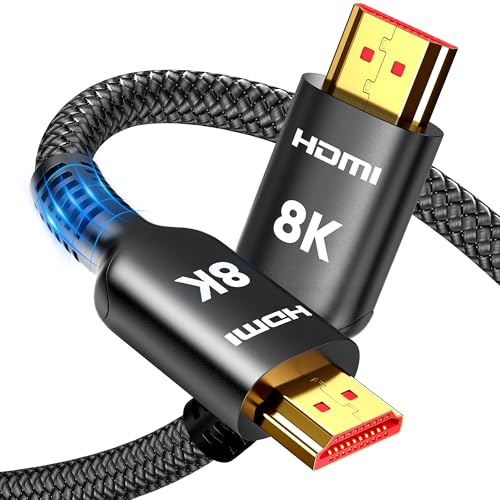
An active cable design that fixed sync and video drop for 4K TV owners.
Some 12-foot cables struggle to maintain a stable signal at high bandwidth, but the Highwings uses active electronics to push the signal cleanly from source to display. Customers note that it fixed sync and video drop issues with 4K TVs and displays, delivering flawless video and audio at a reasonable price. It supports 48 Gigabits Per Second and 120 Hz, making it a good match for both streaming and gaming.
The braided sheath is tested for 10,000+ bends, so it holds up behind furniture or in wall channels. One reviewer found the cable a little thin compared to expectations, but the performance data shows no signal loss.
Strengths
- Active signal boosting resolved sync and video drop issues for multiple buyers
- Rated for 10,000+ bends for long-term reliability
- 48 Gbps and 120 Hz covers PS5, Xbox Series X, and 4K streaming
Minor gripes
- A few buyers expected a thicker-feeling cable for the price
- No AWG gauge listed in specs
Choose this if: you have had sync problems or video drops with other long cables and want an actively boosted solution.
Pass if: cable thickness matters to your setup and you prefer a heavier feel.
4. StarTech.com 12ft HDMI Cable

A reliable 4K 30 Hz cable for conference rooms and desktop monitors.
Not every setup needs 48 Gbps. If you are connecting a laptop to a 1080p or 2560×1440 monitor in an office, the StarTech delivers a stable 10.2 Gigabits Per Second with 30 AWG wire and gold-plated connectors. It supports 4K at 30 Hz, which is fine for presentations and spreadsheets but not for high-refresh gaming. Compared to the Stouchi’s 144 Hz, this runs at 30 Hz, which matters only if you game.
Buyers call it a good solid cable with no complaints at 2560×1440, and the molded PVC jacket with strain relief keeps the plug intact after repeated plugging. The 30 AWG gauge is thinner than the 26 AWG on the Stouchi, but at 10.2 Gbps it does not need the thicker wire.
Why it fits
- Durable PVC jacket with flexible strain relief prevents fraying
- Al-Mylar foil and copper braid shielding for clean signal
- Works at 2560×1440 without issues
Where it falls short
- Limited to 4K at 30 Hz — not usable for 4K 120 Hz gaming or 8K content
- 10.2 Gbps versus 48 Gbps on modern HDMI 2.1 cables
Ideal for: an office, classroom, or home setup where the display runs at 60 Hz or 30 Hz and you just need a reliable, shielded cable.
skip it if: you own a PS5, Xbox Series X, or a 4K 120 Hz TV — you need the 48 Gbps class cables above.
5. SIIG Ultra High Speed HDMI Cable 12ft

Triple-shielded cable with an aluminum housing for maximum interference rejection.
If your 12-foot cable runs next to power cords or in a high-interference area, the SIIG’s triple shielding and aluminum housing help keep the signal clean. It uses 26 AWG gauge wire and gold-plated connectors for reliable conductivity. The spec sheet lists 8K support, making it a viable option for future-proofing a home theater.
One reviewer noted that the cable kept losing signal on their TV, a contrast to other owners who found it works well with a PS5 and delivers all HDMI 2.1 functions. The 2-year warranty provides some protection if you hit a defective unit. Note that the spec data lists the frequency as 48 Hz and data transfer rate as 60 Gigabits Per Second, so check compatibility with your source device before buying.
Build highlights
- Triple shielding (foil + braid) reduces EMI interference effectively
- Aluminum housing at the connector adds durability
- 26 AWG gauge and gold plating for solid signal transfer
Potential issues
- One verified review reports signal loss problems with a 4K TV
- Spec sheet appears to have transposed frequency and data rate values
Consider this for: a home theater where the cable runs near other electronics and you want heavy shielding in an aluminum shell.
Hold off if: you want a guaranteed stable 4K 120 Hz connection — some units may have signal loss issues.
6. Monster 8K HDMI Cable 12 FT

A 24K gold-contact cable from a name that defined premium AV for decades.
Monster’s 8K-certified cable supports 48 Gigabits Per Second, Dynamic HDR, and eARC, matching the raw bandwidth of the Stouchi and Highwings picks. The 24K gold contacts and V-Grip connector aim to maintain a tight, corrosion-free connection. Reviewers point out a big sound improvement over stock cables with 5.1 surround sound content, and one reviewer found it matched a much more expensive Cardas cable for 4K shows on a Samsung TV.
The build uses a Cobalt Blue nylon braid and an aluminum housing, and at 0.23 Kilograms it feels noticeably heavier than the other cables here. The trade-off is the premium price — this sits at the top of the budget tier — and the 60/120 Hz refresh rate supports most modern consoles but may not satisfy PC gamers chasing 144 Hz.
What you gain
- 48 Gbps with full HDMI 2.1 features (eARC, Dynamic HDR, 8K support)
- 24K gold contacts resist corrosion and maintain conductivity
- Heavy-duty build with aluminum housing and V-Grip plug
What you give up
- Highest price in this lineup with no performance advantage over 48 Gbps alternatives
- Some buyers question authenticity due to plastic packaging
Match for: someone who values the Monster brand heritage and wants a heavy, premium-feeling cable for a home theater centerpiece.
Not for: budget-focused buyers — the Stouchi or Highwings deliver identical bandwidth for less.
Understanding the Specs
Data Transfer Rate (Gbps)
Measured in Gigabits Per Second, this is how much video and audio data the cable can move. A rate of 10.2 Gbps (HDMI 1.4) handles 4K at 30 Hz. A rate of 48 Gbps (HDMI 2.1) handles 4K at 120 Hz or 8K at 60 Hz. If you have a modern console or high-refresh monitor, choose 48 Gbps.
Refresh Rate (Hz)
This number tells you how many times per second the TV or monitor can draw a new image. 30 Hz works for movies and presentations. 60 Hz is the standard for most TV content. 120 Hz and 144 Hz are for smooth gaming — they reduce motion blur and make fast movements look crisp.
Gauge (AWG)
American Wire Gauge (AWG) measures the thickness of the copper wire inside. A lower number means thicker wire, which carries the signal better over longer distances. 26 AWG is common for 48 Gbps cables. 30 AWG is thinner and usually found on older 10.2 Gbps cables. For a 12-foot run, 26 AWG gives you more headroom.
eARC and HDR Support
Enhanced Audio Return Channel (eARC) sends high-quality surround sound (like Dolby Atmos) from your TV back to the soundbar or receiver over the same HDMI cable. Dynamic HDR adjusts brightness and color scene-by-scene for richer visuals. Both are part of the HDMI 2.1 spec and require a 48 Gbps cable.
FAQ
Will a 12-foot HDMI cable lose signal quality compared to a 3-foot cable?
Do I need an HDMI 2.1 cable for a PS5 or Xbox Series X?
What is the difference between 10.2 Gbps and 48 Gbps HDMI cables?
Can a 12-foot HDMI cable cause input lag or delay?
Does the 26 AWG gauge matter for a 12-foot cable?
What does eARC mean on an HDMI cable?
Will an 8K HDMI cable work with my 1080p TV?
How do I know if my cable is actually delivering 48 Gbps?
Final Thoughts: The Verdict
For most buyers, the 12ft hdmi cable winner is the Stouchi 8K HDMI 12FT because it delivers 144 Hz and 48 Gbps, compared with 30 Hz on older HDMI 1.4 cables. If you want an active cable that fixes sync and video drop issues, grab the Highwings 8K HDMI 12FT. And for a simple office or basic 4K display connection, the StarTech.com 12ft HDMI is a reliable, shielded workhorse that gets the job done without overpaying for bandwidth you will not use.
How We Picked
We do not accept paid placement. Every pick is matched to a real buyer and a real use-case; we do not hands-on test units.
Sources & Methodology
Specifications: manufacturer listings and product documentation. Review insights: verified customer reviews, as of July 2026. Pricing: not shown on this page (it changes often); check the current price via the retailer link.
As an Amazon Associate, Gadgets Feed earns from qualifying purchases. This does not affect which products we feature.
Product prices and availability are accurate as of the date/time indicated and are subject to change. Any price and availability information displayed on Amazon at the time of purchase will apply to the purchase of this product. As an Amazon Associate I earn from qualifying purchases.
CERTAIN CONTENT THAT APPEARS ON THIS SITE COMES FROM AMAZON. THIS CONTENT IS PROVIDED "AS IS" AND IS SUBJECT TO CHANGE OR REMOVAL AT ANY TIME.
Amazon and the Amazon logo are trademarks of Amazon.com, Inc. or its affiliates.