
Our readers keep the lights on and my morning glass full of iced black tea. As an Amazon Associate, I earn from qualifying purchases.
Specs are compiled from manufacturer listings and verified buyer reviews and can change over time — please confirm the key details on the product page before buying.
Finding a 15-inch gaming laptop that actually fits your life means choosing between raw horsepower, display quality, battery life, and portability — and every model trades off one for another. This guide walks through four very different picks, from a budget-friendly workhorse to a high-end OLED machine, so you can match the laptop to the games you actually play and the desk (or lap) you play on.
I’m Min — the founder and writer behind Gadgets Feed. This guide is built by comparing the manufacturers’ published specifications and the patterns across verified customer reviews, so you get each pick’s real strengths and trade-offs instead of marketing spin.
You will see a few screen sizes here that are actually 15.6 inches instead of exactly 15 inches — that is the nearest standard size and it serves the same purpose with a slightly larger viewing area. This is your guide to the 15-inch gaming laptop that fits your needs, budget, and tolerance for fan noise.
How To Choose The Best 15-Inch Gaming Laptop
The three specs that matter most are the graphics card, the display, and the RAM configuration. The GPU determines what frame rates you get at high settings, the refresh rate decides how smooth the motion looks, and dual-channel RAM avoids a hidden 10% performance loss in demanding games.
Graphics card: the real engine
The graphics chip (GPU, the processor that renders game images) matters most for game performance. An entry-level RTX 4050 runs most modern games at medium settings, while an RTX 5070 handles high settings at higher frame rates. Aim for 8GB of VRAM (video memory, the GPU’s dedicated memory for textures) — that is the balance for today’s games.
Display: what you actually see
A 1080p screen at 144Hz or 165Hz (the screen refreshes 144 or 165 times per second) gives you smooth motion in competitive shooters. A QHD (quad high definition, 2560×1600) or 2.5K OLED (organic light-emitting diode) display delivers sharper images and richer colors for rich single-player games. The faster the refresh rate, the less blur you see when moving quickly.
RAM: the silent performance limiter
Running a single stick of RAM (single-channel) reduces gaming performance by up to 10% according to reviewers. Always check that a laptop ships with dual-channel memory (two sticks) or that the RAM is socketed so you can upgrade it easily. 16GB is the minimum for modern gaming; 32GB gives you more headroom.
Quick Comparison
| Model | Best For | GPU | Display | RAM | Amazon |
|---|---|---|---|---|---|
| msi Katana 15 HX | High-FPS Gaming | RTX 5070 | 15.6″ 165Hz QHD+ | 32GB DDR5 | $2,192.19Amazon |
| Lenovo Legion 5i | Visual Quality & Portability | RTX 5070 | 15″ 165Hz 2.5K OLED | 16GB DDR5 | $1,818.54Amazon |
| ASUS TUF Gaming F15 | Durability & Balanced Performance | RTX 4050 | 15.6″ 144Hz 100% sRGB | 16GB DDR4 | $968.88Amazon |
| acer Nitro V 15 | Budget Gaming | RTX 5050 | 15.6″ 165Hz FHD | 16GB DDR4 | $899.99Amazon |
In‑Depth Reviews
1. msi Katana 15 HX 15.6” 165Hz QHD+ Gaming Laptop

The desktop-replacement that packs an i9 and RTX 5070 into a 15.6-inch frame.
You get a 24-core Intel Core i9-14900HX processor and an NVIDIA GeForce RTX 5070, which together handle the most demanding AAA titles at high frame rates. The QHD 165Hz display with 100% DCI-P3 color gamut delivers crisp motion and vibrant colors — noticeably richer than the 100% sRGB screen on the ASUS TUF Gaming F15. With 32GB of DDR5 RAM and a 1TB Gen4 NVMe SSD, multitasking and load times are smooth from the moment you open the lid.
The Cooler Boost 5 system uses dual fans and a 5-heat-pipe design to keep the CPU and GPU cool under load. Buyers report that it runs hot and a cooling pad helps, but the fans can get loud. The battery lasts around 2-3 hours during gaming, according to multiple owners, and the included power supply is bulky. The 4-zone RGB keyboard with highlighted WASD keys is a nice touch for late-night sessions.
Why It Leads
- 32GB DDR5 RAM handles heavy multitasking without slowdown
- RTX 5070 with DLSS 4 and ray tracing delivers high FPS in modern games
- QHD 165Hz display offers sharp visuals and smooth motion
Real Trade-Offs
- Heavy and bulky — not ideal for daily carry
- Battery life is limited; owners mention 2-3 hours during gaming
- Some units experienced sleep/hibernate resume issues
The power play: This machine is for gamers who want a desktop-replacement level of performance — i9, RTX 5070, 32GB RAM — and are willing to keep it plugged in most of the time.
The catch: The heavy chassis and limited battery make it less portable than other 15-inch options here.
2. Lenovo Legion 5i – Gaming Laptop – Intel Core i7-14700HX
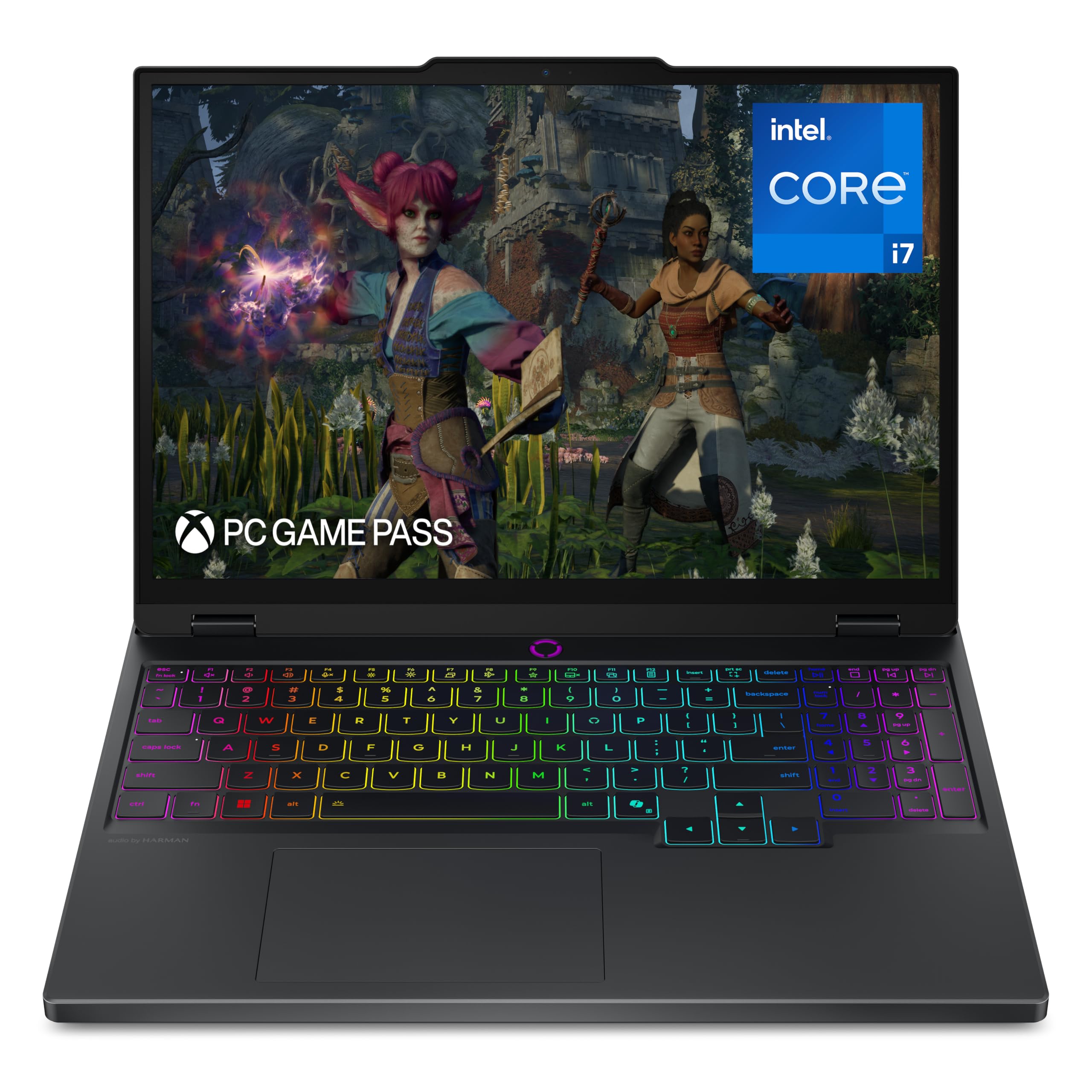
The 2.5K OLED screen that makes every game look richer than you expect.
The Lenovo PureSight OLED display at 2560×1600 with a 165Hz refresh rate delivers true-to-life colors and deep blacks that you just do not get from a standard IPS panel. The Intel Core i7-14700HX processor (5.4 GHz max speed) paired with an RTX 5070 handles both gaming and creative workloads. The Core i7-14700HX reaches 5.4 GHz, a noticeable step up from the 4.6 GHz in the acer Nitro V, so demanding applications and streaming run smoother.
Buyers rave about the lightweight, thin design and the quiet fans under normal use. One reviewer noted that the single-channel 16GB DDR5 RAM loses up to 10% performance and hurts 1% lows in games — a real issue for competitive players. The good news is that the RAM is socketed, so you can add a second stick. The Legion Coldfront Hyper cooling system keeps temperatures in check with turbo-charged stealth fans.
Display Champion
- 15-inch 2.5K OLED display with 165Hz — best visual quality in this list
- RTX 5070 graphics and 1TB SSD for fast storage
- Fast charging: 0 to 70% in under 30 minutes via USB Type-C
Room for Improvement
- Only comes with single-channel 16GB DDR5 RAM, which hurts gaming frame rates
- Speakers are mediocre, according to multiple owners
- No fingerprint reader or Windows Hello support
Reach for this if: You prioritize display quality above all else — the OLED panel transforms games and movies — and you are comfortable upgrading the RAM to dual-channel yourself.
Look elsewhere if: You need every frame of performance right from the start without opening the laptop.
3. ASUS TUF Gaming F15 (2023) Gaming Laptop

The rugged middleweight that pairs an RTX 4050 with a smart MUX Switch for better frame rates.
The Intel Core i5-13500H and NVIDIA GeForce RTX 4050 GPU at 140W Max TGP give you a balanced platform for 1080p gaming. The FHD 144Hz display covers 100% sRGB, so colors look accurate and motion stays smooth. The built-in MUX Switch can boost gaming performance by 5-10% by routing frames directly from the dedicated GPU to the display, bypassing the integrated graphics when needed.
Customers note that the battery lasts only about 1-1.5 hours, which makes this a laptop that lives near an outlet for gaming sessions. The dual 84-blade Arc Flow Fans do keep the system cool, but the laptop still gets hot under load. On the positive side, owners say the build quality feels durable and the laptop runs any game on max settings without issues. Upgrading RAM is straightforward — one buyer mentioned 32GB DDR4 in roughly 8 minutes.
Built to Last
- MUX Switch with Advanced Optimus optimizes frame rates and battery life automatically
- Durable chassis that withstands daily use
- Easy RAM upgrade path — socketed DDR4
Realistic Limits
- Very short battery life — reviewers point out 1-1.5 hours
- Storage screw is extremely tight; some buyers stripped it during SSD upgrade attempts
- Buggy audio jack noted by a few reviewers
Your move if: You want a durable 15.6-inch machine for 1080p gaming and are willing to keep it plugged in — the MUX Switch is a real performance bonus.
Hold off if: You need all-day battery for classes or travel; this model demands an outlet.
4. acer Nitro V 15.6” FHD IPS 165Hz Gaming Laptop

The entry-level workhorse that brings a 165Hz screen and an RTX 5050 to a tight budget.
You get an Intel Core i5-13420H processor (4.6 GHz max) and an NVIDIA GeForce RTX 5050 with 8GB of GDDR7 VRAM, which is enough to run most modern games at high settings without stuttering. The 15.6-inch FHD IPS display at 165Hz gives you smooth motion in fast-paced shooters — a better refresh rate than the 144Hz on the ASUS TUF Gaming F15. Storage is handled by a fast 512GB PCIe Gen 4 SSD.
Shoppers say that the internals are optimized for great performance per dollar, though the base charger drains the battery during intensive gaming (a 230W charger fixes that). One owner noted that there is no M.2 expansion slot, so you are limited to the single drive. The backlit keyboard feels smooth, and the sound quality is better than the previous Acer model according to reviewers.
Why It Wins on Value
- RTX 5050 with 8GB GDDR7 VRAM handles modern games well
- 165Hz display gives you smooth competitive gaming
- Build quality is solid for the price tier
Where It Cuts Corners
- Only one storage slot — no upgrade path for a second SSD
- Base 65W charger cannot sustain gaming; a beefier 230W charger is needed
- DDR4 RAM instead of DDR5
Best for: Gamers on a budget who want a 165Hz screen and the latest RTX 5050 GPU — this is the most affordable path to smooth 1080p gaming.
Not for: Anyone who needs expandable storage or expects to game on the stock charger.
Understanding the Specs
GPU (Graphics Card)
The GPU is the chip that renders your games. An RTX 4050 is a solid entry-level choice for 1080p gaming. The RTX 5050 and RTX 5070 bring more VRAM and higher performance for higher resolutions and ray tracing. The VRAM (video memory) amount — 6GB, 8GB — determines how much visual data the GPU can hold at once.
Display: Resolution and Refresh Rate
FHD (1080p) is the standard resolution for budget and mid-range gaming. QHD (2560×1600) and 2.5K OLED panels offer sharper images and richer colors. The refresh rate (144Hz, 165Hz) tells you how many times the screen updates per second — higher numbers mean smoother motion.
FAQ
Is 16GB of RAM enough for a 15-inch gaming laptop in 2025?
What is the difference between DDR4 and DDR5 RAM?
Do I really need a 165Hz screen?
Can a 15-inch gaming laptop run VR headsets?
How important is the MUX Switch?
Will a 15-inch gaming laptop stay cool enough during long sessions?
Can I upgrade the storage in my gaming laptop later?
What is a good battery life for a gaming laptop?
Is an RTX 5070 overkill for a 15-inch laptop?
What does VRAM do in a gaming laptop?
Final Thoughts: The Verdict
For the majority of shoppers, the 15-inch gaming laptop winner is the msi Katana 15 HX because it combines an i9 processor, RTX 5070, 32GB of DDR5 RAM (double data rate 5, the latest fast memory standard), and a QHD 165Hz display for a desktop-replacement experience. If you want the best display quality and portability, grab the Lenovo Legion 5i for its 2.5K OLED screen. And for budget-friendly 1080p gaming, the acer Nitro V 15 with its 165Hz screen and RTX 5050 gives you smooth competitive play without the high price.
How We Picked
We do not accept paid placement. Every pick is matched to a real buyer and a real use-case; we do not hands-on test units.
Sources & Methodology
Specifications: manufacturer listings and product documentation. Review insights: verified customer reviews, as of July 2026. Pricing: not shown on this page (it changes often); check the current price via the retailer link.
As an Amazon Associate, Gadgets Feed earns from qualifying purchases. This does not affect which products we feature.
Product prices and availability are accurate as of the date/time indicated and are subject to change. Any price and availability information displayed on Amazon at the time of purchase will apply to the purchase of this product. As an Amazon Associate I earn from qualifying purchases.
CERTAIN CONTENT THAT APPEARS ON THIS SITE COMES FROM AMAZON. THIS CONTENT IS PROVIDED "AS IS" AND IS SUBJECT TO CHANGE OR REMOVAL AT ANY TIME.
Amazon and the Amazon logo are trademarks of Amazon.com, Inc. or its affiliates.