
Standard home printers stop at 8.5 x 14 inches, leaving photographers, architects, and small business owners stuck cropping their work. A dedicated wide-format machine unlocks true 13 x 19 inch prints for portfolio sheets, blueprints, and gallery-ready photos that make a real impression.
I’m Min — the co-founder and writer behind Gadgets Feed. My buying guides are built on hundreds of hours of cross-referencing spec sheets, ink yield data, and real-world reliability reports so you know exactly what’s worth your money in this narrow niche.
After analyzing print speeds, ink costs, connectivity options, and paper-path durability across six top contenders, I’ve identified the best 13×19 inkjet printer for every budget and use case.
How To Choose The Best 13X19 Inkjet Printer
Selecting a wide-format printer involves more than just checking if it fits 13×19 paper. Ink delivery system, paper handling, connectivity, and duty cycle all determine whether your purchase will be a joy or a maintenance nightmare. Focus on these three decision points first.
Ink Architecture: Cartridge, Tank, or Sublimation
Cartridge-based printers like the Canon PIXMA PRO-100 offer the highest color accuracy for photo work but cost significantly more per page. EcoTank printers such as the Epson ET-15000 use refillable ink reservoirs that slash per-print costs to pennies, ideal for high-volume document or proof printing. Sublimation-ready models like the Pinckney conversion are purpose-built for heat-transfer apparel businesses and require dedicated sublimation ink that voids standard manufacturer warranties.
Paper Path and Media Handling
Printing 13×19 sheets demands a straight paper path or a rear-feed specialty slot. Models with a rear-feed tray — like the Epson ET-15000 and Epson Artisan 1430 — handle thick cardstock, photo paper, and fine-art media up to 300 gsm without curling or jamming. Front-tray-only units limit your media flexibility and can cause registration errors on heavy stock.
Duty Cycle and Print Speed
For a home office or small business printing a few hundred 13×19 sheets per month, a 500-sheet input capacity and 25-ppm monochrome speed (like the Epson WF-7840) are adequate. Photographers printing fine-art reproductions at 4,800 dpi will trade speed for quality — the Canon PIXMA PRO-100 outputs roughly one color page per minute but delivers gallery-grade tonal gradation. Match the printer’s duty cycle to your monthly volume to avoid premature wear.
Quick Comparison
On smaller screens, swipe sideways to see the full table.
| Model | Category | Best For | Key Spec | Amazon |
|---|---|---|---|---|
| Epson EcoTank ET-15000 | Supertank AIO | Lowest cost per page | 7,500-page ink yield per bottle set | Amazon |
| Canon PIXMA PRO-100 | Professional Photo | Gallery-grade color accuracy | 8 dye-based ink tanks with 3 grayscale | Amazon |
| Epson WF-7840 | Office AIO | High-volume office workflow | 500-sheet input, 25 ppm mono | Amazon |
| Canon IP8720 | Prosumer Photo | Value photo quality under premium | 6-color ink system with gray | Amazon |
| Epson Artisan 1430 | Creative Studio | Disc printing and CIS compatibility | 6-color Claria ink, CD/DVD printing | Amazon |
| Pinckney Super-Tank | Sublimation Bundle | Heat-transfer apparel business | Pre-filled sublimation ink included | Amazon |
In‑Depth Reviews
1. Epson EcoTank ET-15000 Wireless Color All-in-One Supertank Printer

The ET-15000 is the smartest financial decision for anyone printing 13×19 sheets regularly. Its supersized ink tanks — 127 mL black and 70 mL per color — yield up to 7,500 prints per bottle set, dropping the per-page cost below what most laser printers achieve. The rear specialty feed accommodates cardstock up to 300 gsm, making it a versatile workhorse for stickers, proof sheets, and booklets.
The 250-sheet front tray feeds letter and legal, while the rear slot handles the 13×19 stock directly. Duplex printing is automatic for standard sizes, though 11×17 and 13×19 duplex requires manual intervention. The 2.7-inch color touchscreen simplifies navigation, and Wi-Fi Direct enables printing without a network. The built-in scanner and copier add functionality, though the ADF does not handle 13×19 originals.
Some users report occasional paper jams and a tendency for the paper in the front tray to shift, causing false “out of paper” warnings. The printing speed — 17 ppm black, 9 ppm color — is adequate but slower than a mid-range laser. For any home office or small business that wants to minimize recurring ink costs while printing wide-format documents, this is the best-balanced option on the market.
Why it’s great
- Extremely low cost per page with refillable ink tanks
- Rear specialty feed handles thick 13×19 media up to 300 gsm
- Reliable wireless setup and voice-activated printing support
Good to know
- No automatic duplex for 11×17 or 13×19 sizes
- Document feeder jams reported on some units
- Moderate print speed compared to laser alternatives
2. Canon PIXMA PRO-100 Professional Photo Printer
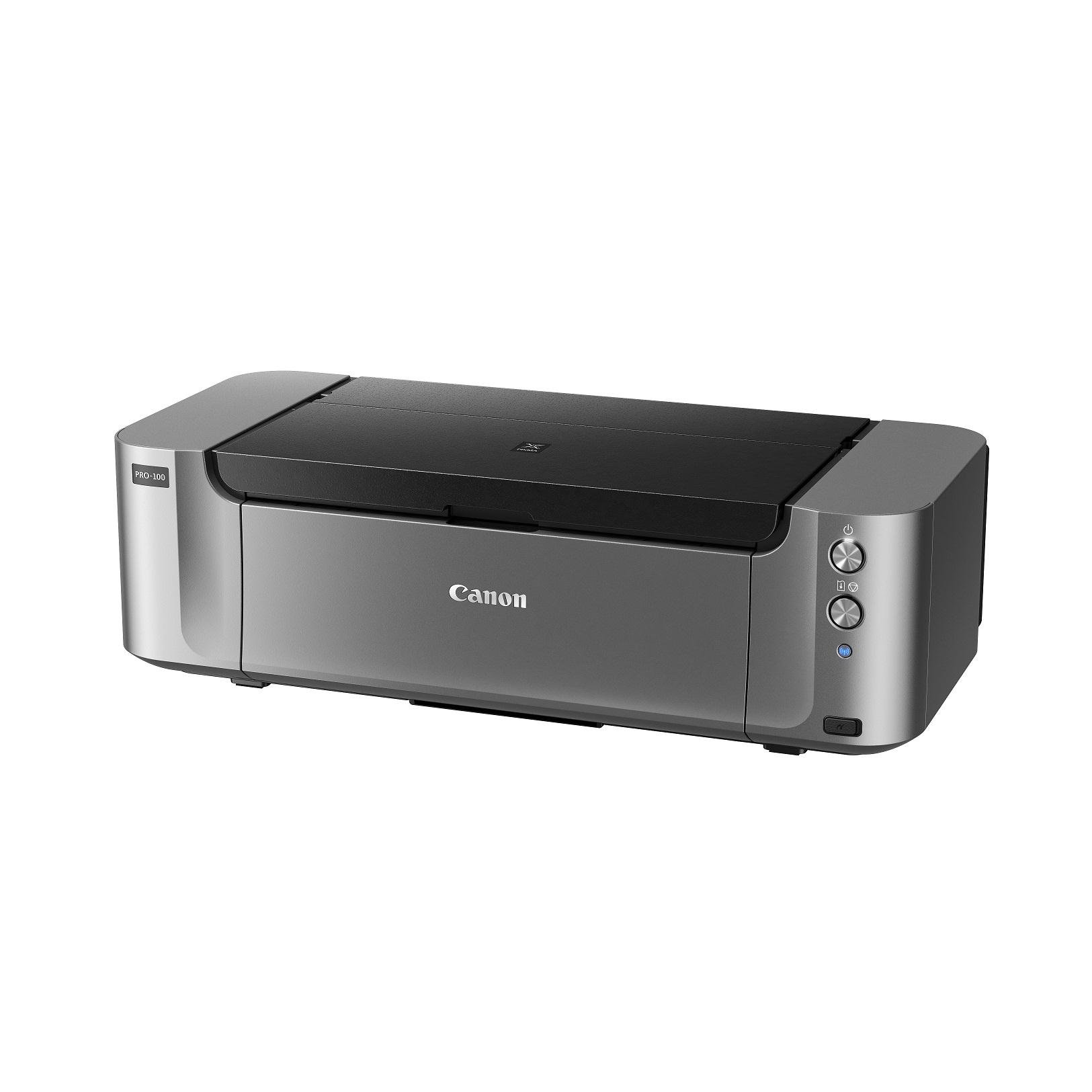
The PRO-100 is the gold standard for photographers who demand gallery-quality 13×19 prints. Its eight individual dye-based ink tanks — including three dedicated grayscale shades (black, gray, light gray) — produce smooth gradations and neutral black-and-white tones that rival traditional darkroom output. The 4,800 x 2,400 dpi resolution with FINE technology captures every nuance in fine-art reproductions.
Setup requires a calibrated monitor and some familiarity with color management profiles to get WYSIWYG results. The included Photoshop plug-in simplifies the process, but this is not a plug-and-play device for casual users. The printer handles a wide range of media, from glossy photo paper to fine-art rag, and the rear feed supports thick sheets up to 300 gsm.
The biggest operational drawback is ink consumption. Each tank runs roughly 50-80 8×10 prints, and a full 13×19 print consumes a meaningful portion of each cartridge. Infrequent use causes printhead clogs that require cleaning cycles that waste even more ink. This is a machine for active photographers, not a general-purpose document printer.
Why it’s great
- Exceptional color accuracy and smooth tonal transitions with 8 ink channels
- Dedicated grayscale inks produce neutral black-and-white prints
- Supports thick fine-art media via rear feed up to 300 gsm
Good to know
- High per-print ink cost; each color tank empties quickly at 13×19
- Printheads clog with infrequent use, requiring wasteful cleaning cycles
- No built-in scanner, copier, or fax — print-only device
3. Epson WorkForce Pro WF-7840 All-in-One Wide-Format Printer

The WF-7840 is built for offices that need to print, scan, copy, and fax wide-format documents without switching machines. Its 500-sheet total paper capacity handles high-volume days, and the automatic duplex prints on both sides of 8.5×11 and legal paper. The PrecisionCore Heat-Free technology delivers 25 ppm black and 12 ppm color — the fastest speeds among the printers reviewed here.
The 4.3-inch color touchscreen provides intuitive control over copy and scan jobs, and the 50-page automatic document feeder handles multi-page originals without manual intervention. Wireless connectivity includes dual-band Wi-Fi (802.11a/b/g/n/ac), AirPrint, and Mopria, making it easy to share across a busy office. The DURABrite Ultra ink is pigment-based, resisting smudges on plain paper.
Several long-term users report issues with Epson’s firmware updates blocking third-party ink cartridges over time, despite a legal settlement. The printer is also physically large — 21.7 inches wide — and heavy, requiring dedicated desk space. The paper path can trigger false “paper does not match tray” errors, which some users find frustrating.
Why it’s great
- Fast 25 ppm monochrome output for high-volume office use
- 500-sheet input tray with 50-page ADF for batch scanning and copying
- Automatic duplex printing for standard sizes saves paper
Good to know
- Firmware updates aggressively block aftermarket ink cartridges
- Large footprint (21.7 inches deep) requires substantial desk space
- Occasional false paper-jam and tray-mismatch software errors
4. Canon IP8720 Wireless Photo Printer

The IP8720 occupies a sweet spot for enthusiasts who want professional-level print quality without the full investment of a PRO series machine. Its six-color ink system, which includes a dedicated gray ink, produces crisp black-and-white images alongside vivid color prints. The 9,600 x 2,400 dpi resolution delivers fine detail on glossy 13×19 photo paper that rivals commercial lab prints.
Professional graphic designers report 5,000-plus sheets across years of use with only occasional paper jams. The rear feed handles media up to 140 lb stock, including vinyl and tissue, expanding creative possibilities beyond standard photo paper. Setup for color-accurate output requires a calibrated monitor and manual paper-size configuration for non-standard dimensions.
Wireless connectivity is the IP8720’s weakest link. Several users report frequent Wi-Fi dropouts where the printer disappears from the network and refuses to reconnect for hours. There is no built-in Ethernet port, so a wired backup is not an option. The lack of automatic duplex and the absence of a scanner or copier also make it unsuitable as a general-purpose office machine.
Why it’s great
- Exceptional 9,600 x 2,400 dpi print quality with 6-color ink system
- Dedicated gray ink for better black-and-white photo output
- Handles heavy media up to 140 lb stock via rear specialty feed
Good to know
- Frequent Wi-Fi disconnections reported by multiple users
- No automatic duplex printing — manual duplex only
- No wired Ethernet port, scanner, or copier built in
5. Epson Artisan 1430 Wireless Color Wide-Format Inkjet Printer

The Artisan 1430 remains a cult favorite among scrapbookers, invitation designers, and anyone who needs to print directly onto CDs and DVDs. Its six-color Claria ink system delivers vibrant, borderless 13×19 prints and supports 12×12 scrapbook layouts, which standard letter-size printers cannot handle. The included CD/DVD tray makes disc printing effortless — a feature almost absent from modern printers.
The print quality is excellent for its age, with accurate color reproduction when using Epson’s Vivid profile. Many users run continuous ink supply systems (CISS) with this model, driving operating costs below per print. The printer lacks automatic duplex, but the rear feed handles heavy cardstock and photo paper reliably, making it a flexible tool for mixed-media projects.
Potential buyers should be aware that this is a discontinued model, so replacement parts and official support are limited. The wireless setup can be finicky, and the printer does not have a native print buffer, which can cause print jobs to freeze if the computer goes to sleep. The ink cartridges are expensive at retail, but third-party alternatives are widely available and work well.
Why it’s great
- Built-in CD/DVD disc printing tray — unique among 13×19 inkjets
- Excellent compatibility with affordable CISS ink systems
- Borderless 12×12 scrapbook layout support
Good to know
- Discontinued model with limited manufacturer support and parts availability
- No automatic duplex printing or Ethernet connectivity
- Expensive OEM ink; third-party cartridges are recommended
6. Pinckney Cartridge-Free Super-Tank Printer with Sublimation Ink Bundle
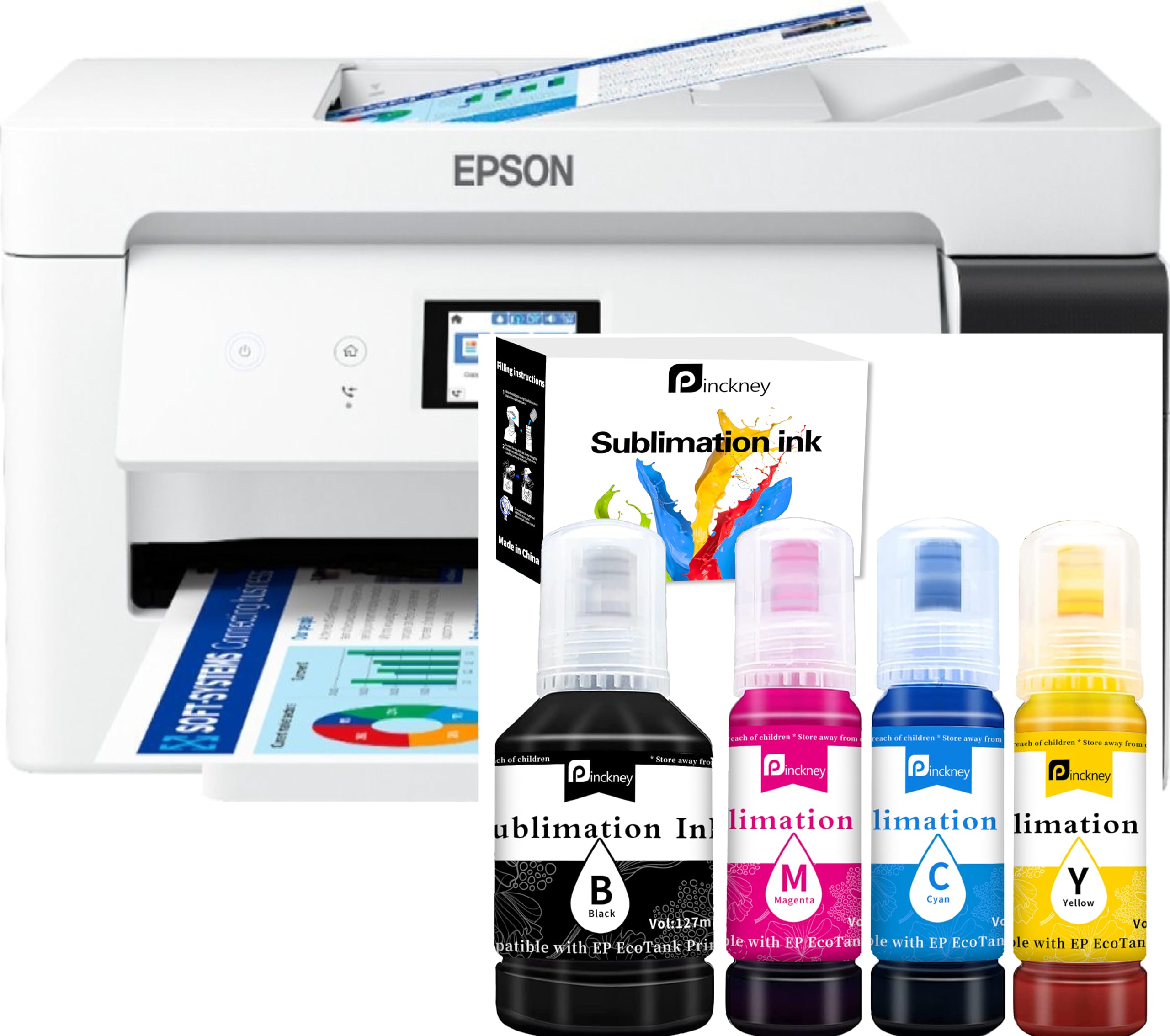
The Pinckney bundle takes a converted Epson ET-15000 and ships it pre-filled with sublimation ink, making it a turnkey solution for heat-transfer apparel businesses. The four-bottle ink set (127 mL black, 85 mL each for cyan, magenta, yellow) provides the high-volume capacity that sublimation printers need for continuous production runs. The 2.7-inch touchscreen and 250-sheet front tray mirror the ET-15000’s interface.
Print quality on sublimation paper is vibrant and consistent, with fine 1-2 picoliter droplets that reduce banding on mugs, fabrics, and hard surfaces. The wide-format capability up to 13×19 inches allows printing large-format designs for banners and oversized garments. The scanner and copier add functionality for tracing and duplicating artwork.
The critical issue is warranty. The included sublimation ink immediately voids the original Epson manufacturer warranty, and the seller’s own support has been inconsistent — several buyers report being charged shipping for repairs on defective units. The printer also lacks duplex for larger sizes. For those willing to accept the warranty trade-off, this is a cost-effective way to enter sublimation printing without buying separate hardware.
Why it’s great
- Ready-to-use sublimation setup with included ink bottles
- Large ink capacity ideal for continuous production runs
- Scans and copies for tracing sublimation designs
Good to know
- Epson manufacturer warranty voided immediately by sublimation ink
- Seller warranty support is inconsistent per customer reports
- No automatic duplex for 13×19 or 11×17 sizes
FAQ
Can I print borderless 13×19 photos on any of these printers?
Which printer has the lowest ink cost for high-volume 13×19 printing?
Is the Canon PIXMA PRO-100 worth the price for a beginner photographer?
What kind of paper works best for 13×19 inkjet prints?
Final Thoughts: The Verdict
For most users, the best 13×19 inkjet printer winner is the Epson EcoTank ET-15000 because it balances low operating costs, reliable wide-format handling, and all-in-one convenience. If you need gallery-grade photo quality for fine-art sales, grab the Canon PIXMA PRO-100. And for a commercial sublimation studio that prints heat transfers daily, nothing beats the Pinckney Super-Tank Sublimation Bundle.