
For jewelry designers, miniature painters, and dental labs, the difference between a good print and a great one is measured in microns. A 3D UV printer cures liquid resin layer by layer using a UV light source through an LCD screen, and the pixel size on that screen determines whether your hobbyist dragon has visible layer lines or a surface as smooth as injection-molded plastic.
I’m Min — the co-founder and writer behind Gadgets Feed. I’ve spent hundreds of hours analyzing the technical specifications, real-world print quality, and long-term reliability of today’s resin printers to separate the machines that deliver on their promises from those that come with hidden costs.
Whether you are prototyping functional parts or printing collectible figures, finding the right best 3d uv printer means weighing resolution, build volume, and speed against your specific workflow and budget.
How To Choose The Best 3D UV Printer
Choosing a UV resin printer means understanding the trade-offs between resolution, build volume, speed, and long-term ownership costs. These aren’t like FDM printers — the LCD screen is a consumable, the resin vat wears out, and every brand uses its own slicing ecosystem.
LCD Resolution and Pixel Size
The headline resolution number (9K, 14K, 16K) tells you the total number of pixels, but the pixel size in microns is what defines the smallest detail your printer can produce. A 10.1-inch 16K screen with a 14×19 μm pixel size will capture textures and fine edges that an 7-inch 9K screen at 34 μm simply cannot.
Light Source Uniformity
Matrix-style light sources like Anycubic’s LighTurbo use multiple LED arrays to spread UV light evenly across the full build area. COB (Chip-on-Board) sources, found in ELEGOO printers, use a single dense LED strip. A uniform light source reduces over-curing on the edges and under-curing in the center, directly affecting dimensional accuracy.
Print Speed and Release Technology
Standard printers lift the build plate vertically to peel the cured layer from the FEP film — this takes time and can stress delicate supports. Tilt release technology, seen on the Saturn 4 Ultra, peels the model with a rocking motion, allowing speeds of 150 mm/h without sacrificing detail. If you print large objects frequently, a fast-peeling printer saves hours per project.
Automatic Leveling and Sensors
Manual leveling on entry-level printers requires tightening four screws and repeating after every few prints. Automatic leveling, found on the ELEGOO Mars 5 and all premium models, uses a mechanical or sensor-based system to zero the build plate with a single button press. Resin shortage sensors and LCD residue detection prevent wasted prints due to empty vats or debris on the screen.
Quick Comparison
On smaller screens, swipe sideways to see the full table.
| Model | Category | Best For | Key Spec | Amazon |
|---|---|---|---|---|
| Creality Halot-X1 Combo | Premium | Pro-Level Detail & Automation | 16K LCD, 14×19 μm pixel, 170 mm/h | Amazon |
| ELEGOO Saturn 4 Ultra 16K | Premium | Heated Vat & AI Monitoring | 16K LCD, 150 mm/h, tilt release | Amazon |
| Creality Halot Mage S 14K | Premium | Fast Large-Format Prints | 14K LCD, 150 mm/h, 10.1″ screen | Amazon |
| ANYCUBIC Photon Mono 4 | Mid-Range | Budget Entry with High Resolution | 10K LCD, 17×17 μm pixel, 70 mm/h | Amazon |
| ELEGOO Mars 5 | Mid-Range | Auto-Leveling Simplicity | 4K LCD, auto-leveling, residue detection | Amazon |
| ELEGOO Mars 4 9K | Entry-Level | Compact & Affordable Detail | 9K LCD, 8520×4320 res, 70 mm/h | Amazon |
In‑Depth Reviews
1. Creality Halot-X1 Combo
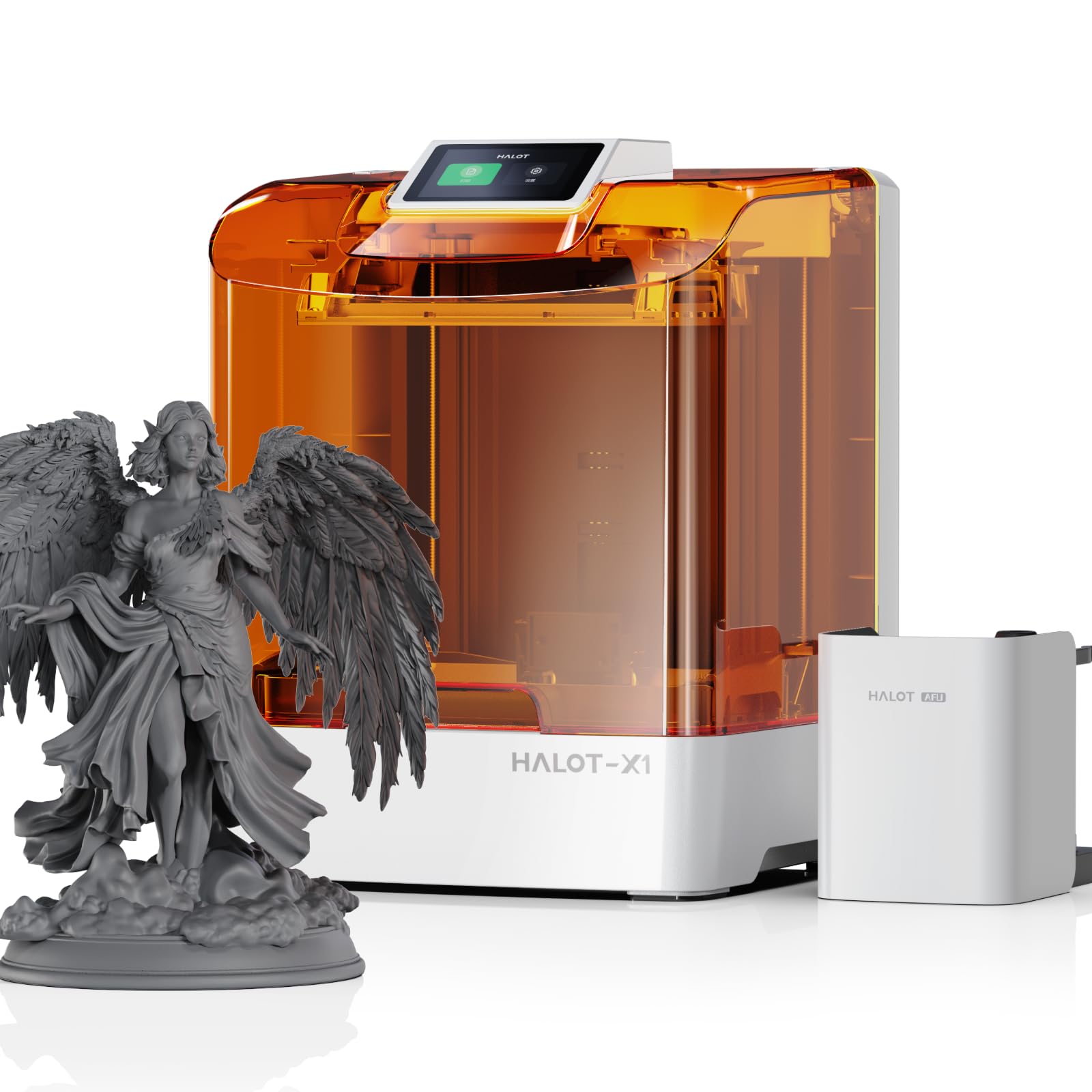
The Creality Halot-X1 Combo sets a new standard for desktop resin printing with its 10.1-inch 16K mono LCD and a pixel size of just 14×19 μm — that is fine enough to print jewelry filigree with no visible stepping. The intelligent resin management system heats the vat to 30–45°C in three minutes, reducing resin viscosity and improving layer adhesion, while RFID tags on official resin bottles automatically load the correct exposure parameters.
At 170 mm/h, this printer is three times faster than entry-level models, yet its fixed build plate eliminates the need for any manual leveling. The top-down movable optical system moves the light source and vat while the plate stays stationary, ensuring the Z-axis maintains 0.01 mm positional accuracy throughout the entire print job. The twist-to-release build plate makes model removal quick and without scraping.
The 92 independent light zones activate UV LEDs only where the model exists, reducing overexposure on empty screen areas and prolonging LCD life. The Halot Box slicing software is functional, though some users report occasional crashes with complex files. At 37.4 pounds, this is a substantial machine designed for daily professional use.
Why it’s great
- Industry-leading 14×19 μm pixel resolution for ultra-fine detail
- Resin pre-heating system improves print success in cooler environments
- Smart exposure reduces LCD wear by lighting only model areas
Good to know
- Halot Box slicing software has stability issues with complex models
- Heavy 37.4-pound frame requires a sturdy dedicated desk
- Premium price point reflects professional-grade features
2. ELEGOO Saturn 4 Ultra 16K

The ELEGOO Saturn 4 Ultra 16K brings a heated resin vat to the desktop, maintaining a steady 30°C throughout the print. This active heating keeps the resin at optimal viscosity, reducing bubble formation and layer separation — two common failure modes in unheated printers, especially in rooms below 70°F. The 10-inch 16K mono LCD delivers crisp detail comparable to the Halot-X1, though ELEGOO does not publish the exact pixel size in microns for this model.
Tilt release technology is the standout feature here. Instead of lifting the entire build plate vertically, the vat tilts to peel the model from the FEP film, enabling print speeds of up to 150 mm/h with lighter supports. The built-in AI camera with a chamber light provides real-time monitoring and time-lapse capture, and automatically alerts you to empty build plates or warped models during printing.
The large build volume of 8.33 × 4.66 × 8.66 inches gives you room for multiple miniatures or a single large bust per batch. Automatic leveling requires no manual adjustment, making this a true plug-and-play experience for users of any skill level. The machine is quiet enough to run in a home office, and the flip-up lid provides easy access to the build plate and vat.
Why it’s great
- Integrated vat heating at 30°C eliminates cold-weather print failures
- Tilt release technology allows faster printing with lighter supports
- AI camera with time-lapse gives you remote monitoring and share-ready clips
Good to know
- AI detection results vary based on resin color and lighting conditions
- Resin can pool on build plate; consider printing a drip bracket
- Firmware updates occasionally reset user settings
3. Creality Halot Mage S 14K

The Creality Halot Mage S 14K is built for speed without sacrificing resolution. Its 10.1-inch LCD delivers a 13320×5120 pixel resolution with a pixel size of 16.8×24.8 μm — slightly less dense than the 16K models but still sharp enough for tabletop miniatures and jewelry patterns. The Dynax+ mode, powered by a closed-loop motor and dual linear rails, pushes print speed to 150 mm/h, printing a 15 cm tall model in about one hour.
The Integral Light Source 3.0 delivers consistent UV intensity across the full build area, which is critical for dimensional accuracy on large prints. The laser-carved build plate provides excellent adhesion, and the 3-layered Pictor speed-release film reduces peel force by 35%, making it easier to remove delicate models without breaking them. The included air purifier with an activated carbon filter keeps odor manageable during long print sessions.
Remote printing via the Halot OS app lets you start and monitor prints from your phone, and the Creality Cloud library offers thousands of ready-to-print models. The optional Smart Resin Pump automates resin refilling, but it is sold separately. Users report that the screen can develop spotting after several months of use, and replacement screens cost a significant portion of the printer’s value.
Why it’s great
- 150 mm/h Dynax+ mode prints tall models in roughly one hour
- Integral Light Source 3.0 provides uniform UV across the 10.1-inch bed
- Remote printing and cloud integration via Halot OS app
Good to know
- LCD screen has documented longevity concerns after 4-6 months
- Smart Resin Pump is an extra cost accessory
- Creality Cloud subscription promises have caused confusion at launch
4. ANYCUBIC Photon Mono 4

The ANYCUBIC Photon Mono 4 proves that high resolution no longer requires a high budget. Its 7-inch 10K mono LCD screen produces a pixel size of just 17×17 μm on the X and Y axes — that is a 105% improvement in precision over the previous Mono 2 model, and it is enough for printing detailed 28 mm miniatures with visible eye sockets and belt buckles. The LighTurbo matrix light source ensures consistent UV distribution across the 6.04 × 3.42 × 6.49 inch build volume.
The laser-engraved Print Platform 2.0 improves adhesion enough that beginners rarely experience lifted corners or warped bases. The 4-point leveling method is genuinely beginner-friendly: after an initial calibration, the four screws hold the level without needing readjustment for many prints. The power-resume function saves a print if the power cuts, and the LCD replacement cost is in the –50 range, making long-term ownership affordable.
Print speed is capped at 70 mm/h, which is half the speed of premium models, so a full build plate of miniatures will take several hours. The plastic frame and small touchscreen feel less robust than metal-chassis competitors. The proprietary FEP unit scratches more easily than standard replaceable film, and some users report occasional resin vat breakage with prolonged use.
Why it’s great
- Exceptional 17×17 μm XY resolution at an entry-level price point
- Low-cost LCD replacement (–50) reduces long-term repair costs
- Simplified 4-point leveling stays calibrated for multiple print runs
Good to know
- 70 mm/h speed is half what premium models achieve
- Proprietary FEP unit scratches easily and needs careful handling
- Smaller build volume limits single-batch output for larger objects
5. ELEGOO Mars 5
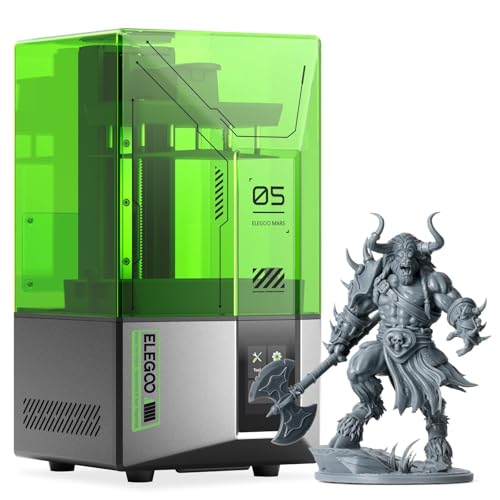
The ELEGOO Mars 5 is designed to eliminate every frustrating step that keeps beginners away from resin printing. The one-click automatic leveling system uses a mechanical sensor to zero the build plate without any manual screw tightening. A self-check routine verifies the Z-axis, LCD, and resin vat before every print, catching errors — like a punctured FEP film or debris on the screen — before they ruin a job.
The 4K mono LCD with a COB light source produces good detail for tabletop gaming and small prototypes, but at 4K resolution, it cannot match the surface smoothness of 10K or 16K screens. The 5.65 × 3.53 × 5.91 inch build volume is among the smallest in this lineup, suitable for one or two medium miniatures at a time. The flip-lock build plate is quick to remove, and the textured plate aids adhesion.
Advanced overheat protection automatically halts the printer if the LED temperature exceeds 80°C, and the efficient cooling system keeps the internals within safe operating range. The vat’s screw caps are made of plastic and can strip if overtightened. A few units have shipped with pre-punctured FEP film, causing resin leaks that damage the LCD, so a careful visual inspection before first use is strongly advised.
Why it’s great
- One-button automatic leveling removes the biggest beginner headache
- Pre-print self-check catches resin shortages and LCD debris early
- Overheat protection and cooling system extend component lifespan
Good to know
- 4K resolution shows visible pixel stepping on curved surfaces
- Plastic vat screw caps can strip if tightened too hard
- Some units arrive with FEP film damage; inspect before first print
6. ELEGOO Mars 4 9K

The ELEGOO Mars 4 9K is a proven workhorse that balances resolution and affordability. Its 7-inch 9K mono LCD with 8520×4320 resolution produces sharp details for miniatures and small functional parts. The COB light source, built from 36 individual LEDs, delivers high uniformity of UV light across the build area — this reduces over-cured edges and under-cured centers, a common issue in cheaper printers with basic matrix lights.
The laser-carved build plate grips models firmly during printing, and the linear guide rail on the Z-axis keeps motion stable for consistent layer alignment. The 3.5-inch touchscreen gives you model preview and a print progress bar. The printer is compatible with Voxeldance Tango and Chitubox slicing software, and it supports the open-source GOO slice format, giving you flexibility in your workflow.
The 153.36 × 77.76 × 175 mm build volume is slightly taller than the Photon Mono 4, allowing for slightly larger single models. The LCD screen is a known failure point — several users report cracking within the first 90 days, with replacement costs around . The Mars 4 also generates a noticeable Z-axis groan during operation, and while it does not affect print quality, it is louder than the Mars 5 or Saturn series.
Why it’s great
- COB 36-LED light source provides excellent UV uniformity for consistent prints
- Taller build volume than similarly priced competitors
- Open-source GOO slice format works with multiple slicer programs
Good to know
- LCD screen has a higher-than-average failure rate within three months
- Z-axis produces audible groaning during print operation
- Manual leveling process requires occasional recalibration
FAQ
How long does a 3D UV printer LCD screen last before needing replacement?
Can I use third-party resin in any 3D UV printer?
What is the real difference between a 4K and a 16K resin printer for a beginner?
Final Thoughts: The Verdict
For most users, the best 3d uv printer winner is the Creality Halot-X1 Combo because it delivers the highest available pixel density (14×19 μm) alongside smart resin management, automated leveling, and 170 mm/h print speed — all in a turnkey package. If you want integrated vat heating and AI monitoring for hands-off operation, grab the ELEGOO Saturn 4 Ultra 16K. And for a budget-friendly entry point with surprisingly high 10K resolution, nothing beats the ANYCUBIC Photon Mono 4.