
Pulling double duty with two graphics processors under one roof isn’t just about bragging rights; it’s about future-proofing your rig for the most demanding 4K gaming, VR, and AI-accelerated creative workflows. Whether you’re aiming for a dedicated physX card alongside your main renderer or building a multi-screen simulation station, the right dual-GPU build separates a smooth experience from a stuttering mess.
I’m Min — the co-founder and writer behind Gadgets Feed. I spend my time cross-referencing benchmark databases, parsing power draw specs, and analyzing motherboard lane configurations to separate truly capable dual-GPU platforms from marketing claims.
The very few pre-built configurations worthy of the title best 2-gpu pc must deliver on the promise of multiplied rendering performance without requiring a second mortgage or a degree in electrical engineering.
How To Choose The Best 2-GPU PC
Selecting a pre-built system designed for dual graphics cards requires looking beyond just the CPU and RAM. The motherboard’s chipset and physical slot layout determine whether a second GPU will run at a crippled x4 speed or a full x8 lane. A 2-GPU PC failure often stems from a PSU that lacks the necessary power connectors or thermal headroom.
Motherboard PCIe Lane Configuration
The chipset dictates how the 20 or 24 CPU-connected PCIe lanes are split. On a mainstream Z790 or X870E board, slotting two GPUs often drops both to x8 operation. For professional workloads, this is acceptable, but look for boards with official support for x8/x8 bifurcation from the primary PCIe slots.
Power Supply Capacity and Connectors
Each high-end GPU can draw 300-450W under load. A dual RTX 5080 setup demands an 850W to 1200W unit with dedicated 12VHPWR cables for each card. The specs must list sufficient wattage and the correct number of PCIe 5.0 or 8-pin connectors.
Physical Clearance and Cooling
Two dual-slot or triple-slot GPUs need a chassis with at least 7 expansion slots and 40mm of space between them. Airflow direction matters — a side-panel fan feeding cool air between the cards prevents thermal throttling. Pre-builts using blower-style coolers are preferred for tight multi-GPU configurations.
Quick Comparison
On smaller screens, swipe sideways to see the full table.
| Model | Category | Best For | Key Spec | Amazon |
|---|---|---|---|---|
| HP OMEN 45L | Premium | Ultimate 4K & AI | RTX 5090 32GB + 64GB DDR5 | Amazon |
| Skytech Azure 3 | Premium | High-FPS Gaming | 9800X3D + RTX 5080 16GB | Amazon |
| Corsair Vengeance i7500 | Premium | Liquid-Cooled Creator | i9-14900KF + RTX 5080 | Amazon |
| Thermaltake View 9580S | Premium | AMD Flagship Build | 9950X3D + RTX 5080 16GB | Amazon |
| MSI Aegis R2 AI | Premium | VR & AI PC | Ultra 9 285 + RTX 5070 Ti | Amazon |
| iBUYPOWER Trace Mesh | Mid-Range | Content Creation | i7-14700F + 32GB DDR5 | Amazon |
| CyberPowerPC Gamer Xtreme | Mid-Range | 1080p/1440p Gaming | i5-13400F + DDR5 | Amazon |
| PNY RTX 5080 Slim | GPU Upgrade | Compact Dual-Slot | 16GB GDDR7, 2730MHz | Amazon |
| KOTIN Prebuilt | Mid-Range | 1440p Gaming Value | Ryzen 5 9600X + RTX 5060 Ti | Amazon |
| YAWYORE Gaming PC | Mid-Range | Budget Dual-GPU Start | Ryzen 7 5700X + 32GB DDR4 | Amazon |
In‑Depth Reviews
1. HP OMEN 45L Gaming Desktop (RTX 5090)

The HP OMEN 45L is the closest you get to a dual-GPU-ready powerhouse out of the box. It ships with the flagship RTX 5090 with 32GB of GDDR7 VRAM, the largest frame buffer available, making it ideal for handling massive 8K textures and local LLM inference tasks. The patented OMEN CRYO CHAMBER isolates the liquid cooler radiator, pulling cool air from outside the chassis to prevent the secondary GPU slot from roasting.
Under the hood, the Intel Core Ultra 9 285K with 24 cores and 64GB of DDR5 RAM ensure zero bottleneck when feeding data to the main GPU. The 360mm LCD AIO cooler and tool-less access panels are thoughtful touches for someone planning to eventually install a second RTX 5090 down the line. The 2TB Gen4 NVMe SSD offers fast asset streaming for heavy workloads.
Some users reported DOA units or shipping damage, though HP’s warranty handled replacements. The stock 2TB SSD can fill up quickly with modern AAA titles. Still, for anyone looking at the highest-end single-GPU performance with an easy path to dual-GPU expansion, this is the definitive premium option.
Why it’s great
- RTX 5090 32GB offers unmatched VRAM for AI and 8K workflows.
- CRYO CHAMBER cooling system keeps CPU temps low in tight spaces.
- Tool-less chassis design simplifies adding a second GPU later.
Good to know
- Some units arrived with dead-on-arrival components.
- 2TB storage may feel limiting for power users.
- Premium price tag targets serious enthusiasts only.
2. Skytech Gaming Azure 3 (RTX 5080)

The Skytech Azure 3 pairs the reigning gaming champion, the AMD Ryzen 7 9800X3D with 3D V-Cache, with an NVIDIA GeForce RTX 5080 16GB. This combination produces consistently high 1% lows in demanding titles like Cyberpunk 2077 and Black Myth Wukong, delivering a butter-smooth 4K experience. The 360mm AIO liquid cooler keeps the CPU under 70°C during prolonged sessions.
With 32GB of DDR5 6000MHz RGB memory and a 2TB NVMe SSD, load times are minimal. The 850W Gold ATX 3.0 PSU provides stable power delivery and includes the necessary 12VHPWR connector for the RTX 5080. The chassis features tempered glass panels and ARGB fans, including a rear fan for exhausting heat from a potential second GPU in the lower slot.
Some Skytech units ship with varying GPU brands, but all verified units in customer reviews ran at proper specs. The included keyboard and mouse are basic. If you want a no-compromise gaming machine that can later accept a second card for dedicated PhysX or compute tasks, this is the sweet spot.
Why it’s great
- 9800X3D CPU is the best gaming chip for high-FPS 4K.
- 360mm AIO liquid cooler prevents thermal throttling.
- 850W ATX 3.0 PSU has headroom for a second GPU.
Good to know
- GPU brand may vary (PNY, Zotac, MSI).
- Included peripherals are entry-level quality.
- No integrated secondary GPU; upgrade required for dual-card.
3. Corsair Vengeance i7500 (RTX 5080)

The Corsair Vengeance i7500 uses a liquid-cooled Intel Core i9-14900KF, a 24-core CPU that excels in both gaming and threaded rendering workloads. Paired with the RTX 5080 16GB, it handles 4K ray tracing and AI-driven DLSS 4.5 frame generation without breaking a sweat. The CORSAIR NAUTILUS RS 360mm AIO cooler and the spacious 3500X ARGB case provide excellent airflow for future dual-card setups.
Corsair uses their own high-quality components: VENGEANCE RGB DDR5 memory, MP600 NVMe storage, and a properly rated PSU. The wraparound tempered glass panels showcase the build beautifully. The system includes three side, rear, and roof fans to maintain positive pressure, crucial when a second GPU is installed in the lower slot.
Some early builds shipped with a faulty fan controller that required replacement. The i9-14900KF also requires a BIOS update for stability. The warranty support from Corsair is responsive. If you want a brand-name system with matched component quality and a clear upgrade path, this is a very solid choice.
Why it’s great
- Liquid-cooled i9-14900KF for high sustained boost clocks.
- All Corsair components ensure compatibility.
- Excellent airflow design for multi-GPU cooling.
Good to know
- Some units had faulty fan controllers.
- Requires BIOS update for CPU stability.
- Limited front panel USB ports.
4. Thermaltake LCGS View 9580S (9950X3D + RTX 5080)
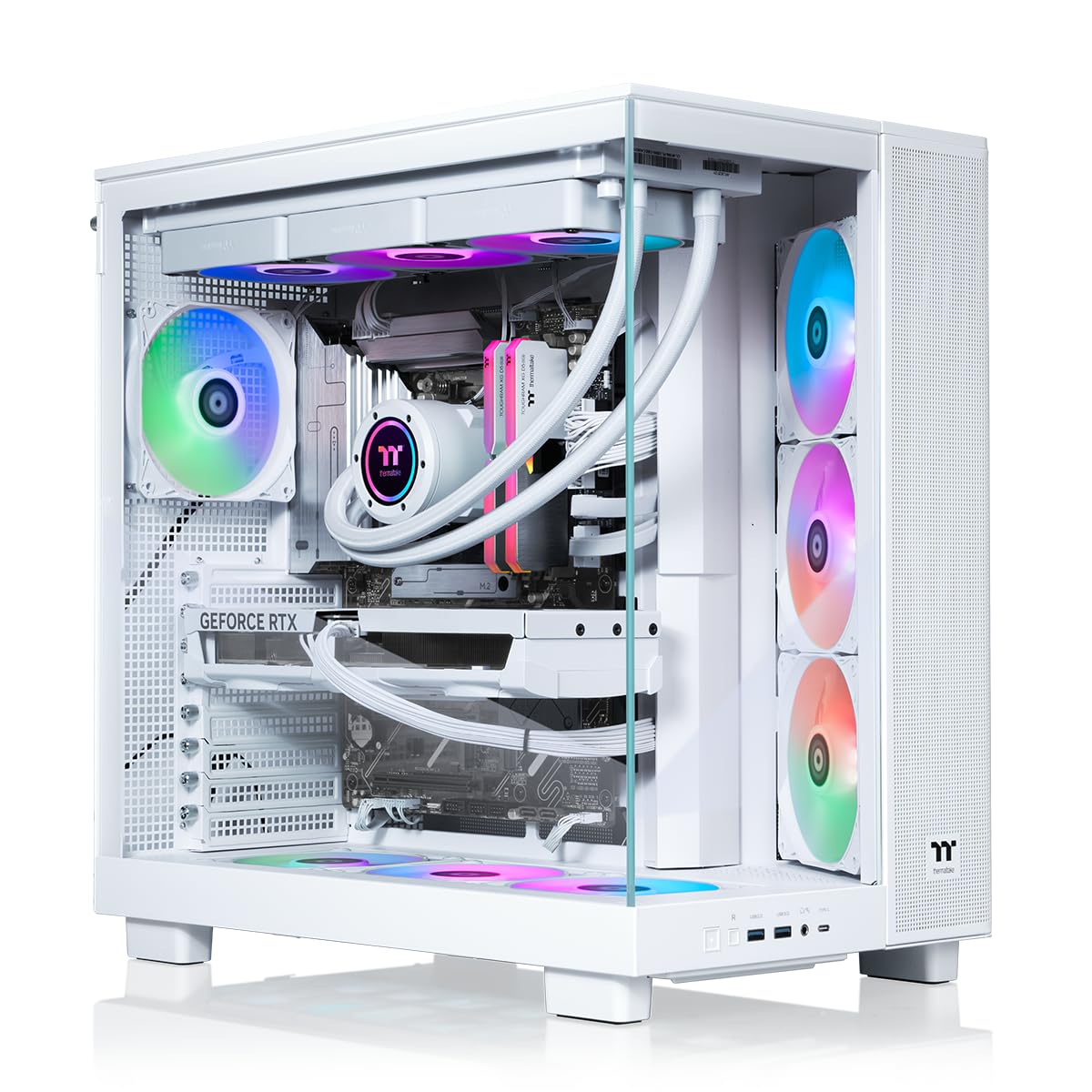
Thermaltake’s LCGS View 9580S goes all-in on AMD with the Ryzen 9 9950X3D. This 16-core processor offers the best of both worlds: high single-threaded gaming performance thanks to the 3D V-Cache and massive multi-core throughput for rendering. Paired with the RTX 5080 16GB, it delivers rock-solid 4K performance across AAA titles.
The 32GB of ToughRam DDR5 6000MT/s RAM and 2TB NVMe SSD are well-matched. The closed-loop liquid cooler with a 360mm radiator and the panoramic tempered glass case create a stunning visual centerpiece. Ten RGB fans ensure ample airflow. The chassis has enough clearance to install a second dual-slot card without blocking airflow.
A few customers received units with loose fan header pins or defective components. Thermaltake’s customer support response has been inconsistent. The 9950X3D also requires a BIOS update for proper core parking. However, for those who want the absolute best AMD platform with easy dual-GPU potential, this is a top contender.
Why it’s great
- 9950X3D offers elite gaming and workstation performance.
- 360mm liquid cooler and 10 fans ensure excellent thermals.
- Panoramic glass design looks incredible on a desk.
Good to know
- Inconsistent QC on fan header connections.
- BIOS setup required for core parking.
- Customer support response times vary.
5. MSI Aegis R2 AI (RTX 5070 Ti)

The MSI Aegis R2 AI comes equipped with the Intel Core Ultra 9 285 and an NVIDIA GeForce RTX 5070 Ti. This configuration excels at 1440p high-refresh-rate gaming and VR titles like Half-Life: Alyx. It accomplishes dual-GPU duty by using the RTX 5070 Ti as the primary renderer, with the integrated GPU on the Intel chip handling lightweight display or streaming tasks.
The 32GB of DDR5 memory and 2TB M.2 NVMe SSD are standard for this tier. The cooling solution uses an RGB CPU air cooler and four case fans (three front intake, one rear exhaust), which keeps noise levels low. The case design is simple and functional, with a front-panel USB-C port.
A rare but serious issue reported by some users is system failure after the 30-day return window. The RTX 5070 Ti, while powerful, lacks the VRAM headroom of the 5080 for 8K or heavy AI workloads. For a dedicated VR gaming rig with a clear single-GPU architecture, this is a well-balanced option.
Why it’s great
- Excellent 1440p and VR performance with RTX 5070 Ti.
- Quiet air cooling with decent thermal performance.
- Clean design with front USB-C connectivity.
Good to know
- Some units suffered unrecoverable system failures.
- RTX 5070 Ti limited for 4K ultra settings.
- Air cooler less effective than AIO for sustained loads.
6. iBUYPOWER Trace Mesh (i7-14700F)

The iBUYPOWER Trace Mesh offers a strong mid-range foundation for a future dual-GPU setup. The Intel Core i7-14700F (20 cores) and 32GB of DDR5 RAM provide plenty of CPU horsepower for both gaming and streaming. The RTX 4060 8GB handles 1080p and 1440p gaming well, leaving the user to upgrade the GPU later.
The 2TB NVMe SSD is generous at this price point. The tempered glass case with 16-color RGB lighting and the included keyboard and mouse add value. The system has a standard ATX motherboard, giving you the freedom to add a second GPU in the second PCIe x16 slot if you also upgrade the PSU down the line.
Some users reported a DOA unit needing replacement. The 802.11AC Wi-Fi is slower than modern Wi-Fi 6E. The system is bulky. It is a fantastic starting point for a creator who wants a solid CPU and RAM foundation and intends to swap in a higher-end GPU later.
Why it’s great
- 20-core i7-14700F is great for CPU-heavy tasks.
- 2TB NVMe SSD provides ample storage from the start.
- Standard ATX board allows easy GPU and PSU upgrades.
Good to know
- RTX 4060 8GB is entry-level for 2-GPU ambitions.
- Wi-Fi 5 is outdated.
- Some units arrived defective.
7. CyberPowerPC Gamer Xtreme (RTX 4060)

This CyberPowerPC Gamer Xtreme is a classic entry-level gaming PC that prioritizes a balanced CPU-GPU pairing. The Intel Core i5-13400F (10 cores) and RTX 4060 8GB provide a smooth 1080p experience in most modern titles. It uses an Intel B760 chipset, which typically provides one PCIe x16 slot wired at x16, limiting true dual-GPU potential.
However, the 16GB of DDR5 RAM and 1TB PCIe Gen4 NVMe SSD are surprisingly modern for this price range. The case has a tempered glass side panel and RGB lighting. The system includes a keyboard and mouse. The 1-year parts and labor warranty and free lifetime tech support are a bonus.
The system is not designed for dual high-end GPUs. The 500W PSU (estimated) and B760 chipset make it unsuitable for a second power-hungry card. It is a perfectly capable single-GPU machine for a first-time PC gamer who may eventually upgrade to a whole new platform.
Why it’s great
- Great price for a 1080p gaming experience.
- Modern DDR5 RAM and PCIe 4.0 SSD standard.
- Lifetime tech support included.
Good to know
- B760 chipset limits dual-GPU viability.
- Only 16GB of RAM for demanding multitasking.
- Wi-Fi 5 and Bluetooth 4.2 are outdated.
8. PNY RTX 5080 Slim (Graphics Card)
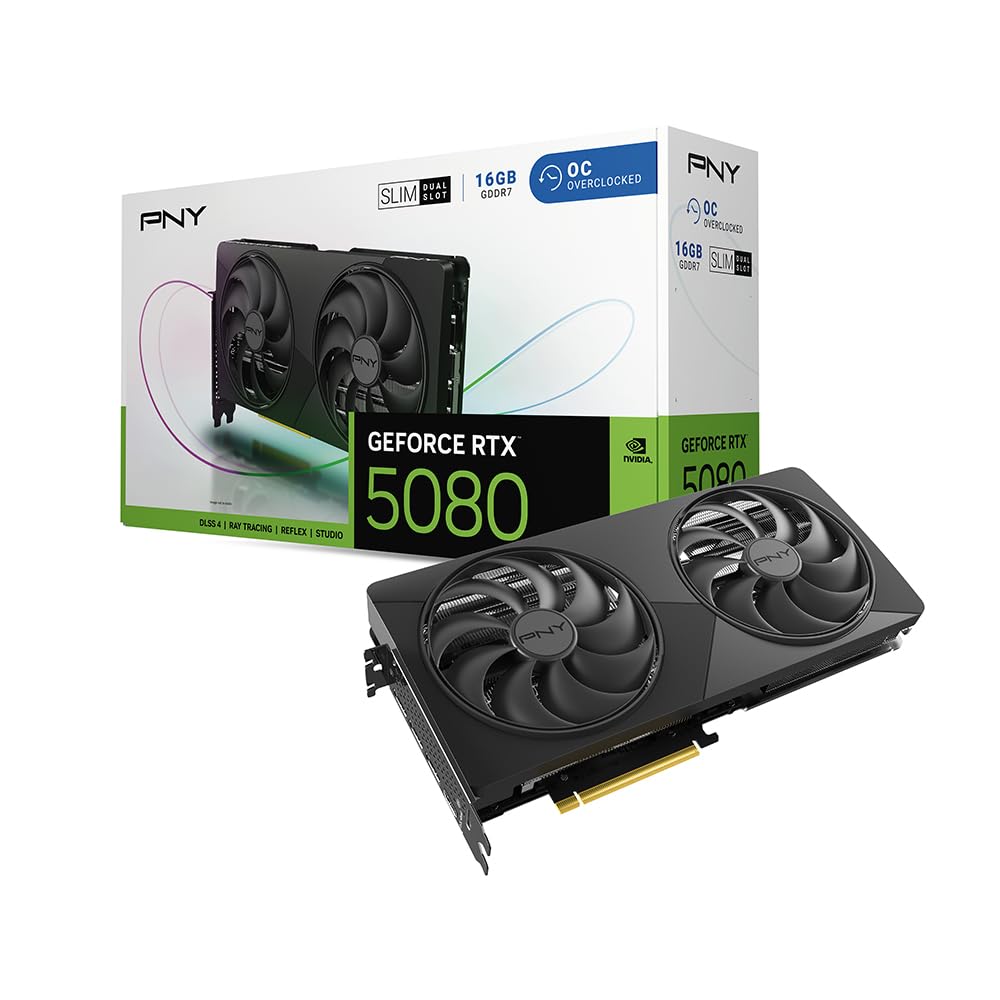
For those building a 2-GPU PC from scratch or upgrading an existing rig, the PNY GeForce RTX 5080 Slim is the ideal second card due to its compact form factor. It measures a true dual-slot design with a dual-fan cooler, allowing it to fit in the second PCIe slot without blocking the main card’s airflow. The 16GB of GDDR7 memory at 2730MHz boost clock delivers excellent 4K performance.
PNY’s cooler uses a large 120mm dual-fan setup and a massive vapor chamber to keep the RTX 5080 running at 65°C under load. It is fully based on the NVIDIA reference design, ensuring compatibility with SLI or NVLink bridges. The card includes VelocityX software for fine-tuning fan curves and clock speeds.
This is a graphics card, not a complete PC. It requires a system with an available PCIe x16 slot and a 750W minimum PSU with a 12VHPWR connector. A rare customer complaint involved a missing 007 code for a bundled game. It is the best way to add a second high-end GPU to an existing compatible build.
Why it’s great
- True dual-slot design fits easily in tight multi-GPU setups.
- Excellent thermals and low noise under load.
- Factory OC with 2730MHz boost clock.
Good to know
- Not a full PC; requires compatible host system.
- Needs a 750W PSU with 12VHPWR.
- Bundled game code may be missing from some units.
9. KOTIN Prebuilt (RTX 5060 Ti)

The KOTIN Prebuilt offers a modern AM5 foundation at a competitive price. The AMD Ryzen 5 9600X (6 cores, Zen 5) and GeForce RTX 5060 Ti 8GB are well-suited for 1080p and 1440p gaming. The CPU’s single-threaded performance is excellent, and the AM5 socket provides a future upgrade path to a Ryzen 9 chip.
The system includes 16GB of DDR5-6000MHz RAM and a 1TB PCIe 4.0 NVMe SSD. It features a digital CPU temperature display on the cooler and five ARGB fans. The 650W 80+ Gold PSU offers solid efficiency for a single-GPU setup. It also supports Wi-Fi 7 and Bluetooth 5.3, which is very forward-looking.
The RTX 5060 Ti is a capable mid-range card, but its 8GB VRAM buffer is a limitation for 4K textures. The PSU is unlikely to support a second high-end GPU. It’s an excellent starter PC for a gamer who wants the latest platform and may build a dedicated dual-GPU machine in the future.
Why it’s great
- Modern AM5 platform with upgrade potential.
- Wi-Fi 7 and Bluetooth 5.3 are future-proof features.
- Digital CPU temp display is a unique touch.
Good to know
- 8GB VRAM limits 4K gaming potential.
- 650W PSU insufficient for dual-GPU.
- Unspecified PSU and motherboard brands.
10. YAWYORE Gaming PC (RTX 5060)

The YAWYORE Gaming PC is a strong value proposition, packing the AMD Ryzen 7 5700X (8 cores) and an RTX 5060 8GB into a neat package. The 32GB of DDR4 3200MHz RAM is generous and ensures smooth multitasking. The MSI B550M-A PRO motherboard is a reputable model, offering PCIe 4.0 support and a solid foundation.
The system uses a 650W 80+ Bronze PSU and includes ARGB fans with a remote control for customizing lighting. The case is a standard mid-tower design with a tempered glass side panel. The CPU cooler is a tower-style air cooler, which is quiet and effective for the 5700X.
The RTX 5060 is not a high-end card; it will struggle with 4K or ray tracing. The DDR4 RAM is a step behind modern DDR5-based builds. The AM4 platform is at its end of life, meaning no CPU upgrade path beyond the 5000 series. It is a solid budget machine for a buyer who wants a well-balanced system right now.
Why it’s great
- Generous 32GB of DDR4 RAM for multitasking.
- MSI B550 motherboard offers good reliability.
- Excellent price-to-performance ratio.
Good to know
- DDR4 RAM is older technology.
- AM4 platform has no future CPU upgrades.
- RTX 5060 is only for 1080p gaming.
FAQ
Can I add a second GPU to any motherboard?
Does dual-GPU double my gaming FPS?
How do I know if my PSU can handle two GPUs?
Final Thoughts: The Verdict
For most users looking for a future-proof 2-GPU build, the winner is the Skytech Gaming Azure 3 because it combines the best gaming CPU (9800X3D) with a powerful RTX 5080 and enough PSU headroom for a second card. If you need the ultimate single-GPU performance with easy expansion, grab the HP OMEN 45L. And for a budget-friendly entry point into the ecosystem, the YAWYORE Gaming PC is hard to beat.