
A 20.7 inch monitor sits in a sweet spot that many shoppers overlook — large enough for comfortable document editing and light productivity, yet compact enough to fit tight desk corners, dorm cubicles, or a second-screen setup without dominating your workspace. Finding one with the right panel quality and input flexibility, however, requires looking past generic size recommendations.
I’m Min — the co-founder and writer behind Gadgets Feed. I’ve spent many hours analyzing market data, customer feedback, and technical specifications across this narrow size tier to separate the truly capable displays from the under-specced outliers.
Whether you need a reliable secondary screen for spreadsheets or a compact primary display for a home office, this guide cuts through the noise to help you confidently choose the best 20.7 inch monitor for your real-world workflow.
How To Choose The Best 20.7 Inch Monitor
When shopping for a 20.7 inch monitor, the three parameters that make or break the experience are resolution, panel type, and input port selection. A low-resolution panel at this size looks visibly pixelated; the wrong panel type makes colors shift when you lean back; and missing ports force you into adapter hell. Here is what to prioritize.
Native Resolution and Pixel Density
A 20.7 inch screen running 1920×1080 delivers a sharp ~106 PPI that keeps text crisp and icons clear without scaling headaches. Anything below Full HD at this diagonal produces obvious grain that fatigues eyes during long work sessions. Always check the native resolution — 1366×768 is common on budget models but feels cramped and blurry for any productivity task beyond a single webpage.
Panel Technology for Real-World Viewing
IPS panels dominate this size class for a reason: they maintain consistent color and contrast from any angle, which matters when the screen is pushed to the side as a secondary display. VA panels offer deeper blacks and higher contrast ratios, but viewing angle shift is more pronounced. TN panels are rare at this size and are usually a red flag for color-critical work. Prioritize IPS unless your use case demands extreme contrast in a dim room.
Connectivity and Mounting Flexibility
At least one HDMI port is table stakes, but a VGA port still appears on many budget 20-inch monitors — avoid those if you plan to connect a modern laptop or mini PC. USB-C with video and power delivery is a premium bonus that simplifies a clean single-cable desk. VESA 75×75 or 100×100 mounting holes let you attach the monitor to an arm, reclaiming desk real estate and improving ergonomics.
Quick Comparison
On smaller screens, swipe sideways to see the full table.
| Model | Category | Best For | Key Spec | Amazon |
|---|---|---|---|---|
| Miktver 10.5″ | Mid-Range | Security & secondary display | 1920×1280 / 16:10 IPS | Amazon |
| ROADOM 10.1″ | Mid-Range | Raspberry Pi & maker projects | 1024×600 IPS touch | Amazon |
| PeakDo 7″ | Premium Travel | Ultra-portable second screen | 1920×1080 IPS touch | Amazon |
| NEEWER F700 | Pro Field | Camera & video monitoring | 1920×1080 2000nit IPS | Amazon |
| KTC 32″ QHD | Premium | Productivity & casual gaming | 2560×1440 120Hz IPS | Amazon |
| Dell S2725QC | Premium | Office & 4K productivity | 3840×2160 120Hz IPS | Amazon |
| INNOCN 49″ | Ultrawide | Multi-window workstation | 3840×1080 144Hz VA | Amazon |
In‑Depth Reviews
1. Miktver 10.5″ Small Security Monitor
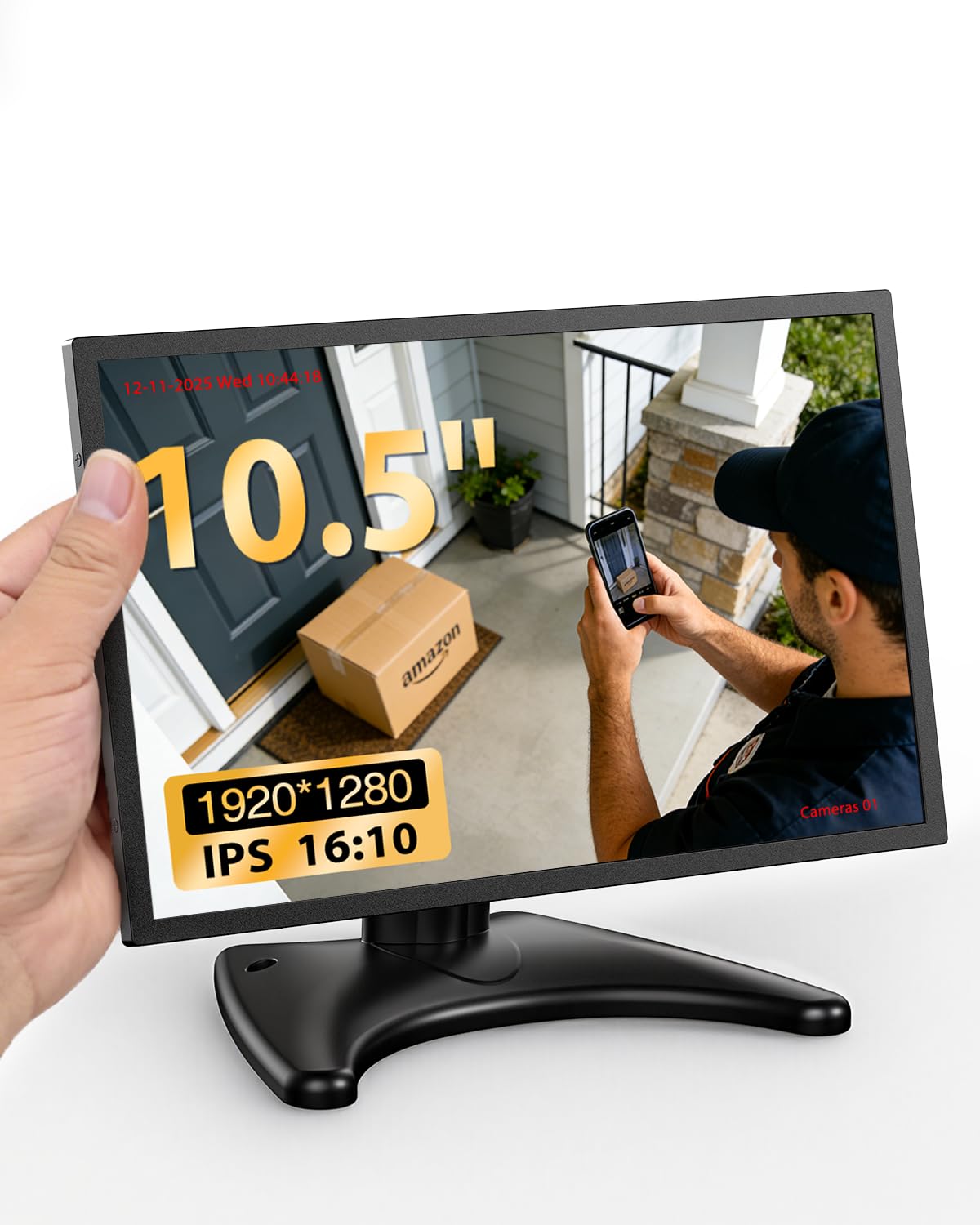
The Miktver punches well above its size class with a native 1920×1280 resolution on a 10.5-inch IPS panel, giving you a pixel density around 215 PPI — that is sharper than most flagship laptops. The 16:10 aspect ratio provides extra vertical space for reading documents or monitoring security camera feeds without scrolling. With a measured brightness of 420 cd/m² and a 1500:1 contrast ratio, this display stays legible even near a window.
The metal chassis vents heat effectively, which matters when the monitor runs 24/7 as a surveillance display. Dual HDMI and VGA inputs mean you can connect a CCTV DVR and a mini PC simultaneously without an external switch. The included moon-shaped stand gives basic tilt, and the VESA 75×75 pattern lets you mount it on a wall or arm for a cleaner install.
For a secondary productivity screen or a dedicated monitoring panel, the Miktver delivers FHD-class sharpness in a footprint that fits almost anywhere. The only trade-off is the slightly recessed button layout that requires a firm press, but the build quality and color reproduction at this size are hard to beat in its price tier.
Why it’s great
- Exceptional 1920×1280 resolution on a compact 10.5″ IPS panel
- Metal housing with VESA 75×75 mount for permanent installation
- 420 cd/m² brightness comfortable in bright rooms
Good to know
- Moon-shaped stand feels light; pressing top buttons can wobble the screen
- HDMI port on some units has a loose fit requiring cable adjustment
2. ROADOM 10.1″ Touch Screen Monitor

The ROADOM 10.1-inch monitor is built specifically for Raspberry Pi enthusiasts who need a native touch interface. Its 1024×600 IPS panel yields a lower PPI than Full HD monitors, but the trade-off is seamless GPIO compatibility — the included 3-pin GPIO cable and mounting kit let you attach a Pi 5/4/3/Zero directly to the rear without an external case. The 178° viewing angle keeps the display readable from the side, and the 300 cd/m² brightness handles indoor workbench lighting well.
Touch response is rated at 3–5 ms with 5-point capacitive support, which makes navigating Klipper interfaces or RetroPie menus feel immediate. Dual built-in speakers, rarely seen on monitors this small, deliver adequate audio for emulation or system feedback without external speakers. The pre-installed screen protector can be removed for better clarity and touch feel — many users report improved responsiveness after peeling it off.
The package includes HDMI, micro HDMI, USB-C to USB-A, and GPIO cables, so you have everything for a Pi setup out of the box. Note that touch is not supported on macOS or iOS, and the USB-C port does not carry video — you must use HDMI plus a separate USB cable for touch and power. For a dedicated Pi workstation or Klipper control panel, this monitor offers the most integrated hardware bundle available at its price.
Why it’s great
- Includes GPIO cable and standoffs for direct Pi mounting on the back
- 5-point capacitive touch with fast 3–5 ms response
- Comprehensive cable kit — HDMI, micro HDMI, USB, and power adapter included
Good to know
- Touch does not work with macOS or iOS devices
- USB-C port is power-only, cannot carry a video signal
3. PeakDo 7″ Portable Touchscreen Monitor

The PeakDo 7-inch monitor prioritizes portability without cutting resolution — the 1920×1080 IPS panel at just 0.37 inches thick and 0.335 lbs makes it the lightest Full HD touch display in this roundup. At 500 cd/m² brightness, the screen remains readable in moderately lit coffee shops or hotel desks. The 2000:1 contrast ratio produces deeper blacks than typical portable monitors, benefiting photo review and video playback on the go.
Touch functionality works with Windows, Android, and Linux via a full-featured USB-C cable that carries both video and touch data in a single connection. The aluminum alloy shell adds rigidity without weight, and dual stereo speakers provide enough volume for casual viewing. The mini HDMI and USB-C DP ports accept input from Switch, PS5, Xbox, laptops, and cameras, making this a flexible companion for both productivity and light gaming on the road.
The main catch is a firmware nuance — the monitor sometimes fails to wake from sleep when the source device shuts down its USB power. Disabling USB power-off in BIOS resolves this, but it is an extra step non-technical buyers should note. For anyone who needs a genuinely pocketable second screen with full 1080p clarity, the PeakDo delivers the highest density of feature per cubic inch.
Why it’s great
- Ultra-slim 0.37″ frame and 0.335 lb weight for true pocket portability
- Full 1920×1080 resolution with 500 cd/m² and 2000:1 contrast
- Single USB-C cable handles power, video, and touch simultaneously
Good to know
- May require BIOS adjustment to wake from sleep after source shutdown
- Speakers are quiet and lack low-end frequency response
4. NEEWER F700 7″ Camera Field Monitor

The NEEWER F700 is built for outdoor video production where sunlight normally washes out LCD screens. Its 2000 nit peak brightness on a 7-inch 1920×1080 IPS panel makes composition and focus checks possible under direct sun — a capability that consumer monitors simply do not offer. The 4K HDMI loop-through port lets you send the camera signal to a director’s monitor while the F700 stays with the operator, and the built-in cooling fan prevents thermal throttling during long takes.
For cinematographers, the preloaded 15 3D LUTs and support for 60 custom LUTs through an SD card slot enable accurate color preview on set. Professional overlays including false color, zebra, waveform, histogram, and vectorscope are all accessible via dedicated F1–F3 shortcut buttons, keeping menu diving to a minimum. The included cold shoe mount rotates 180°, and 1/4″-20 threaded holes on the bottom and side give you multiple rigging positions.
Battery life is strong — two included NP-F750 4400 mAh cells deliver roughly 4.8 hours combined runtime. The monitor also supports DC input and USB-C charging. The only real drawback is weight: with both batteries attached, the unit comes in at 857 grams, which can feel heavy on a small DSLR rig. For filmmakers who need daylight visibility and pro monitoring tools, the NEEWER F700 brings studio-grade functionality into a compact field package.
Why it’s great
- 2000 nit brightness ensures clear visibility in direct sunlight
- 4K HDMI loop-through and 60 custom 3D LUT slots for on-set color grading
- Dual NP-F750 batteries included — over 4 hours of total runtime
Good to know
- Heavy at 857 g with both batteries; may unbalance smaller camera rigs
- Included micro HDMI cable is fragile — plan to replace it with a higher-quality cable
5. KTC 32″ 2K QHD 120Hz Monitor

The KTC 32-inch QHD monitor delivers a native 2560×1440 resolution on an IPS panel with a refresh rate overclockable to 120Hz, making it equally suited for spreadsheet-heavy workflows and casual gaming. At 109% sRGB color gamut with Delta E <2 accuracy, it offers color fidelity that competes with office-grade displays at a significantly lower cost. The 350 cd/m² brightness is standard for indoor use, and Adaptive-Sync support eliminates tearing during motion without requiring G-Sync module licensing fees.
Connectivity includes DisplayPort 1.4 and two HDMI 2.0 inputs, all capable of driving 100Hz at QHD and 120Hz when overclocked via DP. The -5° to 20° tilt adjustment and VESA 100×100 mount give basic ergonomic flexibility, though height and swivel adjustment are absent at this price point. The white chassis is a refreshing alternative to the black monitor monotony, fitting lighter desk aesthetics particularly well.
A known firmware quirk: the on-screen display buttons and settings can become unresponsive after the monitor enters rest mode, requiring an input switch to reset. For the combination of QHD resolution, 120Hz fluidity, and sRGB coverage, the KTC is a compelling choice for budget-conscious users who split time between work and gaming at 32 inches.
Why it’s great
- QHD 2560×1440 IPS panel for sharp text and wide viewing angles
- 120Hz refresh rate with Adaptive-Sync for smooth motion
- 109% sRGB gamut with factory color accuracy under Delta E 2
Good to know
- No height or swivel adjustment — tilt only
- Firmware bug may cause OSD unresponsiveness after sleep mode
6. Dell 27 Plus 4K USB-C Monitor S2725QC

The Dell S2725QC brings true 4K (3840×2160) resolution to a 27-inch IPS panel with a 120Hz refresh rate — a rare combination in the premium office segment. The 1500:1 contrast ratio produces notably deeper blacks than the typical 1000:1 IPS panel, approaching VA-like depth while retaining IPS viewing angles. AMD FreeSync Premium keeps motion smooth during video editing scrubbing or light gaming, and the ultra-low 0.03 ms response time eliminates ghosting for cursor precision.
Connectivity is the standout feature here: a single USB-C cable delivers 4K video, 65W power delivery to charge a laptop, and data pass-through to the built-in USB-A hub. The integrated KVM function lets you control two computers with one keyboard and mouse set. ComfortView Plus reduces blue light below 35% without washing out color, which matters for all-day coding or document work. The adjustable stand offers height, pivot, swivel, and tilt — full ergonomic flexibility out of the box.
For color-critical work, note that the 99% sRGB coverage is excellent for web and office tasks, but falls short of the DCI-P3 gamut needed for professional photo or video editing. The built-in speakers are serviceable for video calls but lack bass for media consumption. If your priority is razor-sharp text, smooth 120Hz motion, and USB-C convenience in a polished package, the Dell S2725QC sets the standard for 27-inch 4K productivity monitors.
Why it’s great
- 4K 120Hz IPS panel with 1500:1 contrast ratio and 0.03 ms response
- USB-C with 65W power delivery simplifies a clutter-free single-cable desk
- Full ergonomic stand with height, pivot, swivel, and tilt adjustment
Good to know
- 99% sRGB is good but lacks DCI-P3 for professional photo editing
- Speakers lack low-end frequency — add external monitors for music or movies
7. INNOCN 49″ Curved Gaming Monitor 49C1G

The INNOCN 49C1G replaces a dual-monitor setup with a single 32:9 ultra-wide VA panel at 3840×1080 resolution, curved at 1800R for an immersive viewing arc. The 144 Hz refresh rate and HDR400 certification make it a productivity beast for financial dashboards, code editors, or timeline-based video work where horizontal space is king. The 3000:1 VA contrast ratio delivers deep blacks that make HDR content pop more than IPS alternatives at this price.
Connectivity is unusually generous: DisplayPort 1.4, HDMI 2.1, USB-C with 65W power delivery, a USB-A hub, a USB-B upstream port, and even an RJ45 Ethernet port. The USB-C single-cable solution charges a laptop while driving the full 144 Hz, keeping the desk tidy. PIP and PBP modes let you display two separate input sources simultaneously, so a work laptop and a gaming PC can coexist on the same screen without a KVM.
The primary limitation is vertical height — at 3840×1080, the screen is only 1080 pixels tall, which feels short compared to two 27″ 1440p monitors stacked. Built-in speakers are adequate for system sounds but lack clarity for media consumption. For users who want to eliminate monitor bezels entirely and prioritize horizontal workspace over vertical real estate, the INNOCN 49C1G is the most cost-effective ultrawide gateway available.
Why it’s great
- 32:9 1800R curved VA panel replaces two monitors with one seamless screen
- 144 Hz HDR400 with 3000:1 contrast for gaming and HDR content
- Extensive port selection including USB-C 65W PD, HDMI 2.1, and RJ45
Good to know
- Vertical resolution is only 1080 pixels — less tall than two 1440p displays
- Built-in speakers are weak; external audio is strongly recommended
FAQ
Can a 20.7 inch monitor replace a standard 24-inch monitor?
Is a 20.7 inch monitor good for gaming?
Final Thoughts: The Verdict
For most users, the 20.7 inch monitor winner is the Miktver 10.5″ because its 1920×1280 resolution, metal chassis, and dual inputs deliver the best blend of sharpness and build quality for productivity or security monitoring. If you need on-screen touch interaction for a Pi project, grab the ROADOM 10.1″. And for a field-grade daylight monitor with professional camera tools, nothing beats the NEEWER F700.