
The jump from 1080p to 4K is a big step in resolution, but the jump from 30 frames per second to 60 frames per second is a completely different kind of upgrade. For anyone who moves naturally on camera—whether you’re presenting, streaming, or teaching—that extra fluidity eliminates motion blur and makes the video feed feel live, not digital. The challenge is that true 4K 60fps capture demands serious hardware, and not every webcam claiming “4K” can actually deliver the frame rate without compromising the image.
I’m Min — the co-founder and writer behind Gadgets Feed. I’ve spent countless hours analyzing lens apertures, sensor sizes, autofocus systems, and frame rate ceilings to separate the real players from the marketing claims in this space.
If you need silky-smooth motion and ultra-HD detail for your workflow, finding the right 4k 60fps webcam means looking past the resolution number and understanding how the sensor, processor, and interface all work together.
How To Choose The Best 4K 60fps Webcam
Choosing a 4K webcam that actually maintains 60 frames per second is not the same as buying a standard 1080p model. The sensor, processor, and connection standard all need to support the data throughput. Here are the three factors that define a true 4K 60fps webcam.
Sensor Size and Pixel Pitch
The sensor is the heart of image quality. A larger sensor (measured in inches, like 1/1.2” or 1/1.3”) can gather more light per pixel, which directly improves low-light performance and color depth. Smaller sensors often struggle to maintain 60fps without introducing digital noise. For a 4K 60fps webcam, look for a sensor at least 1/2.8” in size, but ideally larger if you work in dim lighting.
Autofocus System
Phase Detection Autofocus (PDAF) is the gold standard for webcams at this level because it can lock onto a moving subject instantly without hunting. Time-of-Flight (TOF) sensors complement PDAF by measuring distance for even faster lock-on. Some models use contrast-detect autofocus, which works fine for static scenes but will struggle if you move around a lot. For a 4K 60fps stream, PDAF or hybrid systems are essential.
Connectivity and Bandwidth
True 4K 60fps video requires high data throughput. USB 3.0 is the minimum for uncompressed 4K at this frame rate; USB 2.0 will bottleneck the signal, forcing compression or a drop to 30fps. Models with USB-C are ideal. Some premium PTZ cameras support NDI or PoE for network-based streaming, which is useful for production environments but overkill for a desk setup.
Quick Comparison
On smaller screens, swipe sideways to see the full table.
| Model | Category | Best For | Key Spec | Amazon |
|---|---|---|---|---|
| Elgato Facecam 4K | Studio Webcam | Streamers & Creators | 4K 60fps, Sony STARVIS 2, Prime Lens | Amazon |
| YOLOLIV YoloCam S3 | Streaming Webcam | Image Quality Enthusiasts | 1/1.28″ Sensor, PDAF, All-Aluminum | Amazon |
| OBSBOT Tiny PTZ 4K | PTZ Camera | AI Auto-Tracking | PTZ, AI Framing, 60fps | Amazon |
| OBSBOT Tiny 3 Lite | Compact PTZ | Portable AI Tracking | Tri-Mic Array, 120fps at 1080p | Amazon |
| Insta360 Link 2 Pro | PTZ Camera | Professional Meetings | 1/1.3″ Sensor, Bokeh Mode | Amazon |
| Razer Kiyo Pro Ultra | Pro Webcam | Low-Light Performance | 1/1.2″ Sony STARVIS 2, F/1.7 | Amazon |
| EMEET SmartCam S800 | Streaming Camera | Dual Autofocus Speed | Sony 1/2″ Sensor, PDAF+TOF | Amazon |
| Angetube 4K with AI Tracking | Conference Webcam | Remote Control & Zoom | AI Tracking, 10x Digital Zoom | Amazon |
| FoMaKo K600N NDI PTZ | Professional PTZ | Church & Live Production | 20x Optical Zoom, NDI HX3 | Amazon |
In‑Depth Reviews
1. Elgato Facecam 4K

The Elgato Facecam 4K brings a premium Sony STARVIS 2 CMOS sensor paired with a Prime Lens to deliver true 4K 60fps with exceptional color accuracy. The uncompressed video pipeline means no compression artifacts interfering with the stream, and the dedicated flash memory saves your custom settings directly on the camera. It also supports standard 49mm lens filters, allowing you to mount a CPL or diffusion filter just like a DSLR rig.
In practice, the 4K 60fps output stays smooth and consistent across OBS, Zoom, and Teams, provided you connect it through a high-quality USB-C 3.0 cable. The Camera Hub software gives you full manual control over exposure, white balance, and sharpness, while the all-metal body acts as a heatsink to avoid thermal throttling during long streams. The largest trade-off is the manual focus ring—there is no autofocus, so you need to lock your distance before going live.
This model is best for creators who want a fixed, dialed-in image with DSLR-grade clarity and are comfortable setting up their shot once and leaving it. The lack of AF is a hard stop for anyone who moves around freely while presenting.
Why it’s great
- True uncompressed 4K 60fps with no compression loss
- STARVIS 2 sensor and Prime Lens for vivid, sharp image
- Standard 49mm filter thread for pro lens accessories
Good to know
- Manual focus only — not ideal for moving subjects
- Requires a high-quality USB-C 3.0 direct connection
2. YOLOLIV YoloCam S3

The YoloCam S3 houses what is likely the largest sensor ever put in a consumer webcam at 1/1.28 inches. This sensor size, combined with Phase Detection Autofocus (PDAF), delivers instant zero-lag focus and produces a natural background separation that mimics the look of a DSLR. It captures uncompressed 4K at 30fps or 1080p at 60fps, with a 4x digital zoom that retains crisp detail at 1080p without cropping artifacts.
The all-aluminum body doubles as a massive heatsink, preventing any thermal-induced lag during 24-hour continuous streaming tests. The integrated magnetic mount allows fast orientation switching between landscape and portrait, and the standard 1/4-inch tripod mount works with existing studio gear. The AI-enhanced imaging engine automatically tunes exposure, white balance, and HDR to keep your face properly lit even in mixed lighting environments.
This is the webcam to pick if your top priority is absolute image fidelity with the ability to autofocus quickly. The software suite on Windows offers full manual control, while Mac users have slightly fewer options currently. It also lacks onboard recording, so it is strictly a live-streaming and conferencing tool.
Why it’s great
- Massive 1/1.28″ sensor for superior dynamic range and light capture
- Instant PDAF autofocus locks on moving subjects cleanly
- All-aluminum body prevents overheating during long sessions
Good to know
- No internal SD card recording
- Mac software is less feature-complete than the Windows version
3. OBSBOT Tiny PTZ 4K

The OBSBOT Tiny PTZ 4K combines a physical 2-axis gimbal with Sony’s 1/2.8-inch sensor to deliver smooth 4K video at 60fps with true mechanical pan, tilt, and zoom. Unlike software-based tracking that crops into the image, this camera physically moves to follow you, keeping the full resolution intact. The AI auto-framing and gesture controls (raised hand to track, hand point to zoom) make it a hands-free solution for presenters and educators.
At 30fps, HDR automatically balances highlights and shadows, while switching to 60fps disables HDR to maintain the higher frame rate. The dual omni-directional microphones capture clear voice within a 15-foot radius, and the included carry bag makes it portable enough for road warriors. The OBSBOT Center software provides pro-level controls including auto white balance offset and background blur via NVIDIA Maxine.
This is the best all-around pick for someone who needs both high-resolution conference calls and smooth streaming. The AI tracking is genuinely useful, not a gimmick, and the gimbal design eliminates the crop penalty of digital tracking.
Why it’s great
- Physical 2-axis gimbal provides uninterrupted 4K tracking
- Gesture controls for zoom and tracking activation
- Compact body with included carry bag for travel
Good to know
- Gesture controls can be accidentally triggered by rapid hand movements
- HDR is disabled when shooting at 60fps
4. OBSBOT Tiny 3 Lite
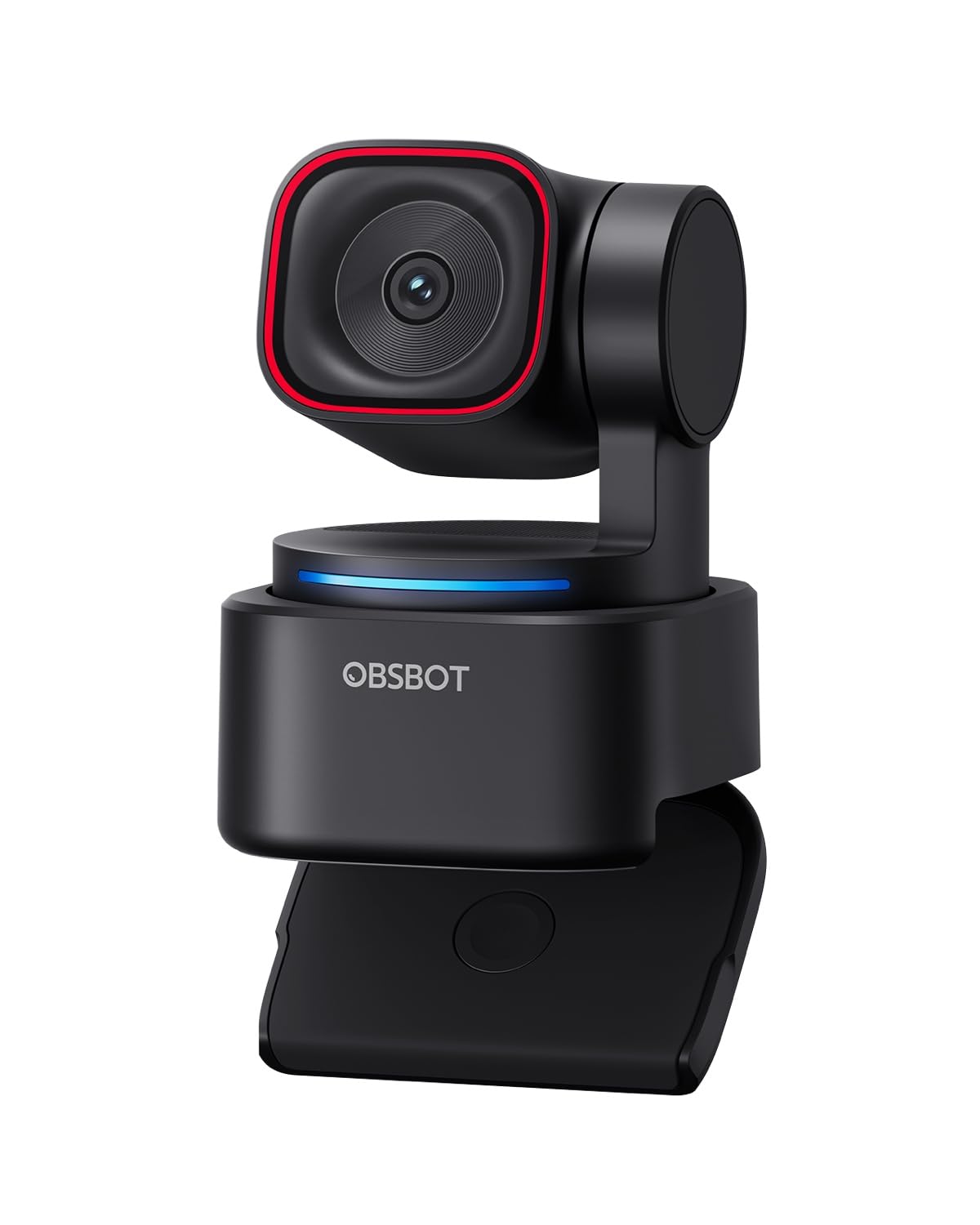
The OBSBOT Tiny 3 Lite packs a 1/2-inch CMOS sensor into a body that is 48% smaller than its predecessor, making it one of the most portable 4K PTZ cameras on the market. It supports 4K at 30fps and 1080p at 120fps, giving you smooth slow-motion options for streaming. The triple-mic array with spatial audio processing picks up voice directionally and filters out background noise better than typical dual-mic designs.
The AI Tracking 2.0 engine can follow not just faces but also over 200 types of objects, which is useful for product demonstrations or whiteboard sessions. Voice control allows you to start tracking, zoom, and switch presets without touching the camera. The software includes Beauty Mode, Background Blur, and Teleprompter, making it a solid choice for content creators who want a small footprint.
Where this camera excels is the combination of size and audio quality. The trade-off is that the 4K 60fps is not available—it delivers 4K at 30fps only—so if 60fps is mandatory, the original Tiny PTZ is a better fit. For most users, however, the 1080p 120fps option is a creative advantage for slow-motion clips.
Why it’s great
- Ultra-compact with professional spatial audio
- 1080p at 120fps for smooth slow-motion streaming
- Voice and gesture control for hands-free operation
Good to know
- 4K is capped at 30fps, not 60fps
- AI tracking occasionally locks onto wrong object in busy scenes
5. Insta360 Link 2 Pro

The Insta360 Link 2 Pro features a 1/1.3-inch sensor that captures 4K video with a natural bokeh effect through software processing, giving your feed a genuine depth-of-field look without needing a DSLR. The dual-mic beamforming system isolates your voice by steering the pickup pattern toward you, reducing background chatter in open offices. The AI tracking uses a physical motorized gimbal to pan and tilt silently as you move around the room.
Specialized modes include DeskView for overhead document capture, Whiteboard Mode for presentations, and a 4K Portrait Mode for vertical streaming on platforms like Twitch or TikTok. The Link Controller software allows fine-tuning of exposure, white balance, and tracking parameters. Elgato Stream Deck integration means you can switch camera presets or trigger tracking modes with a single button press, which is a major productivity boost for multi-camera setups.
This is the best pick for professionals who host meetings, create content, and need a polished aesthetic. The bokeh effect is convincing, the tracking is quiet, and the integration with existing streaming hardware is seamless. The only catch is the lack of ARM-based Windows support at this time and the absence of Windows Hello face recognition.
Why it’s great
- Natural software bokeh for a professional depth-of-field look
- Beamforming mics isolate voice from surrounding noise
- Elgato Stream Deck integration for instant preset switching
Good to know
- Not compatible with ARM-based Windows systems
- No Windows Hello face recognition support
6. Razer Kiyo Pro Ultra

The Razer Kiyo Pro Ultra is built around a 1/1.2-inch Sony STARVIS 2 sensor with a custom F/1.7 aperture lens, making it the best low-light performer in this list. The 2.9-micron pixel size captures more light per pixel than almost any other consumer webcam, resulting in clean, grain-free images even in dimly lit rooms. It outputs uncompressed 4K at 24fps, 1440p at 30fps, or 1080p at 60fps, with HDR available at 30fps for high-contrast scenes.
The onboard processor applies face-tracking autofocus and auto exposure that keeps your face properly lit even if you shift into a shadow. The twist-to-close iris mechanical privacy shutter is a thoughtful security feature. The webcam saves your last settings (including FOV, ISO, and shutter speed) directly to the camera’s internal memory, so your configuration persists across different computers.
Where the Kiyo Pro Ultra stumbles is its software ecosystem on macOS—there is no native Razer Synapse version for Mac, leaving Mac users reliant on third-party apps for full control. On Windows, Synapse 4 has known bugs with saving manual settings to the camera profile. If you are willing to troubleshoot, the hardware is unmatched for low-light environments.
Why it’s great
- Massive 1/1.2″ sensor with F/1.7 lens for exceptional low-light clarity
- Onboard memory saves settings across different PCs
- Twist-to-close iris privacy shutter
Good to know
- No native Razer software support on macOS
- Synapse 4 has reported bugs with saving manual settings on Windows
7. EMEET SmartCam S800

The EMEET SmartCam S800 uses a Sony 1/2-inch sensor with a hybrid autofocus system combining Phase Detection (PDAF) and Time-of-Flight (TOF) sensors, giving it fast and precise focus lock even in low light. It delivers 4K at 30fps and 1080p at 60fps, with HDR available for balancing backlit scenes. The 40-to-73-degree adjustable field of view lets you switch between a tight headshot and a wider group shot.
The dual noise-canceling microphones filter out keyboard clicks and ambient rumble within a 10-foot range. The flexible stand offers both a 44.5-degree horizontal and 45-degree vertical tilt, plus a standard quarter-inch tripod mount for stable positioning. Setup is plug-and-play via USB 3.0 with no driver installation required— it works natively with Zoom, Teams, and Google Meet.
For the price, the image sharpness and autofocus speed rival models costing double. The main reliability concern reported by some users is USB interface failure after extended use, typically on units connected through hubs rather than directly to the motherboard. Connecting directly to a high-power USB port largely resolves this. It is a strong budget-friendly option for anyone who refuses to sacrifice autofocus performance.
Why it’s great
- PDAF + TOF dual autofocus system for instant, accurate focus
- Sony 1/2″ sensor with adjustable FOV from 40° to 73°
- Plug-and-play with no driver required across major platforms
Good to know
- Some long-term units reported USB interface issues when used on hubs
- 4K is capped at 30fps, no 4K 60fps output
8. Angetube 4K with AI Tracking
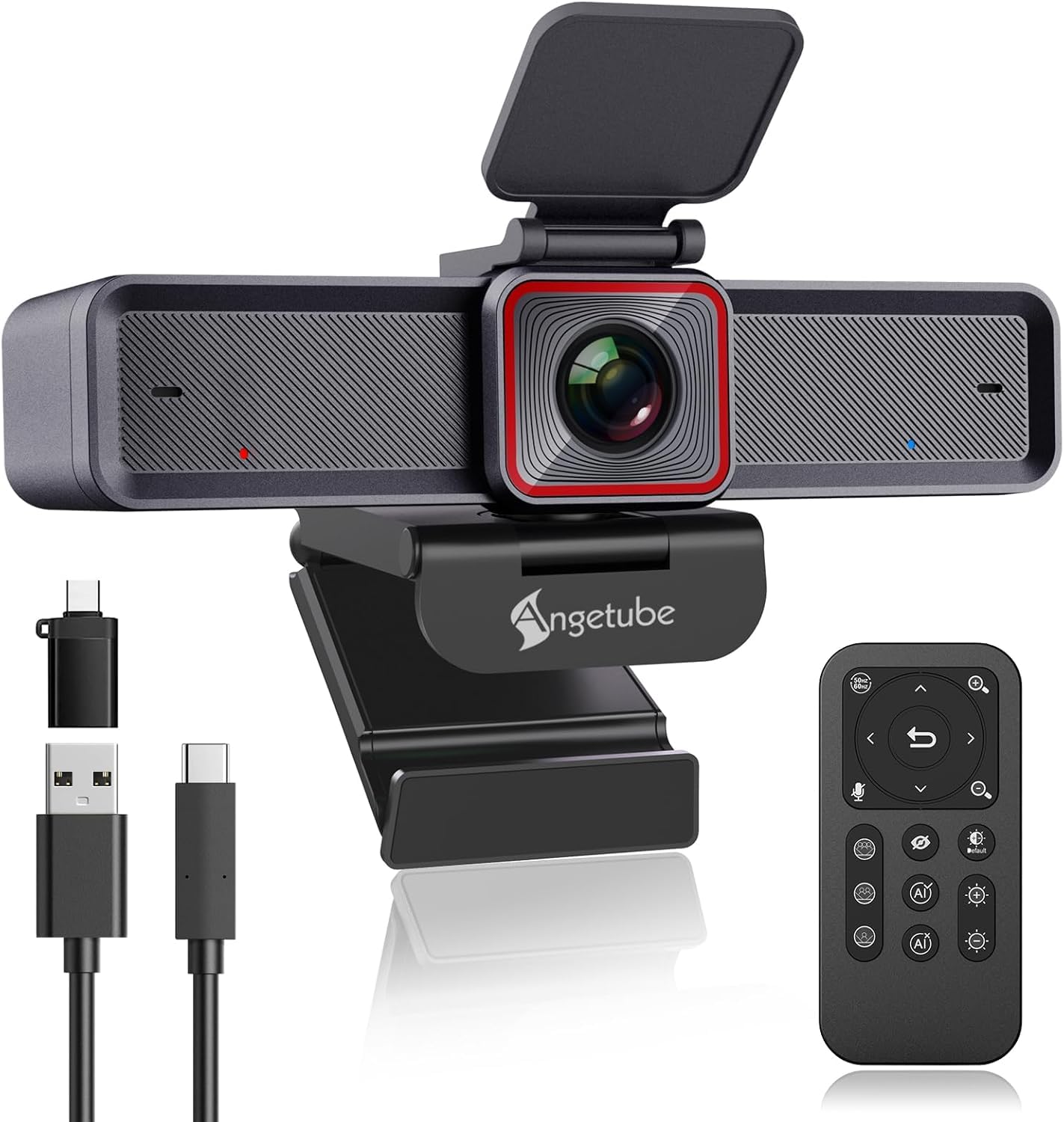
The Angetube 4K webcam offers a 1/2.8-inch sensor capable of 4K at 30fps, but its standout feature is the RF wireless remote control that enables 10x digital zoom and 360-degree operation without any line-of-sight limitation. The AI tracking software frames meetings based on participant count and follows whoever is speaking, which is a practical advantage for conference rooms or dynamic presentations.
It uses an 18-key remote to adjust the field of view between 75, 85, and 100 degrees, toggle the privacy cover, and mute the microphone. The dual noise-canceling microphones filter background noise within 16.4 feet, which is above average for this price tier. The USB 3.0 interface provides the necessary bandwidth for 4K video transfer, and it is plug-and-play with no extra software needed.
The primary trade-off is that the autofocus is not phase-detection, so focus speed is slower than the premium models in this list. For a group meeting around a table, the wide field of view and remote control make it a highly functional choice. It is not ideal for creators who need fast rack focus or low-light performance, but for value-conscious conference setups, it delivers strong results.
Why it’s great
- RF wireless remote for zoom, mute, and tracking control from anywhere
- Adjustable FOV (75°, 85°, 100°) to fit different room sizes
- Dual noise-canceling mics with 16.4 ft pickup range
Good to know
- Autofocus is slower than PDAF-based models
- Digital zoom reduces resolution at maximum magnification
9. FoMaKo K600N NDI PTZ
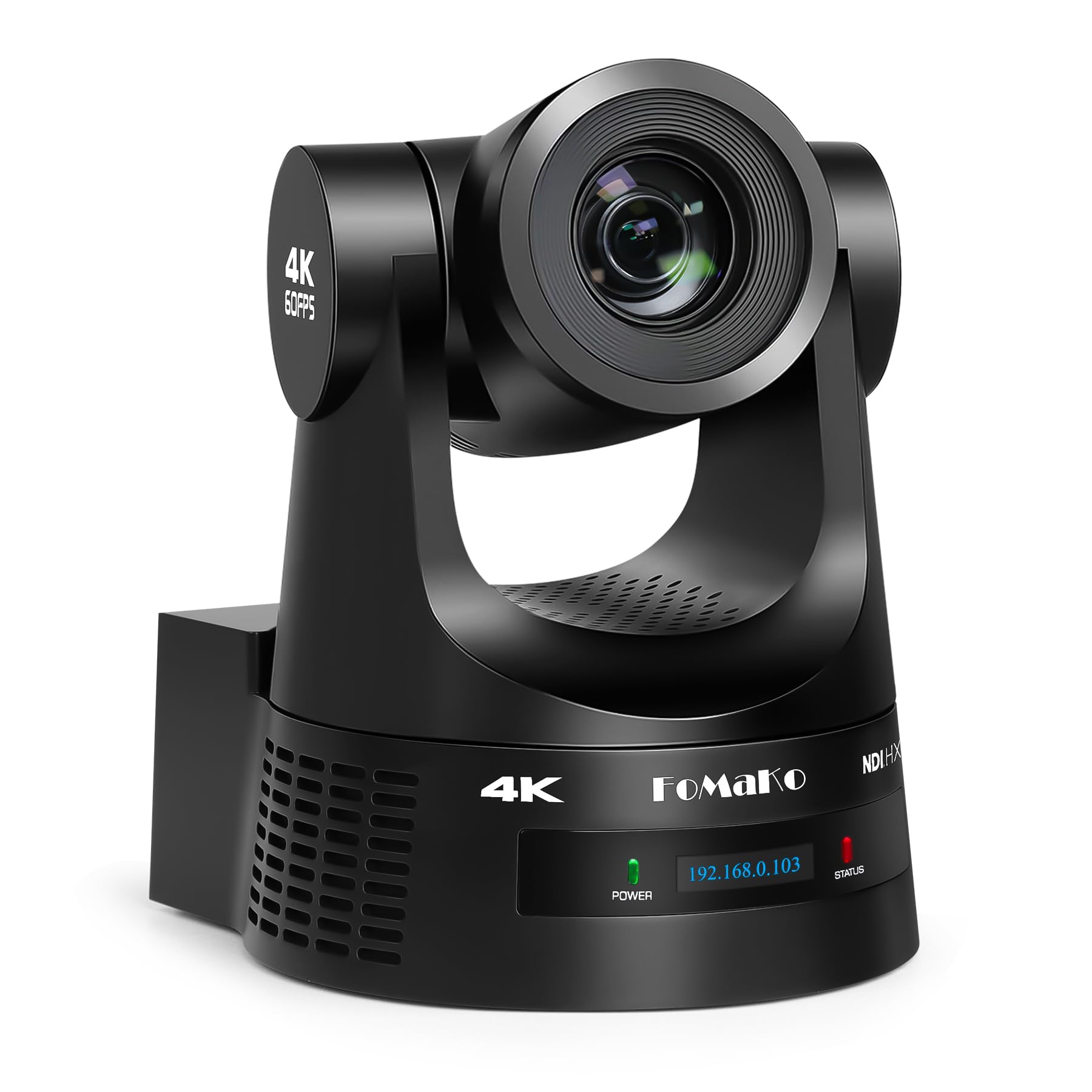
The FoMaKo K600N is a true broadcast-grade PTZ camera that outputs 4K 60fps over HDMI and NDI HX3 simultaneously, with a 20x optical zoom that maintains full resolution at any focal length. This is not a webcam in the traditional sense—it is designed for church worship services, live studio productions, and large conference rooms where a single operator controls multiple camera positions from a switcher.
The third-generation AI auto-tracking allows you to set tracking sensitivity, target figure size, and lost-target recovery behavior. It supports up to 255 presets, with 10 accessible directly from the included IR remote. The camera can be powered over Ethernet (PoE) to reduce cable clutter, and the 3G-SDI output provides a broadcast-ready signal for existing video mixing workflows. It includes a wall mount, USB cable, and power adapter in the package.
This level of hardware requires knowledge of PTZ control protocols (VISCA over IP, RS-232/RS-485) and NDI network configuration. It is overkill for a single-person desk setup but is the correct tool for anyone running a multi-camera live production where 4K 60fps is a hard requirement. The on-screen documentation has some translation quirks, but the hardware itself is robust.
Why it’s great
- 20x true optical zoom with 4K 60fps over NDI HX3 and HDMI
- PoE support for single-cable power and data
- Advanced AI tracking with customizable sensitivity and target parameters
Good to know
- Requires knowledge of PTZ control protocols and network setup
- Documentation has minor translation issues
FAQ
Will a USB 2.0 port support 4K 60fps video from a webcam?
Does autofocus hunting affect the video quality at 60fps?
Final Thoughts: The Verdict
For most users, the 4k 60fps webcam winner is the OBSBOT Tiny PTZ 4K because it balances true 60fps recording with a physical gimbal that eliminates the crop penalty of digital tracking. If you want the absolute best image quality and a massive sensor, grab the YOLOLIV YoloCam S3. And for professional live production with NDI and optical zoom, nothing beats the FoMaKo K600N.