
The quest for a sub- gaming rig is a battleground between raw ambition and cold, hard reality. You aren’t looking for 4K ray tracing at this price point; you’re hunting for a machine that can reliably deliver playable frame rates in esports titles like Fortnite, Valorant, and Roblox without crashing the moment a match starts. This tier is dominated by refurbished business-class workstations from HP, Dell, and Lenovo, retrofitted with some RGB lighting and a fresh coat of Windows—understanding this fundamental fact is the first step to making a smart buy.
I’m Min — the co-founder and writer behind Gadgets Feed. After meticulously analyzing the specifications, customer feedback, and real-world performance data of dozens of refurbished units that fall within this niche budget, I can tell you precisely which configurations offer a fighting chance at a decent gaming experience.
This guide cuts through the marketing noise to help you find the best 250 gaming pc that actually works for the money.
How To Choose The Best 250 Gaming PC
When your budget is tight, every component choice is a compromise. You must prioritize raw gaming capability over aesthetic extras or huge storage. Here is what matters most.
Prioritize a Dedicated Graphics Card
The single biggest mistake is buying a PC with only integrated graphics. An Intel HD 530 or similar chip can barely handle older or less demanding games at low settings. A dedicated GPU like the NVIDIA GT 1030 or AMD Radeon RX 550 is the difference between a playable 60 FPS in Fortnite and a frustrating slideshow. If you can find a unit with an RX 580 or better, you’ve struck gold in this budget range.
RAM and Storage Are Non-Negotiable
8GB of RAM is the absolute minimum for any modern gaming. 16GB is far better for multitasking and prevents stuttering in open-world games. For storage, a 256GB SSD is fine for the OS and a few titles, but a 512GB SSD will save you the headache of constant uninstalling. Prioritize an M.2 drive over a standard SATA SSD for much faster load times. Avoid any unit still using a mechanical hard drive (HDD) as a boot drive.
The Refurbished Reality Check
Almost every PC in this price bracket is a “Renewed” business-class machine. This means it’s a previous-generation office desktop that has been cleaned, tested, and outfitted with some flashy RGB. The core components—Intel 6th or 7th Gen CPUs (like the i5-6500)—are not powerful, but they are adequate when paired with a GPU. The key is ensuring the unit has a reliable motherboard, a decent power supply (PSU), and a seller who backs their product with a warranty.
Quick Comparison
On smaller screens, swipe sideways to see the full table.
| Model | Category | Best For | Key Spec | Amazon |
|---|---|---|---|---|
| HP RGB Gaming Desktop (GT 1030) | Premium Refurb | Entry-Level Dedicated Gaming | GT 1030 2GB / 16GB RAM | Amazon |
| CyberPowerPC Gamer Master | Modern Budget | Latest-Gen Gaming (Over Budget) | RTX 5060 Ti / 16GB DDR5 | Amazon |
| STGAubron (RX 580) | Value Performer | 1080p Gaming | RX 580 16G / 16GB RAM | Amazon |
| STGAubron (RX 550) | Budget Gaming | Light Esports Titles | RX 550 4G / 16GB RAM | Amazon |
| Dell OptiPlex 7040 SFF (512GB) | Mid-Range Specs | High RAM & Storage | 16GB RAM / 512GB SSD | Amazon |
| Lenovo ThinkCentre M700 Bundle | All-in-One Bundle | Whole Setup (Monitor Incl.) | 16GB DDR4 / 256GB SSD | Amazon |
| OKAMUS i5 Gaming PC | Modern Build | Foundation for an Upgrade | M.2 SSD / 4 RGB Fans | Amazon |
| Dell OptiPlex Custom RGB | Value Budget | Basic Daily & Light Gaming | i5-6500 / 8GB RAM | Amazon |
| HP ProDesk RGB Lights | Entry Level | Budget-Friendly Starter | i5-6500 / 8GB RAM | Amazon |
In‑Depth Reviews
1. HP RGB Gaming Desktop Computer (GT 1030)

This is the goldilocks unit for the budget-conscious gamer who wants to actually play games immediately. The inclusion of a dedicated NVIDIA GeForce GT 1030 2GB GDDR5 graphics card is the game-changer here. This single component allows this HP to run esports titles like Fortnite, GTA V, and Valorant at 1080p with playable frame rates, something the majority of similarly priced rivals with integrated graphics simply cannot do.
Backing the GPU is a solid foundation: 16GB of DDR4 RAM is the sweet spot for multitasking, and the 512GB SSD provides ample space for a game library without the constant struggle of uninstalling titles. The Intel Core i5-6500, while a 6th-generation chip, is still a capable quad-core processor for these less demanding workloads. The included RGB lighting system and gaming peripherals are a nice bonus for the aesthetic.
The main risk here is the refurbished lottery; while some units are plug-and-play, reviews mention a small chance of a DOA (Dead on Arrival) unit. The build quality is typical of an older HP office chassis, meaning it is functional but not the most rugged. However, the promise of a 1-year warranty and lifetime tech support adds a layer of security that is rare in this price tier.
Why it’s great
- Includes a dedicated GT 1030 GPU for immediate gaming
- 16GB of RAM is excellent for multitasking
- Comes with a large 512GB SSD for storage
Good to know
- Chassis design is a dated office PC style
- Potential for defects common with refurbished units
2. CyberPowerPC Gamer Master

The CyberPowerPC Gamer Master belongs to a different performance category entirely. It represents the premium, modern building block for high-end gaming. Its heart is an AMD Ryzen 7 8700F 8-core processor and the powerful GeForce RTX 5060 Ti 8GB graphics card, which is capable of 1440p gaming and ray tracing in many titles. This is not a machine that needs to be “good enough”; it is a machine built to conquer current-gen games.
The rest of the specs are equally modern and forward-looking. The 16GB of DDR5 RAM is the latest standard, offering much higher bandwidth than DDR4. The 1TB PCIe 4.0 NVMe SSD provides lightning-fast load times and huge storage from the get-go. Features like integrated Wi-Fi 6, Bluetooth 5.3, and USB-C 3.2 ports are standard, ensuring the case is ready for any modern peripheral. The tempered glass side panel and custom RGB lighting give a truly premium, self-built look.
The trade-off for this performance is, of course, the significant premium. It is an investment, not a bargain bin find. While some users reported minor initial setup issues like needing a driver update, the consensus is that it is a rock-solid performer once dialed in. For anyone whose budget can stretch this far, it is the best path to a hassle-free, high-performance gaming experience.
Why it’s great
- Top-tier gaming performance for modern titles
- Latest DDR5 RAM and PCIe 4.0 SSD
- Excellent build quality and aesthetics
Good to know
- Priced well above a standard budget tier
- Some units may require a BIOS or driver update
3. STGAubron Gaming PC (RX 580)
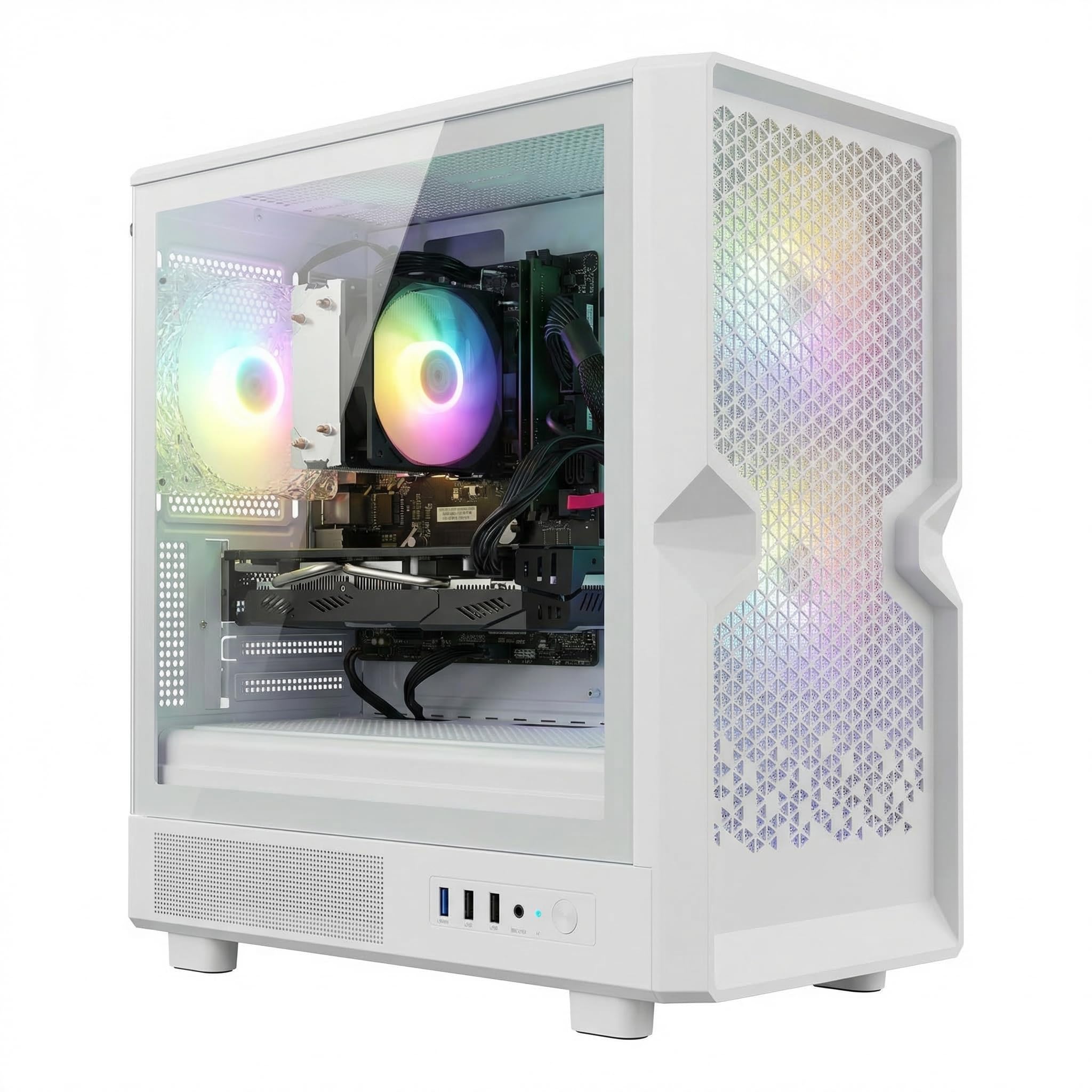
The STGAubron with the AMD Radeon RX 580 is a beast in a lower-mid-range market. The RX 580 16G remains a highly capable 1080p gaming card, capable of running almost any game at medium to high settings, from Call of Duty to Elden Ring. It is paired with an Intel Core i7 processor (up to 3.9GHz), 16GB of RAM, and a 512GB SSD, creating a balanced system that is ready for work and play right out of the box.
The machine targets the “buy it and forget it” consumer. The included Wi-Fi 6, Bluetooth 5.0, and a set of RGB fans mean you don’t need to immediately buy extra components. This white case is eye-catching, and the inclusion of an RGB keyboard and mouse completes the setup. For someone who just wants a system that works and looks the part, this STGAubron delivers excellent value.
The primary concern with any budget prebuilt is component quality and long-term reliability. Some customer reviews mention issues with the GPU driver or fan problems, and the included peripherals are serviceable but not high-end. The warranty from STGAubron seems to be a mixed bag—some users report fantastic support, while others found it lacking. It’s a slight gamble, but the specs for the price are hard to beat.
Why it’s great
- Powerful RX 580 GPU handles 1080p gaming well
- Balanced specs (i7, 16GB RAM, 512GB SSD)
- Includes Wi-Fi 6 and Bluetooth 5.0
Good to know
- Customer support quality can be hit-or-miss
- Included peripherals are budget-friendly, not premium
4. STGAubron Gaming PC (RX 550)
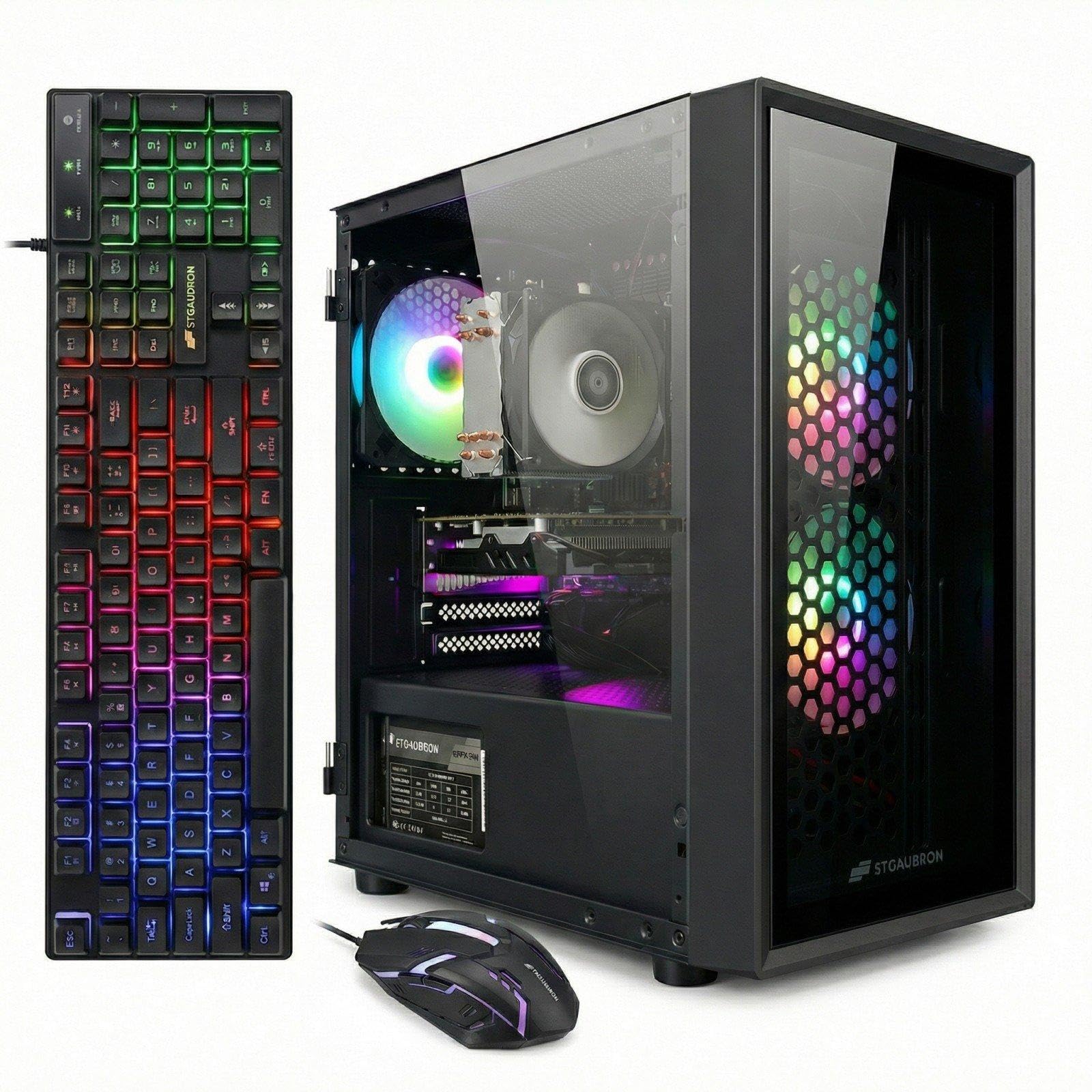
This STGAubron model sits perfectly in the entry-level gaming slot. It features an AMD Radeon RX 550 4GB GPU, which is a step down from the RX 580 but still infinitely better than integrated graphics. It can comfortably run games like Fortnite, Valorant, and Roblox at 1080p with reasonable settings, and even older AAA titles like GTA V are very playable. The Intel Xeon E5 processor might be an older server chip, but its multiple cores handle multitasking well.
The build is a classic budget gaming PC configuration: 16GB of RAM, a 512GB SSD for storage, and an RGB-lit case with three fans to keep things cool. The inclusion of a matching RGB keyboard, mouse, and even a mouse pad gives the buyer a very complete starter kit. It supports Wi-Fi 6 and Bluetooth 5.0, which is great for a tidy, cable-free desk setup.
The biggest caveat is the reliability risk. A non-trivial number of customer reviews report a failure of the dedicated GPU within the first week or two. While the company promises lifetime tech support and a one-year warranty, the process of returning a dead PC is a hassle. If you get a good unit, it is a phenomenal deal. If not, it requires patience with the return process.
Why it’s great
- Dedicated RX 550 GPU for light gaming
- Comes with a full set of matching peripherals
- 16GB RAM and a large 512GB SSD
Good to know
- GPU failure rate appears higher than average
- Xeon E5 CPU is older server tech
5. Dell OptiPlex 7040 SFF (512GB)

The Dell OptiPlex 7040 SFF version represents the best non-gaming office PC you can get for this money, provided you understand its limitations. It relies entirely on its integrated Intel HD Graphics 530, which means it is not a machine for modern gaming. However, for home office work, web browsing, streaming, and light photo editing, it is exceptionally snappy. The 16GB of RAM is a huge boon for multitasking.
The storage solution is a strong point. A 512GB SSD provides far more breathing room than the 256GB drives found in cheaper models. Users report that it handles older or less demanding games like Minecraft and Roblox just fine, and it is an excellent base for adding a low-profile dedicated graphics card later. The included RGB front panel and gaming keyboard and mouse are a fun, budget-friendly touch that makes it feel faster than it is.
The main drawback is the small form factor (SFF) case, which severely limits your future upgrade options. You cannot fit a standard graphics card in here; you would need a specific low-profile slim card. Also, the “renewed” part means you are at the mercy of the previous unit’s wear and tear, with some users reporting drive failures. It’s a fantastic performer within its narrow scope, but not a true “gaming” PC.
Why it’s great
- Excellent amount of RAM (16GB) for daily multitasking
- Large 512GB SSD for fast storage
- Snappy performance for office and web use
Good to know
- Requires a low-profile card for any GPU upgrade
- Integrated graphics are poor for modern gaming
6. Lenovo ThinkCentre M700 Bundle

The Lenovo ThinkCentre M700 bundle is designed for the user who needs a complete, turnkey system. For a single price, you get the small-form-factor desktop, a 24-inch 1080p LCD monitor, a keyboard, a mouse, and even speakers. This removes the guesswork of finding a compatible monitor and getting the cables you need. For a first-time buyer or a parent setting up a child’s first desk, this is incredibly convenient.
The PC itself is a typical refurbished office unit: an Intel Core i5-6500, 16GB of DDR4 RAM, and a 256GB SSD. It is plenty fast for schoolwork, web browsing, and media consumption. While it can handle very light gaming (think indie titles and older classics), the integrated graphics will not run modern shooters. The 16GB of RAM is a welcome upgrade from the standard 8GB, helping with heavy browser tab loads.
The main issues from customer feedback center on the monitor’s quality and the realistic expectations of the setup. Some users report receiving a monitor that uses an older VGA connection rather than HDMI, or a cracked stand. The included keyboard, mouse, and headset are described as basic “cheap” items that you will likely want to replace soon. It’s a fantastic deal for the total package, but not for high-performance gaming.
Why it’s great
- Complete setup with monitor and speakers
- 16GB RAM is great for multitasking
- Compact and space-saving design
Good to know
- Monitor and peripherals are budget quality
- Integrated graphics limit gaming performance
7. OKAMUS i5 Gaming PC
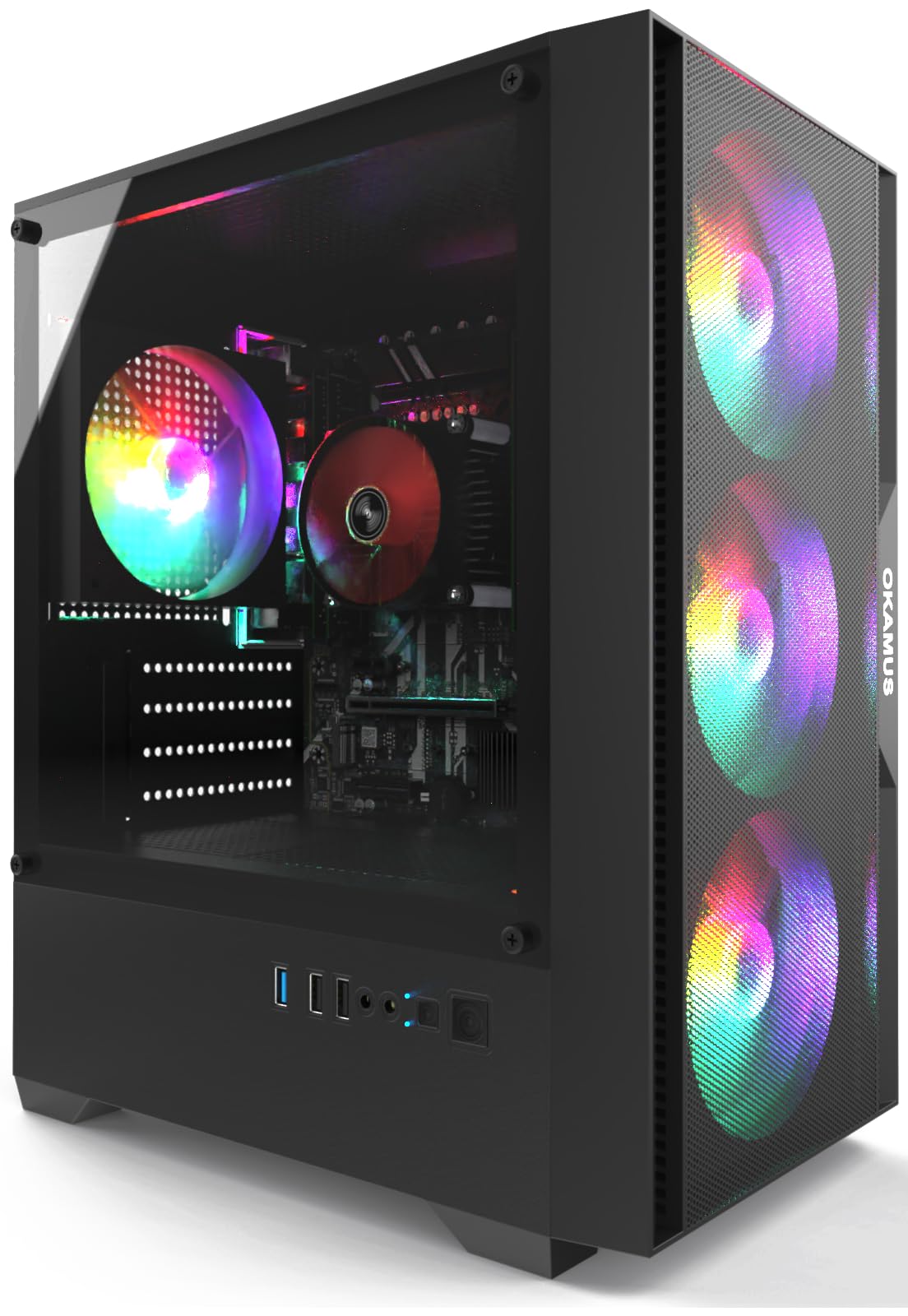
The OKAMUS i5 Gaming PC takes a different approach—it is sold as a modern chassis with a focused foundation. The standout feature is the storage: a 256GB M.2 SSD ensures incredibly fast boot times and game loads. It also includes four RGB fans with a remote, which is a real treat for those wanting a flashy build without the work. The 400W power supply is a solid wattage for adding a low to mid-range dedicated graphics card later.
However, the base specs are still very tight. The 8GB of RAM is the absolute minimum for gaming, and the integrated graphics mean you will need to add a GPU to play anything modern. The Intel Core i5-4570 CPU is a 4th-generation chip, which is noticeably older than the 6th-gen i5-6500 found in many competitors. This older architecture can be a bottleneck in CPU-intensive games.
Customer feedback highlights the typical refurbished gamble. Some units work great out of the box, providing a stable platform for a future GPU. Others have reported a defective motherboard or M.2 SSD that prevents the PC from booting at all. The included remote for the RGB fans is a nice touch. If you plan to immediately add a 1050 Ti or similar GPU, this is a viable greenfield project.
Why it’s great
- Fast M.2 NVMe style SSD storage
- Good case with 4 RGB fans and a remote
- Decent 400W PSU for future upgrades
Good to know
- Only 8GB of RAM
- Older 4th-gen Core i5 processor
8. Dell OptiPlex Custom RGB

The Dell OptiPlex Custom RGB is a classic example of the “gamer-ified” office PC. Its foundation is a solid, workhorse Dell OptiPlex SFF business tower, which is known for its durability. The seller has added an RGB LED light panel to the front and a remote to change the colors, along with an RGB gaming keyboard and mouse. It is an affordable way to get the look of a gaming setup without the performance of one.
The specs are modest but functional for basic tasks. The i5-6500 (3.2GHz) and 8GB of RAM handle office applications, web browsing, and streaming video without issue. The 256GB SSD ensures the system feels snappy for daily use. As the seller notes, this unit has no dedicated graphics card, but you can add a low-profile GPU later. Out of the box, it is for Roblox, Minecraft, and older or less demanding games at low settings.
The biggest complaint from buyers is missing cables and poor build quality control. A recurring issue is the lack of an HDMI port on the PC itself; you must use a DisplayPort adapter to connect a monitor. The Wi-Fi connectivity also seems unreliable for some. It is a very cheap entry point into a desktop PC, but it carries the highest risk of being a “fixer-upper” rather than a plug-and-play experience.
Why it’s great
- Reliable Dell business-class motherboard
- Lowest cost entry point to a desktop PC
- RGB light panel for a gaming look
Good to know
- No HDMI port—requires a DisplayPort adapter
- Potential for missing cables and defective parts
9. HP ProDesk Desktop RGB Lights

The HP ProDesk is the quintessential entry-level machine for the smallest of budgets. It features a standard HP ProDesk small chassis with the now-familiar RGB light strip on the front, creating a nice glow. Inside, the Intel Core i5-6500 and 8GB of DDR4 RAM are the bare minimum for a usable Windows 11 experience. The 256GB SSD is fast enough for the operating system and a few light applications.
Its performance is ideal for a student or as a secondary machine. It handles web browsing, document editing, and video streaming very well for its price. Several users bought this for their children to play Roblox and Minecraft, which run fine on the integrated graphics. The inclusion of a USB Wi-Fi adapter and gaming keyboard and mouse makes it a complete package out of the box. It is very quiet, which is a plus for an office or bedroom setting.
The reviews reveal serious potential downsides. There is a clear lack of quality control, with multiple reports of the PC crashing when any game is launched, or arriving with a weird smell. The biggest omission is the lack of any HDMI or video cable in the box—you must buy a separate monitor cable. The remote for the RGB lights is often reported as non-functional. It is a lottery you might win, but have a return plan ready.
Why it’s great
- Very low cost of entry for a desktop PC
- Comes with a keyboard, mouse, and Wi-Fi adapter
- Quiet operation suitable for a shared space
Good to know
- High risk of receiving a defective unit
- Does not include a monitor cable
FAQ
Can a refurbished office PC actually play modern games?
How much storage do I really need in a budget gaming PC?
What does “Renewed” mean for a gaming PC?
Final Thoughts: The Verdict
For most users, the best 250 gaming pc winner is the HP RGB Gaming Desktop (GT 1030) because it is the only unit in the budget range that includes a dedicated graphics card, 16GB of RAM, and a 512GB SSD, giving you a fighting chance at a real gaming experience immediately. If you want a complete, hassle-free setup with a monitor, grab the Lenovo ThinkCentre M700 Bundle. And for a more powerful 1080p gaming machine that requires a higher budget, nothing beats the performance of the STGAubron (RX 580).