
Running a clean signal over a 30-foot span is the ultimate test for any HDMI cable. Long runs are notorious for introducing signal degradation, random blackouts, and frustrating handshake issues between your source and display. A poorly constructed cable at this length turns a home theater or gaming setup into a troubleshooting nightmare.
I’m Min — the co-founder and writer behind Gadgets Feed. My research for this guide involved cross-referencing dozens of technical datasheets, analyzing customer failure reports, and comparing actual bandwidth performance across copper and fiber optic designs at the 30-foot distance.
After careful analysis of the market, I’ve narrowed down the field to the seven strongest contenders for the best 30 foot hdmi cable, ranking them for signal integrity, build quality, and real-world compatibility.
How To Choose The Best 30 Foot HDMI Cable
Selecting a 30-foot HDMI cable requires a different mindset than grabbing a 3-foot cable from a checkout aisle. At this reach, signal degradation becomes a real risk, and construction quality directly determines whether your picture holds steady or drops out during critical scenes. Here are the key factors to evaluate.
HDMI Version and Bandwidth
HDMI 2.0 cables cap at 18Gbps, which is sufficient for 4K@60Hz with HDR. For 4K@120Hz, 8K@60Hz, or variable refresh rate (VRR) support, you need an HDMI 2.1 cable running at 48Gbps. At 30 feet, only active or fiber optic cables reliably maintain 48Gbps without signal degradation, while standard copper cables at this bandwidth often struggle past 15 to 20 feet.
Passive Copper vs Active Fiber Optic
Passive copper cables rely on conductor gauge and shielding to push the signal across the distance. A 24AWG or 22AWG copper cable can handle 4K@60Hz at 30 feet, but pushing 48Gbps typically requires an active design. Fiber optic HDMI cables use light instead of electricity to transmit data, eliminating electromagnetic interference and maintaining full bandwidth over much longer distances — but they are directional and require correct orientation between source and display.
In-Wall Rating (CL2 vs CL3)
If you plan to run the cable through a wall, ceiling, or conduit, you need a CL2 or CL3 rated cable. These ratings indicate the cable meets fire safety standards for in-wall installation. CL3 is the higher standard, common for commercial installations, while CL2 is acceptable for residential use. Standard HDMI cables without these ratings are a fire hazard when installed inside walls.
Connector Build and Strain Relief
Gold-plated connectors resist corrosion and maintain a clean connection over time, but the physical durability of the connector housing matters more at 30 feet. Look for reinforced zinc alloy or molded strain-relief boots that prevent the connector from pulling loose during installation or cable management. Braided nylon jackets add another layer of protection against kinks and abrasion during wall fishing or routing around furniture.
Quick Comparison
On smaller screens, swipe sideways to see the full table.
| Model | Category | Best For | Key Spec | Amazon |
|---|---|---|---|---|
| Highwings 8K HDMI 2.1 | HDMI 2.1 | Game Console & PC | 48Gbps / 4K@120Hz | Amazon |
| RUBMUD Fiber Optic 8K | Fiber Optic | Long Distance 4K/8K | 48Gbps / Fiber Optic | Amazon |
| BlueRigger 4K HDMI | In-Wall CL3 | In-Wall Installation | 18Gbps / CL3 Rated | Amazon |
| Monoprice 4K Active | Active Copper | Reliable 4K@60Hz | 18Gbps / Active Booster | Amazon |
| StarTech.com 4K HDMI | HDMI 1.4 | Office & 1080p Setups | 10.2Gbps / Gold-Plated | Amazon |
| PowerBear 4K HDMI | Braided Nylon | Budget 4K Daily Use | 18Gbps / Braided Jacket | Amazon |
| grofyllaa 4K HDMI | Entry-Level | Budget Media Streaming | 18Gbps / Gold-Plated | Amazon |
In‑Depth Reviews
1. Highwings 8K HDMI Cable Long 2.1 30FT/9M

The Highwings 8K HDMI 2.1 cable delivers a full 48Gbps of bandwidth over 30 feet, making it the most future-proof passive cable in this roundup. It supports 4K@120Hz with full HDR, VRR, and eARC, which is exactly what modern gaming consoles and PC setups demand. The military-grade tensile nylon braid adds excellent durability, and the upgraded anti-bending tail design prevents connector failure at the stress point — the most common failure location on long cables.
Real-world user reports confirm solid performance with Xbox Series X and PS5 at 4K@120Hz, with no signal drops or handshake issues. The braided jacket is slightly stiff, which helps with cable management but requires careful routing near tight bends. The connector housings are robust and fit snugly, solving the loose-connection problem users reported with cheaper cables.
The Grey color and universal compatibility make it a drop-in solution for most setups. While it is a passive copper cable, the 48Gbps rating at 30 feet is only possible because Highwings uses thicker gauge conductors and high-quality shielding. This is the pick for anyone who needs HDMI 2.1 performance at 30 feet without moving to a fiber optic design.
Why it’s great
- Full 48Gbps HDMI 2.1 bandwidth at 30 feet
- Braided nylon jacket with reinforced strain relief boots
- Supports 4K@120Hz, VRR, and eARC flawlessly
Good to know
- Braided cable is slightly stiff for tight routing
- Not CL3 rated for in-wall installation
2. RUBMUD 8K HDMI 2.1 Cable 30ft, Long Fiber Optic HDMI Cable

The RUBMUD fiber optic HDMI cable is the only fiber optic entry in this selection, and it brings the advantages of light-based transmission to the 30-foot distance. Fiber optic cables eliminate electromagnetic interference entirely, meaning this cable can run alongside power cords without signal degradation. The slim 4.5mm diameter is far thinner than any copper equivalent, making it dramatically easier to feed through conduit or tight wall spaces.
Performance reports from users show flawless 4K@144Hz with G-Sync on high-end PC builds and reliable 8K@60Hz on compatible displays. The directional nature of fiber optic cables requires attention — the SOURCE and DISPLAY ends must be connected correctly, or there will be no signal. The zinc alloy housing and gold-plated connectors withstand over 20,000 bending cycles, which addresses durability concerns some users have with thin fiber cables.
This cable is ideal for running between rooms or from a PC in one area to a TV across the house. The thin profile and superior signal integrity at long distances make it a specialist tool for complex installations. If you are chasing maximum bandwidth at 30 feet or more, this is the technically superior solution. The two-year warranty adds peace of mind for a cable at this price point.
Why it’s great
- Fiber optic transmission eliminates EMI interference entirely
- Extremely thin and flexible for easy wall routing
- Full 48Gbps support for 8K@60Hz and 4K@144Hz
Good to know
- Directional cable — source and display ends are not interchangeable
- Not CL3 rated for in-wall installation
3. BlueRigger 4K HDMI Cable 30 FT

The BlueRigger 4K HDMI cable is built specifically for permanent in-wall installations, carrying a CL3 fire safety rating that meets both residential and commercial building codes. The 24AWG solid copper conductors and 24K gold-plated connectors maintain stable signal transmission across the full 30 feet at 18Gbps, which covers 4K@30Hz with HDR. The cable has a lifespan of over 25,000 bends, which is critical for cables that get pulled through walls and never moved again.
Users consistently report that this cable delivers reliable performance with Apple TV, Roku, PS5, and projectors over long-term use. The thicker construction is noticeable — this is a heavier, more rigid cable than budget alternatives, which makes it harder to maneuver during installation but more durable once in place. The lifetime warranty and US-based customer support are meaningful advantages for an in-wall cable that will be inaccessible after installation.
While this cable is capped at 4K@30Hz rather than 60Hz or 120Hz, that limitation is a function of HDMI 2.0 rather than a flaw in the cable. For home theater setups that only need 4K@30Hz for movies and streaming, this is the most installation-ready option available. The CL3 rating is the deciding factor for anyone who wants to do the job once and pass code inspection.
Why it’s great
- CL3 rated for safe permanent in-wall installation
- 24AWG solid copper with 24K gold-plated connectors
- Lifetime warranty and US-based support included
Good to know
- Limited to 4K@30Hz, not suitable for high-refresh gaming
- Heavy and fairly rigid, harder to route in tight spaces
4. Monoprice 4K High Speed HDMI Cable – Active, 30ft

The Monoprice 4K Active HDMI cable uses an integrated signal booster to maintain 18Gbps bandwidth over its 30-foot length, a design that gives it an edge over passive copper cables when signal integrity is marginal. The CL2 in-wall rating makes it suitable for residential wall installations, and the directional nature of the active electronics means the source and display ends are clearly marked. Users report stable 4K@60Hz performance from gaming PCs to TVs with no visible artifacts.
Several user reports note that this cable delivers true 4K resolution from a computer to a television without signal dropouts, though one user experienced issues with PS4 Pro at 4K + HDR, which Monoprice acknowledged as a compatibility limitation. The included angle adapters are a thoughtful addition for wall-mounted TVs where space behind the panel is tight. The 24AWG gauge provides solid conductor thickness for the distance.
This cable is a strong choice for anyone who wants CL2-rated in-wall compliance with active signal boosting but does not need HDMI 2.1 features. It hits a reasonable sweet spot for 4K@60Hz setups in home theaters or conference rooms. Just verify your source device compatibility before running it through walls, especially for console gaming at 4K with HDR enabled.
Why it’s great
- Active signal booster ensures reliable 18Gbps at 30 feet
- CL2 rated for residential in-wall installations
- Includes angle adapters for wall-mounted TVs
Good to know
- Known compatibility issues with PS4 Pro at 4K+HDR
- Directional cable — must install in correct orientation
5. StarTech.com 30 ft High Speed HDMI Cable

StarTech.com is a known quantity in the professional AV and IT space, and their 30-foot HDMI cable reflects that reputation with consistent build quality and detailed documentation. This is an HDMI 1.4 cable, meaning it supports up to 4K@30Hz at 10.2Gbps, but it does not handle 4K@60Hz or HDR. The gold-plated contacts and solid construction are designed for reliable long-term use in office environments, conference rooms, or educational settings where 1080p or 4K@30Hz is sufficient.
User feedback emphasizes the cable’s sturdiness and consistent performance with projectors, laptops, and desktop monitors at 2560×1440 and 1080p resolutions. The documentation and warranty from StarTech are best-in-class, which matters for corporate or institutional buyers who need accountability. The 28AWG gauge is thinner than the 24AWG cables in this list, but at 10.2Gbps, the signal load is lower and less prone to degradation.
While this cable is not the right choice for 4K HDR gaming or modern media streaming, it is a perfectly competent option for standard office AV setups. The price lands firmly in the premium range relative to its specs, reflecting the brand’s professional positioning and warranty support. Buy this for the reliability and documentation if your resolution needs are modest.
Why it’s great
- Professional-grade build quality with excellent documentation
- Gold-plated contacts resist corrosion over time
- Suitable for 1080p and 4K@30Hz office installations
Good to know
- HDMI 1.4 only — no 4K@60Hz, no HDR support
- Premium price for a non-premium spec level
6. PowerBear 4K HDMI Cable 30 ft
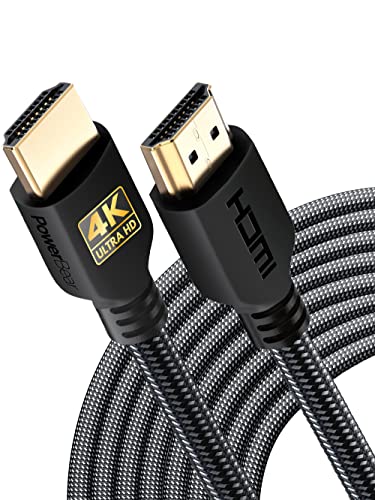
The PowerBear 4K HDMI cable hits a competitive sweet spot between affordability and quality, offering a braided nylon jacket and gold-plated connectors at a budget-friendly price. It supports 18Gbps bandwidth with 4K@60Hz, HDR, and ARC, covering the needs of most streaming and standard gaming setups. The 30AWG copper wire with triple tin shielding provides adequate protection against interference for typical home theater runs.
Users confirm the cable works reliably after 18 months of in-wall use, with clear 4K images and no signal degradation. The braided nylon construction prevents tangles and adds a noticeably premium feel for the price tier. One user noted the cable is not HDMI 2.1 capable, which is accurate — this is an HDMI 2.0 cable, so it will not support 4K@120Hz or 8K. The 0.24-inch thickness is manageable for routing but not as thin as fiber optic alternatives.
This is an excellent pick for everyday use cases: connecting a streaming box, Blu-ray player, or older gaming console to a TV 30 feet away. The combination of braided durability and stable 4K@60Hz performance at this price point is hard to beat. Just verify you do not need HDMI 2.1 features before purchasing.
Why it’s great
- Braided nylon jacket at a very accessible price point
- Reliable 4K@60Hz with HDR and ARC support
- Proven long-term performance in in-wall installations
Good to know
- HDMI 2.0 only — no 8K or 4K@120Hz support
- 30AWG conductors are thinner than the 24AWG cables
7. grofyllaa 4K HDMI Cable 30FT
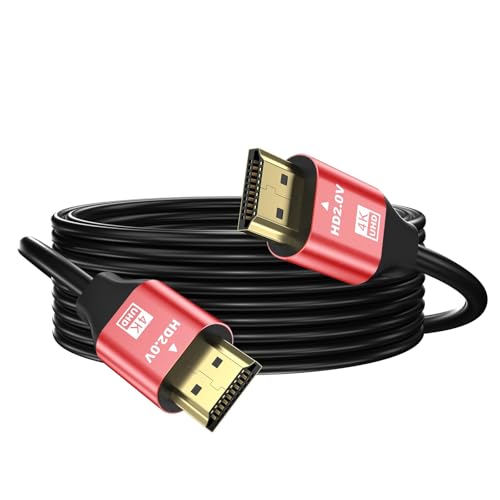
The grofyllaa 4K HDMI cable is the entry-level option in this roundup, offering 18Gbps bandwidth with 4K@60Hz and 2K@120Hz at the lowest price point. It supports HDCP 2.2 and 2.3, ARC, and backward compatibility with older HDMI standards. The gold-plated connectors and basic molded construction are standard for this tier, and the red color makes it easy to identify in a cable bundle.
User reviews are mixed but lean positive — most users find it works well for basic Blu-ray players and laptop-to-TV connections at 10 to 30 feet. However, one user reported that an unshielded unit caused random disconnects when placed near other cables, though a replacement unit resolved the issue. This indicates possible quality control inconsistency at this price tier. The cable is not braided and has no CL rating for in-wall use, making it strictly for open-air installations.
For the price, this cable handles standard 4K streaming and media playback adequately. The value proposition is clear if you need a 30-foot cable for a simple setup and are willing to accept the possibility of QC issues. If your run passes near power cables or other electronic interference sources, consider spending more on a shielded option.
Why it’s great
- Most affordable 30-foot HDMI cable option
- Supports 4K@60Hz and 2K@120Hz for gaming
- Full backward compatibility with older HDMI versions
Good to know
- Unshielded design can cause dropouts near power cables
- Quality control inconsistent between units
FAQ
Can a 30-foot HDMI cable deliver 4K@120Hz without signal loss?
What is the difference between CL2 and CL3 rated HDMI cables?
Why do some 30-foot HDMI cables have a directional arrow?
Will a 30-foot HDMI cable work with my PS5 or Xbox Series X?
Final Thoughts: The Verdict
For most users, the best 30 foot hdmi cable winner is the Highwings 8K HDMI 2.1 because it delivers full 48Gbps bandwidth in a durable braided design at a reasonable price, supporting 4K@120Hz for gaming and HDR movies without moving to fiber optic. If you need the absolute best signal integrity for runs near power cables or across rooms, grab the RUBMUD Fiber Optic 8K HDMI cable. And for permanent in-wall installations where building code compliance matters, nothing beats the BlueRigger 4K HDMI CL3 rated cable.