
A PC without internal lighting feels incomplete, but slapping a cheap flexible LED strip inside a tempered-glass case often results in a mess of exposed hot spots, weak adhesive, and a chaotic tangle of cables. The real challenge is finding a strip that delivers a smooth, diffused neon glow, integrates cleanly with your motherboard’s ARGB ecosystem, and stays put without drooping or buzzing.
I’m Min — the co-founder and writer behind Gadgets Feed. I’ve spent hundreds of hours pouring over technical specifications, reading through long-term user reports, and comparing the connector types, LED densities, and diffusion quality of every major ARGB light strip on the market to separate the truly great from the merely flashy.
After analyzing dozens of models across different price tiers, these are the only strips I would personally trust inside my own build. If you want a build that looks clean both day and night, you have come to the right place to find the absolute best argb light strip for pc.
How To Choose The Best ARGB Light Strip For PC
Not all RGB strips are created equal. The ARGB light strip you choose will determine whether your build looks like a professional showpiece or a teenager’s first mod. You need to focus on three areas: the physical form factor and mounting, the LED density and diffusion quality, and the electrical compatibility with your specific motherboard.
Rigid Bar vs. Flexible Strip: Which Form Factor Fits?
Flexible strips (like those from BTF-LIGHTING) work best for wrapping around corners or hiding behind a monitor desk. Inside a PC case, a rigid aluminum-housed light bar (like the Airgoo Neon Strip or the GIM KB-14) provides a cleaner look with stronger magnetic mounting and a built-in diffuser that eliminates the “disco dot” effect. If you want a seamless neon tube appearance, choose a rigid bar. If you need to snake lighting around a non-standard space, choose a flexible strip.
LED Density and Diffuser Quality
The number of LEDs per inch directly determines how smooth the color transitions look. Strips with fewer than 30 LEDs per foot often show individual dots when placed close to the glass side panel. Look for a strip that uses a milky white diffuser (acrylic or silicone) rather than a clear one. The Airgoo Neon Strip, for example, uses an acrylic plastic diffused shade that spreads the light evenly, while the Corsair iCUE PSU Cable Strips use a silicone tube for a soft glow.
Connector and Voltage Compatibility
This is the most expensive mistake you can make. Every ARGB strip in this guide uses a 5V 3-pin connector (+5V, DATA, GND). Never plug a 5V strip into a 12V 4-pin RGB header (12V, G, R, B) — doing so will instantly destroy the LEDs. Check your motherboard manual to confirm you have a 5V ARGB header, or use an external ARGB controller (like the Airgoo AG-DRGB16) that accepts 5V input and provides additional ports.
Quick Comparison
On smaller screens, swipe sideways to see the full table.
| Model | Category | Best For | Key Spec | Amazon |
|---|---|---|---|---|
| Airgoo AG-NEON-DLS30-1 | Mid-Range | Rigid neon bar with magnetic mount | 30 LEDs, 11.8in, Aluminum alloy housing | Amazon |
| BTF-LIGHTING WS2812B 4-Pack | Mid-Range | Flexible strips for custom routing | 4 x 19in strips, individually addressable | Amazon |
| GIM KB-14 | Mid-Range | Mini rigid bar for tight spaces | 0.98ft, 2-way control (hub or motherboard) | Amazon |
| Speclux 2-Pack ARGB Strip | Mid-Range | Value 2-strip kit with remote | 42 LEDs per strip, magnetic + adhesive | Amazon |
| AsiaHorse Lightsaber-X | Premium | Motherboard-mounted diffused bar | 28 LEDs split across 2 bars (ATX 11.8in) | Amazon |
| Sirlyr PSU Cable Sleeves | Premium | RGB sleeves for PSU cables (GPU + ATX) | 80+81 LEDs, flexible silicone sleeves | Amazon |
| Corsair iCUE PSU Cable Strips | Premium | High-density diffused PSU cable lighting | 2x 200mm strips, 100 RGB LEDs each | Amazon |
In‑Depth Reviews
1. Airgoo AG-NEON-DLS30-1

The Airgoo Neon Strip is the single best balance of build quality, brightness, and clean diffusion in the sub- range. Its aluminum alloy housing encases 30 individually addressable LEDs behind a milky acrylic diffuser, producing a smooth neon tube effect with zero hot spots — exactly what you want when the strip is visible through a glass side panel. Magnetic mounting makes installation tool-free on any steel surface, and the 5V 3-pin connector works with Asus Aura, MSI Mystic Light, and Gigabyte RGB Fusion without adapters.
Users report that the strip is extremely bright — bright enough that many dial it down to 50% in software to avoid washing out the rest of the case. The cable length is generous (long enough to reach a bottom-mounted ARGB header in a mid-tower), and the color accuracy and transition smoothness are on par with strips costing twice as much. Owners of NZXT H3 Flow and Lian Li cases have praised how easily it fits in the narrow vertical slot between the motherboard tray and the rear fan.
For users with more than one ARGB device, Airgoo sells the AG-DRGB16 controller separately, which adds 16 independent ports and full SignalRGB compatibility — a worthwhile upgrade for complex layered lighting setups. The only real limitation is that this is a single 11.8-inch bar, so if you want lighting on both sides of the case, you will need to buy a second unit.
Why it’s great
- Super bright, smooth neon diffusion with no visible individual LEDs.
- Sturdy aluminum housing with strong magnets — no adhesive peeling over time.
- Works flawlessly with Asus Aura, MSI Mystic Light, OpenRGB (Linux), and SignalRGB.
Good to know
- Only one bar per purchase; you may need two for full case coverage.
- Controller not included (recommend AG-DRGB16 for multi-device setups).
2. BTF-LIGHTING WS2812B 4-Pack

If you need flexible strips that can wrap around a fan hub, run along the bottom edge of the case, or hide behind a PSU shroud, the BTF-LIGHTING WS2812B 4-pack delivers four 19-inch individually addressable strips at a price that undercuts most single-bar solutions. Each strip uses the widely compatible WS2812B IC, meaning your motherboard software (Aura Sync, Mystic Light, or Razer Synapse 3.0) will recognize it immediately for full effects like rainbow wave, music sync, and comet trails.
The adhesive backing is adequate for most steel and plastic surfaces, though multiple long-term users note that the connector area at the end of the strip can weigh it down over time — a small piece of double-sided tape fixes this easily. Pay close attention to the wiring: you must use the included splitter cable rather than attempting to wire all four strips in a single daisy chain, or the voltage drop at strip 4 will cause it to remain dark. The strips are IP30 rated (non-waterproof), so they are strictly for interior PC use.
Color reproduction is rich and vibrant, with the brightness often requiring a reduction to 50% in software to avoid glare. The ability to cut the strip at designated cut points makes this the most customizable option for non-standard case layouts. If you want a flexible solution that gives you plenty of spare material, this kit is the hands-down budget champion.
Why it’s great
- Four long strips included — plenty of length for any mid-tower or full-tower case.
- Cuttable every few LEDs for custom sizing.
- Works seamlessly with Razer Synapse 3.0 and game sync effects.
Good to know
- Must use splitter; wiring 4 strips in series causes voltage drop.
- Adhesive at the connector ends can weaken over time (easily fixed with extra tape).
3. GIM KB-14

The GIM KB-14 is the shortest rigid bar in this lineup at just 0.98 feet, making it the ideal choice for filling a specific narrow gap — between the motherboard and the rear fan, above the PSU shroud, or inside a mini-ITX case where space is at a premium. Despite its small size, it packs a punch in brightness: users consistently describe it as “super bright,” with smooth color transitions and no visible individual LEDs thanks to its rectangular diffuser housing.
Mounting is handled by magnets on both sides of the bar, and they hold securely — no adhesive required. The strip supports two control methods: connection to a GIM RGB hub via a 4-pin header for those running GIM fans, or direct connection to a 5V 3-pin motherboard ARGB header for standalone use. Users have successfully synced it with Asus Aura, MSI Mystic Light, and even Corsair iCUE via custom adapters, though pairing with iCUE requires a third-party adapter cable.
The rigid construction means you must measure your placement carefully before sticking it down, as there is no bending around corners. In mid-tower cases like the NZXT H510, it fits perfectly in the vertical gap behind the motherboard tray. If you need a compact accent light that integrates with an existing fan ecosystem, this is your best bet.
Why it’s great
- Very compact — fits in tight gaps where longer bars won’t.
- Strong magnets on both sides hold securely without tape.
- Works with GIM RGB hub or direct motherboard ARGB header.
Good to know
- Rigid bar — cannot be bent to fit non-linear spaces.
- May require adapter cable for iCUE support.
4. Speclux 2-Pack ARGB Strip
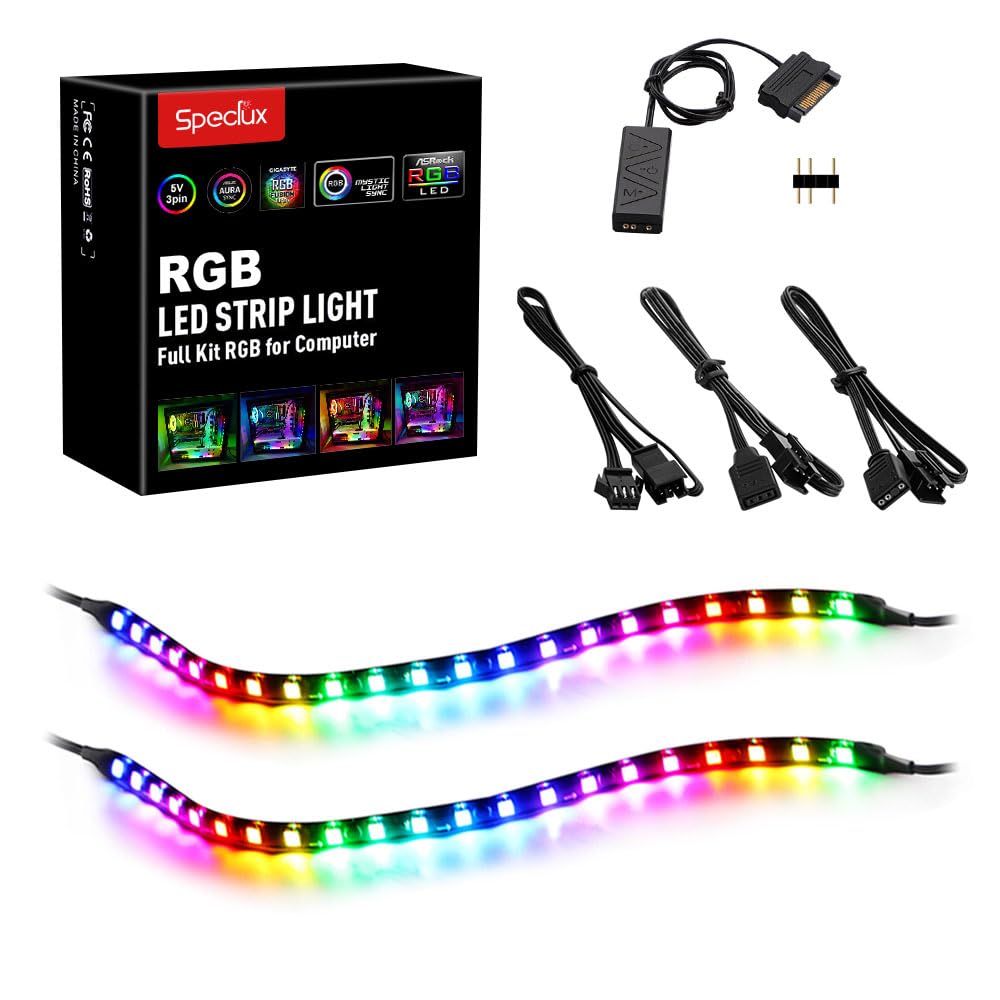
The Speclux 2-Pack offers a complete ARGB lighting kit with two 33-inch strips, a remote control, extension cables, and a 5V SATA power cable — everything you need to light up a full tower without buying extras. Each strip houses 42 individually addressable LEDs, providing ample brightness for a dramatic interior glow. The kit includes both magnetic backing and double-sided adhesive, giving you mounting flexibility for steel and non-steel surfaces alike.
Compatibility spans Asus Aura Sync, Gigabyte RGB Fusion, MSI Mystic Light, and ASRock Polychrome Sync, so it will work with virtually any modern motherboard. Users particularly praise the 5-level dimming in static mode and adjustable speed in dynamic mode, which allows fine-tuning of effects like breathing, wave, and color cycle. The remote control is a nice bonus for those who want to switch effects without opening software.
The most common criticism is that the magnets are weaker than competing products — several users report that the strips sag over time unless supported by the adhesive backing. A few isolated reliability issues (dead LEDs after 9 months) were resolved by warranty support or software updates. For the price, you get a well-equipped kit that delivers bright, true-color ARGB lighting for a clean build.
Why it’s great
- Complete kit with remote, extensions, and SATA power cable.
- Two long strips offer full coverage for large cases.
- 5-level dimming and adjustable speed for custom effects.
Good to know
- Magnets are weak — rely on the adhesive backing for secure mounting.
- Occasional quality control issues reported (customer support responsive).
5. AsiaHorse Lightsaber-X

The AsiaHorse Lightsaber-X is designed specifically to mount directly onto the motherboard itself, sitting on the standoffs near the bottom edge to create a clean under-glow effect for the GPU and chipset area. The kit includes two bars (one 11.8-inch for ATX, one 9.6-inch for mATX), with a combined total of 28 individually addressable LEDs. The diffusion is decent — LEDs are spaced to allow smooth color flow — but some users note that the front-facing diffusion could be more even, with minor hot spots visible in static white mode.
Installation is tool-free: place the strips on the standoffs, connect the single 5V 3-pin ARGB cable, and screw the motherboard down on top. The integration with Asus Aura Sync, MSI Mystic Light, and SignalRGB is flawless, and the bars are bright enough to illuminate the entire lower half of the case. Users have reported that the bars add a subtle, professional outline that looks particularly good in all-ARGB builds where every component is already lit.
There are two notable downsides. First, the cable connecting the two bars uses a thin wire that can pinch at the connection point if not routed carefully — a handful of units arrived DOA due to this issue. Second, the LED-to-LED spacing near the edges can cause some effects (like chasing) to skip a beat visually. For static or gradient colors, the Lightsaber-X is outstanding; for complex animated effects, a more diffused bar like the Airgoo is superior.
Why it’s great
- Unique motherboard under-glow placement — frees up case space.
- Tool-free installation directly onto motherboard standoffs.
- Compatible with Aura Sync, Mystic Light, and SignalRGB.
Good to know
- Thin connecting wire can pinch at the LED bar junction — route carefully.
- Front diffusion could be more even; hot spots visible on static white.
6. Sirlyr PSU Cable Sleeves
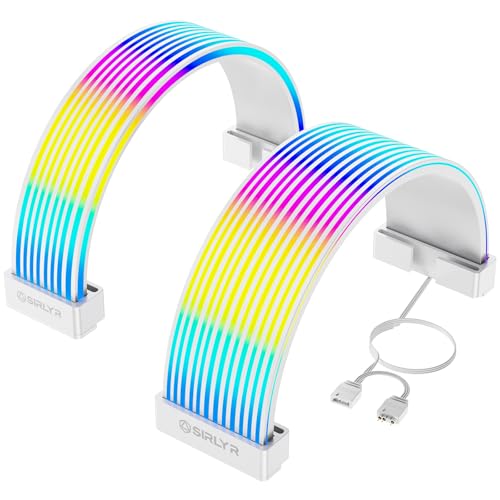
The Sirlyr PSU Cable Sleeves are a completely different approach to PC lighting: instead of a rigid bar or adhesive strip, these flexible silicone sleeves wrap around your existing PSU cables (24-pin ATX, 8-pin PCIe/12VHPWR GPU) to transform them into glowing light channels. Each set contains one long strip for the 24-pin cable (81 LEDs) and one for the GPU cable (80 LEDs), totaling 161 individually addressable LEDs that wrap 360 degrees around the cables.
The silicone material is soft and pliable, allowing you to bend the sleeves around tight cable routing channels without stress. Included cable combs (in three sizes) keep the individual wires organized and the sleeve flush against the cable bundle. Installation is genuinely tool-free — clip the sleeve onto the cable, attach the combs, and plug the single 5V 3-pin ARGB connector into your motherboard header. The result is a clean, uniform glow that hides the messy PSU cables completely.
Color reproduction is excellent, with smooth transitions and no visible shadowing due to the high-density LED layout. Users report that the sleeves integrate perfectly with Aura Sync and Mystic Light, though they cannot be daisy-chained with other ARGB components without a hub. The price is higher than a standard strip, but for builders who prioritize a clean, cable-free interior, this is the most visually impressive upgrade you can make.
Why it’s great
- Hides and lights up PSU cables for a pristine interior look.
- Flexible silicone with 360-degree bend — fits any cable routing.
- 161 LEDs total provide dense, shadow-free illumination.
Good to know
- Higher price than standard strips; aimed at aesthetic-focused builds.
- Cannot daisy-chain with other ARGB devices without a hub.
7. Corsair iCUE PSU Cable Strips

Corsair’s iCUE PSU Cable Strips are the densest lighting option in this guide: two 200mm silicone tubes, each packed with 100 individually addressable RGB LEDs. That density creates an incredibly smooth, diffused glow with zero visible pixels — the silicone material scatters the light so evenly that the entire strip looks like a single glowing tube. They fit over any PSU cable (24-pin ATX or 8-pin PCIe) using included clips of varying sizes.
Out of the box, these strips can connect to a motherboard 5V ARGB header for basic control, but the real magic happens when you pair them with a Corsair iCUE controller (sold separately). iCUE enables per-LED custom effects, synchronized lighting with other Corsair devices (fans, RAM, AIO), and music-reactive modes. The build quality is typical Corsair — premium silicone, solid clips, and a 2-year warranty.
The most significant catch is that the controller is not included, which adds to the total cost. Additionally, the strips are 200mm long, which some users find shorter than expected for full-length PSU cable coverage on an extra-large 1000W+ power supply. A few units have arrived with the box opened or missing clips, though the strips themselves work perfectly. For iCUE loyalists building a showpiece, this is the net best option for a diffused, software-controlled glow.
Why it’s great
- Extremely high LED density (100 per strip) for the smoothest diffusion.
- Full iCUE integration for per-LED custom effects and sync.
- Premium silicone build with 2-year warranty.
Good to know
- iCUE controller sold separately — adds to total cost.
- 200mm strips may be short for very large PSU cables; measure first.
- Some packaging quality issues reported (opened boxes, missing clips).
FAQ
Can I connect an ARGB light strip to a 12V RGB header?
How do I sync multiple ARGB strips from different brands?
Will a magnetic ARGB strip stay attached to a glass side panel?
What does “individually addressable” mean for an ARGB strip?
Final Thoughts: The Verdict
For most users, the best argb light strip for pc is the Airgoo AG-NEON-DLS30-1 because it combines rigid aluminum build quality, smooth acrylic diffusion, and strong magnetic mounting at a price that undercuts most premium alternatives. If you need a flexible strip for custom routing around a non-standard case layout, grab the BTF-LIGHTING WS2812B 4-Pack. And for a showpiece build where you want every PSU cable transformed into a glowing light source, nothing beats the Sirlyr PSU Cable Sleeves.