
That shoebox of old 35mm negatives and dusty slides isn’t a liability—it’s a goldmine of memories waiting to be unlocked. The problem is that a flatbed scanner struggles with the small format, and professional lab services charge a premium per frame that adds up faster than you’d think. A dedicated 35mm film and slide scanner is the only way to get high-resolution digital copies of your family history without spending a fortune or mailing off irreplaceable originals.
I’m Min — the co-founder and writer behind Gadgets Feed. I’ve spent dozens of hours analyzing the optical sensors, DPI ratings, dynamic range, and software ecosystems of the top dedicated film and slide scanners on the market to find the ones that actually deliver crisp, color-accurate scans without endless manual tweaking.
Whether you are digitizing a handful of Kodachrome slides or a lifetime of family negatives, the best 35mm film and slide scanner for you depends on your volume, your need for true optical resolution, and how much time you want to spend per frame.
How To Choose The Best 35mm Film And Slide Scanner
Choosing the right scanner is about matching the hardware to your specific film collection. A scanner that excels at rapidly converting slides for family viewing is different from one that preserves every grain of a fine-art black and white negative. Here are the three critical decisions you need to make before buying.
True Optical Resolution vs Interpolated Megapixels
The single most misrepresented spec in this category is “megapixels.” A standalone scanner that claims 22 megapixels is using a CMOS camera sensor to capture an image of the film in a single shot. This is fast and convenient, but a true optical scanner uses a CCD sensor that moves across the film, capturing data at a true optical DPI. For 35mm film, a true optical resolution of 3600 DPI (roughly 18-20 real megapixels) is the baseline for high-quality work. A 7200 DPI CCD scanner extracts every grain of detail from fine-grain film, allowing you to make large prints. Do not confuse interpolated marketing numbers with real optical capabilities.
Standalone Convenience vs Computer-Tethered Precision
Standalone scanners with a built-in LCD screen let you scan without a computer. You place the film, press a button, and save JPEGs directly to an SD card. This is the ideal workflow for high-volume, casual digitization of family slides. The trade-off is that you are limited to the scanner’s onboard processing and you get less control over color correction and dust removal. Tethered scanners require a computer and professional software like SilverFast or VueScan. They are slower per scan, but they give you 48-bit color depth, manual adjustments for exposure and sharpness, and powerful tools like infrared-based dust and scratch removal. Dedicated enthusiasts and archivists should always prioritize the tethered option.
Film Format Support and Media Handling
Most dedicated scanners support standard 35mm (135) film strips and mounted slides. Some models also accept 110, 126, and Super 8mm film. If you have a mixed collection, look for a scanner that includes the necessary adapters in the box. A crucial, often overlooked detail is the film holder design. A poorly designed holder that is difficult to load or that doesn’t hold the film perfectly flat will introduce soft focus areas in your scans. Premium scanners use glass or metal inserts to flatten the film, while budget models rely on plastic frames that can allow the film to bow. Inspect the holder design thoroughly.
Quick Comparison
On smaller screens, swipe sideways to see the full table.
| Model | Category | Best For | Key Spec | Amazon |
|---|---|---|---|---|
| Plustek OpticFilm 8200i SE | Premium | Archival Quality & Dust Removal | 7200 DPI Optical / CCD / iSRD | Amazon |
| Plustek OpticFilm 8100 | Premium | High-Res Scans on a Budget | 7200 DPI Optical / CCD / No iSRD | Amazon |
| ClearClick QuickConvert 2.0 | Mid-Range | Scanning Photos in Albums | 22MP Interpolated / CIS / 5″ Screen | Amazon |
| HP Touch Screen Film Scanner | Mid-Range | Touchscreen Ease & USB-C | 22MP Interpolated / CMOS / 5″ Touch | Amazon |
| BEONEGLOBAL ClearScan P7 | Mid-Range | Large 7″ Preview Screen | 24MP / 1/2.3″ CMOS / 3600 DPI | Amazon |
| KODAK Slide N SCAN | Mid-Range | Quick Family Slide Conversion | 22MP / CMOS / 5″ Screen / Easy-Load Tray | Amazon |
| PORTTA Film Scanner | Mid-Range | Multiple Film Format Support | 22MP / CMOS / 5″ Screen / HDMI | Amazon |
| KEDOK Photo & Slide Scanner | Budget | All-in-One Budget Digitization | 22MP / CMOS / 5″ Screen / Business Card | Amazon |
| KODAK REELS 8mm Digitizer | Specialty | 8mm & Super 8 Film Conversion | 8MP Sensor / 5″ Screen / MP4 Output | Amazon |
In‑Depth Reviews
1. Plustek OpticFilm 8200i SE

The Plustek OpticFilm 8200i SE is the gold standard for home film scanning. Its 7200 DPI optical resolution is genuine, not interpolated, and the CCD sensor delivers a dynamic range of 3.6 Dmax, meaning it captures shadow and highlight detail that standalone preview scanners simply miss. The bundled SilverFast SE Plus 9 software is the industry standard, offering advanced tools for color restoration and grain management.
The killer feature here is the built-in infrared channel (iSRD). It detects dust and scratches on the surface of the film and removes them automatically without softening the actual image detail. This saves hours of manual Photoshop cleanup on a large batch. The scanner is compact, well-built, and includes a carrying bag for dust-free storage when not in use.
Be prepared for a slow workflow. A single high-res scan with iSRD enabled takes several minutes. This is not a machine for quickly flipping through a thousand slides in an afternoon; it is a precision instrument for archival-quality work. The software has a steep learning curve, but the results once mastered are stunning, rivaling lab-grade Noritsu scans.
Why it’s great
- True 7200 DPI optical resolution extracts maximum film grain detail.
- Infrared dust and scratch removal is a massive time saver.
- Bundled SilverFast SE Plus 9 software is professional-grade.
Good to know
- Slow scan speed of several minutes per frame at high resolution.
- Software has a steep learning curve for beginners.
- Legacy USB connection may require an adapter for modern USB-C laptops.
2. Plustek OpticFilm 8100

The Plustek OpticFilm 8100 shares the exact same 7200 DPI CCD optical hardware and 48-bit color depth as its more expensive sibling, the 8200i. What you lose is the infrared dust removal channel. If you are scanning clean, well-stored negatives, or if you plan to do your own dust cleanup in Photoshop, the 8100 delivers identical raw image quality for a significantly lower investment.
It still bundles SilverFast SE Plus 9, which gives you professional-level control over exposure curves, sharpening, and color balance. You can output to TIFF files at around 20MB per frame at 3600 DPI, which is more than enough for beautiful 11×14-inch prints. The scanner is lightweight at 1.6 kilograms and comes with a custom carry bag for protection.
The same speed limitations apply here as with the 8200i. You will be scanning one frame at a time, and at the full 7200 DPI, each scan will take a couple of minutes. The negative carrier can be finicky with slightly bowed film, requiring careful loading to ensure edge-to-edge sharpness. This is the best option for the budget-conscious enthusiast who demands true optical quality.
Why it’s great
- Same premium 7200 DPI CCD optics as the 8200i at a lower price.
- SilverFast SE Plus software offers pro-level color and tone control.
- Produces prints up to 20×24 inches with sharpening.
Good to know
- No infrared dust removal; you will need to spot-clean manually.
- Slow per-frame scanning speed is not for high-volume bulk work.
- Software license locked to the scanner, making replacements tricky.
3. ClearClick QuickConvert 2.0

The ClearClick QuickConvert 2.0 solves a very specific pain point: scanning photos that are stuck in old magnetic or peel-and-stick albums. You can remove the base plate of the scanner and place the entire album page onto the scanning surface, avoiding the risk of damaging fragile prints. This standalone unit has a 5-inch preview screen and scans photos, slides, and negatives in just two to three seconds each.
The scanner uses CIS technology with 22 megapixel interpolation, outputting JPEG files around 3-4MB each. Image quality is very good for the price and speed, with accurate color reproduction straight out of the box. The built-in rechargeable battery allows for cord-free operation, which is handy when you are working through a box of photos at the kitchen table or on the couch.
The weak point is the color balance; some users report that the brightness setting introduces a bluish tint, and you need to reset the adjustments after a power cycle. It also scans only fixed sizes—4×6 and 3.5×5—so larger 5×7 prints must be scanned in sections. For its intended purpose of quickly preserving album-bound snapshots and slides, it is remarkably effective.
Why it’s great
- Scans photos directly from albums without removing them.
- Very fast scan speed of 1-3 seconds per image.
- Built-in rechargeable battery for true portability.
Good to know
- Color adjustments reset after powering off the unit.
- Scans only fixed sizes; cannot handle 5×7 photos in one pass.
- Interpolated 22MP is not equivalent to true optical resolution.
4. HP Touch Screen Film Scanner

The HP FilmScan introduces a modern touchscreen interface to the standalone scanner world. The 5-inch all-angle LCD responds to touch gestures, making it intuitive to navigate menus, adjust brightness and color, and zoom in for framing checks. It uses a 13MP CMOS sensor with 22MP interpolation and supports 135, 126, and 110 film as well as mounted slides.
A highlight is the USB-C power delivery, which is a welcome upgrade over the older micro-USB standards found on most other standalone scanners. This means you can power it from a modern laptop, a portable power bank, or a standard 5V wall adapter. The quick-load tray design makes swapping between film strips and slides relatively painless, and it outputs directly to an SD card.
The image quality is good but consistent with other CMOS-based standalone scanners. The red channel can oversaturate slightly, but this is easily corrected in post-processing. Over a two-month period, one user successfully scanned thousands of slides with consistent reliability. The build quality feels solid for the price, and the touchscreen genuinely makes the scanning process less tedious.
Why it’s great
- Convenient touchscreen interface for easy navigation.
- Modern USB-C power connection for versatile setup.
- Reliable build quality suitable for high-volume scanning projects.
Good to know
- Red saturation can be slightly high straight out of the scanner.
- Requires your own SD card; not included in the box.
- CMOS sensor has less dynamic range than a dedicated CCD scanner.
5. BEONEGLOBAL ClearScan P7
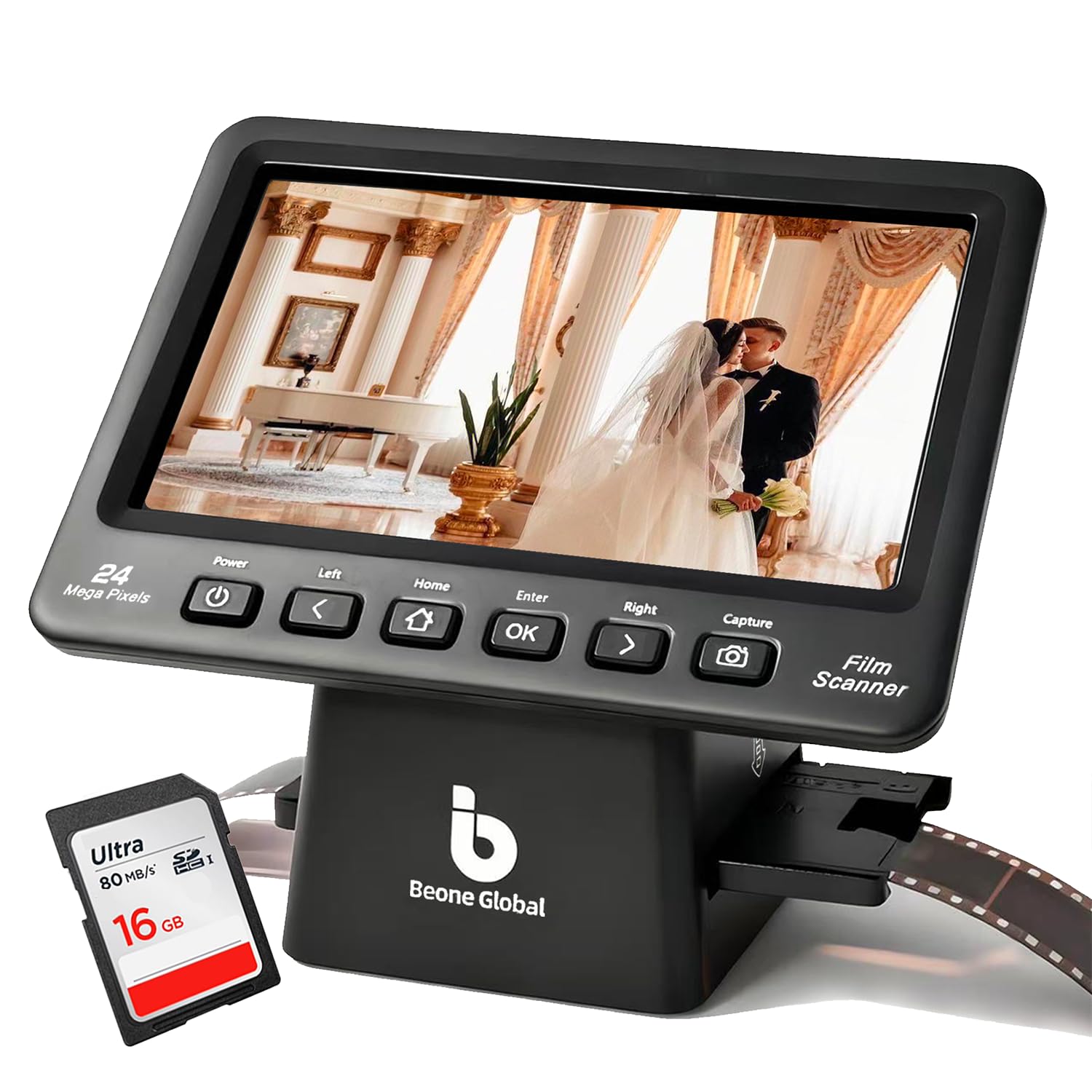
The BEONEGLOBAL ClearScan P7 stands out for its large 7-inch LCD screen, which makes previewing and inspecting images significantly easier than smaller 5-inch panels. It uses a dedicated 1/2.3-inch CMOS sensor to produce 24MP images with a true optical resolution of 3600 DPI. This is higher native resolution than many standalone scanners, and it shows in the final image sharpness.
It supports 35mm, 126, 110, and Super 8 film, making it a versatile choice for mixed collections. The controls are laid out ergonomically below the screen, and the included branded SD card means you can start scanning immediately. The one-touch operation handles color and brightness adjustments automatically, with decent results for well-exposed negatives.
The major frustration is the slide holder. It is difficult to open, requiring a small screwdriver to pry apart, and the resulting stack of plastic makes loading mounted slides cumbersome. Some users have had to modify the holder to fit standard slides. When it works, the image quality is excellent for this class, but the holder design can be a dealbreaker for anyone planning to scan large numbers of mounted transparencies.
Why it’s great
- Large 7-inch screen is excellent for previewing and reviewing scans.
- 3600 DPI native resolution captures more true detail than typical 22MP scanners.
- Includes a branded SD card for out-of-the-box use.
Good to know
- Mounted slide holder is poorly designed and difficult to load.
- Lacks a USB port for direct computer connection or image transfer.
- Color and exposure adjustment steps are too large for fine-tuning.
6. KODAK Slide N SCAN

The KODAK Slide N SCAN is one of the most popular standalone film scanners on the market for good reason. It is well-designed, easy to use, and produces good-looking 22MP scans from 135, 126, and 110 film and slides. The 5-inch LCD screen is bright and clear, and the gallery mode lets you use the device as a digital picture frame when not scanning.
The quick-loading tray technology is a genuine convenience. The film inserts slide in and out smoothly, allowing for rapid sequential scanning. One user reported digitizing over 500 slides in a single afternoon. Basic editing functions like color and brightness adjustment are built in, and the HDMI output lets you preview scans on a larger TV screen.
The biggest caveat is that this is a CMOS-based “scanning” unit, meaning it takes a digital photo of the film rather than optically scanning it. Dust on the film can be a problem, so use the included cleaning brush liberally. Also, it only supports SD and SDHC cards up to 32GB, not modern SDXC cards. The plastic build feels a bit light, but the results are consistently solid for casual digitization.
Why it’s great
- Well-designed insert system allows for a fast and smooth workflow.
- Consistent 22MP output with accurate default color balance.
- HDMI out lets you preview scans on a television.
Good to know
- CMOS camera capture, not a true optical scan.
- Only supports 32GB SD/SDHC cards; no SDXC compatibility.
- The screen can freeze after transferring images to a PC, requiring a power cycle.
7. PORTTA Film Scanner

The PORTTA Film Scanner delivers a no-fuss approach to digitizing multiple film formats. It supports 135, 126, 110, and Super 8 film, handling both color and black and white negatives and slides. The 5-inch LCD screen is bright and responsive, and the device allows you to choose between a 16MP standard scan or a 22MP enhanced scan, giving you a quick quality-speed trade-off.
One useful feature is the HDMI output for real-time viewing on a larger monitor. This makes it easier to inspect images for sharpness and framing before storing them. The scanner saves directly to an SD card up to 128GB, and the built-in tools for adjusting brightness and color orientation work well for quick touch-ups without a computer.
The main drawback is the file naming system. All scans are saved with identical file names across batches, which creates organizational chaos when you transfer them to your computer. You will need to batch-rename files manually or use a separate tool. The sensor is a fixed-focus camera module, so while the results are excellent for the price, they do not match the sharpness or dynamic range of a true CCD optical scanner.
Why it’s great
- Supports a wide range of film formats including 110 and Super 8.
- HDMI output for larger screen preview during operation.
- Simple, intuitive interface that requires no computer setup.
Good to know
- Files are saved with identical names across batches, causing disorganization.
- 8GB SD card holds only about 14 high-resolution images.
- Fixed-focus camera sensor, not a true optical scanner.
8. KEDOK Photo & Slide Scanner

The KEDOK is the most feature-dense budget scanner on the list, offering a 5-inch LCD screen, 22MP output, and the ability to scan not just 35mm film and slides, but also 110 film, name cards, and printed photos up to 5R size. For the price, the sheer versatility is impressive. It comes complete with an 8GB SD card, cleaning cloth brush, and multiple film holders right in the box.
The one-touch editing system simplifies the process down to selecting the film type and resolution, making it a great option for anyone intimidated by complex software. The image quality is adequate for social media sharing, small prints, and preserving memories for archival viewing. The three-year warranty and 24-hour online support provide good peace of mind for a budget purchase.
Build quality is a concern. Some units arrive with a loose micro-USB connection or simply fail to power on. The scanner glass can scratch easily, so careful handling is required. The image quality, while functional, shows less sharpness and more color cast issues than the mid-range KODAK or PORTTA options. It is a capable entry point, not a long-term archival solution.
Why it’s great
- Scans photos, business cards, and name cards in addition to film.
- Comes with everything needed out of the box, including an 8GB SD card.
- Three-year warranty and responsive customer support.
Good to know
- Inconsistent build quality; some units have power or connection issues.
- Scanner glass is susceptible to scratches.
- Image sharpness and color accuracy lag behind mid-range models.
9. KODAK REELS 8mm & Super 8 Digitizer

The KODAK REELS Digitizer is a specialized tool for a specific job: converting 8mm and Super 8 movie film into digital MP4 files. It is the only product on this list designed for motion picture film, and it handles reels from 3 inches up to 9 inches. The 5-inch LCD screen allows you to preview and control the capture, which happens frame by frame at about 2 frames per second.
The 8.08-megapixel sensor captures 1080p video files that look remarkably true to the original film grain structure. It requires no computer—you load the reel, follow the on-screen prompts, and the footage is saved directly to an SD card.
The capture process is slow and requires your attention. A 400-foot reel can take over four hours to digitize, and you will need to monitor it for film breaks or stuck splices. The default video bitrate is low, causing compression artifacts, but a community firmware tweak can fix that. The final output runs at 20fps, which is faster than the original 16fps of 8mm film, requiring some post-processing to achieve natural motion.
Why it’s great
- Cost effective for digitizing large collections of 8mm reels.
- Standalone operation requires no computer or software.
- Accepts reels from 3 to 9 inches for broad compatibility.
Good to know
- Extremely slow capture process requires constant babysitting.
- Default low bitrate can cause blocky compression artifacts.
- Output at 20fps needs post-processing for correct playback speed.
FAQ
Can I scan mounted slides in a flatbed scanner instead of a dedicated film scanner?
What does the infrared dust removal (iSRD) feature do, and do I need it?
Why do my scans look too dark or have a color cast?
Final Thoughts: The Verdict
For most users, the best 35mm film and slide scanner winner is the Plustek OpticFilm 8200i SE because its true 7200 DPI CCD sensor and infrared dust removal deliver archival-quality results that no standalone scanner can match. If you want speed and convenience for digitizing a large family collection without a computer, grab the KODAK Slide N SCAN. And for converting 8mm home movies to digital files, nothing beats the KODAK REELS Digitizer for its dedicated, cost-effective frame-by-frame capture.