
Our readers keep the lights on and my morning glass full of iced black tea. As an Amazon Associate, I earn from qualifying purchases.
Specs are compiled from manufacturer listings and verified buyer reviews and can change over time — please confirm the key details on the product page before buying.
If your CPU is throttling under load, the heat is literally choking your performance. A premium 360mm AIO cooler is the most direct fix — a large radiator (360mm x 120mm) with three fans gives you the surface area to move serious heat away from your processor, keeping boost clocks high and fans from screaming. The right one for your build depends on three things: how much heat your chip puts out, if you want a customizable LCD screen, and how much noise you can tolerate.
I’m Min — the founder and writer behind Gadgets Feed. This guide is built by comparing the manufacturers’ published specifications and the patterns across verified customer reviews, so you get each pick’s real strengths and trade-offs instead of marketing spin.
You will find a range of models from budget-friendly to top-tier, all covering the key specs that matter for a 360mm aio cooler — including pump speed, fan noise, and cooling capacity.
Quick Picks
- ASUS ROG RYUJIN III 360 ARGB Extreme — Best Overall
- ARCTIC Liquid Freezer III Pro 360 A-RGB — Top Performer
- be quiet! Pure Loop 3 360mm — Silent Choice
- Corsair Nautilus 360 RS LCD — Best Value
- Lian Li Hydroshift II-S LCD 360TL — Design Focus
- TRYX Panorama SE 360 ARGB — Best Display
- NZXT Kraken Elite 360 RGB 2024 — Premium LCD
- Thermalright FW360 SE ARGB V2 — Value Screen
- MSI MAG Coreliquid A13 360 — Budget Champion
How To Choose The Best 360mm AIO Cooler
A 360mm cooler uses a large radiator (120mm wide and about 400mm long) to dissipate heat. It is the most common size for high-end builds because it offers a great balance of cooling power and case compatibility. The three most important specs are pump technology, fan performance, and if you need an LCD screen.
Pump Speed and Design
The pump moves the liquid coolant from the CPU block to the radiator. Higher RPM (revolutions per minute) does not automatically mean better cooling — it often just means more noise. What matters more is the pump’s head pressure and flow rate. A pump running at 3000 RPM with a ceramic bearing, for example, is usually quieter and more durable than a basic pump screaming at 5200 RPM.
Radiator Thickness and Fin Density
A thicker radiator (like 38mm vs. the standard 27mm) holds more coolant and offers more surface area for the air to pass over. This helps lower temperatures, but it also makes the cooler harder to fit in narrow cases. A standard 360mm AIO is about 27mm thick, while premium models can be thicker requiring more case clearance.
Fan Static Pressure and Noise Levels
Fans on a radiator need high static pressure (measured in mmH2O) to push air through the dense fins. A good 120mm fan for a radiator should have at least 2.0 mmH2O. Fans that push more air (measured in CFM) are better, but they can be louder. Noise is measured in decibels (dBA); under 30 dBA is considered quiet for a radiator fan.
Quick Comparison
On smaller screens, swipe sideways to see the full table.
| Model | Best For | Noise Level | Max RPM | Air Flow | Amazon |
|---|---|---|---|---|---|
| Thermalright FW360 SE ARGB V2 | Budget LCD AIO | 28.2 Decibels | 2000 RPM | 68.9 CFM | $84.92$89.90PrimeAmazon |
| MSI MAG Coreliquid A13 360 | Ultra-quiet Cooling | 14.4 Decibels | 5200 RPM | — | $89.99$109.99Amazon |
| ARCTIC Liquid Freezer III Pro 360 | Raw Cooling Power | — | 3000 RPM | 77 CFM | from $96.99Amazon |
| be quiet! Pure Loop 3 360mm | Silent Performance | — | 2100 RPM | 59.6 CFM | $99.90$114.90Amazon |
| Corsair Nautilus 360 RS LCD | Mid-range LCD Screen | 20 Decibels | 2100 RPM | — | $159.99Amazon |
| Lian Li Hydroshift II-S LCD 360TL | Clean Build Aesthetics | 33 Decibels | 2600 RPM | 90.1 CFM | $239.99Amazon |
| NZXT Kraken Elite 360 RGB 2024 | Premium Display and Build | 33.88 Decibels | 2800 RPM | — | $259.99$299.99Amazon |
| TRYX Panorama SE 360 ARGB | Best Visual Experience | 27.86 Decibels | 3600 RPM | 66.09 CFM | $279.99Amazon |
| ASUS ROG RYUJIN III 360 ARGB Extreme | Top-Tier Performance | 16 Decibels | — | — | $397.00Amazon |
In‑Depth Reviews
1. ASUS ROG RYUJIN III 360 ARGB Extreme

The no-compromise flagship that keeps even the hottest chips in check.
The ASUS ROG RYUJIN III 360 ARGB Extreme is built around the latest Asetek Emma Gen8 V2 pump with a 3-phase motor, which delivers the highest flow rate in this roundup. That means it can keep a 9950X3D running at a stable 5.9GHz boost, according to one reviewer. The large 3.5-inch LCD screen (640×480 resolution) lets you track clock frequency, voltage, and coolant temperature in real time, or you can display custom animated GIFs. The pump housing also includes an embedded fan to cool your motherboard’s VRMs, a smart addition for overclocked rigs.
Noise is rated at just 16 Decibels, making this one of the quietest coolers here despite its high performance — a significant advantage over many competitors. One reviewer noted the screen is less vibrant than some Corsair models, but the raw cooling power and 6-year warranty make this the clear choice for enthusiasts who want the absolute best performance and build quality. It is a premium investment that matches its price with real, measurable results.
Performance King: This cooler consistently delivers the best thermal results across demanding CPUs like the 9950X3D, keeping idle temps around 42°C and gaming under 70°C. The integrated VRM fan is a unique touch for heavy overclockers.
Premium Price, Premium Build: The materials, the 6-year warranty, and the quiet 16 Decibels operation justify the cost for those who prioritize maximum performance over budget. The Screen, while large, uses the Armoury Crate software which some buyers find less polished for GIF uploads compared to other brands.
Reach for this if: you have a high-end AMD or Intel CPU, want the quietest and most powerful pump available, and value system monitoring with the largest quality LCD screen.
Consider alternatives if: you are on a budget or prefer a simpler software experience without Armoury Crate.
2. ARCTIC Liquid Freezer III Pro 360 A-RGB

The thick-radiator champion built for raw, uncompromising thermal performance.
With a 38mm thick radiator — noticeably thicker than the standard 27mm found on most models here — the ARCTIC Liquid Freezer III Pro 360 has more surface area to dissipate heat. That translates directly into lower CPU temperatures, especially under sustained loads. It pairs this radiator with three P12 PRO fans that push 77 Cubic Feet Per Minute of air, versus 59.6 CFM for the be quiet! Pure Loop 3 360mm. The integrated VRM fan cools your motherboard’s power delivery, and the PWM pump runs at 3000 RPM to move coolant efficiently. Buyers report that with a 9950X, the cooler hits 95C with PBO on (which is normal for the chip) but stays at 80C stress without PBO, and a 9800X3D maxes out at 82C under stress versus 95C with a 240mm AIO. The real-world improvement over smaller coolers is significant.
The catch is the thickness: at 15.7″L x 4.7″W x 2.9″H, it is a chunky unit. You need a roomy mid-tower to fit it, and some buyers mention the two-screw mounting system for the pump can feel less stable than a four-screw design. The included thermal paste (MX-6) has been reported as being solid like putty by a few buyers, so you might want to buy your own high-quality paste like the Corsair XTM70 one reviewer used. For the price, it delivers near-top-tier performance in a straightforward package. This cooler is ideal if you prioritize cooling capacity over aesthetics and case compatibility.
Cooling Beast
- Exceptional 77 CFM air flow, versus 59.6 CFM for the be quiet! Pure Loop 3 360mm.
- Thick 38mm radiator provides more coolant and surface area for better heat dissipation.
- Integrated VRM fan helps stabilize motherboard temperatures during heavy overclocking.
Installation Quirks
- Large dimensions require a spacious case; can be tight in mid-towers.
- Two-screw mounting for the pump block can feel less secure than four-screw alternatives.
- Included thermal paste may arrive dried out, as reported by multiple buyers.
Your choice if: you have a high-core count CPU (like Ryzen 9 or Intel Core i9-13900K/14900K) and you want the best thermal performance per dollar. It is a system builder’s pick that values function over flash.
Pass on it if: you need a compact fit or a clean, cable-free look with an LCD screen.
3. be quiet! Pure Loop 3 360mm

The whisper-quiet performer that is easy to maintain and simple to install.
be quiet! lives up to its name with the Pure Loop 3 360mm. Its 6-pole 3-phase PWM pump is whisper-quiet, and the three Pure Wings 3 120mm fans run at only 30.9 dBA at maximum speed. Unlike many AIOs, this one has a refill port on the radiator, so you can top off the coolant years down the line to extend its lifespan. The daisy-chain function for the fans allows all three to connect with one short cable run, which keeps your case tidy. Owners mention this as the quietest among three tested coolers, including an Arctic Freezer and a Corsair Nautilus RS.
One reviewer replaced a Cooler Master AIO in a small form factor (SFF) PC and found the Pure Loop 3 delivered about 5°C cooler temperatures. The AMD mount includes an offset position (position 8) for the CCD, a nice touch for Ryzen users. A potential trade-off is that some previous generation Pure Loop 2 pumps had failures, though the company redesigned the pump for the Pure Loop 3. If you prioritize a quiet system and prefer a cooler without an LCD screen or RGB lights, this is a top contender. It is a focused, high-performance tool for the user who values substance over sparkle.
Silent Operation
- Quietest pump among tested competitors (Arctic, Corsair).
- Fans are very quiet even at maximum speed (30.9 dBA).
- Refill port allows for maintenance-free long-term use.
Modest Airflow
- Airflow (59.6 CFM) is lower than many rivals, focusing on silence over pure cooling.
- Pump can be slightly audible (a light hum/whine) at 100% speed.
- No RGB or LCD screen; minimal visual flair.
The right fit for: silent PC enthusiasts who want a top-tier cooler without any noise pollution. The refill port is a unique and valuable feature for long-term ownership.
Not the best if: you want the absolute lowest CPU temperatures under extreme load, or you desire RGB aesthetics and screen customization.
4. Corsair Nautilus 360 RS LCD
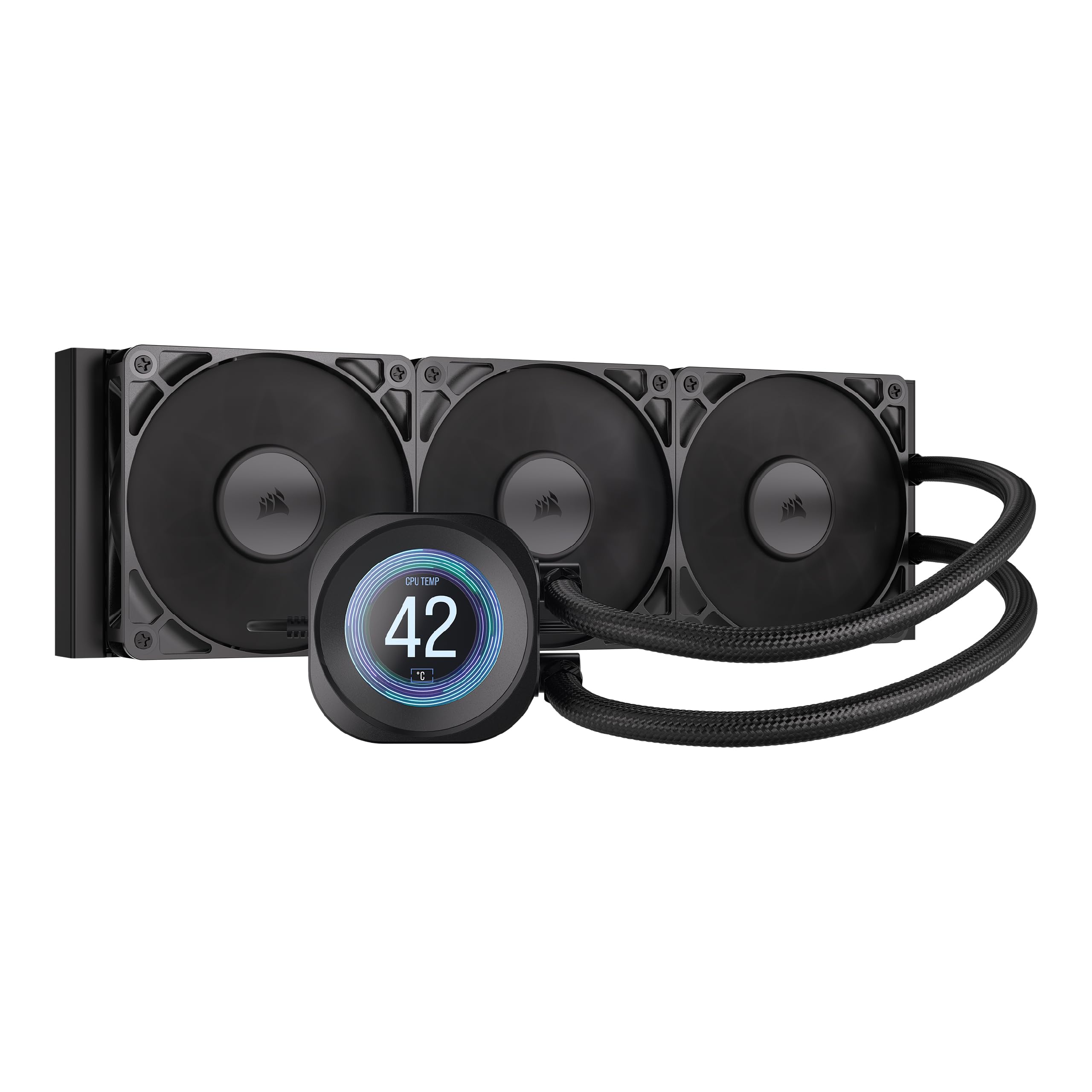
A mid-range LCD cooler that brings style and silence without complexity.
The CORSAIR Nautilus 360 RS LCD offers a clean way to add a customizable screen to your build without spending a fortune. It has a 2.1-inch IPS LCD screen that is pre-installed on the pump block, and you can display system stats or custom images using Corsair’s iCUE software. The pump is rated at just 20 dBA, making it very quiet, and the convex cold plate design ensures maximum contact with your CPU’s integrated heat spreader (IHS). The pre-applied thermal paste speeds up installation — just be careful not to stain your desk, as one buyer quipped. It includes three RS120 fans with AirGuide technology and Magnetic Dome bearings for low-noise operation, and the fans spin up to 2100 RPM.
A big plus is the simple installation: a single breakout cable connects the pump and fans to one motherboard header. Buyers generally praise its quiet performance and good cooling, with one user reporting a 9800X3D stays below 50°C in competitive games and under 70°C in high-load games. A common critique is that the cooler line tubes have a twist memory, meaning they tend to hold a curve from the box, which some find less clean-looking than other models. If you want a mid-range LCD AIO that is quiet and effective without the top-tier price, this is a smart choice.
Balanced Mid-Range: The 20 dBA pump and included fans are genuinely quiet, and the screen works well with the iCUE software. It keeps most modern CPUs cool, including the 9800X3D, without being overly expensive.
Minor Cable Quirks: The tubes have a memory from the box, so you might need zip ties to manage them. The pre-applied thermal paste is convenient, but some users might prefer a higher-quality aftermarket paste for absolute peak performance.
Your pick if: you want a good-looking LCD screen and quiet performance for a reasonable price. It is a great value option for a first-time AIO user who wants a bit of style.
Choose something else if: you have a very high-TDP CPU that needs the absolute maximum cooling headroom, or you dislike the iCUE software ecosystem.
5. Lian Li Hydroshift II-S LCD 360TL
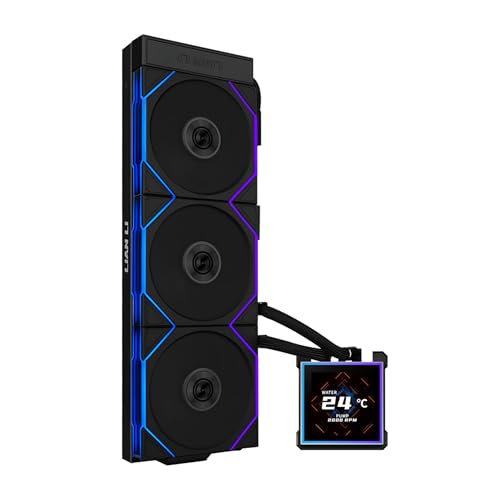
The cable-hiding master with a large screen and impressive fan airflow.
The Lian Li Hydroshift II-S LCD 360TL is designed for builders who value a clean, minimalist look. Its standout feature is the adjustable tube clamp that lets you run the tubes along the top of the radiator, making them almost invisible. It has a 3.4-inch IPS LCD square screen with a 480×480 resolution, 500 nits brightness, and a 60Hz refresh rate. This screen is hot-swappable, so you can change it without turning off your PC. The cooler is also slim, with a 24mm thick radiator (400x122x24mm), which helps it fit in more cases than thicker models. It comes with three pre-installed TL120 ARGB fans that can spin from 0 to 2600 RPM and push an impressive 90.1 Cubic Feet Per Minute of air, which is the highest airflow in this roundup.
The fans rotate at up to 2600 RPM and produce 33 dBA, a bit louder than some rivals, but the high airflow makes it very efficient. One buyer mentioned that the software (L-Connect 3) is straightforward but lags behind competitors like NZXT in integration. The screen uses pogo-pin connections, which means no wires are needed for the display — a clever design touch. A potential trade-off is the thinner 24mm radiator, which might hold slightly less coolant than thicker 27mm models, but it still provides excellent cooling performance that is on par with top 360mm AIOs. This is the ideal pick for anyone who prioritizes a super-clean, cable-free interior.
Clean Build Aesthetic
- Patented tube clamp hides coolant lines for a clean, stealth look.
- 3.4-inch IPS LCD screen uses pogo pins (no wires) and is hot-swappable.
- Extremely high 90.1 CFM airflow from the included TL120 fans.
Design Trade-offs
- Thinner 24mm radiator than standard 27mm models; less coolant capacity.
- Software (L-Connect 3) is simpler than NZXT’s CAM or Corsair’s iCUE.
- Fans can be audibly louder (33 dBA) than some quieter competitors.
Perfect for: builders who want a showcase PC with hidden cables and a large, clean screen. The high 90.1 CFM fans ensure excellent performance despite the thin radiator.
Avoid if: you want the absolute thickest radiator for maximum thermal mass, or you prefer a more integrated software suite with flashy features.
6. TRYX Panorama SE 360 ARGB
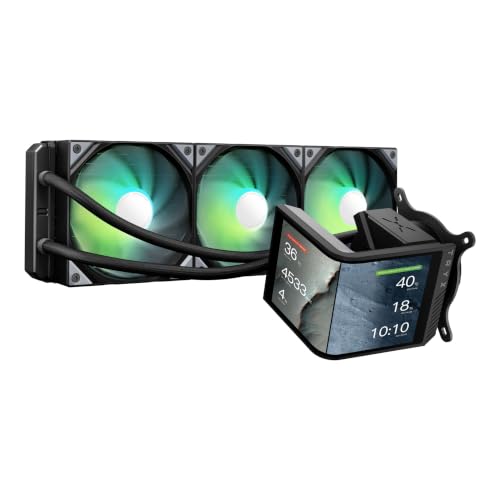
The king of visual flair with a massive curved AMOLED screen that creates 3D effects.
If the screen is more than half the reason you are buying a cooler, the TRYX Panorama SE 360 ARGB is the clear winner. It features a massive 6.67-inch AMOLED curved screen with a 2K resolution, 400 nits brightness, and a stunning 1,000,000:1 contrast ratio. This screen is not just a side feature; it is the central focus of the cooler. Its rotatable design allows you to switch between horizontal and vertical orientations, and it can play custom 3D anamorphic videos for an rich effect. Under the hood, it uses the reliable Asetek Adela pump, which handles a 280W TDP (thermal design power) for demanding CPUs. The included three 120mm ROTA ARGB fans produce 66.09 CFM of airflow at a quiet 27.86 dBA. One owner reported the screen is beautiful and swappable, with idle temps of 40-45°C and gaming temps of 50-55°C, though they noted the cooling is decent but not top-tier for raw performance.
The KANALI software allows deep customization, including split-screen display and support for MP4 videos up to 1080P. The pump can be a bit loud at full speed, according to one review. This cooler is not just about cooling; it is a premium visual centerpiece that happens to cool your CPU very well. If you want the most impressive screen in an AIO, this is it. It is designed for users who want to make a statement inside their PC case.
Screen Marvel: The 6.67-inch AMOLED screen with its rotatable design and 3D effect is class-leading in this category. The visual experience is premium and highly customizable.
Cooling is a Close Second: While the Asetek Adela pump is solid and handles a 280W TDP, some customers note it does not quite match the absolute best raw coolers for very high-end CPUs. The pump can also be a bit audible at full speed.
The screen is the star: If you want the most impressive visual centerpiece for your build and like the idea of custom 3D videos, this is the one. It still cools well enough for most CPUs.
Not for performance purists: If your primary goal is the lowest possible CPU temperature for overclocking a 16-core chip, a thicker-radiator model like the ARCTIC Liquid Freezer III Pro might be a better choice.
7. NZXT Kraken Elite 360 RGB 2024

A polished premium cooler with an excellent display and strong, quiet cooling.
The NZXT Kraken Elite 360 RGB 2024 is a well-rounded premium AIO that has been refined over several generations. Its custom-designed NZXT Turbine pump delivers high flow rate and head pressure, resulting in a 10% performance boost with less noise. The large 2.72-inch IPS LCD has a sharp 640×640 resolution and an ultra-bright 690 cd/m² backlight, ensuring it looks fantastic in any case. It supports 60Hz refresh rate and 24-bit color. The installation is simple thanks to tool-free mounting brackets and pre-applied thermal paste. The F360 RGB Core fans form a single frame for easy daisy-chaining and provide good static pressure (3.88 mmH2O). A reviewer noted that it keeps a Ryzen 9 9950X3D at an idle temperature of 44-45°C.
NZXT’s CAM software is widely praised for its stability and integration with Google Photos, Spotify, and YouTube, which adds a unique layer of personalization. However, the reliability of NZXT AIOs has been questioned by some long-term users; one customer observed a failure after 4 months, noting that a air cooler outperformed it afterwards. While this may be an isolated case, it is worth considering the longevity reports. Overall, it is a premium, user-friendly cooler with a bright display and excellent software ecosystem. It’s the best choice for users who want a refined, easy-to-set-up system with a strong visual identity.
Premium Experience
- Excellent 2.72-inch IPS LCD with vibrant colors and 690 cd/m² brightness.
- Simple tool-free installation with pre-applied thermal paste.
- Stable and feature-rich NZXT CAM software with Spotify/YouTube integration.
Reliability Concerns
- Some long-term user reviews mention pump failures within a year.
- Fans at maximum speed (33.88 dBA) can be audibly louder than some competitors.
- The single-piece fan frame may not be interchangeable with standard 120mm fans.
Best for the clean and polished experience: if you want a premium cooler with a fantastic display, easy setup, and the most stable software suite on the market for customization.
Consider the risk: if the reports of long-term pump reliability concern you, or if you need the absolute quietest operation. A model with a thicker radiator might be a safer bet for extreme overclocking.
8. Thermalright FW360 SE ARGB V2
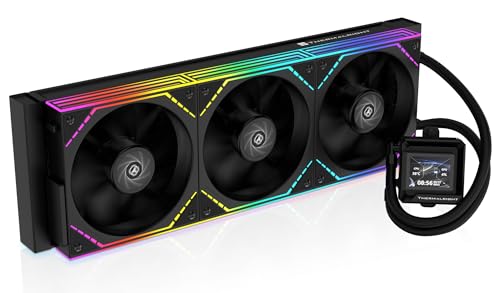
The budget champion that packs an LCD screen and strong cooling into one affordable package.
The Thermalright FW360 SE ARGB V2 is a fantastic entry point into the world of 360mm AIOs with an LCD screen. It features a 2-inch LCD screen that can display system stats, custom images, or animated GIFs, controlled through Thermalright’s software. The three TL-M12Q 120mm daisy-chain fans run up to 2000 RPM and provide a solid 68.9 CFM of airflow. One user highlighted it provides “excellent cooling for 14700K,” a chip known to run hot. The fans are quiet, with a noise level of 28.2 Decibels, which is the loudest on this list but still very manageable. It supports all current mainstream platforms, including Intel LGA1851 and AMD AM5, and comes with a 5-year warranty for confidence.
However, there are trade-offs at this price. Some reviewers point out the LCD screen can have USB-C connection issues, and Thermalright’s warranty support has been described as unhelpful in those cases. The installation is generally easy, but shoppers say the silver bracket may need painting to match a black motherboard aesthetic. The pump runs at 3000 RPM, versus 5200 RPM for the MSI MAG Coreliquid A13 360. Despite these caveats, the sheer value is undeniable. You get an LCD screen, decent cooling (enough for a 14700K), and a 5-year warranty for a very low price. It is a great choice for a budget-conscious builder who wants the look of an LCD cooler while staying affordable.
Incredible Value
- Includes a 2-inch LCD screen at a very affordable price point.
- Strong cooling performance, excellent for a 14700K as verified by buyers.
- Daisy-chain fans help reduce cable clutter and are easy to install.
Budget Constraints
- LCD screen has occasional USB-C connectivity issues, with reported warranty difficulties.
- Noise level (28.2 Decibels) is higher than some quieter competitors.
- Pump speed is 3000 RPM, versus 5200 RPM for the MSI.
Pick this if: you are on a tight budget but still want the aesthetic of an LCD screen and good enough cooling for most mainstream CPUs like the 14700K. The 5-year warranty is a nice safety net.
Choose something else if: you prioritize silent operation (it is louder than the MSI) or need guaranteed reliability from the LCD screen component. The MSI might be a better bet for pure quiet.
9. MSI MAG Coreliquid A13 360

The silent budget king that cools effectively without making a sound.
The MSI MAG Coreliquid A13 360 is a fantastic option for anyone who wants a budget cooler that is effectively silent. With a noise level of just 14.4 Decibels, versus 28.2 Decibels for the Thermalright, it is essentially inaudible in a standard PC case. The high-performance pump runs at up to 5200 RPM, versus 3000 RPM for the Thermalright FW360 SE ARGB V2 pump, using a unique split-flow water cooling system and an integrated three-phase pump. This high pump speed combined with ceramic bearings ensures both performance and quiet operation. The 390mm water cooling tubes are triple-layered and covered in reinforced mesh sheathing to prevent evaporation. Buyers report that it stopped thermal throttling in games for a 5800X3D when it replaced a Thermalright air cooler, reaching a max package temp of 75°C under load. It is also very easy to install with pre-installed fans and included thermal paste.
The main drawbacks are minor: the MSI logo on the block is aligned vertically, which some users note does not sit perfectly straight on AMD AM4/5 sockets because of the offset, and it lacks an LCD screen which some buyers might want. The build feels solid and the performance is excellent for the price. If you value silence above all else on a budget, and you do not need a screen or flashy RGB, this is the smartest purchase. It delivers reliable, cool performance for your CPU at a price that undercuts many competitors.
Silent and Strong
- Extremely quiet at 14.4 Decibels, practically inaudible.
- High-performance pump at 5200 RPM ensures excellent cooling.
- Easy installation with pre-installed fans and daisy-chain cables.
Minor Annoyances
- No LCD screen; a purely functional design.
- MSI logo alignment on the pump block is slightly off for AMD AM4/5 sockets.
- Lacks some premium features like a VRM fan or thick radiator.
The go-to for a quiet PC: if you want a super quiet and effective cooler without spending much money. It is a fantastic upgrade from a stock cooler or a budget air cooler for a 5800X3D or similar chip.
You’ll want something else if: you need an LCD screen, RGB aesthetic, or the absolute thickest radiator for extreme overclocking. For pure value and silence, it is tough to top.
Understanding the Specs
Noise Level (dBA)
Measured in decibels (dBA), this tells you how loud the cooler’s fans and pump are at maximum speed. A lower number is quieter: 14 dBA is almost silent, while 33 dBA is noticeable but not distracting. For a quiet system, look for under 28 dBA. The MSI MAG Coreliquid A13 360 at 14.4 dBA is the quietest on this list.
Pump Speed (RPM)
More RPM means the pump is pushing coolant faster, but it does not always mean better cooling. A high quality pump at 3000 RPM can outperform a basic pump at 5000 RPM. Focus on pump design and build quality rather than just raw RPM. The MSI pump runs at 5200 RPM, while the Thermalright pump runs at 3000 RPM.
Air Flow Capacity (CFM)
Cubic Feet per Minute (CFM) measures how much air the fans can move. Higher CFM means more air passes over the radiator fins, which helps cooling. The Lian Li Hydroshift II-S fans push 90.1 CFM, while the be quiet! fans push 59.6 CFM. The difference between 90.1 CFM and 59.6 CFM can affect cooling performance, especially with thick radiators.
Radiator Thickness
Most 360mm AIOs are about 27mm thick. A thicker radiator (like 38mm on the ARCTIC Liquid Freezer III Pro) holds more coolant and offers more surface area for cooling. This helps lower temperatures but can make it harder to fit in a narrower case. Always check your case’s clearance for radiator + fan thickness.
FAQ
Will a 360mm AIO fit in my case?
Is a 360mm AIO better than a good air cooler?
How long does a 360mm AIO cooler last?
Can I use a 360mm AIO on a small form factor (SFF) PC?
What does the LCD screen on an AIO cooler do?
Which is more important for cooling: pump speed or fan speed?
What is the difference between “push” and “pull” fan configurations on a radiator?
Is a 280mm AIO better than a 360mm AIO?
What is a “VRM fan” on an AIO cooler?
Can I mix different AIO coolers or fans on my system?
Final Thoughts: The Verdict
For most people, the 360mm aio cooler winner is the ASUS ROG RYUJIN III 360 ARGB Extreme because it combines the most powerful Asetek Gen8 V2 pump with a large 3.5-inch LCD screen, all while operating at just 16 Decibels of noise. If you want silent and simple performance, grab the MSI MAG Coreliquid A13 360. And for a ridiculously rich display, the standout is the TRYX Panorama SE 360 ARGB.
How We Picked
We do not accept paid placement, and we did not hands-on test every unit. Instead, we match each pick to a real buyer and use-case by comparing the manufacturers’ published specifications against the patterns in verified customer reviews — so you get each pick’s real strengths and trade-offs instead of marketing copy.
Sources & Methodology
Specifications: manufacturer listings and product documentation. Review insights: verified customer reviews, as of July 2026. Pricing: not shown on this page (it changes often); check the current price via the retailer link.
As an Amazon Associate, Gadgets Feed earns from qualifying purchases. This does not affect which products we feature.
Product prices and availability are accurate as of the date/time indicated and are subject to change. Any price and availability information displayed on Amazon at the time of purchase will apply to the purchase of this product. As an Amazon Associate I earn from qualifying purchases.
CERTAIN CONTENT THAT APPEARS ON THIS SITE COMES FROM AMAZON. THIS CONTENT IS PROVIDED "AS IS" AND IS SUBJECT TO CHANGE OR REMOVAL AT ANY TIME.
Amazon and the Amazon logo are trademarks of Amazon.com, Inc. or its affiliates.