
For anyone managing inventory, organizing a home office, or running a small business, the clutter of untagged bins, unmarked cables, and anonymous files creates a constant, draining friction. A 3D label printer eliminates that friction by producing crisp, durable labels on demand, directly at the point of need, without requiring a full desktop inkjet or laser setup.
I’m Min — the co-founder and writer behind Gadgets Feed. My analysis of this category focuses on real-world print speed, tape compatibility ecosystems, and the actual battery runtime versus battery dependency of each model, filtering out the marketing noise to find what genuinely works.
After cross-referencing technical specifications and real user workflows, this guide distills the field down to the only seven machines worth your time if you are searching for the absolute best 3d label printer for versatile, day-to-day organization.
How To Choose The Best 3D Label Printer
Choosing a label printer means balancing how you intend to use it—whether for quick one-off labels in a classroom or high-volume shipping at a small business—against print method, power source, and tape format.
Thermal vs. Ink Ribbon: The Real Difference
A 3D label printer uses direct thermal technology, meaning no ink cartridges, no toner, and no ribbon. The label itself darkens when heat passes over it. This makes the cost-per-label nearly zero after the initial purchase, but it also means the label material must be thermal-sensitive. Avoid ink-based mini printers for labeling; they bleed, smudge, and cost more per label.
QWERTY Keyboard vs. Bluetooth App: Input Method Matters
Some label printers include a full QWERTY keyboard for standalone use, while others rely entirely on a smartphone app via Bluetooth. A keyboard model—like the Vixic D210S or the Brother PTD220—lets you print within seconds without any setup, which is ideal for classrooms, workshops, and shared offices. Bluetooth models, such as the NIIMBOT B1 or the SUPVAN E12, unlock thousands of fonts, frames, and icons through an app, giving you design flexibility for branding and decorative labels. If you need both, hybrid units with a keyboard plus Bluetooth exist, but they are rare in this price tier.
Battery Life and Power: Rechargeable vs. Disposable
Portability comes down to how the label printer is powered. Rechargeable models with a built-in lithium battery (like the SUPVAN E12 with its 1200mAh cell) let you label anywhere without hunting for AA packs. Disposable battery models, such as the Brother PTD220 or the LABELWORKS Epson LW-PX300, require six AAA or AA batteries each time they run out, which adds recurring cost and weight. Some label printers also accept an AC adapter, but many do not include one in the box—check this before buying.
Tape Width and Lamination: Durability for Your Environment
Label tape width directly affects how much text fits on one line. Most home and office models support 12mm (0.5-inch) wide tape. Industrial models like the Epson LW-PX300 handle up to 18mm tape and even shrink tube for wire marking. Laminated tapes, which use a clear protective layer over the printed text, resist water, fading, abrasion, and temperature extremes. The Vixic D210S uses seven-layer lamination technology, promising storage for up to ten years. Non-laminated thermal labels are cheaper but fade quickly under direct sunlight or heavy handling.
Quick Comparison
On smaller screens, swipe sideways to see the full table.
| Model | Category | Best For | Key Spec | Amazon |
|---|---|---|---|---|
| Brother P-Touch PT-N25BTv3 | Bluetooth & Bundle | App-driven design flexibility | Bluetooth + 3 sample tapes | Amazon |
| SUPVAN E12 | Hybrid Input | Keyboard & app dual control | 1200mAh rechargeable battery | Amazon |
| Brother P-Touch PTD220 | Standalone Keyboard | Immediate, no-phone labeling | 30-label memory + QWERTY | Amazon |
| Vixic D210S | Kid-Friendly | Quick labels for families | 20-second startup, 4 tapes incl. | Amazon |
| NIIMBOT B1 | Bluetooth Mini | Compact on-the-go printing | 60 ppm speed, 3 label rolls | Amazon |
| LabelRange BT Thermal | Shipping Pro | 4×6 shipping labels | 70 ppm, 4.4in max width | Amazon |
| LABELWORKS Epson LW-PX300 | Industrial Grade | Wire marking & shrink tube | 18mm tape, lifetime warranty | Amazon |
In‑Depth Reviews
1. Brother P-Touch PT-N25BTv3
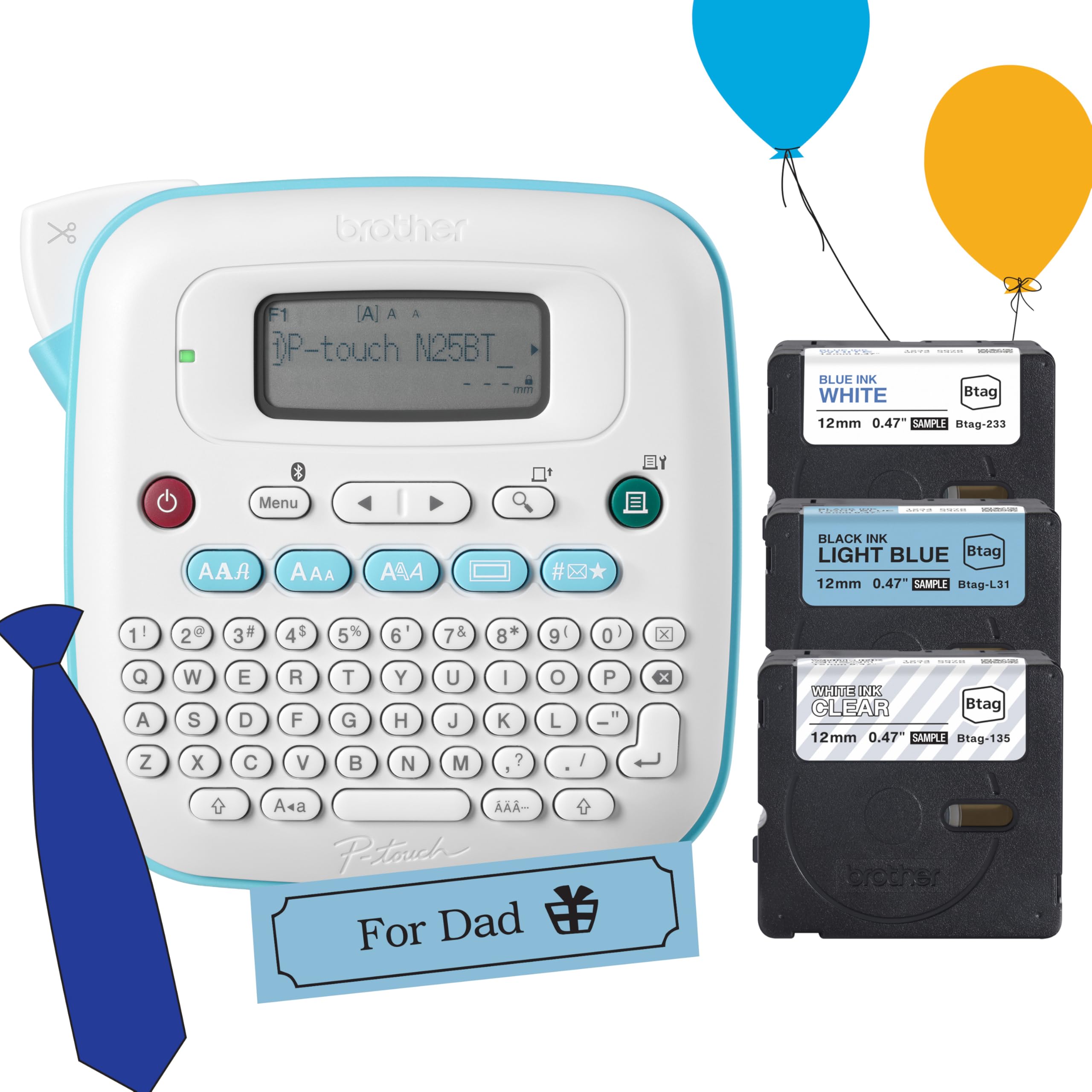
This Brother bundle strikes the best balance between app-driven creativity and straightforward standalone use. The Bluetooth connectivity hooks into the free Design&Print2 app, giving you access to templates, 250 symbols, 15 frames, and three fonts in seven styles without requiring a second device. The included three sample tapes (black on light blue, blue on white, and white on clear) let you test different label looks immediately.
The sixteen-character preview display lets you proof every label before committing, reducing tape waste, while the built-in cutter produces clean, straight edges every time. It saves up to ten frequently used labels, so reprinting a batch of address labels or spice jar tags takes seconds. The unit weighs 1.1 pounds and runs on six AAA batteries (not included), which users report lasting through many rolls of tape.
Where this model truly excels is its versatility—it works as a stand-alone keyboard labeler for quick jobs and as a Bluetooth design tool for more complex projects. The learning curve is modest, and once connected, the app updates with fresh templates. For anyone who wants a single label printer that does both simple and elaborate jobs well, this is the standout choice.
Why it’s great
- Bluetooth app unlocks hundreds of design options
- Includes three sample tapes in different colors
- Compact, lightweight, and easy to carry
Good to know
- AC adapter not included
- Requires AAA batteries; no internal rechargeable battery
- Bluetooth setup can be finicky on first pairing
2. SUPVAN E12
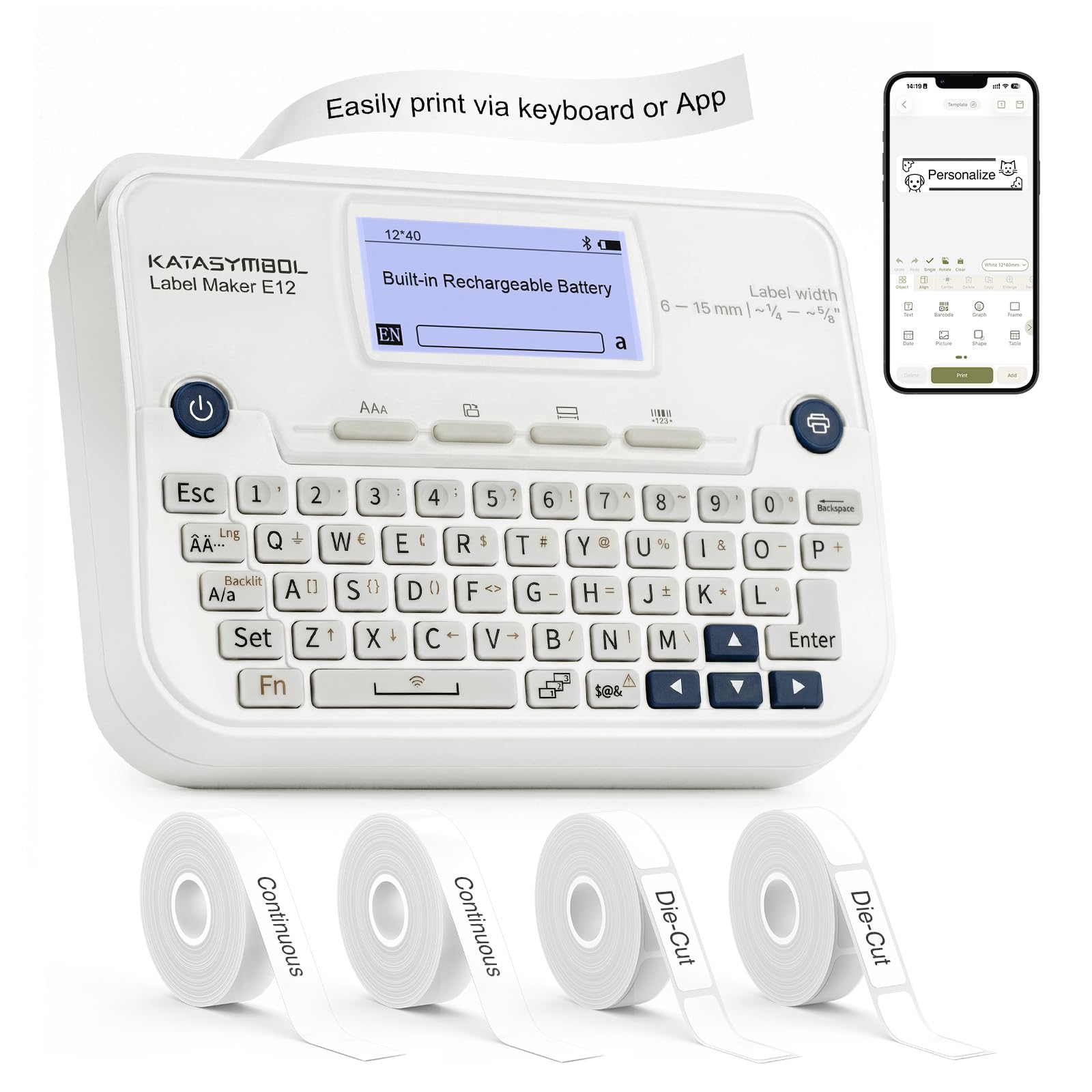
The SUPVAN E12 solves the biggest frustration of Bluetooth-only label makers: what happens when your phone dies or the app crashes. It features a full QWERTY keyboard with an LCD backlit display, so you can type and print labels entirely offline. The Bluetooth app (Katasymbol) adds 30-plus fonts, 660-plus icons, and 50 frames, plus emoji support and custom template saving.
Inside the compact white shell lives a 1200mAh rechargeable battery rated for up to a month of typical use on a single charge. The printer comes with four tapes out of the box—one preloaded and three hidden in the back—including both continuous and die-cut options. The minimal margin printing leaves only a 0.2-inch tail, a significant improvement over the standard 1-inch waste found on many competing models.
Users consistently report being impressed by the standout feature set: the ability to auto-detect label size, the clean thermal print, and the fact that all fonts and icons in the app are free with no subscription. The tape width maxes out at 12mm, which limits multi-line labels, but for home pantry, craft supplies, and office file folders, this is a polished machine that delivers serious value.
Why it’s great
- Hybrid QWERTY keyboard plus Bluetooth app
- Built-in rechargeable battery, no AA hunting
- Very little tape waste with 0.2in margin
Good to know
- Max tape width is 12mm, limiting multi-line capacity
- Auto-margin waste still leaves a small tail
- Tape is proprietary to Supvan E series
3. Brother P-Touch PTD220

For anyone who wants a label printer that simply works without a phone, the Brother PTD220 is the gold standard. Its familiar QWERTY keyboard, combined with 14 fonts, 11 font styles, 99 frames, and over 600 symbols, means you can create a wide variety of labels entirely through the device itself. The 25 pre-set label templates speed up common tasks like file folder labeling and cable tags.
Unlike rechargeable models, this unit runs on six AAA batteries or an optional AC adapter (sold separately). Users report the batteries last a very long time because the thermal printing only draws power during the actual print stroke. The built-in memory stores up to 30 of your most-used labels, which is a practical time-saver for reprinting name badges or bin labels weekly.
The main trade-off is the LCD screen, which several users note is hard to read in bright light. However, a contrast adjustment dial helps mitigate this. The TZe tape cartridges from Brother produce laminated, durable labels that resist water, fading, and abrasion. If you value offline reliability over smartphone gimmicks, the PTD220 remains the dependable choice trusted by schools and offices for years.
Why it’s great
- Fully standalone, no phone or app needed
- Supports third-party TZe tape cartridges in many colors
- Durable laminated labels with excellent peel backing
Good to know
- Screen visibility is poor in direct sunlight
- Uses 6 AAA batteries, not rechargeable
- Only prints 1 or 2 lines of text
4. Vixic D210S

The Vixic D210S is designed to be the simplest label printer in this lineup, and it delivers on that promise. From power-on to printing a label takes only 20 seconds, thanks to a German-imported screen that improves clarity by 25 percent. It includes four full-length laminated tape rolls each 26.2 feet long, which use seven-layer lamination technology to resist water, fading, abrasion, and temperature extremes for up to 10 years.
This labeler powers directly via USB-C cable—no batteries required—which extends the device lifespan by eliminating rechargeable battery degradation. It also offers the option of six AAA alkaline batteries for portable use. The chain print function lets you batch-print up to 20 different labels one after another, and based on the tape length, the D210S can produce roughly 264 labels per roll at 1.2 inches each.
For home use, the D210S is a hit with families labeling school supplies, lunch boxes, and pantry containers. It supports up to 4 lines of text, 16 different fonts, 100-plus frames, and 800-plus symbols, including barcodes. The soft QWERTY keyboard is comfortable for kids and elderly users alike. It won’t match Bluetooth models for design depth, but for simple, fast, and durable labels, it is hard to beat.
Why it’s great
- Very fast startup and print cycle
- Includes 4 rolls of laminated tape
- USB-C power extends device lifespan
Good to know
- No Bluetooth or app connectivity
- USB-C cable is included but short
- Limited to 12mm tape width only
5. NIIMBOT B1

The NIIMBOT B1 is a pure Bluetooth label maker that strips away the keyboard to deliver an extremely compact printing experience. It connects instantly to iOS and Android devices via the NIIMBOT app, which gives you over 30 fonts, 100 borders, and 1,500 symbols. The app auto-identifies the label size, so there is no manual template selection required before printing.
Print speed clocks in at an impressive 60 pages per minute at 203 DPI resolution, making it one of the fastest thermal label printers in this roundup. It comes bundled with three white label rolls (50x30mm rectangle, 50x80mm rectangle, and 50mm round), which are already loaded into the paper bin. The unit draws power via USB-C, and the internal rechargeable battery lasts through multiple print sessions.
Customer feedback highlights the quick Bluetooth pairing, the auto paper repositioning feature that prevents jams, and the decent print quality for small business tasks like product barcodes, jewelry tags, and retail shelving labels. It is not compatible with tablets, and some advanced templates in the app require a monthly subscription. Overall, the NIIMBOT B1 is a fine choice if you want an even smaller, app-dependent label printer for high-speed output.
Why it’s great
- Extremely fast at 60 ppm
- Very compact and portable
- Auto-identifies label size, saving time
Good to know
- Not compatible with tablets
- Some app features require a subscription
- No keyboard for offline use
6. LabelRange BT Thermal

While the other label printers on this list cap at 12mm tape, the LabelRange BT Thermal handles labels up to 4.4 inches wide, making it the only true shipping label printer here. It prints 4×6 shipping labels for USPS, UPS, FedEx, Amazon, Etsy, Shopify, and Pirate Ship, replacing expensive inkjet cartridges with direct thermal technology at 70 pages per minute.
Full Bluetooth support extends across Mac, Windows, iOS, Android, Linux, and Chrome OS, which is unusual at this price point. The free “Label Expert” app allows creation and editing of text, symbols, icons, and barcodes, plus PDF import for sharing labels from shipping platforms. The printer itself is about the size of a mobile phone and weighs only 1.08 pounds.
Users appreciate the easy setup, the quiet operation, and the fact that it comes with roughly 50 label sheets to get started. The most significant concern is a small number of reports about the printer stopping after several months of heavy use, though the lifetime customer service promise from LabelRange is a genuine differentiator. If your primary need is printing 4×6 shipping labels from home or a small business, this unit delivers massive cost savings over inkjet alternatives.
Why it’s great
- Prints 4×6 shipping labels, saving ink costs
- Extremely fast at 70 ppm
- Works with all major shipping platforms
Good to know
- Some reported reliability issues after several months
- App is required for phone/tablet printing
- Not suitable for regular label-tape organization
7. LABELWORKS Epson LW-PX300

The LABELWORKS Epson LW-PX300 is built for industrial environments where standard 12mm labels simply do not cut it. It supports tape widths up to 18mm and can print on shrink tube up to 3/16-inch for wire marking. The large print preview screen displays exactly what the label will look like before printing, minimizing errors in professional settings like data centers and workshops.
This unit runs on six AA batteries and does not include an AC adapter, a notable omission given the premium positioning. However, the lifetime warranty from Epson LABELWORKS is the strongest guarantee in this guide—if the label maker breaks for any reason, Epson replaces it with no questions asked. It is only available in the US and Canada, so international buyers should look elsewhere.
Users report outstanding results for labeling cables, shrink tubing, and studio gear. The split label backing makes peeling effortless, and the tape adhesion is reliable on most surfaces except for very unusual materials like textured garage remotes. The keyboard and navigation buttons feel solid and responsive. If you need to print on shrink tube or require an industrial-grade labeler with a no-fail warranty, the LW-PX300 is the correct tool.
Why it’s great
- Supports up to 18mm tapes and shrink tube
- Unmatched lifetime warranty from Epson
- Large preview screen reduces label errors
Good to know
- No AC adapter and no rechargeable battery included
- Bulky and heavy due to 6 AA batteries
- Limited to 2 lines of text
FAQ
How long do thermal label printer labels last before fading?
Can I use third-party label tapes in Brother or Epson label makers?
What is the difference between a label maker and a thermal label printer?
Do any of these label printers work with macOS without an app?
Final Thoughts: The Verdict
For most users, the best 3d label printer winner is the Brother P-Touch PT-N25BTv3 because it marries Bluetooth app design flexibility with a reliable standalone keyboard, all backed by the deep Brother accessory ecosystem. If you want a rechargeable hybrid with an incredible app library, grab the SUPVAN E12. And for industrial environments requiring shrink tube labeling and a lifetime warranty, nothing beats the LABELWORKS Epson LW-PX300.