
Printing clothes at home is less about a machine and more about the material — flexible filaments like TPU are the real game here, demanding a printer with a direct-drive extruder and a heated bed that can handle the stretch. Standard printers often jam or skip layers when faced with bendable fabric-like textures, so your choice of hardware directly determines whether your wearable project ends up soft and durable or brittle and cracked.
I’m Min — the co-founder and writer behind Gadgets Feed. I’ve spent countless hours analyzing extruder tolerances, firmware compatibility, and user-reported print quality across dozens of models to find the machines that genuinely handle flexible filaments without constant babysitting.
This guide breaks down the specific hardware traits that matter for garment-grade 3D printing, from all-metal hotends to enclosed chambers, so you can confidently pick the best fit for your workshop. 3d printer for clothes options vary wildly in build volume and filament support — here is the focused shortlist you need.
How To Choose The Best 3D Printer For Clothes
Printing wearable garments isn’t like printing a vase or a figurine — fabric-like materials demand a printer that can handle stretch, flexibility, and consistent extrusion without snapping mid-print. The wrong machine will turn your flexible filament into a tangled mess or produce stiff, unwearable parts. Focus on these four criteria to avoid expensive mistakes.
Direct Drive Extruder — The Non-Negotiable
Bowden extruders push filament through a long tube, which works fine for rigid materials like PLA but fails miserably with flexible TPU — the filament buckles under its own resistance. A direct-drive extruder mounts the motor right above the nozzle, giving you precise control over soft materials. Every printer in this guide uses a direct-drive system; if a machine doesn’t have one, it cannot reliably print clothing-grade parts.
Heated Chamber vs. Open Frame
Large wearable projects — like a hoodie panel or a flexible corset — cool unevenly in open air, causing the bottom layers to warp or lift. A heated chamber (typically between 45°C and 65°C) keeps the entire build volume at a stable temperature, allowing flexible materials to bond layer-to-layer without stress. Open-frame printers work for small accessories but struggle with garment-sized prints that take hours to complete.
Enclosed Build Envelope for Safety and Consistency
An enclosed printer protects your hands from a 260°C+ nozzle and keeps drafts from cooling the print unevenly. For clothing applications where you might print thin, flexible mesh or lattice patterns, enclosure becomes a necessity — it locks in heat and prevents layer separation. Many premium models here include HEPA filtration too, which matters if you’re printing wearables in a living space.
Material Compatibility Beyond PLA
Clothing-grade prints rely on TPU (thermoplastic polyurethane) for stretch and flexibility, but advanced wearables might use PETG for durability or even PLA-CF for reinforced sections. A nozzle that reaches at least 280°C and supports hardened steel tips will handle abrasive carbon-fiber blends without degrading. Always check the maximum nozzle temperature and whether the hotend is all-metal — PTFE-lined hotends degrade above 260°C and are unsafe for high-temp flexible filaments.
Quick Comparison
On smaller screens, swipe sideways to see the full table.
| Model | Category | Best For | Key Spec | Amazon |
|---|---|---|---|---|
| Flashforge Adventurer 5M Pro | Mid-Range | Fast prototyping & filament flexibility | 600 mm/s speed, 280°C nozzle | Amazon |
| AOSEED X-Maker AI+ | Mid-Range | Family/classroom entry-level printing | 0.05 mm precision, enclosed design | Amazon |
| Bambu Lab A1 Combo | Mid-Range | Multi-color & quiet operation | 10,000 mm/s² acceleration, ≤48 dB | Amazon |
| Anycubic Kobra S1 Combo | Mid-Range | Value multi-color with built-in dryer | 600 mm/s, 4-color printing | Amazon |
| Creality K2 Combo | Premium | Quiet multi-color with large build | 260 mm³ build, 16-color option | Amazon |
| QIDI Q2 Combo | Premium | Advanced materials & enclosed chamber | 65°C heated chamber, 370°C nozzle | Amazon |
| Creality K2 Pro Combo | Premium | Dual AI monitoring & active chamber | 300 mm³ build, 60°C chamber | Amazon |
| Creality K2 Plus Combo (17x17x17) | High-End | Large garment panels & batch printing | 350 mm³ build, dual AI cameras | Amazon |
| Creality K2 Plus Combo (13.78×13.78×13.78) | High-End | 16-color multicolor and RFID support | 350 mm³ build, 60°C active chamber | Amazon |
| SYXINGL A3 DTF/DTG Printer | Professional | Direct-to-film garment decoration | A3 flatbed, DTF & DTG modes | Amazon |
In‑Depth Reviews
1. Flashforge Adventurer 5M Pro

The Adventurer 5M Pro strikes an impressive balance between speed and material flexibility — its all-metal direct-drive extruder reaches 280°C, which is hot enough to handle TPU and even carbon-fiber blends without degrading the nozzle. The 600mm/s travel speed and 20,000mm/s² acceleration mean that even large, flexible garment prototypes finish in hours rather than days, and the auto-leveling system ensures consistent first-layer adhesion on the dual-sided PEI plate.
What truly sets this machine apart for clothing-grade work is the optional 0.25mm and 0.6mm nozzle sizes. With the 0.6mm nozzle you get smoother extrusion for flexible filaments, reducing stringing and layer separation that plague slower printers. The enclosed build chamber with dual circulation cuts down dust and warping, while the HEPA and carbon filtration make it safe to run TPU in a home office without fume concerns.
FlashMaker app support lets you monitor prints remotely with a camera feed and auto-shutdown, which is a real time-saver when you’re printing multi-hour garment panels. The Core XY all-metal structure keeps vibrations low at high speeds, so you don’t sacrifice surface finish for speed.
Why it’s great
- All-metal hotend rated to 280°C supports TPU, PETG, and CF blends
- Interchangeable nozzle sizes (0.25-0.8mm) optimize extrusion for flexible filaments
- HEPA + carbon filtration enables safe fume management for enclosed wearables
Good to know
- Some users report software compatibility issues with macOS Sequoia
- Initial quality control inconsistency noted in customer feedback
2. AOSEED X-Maker AI+
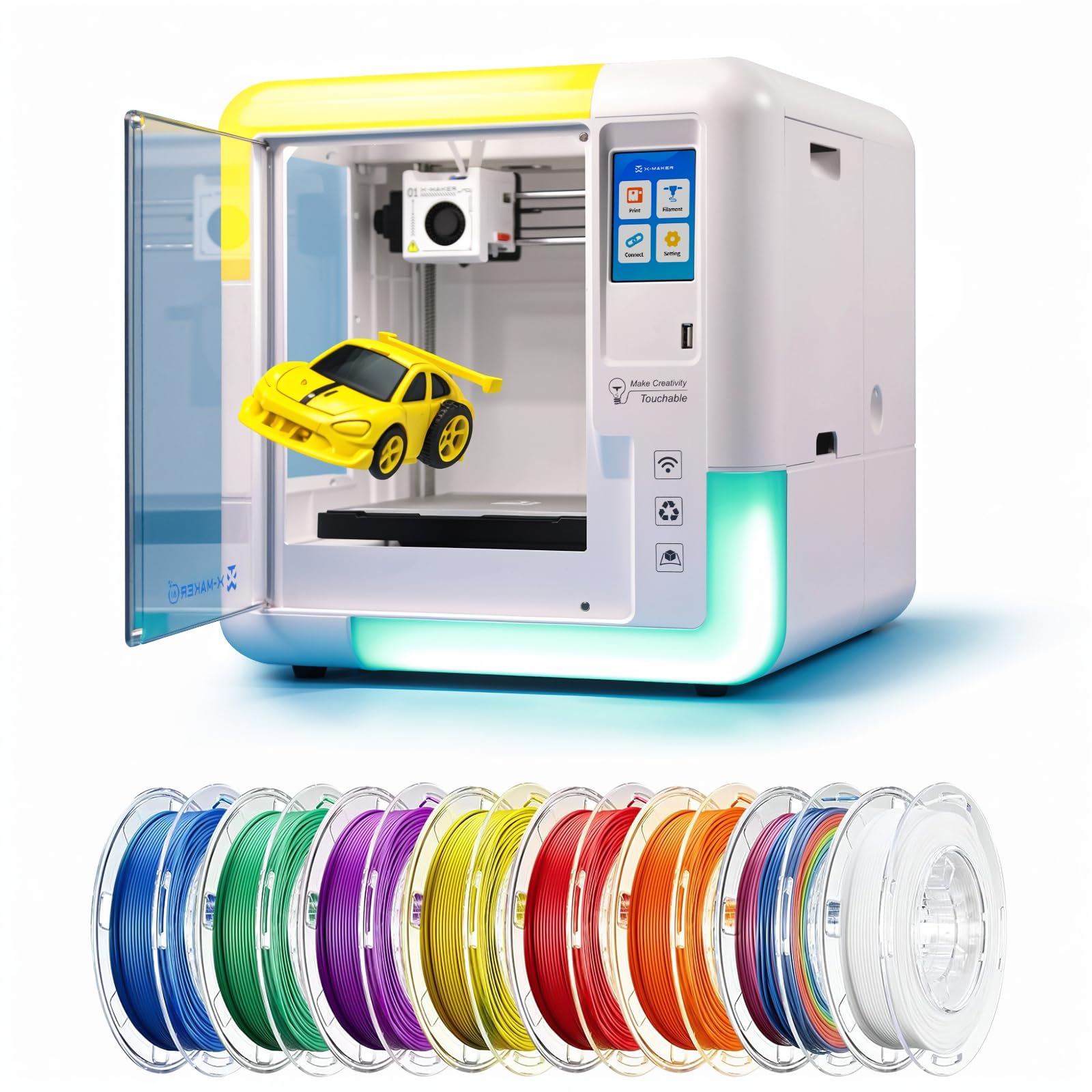
If you’re new to 3D printing for clothing and want a machine that works out of the box without manual bed leveling, the X-Maker AI+ is a strong contender. Its fully enclosed build protects smaller flexible prints from drafts, and the 0.1mm precision layer height is sufficient for detailed wearable accessories like custom bracelets or mesh panels.
Built-in Wi-Fi and a 3.5-inch touchscreen mean you can start printing from the included 1,500+ model library in under ten minutes — no tinkering required. The sub-50 dB noise level makes it unobtrusive in a shared living space, and the magnetic build plate lets you pop off finished prints without struggling with adhesion issues.
For garment-focused beginners, the AI Doodle feature that converts sketches into printable 3D models is genuinely useful for prototyping custom fashion pieces. However, the 220mm³ build volume limits its ability to produce large single-piece garments like full sleeves or dress panels.
Why it’s great
- Enclosed safety design with magnetic bed — great for home use
- AI-based model generator simplifies custom wearable prototyping
- Ultra-quiet operation (under 50 dB) suitable for classrooms
Good to know
- Limited to single-color printing without filament swapping
- Small build volume restricts large garment production
3. Bambu Lab A1 Combo + LED Lamp Kit

The Bambu Lab A1 Combo delivers multi-color printing via the AMS lite system, which is a genuine advantage if you want to create garments with gradient patterns or multi-tone designs. The active flow rate compensation algorithm monitors extrusion in real-time, adjusting the flow to prevent over- or under-extrusion — a critical feature for flexible filaments that tend to vary in diameter.
With 10,000 mm/s² acceleration and a full-auto calibration system that handles Z-offset and bed leveling without user intervention, this printer reduces the typical learning curve. The 1-Clip quick-swap nozzle makes switching between TPU and PLA effortless, and the LED lamp kit opens up possibilities for illuminated wearable accents.
Users consistently report zero failed prints right out of the box, and the Maker World online library provides thousands of garment-adjacent models like jewelry and costume pieces. Note that the A1 is an open-frame design, so larger TPU prints may need an enclosure or draft shield to prevent warping.
Why it’s great
- Multi-color printing via AMS lite enables complex garment designs
- Active flow compensation ensures consistent flexible filament extrusion
- Auto-calibration eliminates manual bed leveling for beginners
Good to know
- Open frame — large TPU parts may require additional enclosure
- Minimal included filament sample for initial prints
4. Anycubic Kobra S1 Combo

The Anycubic Kobra S1 Combo packs a 4-color printing system (expandable to eight colors with a second ACE PRO) at a price that undercuts most multi-color competitors — an attractive offer for anyone producing detailed wearable textiles with color transitions. The integrated filament dryer is a standout: it uses dual PTC heating and 360° hot air circulation to keep TPU and PETG dry during long prints, preventing the moisture-related stringing that ruins flexible garment layers.
Print speed reaches 600mm/s with 20,000 mm/s² acceleration, and the Kobra OS includes flow compensation to eliminate virtual waste — a subtle but important feature when you’re paying premium prices for colored TPU spools. The full enclosure stabilizes the chamber temperature for consistent layer adhesion on large prints.
Setup time is roughly 30 minutes, and the Anycubic app allows one-click printing and remote monitoring. While the ACE PRO dryer handles cardboard spools adequately, some users note that it’s loud in drying mode, so factor that in if your printer lives in a bedroom or shared studio.
Why it’s great
- Built-in ACE PRO dryer actively dries TPU and PETG during multicolor prints
- Expandable to 8-color printing for complex apparel designs
- Fully enclosed build chamber prevents warping in long garment prints
Good to know
- ACE PRO can be loud when actively drying filament
- Some users experienced early firmware connectivity problems
5. Creality K2 Combo

For users who need quiet operation alongside multicolor capability, the Creality K2 Combo employs step-servo motors and dynamically balanced fans to maintain noise levels comparable to a laptop keyboard — a rare combination for a printer capable of 16-color prints (via four CFS units). The 260mm³ build volume handles medium-sized garment sections like sleeves or panels without requiring segmentation.
The smart auto-leveling system only probes the bed area relevant to your print, reducing setup time to minutes. The direct-drive extruder with step-servo motors adjusts torque dynamically in under a millisecond, which translates to smooth TPU extrusion even at the high-end of the speed range. The CFS (Creality Filament System) auto-feeds, dries, and switches between filaments without manual intervention.
Print quality is reported as exceptional, with users noting zero clogs or adhesion failures across hundreds of hours of operation. One caveat: the CFS doesn’t natively fit standard spools without printed adapters, so you’ll need to invest time (4-5 hours per adapter) to make your existing filament collection work.
Why it’s great
- Step-servo motors deliver whisper-quiet operation for home studios
- 16-color capability via daisy-chained CFS units
- Auto-leveling that only probes the print area saves time
Good to know
- CFS requires printed adapters for non-Creality spools
- Some users report firmware hiccups with multicolor slicing
6. QIDI Q2 Combo

If your clothing-grade projects demand engineering materials like carbon-fiber-reinforced TPU or PPA-CF, the QIDI Q2 Combo is the only enclosed machine in this list with a 370°C nozzle and a 65°C actively heated chamber. That combination lets you print high-temperature flexible composites without layer delamination — essential for durable, warp-resistant wearable armor or reinforced textile joints.
The triple filtration system (G3 pre-filter, H12 HEPA, activated carbon) makes this safe for indoor use even with materials that release VOCs. The 1.5GT synchronous belt reduces vibration artifacts (VFA) that cause surface ripples on flexible prints, resulting in a smoother finish than most CoreXY machines deliver. QIDI BOX automatically dries filament while printing, with a 65°C drying chamber that keeps TPU bone-dry for consistent extrusion.
Users report perfect first layers and excellent support responsiveness. The open Klipper firmware allows deep customization, which experienced users appreciate, but beginners should expect a steeper learning curve for advanced tuning.
Why it’s great
- 370°C nozzle unlocks high-temp engineering filaments for reinforced wearables
- 65°C active chamber prevents warping on large garment parts
- Triple HEPA/carbon filtration enables safe indoor printing of VOCs
Good to know
- Higher price point requires justification for TPU-only users
- Steeper learning curve for beginners due to open firmware
7. Creality K2 Pro Combo

The K2 Pro Combo upgrades the standard K2 with a larger 300mm³ build volume and active chamber heating up to 60°C — a meaningful improvement for garment makers who want to print full-sized clothing sections without splitting files. The dual AI cameras (one chamber-side for failure detection and time-lapse, one nozzle-side for flow rate tuning) provide real-time monitoring that catches spaghetti failures early, saving hours of wasted material on long prints.
The direct-drive extruder uses hardened steel gears for abrasive filaments like carbon-fiber TPU, and the quick-swap hotend supports effortless maintenance between material changes. FOC step-servo motors deliver 600mm/s printing with 20,000 mm/s² acceleration, while the auto-leveling system only probes the target print area for faster starts.
User feedback highlights excellent print quality and responsive customer support. The printer is heavy (61.6 pounds) and requires a dedicated workspace, but the combination of chamber heating, dual AI, and large volume makes it a strong candidate for serious wearable production.
Why it’s great
- 60°C active chamber prevents warping in large garment prints
- Dual AI cameras provide real-time failure detection and flow tuning
- Hardened steel extruder handles abrasive carbon-fiber TPU
Good to know
- Very heavy (61.6 lbs) — requires a dedicated, sturdy table
- CFS multicolor operation can have cryptic error messages
8. Creality K2 Plus Combo (17x17x17)

The K2 Plus Combo with the 350mm³ build volume is the largest enclosed printer on this list, purpose-built for garment makers who need to print entire panels in a single run. The 30,000 mm/s² acceleration and 600mm/s printing speed mean large parts don’t consume your entire day, and the step-servo motor system keeps noise manageable despite the high throughput.
Dual AI cameras watch for spaghetti failures, idle time, and foreign objects while also enabling time-lapse for documentation. The automatic tilt-reduction system uses dual independently motorized Z-axes to compensate for bed tilt before leveling, ensuring perfect first-layer adhesion across the entire 350mm surface — critical for flexible materials that lift easily.
The CFS system supports 16-color printing, and the active chamber heating up to 60°C accommodates materials like ASA and PPA-CF. Users report that the RFID filament system automatically detects color and type, simplifying workflow for multicolor wearables. The printer is massive and heavy (requires two people to unbox), so plan your studio layout accordingly.
Why it’s great
- 350mm³ build volume prints full garment panels without splitting
- 30,000 mm/s² acceleration delivers fast throughput on large parts
- Automatic tilt-leveling ensures uniform adhesion across the big bed
Good to know
- Extremely heavy — plan for permanent installation with two-person setup
- Some units require manual QC fixes out of the box
9. Creality K2 Plus Combo (13.78×13.78×13.78)
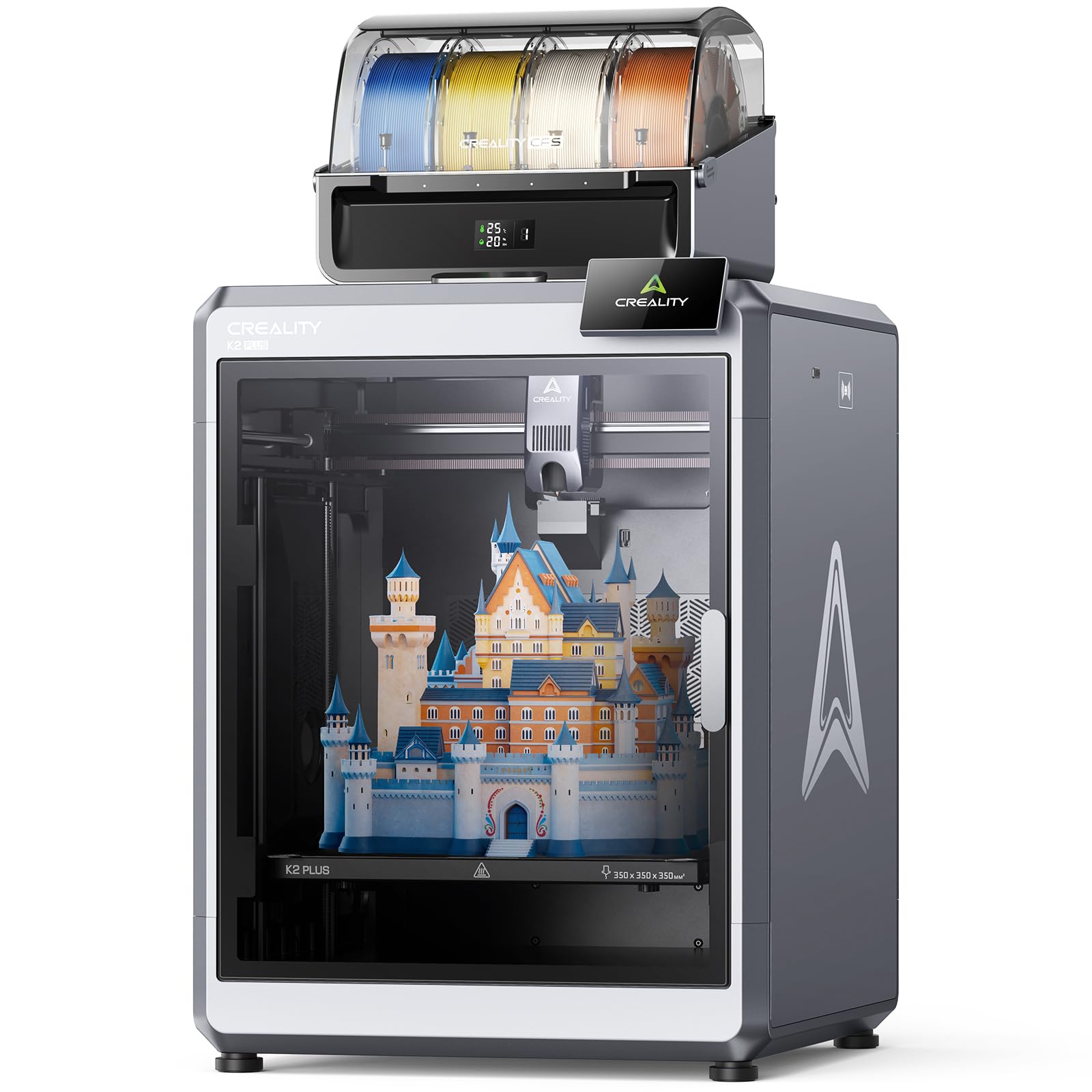
This variant of the K2 Plus Combo adds RFID filament recognition — the CFS automatically reads the color and material type from Creality’s Hyper filament, setting the correct temperature and retraction settings without manual input. For clothing production that cycles between TPU, PETG, and PLA-CF, this removes a major source of user error and wasted time.
The “Matrix” frame uses aerospace-grade aluminum alloy die-casting, providing exceptional rigidity that eliminates resonance and deformation during high-speed printing. The dual Z-axis with four linear rods ensures stable vertical movement, which translates to consistent layer lines on tall wearable prints. Active chamber heating maintains 60°C for warp-prone materials, and the dual AI cameras (chamber + toolhead) catch extrusion issues early.
Users report over 1,400 hours of flawless printing, with the CFS handling filament switching seamlessly. The only consistent feedback is that the CFS struggles with cardboard spools unless you use adapters. The printer ships with four 500g RFID spools (black, white, red, blue) — enough to start multi-color projects immediately.
Why it’s great
- RFID CFS auto-detects material type and sets optimal print parameters
- Aerospace-grade aluminum frame eliminates vibration at high speeds
- Active 60°C chamber ensures warp-free large garment prints
Good to know
- Cardboard spools may need printed adapters for CFS compatibility
- Some units reported QC issues with hotend and network cables
10. SYXINGL A3 DTF & DTG Printer

While most printers on this list use FDM technology (layering melted plastic), the SYXINGL A3 is a fundamentally different tool — it uses DTF (direct-to-film) and DTG (direct-to-garment) inkjet printing to apply designs onto fabric surfaces. This machine is not for creating 3D textile objects but for decorating flat garments (T-shirts, hoodies, hats) with full-color graphics that feel soft to the touch.
The A3 suction platform holds both film (for DTF transfer) and flat garments (for DTG direct printing). The white ink stirring system runs on an automatic timer, reducing the risk of printhead clogs — a common failure point in DTG printers. Standardized replacement printheads and motherboards are easy to source, unlike proprietary systems that leave you stranded after warranty.
Customer support (frequently mentioned as “Michael” in reviews) provides hands-on guidance for setup, which is essential because the instructions are minimal. Users report excellent color reproduction and print quality, with vivid gradients that hold up through washing. This is a niche professional tool for small-batch garment production, not a hobbyist 3D printer.
Why it’s great
- Dual DTF and DTG modes cover fabric decoration and transfer printing
- A3 flatbed with suction enables precise alignment on garments
- Easy-to-source replacement printheads reduce long-term costs
Good to know
- Not a traditional 3D printer — only for flat-surface garment decoration
- Setup is intimidating without seller’s direct support
FAQ
Can any 3D printer print flexible fabric-like materials?
What is the best filament for printing clothes?
Do I need a heated chamber for TPU clothing prints?
Can I use a DTF/DTG printer to create 3D printed clothes?
How do I prevent stringing when printing flexible materials?
Final Thoughts: The Verdict
For most users, the 3d printer for clothes winner is the Flashforge Adventurer 5M Pro because it delivers the fastest print speeds, flexible filament support, and enclosed safety at a price that doesn’t break the bank. If you want multi-color capability with an integrated filament dryer, grab the Anycubic Kobra S1 Combo. And for large-scale garment production with active chamber heating and dual AI monitoring, nothing beats the Creality K2 Pro Combo.