
Our readers keep the lights on and my morning glass full of iced black tea. As an Amazon Associate, I earn from qualifying purchases.
Specs are compiled from manufacturer listings and verified buyer reviews and can change over time — please confirm the key details on the product page before buying.
If your laptop only has one or two USB-C ports, you know the shuffle: unplug the mouse to plug in a drive, then swap again for the backup hard drive. A 4 Port USB-C Hub stops that dance cold — giving you four full-speed ports from a single slot, so every peripheral stays connected at once without you playing musical cables.
I’m Min — the founder and writer behind Gadgets Feed. This guide is built by comparing the manufacturers’ published specifications and the patterns across verified customer reviews, so you get each pick’s real strengths and trade-offs instead of marketing spin.
You will find seven top options for a 4 port usb-c hub, comparing plastic compact designs against aluminum heat-sinks, 5Gbps versus 10Gbps speeds, and a standout premium hub that also passes power through to your laptop.
Quick Picks
- Satechi USB-C Hub (4-in-1) — Premium Performer
- Anker USB-C Display Hub (A8340) — Versatile Display Hub
- Belkin Connect 4-Port USB-C Hub — Reliable Everyday Pick
- UGREEN Revodok USB C Hub 10Gbps — Pure Data Speed
- UGREEN USB C Hub (CM806) — Compact Speedster
- Anker USB C Hub (A8309012) — Trusted Budget Pick
- Cable Matters Ultra Mini 4 Port USB C Hub — Long-Range Value
How To Choose The Best 4 Port USB-C Hub
A 4 Port USB-C Hub shares one common job — turning one port into four — but three key specs separate a good one from a frustrating one.
Transfer Speed: 5Gbps vs 10Gbps
Speed is the biggest divide. A 5Gbps hub (USB 3.0) works fine for a mouse, keyboard, and flash drives. A 10Gbps hub (USB 3.2 Gen 2) moves large files like video projects or disk images twice as fast. If you regularly transfer big files, the faster tier saves real time.
Pass-Through Charging vs Data-Only
Some hubs only pass data. Others let you plug a laptop charger into the hub so your device charges while the hub works. If your laptop has one USB-C port (like a MacBook Air), a data-only hub blocks charging — you will need a model with pass-through power delivery (PD).
Build Quality: Plastic vs Aluminum
Plastic hubs are light and cheap, but they trap heat. Aluminum shells act as a heat sink, keeping the internals cooler during heavy transfers. For sustained work with multiple drives, an aluminum hub tends to run more reliably for longer stretches.
Quick Comparison
On smaller screens, swipe sideways to see the full table.
| Model | Best For | Transfer Speed | Pass-Through Charging | Build Material | Amazon |
|---|---|---|---|---|---|
| Satechi USB-C Hub (4-in-1) | Premium all-rounder with speed and charge | 10 Gbps | 100W PD | Aluminum | Amazon |
| Anker USB-C Display Hub (A8340) | Power delivery with 4K video | 10 Gbps | 100W PD | Plastic (recycled) | Amazon |
| Belkin Connect 4-Port USB-C Hub | Reliable build with audio support | 10 Gbps | 100W PD | Plastic | Amazon |
| UGREEN Revodok USB C Hub | Pure speed for data-heavy workflows | 10 Gbps | No | Aluminum | Amazon |
| UGREEN USB C Hub (CM806) | Ultra-compact budget speedster | 10 Gbps | No | Aluminum | Amazon |
| Anker USB C Hub (A8309012) | Trusted brand for basic desktop use | 5 Gbps | No | Plastic | Amazon |
| Cable Matters Ultra Mini 4 Port USB C Hub | Long cable for distant placements | 5 Gbps | No | Plastic | Amazon |
In‑Depth Reviews
1. Satechi USB-C Hub (4-in-1)

This compact aluminum block turns one USB-C port into four, keeps your laptop charged, and moves files at 10 Gbps.
The defining advantage here is pass-through charging — you plug your laptop charger into the hub, and a full 100W of power delivery keeps your device topped up while all four ports run at full speed. That is a feature most 4-port hubs skip entirely. The aluminum enclosure measures just 2.36 inches square, so it disappears into a pocket or bag easily.
Buyers report using it with an M1 MacBook Pro to run Sidecar to an iPad and a USB-C ethernet adapter simultaneously without any glitches. One reviewer noted the short 17cm cable feels sturdy enough for desktop setups but may need an extension for tower PCs. Another mentioned the hub mounts drives quickly and outperforms cheaper competitors in reliability.
The trade-off is straightforward: no monitor output via USB-C HDMI alt mode, so this is a data and charge hub only. If you need to drive an external display through the same dock, you will need a different product.
Why it stands out
- 100W power delivery charges laptop through the hub
- Aluminum build with chamfered edges dissipates heat
- 2-year limited warranty covers defects
The limitation
- No video output; data and power only
- Short cable may not reach tower PCs without extension
Reach for this if you need a premium hub that both charges your laptop and handles four 10Gbps devices in one tiny package.
Look elsewhere if you need to connect a monitor or external display through the hub.
2. Anker USB-C Display Hub (A8340)

This hub gives you 4K video at 60Hz plus 100W pass-through charging from one compact box.
The clever trick here is the first USB-C port doubles as a video output using DisplayPort Alt Mode. Plug your monitor into that specific port and you get 4K at 60Hz, making this a rare 4-port hub that handles a display. The other three ports still run at 10 Gbps for drives and peripherals. The exterior uses 75% post-consumer recycled materials.
One buyer described it as “flawless” when running a 12-channel music interface through their iMac. Another mentioned an initial video output issue that Anker support resolved with a firmware update. Owners mention the hub passes 100W power delivery through to the host device, so a single cable connects power, video, and data.
Note that 4K@60Hz works only via that first USB-C port, and your host device must support DisplayPort Alt Mode — check compatibility before buying.
What makes it special
- 4K@60Hz display output via USB-C with DisplayPort Alt Mode
- 100W pass-through power delivery
- Eco-friendly build with 75% recycled materials
What to watch for
- Video output only works on port 1
- Firmware update may be needed for stable video
Ideal for the user who needs one hub to handle charging, a 4K monitor, and fast file transfers from a single laptop port.
Not for you if your device does not support DisplayPort Alt Mode over USB-C, or if you want USB-A ports rather than USB-C.
3. Belkin Connect 4-Port USB-C Hub

A trusted name in connectivity, this hub delivers 10Gbps data and up to 100W pass-through in a pocket-size shell.
Belkin built this hub around two things that matter daily: speed and stability. Each of the four USB-C 3.2 Gen 2 ports delivers 10 Gbps for fast file transfers. The pass-through charging supports up to 100W of power delivery to keep your laptop running. Fast Role Swap (FSR) prevents data interruptions if you remove or add a power source while devices are connected.
Customers note the hub connects to a phone with a broken screen and successfully downloads all content to another device. Another reviewer mentioned running 65W passthrough without any heat or speed issues, calling it an essential daily accessory. The glossy black surface, however, scuffs easily — so treat it gently if aesthetics matter.
One word of caution from recent buyers: 2026 batches saw a higher failure rate, so some shoppers advise keeping a backup hub handy until Belkin addresses quality consistency.
Strong points
- 100W pass-through charging with Fast Role Swap protection
- Supports audio devices like headphones and interfaces
- Compact 2.95-inch design fits anywhere
Weak spots
- Glossy finish shows scuffs quickly
- Some recent batches reported quality issues
Best suited for anyone who wants a brand-name hub with full-speed ports and audio support in a compact size.
skip it if you are concerned about recent build consistency and want to avoid the risk of a faulty unit.
4. UGREEN Revodok USB C Hub 10Gbps
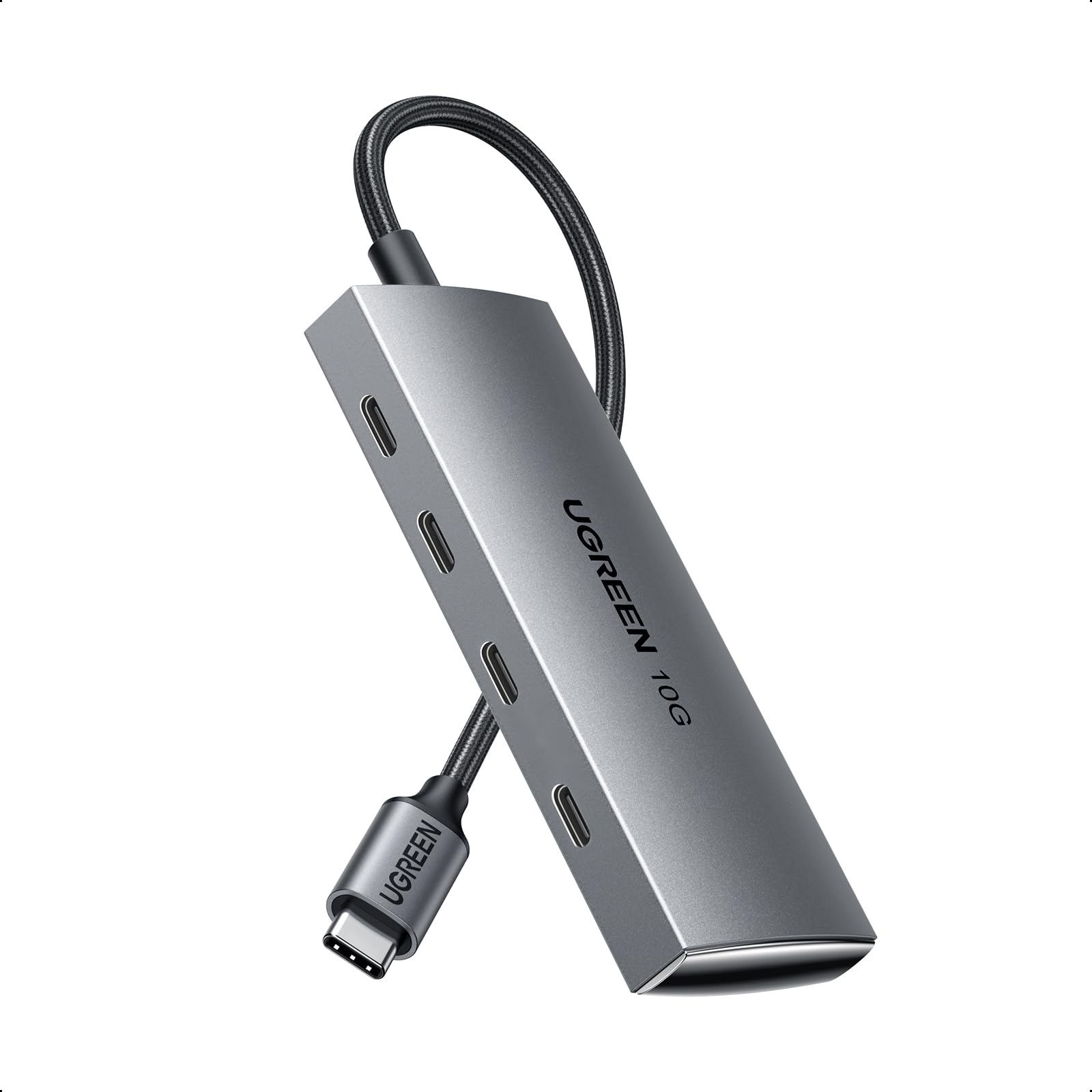
An aluminum data hub built for creative pros who move big media files all day long.
This is the purest 10 Gbps hub on the list — all four ports run USB 3.2 Gen 2 at full speed simultaneously, as long as you use UASP-enabled SSDs. The aircraft-grade aluminum shell works as a heat sink, pulling heat away during long transfer sessions. The 1-foot braided cable reduces strain on the laptop port.
Reviewers point out it works with 4 digital audio interfaces on a Mac Mini or Mac Studio at the same time — a real-world test of bandwidth and stability. One buyer mentioned a high-pitched noise that changes pitch when plugging in devices, though they did not observe overheating or short circuits. Another buyer confirmed it handles an SSD, keyboard, and mouse without issues.
The catch is simple: this hub does not charge your laptop. It is data-only. If your laptop has one USB-C port, plugging in this hub means you lose the ability to charge unless you have a second port.
Where it shines
- All four ports run 10 Gbps simultaneously
- Aluminum shell dissipates heat effectively
- Braided 1-foot cable reduces port strain
Where it falls short
- No pass-through charging at all
- Some units emit coil whine under load
Go for this if you only need data speed and already have a dedicated charging port or dock for your laptop.
Pass if you need one cable to both charge your device and connect peripherals — this hub delivers no power.
5. UGREEN USB C Hub (CM806)

Tiny aluminum hub that turns a single USB-C port into four 10Gbps data lanes for under.
Size-wise, this is the smallest hub here at 4 x 1.5 x 0.5 inches and 50 grams. The 10 Gbps transfer speed per port matches hubs that cost twice as much. One owner reported running 3 HDDs totaling 40TB plus a 4TB SSD simultaneously at full speed — real proof of bandwidth. Another reviewer used it to DJ a gig from a MacBook Air with zero stutters.
The aluminum frame helps keep temperatures under control during sustained use. There is no power delivery and no video output — this is purely a data expander. At this size and speed, it is easy to leave it permanently attached to a laptop bag.
One negative review noted the hub disconnects drives during cloning at about 90% with multiple devices connected, so heavy cloning may be risky with this unit.
What works well
- 10Gbps data on all four ports in a tiny footprint
- Aluminum build for heat dissipation
- Proven with 40TB+ of storage connected
Potential issues
- Some units disconnect during heavy cloning tasks
- Plastic feel despite aluminum claims in one review
Grab this if you want the cheapest way to add four full-speed USB-C data ports to your setup without sacrificing transfer speed.
Avoid if you plan to clone drives or run mission-critical data tasks where a disconnect would be a problem.
6. Anker USB C Hub (A8309012)

Anker’s slim 5Gbps hub keeps things simple and reliable for everyday mouse-keyboard-drive connections.
At 5Gbps, this hub is half the speed of the 10Gbps models above. For most people plugging in a wireless mouse receiver, a keyboard, and a flash drive, that speed is invisible — you will not notice a difference. The 2-foot cable gives you more placement freedom than the ultra-short dongle-style hubs. It measures just 4.2 x 1.2 x 0.4 inches, making it one of the slimmest options for sliding into a laptop sleeve.
Buyers consistently give it five stars for simplicity: “extremely easy to use for non-technical users” and “keeps dongles organized to prevent loss.” One customer observed it simplifies connecting a laptop, mouse, keyboard, and headset for an office setup. No one reports heat issues or dropouts at this 5Gbps speed tier.
The real drawback is speed — if you copy large video files, design assets, or disk images regularly, the 5Gbps cap will feel slow compared to the 10Gbps hubs at a similar price like the UGREEN CM806.
Solid attributes
- Simple plug-and-play, no drivers to install
- 2-foot cable offers better reach than stubby dongles
- 1.12 ounces — lighter than a pack of gum
The speed trade-off
- 5 Gbps cap is slower than the 10Gbps competition
- Plastic enclosure does not dissipate heat as well as aluminum
Pick this if you want Anker’s reliability for a desk setup with basic peripherals and occasional file transfers.
Look elsewhere if you regularly move large files and want the 10Gbps speed that similarly priced options offer.
7. Cable Matters Ultra Mini 4 Port USB C Hub

A 4-foot cable tail sets this ultra-mini hub apart from every stubby dongle on the shelf.
The standout feature here is the 4-foot extension cable — 2.8x longer than the UGREEN Revodok’s 11-inch body and cable combined. That lets you place the hub on your desk where you can actually reach the ports, rather than dangling off the side of your laptop. At 4 x 2.4 x 0.6 inches, the octagonal shape provides roomy access to all four USB-A ports at once.
Shoppers say the hub supports a mouse, keyboard, and two portable 3TB HDDs simultaneously without power draw issues. One reviewer specifically praised the longer cable for keeping the hub out of the way at their workstation. The plastic build feels durable for travel, and the molded strain-relief connectors handle frequent plugging and unplugging.
The obvious limitation is 5Gbps speed and USB-A ports rather than USB-C, but for legacy peripherals like flash drives, mice, and keyboards, that is exactly what most people need.
Why it earns its spot
- 4-foot cable for flexible placement away from laptop
- Strain-relief connectors built for frequent use
- Roomy octagonal design for easy plugging
Limitations
- 5Gbps speed is slower than 10Gbps alternatives
- USB-A ports only; no USB-C output for newer devices
Choose this if you need to reach your hub across a desk or mount it out of sight with the long extension cable.
pass on it if you need USB-C ports or want the 10Gbps speed that newer hubs offer.
Understanding the Specs
Data Transfer Speed: 5Gbps vs 10Gbps
Speed is the single most important spec on a USB-C hub. 5Gbps (USB 3.0) handles keyboards, mice, flash drives, and smaller file transfers without issue. 10Gbps (USB 3.2 Gen 2) moves large files like 4K video projects, disk images, or backup archives twice as fast. If you work with big files daily, the 10Gbps tier saves real time — a 20GB file transfers in roughly 16 seconds at 10Gbps versus 32 seconds at 5Gbps.
Pass-Through Charging (Power Delivery)
Some hubs include a USB-C port that accepts your laptop charger and sends power through to the host device. This is essential if your laptop has only one USB-C port — a data-only hub will block charging. Look for 100W PD if you have a power-hungry laptop. Lower wattage PD (like 60W) may not charge faster than the laptop consumes.
FAQ
Will a 4 Port USB-C Hub work with my MacBook Air or Pro?
Can I charge my laptop through a 4 Port USB-C Hub?
What is the difference between 5Gbps and 10Gbps in real use?
Can I connect a monitor to a 4 Port USB-C Hub?
Will these hubs work with an iPad or iPhone?
How many hard drives can I connect at once?
Does a plastic hub overheat faster than an aluminum one?
What is UASP and do I need it?
Are these hubs plug-and-play or do I need drivers?
How long is the cable on a typical 4 Port USB-C Hub?
Final Thoughts: The Verdict
If you want one dependable pick, the 4 port usb-c hub winner is the Satechi USB-C Hub because it combines 10Gbps speed, 100W pass-through charging, and a compact aluminum build that fits any setup. If you want Anker USB-C Display Hub gives you 4K@60Hz video output plus full charging — a rare combo in this size. And for UGREEN Revodok delivers pure 10Gbps data speed in an aluminum shell for users who already have a charging solution.
How We Picked
We do not accept paid placement, and we did not hands-on test every unit. Instead, we match each pick to a real buyer and use-case by comparing the manufacturers’ published specifications against the patterns in verified customer reviews — so you get each pick’s real strengths and trade-offs instead of marketing copy.
Sources & Methodology
Specifications: manufacturer listings and product documentation. Review insights: verified customer reviews, as of July 2026. Pricing: not shown on this page (it changes often); check the current price via the retailer link.
As an Amazon Associate, Gadgets Feed earns from qualifying purchases. This does not affect which products we feature.
Product prices and availability are accurate as of the date/time indicated and are subject to change. Any price and availability information displayed on Amazon at the time of purchase will apply to the purchase of this product. As an Amazon Associate I earn from qualifying purchases.
CERTAIN CONTENT THAT APPEARS ON THIS SITE COMES FROM AMAZON. THIS CONTENT IS PROVIDED "AS IS" AND IS SUBJECT TO CHANGE OR REMOVAL AT ANY TIME.
Amazon and the Amazon logo are trademarks of Amazon.com, Inc. or its affiliates.