
A 4K smart monitor merges the pixel-dense clarity of a professional-grade display with the built-in streaming and app ecosystem of a modern television. This hybrid category eliminates the need for a separate TV box or smart dongle by integrating Wi-Fi, on-board speakers, and a full operating system—Samsung Tizen, LG webOS, or Google Android—directly into the panel. The result is a single screen that serves as both your primary computer monitor for work and a living-room-grade TV for movies, live sports, or cloud gaming.
I’m Min — the co-founder and writer behind Gadgets Feed. My deep-market research on 4K smart monitors involves dissecting panel technologies (IPS, VA, OLED), OS feature sets, connectivity bandwidths like Thunderbolt 4 and USB-C with Power Delivery, and real-world performance metrics such as refresh rate, response time, and color gamut coverage to separate genuine utility from marketing gloss.
To help you cut through the noise, I have analyzed over 20 models across the – price band and identified the eleven that truly deliver. This guide to the best 4k smart monitor covers everything from screen size and operating system to connectivity and color accuracy.
How To Choose The Best 4K Smart Monitor
Selecting a 4K smart monitor requires balancing the traditional demands of a computer display—color accuracy, refresh rate, and ergonomic adjustability—with the multimedia capabilities of a smart TV: a responsive OS, integrated speakers, and remote control navigation. Below are the key decision points.
Panel Technology: VA vs. IPS vs. OLED
VA panels offer the highest native contrast (3000:1 to 5000:1), producing deep blacks ideal for movie watching in a dim room, but viewing angles are narrower. IPS panels provide consistent color and brightness from any angle, making them preferable for collaborative work or multi-monitor setups, though contrast is lower (1000:1). OLED panels deliver perfect blacks with infinite contrast and the fastest response times, but they are more expensive and carry burn-in risk if static desktop elements are left on screen for extended periods. For a smart monitor that doubles as a TV, a high-quality VA or a well-tuned IPS will serve most users better than an OLED unless gaming is a primary use case.
Built-in Operating System and App Ecosystem
The operating system defines your daily experience. Samsung Tizen provides a smooth interface with Samsung TV Plus and Gaming Hub. LG webOS offers a polished navigation system known for its pointer remote and deep integration with PC-level multitasking via the Switch app. Android-based platforms, including Google EDLA-certified units, unlock the full Google Play Store, allowing you to install any Android app, from Netflix to Zoom, natively. Check whether the OS is locked to a proprietary app store or open to the full ecosystem—this determines whether you can run your preferred streaming services and productivity tools directly on the monitor without a secondary device.
Connectivity and USB-C Power Delivery
A 4K smart monitor’s value as a desktop hub hinges on its port selection. USB-C with Power Delivery (65W or higher) lets you connect a laptop with a single cable that carries video, data, and charging simultaneously. Thunderbolt 4 offers even higher bandwidth for daisy-chaining multiple 4K displays. HDMI 2.1 is essential for connecting a PlayStation 5 or Xbox Series X at full 4K 120Hz. Wi-Fi 6 ensures smooth 4K streaming without buffering interruptions. If the monitor lacks USB-C video input, you will need an adapter for modern laptops, compromising the clean, single-cable aesthetic.
Quick Comparison
On smaller screens, swipe sideways to see the full table.
| Model | Category | Best For | Key Spec | Amazon |
|---|---|---|---|---|
| Samsung 43” M7 (M70F) | Smart Monitor, VA | All-in-one work & TV | 5000:1 contrast ratio | Amazon |
| Samsung 43” M7 (M70D) | Smart Monitor, VA | OTT streaming + Gaming Hub | SolarCell Remote | Amazon |
| Dell UltraSharp U2725QE | Professional, IPS Black | Color-critical work | 120Hz refresh rate | Amazon |
| BenQ MA320U | Mac-Specific, IPS | MacBook Pro/Air users | 90W USB-C PD | Amazon |
| LG 32GX850A-B UltraGear | Gaming, OLED | Competitive 4K gaming | 0.03ms GtG response | Amazon |
| KTC MEGAPAD A32Q7 Pro | Portable, Android | Battery-powered mobility | 9500mAh battery | Amazon |
| ApoloSign 32″ Gen2 | Portable, Android | Family calendar & kiosk | 15000mAh battery | Amazon |
| LG Smart Monitor Swing 32U889SA-W | Touchscreen, Mobile | Touch interactivity on wheels | 10-point touch IPS | Amazon |
| BenQ PD3225U | Pro Design, IPS Black | Mac designers & colorists | 2000:1 IPS Black | Amazon |
| ASUS ProArt PA32QCV | Professional, 6K | Ultra-High pixel density | 6016 x 3384 resolution | Amazon |
| ASUS ROG Swift PG32UCDMR | Gaming, QD-OLED | Elite 4K HDR gaming | 240Hz refresh rate | Amazon |
In‑Depth Reviews
1. Samsung 43” Smart Monitor M7 (M70F)

The Samsung M7 M70F delivers a 43-inch VA panel with a 5000:1 contrast ratio that produces deep, cinematic blacks—a clear advantage over IPS panels when watching movies in a dark room. Its Samsung Tizen OS provides instant access to Netflix, YouTube, Samsung TV Plus, and Gaming Hub without requiring a connected PC or a streaming dongle. The AI Picture Optimizer adjusts visual presets based on whether you are working on documents, gaming, or watching content, which adds genuine usability across different usage scenarios.
Connectivity is robust for a mid-range smart monitor: a single USB-C port supports video, data transfer, and device charging, plus two HDMI inputs and USB-A ports for peripherals. The built-in remote with far-field voice interaction makes navigating the smart interface as natural as using a standard TV. Samsung Knox provides multi-layered security for your data and IoT connections, which is a rare feature on consumer monitors.
At 60Hz, this monitor is not designed for competitive gaming, and its 300-nit brightness is adequate rather than brilliant for HDR content. Some users report occasional software quirks with the smart hub, and the treble-heavy onboard speakers benefit from an external soundbar. For users who want a single large screen for both productivity and entertainment without sacrificing smart TV features, however, this model offers the most balanced package in its category.
Why it’s great
- Excellent 5000:1 VA contrast for deep blacks in movies
- Full smart TV ecosystem with Tizen and Vision AI
- USB-C single-cable connectivity with device charging
Good to know
- 60Hz refresh rate limits gaming potential
- 300-nit brightness is modest for HDR content
- Onboard speakers lack bass; external audio recommended
2. Samsung 43-Inch M7 (M70D) Series 4K UHD Smart Monitor

The M70D iteration refines the Samsung smart monitor formula with several quality-of-life upgrades over its predecessor. It retains the same 43-inch VA panel with a 5000:1 contrast ratio and 300-nit brightness, but adds a SolarCell Remote that charges via ambient light, eliminating the need for disposable batteries. The Samsung Gaming Hub is now integrated, allowing instant access to Xbox Cloud Gaming and NVIDIA GeForce NOW without a console or PC.
A key productivity differentiator is the ability to control multiple devices—including a Galaxy Tab and phone—with one keyboard and mouse, and to drag and drop content across them seamlessly. The built-in remote PC access and embedded Microsoft 365 apps enable a complete work-from-desktop setup without ever booting a connected computer. The 3D Map View for smart home devices adds a layer of home IoT control that no other monitor in this class offers.
Like the M70F, the M70D is limited to a 60Hz refresh rate and lacks a DisplayPort input, which may deter PC gamers with older GPUs. The glossy screen finish can be reflective in bright rooms, and the interface can feel overly complex compared to a traditional monitor OSD. For users who want a self-contained productivity and entertainment hub with a strong sustainability angle, the M70D delivers excellent value.
Why it’s great
- SolarCell Remote eliminates battery waste
- Multi-device control with drag-and-drop across Galaxy devices
- Integrated Gaming Hub for cloud gaming without a PC
Good to know
- 60Hz refresh rate and no DisplayPort
- Glossy screen can cause reflections in bright rooms
- Smart TV menus can feel cluttered for monitor purists
3. Dell UltraSharp U2725QE 27 Inch 4K UHD IPS Black Monitor

The Dell UltraSharp U2725QE is a 27-inch professional-grade monitor that uses IPS Black technology to achieve a 2000:1 contrast ratio—double that of standard IPS panels—while maintaining wide 178-degree viewing angles. It covers 99% of the DCI-P3 color space and comes factory-calibrated to Delta E less than 1.5, making it suitable for photo editing, video color grading, and any workflow where color accuracy is non-negotiable. The 120Hz refresh rate is a significant upgrade over the standard 60Hz found on most professional 4K monitors, providing noticeably smoother cursor movement and scrolling.
Thunderbolt 4 connectivity delivers up to 140W of Power Delivery, enough to charge a MacBook Pro at full speed while transmitting video and data over a single cable. The daisy-chain capability lets you connect two additional 4K monitors without extra cables. ComfortView Plus reduces harmful blue light without distorting color, which is critical for professionals who spend 8+ hours at their desk.
While this monitor lacks a conventional smart TV operating system, its Thunderbolt hub functionality and exceptional color accuracy make it the ultimate desktop companion for creative professionals. The 27-inch screen size provides a high pixel density of 163 PPI, delivering retina-like sharpness for text and UI elements. Some Mac users have reported compatibility quirks that may require firmware updates, but for Windows and general productivity, the U2725QE is nearly flawless.
Why it’s great
- IPS Black technology offers 2000:1 contrast with wide viewing angles
- 140W Thunderbolt 4 PD charges a MacBook Pro at full speed
- 120Hz refresh rate for smoother desktop and light gaming
Good to know
- No built-in smart TV OS or streaming apps
- Some Mac users report compatibility issues at launch
- Premium pricing reflects professional-grade specifications
4. BenQ MA320U 32” 4K Monitor for MacBook Pro/Air

The BenQ MA320U is built from the ground up for the Mac ecosystem. Its exclusive color tuning delivers a P3 wide color gamut that matches the MacBook Pro and MacBook Air display, so colors appear consistent across your laptop and monitor without manual calibration. You can adjust the monitor’s brightness and volume directly from your MacBook keyboard using the native function keys, a level of integration that third-party monitors rarely achieve without third-party software.
Connectivity is centered around two USB-C ports: one delivers 90W Power Delivery for charging a MacBook Pro, while the second provides 15W for charging an iPad or iPhone. Two HDMI 2.0 ports offer legacy device support. The 32-inch IPS panel runs at 60Hz with a 400-nit brightness, and the ergonomic stand provides full tilt, swivel, pivot, and height adjustments. The included blue light filter and flicker-free technology reduce eye strain during long coding or writing sessions.
The MA320U does not include an integrated smart TV operating system; it relies on the MacBook for all content delivery. HDR performance is adequate but unremarkable, as the monitor lacks local dimming. For creatives and professionals who primarily work on a Mac and want a large 4K screen that feels like a natural extension of their laptop, the MA320U offers seamless integration that no other monitor at this price point can match.
Why it’s great
- Native MacBook keyboard control for brightness and volume
- P3 color gamut matches MacBook display out of the box
- Dual USB-C with 90W + 15W for laptop and device charging
Good to know
- 60Hz refresh rate limits fluidity in fast content
- No smart TV OS or built-in speakers worth mentioning
- HDR performance is modest without local dimming
5. LG 32GX850A-B 32″ UltraGear 4K UHD Glossy OLED Gaming Monitor

The LG 32GX850A-B is a 32-inch glossy OLED gaming monitor that delivers perfect blacks, infinite contrast, and a 1.5M:1 contrast ratio through its Micro Lens Array+ technology. The glossy finish eliminates the matte haze common on other OLEDs, making colors pop with a depth and vibrance that closely mimics real-world viewing. It features a dual-mode function that allows switching between 4K UHD at 165Hz for immersive single-player titles and Full HD at 330Hz for competitive shooters—all accessible via a hotkey.
The 0.03ms GtG response time is effectively instantaneous, eliminating motion blur and ghosting in fast-paced scenes. VESA DisplayHDR True Black 400 certification ensures that dark scenes in games and movies retain detail without crushing shadows. NVIDIA G-SYNC Compatible and AMD FreeSync Premium Pro support ensure tear-free gameplay across all GPU ecosystems. The ergonomic stand offers tilt, swivel, pivot, and height adjustments, and the virtually borderless design fits seamlessly into a multi-monitor setup.
OLED text clarity can exhibit minor color fringing due to the subpixel layout, which may be noticeable for productivity users. The 275-nit typical brightness is lower than mini-LED competitors, though HDR highlights still impress due to the per-pixel luminance control. Some users have reported dead sub-pixels on arrival, though LG’s warranty covers burn-in and pixel issues. For gamers who prioritize image quality and response time above all else, this OLED panel is a transformative upgrade.
Why it’s great
- Glossy OLED produces perfect blacks and vibrant colors
- Dual Mode: 4K 165Hz or FHD 330Hz for versatile gaming
- 0.03ms response time eliminates ghosting completely
Good to know
- 275-nit brightness is lower than high-end mini-LED panels
- Text clarity can show minor color fringing on OLED
- Burn-in risk requires careful usage for mixed productivity
6. KTC MEGAPAD 32″ 4K UHD Smart Portable TV

The KTC MEGAPAD is a 32-inch portable Android TV on wheels that redefines what a smart monitor can be. Powered by Android 13 with full Google EDLA certification, it provides access to the entire Google Play Store, including Netflix, YouTube, Microsoft 365, and Zoom. The 10-point touchscreen on a 4K VA panel with a 3000:1 contrast ratio makes it a giant interactive tablet for streaming, recipe browsing, or collaborative note-taking. The built-in 9500mAh battery provides cordless operation for up to 11 hours of music playback or approximately 3–4 hours of streaming video.
Connectivity includes Wi-Fi 6, Bluetooth 5.2, HDMI 2.0, USB 3.0, and USB 2.0 ports, along with wireless screen mirroring from phones, tablets, and laptops. The adjustable stand offers height, tilt, swivel, and pivot adjustments, and the five silent universal wheels allow the unit to glide smoothly between rooms. The dual 6W 3D speakers are surprisingly loud and clear for a portable device, making it suitable for presentations or outdoor gatherings.
The 220-nit brightness is a significant compromise—this screen will struggle in direct sunlight or very bright rooms. The touchscreen can be overly sensitive, and some users have reported intermittent freezing with certain streaming apps. The battery, while generous, drains faster than the music playback estimate suggests during video streaming. For users who need a 4K smart monitor that can move from the kitchen to the home office to the backyard patio without being tethered to an outlet, the MEGAPAD delivers unmatched flexibility.
Why it’s great
- Battery-powered with 9500mAh for room-to-room portability
- Full Google EDLA certification with access to 100,000+ apps
- 10-point touchscreen on a 32-inch 4K display
Good to know
- 220-nit brightness is too dim for bright rooms or outdoor use
- Battery life during video streaming is shorter than advertised
- Touch sensitivity can be overly responsive for precise work
7. ApoloSign 32 Inch 4K UHD Smart Portable TV on Wheels, Gen2

The ApoloSign Gen2 is a 32-inch portable smart TV that runs Android 16 with Google EDLA certification, offering a massive 256GB of built-in storage and a 15000mAh battery that delivers up to 6 hours of cordless entertainment. The 10-point touchscreen on the 4K VA panel provides smooth interactive control, while the included detachable camera enables video calls directly from the monitor. The ApoloSign Dashboard app transforms the screen into a family calendar, chore chart, digital photo frame, or kiosk display—making it more than just a TV.
Wi-Fi 6 and Bluetooth 5.3 ensure fast wireless connectivity, and the smooth rolling stand with silent wheels makes it easy to move between rooms. The white minimalist design blends well with modern home decor, and the adjustable stand supports tilting and swiveling for optimal viewing angles. Setup is straightforward, requiring only attaching the display to the pre-assembled base and plugging in the power adapter.
Multiple user reviews have flagged that the device ships with Android 14 TV (EDLA) rather than Android 16 as advertised, and the desktop interface may be restricted compared to a standard Android tablet. The 4K resolution applies only to video playback; the user interface and apps render at 1080p upscaled, which diminishes text clarity for productivity tasks. The portrait mode orientation has also been reported as problematic. For families seeking a portable, multi-functional smart display for casual streaming and organizational tools, the Gen2 offers strong value, but the OS discrepancies require careful consideration.
Why it’s great
- 256GB storage for offline media and app installations
- 15000mAh battery provides substantial cordless runtime
- Dashboard app converts the screen into a family command center
Good to know
- Advertised Android 16 may actually ship with Android 14 TV
- 4K resolution only active for video; UI defaults to 1080p
- Restricted app store and no true desktop mode
8. LG Smart Monitor Swing 32U889SA-W 32-Inch 4K UHD IPS Touchscreen
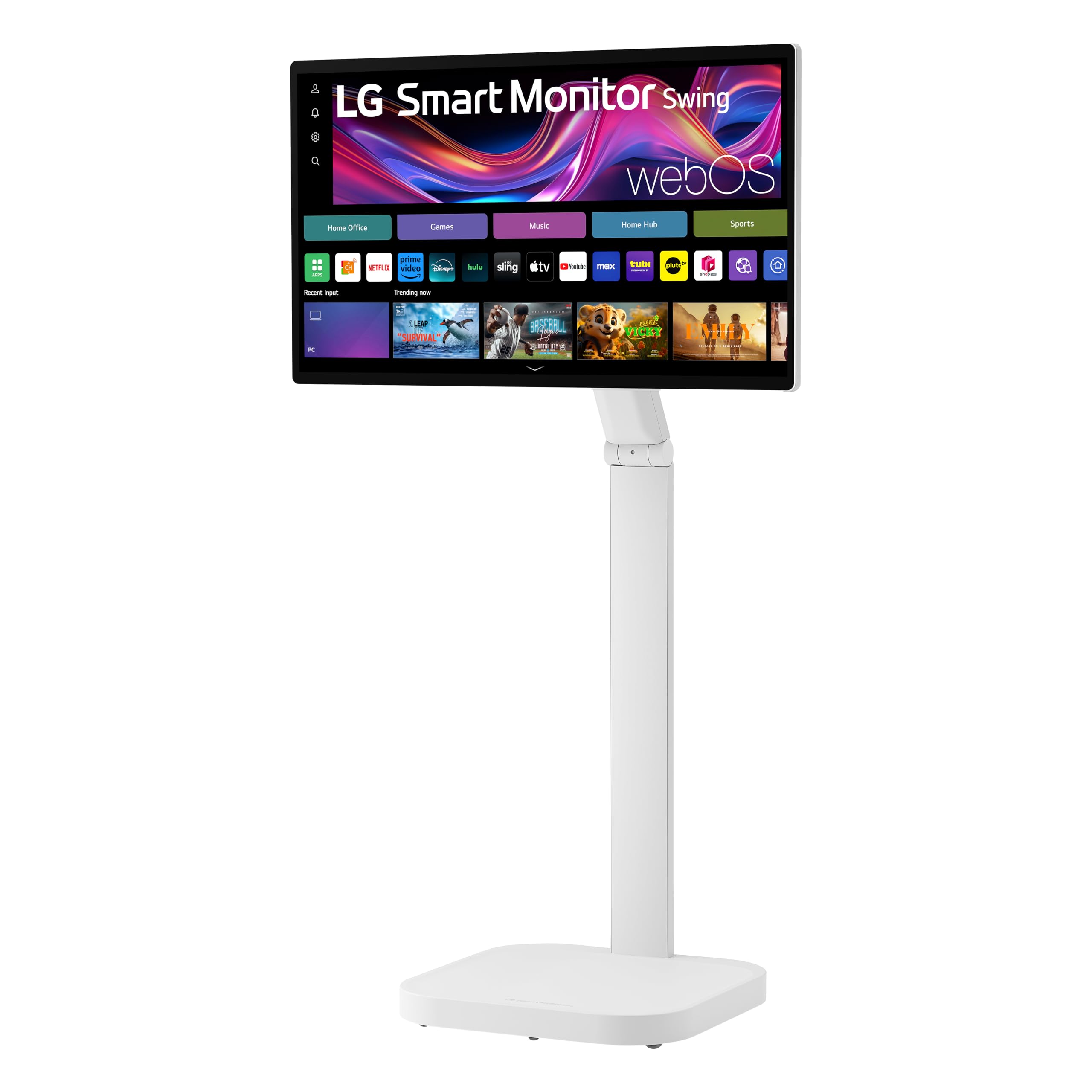
The LG Smart Monitor Swing is a 32-inch IPS touchscreen monitor mounted on a stable, wheeled base that allows 360-degree movement across your home or office. The torsion spring hinge supports tilt, swivel, height, and pivot adjustments, including a full portrait mode. The 4K UHD IPS panel delivers 95% DCI-P3 color coverage and 350 nits of brightness, with touch sensitivity that works smoothly for swiping, tapping, and pinch-to-zoom gestures across webOS and connected apps.
webOS powers the smart experience, providing access to popular streaming services, remote PC access, and the Switch app for splitting the screen into up to six sections for multitasking. Three USB-C ports enable single-cable connection with up to 65W Power Delivery, and the hidden adapter compartment keeps cables neatly concealed. AirPlay 2 and screen mirroring support both iOS and Android devices, making it easy to share content from your phone.
Some users have reported the unit ships as a Latin American regional variant with a locked app store that lacks popular US streaming services. Wi-Fi connectivity can be intermittent, and the lack of dedicated cable management for external devices connected to the base detracts from the otherwise clean design. The display requires two people to attach to the stand safely. For those who want a touchscreen smart monitor that moves as freely as a tablet, the Swing delivers a unique, polished experience—provided the regional firmware matches your location.
Why it’s great
- Fully adjustable rolling stand for room-to-room portability
- Superb 95% DCI-P3 color on a responsive touchscreen
- Three USB-C ports with 65W PD and hidden cable compartment
Good to know
- Regional firmware may lock US streaming apps and services
- Wi-Fi disconnections reported during extended use
- Requires two people for safe stand attachment to the display
9. BenQ PD3225U 32 Inch 4K IPS Black Thunderbolt Monitor

The BenQ PD3225U uses IPS Black technology to deliver a 2000:1 contrast ratio, making it one of the few monitors that combine wide viewing angles with deep, true blacks—ideal for graphic designers and video editors working in P3 and sRGB color spaces. It covers 98% DCI-P3 and 100% sRGB/Rec.709, and is Pantone Validated and Calman Verified with Delta E ≤ 2 accuracy. The M-Book mode matches the color temperature and gamma of Apple MacBook displays, ensuring seamless visual consistency across devices.
The Thunderbolt 3 port provides 40 Gbps bandwidth and 85W Power Delivery, allowing a single cable to handle video, data, and laptop charging while supporting daisy-chaining for a multi-monitor setup. The included Hotkey Puck G3 offers tactile control over brightness, input switching, and display presets, which is far faster than navigating on-screen menus. The anodized metal stand offers full ergonomic adjustment with a premium, durable feel.
The 250-nit brightness is noticeably dimmer than many competitors and may be insufficient for brightly lit studios or sunlit rooms. The Thunderbolt 3 port uses the older standard, so it lacks the bandwidth of Thunderbolt 4 for demanding multi-stream setups. The built-in speakers are weak and best replaced with dedicated desktop monitors. For creative professionals who require panel-grade color accuracy and deep contrast in a controlled lighting environment, the PD3225U is a reference-grade tool.
Why it’s great
- IPS Black panel achieves 2000:1 contrast with wide viewing angles
- Pantone Validated and Calman Verified with Delta E ≤ 2
- Hotkey Puck G3 offers fast tactile preset control
Good to know
- 250-nit brightness is dim for bright studio environments
- Thunderbolt 3, not the newer Thunderbolt 4 standard
- Built-in speakers are too weak for professional use
10. ASUS ProArt Display 32” 6K Professional Monitor (PA32QCV)

The ASUS ProArt PA32QCV is a 31.5-inch 6K monitor with a resolution of 6016 x 3384 pixels, delivering a pixel density that rivals Apple’s Retina displays. This makes it the sharpest monitor in this list by a significant margin, ideal for photo editing, video production, and code where every pixel counts. It covers 98% DCI-P3 and 100% sRGB, with factory calibration to Delta E < 2. The LuxPixel AGLR anti-glare coating reduces reflections without introducing the hazy grain typical of matte screens.
Dual Thunderbolt 4 ports support up to 96W Power Delivery with daisy-chaining, allowing you to connect multiple 6K displays in a chain. The HDMI 2.1 port supports the latest gaming consoles at full bandwidth. The built-in Auto KVM lets you switch between two connected laptops or PCs using a single keyboard and mouse, a significant productivity enhancer for mixed-platform workflows. The DisplayWidget Center allows OSD adjustment with a mouse instead of fiddling with buttons.
Panel lottery issues have been reported, with some units arriving with dead pixels or backlight bleed, requiring multiple exchanges to get a flawless screen. The 60Hz refresh rate and 5ms response time are standard for productivity but not suitable for fast-paced gaming. The included speakers are basic and better used only for system sounds. For professionals who demand the highest pixel density in a color-accurate package, the PA32QCV provides a 6K canvas at a fraction of the cost of Apple’s Pro Display XDR.
Why it’s great
- 6K resolution (6016 x 3384) offers Retina-level pixel density
- 98% DCI-P3 with factory Delta E < 2 color accuracy
- Dual Thunderbolt 4 with 96W PD and daisy-chain support
Good to know
- Panel lottery can result in dead pixels or backlight bleed
- 60Hz refresh rate is unsuitable for gaming
- Built-in speakers are weak and only good for system sounds
11. ASUS ROG Swift 32” 4K OLED Gaming Monitor (PG32UCDMR)

The ASUS ROG Swift PG32UCDMR is a 32-inch QD-OLED gaming monitor that combines a 240Hz refresh rate with a 0.03ms response time, making it one of the fastest 4K displays available. The QD-OLED panel delivers a 1.5M:1 contrast ratio with DisplayHDR 400 True Black certification and 99% DCI-P3 coverage, providing perfect blacks and vibrant colors that LCD panels cannot match. The Neo Proximity Sensor automatically switches to a black screen when the user leaves the desk, significantly reducing burn-in risk.
DisplayPort 2.1 with DP80 cables provides full bandwidth for 4K at 240Hz without display stream compression, ensuring pixel-perfect image quality. HDMI 2.1 supports the PlayStation 5 and Xbox Series X at 4K 120Hz. USB-C with 90W Power Delivery allows charging a gaming laptop while transmitting video. The uniform brightness setting maintains consistent luminance across the entire panel, which is critical for professional color work between gaming sessions.
QD-OLED panels can exhibit a purple tint on blacks when exposed to direct ambient light, and text clarity may show minor fringing due to the subpixel layout. Some users have reported non-functional OSD buttons on arrival, requiring an immediate return or replacement. The stand is large and takes up significant desk space, though it offers full ergonomic adjustment. For competitive and single-player gamers who want the ultimate visual experience with the fastest response times, the PG32UCDMR is the benchmark to beat.
Why it’s great
- 240Hz QD-OLED with 0.03ms response time for elite gaming
- DisplayPort 2.1 delivers full bandwidth without compression
- Neo Proximity Sensor reduces burn-in risk automatically
Good to know
- QD-OLED shows purple tint on blacks in bright ambient light
- Some units ship with non-functional OSD buttons
- Large stand foot consumes substantial desk surface area
FAQ
Can I use a 4K smart monitor as a regular computer monitor?
How important is USB-C Power Delivery for a 4K smart monitor?
What is the difference between Samsung Tizen and Google EDLA certified monitors?
Can I use a 4K smart monitor for console gaming at 120Hz?
Do all 4K smart monitors have built-in speakers?
Final Thoughts: The Verdict
For most users, the best 4k smart monitor winner is the Samsung 43” Smart Monitor M7 (M70F) because it strikes the ideal balance between a large VA panel with excellent contrast for movies and a fully featured Tizen smart TV OS with Vision AI, all at a mid-range price. It works as a complete PC, TV, and gaming hub in one package. If you want professional-grade color accuracy and Thunderbolt 4 connectivity, grab the Dell UltraSharp U2725QE. And for elite gaming with a QD-OLED panel at 240Hz, nothing beats the ASUS ROG Swift PG32UCDMR.