
Our readers keep the lights on and my morning glass full of iced black tea. As an Amazon Associate, I earn from qualifying purchases.
The leap from 1440p to a true 4K UHD panel isn’t subtle — it’s a wall of pixels that transforms how enemy outlines resolve at distance and how textures materialize under dynamic lighting. But raw resolution alone won’t save you from ghosting, input lag, or a panel that can’t keep up with a modern GPU’s frame output. The real fight is in the refresh rate, response time, and panel technology that turns a spec sheet into a competitive weapon.
I’m Min — the co-founder and writer behind Gadgets Feed. I’ve spent hundreds of hours cross-referencing panel types, HDR certification levels, and adaptive sync implementations to separate marketing claims from genuine performance gains in this specific niche.
This guide breaks down the critical specs and real-world trade-offs behind each top contender, helping you find the perfect best 4k uhd gaming monitor for your rig and your budget.
How To Choose The Best 4K UHD Gaming Monitor
Choosing the right monitor means balancing resolution, refresh rate, panel technology, and connectivity in a way that matches your GPU, budget, and the specific genres you play most.
Panel Technology: The Foundation of Image Quality
IPS panels offer the best color accuracy and wide viewing angles, making them ideal for games where visual fidelity matters. VA panels deliver superior contrast ratios (typically 3000:1 or higher) for deeper blacks, but can suffer from slower pixel response in dark transitions. QD-OLED technology provides per-pixel lighting, infinite contrast, and the fastest response times, but carries a premium price and requires care to mitigate burn-in risk.
Refresh Rate and Response Time: Smoothness You Can Feel
For 4K gaming, 144Hz is the baseline for a fluid experience, while 240Hz panels give competitive players a tangible edge in fast-twitch scenarios. Response time, measured in GtG (Gray to Gray), should be 1ms or lower for IPS and VA panels; QD-OLED panels achieve 0.03ms, virtually eliminating motion blur entirely. Pair these specs with adaptive sync (FreeSync or G-Sync Compatible) to prevent screen tearing without adding input lag.
Connectivity and HDR: Future-Proofing Your Setup
HDMI 2.1 bandwidth is essential for running 4K at 120Hz or higher on modern consoles like the PS5 and Xbox Series X. DisplayPort 1.4 with DSC (Display Stream Compression) achieves the same on PC. For HDR, look for VESA DisplayHDR 600 or higher for meaningful brightness and contrast improvements; True Black certifications (400 or 600) are specific to OLED panels and indicate per-pixel lighting performance.
Quick Comparison
On smaller screens, swipe sideways to see the full table.
| Model | Category | Best For | Key Spec | Amazon |
|---|---|---|---|---|
| ASUS ROG Swift PG32UCDM | QD-OLED | Competitive & immersive gaming | 240Hz / 0.03ms / 99% DCI-P3 | Amazon |
| LG 32GX870A-B | OLED | Dual-mode esports & story | Dual Mode 4K 240Hz / FHD 480Hz | Amazon |
| MSI MPG 321URX QD-OLED | QD-OLED | HDR-rich single-player games | 240Hz / 0.03ms / True Black 400 | Amazon |
| Samsung Odyssey G8 (G81SF) | QD-OLED | Bright-room gaming with anti-glare | 240Hz / 0.03ms / Glare Free Tech | Amazon |
| ASUS ROG Strix XG32UCG | Fast IPS | Dual-mode value & performance | Dual Mode 4K 160Hz / FHD 320Hz | Amazon |
| KTC 27″ Dual Mode Mini LED | Mini-LED | High-contrast HDR on a budget | Dual Mode 4K 160Hz / FHD 320Hz | Amazon |
| MSI MAG 322URDF E16 | Rapid IPS | High-refresh 4K at mid-range | 320Hz / 0.5ms / DisplayHDR 400 | Amazon |
| KTC 32″ 4K Fast IPS | Fast IPS | Large-screen productivity & gaming | 165Hz / 1ms / 3000:1 Contrast | Amazon |
| LG 32GQ750-B | VA | Console gaming with HDMI 2.1 | 144Hz / 1ms / DCI-P3 90% | Amazon |
| Samsung Odyssey G7 (G70D) | Fast IPS | Smart TV integration & gaming | 144Hz / 1ms / 4K AI Upscaling | Amazon |
| CRUA 32″ 4K Curved | VA Curved | Budget immersive 4K gaming | 240Hz / 1500R / FreeSync | Amazon |
In‑Depth Reviews
9. ASUS ROG Swift PG32UCDM

At the top of the 4K UHD class, the ASUS ROG Swift PG32UCDM delivers a reference experience for both competitive and immersive gaming. Its 32-inch QD-OLED panel runs at 240Hz with a 0.03ms GtG response time, which translates to buttery-smooth motion clarity without ghosting or perceptible input lag. The 99% DCI-P3 color gamut and VESA DisplayHDR 400 True Black compliance produce deep, inky blacks and vibrant highlights that make HDR titles like Cyberpunk 2077 look transformative.
ASUS includes a custom heatsink and graphene film for heat management, reducing burn-in risk on static HUD elements. The stand adjusts in height, tilt, swivel, and pivot, and the 90W USB-C port powers a laptop while passing display signals. The 1/4-inch tripod socket is a thoughtful addition for streamers mounting a camera overhead. The glossy panel enhances perceived contrast and color saturation, but users in bright rooms may notice reflections more than on matte alternatives.
Three years of warranty coverage that explicitly includes burn-in protection adds peace of mind for long-term ownership. For gamers seeking uncompromised 4K performance, this is the benchmark that competing monitors must be measured against.
Why it’s great
- Exceptional 240Hz QD-OLED motion clarity with 0.03ms response
- Burn-in coverage included in 3-year warranty
- Built-in heatsink and graphene film for OLED longevity
Good to know
- Glossy screen finish shows reflections in bright rooms
- Peak brightness limited in uniform brightness mode for burn-in prevention
11. LG 32GX870A-B

The LG 32GX870A-B redefines flexibility with its Dual Mode capability, letting players toggle between 4K UHD at 240Hz for story-driven titles and Full HD at 480Hz for fast-paced competitive shooters. The Micro Lens Array+ technology pushes peak brightness up to 1300 nits, making it one of the brightest OLED gaming monitors available. The 0.03ms GtG response time is virtually instantaneous, and both G-Sync Compatible and FreeSync Premium Pro ensure no screen tearing across the entire refresh range.
Connectivity includes DisplayPort 2.1, which provides enough bandwidth for 4K at 240Hz without relying on Display Stream Compression. The anti-glare/low-reflection OLED coating minimizes distracting reflections while maintaining deep black levels. Built-in speakers with DTS Headphone:X support deliver clear audio, though gamers with dedicated headsets may still prefer external audio solutions. The Switch App integration allows for windowed multitasking layouts, splitting the screen into up to six sections.
The 2-year limited warranty and OLED Care tools cover pixel cleaning and panel health. For gamers who split time between immersive RPGs and competitive esports, this monitor’s dual-mode flexibility makes it a uniquely versatile and future-proof choice.
Why it’s great
- Dual Mode: 4K 240Hz and FHD 480Hz on a single panel
- Micro Lens Array+ achieves 1300 nits peak brightness
- DisplayPort 2.1 for uncompressed 4K high-refresh
Good to know
- Matte coating may appear slightly grainy on static white backgrounds
- 2-year OLED warranty is shorter than some competitors’ 3-year burn-in coverage
8. MSI MPG 321URX QD-OLED

The MSI MPG 321URX brings QD-OLED quality to a more accessible price point without cutting corners on the essentials. Its 32-inch panel delivers 4K resolution at 240Hz with a 0.03ms GtG response time, making it competitive with monitors costing significantly more. The VESA DisplayHDR True Black 400 certification means blacks are truly infinite in a dark room, and the DCI-P3 99% color gamut with Delta E ≤2 accuracy serves both gaming and color-sensitive productivity work.
The stand supports height, tilt, swivel, and pivot adjustments, and the 90W USB-C port charges a laptop at full speed. KVM functionality is built in, allowing a single keyboard-and-mouse setup to control two connected devices with PiP/PbP modes. MSI’s OLED Care 2.0 includes pixel shift and panel protection routines that run in the background without interrupting gameplay. The 4-way adjustable stand is sturdy but takes up significant desk depth — users with limited space may prefer a VESA arm.
The 0.03ms response time eliminates motion blur even in fast-paced titles like Valorant or Overwatch 2. For buyers who want premium OLED performance at a price that leaves room for other upgrades, this is a strong contender.
Why it’s great
- True Black 400 with 99% DCI-P3 and Delta E ≤2 color accuracy
- Built-in KVM with 90W USB-C charging
- Competitive pricing for a 4K 240Hz QD-OLED
Good to know
- Large stand base demands ample desk space
- Peak brightness of 250 nits may struggle in very bright rooms
10. Samsung Odyssey G8 (G81SF)

Samsung’s Odyssey G8 G81SF solves one of the biggest complaints about QD-OLED panels — reflections in bright rooms — with its Glare Free technology that reduces gloss by 54% compared to conventional anti-reflection films. This makes it the best choice for gamers who cannot control ambient lighting, as the screen remains legible without sacrificing the deep blacks and vibrant colors OLED is known for. The 32-inch panel delivers 4K at 240Hz with a 0.03ms response time, and VESA DisplayHDR True Black 400 ensures rich shadow detail in HDR games.
The Dynamic Cooling System uses a pulsating heat pipe to dissipate heat five times faster than graphite sheets, reducing core temperature during long sessions and mitigating burn-in. The Thermal Modulation System automatically controls brightness to prevent overheating. Samsung’s CoreSync technology projects colors onto the desk via the rear lighting ring, syncing with on-screen action for deeper immersion. The silver-finished stand adjusts for tilt and height, though it lacks the swivel and pivot found on some rivals.
The 3-year warranty covers the OLED panel, and features like auto source switch+ streamline multi-device setups. For gamers who want OLED quality without fighting reflections, this is the most practical choice in the premium tier.
Why it’s great
- Glare Free coating drastically reduces reflections without compromising blacks
- Pulsating Heat Pipe cooling system for burn-in prevention
- CoreSync ambient lighting syncs with on-screen colors
Good to know
- Some users report dead pixel clusters within the first few months
- Mini joystick navigation can be finicky compared to dedicated buttons
6. ASUS ROG Strix XG32UCG

The ASUS ROG Strix XG32UCG bridges the gap between premium OLED and budget-friendly IPS with its dual-mode Fast IPS panel. At 4K UHD, it runs at 160Hz, while toggling to FHD unlocks 320Hz for esports titles that benefit from higher frame rates. The 0.3ms minimum response time is among the fastest on any IPS panel, and the Extreme Low Motion Blur Sync (ELMB SYNC) technology works simultaneously with variable refresh rate to eliminate ghosting and tearing together — a feature that few monitors in this price range offer.
Color performance is strong with a 95% DCI-P3 gamut, and the DisplayHDR 400 certification provides enough luminance for noticeable highlight pop in supported games. Connectivity includes USB-C with DP Alt mode, two HDMI 2.1 ports, and a DisplayPort 1.4. The built-in DisplayWidget Center allows mouse-controlled settings adjustments, and the tripod socket on top accommodates streaming cameras. The stand offers full ergonomic adjustment: height, tilt, swivel, and pivot.
The semi-gloss screen finish enhances perceived contrast and color vibrancy without being as reflective as fully glossy panels. For gamers who want fast IPS performance and dual-mode flexibility without jumping to OLED pricing, this is a compelling middle-ground option.
Why it’s great
- ELMB SYNC eliminates ghosting and tearing simultaneously
- Dual Mode: 4K 160Hz and FHD 320Hz in a Fast IPS panel
- 0.3ms response time with full ergonomic stand
Good to know
- DisplayHDR 400 is entry-level HDR — not as impactful as OLED HDR
- No built-in speakers on this model
4. KTC 27″ Dual Mode Mini LED
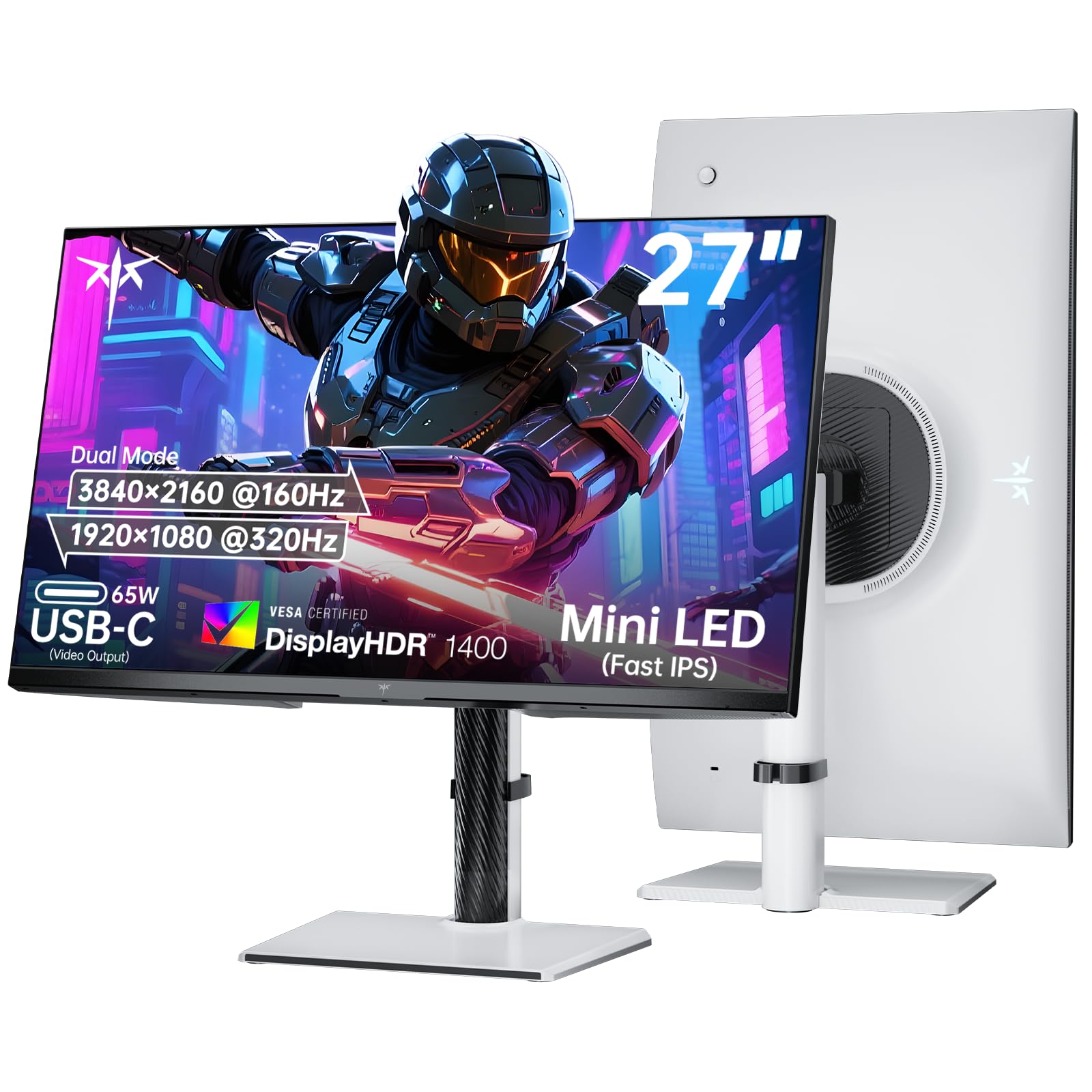
The KTC 27-inch Dual Mode Mini LED monitor delivers contrast and brightness that rival OLED in specific scenarios, thanks to its 1152 independent dimming zones. The HDR1400 certification means peak brightness reaches 1400 nits, which is genuinely impactful for HDR content — explosions and sunlight in games look intensely bright against dark scenes. The dual-mode option lets you run 4K at 160Hz or switch to 1080P at 320Hz, giving flexibility across game genres.
The Fast IPS panel maintains good color accuracy with a 145% sRGB color gamut, and the 1.07 billion colors ensure smooth gradients without banding. The 65W USB-C port charges a laptop while carrying display data, and the two HDMI 2.1 ports support full 4K 120Hz on PS5 and Xbox Series X. The stand adjusts for height, tilt, swivel, and pivot, and VESA 100x100mm mounting is supported. The three-year warranty provides added confidence.
At 27 inches, the pixel density is exceptionally sharp for 4K, making text and fine details look crisp without scaling. The trade-off is that backlight bleed can be visible on dark scenes when viewed from extreme angles. For gamers who prioritize HDR brightness and contrast over the absolute black levels of OLED, this Mini-LED monitor delivers remarkable value.
Why it’s great
- HDR1400 with 1152 dimming zones for outstanding brightness and contrast
- Dual Mode: 4K 160Hz and 1080P 320Hz
- 65W USB-C charging and 3-year warranty
Good to know
- Backlight bleed visible at off-center viewing angles
- No built-in speakers, requires external audio
3. MSI MAG 322URDF E16
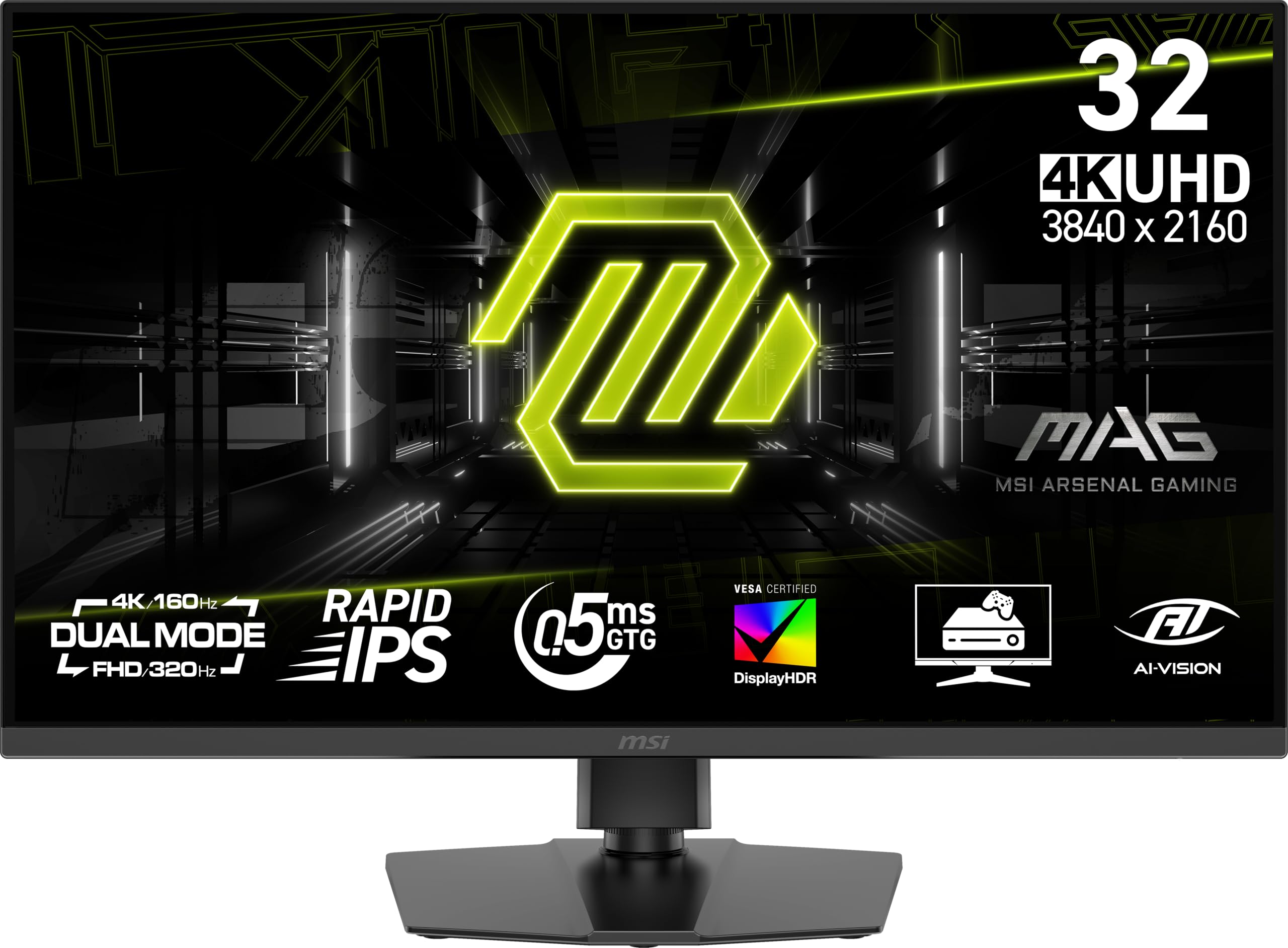
The MSI MAG 322URDF E16 focuses on raw speed with a 320Hz refresh rate on its Rapid IPS panel — an exceptionally high refresh for a 4K monitor. The 0.5ms minimum GtG response time keeps motion blur to a minimum, and the dual-mode feature allows resolution switching to prioritize frame rate when needed. VESA DisplayHDR 400 certification provides decent highlight detail, though the 1000:1 contrast ratio is standard for IPS and won’t match VA or OLED in dark scenes.
The stand includes height adjustment, tilt, and VESA compatibility, and connectivity covers HDMI 2.1 and DisplayPort 1.4a inputs. Console mode optimizes compatibility with PS5 and Xbox Series X, detecting the source and adjusting settings automatically. The built-in speakers are adequate for system sounds but lack the volume and clarity needed for immersive gaming audio.
The color gamut covers 93% of DCI-P3, which is solid for an IPS panel in this price bracket. However, some users report that viewing angles are narrower than expected, with color shifting visible when viewing from beyond 30 degrees off-center. For competitive players who want 4K clarity at the highest possible refresh rate, this monitor delivers speed as its primary advantage.
Why it’s great
- 320Hz refresh rate in 4K — one of the fastest available
- 0.5ms minimum GtG response time for blur-free motion
- Dual Mode with console-optimized compatibility
Good to know
- Narrow viewing angles for an IPS panel
- Reports of white screen defect after extended use
5. KTC 32″ 4K Fast IPS

The KTC 32-inch Fast IPS monitor stakes its claim as a budget-friendly entry into 4K gaming without sacrificing the features that matter most. Its 165Hz refresh rate and 1ms MPRT response time provide smooth gameplay that handles most modern titles comfortably. The 3000:1 contrast ratio is unusually high for an IPS panel and approaches VA territory, delivering deeper blacks and richer shadow detail than typical IPS competitors.
The color gamut covers 121% sRGB, and the 1.07 billion color support produces vibrant, saturated visuals out of the box. The stand offers height and tilt adjustment, and VESA 100x100mm compatibility allows for arm mounting. Connectivity includes HDMI 2.1 and DisplayPort 1.4, which cover current-gen consoles and PCs. The three-year warranty is a welcome reassurance at this price level.
The built-in power brick uses a standard IDE cable, which is a thoughtful design choice for international travelers or those needing replacement cables. The lack of built-in speakers means external audio is required. For gamers seeking a large 4K display with solid specs at the lowest possible entry price, this monitor represents strong value.
Why it’s great
- 3000:1 contrast ratio provides unusually deep blacks for IPS
- 165Hz and 1ms response at a very accessible price point
- 3-year warranty and HDMI 2.1 support
Good to know
- No built-in speakers included
- Limited stand adjustability — tilt and height only, no swivel or pivot
7. LG 32GQ750-B

The LG 32GQ750-B leverages a VA panel to deliver a 2500:1 contrast ratio that provides noticeably deeper blacks than IPS alternatives at a similar price. The 32-inch 4K UHD display runs at 144Hz with a 1ms GtG response time, and the HDMI 2.1 connection supports 4K 120Hz on PS5 and Xbox Series X. AMD FreeSync Premium ensures tear-free gameplay with a minimum 120Hz floor at FHD, making it suitable for console gamers who want a large, responsive display.
Built-in stereo speakers with Waves MaxxAudio deliver 5W per channel, which is louder and fuller than most monitor speakers, reducing the need for desktop speakers in casual setups. The stand offers height, tilt, and swivel adjustments, and the 90% DCI-P3 color gamut provides vibrant, punchy colors for HDR10 content. Dynamic Action Sync and Black Stabilizer help in competitive shooters by reducing input lag and improving shadow visibility.
The adaptive brightness feature can be distracting, adjusting luminance based on on-screen content rather than ambient light. Some units have arrived with dead pixel clusters, though LG’s warranty covers panel defects. For console-dominant gamers who want deep contrast and built-in audio without a separate soundbar, this is a well-rounded option.
Why it’s great
- 2500:1 contrast ratio from VA panel for deep black levels
- Built-in 5W stereo speakers with Waves MaxxAudio
- HDMI 2.1 delivers 4K 120Hz on PS5 and Xbox Series X
Good to know
- Adaptive brightness can cause unwanted luminance shifts
- Some quality control issues reported with dead pixels
2. Samsung Odyssey G7 (G70D)

The Samsung Odyssey G7 G70D is a 27-inch Fast IPS monitor that integrates the Samsung Gaming Hub and Smart TV platform, letting users stream games from Xbox Cloud Gaming, GeForce Now, or Amazon Luna without connecting a PC. The 4K UHD panel runs at 144Hz with a 1ms GtG response time, and G-Sync Compatibility combined with FreeSync Premium Pro ensures fluid gameplay across both consoles and PC. The 4K AI Upscaling powered by the NQM AI Processor improves lower-resolution content to near-4K quality.
The stand adjusts for height, tilt, and swivel, and the USB hub provides convenient access to peripherals. The Dynamic Black Equalizer analyzes scene brightness and automatically adjusts gamma, sharpness, and saturation to reveal shadow details without washing out highlights. The 99% sRGB color gamut delivers accurate, consistent colors, though the 1000:1 contrast ratio is typical for IPS and won’t match VA or OLED for black levels.
The Smart TV interface includes built-in Wi-Fi, Bluetooth, and Ethernet, but some users report that the ad-supported smart TV interface can be distracting and that the setup process is more involved than a standard monitor. The 350 cd/m² brightness is adequate for most rooms but falls short for impactful HDR. For users who want a gaming monitor that doubles as a streaming device, this hybrid approach saves desk space and cable clutter.
Why it’s great
- Built-in Gaming Hub streams games without a PC
- 4K AI Upscaling improves lower-resolution content
- G-Sync Compatible and FreeSync Premium Pro
Good to know
- Smart TV interface includes ads and can feel intrusive
- 1000:1 contrast ratio is standard for IPS — not HDR impactful
1. CRUA 32″ 4K Curved

The CRUA 32-inch 4K Curved monitor delivers an astonishingly high refresh rate of 240Hz at its price point, making it one of the most cost-effective entry points into high-refresh 4K gaming. The 1500R VA panel provides a 3000:1 contrast ratio that significantly outperforms budget IPS monitors in black depth, creating a more immersive experience in darker game scenes. The 120% sRGB color gamut and 1.07 billion colors produce vibrant, punchy visuals that exceed expectations at this tier.
Picture-in-Picture (PIP) and Picture-by-Picture (PBP) modes allow simultaneous display from two input sources, a feature typically found on higher-end productivity monitors. Connectivity includes two HDMI 2.1 ports and two DisplayPort 1.4 inputs, supporting 4K at full refresh rate on both PC and console. The rear RGB lighting adds ambient glow for late-night sessions, and the tilt-adjustable stand and 75x75mm VESA compatibility provide basic mounting flexibility.
The built-in speakers are functional for system audio but lack bass and volume for immersive gaming. The stand does not offer height adjustment, and the monitor weighs roughly 16 pounds, so a VESA arm is recommended for ergonomic setups. For budget-constrained gamers who refuse to compromise on 4K resolution and high refresh rate, this monitor delivers remarkable specifications for what you pay.
Why it’s great
- 240Hz refresh rate and 4K UHD at an entry-level price
- 3000:1 VA contrast ratio for deep, immersive blacks
- PIP/PBP support and dual HDMI 2.1 inputs
Good to know
- Stand lacks height adjustment — VESA arm recommended
- Built-in speakers are adequate but lack bass response
FAQ
Is a 4K 240Hz gaming monitor worth it over 144Hz?
Do I need HDMI 2.1 for a 4K gaming monitor?
What is VESA DisplayHDR True Black 400?
Can a 4K monitor run at 1080p without looking blurry?
How long does a QD-OLED gaming monitor last before burn-in?
Final Thoughts: The Verdict
For most users, the best 4k uhd gaming monitor winner is the ASUS ROG Swift PG32UCDM because it combines a premium QD-OLED panel with 240Hz, 0.03ms response times, and a comprehensive 3-year warranty that includes burn-in coverage. If you want dual-mode flexibility for both immersive single-player and competitive esports, grab the LG 32GX870A-B. And for the best HDR performance at a mid-range price, nothing beats the KTC 27″ Dual Mode Mini LED with its 1152 dimming zones and HDR1400 certification.