
True 5.1 surround sound for a PC isn’t just about more speakers—it’s about spatial audio that places you inside the game or movie. A dedicated center channel locks dialogue to the screen, while rear satellites deliver the environmental cues that stereo simply flattens. The right system transforms a desk into a command center where every footstep, explosion, and whispered line has a distinct place in the room.
I’m Min — the co-founder and writer behind Gadgets Feed. For this guide, I’ve analyzed frequency response curves, connectivity protocols, amplifier topologies, and satellite driver configurations across nine systems to identify which delivers genuine positional audio for a desktop environment without the compromises that break immersion.
Whether you are pairing with a gaming rig or a home office workstation, finding the right 5.1 surround sound system for pc means balancing satellite placement, subwoofer integration, and input compatibility to achieve a convincing soundstage within arm’s reach.
How To Choose The Best 5.1 Surround Sound System For PC
A desktop surround setup imposes unique constraints. Speaker distance, cable run lengths, amplifier integration, and input formats all differ from living-room home theater. Understanding these four factors will keep your purchase from turning into a tangled mess of mismatched connectivity and weak center-channel presence.
Discrete Input vs. Virtual Upmix
True 5.1 requires six discrete channels sent from the PC. Many budget systems only accept stereo via optical or 3.5mm and rely on a built-in processor to fake surround. This works for movies encoded with Dolby Pro Logic, but for PC gaming with native 5.1 audio outputs, you need either six-channel RCA inputs or a USB connection that the OS recognizes as a multichannel device. Check your motherboard or sound card for the output configuration before choosing a system.
Satellite Cable Length and Placement
Desktop rear speakers often sit behind a chair that may be six to ten feet from the subwoofer. Systems with 25-foot rear cables, like the Acoustic Audio AA5240 and Rockville HTS45, allow proper separation. Systems with shorter cables force awkward placement or require extension cables, adding resistance and potential signal degradation. Measure your room before committing to a system with fixed wires.
Subwoofer Size and Room Coupling
A subwoofer’s job is to pressurize the space below the satellite’s crossover point. In a small office or bedroom, an 8-inch driver may be sufficient and less fatiguing. A 10-inch or 12-inch driver delivers deeper extension but can overwhelm a small room or bleed through walls. Adjustable crossover and independent subwoofer volume control let you tune the low end to match your space without rattling the entire house.
Center Channel Clarity
For PC use, the center speaker handles almost all game dialogue, video call audio, and movie speech. Systems that use a single full-range driver for the center often sound hollow compared to those with a dedicated tweeter and midrange cone. The Monoprice center speaker uses two 3-inch drivers, while the Klipsch center employs a horn-loaded tweeter—both prioritize vocal articulation over mere loudness.
Quick Comparison
On smaller screens, swipe sideways to see the full table.
| Model | Category | Best For | Key Spec | Amazon |
|---|---|---|---|---|
| Klipsch Reference 5.1 | Premium Towers | Audiophile-grade desktop theater | 12″ subwoofer, 400W peak | Amazon |
| SteelSeries Arena 9 | Premium Desktop | Wireless rear channels, USB 5.1 | 6.5″ sub, wireless rears | Amazon |
| Logitech Z906 | Premium Compact | THX-certified PC surround | 500W RMS, Dolby/DTS decoding | Amazon |
| Logitech G560 | Gaming RGB | RGB-integrated gaming with DTS:X | 240W peak, LIGHTSYNC RGB | Amazon |
| Bobtot 1200W | Mid-Range | Big bass, karaoke, LED effects | 10″ subwoofer, 1200W peak | Amazon |
| Rockville HTS45 | Mid-Range | Wall-mountable, 30-ft rear cables | 800W peak, Class AB amp | Amazon |
| Bobtot 700W | Entry-Level | Optical ARC, five sound modes | 5.25″ sub, 700W peak | Amazon |
| Monoprice 5.1 | Budget Value | Neutral sound, receiver-ready | 8″ sub, 60W RMS, 8-ohm satellites | Amazon |
| Acoustic Audio AA5240 | Budget Friendly | Cheapest true 5.1 with Bluetooth | 300W system power, 25-ft rears | Amazon |
In‑Depth Reviews
1. Klipsch Reference 5.1 Dolby Atmos System

This Klipsch bundle is the only system on the list with built-in Dolby Atmos up-firing drivers in the front towers. The R-625FA floorstanders each contain a dedicated elevation channel that bounces sound off the ceiling for overhead effects, creating a three-dimensional bubble that desktop users with enough ceiling height will appreciate. The Tractrix horn-loaded tweeters produce high sensitivity (96dB), meaning a modest 75W receiver can drive them to reference levels without strain.
The R-52C center channel uses dual 5.25-inch copper-spun woofers alongside the horn tweeter, delivering vocal articulation that cuts through dense game soundtracks. The R-12SW subwoofer—a 12-inch front-firing driver powered by a 400-watt digital amplifier—reaches down to 29Hz, pressurizing even a medium-sized office. All satellite crossovers are set at 1.8kHz, ensuring seamless handoff between the horn and woofer for coherent panning across the front soundstage.
Setup requires an external AV receiver with 5.1.2 pre-outs or speaker-level binding posts—this is not a powered system. The supplied floor-standing speaker feet use small screws that some owners replace with sturdier hardware. Once calibrated via the receiver’s room correction, the imaging locks instruments and effects to precise spatial locations, making this the only system where you can hear rain move from the front-left tower to the rear-left surround without gaps.
Why it’s great
- Dedicated Atmos elevation channels in the towers
- Horn-loaded tweeter achieves over 96dB sensitivity for low-distortion dynamics
- 12-inch subwoofer extends to 29Hz for authoritative low-frequency response
Good to know
- Requires an external AV receiver—not a self-powered system
- Tower feet mounting hardware has thin screws that may strip
- Large footprint may overwhelm a compact desktop setup
2. SteelSeries Arena 9

The Arena 9 solves one of the biggest PC surround pain points: rear speaker cable routing. The two rear satellites connect wirelessly to the subwoofer, each requiring its own wall power outlet but no signal wire crossing the room. This is a near-field 5.1 system designed explicitly for PC use, connecting to the computer through a single USB cable that Windows recognizes as a 5.1 device, eliminating the need for a separate sound card or optical decoder.
Each front satellite uses a two-way design with a 0.75-inch silk dome tweeter and a 3.5-inch organic-fiber woofer, crossing over at 4.5kHz. This provides detail in the upper frequencies that single-driver satellites cannot match. The 6.5-inch downward-firing subwoofer uses a ported enclosure tuned to 45Hz, which is adequate for gaming explosions and movie LFE but lacks the deep extension for music bass. The control pod displays volume, input selection, and EQ presets, and includes a headphone jack that automatically mutes the speakers.
True 5.1 audio only works over USB; optical and AUX inputs are limited to stereo with optional virtual upmix. The SteelSeries GG software lets you tweak individual channel levels and the 5.1 upmix algorithm, but many web sources remain stereo, and the upmix adds reverb rather than true discrete separation. The rear satellites are each linked to the sub via a 2.4GHz wireless connection with roughly 5-meter range, though they must stay within line of sight of the subwoofer for stable transmission.
Why it’s great
- Rear satellites are completely wireless for cable-free desktop placement
- Two-way front speakers with dedicated tweeter and woofer improve clarity
- Single USB connection delivers true 5.1 to PC without external decoder
Good to know
- Subwoofer lacks deep extension below 45Hz, limiting music bass impact
- Optical and AUX inputs are stereo only—5.1 requires USB
- Rear wireless channels each need wall power, defeating wireless convenience slightly
3. Logitech Z906

It carries THX certification, which means it passes stringent distortion and frequency response tests for cinema playback at reference levels. The control console accepts up to six simultaneous sources: two digital optical, one digital coaxial, one six-channel direct RCA, one stereo RCA, and one 3.5mm input. The integrated Dolby Digital and DTS decoder handles compressed surround formats sent from games or movies over TOSLINK.
The powered subwoofer delivers 165 watts RMS to a sealed 8-inch driver, producing tight bass with a -3dB point around 35Hz. The four 67-watt satellites use a single 3-inch full-range driver each, rear-ported for wall mounting. Frequency response from the satellites rolls off at 150Hz, where the subwoofer crossover takes over. In practice, this creates a meaty, kick-in-the-chest low end that works well for action games and blockbuster movies, though the satellites lack a dedicated tweeter for airy high-frequency detail.
Speaker wires are thin 20-gauge and permanently attached to the satellites, which makes replacement or extension difficult. The amplifier module inside the subwoofer runs hot even at idle, and several long-term owners report fan noise or thermal shutdown after years of heavy use. The control console uses an infrared remote that requires direct line of sight. Setup on a PC requires either a sound card with digital optical output or a USB-to-optical adapter for full 5.1 decoding, as the six-channel direct inputs bypass the internal Dolby decoder.
Why it’s great
- THX certification guarantees low distortion and flat response at reference levels
- Built-in Dolby Digital and DTS decoder handles compressed surround formats
- Six simultaneous inputs allow multiple devices to stay connected
Good to know
- Satellite wires are thin 20-gauge and permanently attached, limiting placement options
- Amplifier runs hot even when idle, raising long-term reliability concerns
- No dedicated tweeter in satellites reduces high-frequency air and detail
4. Logitech G560

The G560 is Logitech’s gaming-focused 2.1 system with virtual 7.1 via DTS:X Ultra, not a true 5.1 configuration. It uses two satellites and a subwoofer, then processes audio through DTS:X Ultra to create a virtualized surround field. Over USB connection, the PC sends a 7.1 signal to the speakers, which render it through two drivers using binaural and phase-based cues. This works well for headphone-like spatial awareness in competitive shooters but lacks the physical rear separation of a true six-speaker setup.
The satellites employ a unique dual-driver design: each has a 2-inch full-range driver and a passive radiator to extend low-end response down to 85Hz, allowing the satellites to handle some mid-bass before the sub takes over. The 6.5-inch downward-firing subwoofer integrates at 120Hz. Total system output is 240 watts peak, with a maximum SPL of 97dB. The LIGHTSYNC RGB lighting in each satellite has four individually addressable zones that react to in-game events or screen content through the G Hub software.
Audio is limited to stereo or virtual surround; there are no physical rear channels. The system connects via USB, Bluetooth, or 3.5mm AUX. The 3.5mm input bypasses the DTS processor, delivering only stereo. Bluetooth latency is noticeable for gaming but acceptable for music. The subwoofer is tall and may not fit under a standard desk, and the included USB cable is short. For true 5.1, you would need the Z906 or a dedicated six-speaker system.
Why it’s great
- DTS:X Ultra virtual surround creates convincing spatial cues from stereo
- LIGHTSYNC RGB has four per-speaker zones with game-reactive lighting
- Passive radiators in satellites extend low-end response to 85Hz
Good to know
- Only 2.1 channels—no physical rear satellites for true 5.1
- Virtual surround over USB adds processing latency
- Tall subwoofer may not fit under standard desk heights
5. Bobtot 1200W 5.1 System
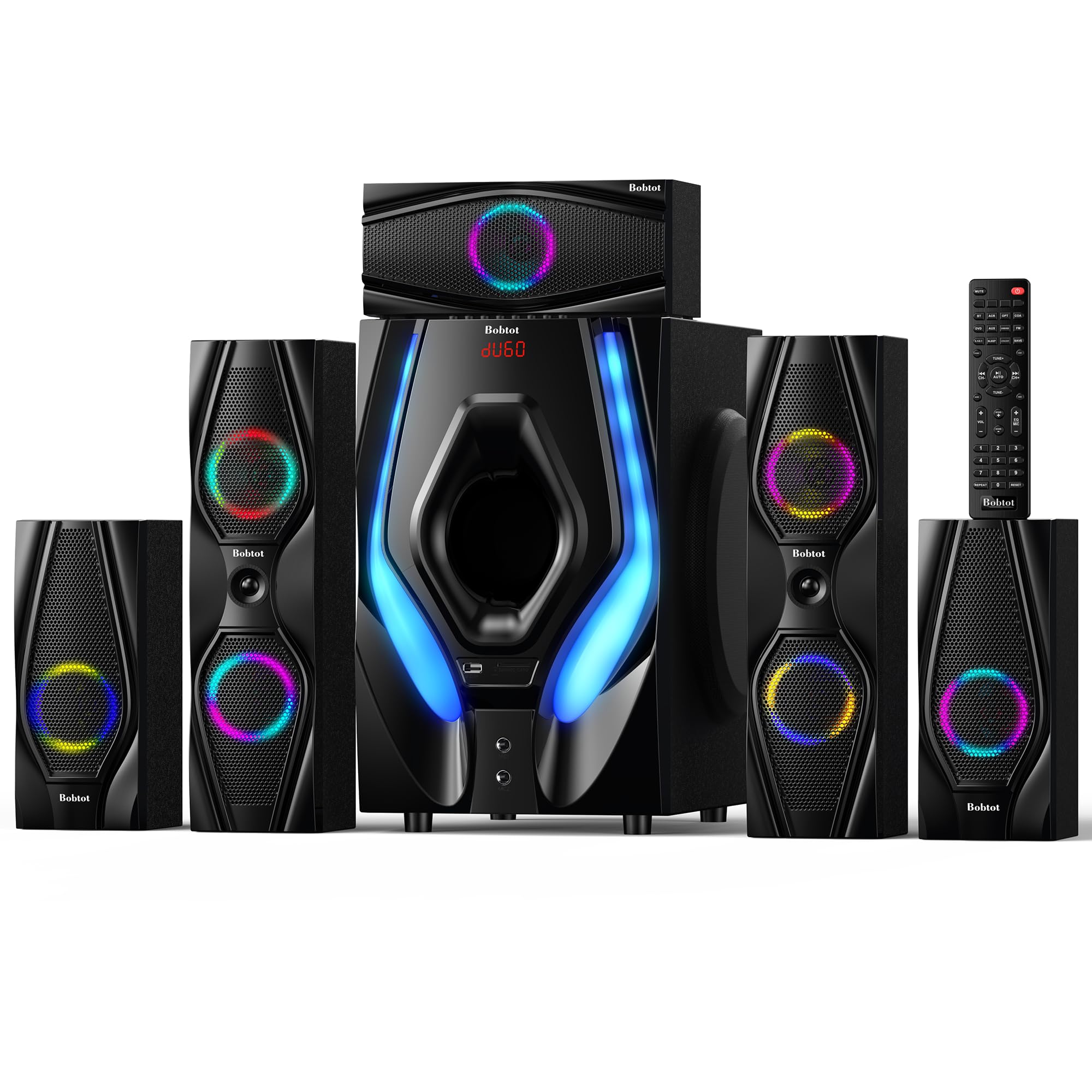
The 10-inch subwoofer in this Bobtot system is its main draw. The driver is powered by a built-in amplifier with a claimed 1200-watt peak rating, though real-world continuous output is closer to 200 watts RMS. That still moves enough air to pressurize a 15×15-foot room and produces tactile bass that desk-mounted subwoofers cannot match. The sub has four LED lighting modes—beat-sync, solid, spectrum EQ, and off—controlled via the included remote.
The five satellite speakers use 3-inch full-range drivers. The front left and right cables are 13 feet, the center is 10 feet, and the rear cables are a generous 31 feet, allowing placement behind a couch or desk with significant separation. The system accepts ARC over HDMI, optical, coaxial, AUX, USB, and SD card. Two 1/4-inch microphone inputs with adjustable echo make karaoke viable. The front panel includes a digital display and control knobs for volume, treble, bass, and microphone echo level.
Channel balance is adequate but not precise: the center speaker sometimes sounds recessed compared to the fronts, and the satellites lack a crossover adjustment. The rear channels produce audible hiss when no signal is present, a trait shared by other budget systems. The amplifier section inside the subwoofer runs warm, and some units have failed after 6–12 months, though warranty replacements are available. For the subwoofer size and connectivity options, this system offers heavy bass presence at a mid-range price.
Why it’s great
- 10-inch subwoofer delivers deep, tactile bass at a budget-friendly price point
- 31-foot rear speaker cables allow wide separation in large rooms
- Built-in ARC, optical, and karaoke inputs add versatility beyond PC use
Good to know
- No crossover frequency control on satellites or center channel
- Audible background hiss from rear channels with no signal
- Reported amplifier reliability issues in some units after prolonged use
6. Rockville HTS45

The Rockville HTS45 offers six discrete RCA inputs for true 5.1 channel audio from a PC sound card, alongside optical, coaxial, Bluetooth, USB, and SD inputs. The 5.25-inch subwoofer is powered by a Class AB amplifier rated at 800 watts peak, with a crossover dial on the rear that lets you adjust the low-pass frequency from 40Hz to 180Hz. The five satellite speakers use 3-inch dynamic drivers with a claimed frequency response of 90Hz–20kHz.
Included wall-mount kits for all five satellites, along with 30-foot rear speaker cables and 12-foot front and center cables, make this one of the most flexible budget systems for room layout. The subwoofer cabinet is constructed from MDF with a plastic front baffle, giving it respectable rigidity for the driver size. The system also includes an FM radio tuner with antenna, a feature uncommon in PC-targeted surround setups.
Sound quality at moderate volumes is clean, with the Class AB amplifier offering lower distortion than the Class D amps common in cheaper systems. At maximum volume, the subwoofer begins to compress and the satellites lose composure. The remote control requires direct infrared line of sight and has a narrow beam angle. Bluetooth range is rated at 10 meters, but streaming stereo audio via Bluetooth means losing the 5.1 channel separation—only RCA or optical maintain discrete surround.
Why it’s great
- Six discrete RCA inputs for true 5.1 from a PC sound card
- 30-foot rear cables and included wall-mount kits for flexible placement
- Class AB amplifier provides lower distortion than typical Class D budget amps
Good to know
- Bluetooth connection is stereo only, bypassing 5.1 channel separation
- Subwoofer compresses audibly at maximum volume levels
- Infrared remote has narrow beam angle, requiring direct line of sight
7. Bobtot 700W 5.1 System
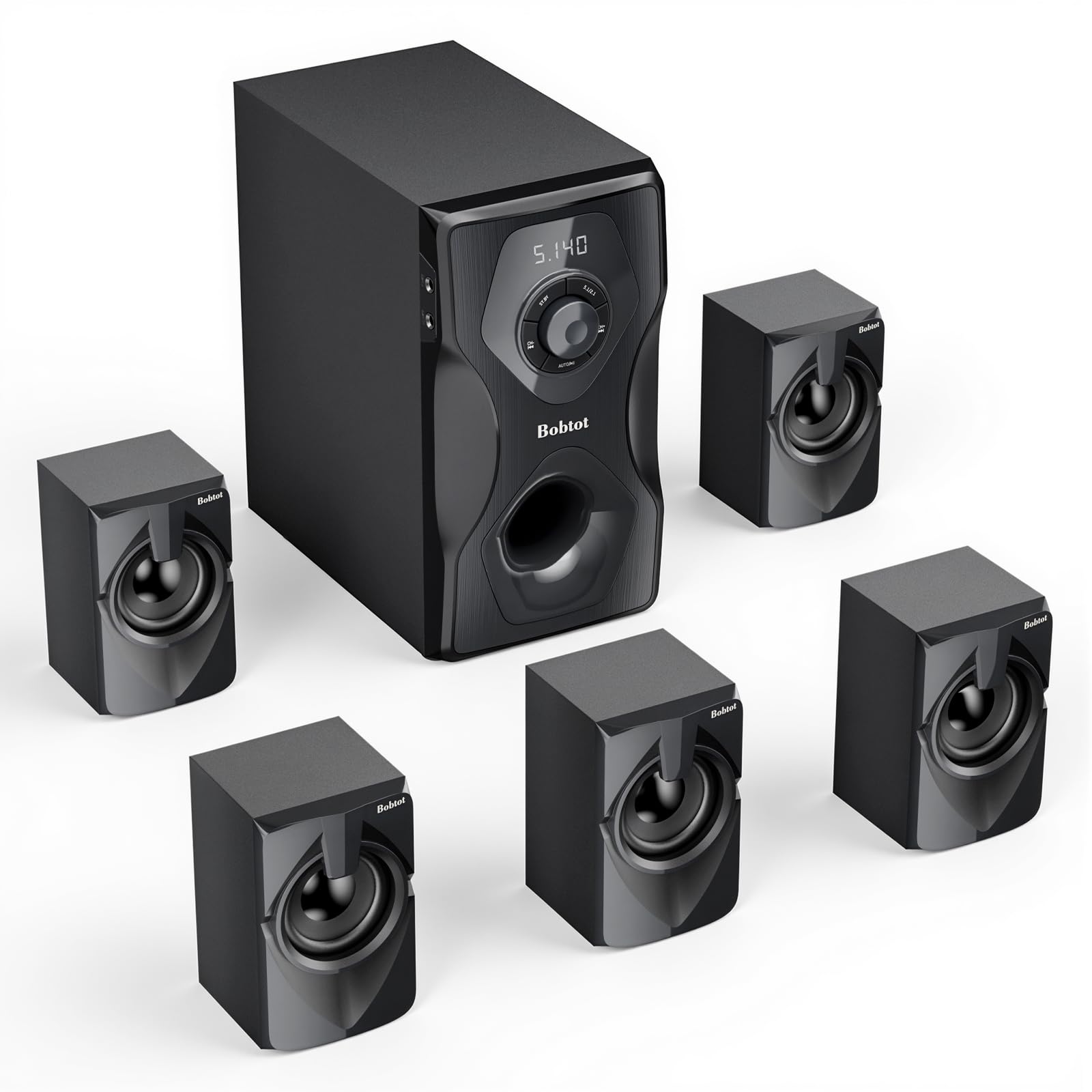
This Bobtot system packs ARC HDMI, optical, coaxial, USB, SD, and FM radio inputs into a single subwoofer unit. The 5.25-inch subwoofer is paired with five 3-inch satellite speakers. Total peak power is rated at 700 watts. The front panel has a microphone input for karaoke and a digital display that shows the current input. Five preset EQ modes—jazz, country, classic, pop, and rock—allow quick tonal shifts without manual equalization.
Setup is straightforward: connect the five speakers to the subwoofer with the color-coded RCA cables, then plug the sub into the PC via the included 3.5mm-to-RCA cable. For true 5.1, the system requires a PC sound card with six-channel RCA outputs, as the optical input is limited to stereo. Some users report that the DVD/5.1 input mode described in the manual is missing from the remote, meaning the six RCA inputs may not activate as discrete channels. This limits this system to stereo or virtual surround in practice unless the PC is configured to send six-channel analog audio.
Audio quality at moderate volume is clear, with the 5.25-inch sub producing enough mid-bass to feel explosions in games without shaking the entire house. The wires for the front speakers are shorter than ideal, measuring under 10 feet, which may not allow proper separation across a wide desk. Build quality is light: the satellite cabinets are plastic and feel hollow. At this price, the feature list is impressive, but the true 5.1 functionality depends heavily on PC sound card output and may not work as advertised for all users.
Why it’s great
- ARC HDMI and optical inputs for TV connectivity alongside PC use
- Five preset EQ modes allow quick tuning without software
- Includes FM radio and karaoke microphone input for multifunction use
Good to know
- True 5.1 RCA input mode may not function as described in documentation
- Front speaker wire length is short, limiting separation across a wide desk
- Satellite cabinets are plastic with light build quality
8. Monoprice 5.1 Channel System

The Monoprice 5.1 system is the only passive set on this list—it requires an external AV receiver with at least 70 watts per channel at 8 ohms. The satellites are each rated for 125 watts peak and 50 watts RMS, with an impedance of 8 ohms. The center channel uses dual 3-inch shielded midrange cones. Each satellite uses a 3-inch cone paired with a 0.5-inch dome tweeter. Frequency response extends from 150Hz to 20kHz on the satellites, with the subwoofer handling 50Hz to 250Hz via its built-in 60-watt RMS amplifier.
After a break-in period of roughly 35 hours, the Monoprice system reveals a neutral, detailed sound signature that outperforms many –800 retail sets. The dome tweeters provide airy high frequencies that budget single-driver systems cannot produce. The subwoofer is a downward-firing 8-inch driver with adjustable crossover and volume controls. It is tight and musical—unlike many budget subs that sound sloppy, the Monoprice sub stays controlled down to 50Hz, below which it rolls off naturally rather than distorting.
The push-spring speaker connectors are fiddly with thick wire, and the included RCA cable is a single stereo pair that requires a Y-splitter for full subwoofer output. No speaker stands or mounting hardware beyond the wall brackets are included, and the Monoprice-brand stands are incompatible (they must be mounted upside-down). The rear cable runs are short—roughly 15 feet—which may not reach across a large room. This system rewards those who already own a competent AV receiver and want budget-friendly speakers with audiophile potential.
Why it’s great
- Neutral, detailed sound with dome tweeters outperforms budgets by a wide margin
- Passive design allows pairing with any quality AV receiver for future upgrades
- Subwoofer crossover is fully adjustable with separate volume control
Good to know
- Requires an external AV receiver—no built-in amplifier
- Push-spring connectors are tight and fiddly with thicker speaker wire
- Rear speaker cables are short for larger rooms, and rear mounting is challenging
9. Acoustic Audio AA5240

The Acoustic Audio AA5240 is the cheapest route to a true six-speaker surround setup with Bluetooth. The powered subwoofer houses a 300-watt amplifier that drives five passive satellites. Input selection includes 3.5mm AUX, RCA stereo, digital optical, six-channel RCA, USB drive, and SD card. The built-in Bluetooth receiver streams stereo from a phone, which the Pro Surround function then upmixes to all five satellites, creating a wider sound field than stereo alone.
The five satellites are small—each about 6.7 inches tall with a 3-inch driver. They lack a dedicated tweeter, so high-frequency detail is limited and cymbal crashes sound rolled off. Bass is not adjustable independently; the subwoofer has a fixed crossover that sends too much low-end at default, causing some recordings to sound muddy. The 25-foot rear cables are a standout feature at this price, allowing proper placement behind a desk even in larger rooms.
Setup is plug-and-play with a PC sound card that has 3.5mm or RCA output, but some users report crackling or muffled audio over optical from a PC—this is likely a sample rate compatibility issue. The system has lasted over five years for some owners before developing channel dropout, which is surprisingly durable for the cost. The remote requires line of sight and has a short range. For a pure budget entry into 5.1 PC gaming, this system will deliver positional audio at a fraction of the price of competing options, provided you accept the limitations in frequency extension and bass control.
Why it’s great
Why it’s great
- Lowest-priced true 5.1 system with six discrete input channels
- 25-foot rear cables allow proper satellite placement in any room
- Built-in Bluetooth streams wirelessly from phone or tablet
Good to know
- No independent bass adjustment, leading to muddy low end with certain tracks
- Satellites lack tweeters, causing rolled-off high-frequency response
- Optical input may have sample rate compatibility issues with some PC sound cards
FAQ
Can I connect a 5.1 system to a PC with only a 3.5mm stereo output?
How far should the rear speakers be from my listening position in a PC setup?
Is it worth getting a 5.1 system if my room is small, like a 10×10 foot office?
What is the difference between Dolby Digital and DTS in a PC 5.1 system?
Final Thoughts: The Verdict
For most users, the 5.1 surround sound system for pc winner is the Logitech Z906 because its THX certification, built-in Dolby/DTS decoding, and six-input control console make it the most complete powered solution for desktop gaming and movies without requiring an external receiver. If you want wireless rear channels and a clean USB 5.1 connection, grab the SteelSeries Arena 9. And for uncompromising floorstanding sound with Dolby Atmos, nothing beats the Klipsch Reference 5.1 bundle.