
The RTX 5080 sits in a unique spot in NVIDIA’s Blackwell lineup — it delivers genuine 4K gaming performance and ray tracing chops without the stratospheric price tag of the 5090. A prebuilt machine built around this GPU is the smartest path for gamers who want high-refresh-rate 4K on Ultra settings but don’t want to hunt for individual components or assemble a complex liquid-cooled build themselves. The market is flooded with options pairing the 5080 with everything from last-gen CPUs to cutting-edge X3D chips, making the decision harder than the spec sheet suggests.
I’m Min — the co-founder and writer behind Gadgets Feed. I’ve spent countless hours analyzing the technical specifications, customer feedback, and real-world performance data across dozens of RTX 5080 prebuilt configurations to separate genuine performance leaders from overpriced assembly jobs.
This guide breaks down the critical hardware combinations, cooling solutions, and build quality markers that define the best 5080 prebuilt pc for your specific gaming and productivity needs.
How To Choose The Best 5080 Prebuilt PC
Not all RTX 5080 prebuilts are created equal. The GPU itself is a powerhouse, but the surrounding components — CPU, RAM speed, cooling solution, and power supply — determine whether you actually get the full 4K, high-refresh experience you’re paying for. Here’s what matters most.
CPU Generation and Architecture
The RTX 5080 thrives with a modern CPU that can feed it data fast enough to avoid bottlenecking at 1440p and 4K. AMD’s Ryzen 7 9800X3D and Ryzen 9 9950X3D are the top choices because their 3D V-Cache technology dramatically improves frame rates in CPU-bound titles like Star Citizen and Cyberpunk 2077. Intel’s Core i9-14900KF remains a strong alternative, especially for productivity tasks, but check that the BIOS is updated to address the stability issues that affected earlier 14th-gen chips. Avoid older CPU generations like the 13th-gen or Ryzen 7000 non-X3D unless the price is significantly lower, as they’ll leave performance on the table.
Cooling Solution: Liquid vs. Air
The RTX 5080 runs cool under normal gaming loads, but the CPU paired with it often generates significant heat. A 240mm or 360mm AIO liquid cooler is the baseline for any prebuilt with an i7/Ryzen 7 or higher CPU — air coolers struggle to keep temperatures in check during extended sessions, leading to thermal throttling and lower frame rates. Look for prebuilts with a 360mm AIO as the sweet spot for noise-normalized performance. 420mm AIOs are overkill for most users but do offer extra headroom for overclocking.
Power Supply Headroom
The RTX 5080 draws up to 360W under full load, and a high-end CPU can pull another 250W+. A quality 850W 80+ Gold power supply is the minimum for a stable build. Prebuilts with 1000W Platinum-rated PSUs offer better efficiency and room for future upgrades. Avoid setups with 750W PSUs — they run at the edge of their capacity, causing voltage ripple that can reduce component lifespan. Always check the PSU brand; known names like Corsair, Seasonic, and EVGA are preferable to generic white-label units.
Quick Comparison
On smaller screens, swipe sideways to see the full table.
| Model | Category | Best For | Key Spec | Amazon |
|---|---|---|---|---|
| Alienware Aurora ACT1250 | Premium | 4K Gaming with RTX 5080 | 16GB GDDR7 VRAM | Amazon |
| Corsair Vengeance i7500 | Premium | Balanced Performance & Aesthetics | 360mm AIO Liquid Cooling | Amazon |
| Skytech Gaming King 95 | Premium | RTX 5080 + X3D CPU Combo | Ryzen 7 9850X3D + RTX 5080 | Amazon |
| Empowered PC Panorama | Premium | High-End 1080p/1440p Gaming | i9-14900KF + 5080 16GB | Amazon |
| STORMCRAFT Skyhawk PRO | Mid-Range | Best Value X3D + 5070 Ti | Ryzen 7 9800X3D + 5070 Ti | Amazon |
| iBUYPOWER Y40 PRO | Mid-Range | RTX 5070 Ti Performance | Ryzen 9 7900X + 5070 Ti | Amazon |
| Thermaltake LCGS View i570 | Mid-Range | i9 + RTX 5070 Value | i9-14900KF + RTX 5070 | Amazon |
| The Horizon Autherium Dragon | Mid-Range | High RAM + Storage Capacity | 64GB RAM + 10TB Storage | Amazon |
| MSI Codex Z2 | Mid-Range | Entry-Level RTX 5070 Gaming | Ryzen 7 8700F + RTX 5070 | Amazon |
| Skytech Gaming Azure 3 | Budget | AMD RX 9070XT Alternative | RX 9070XT 16GB VRAM | Amazon |
| Skytech Gaming Legacy 4 | Budget | Ultra-High-End RTX 5090 Build | RTX 5090 32GB VRAM | Amazon |
In‑Depth Reviews
1. Alienware Aurora Gaming Desktop ACT1250

Alienware’s Aurora ACT1250 is built around the RTX 5080 with 16GB of GDDR7 VRAM, paired with the Intel Core Ultra 9 285 processor — a 5.6 GHz chip that keeps frame rates high in CPU-intensive scenes. The 240mm liquid cooler is adequate for the Ultra 9, though a larger radiator would provide more thermal headroom during long sessions. The 1000W Platinum-rated PSU is a standout, offering clean power delivery and plenty of headroom for overclocking.
Customer feedback confirms the RTX 5080 in this unit can achieve world-record 3D Mark scores when paired with faster DDR5 RAM, and the system runs remarkably quiet under load. However, several buyers reported motherboard failures after a few weeks, requiring Dell service visits. The Alienware Command Center software gives you granular control over lighting and performance profiles, which is a nice bonus for enthusiasts.
The design is polarizing — the basalt black finish and stadium lighting look sleek, but the proprietary motherboard and PSU form factor limit future upgrade options. For buyers who want a turnkey 4K gaming machine with the RTX 5080 and don’t plan to tinker, this is a solid choice. Just ensure you register the warranty immediately.
Why it’s great
- Genuine RTX 5080 16GB GDDR7 delivers excellent 4K ray tracing performance
- 1000W Platinum-rated PSU provides clean power and upgrade headroom
Good to know
- Proprietary motherboard and PSU limit future component swaps
- Multiple reports of motherboard failures within weeks of purchase
2. Corsair Vengeance i7500 Gaming PC

Corsair’s Vengeance i7500 pairs the RTX 5080 with the Intel Core i9-14900KF, a 24-core processor capable of boosting to 5.8 GHz. The 360mm AIO liquid cooler from Corsair’s NAUTILUS RS series keeps the CPU well within safe temperature ranges even under sustained all-core loads. The 32GB of Vengeance RGB DDR5 memory operates at optimized speeds for Intel’s platform, minimizing latency.
The 3500X ARGB case offers a wraparound tempered glass panel that shows off the internal components, but some users have received units with non-working fans or poorly installed windows. Corsair’s customer service appears responsive for replacements, though the quality control inconsistency is frustrating at this price point. The 2TB NVMe SSD provides ample storage for a large game library.
One recurring note from buyers is the need to update the BIOS immediately due to the known 14900KF stability bug. After that update, the system runs flawlessly. The USB port count is on the lower side, so plan for a USB hub if you have many peripherals. For pure gaming performance with Corsair’s ecosystem integration, this is a strong contender.
Why it’s great
- 360mm AIO liquid cooler handles the i9-14900KF’s heat output effectively
- Premium case design with wraparound tempered glass panels
Good to know
- BIOS update required immediately to fix 14900KF instability bug
- Limited USB ports; QC issues reported on fan and window installation
3. Skytech Gaming King 95 Gaming PC
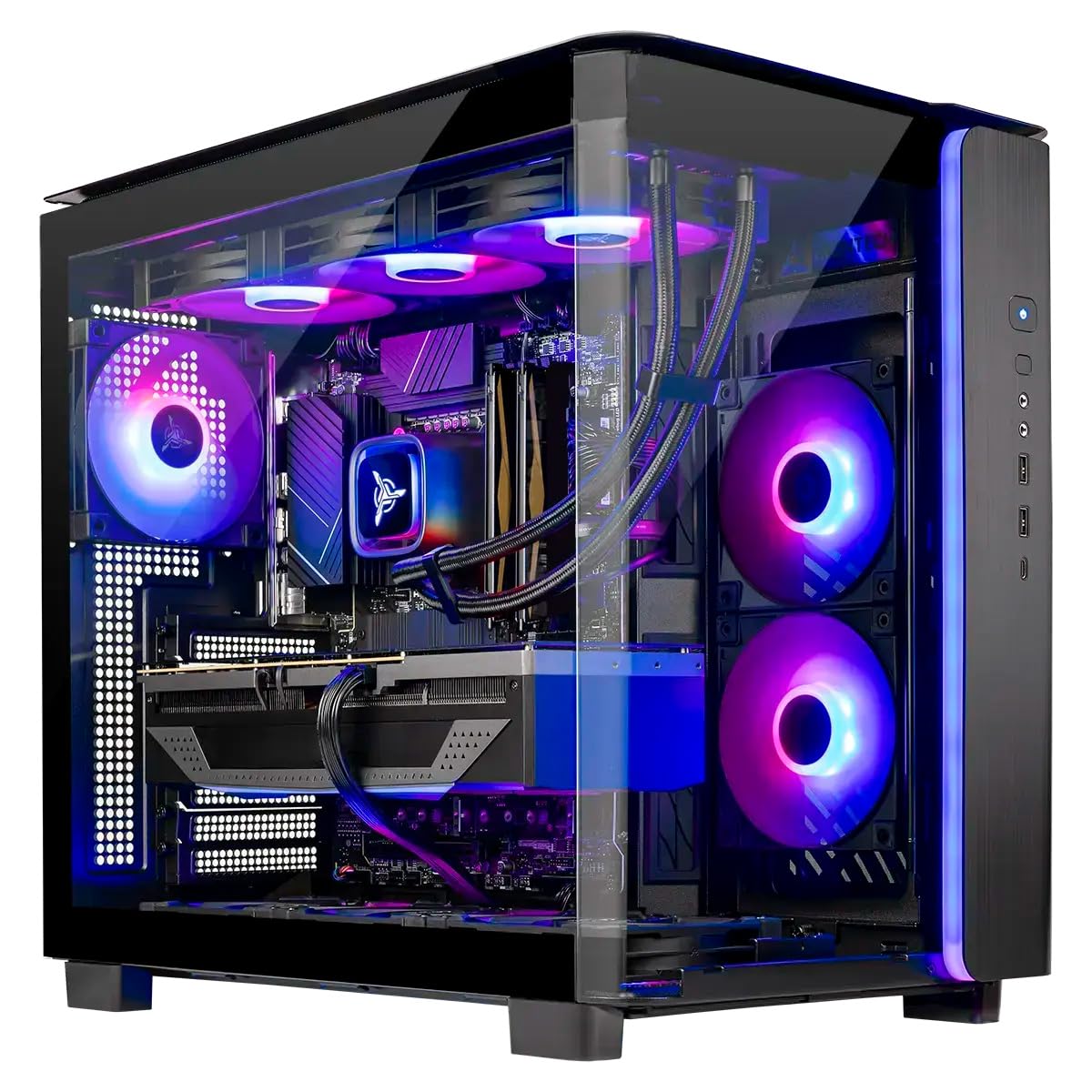
The Skytech Gaming King 95 is the most compelling RTX 5080 prebuilt on the market right now, pairing NVIDIA’s Blackwell flagship with the AMD Ryzen 7 9850X3D — a processor that excels in gaming due to its 3D V-Cache technology. With 32GB of DDR5-6000 RAM and a 2TB NVMe SSD, this configuration hits the sweet spot for high-refresh 4K gaming. The 360mm AIO liquid cooler ensures the X3D chip stays cool even during extended sessions.
Customer reports highlight the excellent packaging and build quality. The King 95 case features secure glass panels and customizable RGB lighting. One buyer confirmed correct 5080 ROP counts and activated Windows 11 without issues, while another praised the magnetic dust covers that simplify maintenance. The unit runs quiet even under load, with fans that move substantial air without audible whine.
The Wi-Fi 5 connectivity is a minor disappointment given the price point — most buyers at this tier expect Wi-Fi 6E or 7. The 850W Gold PSU from the ATX 3 standard is adequate for the RTX 5080 and 9850X3D combo, though a 1000W unit would offer more peace of mind. For pure gaming performance per dollar, this is the prebuilt to beat.
Why it’s great
- Ryzen 7 9850X3D with 3D V-Cache maximizes frame rates in CPU-bound titles
- 360mm AIO keeps thermals in check for sustained high-performance gaming
Good to know
- Wi-Fi 5 is outdated for this price tier; expect slower wireless speeds
- 850W PSU sufficient but leaves less upgrade headroom than a 1000W unit
4. Empowered PC Panorama RTX 5080

The Empowered PC Panorama delivers a compelling mix of high-end components at a price that undercuts many competitors. It combines the Intel Core i9-14900KF with the RTX 5080 16GB, 32GB of DDR5 RAM, and a 2TB Gen4 NVMe SSD. The 360mm AIO liquid cooler and 9 ARGB PWM fans provide excellent airflow, keeping both CPU and GPU well within their thermal limits. Windows 11 Pro comes pre-installed, which is a nice bonus for power users.
Owner feedback is overwhelmingly positive. One user reported a loose wire in the first month that support quickly resolved with clear instructions. Another noted that the GPU power cable touched a lower fan, causing a spin failure, but they fixed it easily. The system runs fast and cool, with reliable performance over a year of heavy use. The panoramic case with front and side tempered glass panels looks stunning on a desk.
The 1080p resolution in the official specs seems odd for a 5080 build — this machine is clearly capable of 1440p and 4K gaming. The 3-year warranty and lifetime technical support from Empowered PC add substantial value. For buyers who want a reliable RTX 5080 prebuilt backed by solid customer service, this is a smart buy.
Why it’s great
- Competitive pricing for i9-14900KF and RTX 5080 combination
- 3-year warranty plus lifetime technical support included
Good to know
- Minor cable management issues reported near GPU power connectors
- Official specs mention 1080p despite 5080 being a 4K-capable card
5. STORMCRAFT Skyhawk PRO Gaming PC

STORMCRAFT’s Skyhawk PRO uses the RTX 5070 Ti with 16GB of GDDR7 memory, paired with the AMD Ryzen 7 9800X3D — arguably the best gaming CPU available today thanks to its 3D V-Cache. With 32GB of DDR5-6000 RGB RAM and a 2TB Gen4 NVMe SSD, this build is optimized for high-frame-rate gaming. The 360mm AIO liquid cooler and 6 ARGB fans keep everything running cool and quiet.
Customer reviews highlight excellent build quality and packaging. One user reported a minor buzzing interference on the top headphone jack, but the rear jack worked fine. Another noted that one of six fans scraped against the duct at high loads, which was easily mitigated. The system runs Star Citizen on Ultra at 1080p with 48 FPS in cities and over 200 FPS in space. The curved glass case looks refined, and the LED lighting is subtle rather than garish.
The warranty structure is generous: 1-year parts, 3-year labor, and free lifetime technical support. Assembly is done in California, USA. The only catch is that this system uses the RTX 5070 Ti, not the 5080 — so you lose some 4K ray tracing performance. But for anyone targeting 1440p or 1080p high-refresh gaming, the 9800X3D + 5070 Ti combo is incredible value.
Why it’s great
- Ryzen 7 9800X3D delivers class-leading gaming performance with 3D V-Cache
- Excellent warranty coverage: 1-year parts, 3-year labor, lifetime support
Good to know
- Uses RTX 5070 Ti, not 5080 — lower 4K ray tracing performance
- Minor QC issues reported with fan scraping and headphone jack noise
6. iBUYPOWER Y40 PRO Gaming PC

The iBUYPOWER Y40 PRO pairs the AMD Ryzen 9 7900X with the RTX 5070 Ti 16GB, 32GB of DDR5-5200 RAM, and a 2TB NVMe SSD. The Ryzen 9 7900X is a 12-core powerhouse that boosts to 5.6 GHz, offering strong performance in both gaming and productivity workloads. The water cooling system keeps CPU temperatures manageable, though the RAM speed of 5200MHz is slightly slower than the 6000MHz sweet spot for Ryzen.
Customers who received functional units report excellent performance — one buyer upgraded from an RTX 2080 Super and saw massive gains, running games at very high settings with 100+ FPS at 1440p. Another noted that the Y40 PRO arrived well-packaged with a 15-minute setup time. However, there are concerning reports of crashes within the first two weeks, with one user being told it was a RAM issue after a 3-day diagnostic test.
The tempered glass RGB case looks great, and the inclusion of a free keyboard and mouse adds convenience. The lack of bloatware is a nice touch. For buyers on a tighter budget who want a capable 1440p gaming machine, the Y40 PRO is worth considering — but the mixed reliability feedback means you should buy from a retailer with a good return policy.
Why it’s great
- Ryzen 9 7900X 12-core CPU handles gaming and multitasking with ease
- RTX 5070 Ti 16GB delivers strong 1440p performance
Good to know
- 5200MHz DDR5 RAM slower than ideal 6000MHz for Ryzen optimization
- Several reports of crashes within first two weeks of ownership
7. Thermaltake LCGS View i570-170 Gaming Desktop

Thermaltake’s LCGS View i570 combines the Intel Core i9-14900KF with the RTX 5070 12GB, 32GB of DDR5-6000 memory, and a 1TB NVMe SSD. The 240mm closed-loop liquid cooler is adequate for the i9, though the CPU will run toasty under sustained all-core loads. The RTX 5070 with 12GB of VRAM is a solid 1440p card, but it’s a step behind the 5070 Ti and 5080 in 4K scenarios.
Customer reviews praise the lack of bloatware and the fast, quiet operation. One buyer reported excellent performance in Cyberpunk, Rust, BG3, and Helldivers — all running flawlessly. Another noted the system is very quiet, with only minimal fan noise. The B760 chipset motherboard offers basic connectivity but lacks the PCIe 5.0 support found on higher-end boards.
The 1TB SSD fills up quickly with modern game installations. At this price point, 2TB should be the standard. The RTX 5070’s 12GB VRAM is also a limitation for future titles that may require more memory at higher detail settings. For a quiet, well-built 1440p gaming PC with minimal fuss, this is a solid mid-range option.
Why it’s great
- Very quiet operation even under gaming loads
- No bloatware — clean Windows 11 installation out of the box
Good to know
- RTX 5070 12GB VRAM limited for 4K gaming and future titles
- 1TB storage fills quickly; 2TB preferred for this price segment
8. The Horizon Autherium Dragon RGB I9 RTX Gaming PC

The Horizon Autherium Dragon is unusual in this market segment — it prioritizes massive memory and storage capacity over pure GPU power. The system pairs a Core i9 KF processor with an RTX 5070 OC 12GB, but the real story is the 64GB of RAM and 10TB of total storage (2TB NVMe + 8TB HDD). The 360mm AIO with 11 total fans (7 visible) provides excellent cooling. Windows 11 Pro comes pre-installed for advanced security features.
Buyer feedback is overwhelmingly positive. One user highlights the system handles heavy CAD and 3D printing workloads without strain. Another reports the PC runs Microsoft Flight Simulator on Ultra and handles VR on Quest 3 flawlessly, with video rendering completing in about 35 seconds. Customer support is praised for quick resolution of a missing Windows 11 Pro key issue. One buyer even received a free motherboard upgrade.
The RTX 5070 OC 12GB is the bottleneck here — this system’s massive RAM and storage are best suited for content creators who need to load huge datasets, not pure gamers. The 850W Gold PSU and 2.4GB/s WiFi are solid inclusions. If your priority is extreme multitasking with large files rather than max FPS, this is a compelling option.
Why it’s great
- 64GB RAM and 10TB storage ideal for content creation and heavy multitasking
- Excellent customer support with fast issue resolution
Good to know
- RTX 5070 OC 12GB is the weakest component relative to the rest of the build
- Targeted more at content creators than pure gamers
9. MSI Codex Z2 Gaming Desktop

The MSI Codex Z2 is the most affordable entry point into the RTX 5070 ecosystem, pairing the AMD Ryzen 7 8700F with the RTX 5070 12GB. The 8700F is an 8-core, 16-thread processor with a 5.0 GHz boost clock — solid for gaming, though slower than the X3D chips found in more expensive builds. With 32GB of DDR5 RAM and a 2TB NVMe SSD, storage and memory are generous for the price tier.
Customer feedback is mixed. Several buyers report excellent 160Hz gaming performance and cool operation, praising the built-in RGB lighting and MSI Center software. However, there are concerning reports of SSD failure requiring a multi-week RMA process, WiFi issues, and Blue Screen of Death errors after a month of use. One user noted poor Bluetooth performance, which was resolved by swapping in a TP-Link BE9300 PCIe card.
The air cooling solution with four fans keeps temperatures manageable, but the fans become loud under load. The compact size and many included USB ports are practical advantages. For budget-conscious gamers who want RTX 5070 performance, the Codex Z2 is a valid option — just be prepared for potential reliability issues and factor in the cost of a Bluetooth upgrade.
Why it’s great
- 2TB NVMe SSD and 32GB RAM provide excellent storage and memory for the price
- Compact design with many USB ports and integrated RGB lighting
Good to know
- Multiple reports of SSD failure and Blue Screen of Death within first month
- Bluetooth performance is poor; upgrade to a PCIe card recommended
10. Skytech Gaming Azure 3 Gaming PC
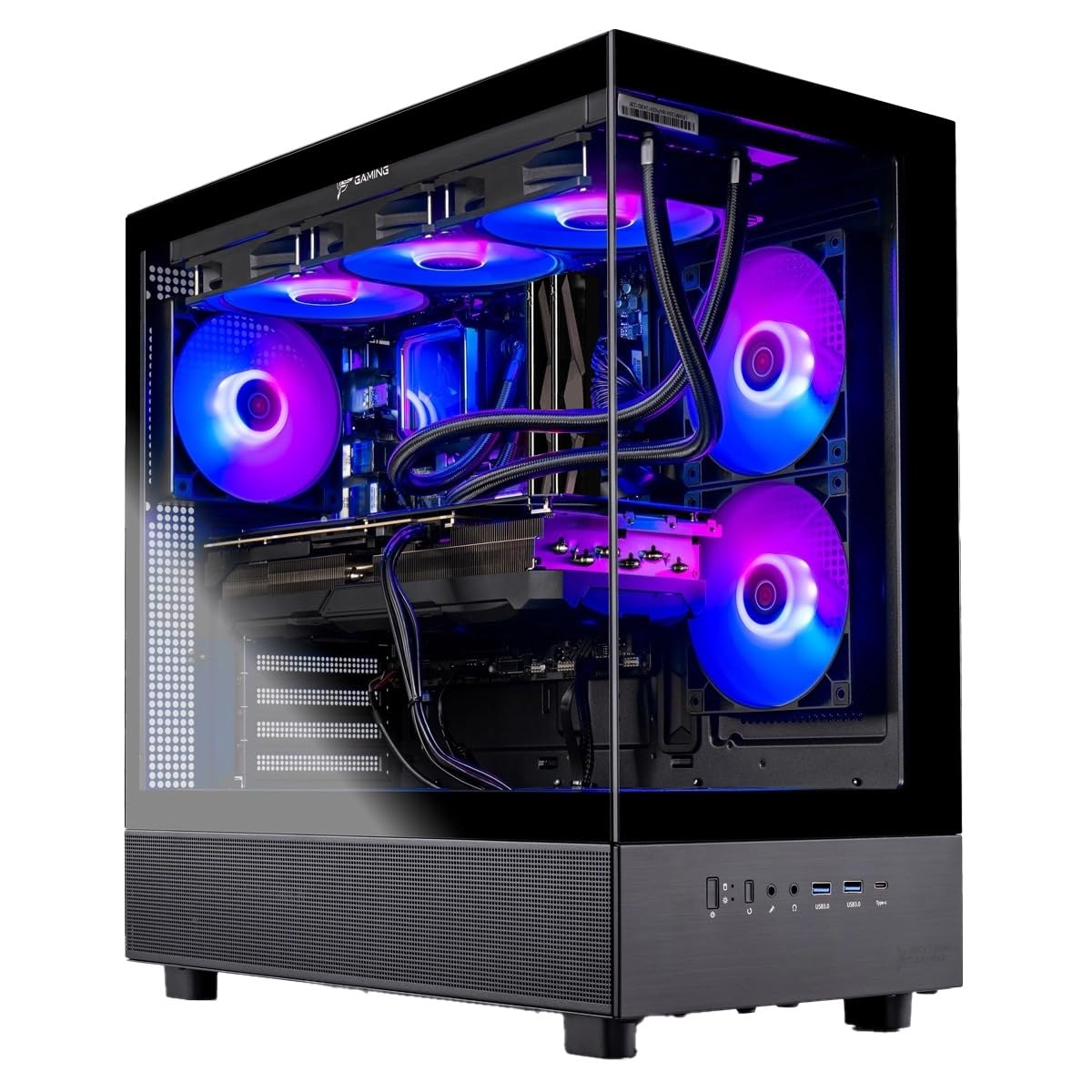
The Skytech Gaming Azure 3 is unique in this lineup as it uses an AMD Radeon RX 9070 XT 16GB instead of an NVIDIA card. Paired with the Ryzen 7 9850X3D, 32GB of DDR5-5600 RAM, and a 2TB Gen4 NVMe SSD, this build targets the same 4K high-refresh market as the RTX 5080 competitors. The 360mm AIO liquid cooler ensures the X3D chip runs cool during extended sessions.
Buyer feedback is limited but positive. One user reports the system runs quietly and handles casual use without issues. Another mentions it performs well for their 13-year-old gamer, though they plan to upgrade the RAM. The inclusion of a free keyboard and mouse adds value. The 850W Gold ATX 3 PSU should handle the RX 9070 XT’s power draw adequately.
The RX 9070 XT offers competitive rasterization performance with the RTX 5070 Ti, but falls behind in ray tracing workloads and lacks NVIDIA’s DLSS 4 upscaling technology. The Wi-Fi 5 connectivity is outdated for this price tier. For AMD fans or buyers who prioritize raw rasterization over ray tracing, the Azure 3 is a decent option, but the NVIDIA-based alternatives offer better feature sets for the same money.
Why it’s great
- Ryzen 7 9850X3D provides excellent gaming performance with 3D V-Cache
- RX 9070 XT 16GB offers strong rasterization performance at 1440p
Good to know
- RX 9070 XT lags behind NVIDIA in ray tracing and lacks DLSS 4
- Wi-Fi 5 is outdated for this price segment
11. Skytech Gaming Legacy 4 Gaming PC

Skytech’s Legacy 4 is the ultimate flagship in this lineup, pairing the Ryzen 9 9950X3D with the RTX 5090 32GB — the most powerful consumer GPU on the market. With 64GB of DDR5-6000 RAM, a 4TB Gen4 NVMe SSD, and a 420mm AIO liquid cooler, this build leaves nothing on the table. The 1200W Gold ATX 3 PSU provides massive headroom for overclocking. Windows 11 Home comes pre-installed.
Customer feedback is limited but positive. One buyer calls it the best pre-built gaming computer with an RTX 5090, praising the ultra-high settings and high frame rates. Another notes the great value and mentions receiving an upgraded motherboard with excellent cable management. The full RGB implementation and magnetic dust filters add to the premium feel.
The system is massive and heavy — make sure your desk can support the weight. The 4TB NVMe SSD is generous, but for this price point, a secondary drive or faster Gen5 SSD would be expected. The Wi-Fi 5 connectivity is a notable weak point on a build — most buyers at this tier expect Wi-Fi 7. For those who want the absolute best performance available in a prebuilt, regardless of cost, the Legacy 4 delivers.
Why it’s great
- RTX 5090 32GB and Ryzen 9 9950X3D offer unmatched gaming performance
- 420mm AIO cooler and 1200W PSU provide excellent thermal and power headroom
Good to know
- Wi-Fi 5 is severely outdated for a flagship machine
- 4TB SSD adequate but Gen5 NVMe expected at this price point
FAQ
How much VRAM does the RTX 5080 have in most prebuilts?
Can I upgrade the CPU in a 5080 prebuilt later?
Is a 850W power supply enough for an RTX 5080 prebuilt?
Does the RTX 5080 support DLSS 4 and multi-frame generation?
Should I get an RTX 5080 prebuilt or wait for the RTX 5080 Super?
Final Thoughts: The Verdict
For most users, the best 5080 prebuilt pc winner is the Skytech Gaming King 95 because it combines the RTX 5080 with the Ryzen 7 9850X3D — a CPU that maximizes frame rates in demanding titles — backed by a 360mm AIO cooler and solid build quality. If you want premium brand support with an iconic design, grab the Alienware Aurora ACT1250. And for high-value 1440p gaming with an X3D CPU, nothing beats the STORMCRAFT Skyhawk PRO.