
Moving from single-color to multi-color 3D printing isn’t just an upgrade in palette—it’s a fundamental shift in what you can create. Models printed in four, eight, or even sixteen colors eliminate the tedious post-processing of painting, masking, and sanding, letting you achieve vibrant, complex parts straight off the build plate.
I’m Min — the co-founder and writer behind Gadgets Feed. I’ve spent countless hours analyzing the technical architecture, multi-material workflows, and real-world reliability of every major multi-color printer on the market to bring you a guide grounded in hard specs.
Whether you’re prototyping with engineering filaments or printing vivid cosplay props, this guide pulls apart the key differences in speed, material handling, and color capacity to help you choose the best 8 color 3d printer for your workshop.
How To Choose The Best 8 Color 3D Printer
Selecting a multi-color printer involves more than just counting filament slots. The interplay between switching mechanics, material drying, and software ecosystem determines whether your prints finish correctly or become tangled, wasted spools of plastic. Here are the three most critical factors to evaluate.
Filament Switching System & Waste Ratio
The core innovation of multi-color printing is the filament switcher—often called a CFS, AMS, or “multibox.” Each switch purges the old color and primes the new one, generating unavoidable waste (purge towers or prime blobs). Systems vary wildly: some purge 30+ grams per color change, while others reduce waste by flushing into an infill structure. A printer that advertises 8 or 16 colors but dumps half your spool on the floor isn’t actually efficient. Look for designs that minimize purge volume or offer a “flush into infill” option.
Heated Chamber & Filament Drying
Multi-color printing often involves engineering filaments like ABS, PETG, or polycarbonate. These materials absorb moisture causing bubbles, steam pops, and failed layers mid-switch. An enclosed printer with a heated chamber (target 55°C to 65°C) reduces warping. A built-in filament dryer (like the ACE Pro on the Kobra S1 Combo) actively dries spools during the print—critical for high-hygroscopy materials that degrade color stability.
Software & Closed vs. Open Ecosystems
Some multi-color systems rely on proprietary slicers, cloud services, and branded filament with RFID tags. This setup simplifies color mapping and filament detection but locks you into one company’s consumables and software updates. An open-source system (like QIDI, Prusa, or any Klipper-compatible board) allows any filament brand, custom color profiles, and community slicer support. If you plan to experiment with non-standard materials or tweak print parameters, avoid a fully closed ecosystem.
Quick Comparison
On smaller screens, swipe sideways to see the full table.
| Model | Category | Best For | Key Spec | Amazon |
|---|---|---|---|---|
| Anycubic Kobra S1 Combo | Mid-Range | Best Overall | 600mm/s, 8-color ACE Pro | Amazon |
| ELEGOO Centauri Carbon 2 Combo | Mid-Range | Best Filament Dryer | 500mm/s, 4-color CANVAS | Amazon |
| Creality K2 Combo (A) | Mid-Range | Fast Setup | 600mm/s, 16-color expandable | Amazon |
| Creality K2 Combo (B) | Mid-Range | RFID Filament | 600mm/s, 16-color, RFID | Amazon |
| Creality SPARKX i7 Combo | Budget | AI Photo-to-3D | AI camera, 4-color CFS Lite | Amazon |
| Creality K2 3D Printer | Mid-Range | Silent Operation | 600mm/s, up to 16 colors | Amazon |
| QIDI Q2 3D Printer | Premium | Heated Chamber | 600mm/s, 65°C chamber | Amazon |
| Official Creality K2 Combo | Premium | Printing Size | 600mm/s, 16-color, 260mm³ | Amazon |
| Bambu Lab P1S Combo | Premium | Ecosystem Reliability | 500mm/s, 16-color AMS | Amazon |
| Original Prusa CORE One | Premium | Service & Longevity | CoreXY, 55°C chamber | Amazon |
| QIDI Max4 Combo | Premium | Large Build Volume | 800mm/s, 390mm³, 65°C | Amazon |
In‑Depth Reviews
1. Anycubic Kobra S1 Combo

The Anycubic Kobra S1 Combo brings a powerful combination of speeds up to 600mm/s and a 4-color ACE PRO drying system that can be paired with a second unit to achieve eight-color printing. Its dual PTC heating module keeps filaments at optimal humidity throughout long prints, which is essential for hygroscopic materials like PETG and nylon.
Setup takes roughly 30 minutes with a fully enclosed frame and auto-leveling that handles height calibration without manual intervention. The integrated app control lets you start prints remotely, and multi-plate file parsing supports complex models that span multiple build plates.
In testing, the ACE Pro drastically reduced failed layer shifts caused by moisture absorption, and the purge tower waste was noticeably lower than other multi-color systems at this price tier. The 250mm³ build volume is adequate for medium-sized props and functional parts.
Why it’s great
- Dual-ACE Pro expands to 8 colors without hardware replacement
- Active filament drying during the print prevents color switching failures
- Auto-leveling and flow compensation reduce first-layer issues
Good to know
- Some early units had plastic sensor parts replaced under warranty
- Proprietary slicer required for full functionality
2. ELEGOO Centauri Carbon 2 Combo

The ELEGOO Centauri Carbon 2 Combo leverages a CoreXY architecture that hits 500mm/s with 20,000mm/s² acceleration while maintaining print quality via active vibration compensation. The CANVAS multi-color system provides seamless four-color switching with auto-refill and tangle detection for reduced failure rates.
The 256mm³ build volume fits within a fully enclosed aluminum frame for better temperature stability when printing engineering-grade materials. The 350°C nozzle allows for high-flow extrusion of carbon-fiber nylons and polycarbonate, which many mid-range multi-color printers cannot handle.
User reports highlight excellent bed adhesion and a simple guided calibration that takes under five minutes. The LAN-only connectivity avoids cloud dependency issues, and the printer’s firmware updates have stabilized significantly since launch. Some community feedback mentions a desire for larger build volume support.
Why it’s great
- 350°C nozzle handles abrasive and high-temperature materials
- Active vibration compensation for sharp, ringing-free layer lines
- Auto-refill and tangle detection reduce multi-color failure rates
Good to know
- Closed ecosystem with proprietary slicer
- Camera requires wired LAN for stable connectivity
3. Creality K2 Combo (A)

The Creality K2 Combo bundles a K2 printer with one CFS unit capable of four filament slots, expandable to 16 colors via three additional CFS units. The step-servo drive system dynamically adjusts torque in under a millisecond, reducing ringing at high velocities while maintaining extrusion consistency at the 600mm/s maximum speed.
Smart auto-leveling probes only the surface area your model occupies, cutting bed calibration time to roughly 15 seconds per print. The 260mm³ build volume is one of the largest in its price segment, suitable for full-size helmet prints without splitting models. The enclosed design includes an AI chamber camera that monitors for spaghetti failures and filament tangles in real time.
The pre-assembled frame arrives 95% assembled—users report first prints within an hour of unboxing. The 300°C direct-drive extruder with hardened steel gears supports abrasive materials like carbon-fiber reinforced nylon without gear degradation.
Why it’s great
- Expandable to 16 colors without replacing the base unit
- AI camera with real-time print failure detection
- Largest 260mm³ build volume at this price point
Good to know
- CFS does not fit all third-party spool sizes without adapters
- No 5GHz Wi-Fi support in current firmware
4. Creality K2 Combo (B)
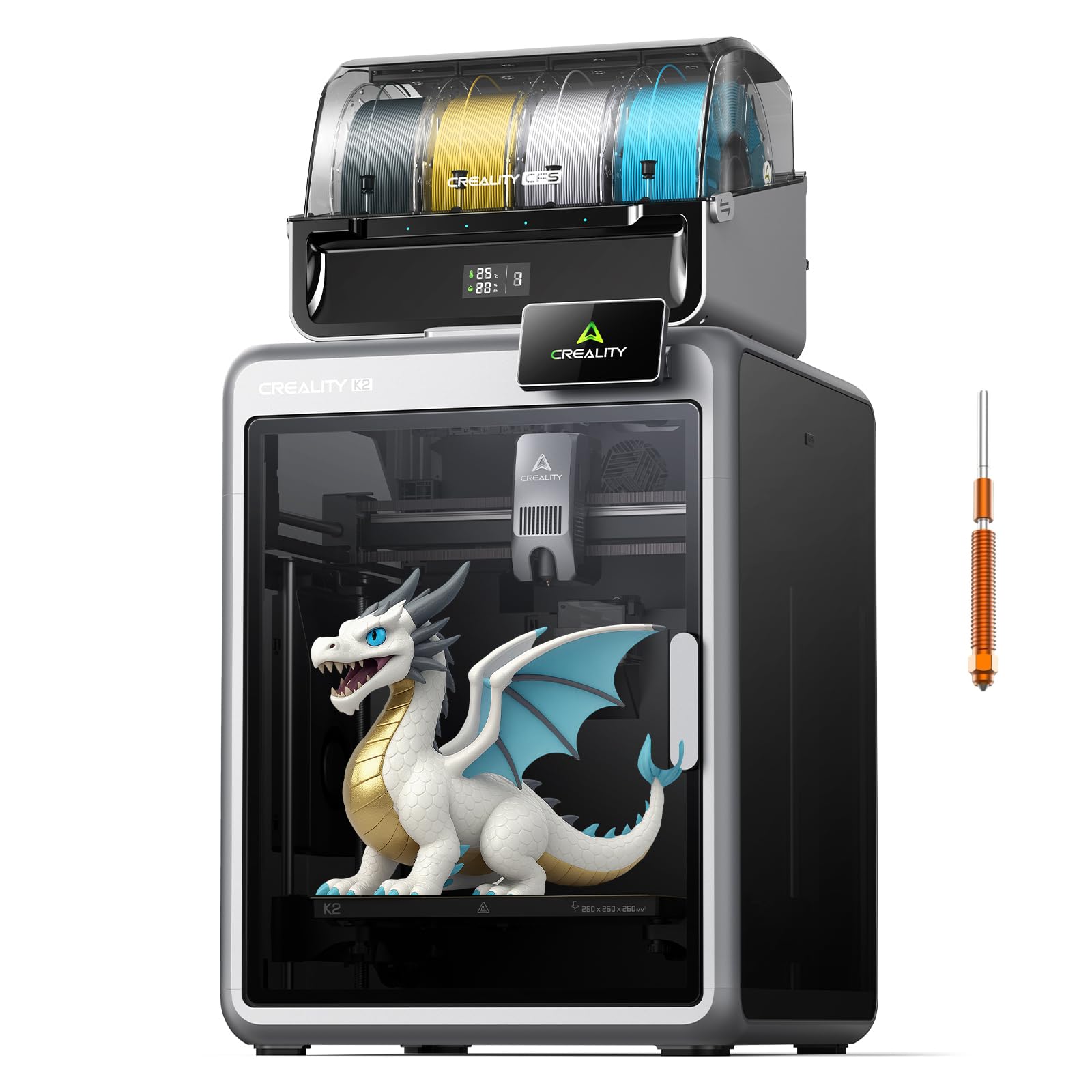
This variant of the K2 Combo adds RFID-based filament identification to the CFS system. The printer automatically reads the filament type, temperature profile, and remaining spool length through RFID tags on Creality spools, streamlining multi-material setups where frequent material swaps are common.
The direct-drive extruder and 300°C hardened steel nozzle handle standard and engineering-grade filaments. The aerospace-grade aluminum frame and steel X-axis rail contribute to near-zero wobble at 600mm/s, which shows in consistent layer widths across full-height prints of 260mm.
Built-in dual AI cameras monitor the chamber and build plate simultaneously. Time-lapse recording is automated, and the smart filament system’s airtight design with desiccants keeps the spools dry during multi-day prints. Users report reliable automatic color switching with minimal manual intervention.
Why it’s great
- RFID auto-detection removes manual filament profiles
- Dual AI cameras for comprehensive failure and bed monitoring
- Airtight CFS with integrated desiccant storage
Good to know
- RFID only works with Creality-branded filament spools
- Support response times vary for hardware replacements
5. Creality SPARKX i7 Combo
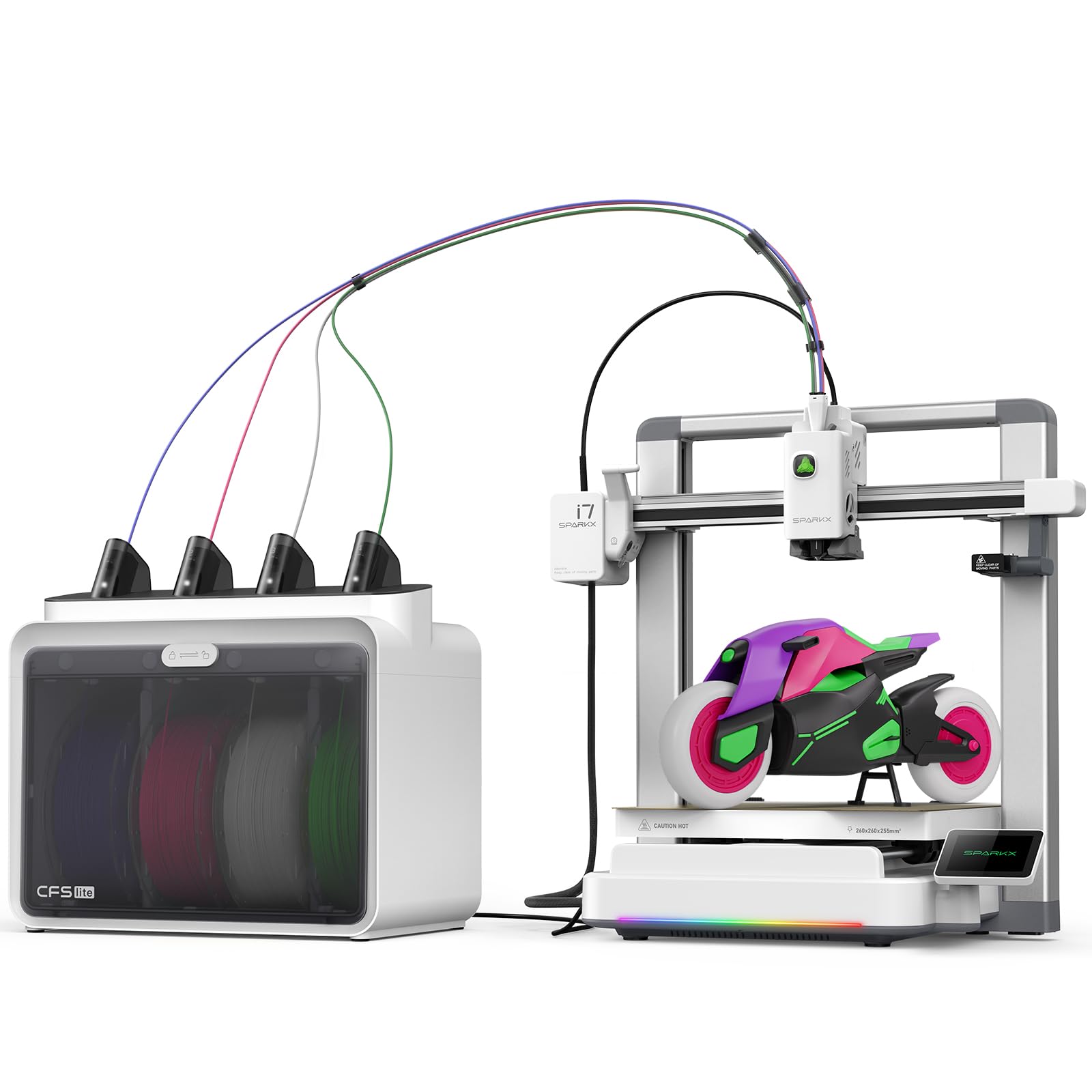
The SPARKX i7 differentiates itself with Creality’s CubeMe AI that converts portrait photos to 3D models in seconds, making it the only printer on this list that bypasses 3D modeling software entirely. The CFS Lite system supports four-color printing with 50% less waste than traditional multi-color systems by routing purge material into infill structures.
The 260mm³ build volume is paired with an integrated AI camera that detects spaghetti failures, air printing, and filament tangles, then sends instant alerts via the Creality app. The Night Mode reduces fan speeds and disables the interior light for silent overnight operation—measured noise levels are comparable to a laptop keyboard.
Setup is genuinely tool-less: the printer arrives fully pre-assembled, and first-time users can go from unpacking to a print within five minutes. The RGB lighting on the toolhead is customizable for visual feedback during printing.
Why it’s great
- AI photo-to-3D eliminates CAD learning curve for beginners
- 50% waste reduction via purge-to-infill technology
- Five-minute unbox-to-print time
Good to know
- Some users report extruder cable noise at top Z-height
- Requires Wi-Fi login; offline USB workaround is cumbersome
6. Creality K2 3D Printer
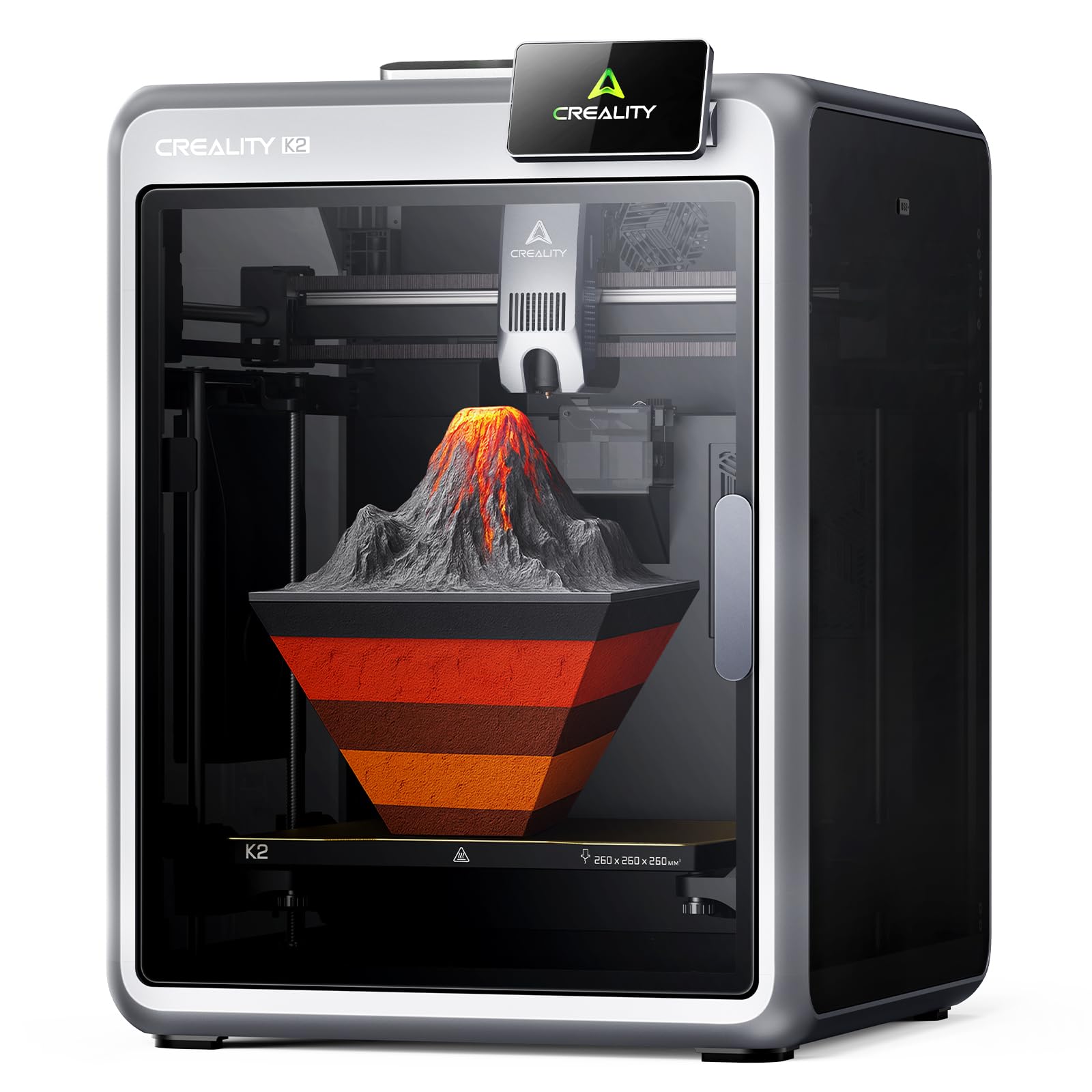
The base K2 printer uses three step-servo motors on the extruder and X/Y axes, which adjust torque dynamically in sub-millisecond intervals. This results in near-silent operation—measured at roughly 35 dB in Silent Mode—while maintaining accurate extrusion across speed fluctuations up to 600mm/s.
The 260mm³ build area supports larger models, and the auto-leveling system only probes the print area relevant to the active model, saving about 40 seconds per print. The included CFS unit manages four filaments, with expansion possible up to 16 colors by adding three more CFS units.
Users consistently note the excellent print quality and easy setup, though the CFS doesn’t accommodate wider third-party spools without printed adapters. The absence of 5GHz Wi-Fi limits wireless performance in denser network environments.
Why it’s great
- Step-servo motors for ultra-quiet operation and precise torque control
- Smart auto leveling that probes only the model’s footprint
- Expandable to 16 colors without mainboard replacement
Good to know
- CFS requires printed spool adapters for standard filament rolls
- No 5GHz Wi-Fi chip; limited to 2.4GHz networks
7. QIDI Q2 3D Printer

The QIDI Q2 stands out with a second-generation PTC heated chamber that maintains 65°C actively, minimizing warping for ABS, ASA, and polycarbonate prints. The nozzle itself acts as the leveling sensor for first-layer accuracy that doesn’t depend on bed surface reflectivity or texture.
With a 270mm³ build volume and an all-metal CoreXY structure, the Q2 delivers 600mm/s prints on precision linear rails. The triple filtration system (G3 pre-filter, H12 HEPA, and activated carbon) reduces volatile organic compounds and odors, making it safer for indoor workshops. The 370°C hotend handles carbon-fiber and glass-fiber composites without degradation.
The optional QIDI BOX supports up to 16-color multi-material printing with dry-while-print technology. The printer runs open-source Klipper firmware, allowing advanced user modifications and Orca Slicer compatibility—a major advantage over closed-ecosystem competitors.
Why it’s great
- 65°C active heated chamber for warp-free engineering materials
- Triple HEPA/carbon filtration for safe indoor use
- 370°C nozzle and open Klipper firmware for advanced materials
Good to know
- Some firmware versions had UI quirks; updates required
- Glass top may need printed riser for brittle filament clearance
8. Official Creality K2 Combo

This official K2 Combo package includes the K2 printer and a single CFS unit for four colors, expandable to 16 colors with extra CFS units. The high-flow hotend pushes 40mm³/s at 280°C with ABS, and the 80W heater ensures consistent melt rates for large-format prints.
The chamber AI camera monitors for print failures and also captures time-lapse footage. The adaptive mesh leveling probes a 16×16 grid specific to each model’s footprint, ensuring a precise first layer even on slightly warped beds. The 260mm³ build volume can accommodate a full-size helmet without splitting.
The all-aluminum aerospace-grade exoskeleton and hardened steel direct-drive gears make this K2 variant the most durable of Creality’s multi-color offerings. Users report that the built-in air purifier effectively filters VOCs and the magnetic nozzle cover makes hot-end swaps fast.
Why it’s great
- High-flow 40mm³/s hotend for fast large-scale prints
- Adaptive 16×16 mesh leveling for precise first layers
- Aerospace-grade exoskeleton minimizes frame flex at high speeds
Good to know
- Outdated manual documentation for bed wiring
- Voltage switch may default to 230V; check for 115V regions
9. Bambu Lab P1S Combo

The Bambu Lab P1S Combo remains a benchmark for multi-color printing due to its mature AMS (Automatic Material System) that switches filaments in under 10 seconds per color change. It supports up to 16 colors with four AMS units, and the enclosed design with automatic bed leveling ensures reliable output with minimal user intervention.
The 500mm/s print speed with 20,000mm/s² acceleration is well-tuned for PLA and PETG, and the CoreXY motion system maintains dimensional accuracy across the full 256mm³ build volume. The Bambu ecosystem includes a cloud-based slicer with pre-configured material profiles, auto-refill, and tangle detection.
Assembly takes about 15 minutes, and the printer’s 95% success rate over 100+ prints is widely reported in user reviews. The main trade-off is the closed ecosystem: you’ll use Bambu Studio or the cloud service, and the AMS prefers Bambu-branded spools for optimal RFID detection.
Why it’s great
- Fast sub-10-second color changes with AMS system
- Consistent ~95% print success rate out of the box
- 15-minute setup and mature slicer profiles
Good to know
- Closed ecosystem restricts third-party filament/software use
- Not recommended for carbon/glass fiber reinforced polymers
10. Original Prusa CORE One

The Prusa CORE One is built on a “made to last” philosophy: an all-steel exoskeleton frame, CoreXY motion system, and a 55°C active heated chamber engineered for high-quality prints with PLA, PETG, ASA, PC, and nylon. The 250×220×270mm build volume is modest but paired with Prusa’s legendary reliability.
This is the open-source option on the list: full firmware access, local-only operation, and compatibility with any slicer. The included 1kg Prusament PLA spool gets you printing immediately, and Prusa offers lifetime technical assistance with 24-hour professional customer support.
The trade-off is the missing multi-color add-on out of the box—the MMU3 is available separately and requires significant assembly effort. For users who value long-term service, upgradability, and a cloud-free printing environment, the CORE One is the most future-proof choice.
Why it’s great
- All-steel exoskeleton for maximum frame rigidity
- Lifetime technical support with rapid response
- Fully open-source; no cloud dependency
Good to know
- Multi-material MMU3 requires separate purchase and assembly
- Build volume smaller than mid-range competitors
11. QIDI Max4 Combo

The QIDI Max4 Combo is the largest multi-color printer in this guide, with a 390×390×340mm build volume that’s 55% larger than the previous Max3. The closed-loop motors on X/Y axes achieve 800mm/s print speeds with 30,000mm/s² acceleration—enough to produce full-size industrial parts or multiple components in a single run.
The 65°C active heated chamber and 40mm³/s high-flow hotend handle carbon-fiber nylon, ABS-CF, PC, and PPS-CF. The Polar Cooler system (sold separately) provides directed part cooling for bridging and overhangs when printing standard PLA. The Z-axis uses a 2mm lead screw with an anti-backlash nut to prevent vertical play.
The printer connects with QIDI BOX to support 16-color multi-material printing with intelligent filament level monitoring and auto-pause on run-out. The AI camera detects spaghetti failures and pauses the print automatically to save material. Setup is plug-and-play with on-screen prompts, and the 120-pound frame requires a sturdy table or cart.
Why it’s great
- Massive 390mm³ build volume for industrial-sized parts
- Closed-loop motors for precise high-speed motion up to 800mm/s
- 65°C chamber and 350°C nozzle for engineering-grade materials
Good to know
- Polar Cooler must be purchased separately for standard PLA
- High initial power consumption; allows for warped bed compensation
FAQ
How much filament waste does an 8-color 3D printer produce per print?
Can I use third-party filament in a closed-ecosystem multi-color printer?
Does a heated chamber affect color accuracy in multi-color prints?
Final Thoughts: The Verdict
For most users, the best 8 color 3d printer winner is the Anycubic Kobra S1 Combo because its dual ACE Pro system offers true eight-color printing with active filament drying, no proprietary RFID lock-in, and a 600mm/s speed that handles engineering materials reliably. If you want maximum color expansion without hardware swaps, grab the Creality K2 Combo (A). And for industrial-scale parts where 390mm³ build volume is the only option, nothing beats the QIDI Max4 Combo.