
If your office or home network relies on multiple access points, you already know the pain: clients stubbornly clinging to a weak signal, inconsistent roaming between floors, and logging into each device individually to tweak settings. A dedicated access point controller eliminates that chaos by centralizing the brain of your wireless deployment—managing everything from channel selection and firmware updates to seamless handoffs—all from a single dashboard that actually gives you visibility into your airspace.
I’m Min — the co-founder and writer behind Gadgets Feed. I’ve spent years buried in spec sheets and market research on enterprise and prosumer network gear, parsing the differences between hardware controllers, cloud-managed platforms, and integrated gateway appliances so you don’t have to decide blind. (And Homer 🐱 supervised the unboxing from atop the warm server-switch box, one paw hovering over the power cord.)
Whether you’re outfitting a growing small business or a sprawling smart home, the right controller can mean the difference between a self-healing network and a daily reboot ritual. This buyer’s guide breaks down the top dedicated options to help you find the best access point controller for your scale, security, and sanity.
How To Choose The Best Access Point Controller
Picking the right controller comes down to three pillars: device capacity, management ecosystem, and deployment flexibility. A controller that can’t handle your next AP expansion will force a painful migration, while one locked to a proprietary cloud might leave you stranded if the internet goes down. Here’s what to look for.
Device Scalability and Throughput
Every controller lists a maximum device count, but real-world performance often dips before that ceiling. Controllers managing 30 to 50 APs and 200+ clients (like the OC220 or Alta Control) suit mid-size offices and advanced home labs. For larger deployments, look for models that advertise 500 or 1,000 devices, such as the OC300 or Alta Control, but verify the WAN routing throughput if the controller also acts as a gateway — sub‑1 Gbps routing with IDS/IPS active can bottleneck a fiber connection.
Local vs. Cloud Management
A local hardware controller keeps your network operational even when the ISP goes down, and it typically offers lower latency for configuration changes. Cloud-based portals (like those offered by Instant On or Cudy) provide convenience for multi-site management and remote troubleshooting, but they introduce a dependency on external servers. Many buyers prefer a hybrid approach: a local hardware controller with optional cloud access for remote monitoring, which is exactly how the Omada and Alta ecosystems handle it.
PoE Power, Ports, and Physical Form Factor
Controllers that accept PoE+ power eliminate one more wall wart from your rack; models like the Alta Control and the OC300 offer this, while others like the Ubiquiti Cloud Gateway Ultra require USB‑C. If you’re rack-mounting, a metal chassis with built-in rack ears (OC300) is preferable to a desktop puck. Also check whether the controller has a USB port for automatic configuration backups — a feature that can save hours during a hardware failure.
Quick Comparison
On smaller screens, swipe sideways to see the full table.
| Model | Category | Best For | Key Spec | Amazon |
|---|---|---|---|---|
| TP-Link Omada OC300 | Hardware Controller | Large deployments up to 500 devices | 2× Gigabit LAN · USB 3.0 backup | Amazon |
| Alta Control On‑Premise | Hardware Controller | Alta AP ecosystems with local control | Manages 1,000 devices · PoE+ | Amazon |
| Ubiquiti Cloud Gateway Ultra | Gateway/Controller | All‑in‑one UniFi network management | 1 Gbps routing with IDS/IPS | Amazon |
| TP-Link Omada OC220 | Hardware Controller | Mid-size Omada networks | Manages 200 APs · 1 Gbps LAN | Amazon |
| Tenda BE5010 (i36) | Wi‑Fi 7 AP | Future‑proofing small offices | BE5010 speeds · 2.5G PoE+ | Amazon |
| Cudy BE3600 (AP3600) | Wi‑Fi 7 AP | Budget‑friendly Wi‑Fi 7 upgrade | 3600 Mbps · 2.5GE port | Amazon |
| HPE Aruba Instant On AP21 | Wi‑Fi 6 AP | Small retail & home offices | 1.5 Gbps aggregate · Smart Mesh | Amazon |
| TP-Link Omada EAP650 | Wi‑Fi 6 AP | Standalone or Omada‑managed | AX3000 · 1G PoE+ | Amazon |
| NETGEAR WAX210PA | Wi‑Fi 6 AP | Small business with PoE simplicity | AX1800 · Up to 128 clients | Amazon |
In‑Depth Reviews
1. TP-Link Omada OC300

The OC300 is TP-Link’s flagship hardware controller for the Omada SDN ecosystem, built inside a durable metal enclosure that works equally well on a desk or in a 19‑inch rack. Its dual gigabit Ethernet ports and USB 3.0 port for automatic configuration backups give it a clear edge over smaller Omada controllers when uptime and data integrity matter. With support for up to 500 Omada devices — including access points, switches, and gateways — this is the controller you pick when your deployment is scaling fast and you can’t afford to swap hardware again next year.
In real-world forums, users consistently report that the OC300 solves roaming headaches that plague standalone AP setups, especially in environments with three or more access points. The cloud access feature requires no license fee, which makes remote site management surprisingly affordable for an enterprise‑grade controller. The dashboard provides real-time topology views and client analytics, and the Omada app offers enough functionality for on-the-go troubleshooting without needing a full laptop.
Setup does demand familiarity with the Omada SDN interface, and a small subset of users note that band-steering can occasionally ping‑pong clients between bands during high congestion. However, for anyone running a sizable Omada network — from a large home with five APs to a small business with a dozen switches and gateways — the OC300 delivers the stability and granular control that justifies its premium positioning.
Why it’s great
- Manages up to 500 devices from a single pane
- Metal rackmount design with USB 3.0 backup support
- Free cloud access with no subscription fees
Good to know
- Requires Omada SDN‑compatible devices (not legacy Omada)
- Band‑steering can occasionally behave erratically under load
2. Alta Control On‑Premise
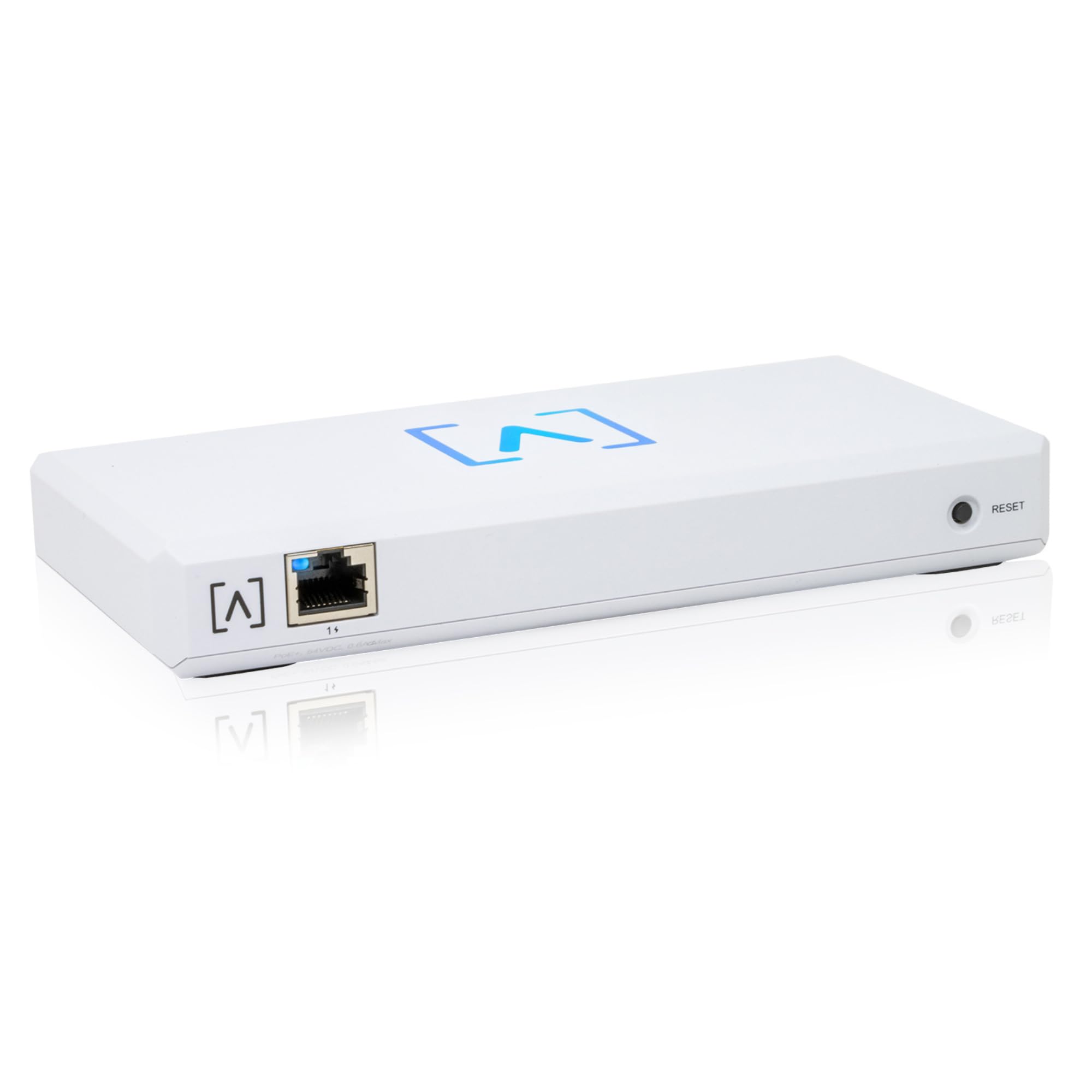
The Alta Control module is an on‑premise hardware controller built exclusively for Alta Labs’ ecosystem of WiFi 6 access points. Its headline metric — managing up to 1,000 devices — places it into a scalability tier that rivals some cloud‑hosted platforms, and the PoE+ power input means it can be tucked away in a wiring closet without an extra power outlet. The controller brings deep packet inspection and customizable security policies to the table, giving administrators fine‑grained visibility into traffic types and potential threats.
Multi‑site management is where Alta Control really differentiates itself: you can monitor and configure networks across several physical locations from a single console. This makes it a compelling option for managed service providers or businesses with retail branches that need consistent policy enforcement. The hardware is also designed to keep operating locally if the internet connection drops — a critical feature for environments that can’t afford a total blackout just because the WAN link goes down.
On the downside, setup has been reported as non‑trivial — especially if the network lacks a second DHCP server — and some users feel the controller still leans too heavily on cloud services for certain functions, despite being marketed as an on‑premise solution. The package does not include a power injector, so you will need a PoE+ switch or a separate injector to get started. For buyers already invested in the Alta ecosystem, however, this controller unlocks the full potential of the hardware.
Why it’s great
- Massive 1,000‑device ceiling for future growth
- PoE+ simplifies power and data cabling
- Deep packet inspection and VLAN‑based security out of the box
Good to know
- Setup demands networking experience; no power injector included
- Some management functions still depend on cloud connectivity
3. Ubiquiti Cloud Gateway Ultra (UCG‑Ultra)

The Ubiquiti Cloud Gateway Ultra is not just a controller — it is a full routing gateway that runs the UniFi Network application natively, eliminating the need for a separate cloud key or self‑hosted software. It handles up to 30+ UniFi devices and 300+ clients with IDS/IPS enabled at full 1 Gbps throughput, which is rare at this price tier. The 0.96‑inch LCM status display offers a quick glance at system health and WAN status without opening a browser, and the USB‑C power input keeps the footprint small enough to slip into any cable run.
For homes and small offices already using UniFi access points, the UCG‑Ultra is the natural brain of the network. Setup through the UniFi mobile app or web portal is famously streamlined, and the multi‑WAN load balancing feature provides failover redundancy for mission‑critical internet connections. Users coming from consumer mesh systems routinely describe a “night‑and‑day” improvement in network stability and diagnostic visibility after migrating to the UCG‑Ultra paired with UniFi APs like the U7 Pro.
The trade‑offs are tied to its dual role as a gateway: it has only four LAN ports, so any branch office with many wired devices will need to add a UniFi switch. PoE is also absent from the UCG‑Ultra itself, meaning APs must be powered by a PoE switch or injectors. Despite those small concessions, this controller/gateway combo offers the best integrated experience for anyone building a new UniFi network from the ground up.
Why it’s great
- Full UniFi controller + 1 Gbps gateway in one compact unit
- IDS/IPS at line rate without crippling throughput
- Multi‑WAN load balancing for failover and redundancy
- Limited to 4 LAN ports; requires a switch for expansion
- No PoE output; APs need separate power
4. TP-Link Omada OC220
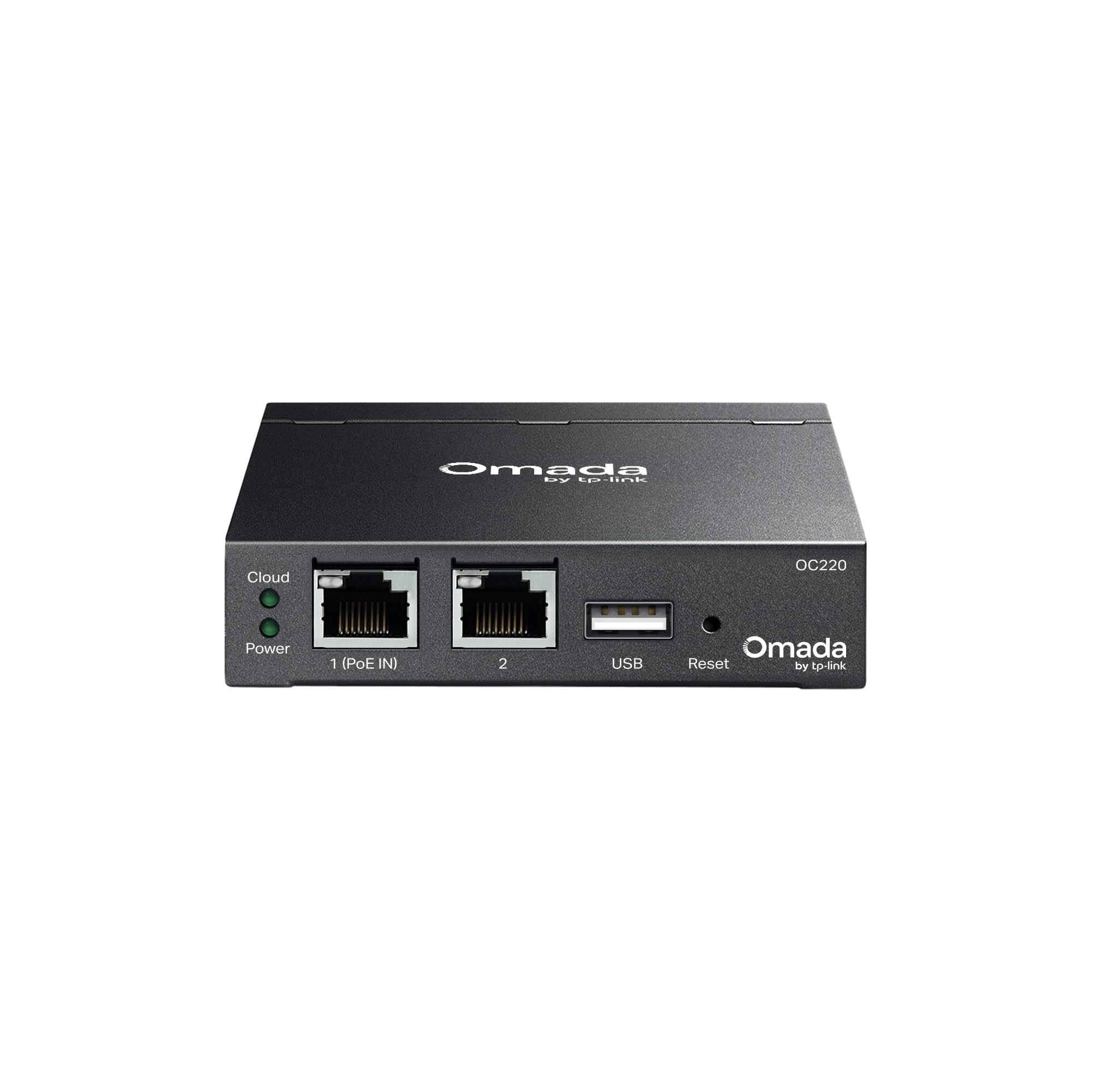
The Omada OC220 is the sweet‑spot hardware controller for anyone who has outgrown a free software instance but doesn’t need the full 500‑device overhead of the OC300. It supports up to 200 Omada devices — access points, switches, and gateways — which comfortably covers mid‑sized businesses, larger homes, and homelabs with aggressive coverage zones. The web interface and mobile app mirror the full Omada SDN suite, giving you real-time monitoring, scheduled reboots, and client-level diagnostics without requiring a dedicated PC to run the software controller 24/7.
Users upgrading from the older OC200 consistently praise the OC220’s snappier interface and lower power draw. The controller can manage both ‘Agile’ and ‘Access Series’ Omada hardware, which future‑proofs your investment if you plan to mix WiFi 6 and WiFi 7 APs under the same umbrella. The cloud access is free and works well for remote management, and the unit’s compact, fanless design means it can live silently in a networking closet next to the PoE switch.
The main caution is that the Omada app is not as polished as the web UI, and some users have reported instability when using the controller as both an AP manager and a router gateway — the OC220 is best used strictly as a controller for dedicated Omada gateways. Also, the unit does not include rack‑mount ears, so if you plan to rack it, you will need a shelf. For the vast majority of Omada‑based networks, the OC220 delivers the perfect balance of capacity, cost, and reliability.
Why it’s great
- Manages 200 Omada devices for a reasonable price
- Low power consumption and silent fanless operation
- Free cloud access with full remote configuration
Good to know
- Omada mobile app is less capable than the web dashboard
- No rack‑mount hardware included; desktop placement only
5. Tenda BE5010 (i36)
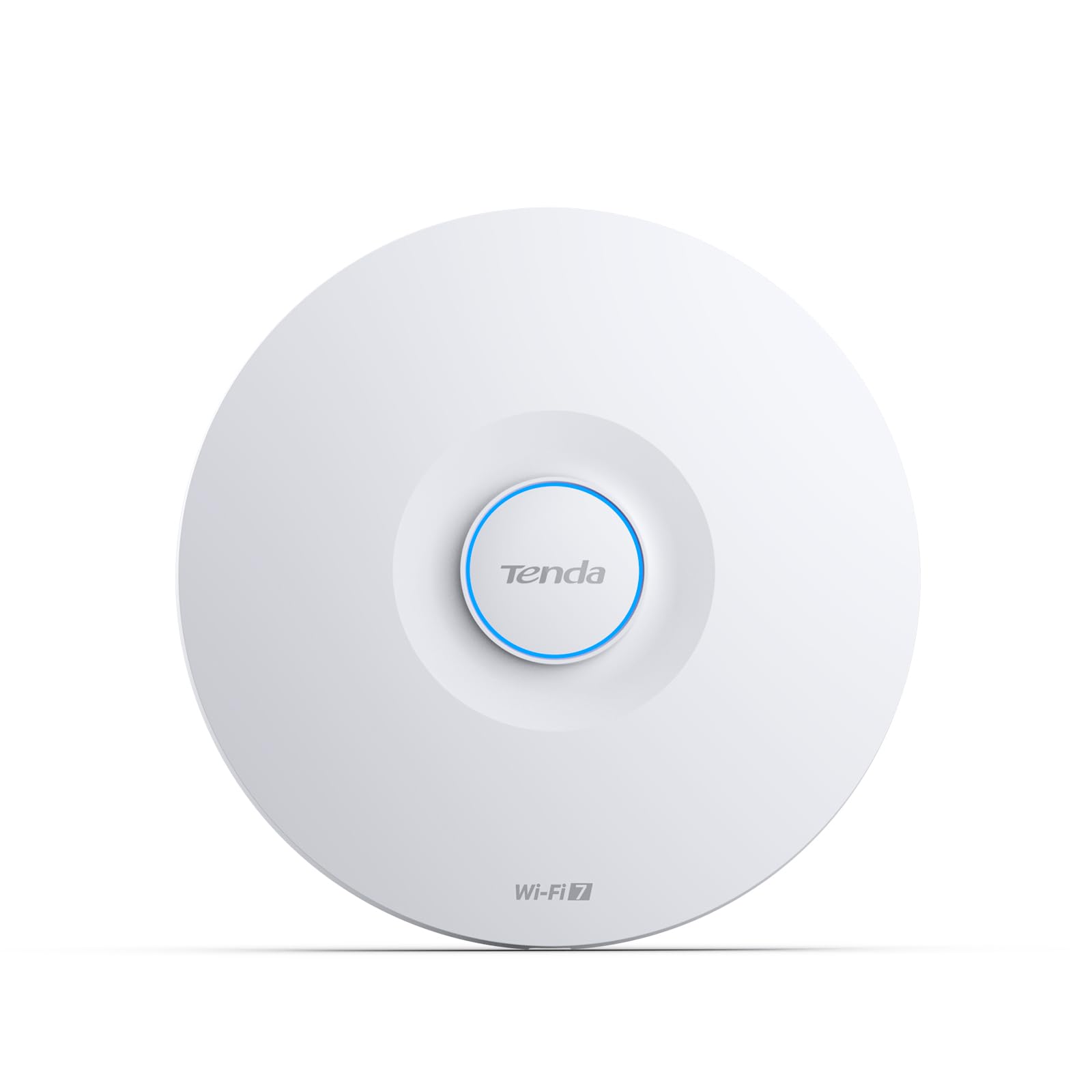
The Tenda BE5010 (model i36) is a ceiling‑mount Wi‑Fi 7 access point that brings next‑gen wireless speeds — up to 5010 Mbps — into a form factor designed for business networks. The 2.5G PoE+ uplink port is a standout feature because it provides both multi‑gigabit backhaul and power over a single cable, keeping installations clean and future‑proof for the growing number of clients that support 160 MHz channels and 4K‑QAM modulation. The integrated cloud management via the CloudFi app and web dashboard makes this AP manageable as part of a larger Tenda deployment without needing a separate hardware controller.
Real‑world feedback highlights the BE5010’s ability to extend high‑speed coverage to the property line and drastically improve signal for outdoor cameras that previously struggled. The unit supports 802.11k/v/r fast roaming, which is essential for mobile workers moving between coverage zones during video calls. With WPA3 encryption and VLAN tagging for guest and IoT isolation, the security suite satisfies most small business compliance requirements without extra licensing.
The primary consideration is that Tenda’s ecosystem is newer than TP‑Link’s Omada or Ubiquiti’s UniFi, so the community of online config guides and third‑party integration is thinner. Additionally, while the BE5010 can be managed via cloud, there is currently no dedicated Tenda hardware controller that matches the depth of OC220 or Alta Control — meaning you are either using the cloud platform or running standalone. For early adopters who want Wi‑Fi 7 today and are willing to navigate a smaller support community, the i36 delivers impressive range and throughput.
Why it’s great
- True Wi‑Fi 7 speeds with 2.5G PoE+ backhaul
- Excellent outdoor and through‑wall coverage
- WPA3, VLAN, and fast roaming support baked in
Good to know
- Ecosystem is smaller; fewer community resources available
- Cloud management dependency unless running standalone
6. Cudy BE3600 (AP3600)

Cudy’s AP3600 is a ceiling‑mount Wi‑Fi 7 access point that delivers 3600 Mbps of dual‑band throughput and a 2.5 Gigabit Ethernet port — all at an entry‑level price that undercuts most Wi‑Fi 7 rivals by a noticeable margin. The AP is powered via 802.3at PoE or passive PoE, and the package includes a DC adapter despite Amazon’s listing sometimes stating otherwise. The web UI is fully local and account‑free, which appeals to buyers who dislike mandatory cloud registration. It also supports WireGuard, OpenVPN, and ZeroTier VPN clients directly on the AP without extra hardware.
Users report that a single AP3600 can punch through cinder‑block interior walls and still deliver over 50% signal strength 65 feet away, making it a strong candidate for challenging building layouts. The Cudy app provides both cloud and local management options, so you can decide whether your control plane lives on‑site or remotely. For homelabbers who want to experiment with multi‑link operation (MLO) and 4K‑QAM without a big budget, the AP3600 offers a very low barrier to entry.
The trade‑offs are minor but worth noting: the AP3600 does not include a mounting template in the box, and the instruction manual is minimal. Cudy’s firmware update cycle is less frequent than TP‑Link’s, so early adopters of Wi‑Fi 7 may need to wait longer for bug fixes. Still, for a buyer on a tighter budget who wants to dip into the latest wireless standard, the AP3600 punches well above its price tier.
Why it’s great
- Wi‑Fi 7 for a very accessible price
- 2.5 Gigabit port prevents wire‑speed bottleneck
- Local web UI doesn’t require any cloud account
Good to know
- Firmware updates are less frequent than bigger brands
- Setup instructions are sparse; expect some manual exploration
7. HPE Aruba Instant On AP21

The HPE Aruba Instant On AP21 is a 2×2 WiFi 6 access point built for small spaces — think single retail rooms, cafes, and home offices — where you need enterprise reliability without enterprise complexity. It delivers up to 1.5 Gbps aggregate throughput (1.2 Gbps on 5 GHz and 300 Mbps on 2.4 GHz) and supports Smart Mesh, which lets you extend coverage wirelessly when running a cable to a second location isn’t feasible. The AP21 is managed entirely through the Aruba Instant On mobile app or web portal, which requires no subscription or license and is famous for its “minutes‑to‑deploy” setup flow.
Users who pair the AP21 with an Instant On switch consistently report excellent roaming behavior and stable throughput even in environments with many concurrent clients. The AP21 can be powered by PoE (802.3af) or a 12V adapter (sold separately), and the wall/ceiling mount kit is included in the box. For a small business that wants a single vendor stack without monthly fees, the Instant On ecosystem is hard to beat — and the AP21 serves as the most cost‑effective entry point into that stack.
The main limitation is that the AP21 is meant for 1–2 AP deployments; if your network will grow significantly, you will want the higher‑capacity AP22 or AP25. Also, the Instant On app requires an internet connection for initial setup and lacks advanced features like per‑client traffic shaping that power users expect from a UniFi or Omada controller. For its intended use case — simple, rock‑solid WiFi 6 in a small footprint — the AP21 is an excellent choice.
Why it’s great
- Zero‑license cloud management with excellent ease of use
- Smart Mesh for wireless backhaul without extra cables
- Proven HPE Aruba reliability in a compact package
Good to know
- Designed for small deployments; limited to 1–2 APs per site
- Initial setup requires internet; no local‑only mode
8. TP-Link Omada EAP650

TP‑Link’s Omada EAP650 is a dual‑band AX3000 ceiling‑mount WiFi 6 access point that hits the sweet spot between price and throughput for medium‑density environments. With aggregate speeds up to 2976 Mbps, a gigabit PoE+ port, and support for both hardware and software Omada controllers, the EAP650 fits seamlessly into a fully managed Omada SDN network. The ultra‑slim white chassis blends into office ceilings, and the included mounting kit makes ceiling installation straightforward.
Users specifically praise the EAP650’s roaming performance when paired with an Omada controller like the OC220 or OC300 — fast handoffs between APs eliminate video call drops and keep IoT devices connected as they move through the building. The AP also supports VLAN assignment per SSID, which is critical for segmenting guest, staff, and IoT traffic on the same physical hardware. The free Omada cloud management is a huge plus for remote teams, as it avoids the subscription fees that competitors like Cisco Meraki require.
One common complaint is that Amazon often ships older hardware revisions (v1) even though v2.6 is the current revision, so it is worth checking the firmware compatibility before purchase. Additionally, the EAP650 requires a PoE+ switch or the included adapter; the adapter itself is rated at 12V/1.5A, so plan your power budget accordingly. For anyone building a mid‑sized Omada network, the EAP650 delivers reliable, manageable WiFi 6 without breaking the bank.
Why it’s great
- Excellent roaming and VLAN support via Omada controller
- Free cloud management with no ongoing license cost
- Ultra‑slim profile fits discreetly into any ceiling
Good to know
- Amazon stock often ships older hardware revisions
- Requires PoE+ or included 12V adapter for power
9. NETGEAR WAX210PA

NETGEAR’s WAX210PA is a compact WiFi 6 access point aimed squarely at small businesses, retail lobbies, and detached‑office extensions that need a quick, reliable wireless upgrade. Its AX1800 dual‑band radio delivers up to 1,800 Mbps and supports up to 128 registered clients (with 30 active simultaneously), which is solid for a single‑AP deployment. The unit ships with both a power adapter and a wall/ceiling mount kit, so you can deploy it even if your switch lacks PoE.
Setup is done entirely through a web browser on a computer or tablet — no app required — and the default login credentials are printed on the label so there is no fumbling around. Users consistently report that PoE deployment makes it trivially easy to install the AP in hard‑to‑reach locations like crawl spaces or garages, and the coverage extends reliably to about 1,500 square feet. The WAX210PA also supports WPA2 and WPA3 encryption along with MAC address filtering for basic network security.
The biggest limitation is that this is a standalone AP — it does not integrate into a broader NETGEAR controller ecosystem like Insight or ProSAFE, so advanced multi‑AP roaming features are absent. If your network will never exceed two APs and you are happy configuring each one via its own browser page, this is a fine choice. But for larger or more dynamic deployments, one of the Omada or Alta controllers in this guide will serve you better.
Why it’s great
- Includes both PoE and AC adapter for maximum flexibility
- Simple web‑based setup with no mandatory app or cloud account
- Compact form factor fits discreetly in any room
Good to know
- No centralized multi‑AP management; each AP configured separately
- Limited to 30 active clients; not suited for dense environments
FAQ
Should I buy a dedicated hardware controller or just run the software on a PC?
Can I mix different brands of access points under one controller?
Final Thoughts: The Verdict
For most users, the best access point controller winner is the TP‑Link Omada OC220 because it offers the ideal balance of device capacity (200 units), free cloud access, and proven stability for mid‑sized deployments. If you want the highest scalability in a rackmount form factor, grab the TP‑Link Omada OC300. And for an all‑in‑one gateway/controller that pairs perfectly with UniFi APs, nothing beats the Ubiquiti Cloud Gateway Ultra.