
You’ve got the router, the switches, and the cable runs — but your wireless coverage is still spotty. The real bottleneck isn’t the radio; it’s how many wired devices you can anchor to the access point itself. An access point with Ethernet ports isn’t just a ceiling ornament for Wi-Fi — it’s a mini aggregation point that lets you wire a game console, a VOIP phone, a security camera, or a printer exactly where the signal is strongest, without running a second cable back to the switch.
I’m Min — the co-founder and writer behind Gadgets Feed. I’ve spent years deep-diving into network hardware specifications, comparing chipset generations, real-world throughput ceilings, and the quiet differences between passive PoE vs. 802.3at compliance that separate a one-day setup from a constant reboot headache. (And Homer 🐱 supervised the cable sorting from his laptop throne, tail wrapped around the power brick).
Whether you are wiring a warehouse, a two-story home, or a multi-building campus, you need an access point that brings its own wired muscle. That is exactly what this guide delivers — a carefully curated selection of the best access point with ethernet ports for every deployment scenario, from the budget-conscious tech enthusiast to the enterprise network admin.
How To Choose The Best Access Point With Ethernet Ports
A multi-port access point bridges two worlds: the wireless airspace your clients roam and the physical copper that delivers rock-solid latency. Before you click buy, you need to match the port count, PoE standard, and ecosystem to your actual network architecture — not just the sticker speed on the box.
Port Count & Throughput Ceiling
A single Gigabit Ethernet port is fine for a basic AP, but the moment you need to daisy-chain a second AP, connect a wired device at the AP location, or use a 2.5G backbone for Wi-Fi 6 or 7 clients, you need two or more ports. Look for models that do not share a single 1 Gbps bottleneck across all wired connections — a true multi-Gig port (2.5G) ensures your Wi-Fi speeds are not cut in half by the uplink.
PoE Budget & Standard Compliance
Passive PoE (24V or 48V) is common in budget gear but can damage non-compatible devices. Active 802.3af (up to 15.4W) and 802.3at PoE+ (up to 30W) are safer and allow professional switches to negotiate power intelligently. If your AP draws more than 15W — typical for Wi-Fi 6 with multiple spatial streams — you must use PoE+ or the AP will power-cycle under load.
Ecosystem Lock-In vs. Standalone Flexibility
Ubiquiti UniFi and TP-Link Omada offer centralized management dashboards, automatic channel optimization, and seamless roaming. The trade-off is that you generally need their controller hardware or software to unlock advanced features. Standalone models (like MikroTik’s RouterOS) give you full control without a subscription but demand more manual configuration.
Quick Comparison
On smaller screens, swipe sideways to see the full table.
| Model | Category | Best For | Key Spec | Amazon |
|---|---|---|---|---|
| MikroTik hAP ac2 | Compact AP/Router Combo | Tech users wanting 5 wired ports | 5x 1G Ethernet ports | Amazon |
| TP-Link EAP650 | Wi-Fi 6 Wall/Ceiling AP | SOHO and light office | 1x 1G port, Wi-Fi 6 AX3000 | Amazon |
| Ubiquiti U6+ | UniFi Entry-Level | Entry into UniFi ecosystem | 1x 1G port, 3 Gbit/s wireless | Amazon |
| WAVLINK AX1800 Outdoor | Outdoor Wi-Fi 6 AP | Farm, yard, long-range outdoor | 1x 1G port, 4x 8dBi antennas | Amazon |
| TP-Link EAP660 HD | High-Density Wi-Fi 6 | Offices with 50+ clients | 1x 2.5G port, AX3600 | Amazon |
| Ubiquiti U6-LR | Long-Range Wi-Fi 6 AP | Large homes / warehouses | 1x 1G port, dual-core 1.3 GHz | Amazon |
| WAVLINK BE5100 Outdoor | Wi-Fi 7 Outdoor AP | Future-proof outdoor (8+ acres) | 1x 2.5G port, Wi-Fi 7 BE5100 | Amazon |
In‑Depth Reviews
1. MikroTik hAP ac2 RBD52G-5HacD2HnD-TC

The MikroTik hAP ac2 is the only device in this roundup that packs five Gigabit Ethernet ports into a compact desktop case. That alone makes it a wired-swiss-army-knife: you can use it as a router, a wireless bridge, or a wired-to-wireless gateway in a media cabinet. The 128MB of RAM and quad-core CPU ensure IPsec hardware acceleration and VLAN routing don’t choke even with multiple client devices under load.
RouterOS gives you enterprise-grade flexibility — Wireguard, VLAN isolation, firewall rules — but the learning curve is real. Reviews confirm that the Quickset wizard makes a basic Home AP Dual setup fast, but advanced features require hours of WinBox exploration. The internal antennas deliver strong 2.4/5 GHz coverage across a 3,200+ sqft home, and the USB port can host storage or a 4G failover modem.
The catch? Passive PoE (18–28V) means you cannot plug it into a standard 802.3af switch and expect it to power up. Some users note that the limited memory blocks WPA3 support, and the wireless station bridge mode struggles with mixed WPA2/WPA3 environments. For wired-first deployments where you need five ports in one tiny box, this is a beast — but it rewards those willing to tinker.
Why it’s great
- Five Gigabit ports for daisy-chaining or wired clients
- RouterOS is incredibly flexible (VLANs, Wireguard, firewall)
- Reliable, no-reboots-required stability over years of use
Good to know
- Passive PoE only — not compatible with standard PoE switches
- Steep learning curve; basic setup is easy but advanced config is not
- Limited RAM prevents WPA3 and some advanced wireless modes
2. TP-Link Omada EAP650 AX3000

The EAP650 is the sweet spot for anyone moving to Wi-Fi 6 without a massive budget. Its single Gigabit Ethernet port is the only wired connection, but the real value is in the software: TP-Link’s Omada Essentials cloud management is free, and the AP supports 802.3at PoE+, passive PoE, and the included 12V DC adapter — so you can deploy it on any existing switch. The dual-band AX3000 throughput (up to 2976 Mbps) handles a typical 1,300 sqft townhouse with ease.
Customer feedback highlights the easy standalone setup via web browser, where you can configure VLANs, multiple SSIDs per band, and WPA3 without forcing an account sign-up. The captive portal feature is a bonus for small hotels or cafes. With a 5-year warranty backing it, the EAP650 is built for longevity. The ultra-slim white chassis mounts cleanly on a ceiling or wall and stays cool even under sustained load.
The main trade-off is the single Ethernet port — you cannot daisy-chain a second AP or connect a wired device at the AP location without adding a separate switch. A few buyers also report receiving the v1 hardware revision when v2.6 is current, which can affect future firmware support. For a straightforward, centrally-managed Wi-Fi 6 AP with excellent price-to-performance, this one is hard to beat.
Why it’s great
- Free Omada cloud management with no hardware controller required
- Triple power options (PoE+, passive PoE, DC) for flexible deployment
- Excellent Wi-Fi 6 performance with reliable VLAN/SSID support
Good to know
- Single Gigabit port — no wired pass-through for other devices
- Hardware revision may vary; check before purchase
- Setup via Omada app is easy, but local web UI is more reliable
3. Ubiquiti U6+ Dual Band Wi-Fi 6 AP

The Ubiquiti U6+ is the entry-point into the UniFi ecosystem that balances price, performance, and simplicity. It has a single Gigabit Ethernet port (PoE+ powered) and delivers a 3 Gbit/s aggregate wireless data rate — though real-world throughput to a single client hangs around 650–900 Mbps depending on your Wi-Fi 6 adapter. The AP covers roughly 1,500 sqft per unit, and multi-AP setups use UniFi’s seamless handoff to keep clients connected as they move.
Adopting the U6+ into a UniFi network is famously straightforward: power it via PoE+, adopt it in the UniFi Network app, and you’re done. Reviews consistently praise its rock-solid stability — no reboots, no dropouts, and no performance degradation over months of uptime. The white puck design is unobtrusive on a ceiling or wall, and the data encryption features provide peace of mind for business deployments.
The downside is that the U6+ requires a UniFi gateway or a self-hosted UniFi controller to adopt and manage — it is not a standalone AP out of the box. It also lacks a multi-port design, so wired device connections require an external switch. For anyone building a UniFi network and needing a reliable, set-and-forget AP that integrates with the broader ecosystem, the U6+ is the reference standard.
Why it’s great
- Clean, rock-solid UniFi integration with seamless roaming
- Excellent real-world throughput and stability in home/office
- Compact, low-profile design with PoE+ power
Good to know
- Single Ethernet port — no wired pass-through
- Requires UniFi gateway or controller for full management
- PoE+ injector not included in the box
4. WAVLINK AX1800 Outdoor WiFi 6 Extender

The WAVLINK AX1800 is purpose-built for punishing outdoor conditions: an IP67 sealed enclosure with 6KV lightning protection and 15KV static protection means it can live on a pole in the rain, snow, or direct sunlight. It ships with four detachable 8dBi fiberglass omni antennas that push Wi-Fi 6 coverage up to a 300-meter radius, supporting up to 256 simultaneous devices. The single Gigabit Ethernet port handles the uplink via either 802.3af/at active PoE or the included passive PoE adapter.
Real-world user reports confirm the range claim: one buyer extended coverage over 200 yards through dense trees and a cabin wall, while another mounted it 25 feet high on a barn peak and covered 8 acres without dead zones. The dual-band AX1800 speeds (1200 Mbps on 5 GHz, 600 Mbps on 2.4 GHz) are sufficient for HD streaming and outdoor IP cameras. Setup is handled via a simple web GUI, and Mesh mode (WAVLINK proprietary) allows pairing with a second unit for seamless roaming.
The drawbacks center on firmware polish: multi-SSID support only works when splitting the 2.4 GHz and 5 GHz radios, and that feature is limited to Mesh mode rather than AP mode. The waterproof gland for the Ethernet cable is tight — several users had to ream it out to fit the RJ45 plug. For the price, the outdoor AX1800 delivers unmatched range and ruggedness, but expect to work around some software quirks.
Why it’s great
- Genuine 300-meter range with 4x 8dBi high-gain antennas
- IP67 sealed with lightning and static protection for harsh environments
- Supports both active PoE and passive PoE for flexible power
Good to know
- Multi-SSID support is limited to Mesh mode only
- Waterproof gland requires modification to fit some Ethernet cables
- No per-SSID bandwidth limiting in AP mode
5. TP-Link Omada EAP660 HD AX3600

The EAP660 HD is TP-Link’s high-density specialist, designed to push through crowded airspace with eight spatial streams and OFDMA that increases network capacity up to 4x over Wi-Fi 5. The killer feature is the 2.5 Gigabit Ethernet uplink port — this ensures your 3,550 Mbps aggregate wireless speed is not bottlenecked by a 1 Gbps cable. It requires 802.3at PoE+ to deliver full power to all eight streams; a standard 15.4W PoE port will leave it underpowered.
In side-by-side tests against the Ubiquiti U6-LR, the EAP660 HD matched or exceeded throughput (averaging 650 Mbps on an iPhone 13 Pro and over 900 Mbps on laptops) and handled five simultaneous iperf3 clients with better consistency. The Omada SDN platform gives you centralized cloud management, Zero-Touch provisioning, and AI-driven optimization. Users highlight the easy plug-and-play installation and the future-proofing value of the 2.5G port for upcoming ISP speed upgrades.
The biggest complaint is cosmetic: a very bright blue LED that cannot be dimmed or disabled, which can be distracting in a bedroom or conference room. Some users also note that the Omada web app interface is less polished than Ubiquiti’s UniFi controller, though it remains fully functional. For dense offices, classrooms, or any environment where 50+ Wi-Fi clients fight for airtime, the EAP660 HD is the clear winner.
Why it’s great
- 2.5G Ethernet port eliminates the Wi-Fi uplink bottleneck
- Eight spatial streams with OFDMA handle 50+ clients cleanly
- Limited lifetime warranty with free 24/7 support
Good to know
- Bright blue LED cannot be dimmed or turned off
- Requires 802.3at PoE+ — standard PoE will underpower it
- Omada web UI is functional but less polished than UniFi
6. Ubiquiti UniFi 6 Long-Range (U6-LR)

The UniFi 6 Long-Range AP is built around a 1.3 GHz dual-core processor and four-stream high-efficiency Wi-Fi 6 (5 GHz 4×4 MU-MIMO/OFDMA at 2.4 Gbps, 2.4 GHz 4×4 at 600 Mbps). It covers a radius that easily stretches across a 3,500+ sqft home or a warehouse floor, and the 802.3at PoE+ power requirement ensures it can drive those four spatial streams at full tilt. The single Gigabit Ethernet port is the only wired connection — ideal for a clean ceiling mount where the cable runs straight to a PoE switch.
User feedback is overwhelmingly positive about the U6-LR’s range and build quality — reviewers note it feels more solidly constructed than previous Ubiquiti models — and the handoff in a multi-AP UniFi network is seamless. Some users report deploying multiple U6-LR units across metal barns and farm properties with excellent results, thanks to the dust and water resistance (it is not fully IP-rated but handles challenging indoor and covered outdoor installations).
The minor pain point is an intermittent adoption issue: a fraction of units lose connection to the UniFi controller after a few days and require reprovisioning. Ubiquiti has acknowledged this as an early firmware issue with the U6-LR, and updates have mitigated but not entirely eliminated it. Ensure your controller and AP firmware are on the latest stable release. For pure range in a UniFi network, the U6-LR remains the flagship choice.
Why it’s great
- Exceptional long-range coverage with 4×4 MU-MIMO on both bands
- Rock-solid build quality and reliable day-to-day performance
- Seamless roaming and handoff in multi-AP UniFi deployments
Good to know
- Single Gigabit Ethernet port (no wired pass-through)
- Intermittent adoption cycle issue in some early firmware versions
- PoE+ injector sold separately — not included in the box
7. WAVLINK BE5100 Outdoor WiFi 7 Extender
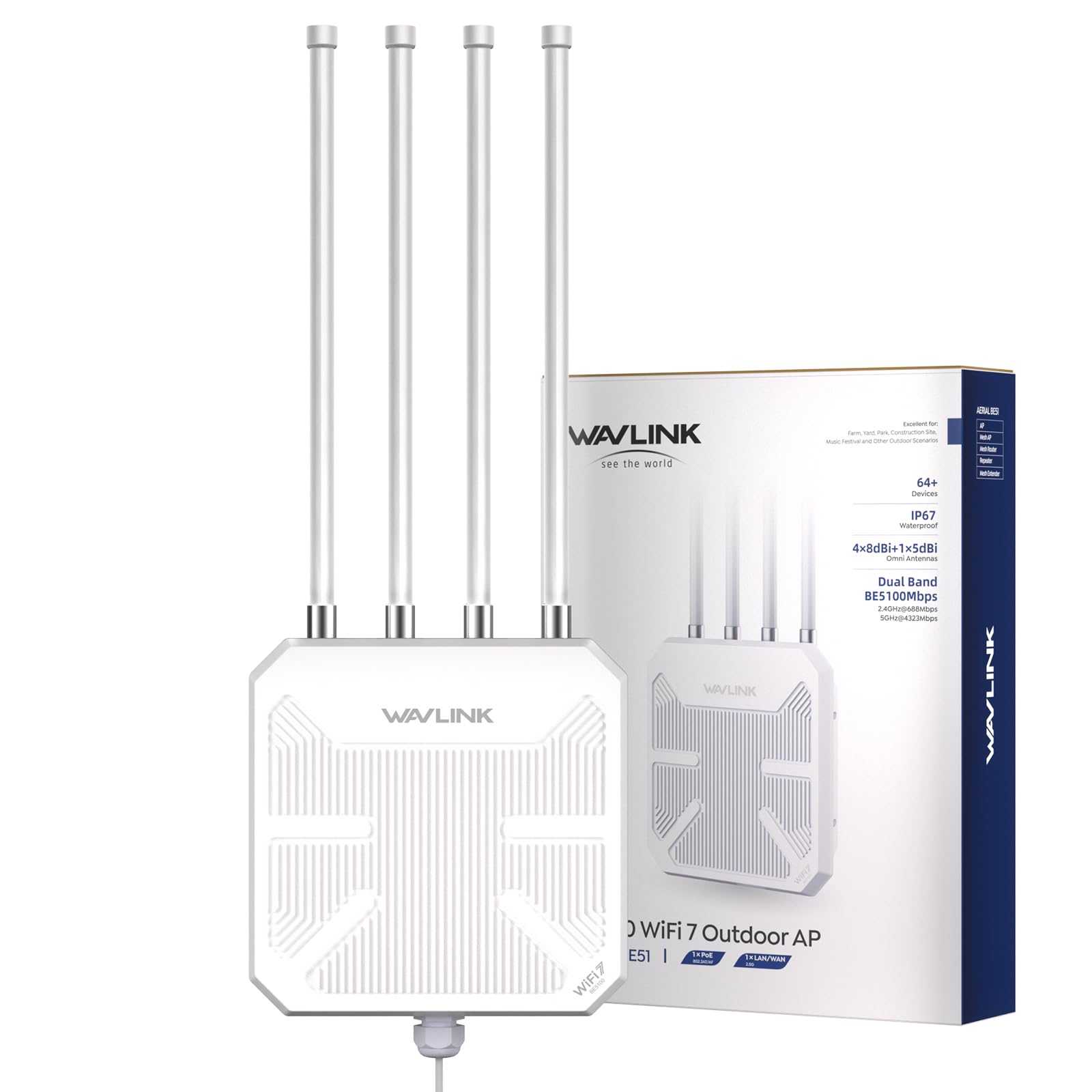
The BE5100 is one of the first outdoor access points to ship with Wi-Fi 7, delivering a 5 GHz band speed of 4323 Mbps and a 2.4 GHz speed of 688 Mbps — enough for 8K streaming and AR/VR without a stutter. The 2.5 Gigabit Ethernet port ensures the wired backhaul keeps pace with those speeds. It inherits the same IP67 waterproof housing, 4x 8dBi detachable fiberglass antennas, and 6KV lightning protection as its Wi-Fi 6 sibling, but adds the latest 802.11be standard and a higher aggregate throughput of 5100 Mbps.
Early adopters report the BE5100 covers 8-acre properties with a single unit mounted 25 feet up, with seamless handoff when adding a second unit in Mesh mode. Setup is handled through a responsive web GUI, and the included passive PoE adapter (54V) gets you running fast — though an active PoE switch also works. The plastic housing feels more commercial than consumer, and the 360-degree detachable antennas make directional tuning possible for long, narrow coverage zones.
The biggest caveat is Wi-Fi 7 client requirement: to unlock the full 5 Gbps-class speeds, you need a Wi-Fi 7 adapter (like an iPhone 16 Pro or Samsung S24 Ultra). Connecting older Wi-Fi 6 or Wi-Fi 5 clients works perfectly but caps at their respective maximums. A small number of users report inconsistent performance (1-star reviews), but the majority praise its range and reliability. For future-proofing an outdoor deployment right now, this is the most advanced option available.
Why it’s great
- First-wave Wi-Fi 7 standard with 4323 Mbps on 5 GHz band
- 2.5G port prevents wired backhaul bottleneck at outdoor distances
- IP67 rugged housing with lightning & static protection
Good to know
- Wi-Fi 7 speeds only achieved with compatible clients
- Some early units show inconsistent performance
- Passive PoE injector included but waterproof gland is tight
FAQ
Why do I need an access point with more than one Ethernet port?
Can I connect a switch to an access point’s Ethernet port?
What is the difference between passive PoE and 802.3at PoE+ for access points?
Can I use an outdoor Wi-Fi 6 AP indoors for better coverage?
Final Thoughts: The Verdict
For most users, the access point with ethernet ports winner is the MikroTik hAP ac2 because it offers five wired ports in a compact desktop form factor, giving you the flexibility to build a wired backbone at the edge of your network without extra hardware. If you want centralised cloud management and silent Wi-Fi 6 performance, grab the TP-Link Omada EAP650. And for future-proofing a large outdoor property, nothing beats the WAVLINK BE5100 Outdoor Wi-Fi 7 AP with its 2.5G port and IP67-rated endurance.