
An adult tablet sits at a different intersection than a kid’s Fire slate or a budget grocery-list device. You need a display that respects your eyes for hours of reading or sheet music, a processor that won’t stutter through split-screen note-taking, and enough storage to hold your digital library without constant micro-managing. The difference between a miserable purchase and a daily driver comes down to raw specs like pixel density, refresh rate, chipset architecture, and battery endurance measured in real-world tasks, not marketing numbers.
I’m Min — the co-founder and writer behind Gadgets Feed. I’ve spent hundreds of hours dissecting technical specifications, poring over verified customer reports, and mapping the performance boundaries of the current tablet landscape to find the models that actually hold up for demanding adult use cases.
From the massive 14.3-inch TCL NXTPAPER to the pocketable performance of the Samsung Galaxy Tab S11, this guide isolates the models that earn their spot as the best adult tablet for your specific workflow, whether that’s sketching, spreadsheets, sheet music, or streaming.
How To Choose The Best Adult Tablet
The right tablet for a grown-up buyer balances three non-negotiable elements: a panel that won’t cause eye fatigue during long sessions, a processor that handles real multitasking without reloading tabs, and battery life measured in days of casual use, not hours. Budget-tier slates often compromise on at least two of these, which is why this category rewards informed spending.
Display Resolution and Panel Type
A 2.5K or 3K resolution on an 11-inch or larger screen delivers a pixel density around 260-300 PPI, which makes text crisp enough for PDF annotation and spreadsheet reading without pinching to zoom. Panel type matters more than resolution alone — LCD with low blue light certification reduces strain, while OLED offers superior contrast for media consumption. The TCL NXTPAPER 14 uses a unique paper-like surface that diffuses glare and filters blue light at the hardware level, making it a standout for reading and sheet music.
Processor and RAM for Real Multitasking
The MediaTek Dimensity 8300 in the Lenovo Idea Tab Pro and the Snapdragon X Plus in the Microsoft Surface Pro represent the two performance tiers worth considering for an adult workflow. An 8-core architecture with at least 8GB of physical RAM ensures you can run a note-taking app, a browser with a dozen tabs, and a video stream simultaneously without the OS killing background processes. Virtual RAM expansion (any marketing claim beyond 12GB) is a gimmick — focus on the physical RAM figure and the chipset’s Geekbench multi-core score.
Stylus Integration and Input Quality
If note-taking, sketching, or document annotation is part of your routine, look for a stylus with 4096 levels of pressure sensitivity and low latency — below 20ms for a natural feel. The Galaxy Tab S Pen and Lenovo Tab Pen Plus implement active EMR technology that doesn’t require charging, while the T-Pen on the TECLAST Artpadpro needs separate battery management. Palm rejection and a dedicated eraser (like the Marker Plus on the reMarkable Paper Pro) separate a usable stylus from a frustrating one.
Battery Capacity and Charging Speed
A 10,000mAh battery is the baseline for a full-day adult tablet — smaller capacities will leave you hunting for an outlet by mid-afternoon. Charging speed matters equally: 30W or 45W fast charging can refill from 20% to 80% in under an hour, while 20W chargers take twice as long. Note that some models like the Lenovo Idea Tab Pro require a proprietary 45W PD charger to reach full speed; a standard phone brick will trickle-charge at a frustrating pace.
Quick Comparison
On smaller screens, swipe sideways to see the full table.
| Model | Category | Best For | Key Spec | Amazon |
|---|---|---|---|---|
| Lenovo Idea Tab Pro | Premium Mid-Range | Students & Gamers | 12.7″ 3K (2944×1840) 90Hz LCD | Amazon |
| Samsung Galaxy Tab S11 | Premium | Artists & Professionals | 11″ Dynamic AMOLED 2X, IP68 | Amazon |
| Samsung Galaxy Tab S10+ | Premium | Note-Taking & AI Tools | 12.4″ AMOLED 2X, 10090mAh | Amazon |
| Apple iPad Pro 13 (M5) | Ultra-Premium | Creative Professionals | 13″ Ultra Retina XDR, M5 chip | Amazon |
| Microsoft Surface Pro (2025) | Ultra-Premium | Windows Power Users | 12″ PixelSense, Snapdragon X Plus | Amazon |
| Lenovo Idea Tab | Mid-Range | Everyday Media & Notes | 11″ 2.5K (2560×1600) 90Hz IPS | Amazon |
| TECLAST Artpadpro | Mid-Range | Budget Multitaskers | 12.7″ 2176×1600, 10000mAh | Amazon |
| TCL NXTPAPER 14 | Specialty | Readers & Musicians | 14.3″ 2.4K Paper-Like Display | Amazon |
| reMarkable Paper Pro | Specialty | Distraction-Free Writing | 11.8″ Canvas Color ePaper | Amazon |
In‑Depth Reviews
1. Lenovo Idea Tab Pro with Google Gemini

The Lenovo Idea Tab Pro earns the top spot because it nails every spec that matters for an adult user without forcing you into flagship pricing. Its 12.7-inch 3K LCD panel at 2944×1840 resolution delivers a pixel density of roughly 270 PPI — crisp enough for 4K video and fine-print PDFs — while the 90Hz refresh rate smooths out scrolling and stylus input. Under the hood, the MediaTek Dimensity 8300 handles split-screen multitasking and light gaming without thermal throttling, and the 45W fast charging refills the 10,200mAh battery from empty to usable in about 90 minutes.
PUBG certification and a 360Hz touch sampling rate make this a legitimate option for competitive mobile gaming, but the real draw is the included Tab Pen Plus and folio case. The pen uses active EMR technology with no batteries, palm rejection works reliably, and the Circle to Search feature integrates seamlessly with Google Gemini for instant lookups — a genuine productivity boost rather than a gimmick. The quad JBL Dolby Atmos speakers provide enough clarity for lecture playback and streaming without external speakers.
The main trade-off is weight. At roughly 1.5 pounds, the 12.7-inch chassis feels substantial in one hand during extended reading sessions, and the 16:10 aspect ratio makes portrait-mode note-taking slightly less natural than a 4:3 screen. Some users report that the 45W PD charger required for full-speed charging is a separate purchase, adding to the effective cost. Overall, this is the most balanced adult tablet for mixed work and entertainment use.
Why it’s great
- 3K resolution at 90Hz offers exceptional clarity and smoothness
- Dimensity 8300 provides desktop-class multitasking performance
- Included Tab Pen Plus with EMR requires no charging
Good to know
- Heavy for one-handed use at over 1.5 pounds
- Full-speed 45W charging requires separate PD adapter purchase
2. Samsung Galaxy Tab S11

The Galaxy Tab S11 delivers the most satisfying display in its class — an 11-inch Dynamic AMOLED 2X panel with Vision Booster that hits 2560×1600 resolution and 120Hz effective motion clarity despite the listed 60Hz base refresh. Colors are vivid without oversaturation, and deep blacks make HDR content genuinely cinematic. The 3nm MediaTek processor paired with 12GB of physical RAM ensures zero lag when switching between Samsung Notes, Chrome, and a video call simultaneously.
The IP68 dust and water resistance rating sets this apart from nearly every other adult tablet on the market. You can use it poolside, in the kitchen, or during a rain-soaked commute without worry. The included S Pen offers 4096 levels of pressure sensitivity with a mere 2.8ms latency, making it suitable for serious digital art through apps like Clip Studio Paint. Note Assist with Galaxy AI automatically organizes and summarizes handwritten notes — a feature that actually saves time rather than adding complexity.
The trade-off is the 8,400mAh battery, which is smaller than the 10,000mAh+ packs found on similarly priced competitors. Real-world endurance settles around 10-12 hours of mixed use, which is acceptable but not class-leading. The 5.5mm thin profile makes it exceptionally portable, but the aluminum frame can feel slippery without a case. This is the tablet to buy if display quality and waterproofing are your top priorities.
Why it’s great
- Dynamic AMOLED 2X display is best-in-class for media consumption
- IP68 rating provides genuine dust and water protection
- S Pen offers near-zero latency for natural writing feel
Good to know
- Battery capacity is average for the premium tier
- Slim metal build is slippery without a case
3. Samsung Galaxy Tab S10+ Plus

The Galaxy Tab S10+ Plus brings a massive 10,090mAh battery to the table, which translates to 8-10 hours of continuous heavy use and well over two days of casual reading and note-taking. The 12.4-inch AMOLED 2X display provides the same vibrant color reproduction as the smaller S11 but with additional screen real estate that makes split-screen productivity genuinely usable. The MediaTek Dimensity 9300+ processor handles demanding apps like Photoshop and LumaFusion without breaking a sweat.
Galaxy AI tools are integrated deeply here — Sketch to Image transforms rough drawings into polished artwork, Note Assist automatically transcribes and summarizes lecture recordings with real-time playback, and Circle to Search works system-wide. The S Pen is included and stored magnetically on the back for easy access. The fingerprint scanner embedded in the power button provides fast biometric unlock, and the 5G cellular option ensures connectivity when Wi-Fi isn’t available.
The 16:9 aspect ratio is the primary drawback for productivity use — it’s excellent for widescreen video but feels cramped in portrait orientation for document reading and note-taking compared to 4:3 or 3:2 panels. Build quality is premium, but the price point sits firmly in flagship territory. This is the tablet for power users who prioritize endurance and AI-assisted workflows above all else.
Why it’s great
- 10,090mAh battery delivers multi-day endurance
- Galaxy AI tools genuinely enhance note-taking and creativity
- 5G cellular option provides always-on connectivity
Good to know
- 16:9 aspect ratio is less productive for portrait tasks
- Premium pricing may exceed budget for some users
4. Apple iPad Pro 13-inch (M5)

The iPad Pro with M5 is the most powerful tablet currently available, and the 13-inch Ultra Retina XDR display justifies the premium alone. At 11.09 x 8.48 inches with a 0.2-inch profile, it mirrors the dimensions of a standard sheet of paper while weighing just 1.28 pounds. The display supports ProMotion at 120Hz, P3 wide color, and True Tone, delivering reference-grade color accuracy for professional photo editing, 3D modeling, and video color grading. XDR brightness peaks at 1600 nits for HDR content.
The M5 chip with its Neural Accelerators handles Apple Intelligence tasks like image generation, live text translation, and on-device AI rendering without any cloud dependency. The landscape 12MP Center Stage camera keeps you framed during video calls, and the four-speaker audio system with spatial audio genuinely outperforms many laptop speakers. Wi-Fi 7 with Apple N1 provides the fastest wireless connectivity available on any tablet, making large file transfers seamless.
The ecosystem lock-in is real — the Magic Keyboard and Apple Pencil Pro are expensive accessories that significantly increase the total cost. The 13-inch size, while expansive, can cause one-hand fatigue during extended reading sessions. Battery life is excellent at 2-3 days of mixed use, but fast charging peaks at 35W, which is slower than the 45W competitors. This is the ultimate creative tool for professionals already invested in the Apple ecosystem.
Why it’s great
- Ultra Retina XDR display is unmatched for professional color work
- M5 chip delivers desktop-class AI and rendering performance
- Wi-Fi 7 provides the fastest wireless connectivity available
Good to know
- Expensive accessories required for full laptop replacement
- Large form factor can be tiring for one-handed use
5. Microsoft Surface Pro (2025)

The Microsoft Surface Pro bridges the gap between tablet and laptop better than any competitor, running full Windows 11 with a Snapdragon X Plus processor that delivers up to 45 trillion operations per second for AI tasks. The 12-inch PixelSense touchscreen at a 16:10 aspect ratio provides sharp, vibrant visuals at 90Hz, and the built-in kickstand allows for infinite angle adjustment without a separate case. The 16GB of LPDDR5 RAM and 512GB SSD provide workstation-class storage and memory bandwidth.
Battery life reaches up to 16 hours in controlled testing, and real-world usage consistently delivers a full workday of productivity tasks like Excel, Word, and web browsing without needing a charge. The Surface Slim Pen attaches magnetically to the keyboard cover for charging and storage, and the Windows 11 Copilot integration provides native AI assistance for summarizing documents, drafting emails, and managing calendar entries. Facial recognition via Windows Hello provides secure, instant unlock.
The primary compromises are the lack of an included charger (only a USB-C cable is in the box) and the sealed design with no user-replaceable storage or battery. The ARM-based Snapdragon X Plus runs most x86 applications through Prism emulation without issues, but some legacy creative software like Adobe Lightroom Denoise runs slower on native ARM code. This is the best adult tablet for Windows users who need a full desktop OS in a portable form factor.
Why it’s great
- Full Windows 11 with Copilot AI runs native desktop applications
- 16GB RAM and 512GB SSD provide exceptional multitasking headroom
- 16-hour battery life outlasts most ultrabooks
Good to know
- No charger included in the box — USB-C cable only
- ARM emulation may impact performance in some legacy creative apps
6. Lenovo Idea Tab

The Lenovo Idea Tab delivers a 2.5K IPS display at 2560×1600 resolution with a 90Hz refresh rate for a price that undercuts most competitors by a wide margin, making it the value champion in this lineup. The MediaTek Dimensity 6300 processor with 8GB of physical RAM handles YouTube, streaming, light gaming, and note-taking without lag, and the 256GB of built-in storage provides ample space for apps and media. The 7,216mAh battery lasts up to 12 hours of video playback in real-world testing.
The included Tab Pen and folio case add genuine utility, with the pen performing well for doodles, note-taking, and document annotation. The Circle to Search feature works with both the pen and fingertip, and the quad Dolby Atmos-tuned speakers provide clear audio for media consumption. The 11-inch size strikes a good balance between screen real estate and portability, weighing only about 1.1 pounds.
The 60Hz base display (the 90Hz is a refresh rate limit, not a variable rate) means scrolling isn’t as fluid as the 90Hz panels on the Idea Tab Pro, and the 20W charging speed is noticeably slower — a full charge takes over two hours. The included folio case is functional but flimsy. For users on a tighter budget who still want a high-resolution display and stylus support, this is the best compromise available.
Why it’s great
- 2.5K 90Hz display at a budget-friendly price point
- Includes Tab Pen and folio case for added value
- 256GB storage provides generous space for apps and media
Good to know
- 20W charging is slow compared to 30W+ competitors
- Included case is functional but not durable
7. TECLAST Artpadpro

The TECLAST Artpadpro punches well above its price bracket with a 12.7-inch 2176×1600 IPS display that provides 20% more viewing area than similarly priced 11-inch tablets. The 16:10 aspect ratio and TDDI technology deliver bright, responsive visuals with good color reproduction. The 10,000mAh battery with 30W fast charging ensures you can get through a full day of use and recharge quickly — the 30W charger refills from 20% to 80% in about 45 minutes.
The 20GB total memory (8GB physical plus 12GB virtual expansion) combined with 256GB UFS storage provides enough headroom for heavy multitasking, though the virtual RAM expansion is a software gimmick. The Android 15-based ArtOS includes Gemini AI integration for document generation and data analysis, which is a surprising productivity feature at this price point. Widevine L1 certification ensures HD streaming from Netflix and Prime Video, and the included T-Pen stylus offers 4096 levels of pressure sensitivity.
The stylus quality is the main weak point — user reports indicate the T-Pen can be skippy with light pressure and occasionally registers unintended touches, though palm rejection works adequately. The MediaTek G99 processor handles everyday tasks well but struggles with heavy 3D gaming. Software update support is uncertain, with no guaranteed timeline for future Android versions. This is an excellent entry-level option for users who prioritize screen size and battery life over premium build and stylus precision.
Why it’s great
- Massive 12.7-inch display offers exceptional screen real estate
- 10,000mAh battery with 30W fast charging provides all-day endurance
- Gemini AI integration adds surprising productivity value
Good to know
- Included stylus has inconsistent pressure sensitivity
- No guaranteed software updates beyond current version
8. TCL NXTPAPER 14
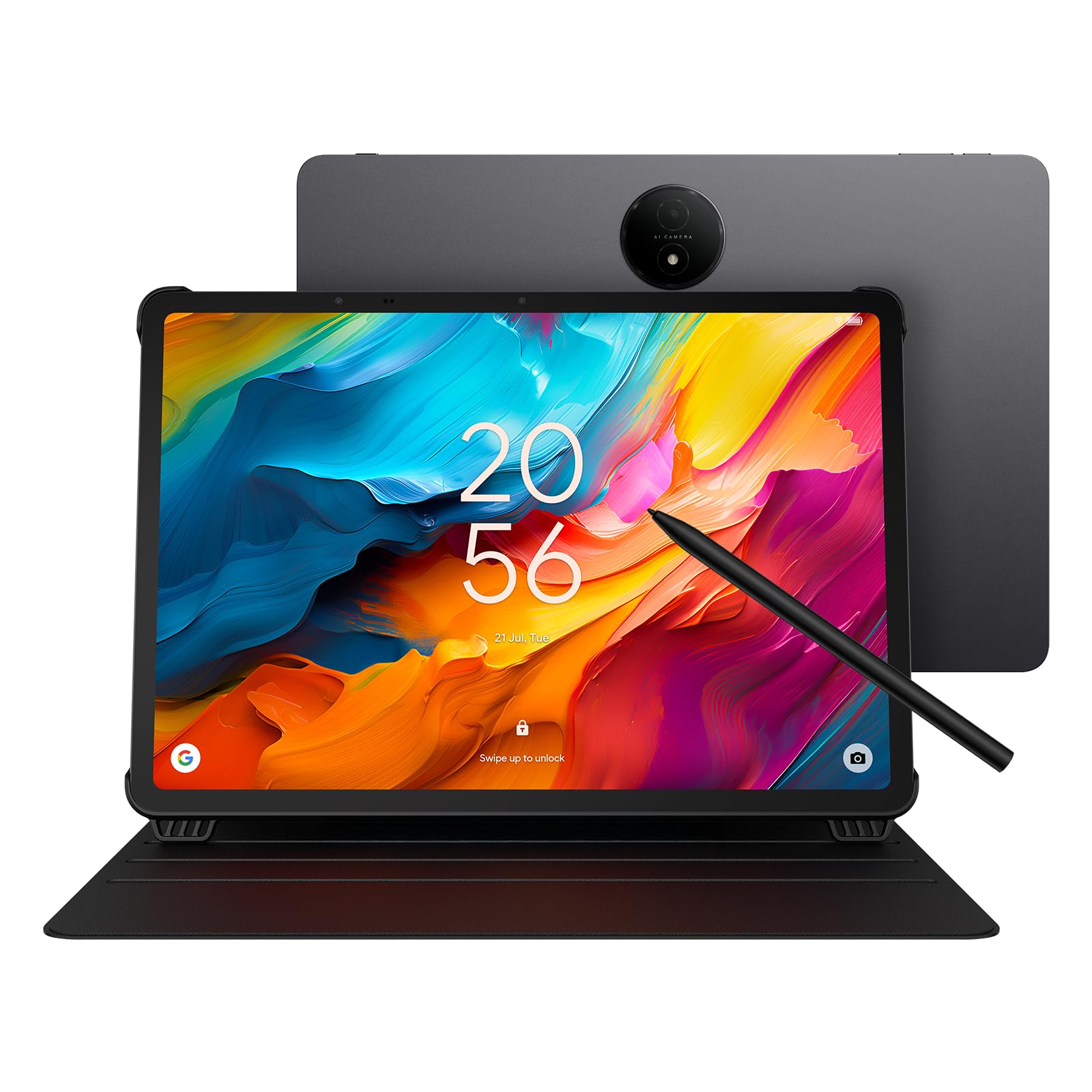
The TCL NXTPAPER 14 is a specialized tool that excels at one thing: extended reading without eye strain. The 14.3-inch NXTPAPER 3.0 display uses a proprietary surface texture that diffuses glare and filters blue light at the hardware level, creating a paper-like experience that’s vastly different from standard glossy LCDs. The three display modes — Standard for everyday tasks, Color Paper for comics and digital art, and Ink Paper for pure reading — let you switch based on your activity. The screen is matte and reflective, unlike the glass tablet norm.
The 4096-level T-PEN stylus is included along with an adjustable flip case, and the 10,000mAh battery with 33W fast charging provides 8-10 hours of continuous reading or note-taking. Musicians will appreciate the 14.3-inch screen for displaying sheet music — users report excellent compatibility with MobileSheets and foot pedal controllers. The dual front cameras (13MP and 5MP) handle video calls adequately, and the quad stereo speakers with Smart PA deliver room-filling sound.
The MediaTek Helio G99 processor is adequate for reading, sheet music, and note-taking but will struggle with heavy multitasking or modern 3D games. There is no microSD card slot — the 256GB of built-in storage is your only option. The included charger is a point of friction: no wall plug is provided, only a USB-C cable. The boot loop issue when charging while powered off has been reported by some users. This tablet is a niche choice for readers and musicians who prioritize eye comfort above all else.
Why it’s great
- NXTPAPER 3.0 display dramatically reduces eye strain during long reading sessions
- 14.3-inch screen is ideal for sheet music and digital textbooks
- Three display modes adapt to different content types
Good to know
- Processor is underpowered for gaming or heavy multitasking
- No microSD expansion and no included wall charger
9. reMarkable Paper Pro Bundle

The reMarkable Paper Pro is not a general-purpose tablet — it’s a dedicated digital notebook and document reader that deliberately strips away notifications, apps, and web browsers to create a focused writing environment. The 11.8-inch Canvas Color display uses ePaper technology that reflects natural light, eliminating backlight glare entirely and providing a reading experience indistinguishable from physical paper. The adjustable reading light allows use in dark environments without the eye strain of traditional LCD or OLED displays.
The Marker Plus with built-in eraser provides the most authentic paper-like writing feel of any device on this list, with realistic friction and sound feedback. The ability to write, sketch, and highlight in color for the first time on a reMarkable device is a genuine differentiator for note organization and document annotation. The 64GB of internal storage holds thousands of PDFs and notebooks, and the battery lasts up to two weeks on a single charge. The Book Folio in Mosaic Weave provides premium protection and doubles as a stand.
The limitations are severe for anyone wanting a multi-purpose device. The reMarkable cannot run third-party apps, browse the web, watch videos, or read standard e-book formats without conversion. At this price point — and with reported customer service issues around defective units and lengthy exchange processes — it requires a very specific use case to justify. For writers, lawyers, students, and professionals who want a distraction-free digital notebook with zero notifications, it’s unmatched. For anyone else, the iPad or Samsung Galaxy Tab offers far more versatility.
Why it’s great
- Paper-like writing feel with color support is unmatched by any LCD tablet
- Two-week battery life eliminates charging anxiety
- Zero notification distraction creates a focused workflow
Good to know
- Cannot run apps, browse web, or play media — single-purpose device only
- High price point and reported customer service issues are concerns
FAQ
What processor do I need in an adult tablet for heavy multitasking?
Is a matte or paper-like screen worth it for an adult tablet?
How much storage do I need for documents, notes, and apps?
Can I use an adult tablet as a laptop replacement?
Final Thoughts: The Verdict
For most users, the adult tablet winner is the Lenovo Idea Tab Pro because it delivers a 12.7-inch 3K 90Hz display, Dimensity 8300 performance, and an included stylus at a price that undercuts premium flagships while outperforming budget alternatives. If you want the best display and waterproofing, grab the Samsung Galaxy Tab S11. And for distraction-free note-taking and reading, nothing beats the reMarkable Paper Pro.