
Building a PC on a strict budget often means squeezing every last drop of value from each component, and the case is where the smart compromises live. A well-designed affordable chassis gives you the airflow, clearance, and builder-friendly features you need without demanding a premium for flashy branding or exotic materials. The right mid-tower at this tier keeps your GPU cool, your cables tidy, and your build quality well above the ‘shoebox’ standard.
I’m Min — the co-founder and writer behind Gadgets Feed. I’ve spent hundreds of hours combing through technical specifications, user benchmarks, and real-world build reports to isolate the exact seven chassis that deliver exceptional build quality and thermal performance without breaking your budget.
Whether you are assembling your first gaming rig or upgrading an existing workstation, this guide cuts through the noise to find the very best affordable computer cases that actually breathe, fit modern GPUs, and make your first build or rebuild a genuinely smooth experience.
How To Choose The Best Affordable Computer Case
An affordable case shouldn’t mean sacrificing airflow or structural stability. The chassis is the foundation of your entire build — picking one with the right layout and clearance prevents headaches from the first motherboard drop to the final cable tie-down.
Airflow Front Panel Design
Closed glass or solid metal front panels strangle budget builds that often lack premium high-static-pressure fans. A perforated mesh front with a large intake area is the single most important feature for keeping components cool in this price bracket. Look for cases with a wide mesh pattern and a removable dust filter that you can clean without dismantling the whole front fascia.
GPU and Cooler Clearance
Modern graphics cards are physically enormous, and many budget cases claim compatibility but leave no room for front radiator clearance or thick GPU backplates. Check for a stated GPU length limit of at least 320mm and a CPU cooler height of 160mm or higher. These two numbers determine whether your chosen parts will actually fit without forcing you into a smaller, hotter build.
Quick Comparison
On smaller screens, swipe sideways to see the full table.
| Model | Category | Best For | Key Spec | Amazon |
|---|---|---|---|---|
| Montech AIR 903 MAX | Premium Mid-Tower | Best Airflow Value | 4x 140mm Fans Pre-Installed | Amazon |
| Thermaltake View 270 Plus | Premium Mid-Tower | Dual Glass Showcase | Full-View Pillarless Design | Amazon |
| Montech XR-B | Premium Mid-Tower | Stylish Wood-Grain I/O | 3x PWM Fans & Reverse Blades | Amazon |
| FOIFKIN F300 | Mid-Range Mid-Tower | Panoramic Glass View | 270° Tempered Glass Panel | Amazon |
| GAMDIAS TALOS E3 MESH | Mid-Range Mid-Tower | White Aesthetic Build | 3x 120mm ARGB Fans Included | Amazon |
| DARKROCK EC2 | Value Mid-Tower | Type-C Ready Budget Pick | Front USB-C Port | Amazon |
| Thermaltake Versa H21 | Budget Mid-Tower | Optical Drive & NAS Builds | 3x 5.25″ External Bays | Amazon |
In‑Depth Reviews
1. Montech AIR 903 MAX, E-ATX Mid Tower Case

The Montech AIR 903 MAX sets a new bar for budget airflow by including three 140mm ARGB PWM fans and a fourth 140mm PWM exhaust fan right out of the box. That 51% ventilation mesh front panel keeps your GPU and CPU cool even under sustained gaming loads, and the integrated fan hub simplifies cable routing significantly.
Clearance is generous for the price — you get support for 400mm GPUs, coolers up to 180mm tall, and a 240mm PSU length that lets you use high-wattage units without obstruction. The tempered glass side panel and magnetic dust filters at the top and bottom complete a package that feels several tiers above its price bracket.
Some users report the included exhaust fan can exhibit coil whine at higher RPMs, but the stock curve is quiet enough for most builds. The case also runs large if you don’t populate the front radiator space, leaving about five inches of empty cavity behind the mesh panel. For pure thermal performance and included fan count, this is the top contender.
Why it’s great
- Four high-quality 140mm fans included — exceptional value
- Massive GPU clearance up to 400mm
- Tool-less HDD cage and PSU basement
Good to know
- Stock exhaust fan can have coil whine
- I/O ports are on the left side, not top-front
- Extra front cavity space if no front radiator used
2. Thermaltake View 270 Plus TG ARGB Black Mid Tower
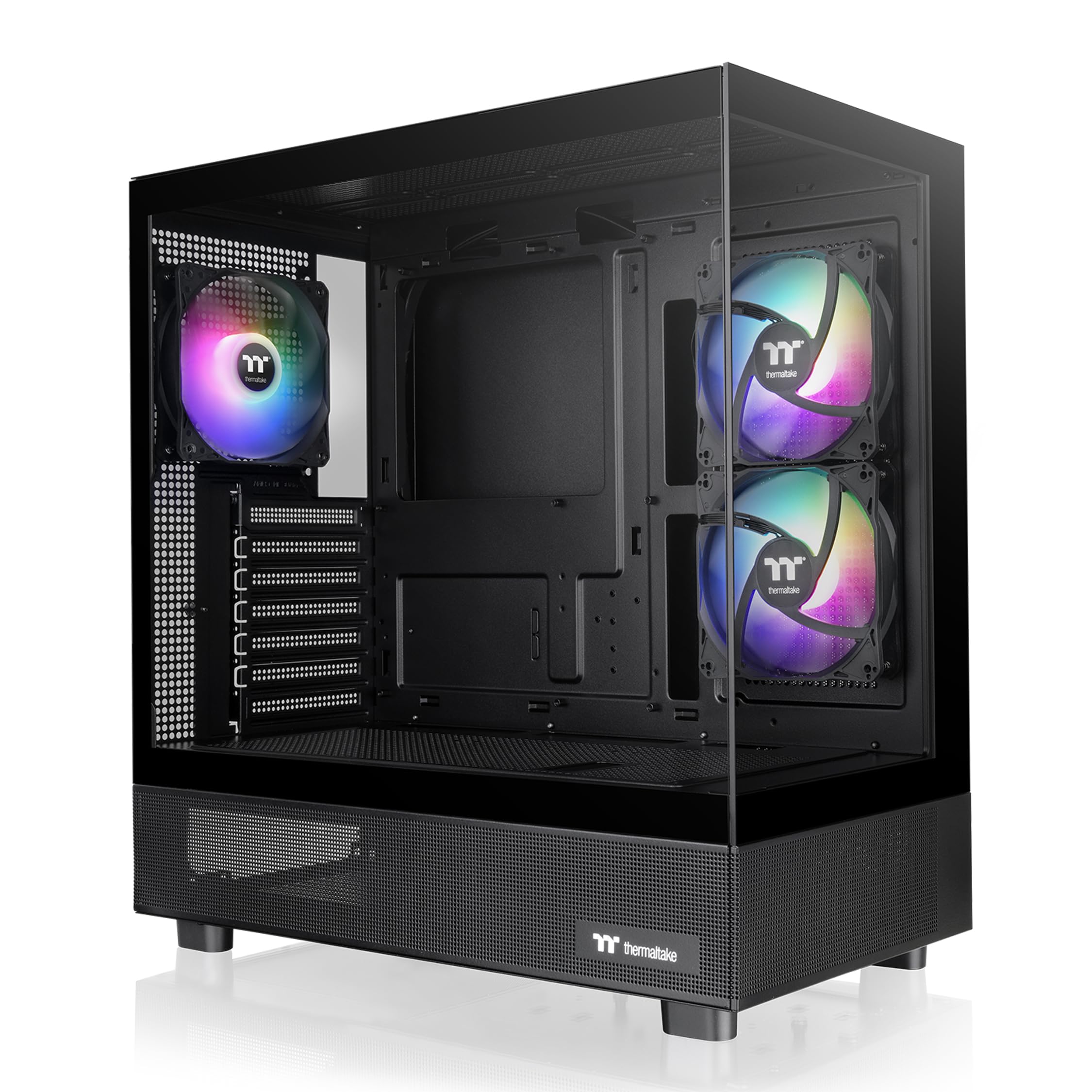
Thermaltake’s View 270 Plus delivers a full-view pillarless dual tempered glass design usually reserved for premium flagships, making it a standout aesthetic choice in the affordable bracket. Three pre-installed 120mm ARGB fans provide good out-of-box airflow, though the real star is the unobstructed view of your components that the glass architecture allows.
This chassis supports up to E-ATX motherboards, a 360mm radiator at the top, and GPUs up to a staggering 420mm — meaning even the chunkiest RTX 40-series cards will slide in without clearance worries. The I/O bay includes a USB 3.2 Gen 2 Type-C port and two USB 3.0 ports, future-proofing your front panel connectivity for modern motherboards.
The only real compromises are the break-out PCIe slot covers instead of screw-down ones, and the HDD mounting could support two 3.5-inch drives with a proper tray. Cable management is intuitive thanks to the spacious interior, and the included dust screens keep the glass panels clean. If you want a showpiece without a showpiece budget, this is the pick.
Why it’s great
- Unique pillarless dual glass design
- 420mm GPU clearance — fits any consumer card
- Excellent cable management channels
Good to know
- Cheap break-out PCIe slot covers
- HDD mounting could be better
- Glass is a fingerprint magnet
3. Montech XR-B ATX Mid-Tower PC Gaming Case

Montech continues its value crusade with the XR-B, a dual-tempered-glass mid-tower that includes three ARGB PWM fans — two of which are reverse-blade units mounted on the side for clean intake airflow without visible fan hub cables. The wood-grain I/O interface adds a warm natural touch to an otherwise all-black chassis, offering a subtle premium vibe that stands out from the crowd.
Internally, the case supports 360mm radiators at the top, GPUs up to 40-series size, and standard ATX PSUs with a dedicated shroud. The included fan hub simplifies lighting and speed control, and the magnetic dust filters cover the top, bottom, and side panels to keep dust accumulation minimal. Build quality feels solid for the price, with no sharp edges or flimsy panels.
Some users reported the side glass panel arrived with minor scratches, and the push-in glass retention can feel tight. The 14.5-pound weight hints at sturdier steel than ultra-budget options, yet it stays easy to move during assembly. For a feature-rich build with great looks and solid cooling, the XR-B is a fantastic mid-range option.
Why it’s great
- Unique wood-grain I/O design aesthetic
- Three ARGB PWM fans with two reverse blades
- Top-tier dust filter coverage
Good to know
- Glass panel can arrive with scratches
- Side panel fit is quite tight
- Limited 3.5-inch drive support
4. FOIFKIN F300 (2025) PC Case
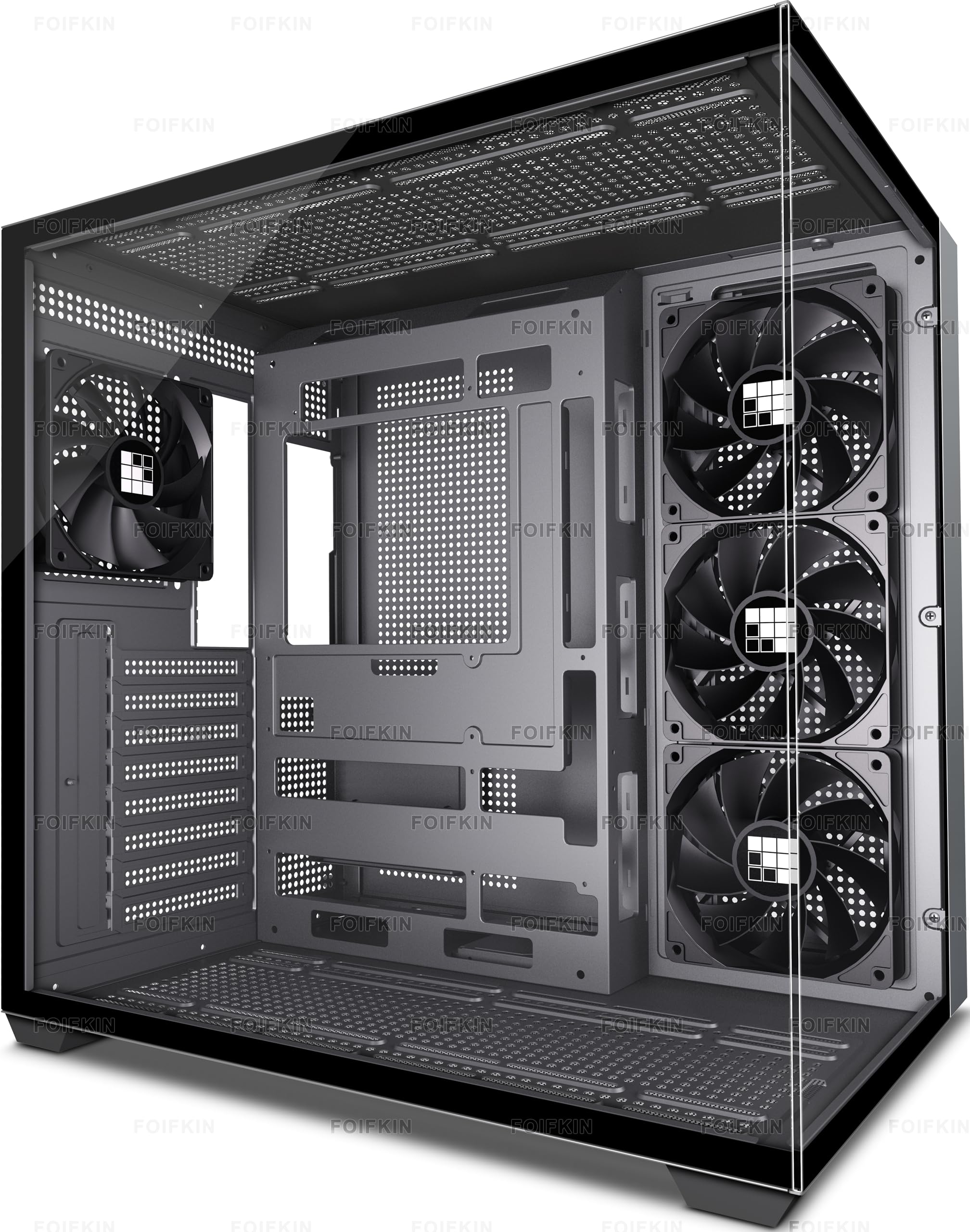
The FOIFKIN F300 leverages a 270° panoramic tempered glass design that wraps around the front and side, giving you a fish-tank-style view of your components without a premium fish-tank price. It comes with four pre-installed non-LED fans, providing strong baseline airflow, and the tool-less glass panels make cleaning or swapping parts a breeze.
Capacity is generous — you get 400mm of GPU clearance, 170mm for CPU coolers, and support for 360mm radiators at the top and front (up to three 360mm units). The I/O panel includes a Type-C 3.0 port alongside USB 3.0 and USB 2.0 ports, which is excellent for the price. The dual-cabin layout also helps separate the PSU cavity from the main chamber for cleaner aesthetics.
Build quality is decent but not premium — the metal panels are thin, and the included fan connector is non-standard, which may cause issues connecting to older motherboard headers. The bottom fan location can also obstruct some motherboard headers if not planned carefully. For the panoramic glass and clearance, though, the F300 delivers impressive value.
Why it’s great
- Showcase-level 270° glass design
- Excellent 400mm GPU and 170mm cooler clearance
- Type-C 3.0 front port included
Good to know
- Thin metal panels feel less rigid
- Non-standard fan connector may limit upgrades
- Bottom fans can block motherboard headers
5. GAMDIAS TALOS E3 MESH WH White RGB Gaming Case

For builders seeking a clean white-themed rig, the GAMDIAS TALOS E3 MESH WH offers a compact mid-tower with three pre-installed 120mm ARGB fans and an elegant PSU shroud that hides cable clutter. The mesh front panel promotes good airflow, and the built-in fan hub includes an ARGB output that syncs with most modern motherboards for unified lighting control.
GPU clearance is capped at 300mm, which fits most dual-fan cards but may struggle with triple-fan flagships — measure before you buy. The case supports standard ATX PSUs and multiple 3.5-inch and 2.5-inch drives, making it versatile for both gaming and storage builds. The side panel is real tempered glass with a slight tint that darkens the interior slightly.
Build quality is solid for the price, though the PCIe slot covers are break-off type and cannot be reused. The included fan hub uses 3-pin connectors, so you lose PWM control over the fans — they run at a fixed speed or via voltage control. For a white budget build with great RGB out of the box, this case is a strong contender.
Why it’s great
- Clean white aesthetic with ARGB lighting
- Integrated fan hub for easy cable management
- Good mesh airflow design
Good to know
- Only 300mm GPU clearance — tight for large cards
- Break-off PCIe slot covers are non-reusable
- Fan speed control limited to voltage, not PWM
6. DARKROCK EC2 Black ATX Mid Tower PC Case

The DARKROCK EC2 is a budget-friendly mid-tower that punches above its weight by including a front USB-C port and a tempered glass side panel at a price where most cases only offer acrylic windows. The mesh front panel and magnetic top dust filter keep dust out while allowing good airflow, and the case supports up to eight 120mm fans for those who want maximum cooling.
GPU clearance is 340mm, which fits most modern cards comfortably, and the PSU shroud provides a clean look with a dedicated HDD bay underneath. The hinged glass panel is a nice touch at this price, making interior access tool-less. Cable management is workable with ample tie-down points, though the metal is thin and can flex under pressure.
Some users noted the steel bends easily during transport, and the fan mounting slots (not full circles) make it harder to install rubber isolation grommets. The top fan fitment can also conflict with the CPU power connector on some motherboards. For a Type-C-ready chassis with excellent fan capacity, the EC2 is a smart value play.
Why it’s great
- Front USB-C port on a budget case
- Supports up to eight 120mm fans
- Hinged tempered glass side panel
Good to know
- Thin steel can flex and bend
- Top fan clearance tight near CPU power plug
- Fan mounting slots not ideal for rubber isolators
7. Thermaltake Versa H21 SPCC ATX Mid Tower

The Thermaltake Versa H21 is a no-frills mid-tower built for users who still rely on optical drives or need a high-density storage hub without paying a premium. It features three external 5.25-inch bays and six internal drive slots — a rarity in modern affordable cases — making it ideal for media server or NAS-style builds alongside a standard ATX motherboard.
Airflow is handled by a perforated mesh front and top panel with a single pre-installed 120mm rear exhaust fan. The case supports tall CPU coolers and full ATX PSUs, though there is no PSU basement or cable management shroud — cables will be visible through the solid side panel. The steel construction is thin but free of sharp edges, and tool-less drive installation speeds up the build process.
The biggest downsides are the lack of front fan mounts, non-removable front dust filter, and the absence of USB 3.2 or Type-C ports — you get one USB 3.0 and one USB 2.0 port. It also lacks a transparent side window, which some builders may prefer for a stealth look. For optical-drive-dependent builds or high-capacity storage rigs, nothing beats the Versa H21 at this price.
Why it’s great
- Three 5.25-inch optical drive bays
- Six internal 3.5-inch drive slots for storage
- Tool-less drive and expansion installation
Good to know
- No front fan mounts included
- Non-removable front dust filter
- Only rear exhaust fan included
FAQ
What is the minimum GPU clearance I should look for in an affordable computer case?
Do I need a PSU shroud for cable management?
Can I fit a 360mm radiator in a budget mid-tower case?
How important is the front mesh panel for airflow?
Final Thoughts: The Verdict
For most users, picking the best affordable computer cases comes down to the Montech AIR 903 MAX because it delivers four superior 140mm fans, excellent mesh airflow, and generous clearance at a price that beats nearly every competitor. If you want a showpiece design with a pillarless glass panel, grab the Thermaltake View 270 Plus. And for a budget build needing optical drives or massive storage capacity, nothing beats the Thermaltake Versa H21.