
The best AI smart pen bridges a gap that has frustrated note-takers, students, and professionals for years — the chasm between the feel of real ink on paper and the searchable convenience of digital text. A scanner, a translator, a dictation tool, and a search engine all packed into the shape of a writing instrument, the category has matured beyond simple digitization into something genuinely intelligent.
I’m Min — the co-founder and writer behind Gadgets Feed. My research process for this guide involved cross-referencing optical character recognition accuracy rates, battery endurance in hours of continuous scanning or writing, and the quality of AI-powered transcription across dozens of models to identify which units truly deliver on their promises.
By the end of this guide, you’ll understand exactly which AI-powered features matter most to your workflow and how to select the best ai smart pen for your specific needs without wasting money on flashy but underperforming hardware.
How To Choose The Best AI Smart Pen
Not every smart pen is built for the same job. A tool designed for professional meeting transcription uses different core technology than one optimized for a student with dyslexia scanning lines of text. Before you buy, understand these three critical decision points.
Digitization vs. OCR Translation vs. AI Assistant
The foundational question is what problem you are solving. Pure digitization pens like the Yuan Digital Sync Pen or the XNote Smart Notebook capture every stroke you write on paper and mirror it to an app. This is ideal for retaining the tactile writing experience while getting searchable digital copies. OCR translation pens like the NEWYES AI Pen or PenPower WorldPenScan Go use a camera at the tip to scan printed text and speak it aloud or translate it — perfect for language learners and readers with dyslexia. AI assistant devices like the iFLYTEK AINOTE Air 2 combine handwriting recognition with real-time voice-to-text transcription and meeting summarization, targeting the professional who needs a single device to capture both spoken and written information.
Battery Life and Offline Storage Reliability
A pen that dies an hour into a lecture or loses data when Bluetooth drops is worse than useless. Look for a minimum of 8 hours of active use for note-taking pens. The XNote claims 17 hours, and the Yuan offers 8 hours with a very long 110-day standby. For scanning pens, battery endurance is less commonly advertised but equally critical — the device must survive a full school day or business trip without needing a recharge. Offline storage capacity matters because you cannot always have a phone nearby. The Yuan stores what you write locally and syncs later, while the NEWYES AI Pen includes 16 GB of onboard storage for scanned texts and audio files.
Language Support and AI Feature Depth
How many languages does the pen actually handle, and what kind of AI is on board? Entry-level devices often advertise dozens of languages but deliver inconsistent OCR accuracy for less common scripts. The PenPower WorldPenScan Go supports 57 languages with Wi-Fi, while the iFLYTEK AINOTE Air 2 transcribes in 17 languages and converts handwritten text in 83 languages. For true AI features, look past the marketing. Does the device offer real-time AI chat or homework checking like the NEWYES? Does it generate meeting summaries and auto-tag notes like the XNote? These features separate a genuinely intelligent tool from a simple digital highlighter.
Quick Comparison
On smaller screens, swipe sideways to see the full table.
| Model | Category | Best For | Key Spec | Amazon |
|---|---|---|---|---|
| Amazon Kindle Scribe (32GB) | e-Ink Tablet | Reading & note-taking hybrid | 10.2″ 300 ppi glare-free display | Amazon |
| iFLYTEK AINOTE Air 2 Bundle | E-Ink Tablet | Meeting transcription & summaries | 17-language real-time voice transcription | Amazon |
| XNote Smart Pen & Notebook | Digital Notebook | AI‑powered note organization | 17‑hour battery, AI summarization | Amazon |
| Scanmarker Pro | Reader Pen | Dyslexia support & translation | 100+ language online translation | Amazon |
| PenPower WorldPenScan Go | Reader Pen | Multilingual document scanning | 57 languages with Wi‑Fi connection | Amazon |
| NEWYES AI Pen (Blue) | Reader Pen | AI homework help & dyslexia | 16 GB storage, AI Chat, 112 languages | Amazon |
| Ophayapen Smart Sync Pen | Digital Notebook | Real‑time sync & audio recording | OCR to Word, audio synced to notes | Amazon |
| Yuan Digital Sync Pen with Notebook | Digital Notebook | Entry‑level writing digitization | 8‑hour battery, 360‑degree writing | Amazon |
| Samsung Galaxy S23 Ultra 5G (Renewed) | Smartphone | Built‑in S Pen & camera AI | 200 MP camera, Snapdragon 8 Gen 2 | Amazon |
In‑Depth Reviews
1. Amazon Kindle Scribe (32GB)

The Kindle Scribe represents a fundamentally different approach to the smart pen category — it is not a pen that talks to a separate notebook but a 10.2-inch e-Ink tablet with an integrated Premium Pen that writes directly on the screen. The 300 ppi glare-free display looks sharp in direct sunlight and the writing feel genuinely mimics pen on paper, with audible feedback through the stroke sound. Built-in AI notebook summarization converts messy handwriting into readable font and can even change the tone or length of your notes, making this a serious productivity device beyond simple digitization.
Active Canvas technology lets you write directly on book pages while reading, then collapse your notes to see the original text beneath — a feature no other device in this roundup replicates. Battery life is measured in weeks for reading and days for active writing, eliminating the cable anxiety that plagues lesser pens. The Premium Pen itself requires no pairing or charging; pick it up and write. Importing PDFs and documents through Send to Kindle and marking them up directly on the page makes it a powerhouse for professionals who review contracts or academic papers.
The trade-off is the locked ecosystem. You are buying into Amazon’s world, and note syncing is limited compared to open Android alternatives. The pen tips wear faster than some competitors, and the 433-gram weight makes one-handed reading a stretch for extended sessions. For users who want a single device that replaces physical notebooks, textbooks, and a library of printed documents while including intelligent AI note tools, the Scribe is the most polished execution available.
Why it’s great
- Weeks-long battery life eliminates charging anxiety entirely
- Active Canvas lets you write on books without losing page space
- AI notebook tools convert, summarize, and restyle handwritten notes
Good to know
- Closed ecosystem with limited note syncing outside Kindle
- Heavy for one-handed reading at over 430 grams
- Pen tips wear out faster than expected with regular use
2. iFLYTEK AINOTE Air 2 Bundle

The iFLYTEK AINOTE Air 2 is the most feature-dense digital notebook in this lineup if your workflow involves meetings. The 8.2-inch E Ink screen with 4,096 pressure levels delivers a paper-like handwriting feel that rivals the Scribe, but the real differentiator is the real-time voice-to-text transcription engine that supports 17 languages. You can sit in a bilingual meeting, take handwritten notes, and the device simultaneously transcribes spoken words and syncs them with your written annotations. After the meeting, the AI generates a summary and extracts action items based on symbols you draw — circling a star creates a to-do, drawing a triangle marks an attention item.
The unit is remarkably thin at roughly 5 mm and lightweight, making it genuinely portable in a way that the larger Scribe is not. Handwritten text conversion extends to 83 languages, which is exceptional for international users. The dual-color front light with 24 brightness levels ensures comfortable reading in near darkness without eye strain. Battery life is quoted at 5 weeks on standby and several days of heavy use, which is competitive for a device this slim.
The catch is the software lock-in. The device is not a full Android tablet and does not support Google Play Protect certification out of the box, which blocks access to Gmail, Drive, and the Play Store without workarounds. Some users report firmware instability that breaks these features after updates. The screen also looks slightly washed out compared to the Kindle Scribe’s higher-contrast panel. For professionals who prioritize bilingual meeting transcription and AI summarization above all else, this device is unmatched.
Why it’s great
- Real-time voice transcription in 17 languages with meeting summaries
- Symbol-based gesture note-taking creates to-dos automatically
- Ultra-slim 5 mm design with exceptional portability
Good to know
- Not a full Android tablet; limited app ecosystem and Google services
- Screen contrast feels lower than competing e-Ink devices
- Software updates can break core feature compatibility
3. XNote Smart Pen & Notebook Starter Set
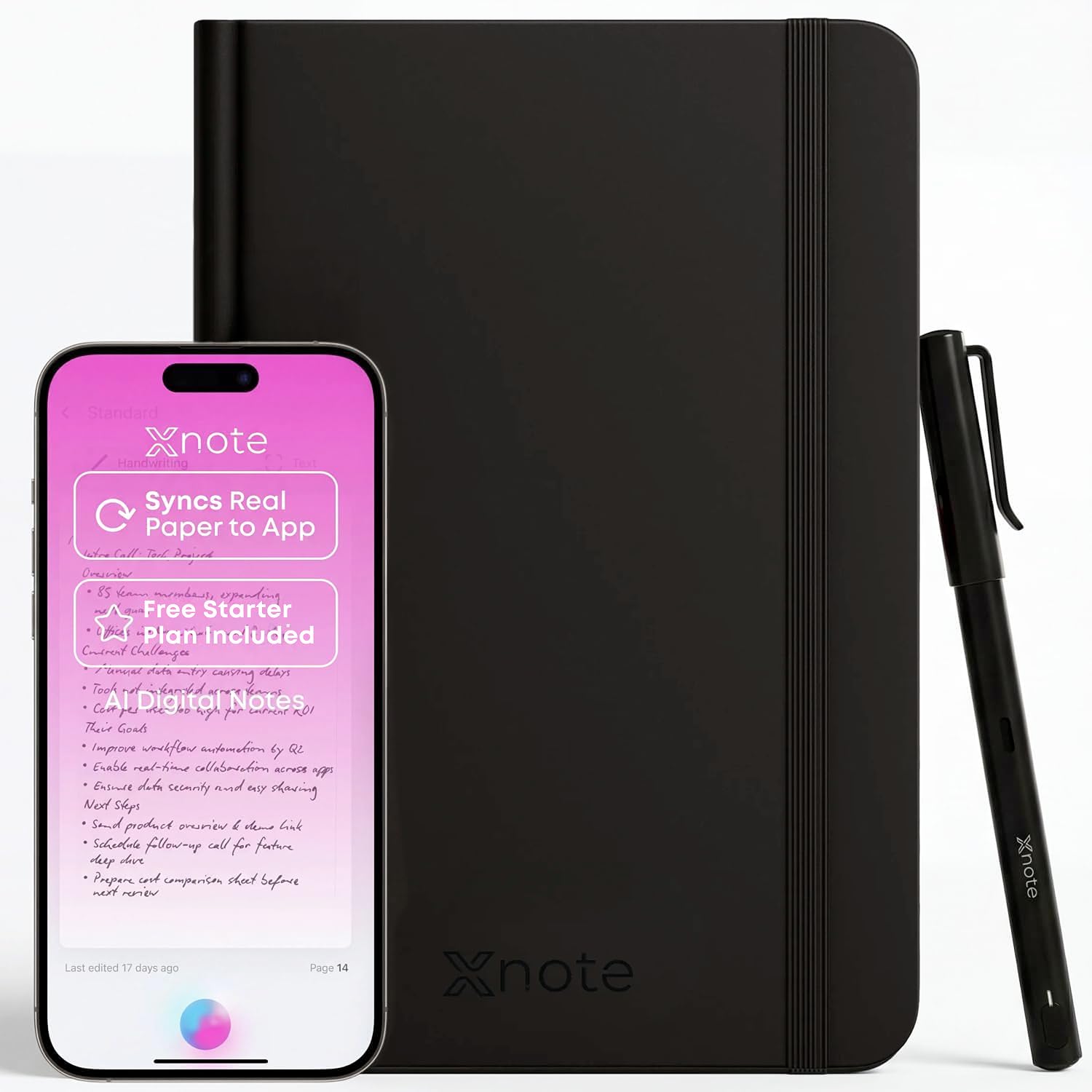
The XNote Smart Pen solves the most frustrating problem of paper-to-digital workflows: it digitizes your handwriting while you write, not after you finish. Using Bluetooth 4.2, every stroke on the proprietary notebook syncs to the XNote app in real time. The AI layer is genuinely useful — it can summarize a lecture from your handwritten notes, auto-tag content by topic, enable keyword search across all your notebooks, and translate your notes into over 100 languages. This turns a stack of paper notebooks into a fully searchable, AI-organized database without requiring you to type a single word.
The 17-hour battery life is the best in the pure digitization subcategory. You can write through a full day of back-to-back meetings or an intensive study session and still have charge left for the next day. The 90-minute full recharge is fast enough to top up during a lunch break. Offline storage means the pen keeps recording even when the app is closed, automatically syncing everything when reconnected. The Starter Plan includes 150 audio transcription minutes and one automation workflow for organizing notes.
The major downside is the proprietary notebook requirement — you must keep buying XNote’s special paper to maintain functionality, which creates an ongoing cost. Some users report initial pairing lag, and the app must remain open on your phone for real-time sync to work. The pen itself does not have a built-in microphone for audio recording; that function is handled entirely by the companion app. For students and professionals who prefer real pen-on-paper writing but want AI-powered organization, this is the best balance.
Why it’s great
- 17-hour battery endurance outlasts any full day of writing
- AI summarization, keyword search, and translation of handwritten notes
- Offline storage catches notes even when the app is not running
Good to know
- Requires ongoing purchases of proprietary XNote notebooks
- App must remain active on phone for real-time Bluetooth sync
- Pen lacks a built-in microphone; audio recording is app-only
4. PenPower WorldPenScan Go

The PenPower WorldPenScan Go is the lightest dedicated reading pen in this guide at just 77 grams, making it easy to carry in a pocket or hang from a lanyard. Its primary strength is multilingual text scanning — it uses Wi-Fi to connect to ScanNote software and can recognize, define, and speak text aloud in 57 languages. The AI-based text recognition is fast and accurate, converting scanned printed text into spoken audio without needing a phone or tablet as an intermediary. The built-in dictionary and thesaurus provide instant definitions and example sentences, which is valuable for language learners and anyone with dyslexia or sight impairment.
The AI Reading Buddy feature in ScanNote is a thoughtful addition for younger users — it simplifies paragraphs, summarizes key ideas, and adds curiosity-sparking fun facts based on what the child scans. The 1-year warranty provides better coverage than many competitors at this price tier. The Wi-Fi connectivity to PCs and laptops allows you to send scanned text and audio recordings directly to classroom Chromebooks or office machines without plugging in a cable.
Some users report that the device is locked to one device for text-to-speech functionality, nullifying the TTS value if you swap between devices frequently. The bundled software documentation is sparse, and users who want word definitions rather than translations may struggle to configure it correctly. The lack of on-device screen feedback for definitions means you need to rely on the ScanNote interface. For multilingual document scanning with audio output, this remains a top-tier choice.
Why it’s great
- Extremely lightweight at 77 grams for all-day portable scanning
- AI Reading Buddy simplifies text for younger or dyslexic readers
- Wi-Fi connection to PC enables direct document text transfer
Good to know
- TTS function can be limited to a single paired device
- Device struggles to show word definitions instead of translations
- Sparse documentation makes initial setup frustrating for some users
5. Scanmarker Pro

The Scanmarker Pro positions itself as an all-in-one reading and translation pen with a clear focus on accessibility. It scans printed text and reads it aloud while highlighting words on the screen, making it particularly effective for users with dyslexia who need multisensory reinforcement. The offline mode supports English, Spanish, French, German, and Italian, which is a meaningful advantage for travelers or students who do not always have reliable internet access. Online translation extends to over 100 languages, covering virtually any printed material a user might encounter.
The built-in English dictionary and word translator help users of all ages improve vocabulary and reading comprehension. Smart note-taking and recording features allow you to capture memos directly on the device, though this is a secondary function — the core strength remains reading assistance. The compact design is user-friendly and fits in a pocket, and the ability to connect earbuds for private audio playback makes it classroom- and library-friendly.
The main complaint from reviewers is the interface speed — navigation can feel sluggish compared to competitors like the NEWYES or PenPower. Some users found word pronunciation accuracy inconsistent, and the interface learning curve is steeper than expected for a device marketed as simple. For students with dyslexia who need offline access to five core languages and a strong text-to-speech engine, the Scanmarker Pro delivers reliable performance if you can tolerate the slower menu response.
Why it’s great
- Offline translation support for 5 major languages without internet
- Word highlighting while reading aloud aids dyslexic learners
- Compact build with earbud compatibility for private use
Good to know
- Interface navigation feels slow compared to newer competitors
- Pronunciation accuracy is inconsistent across all languages supported
- On-device note-taking is basic and limited in functionality
6. NEWYES AI Pen (Blue)
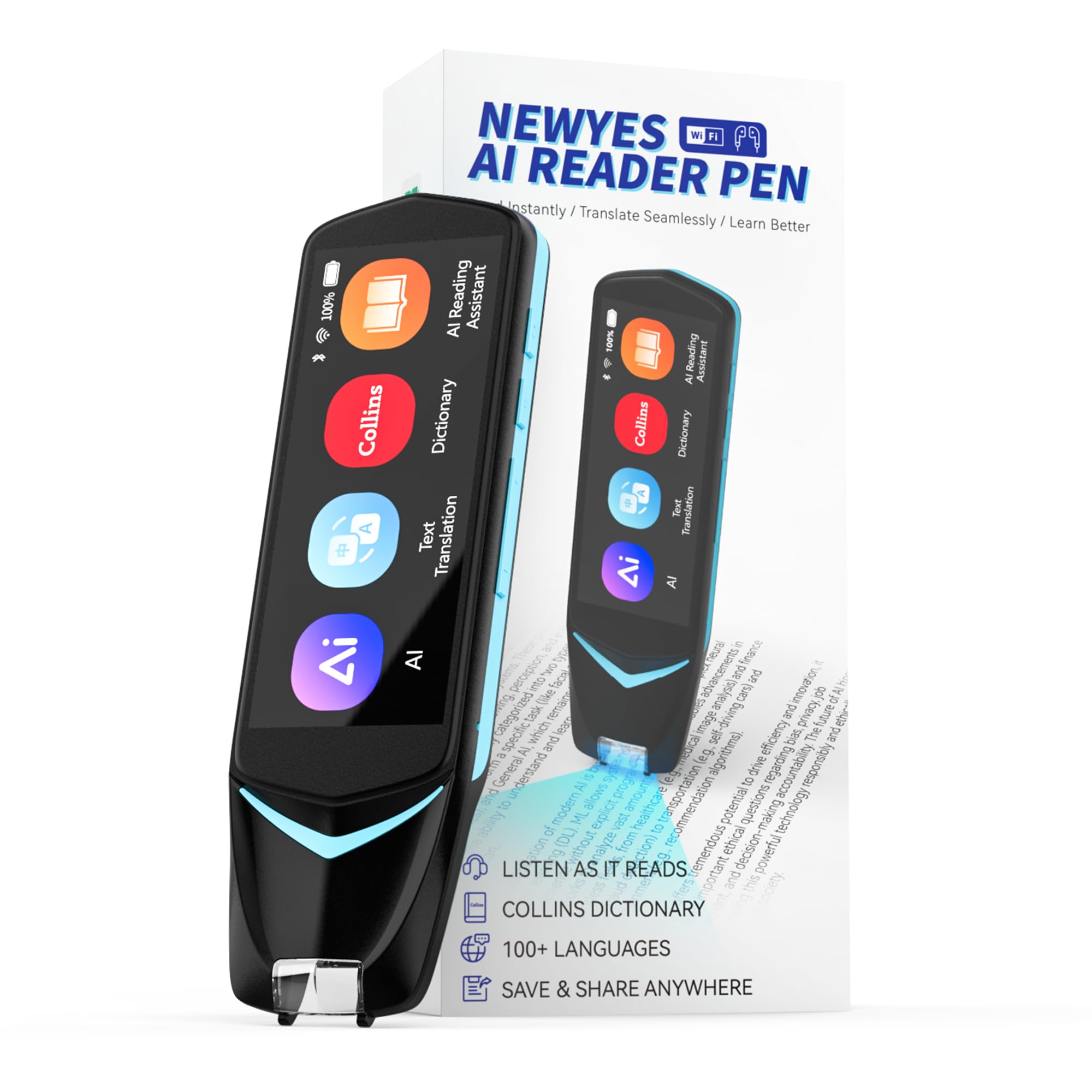
The NEWYES AI Pen packs the most raw AI features into a single scanning device in this comparison. Beyond simple text scanning and translation, it includes an AI Dictionary, an AI Homework Checker that analyzes scanned problems, and a real-time AI Chat function for study assistance. The 5-megapixel built-in camera allows photo-based translation of signs, menus, and documents, covering both scanning and visual input. The dyslexia-friendly design includes adjustable reading speed, pause time, and British or American accent options, with a special font design that reduces reading stress for struggling readers.
The 16 GB of internal storage is generous for a pen of this form factor, allowing you to store thousands of scanned pages and audio files without worrying about running out of space. Data can be exported as txt, doc, or pdf files via Bluetooth to a phone, tablet, or computer without requiring additional software. The six reading levels from pre-reader (Level 1) to advanced reader (Level 6) make it adaptable for a wide age range, from young children learning to read to adults studying a new language.
Reviewers note that the OCR accuracy on non-English scripts, particularly complex character-based languages like Japanese, can be unreliable — scanned sentences frequently came back garbled, leading to incorrect translations. The AI Chat and Homework Checker features are still less polished than dedicated study apps. The pen is heavier than pure reader pens like the PenPower at around 10 ounces. For parents looking for a dyslexia-friendly reading tool that also offers homework assistance, the NEWYES provides the broadest feature set at a mid-range price.
Why it’s great
- AI Homework Checker and real-time AI Chat for active study support
- 16 GB onboard storage for large document libraries
- Six adjustable reading levels suitable for children through adults
Good to know
- OCR accuracy on Asian character languages is inconsistent
- AI Chat and Homework Checker less refined than dedicated apps
- Heavier than pure scanning pens at approximately 10 ounces
7. Ophayapen Smart Sync Pen
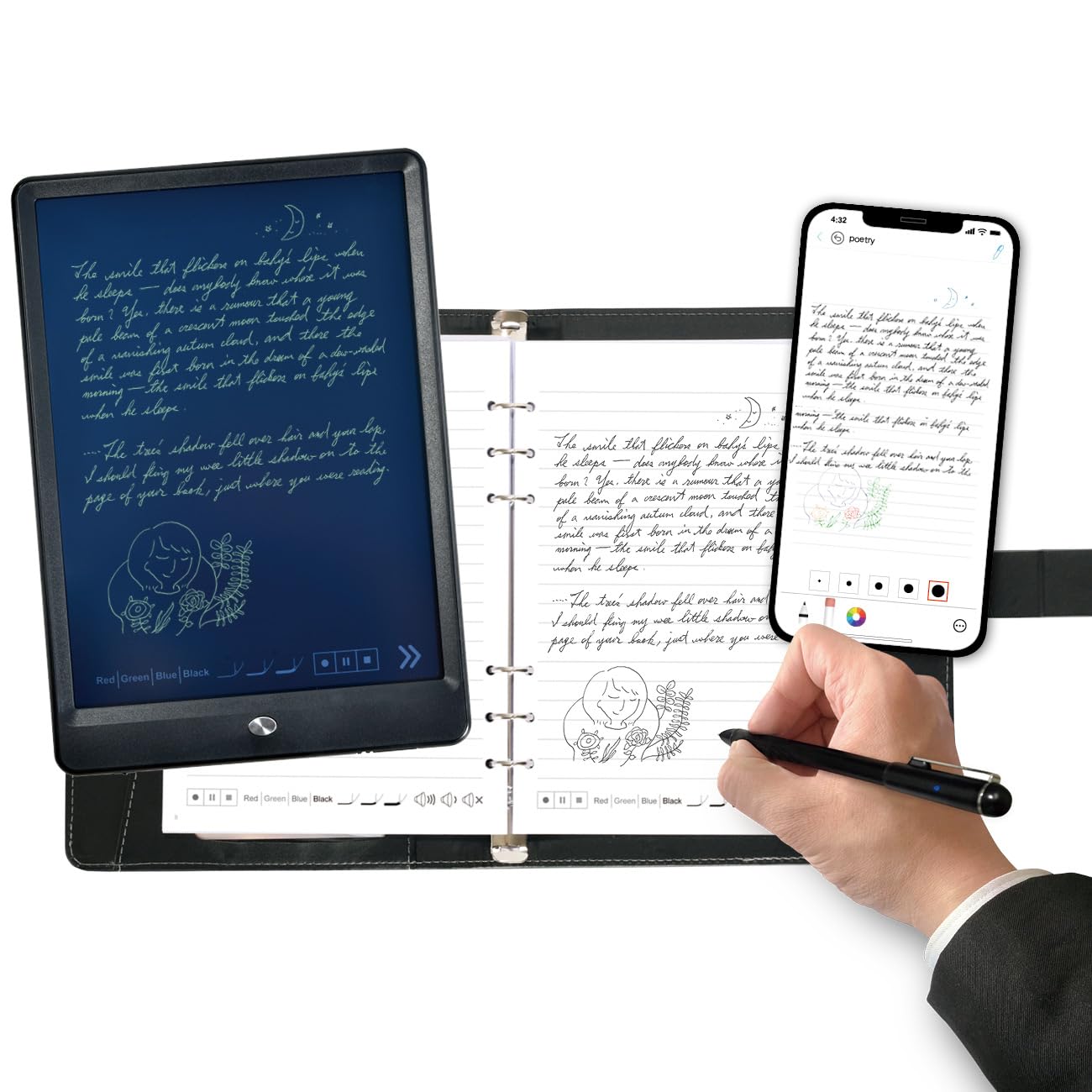
The Ophayapen Smart Sync Pen is a strong mid-range competitor that differentiates itself with simultaneous audio recording synced to your handwritten notes. As you write, the Ophayapen Pro+ app records audio through your phone and time-stamps it to your strokes — tapping on a specific note later plays back exactly what was being said at that moment. This is invaluable for students recording lectures or journalists conducting interviews. The OCR handwriting-to-text conversion is accurate out of the box, supporting searchable keyword and tag-based organization of handwritten notes.
The package includes a PU notebook with a magnetic cover, a separate writing board for sketching, four ballpoint refills, two plastic pen nibs, and a USB-C charging cable. The aluminum enclosure gives it a premium feel that belies its accessible price point. Support for multiple export formats — PDF, Word, PNG, GIF, and MP4 — provides flexibility for different workflows. Customizable pen thickness, colors, and eraser functionality within the app give a near-digital writing experience on real paper.
The app quality is the weak link. Navigation is confusing, there is no speed control for audio playback, and clicking a note does not reliably jump to the corresponding audio point. The audio recording runs through the phone microphone, which picks up surrounding notifications and conversations. Some users report no customer support available when issues arise. For buyers who primarily need accurate real-time handwriting digitization with backup audio sync and can tolerate a mediocre app experience, this represents good value.
Why it’s great
- Audio recording synced to handwritten notes for lecture playback
- Aluminum body provides a premium build at a mid-range price
- Supports multiple export formats including PDF, Word, and MP4
Good to know
- App interface is poorly designed with limited navigation controls
- Audio quality depends on phone mic, capturing ambient noise
- Customer support is reportedly difficult to reach when issues arise
8. Yuan Digital Sync Pen with Notebook

The Yuan Digital Sync Pen is the most budget-friendly pure digitization option in this guide, and it punches above its weight in fundamental performance. The 360-degree writing angle means you do not have to hold the pen at any specific orientation for it to capture your strokes — you can write naturally without adjustment. Real-time synchronization to the Yuan Smart Pen Business app on both Android and iOS is seamless, and the offline storage capability means a dead phone or lost Bluetooth connection will not cause data loss. Once reconnected, everything syncs automatically.
The 8-hour active battery life combined with a 110-day standby time is genuinely impressive for the price point, and the 1.5-hour fast charging means quick top-ups between classes or meetings. The starter kit is generous, including the smart pen, two notebooks, five ink refills, a charging cable, a bookmark, and even a pen refill tweezer tool. For a student or casual note-taker who wants to try the digital notebook concept without a heavy investment, this is the safest entry point.
The notebook paper quality is the main compromise — users report that the printed gray paper and low-contrast ink make it difficult to read what you wrote, especially in dim lighting. The bookmark-based color coding system adds unnecessary steps to your flow. The pen loop on the notebook cover is fragile and tears easily. Replacement notebooks cost around for 60 sheets, which adds up over time. For the price, the core digitization functions work reliably, but the consumable experience feels cheap.
Why it’s great
- Exceptional 110-day standby and 8-hour active battery for its price
- 360-degree writing angle allows completely natural pen grip
- Offline storage prevents data loss when connection drops
Good to know
- Notebook paper is gray with low-contrast ink, hard to read
- Pen loop on notebook cover is fragile and prone to tearing
- Color coding system via bookmark adds friction to note-taking flow
9. Samsung Galaxy S23 Ultra 5G (Renewed)

The Samsung Galaxy S23 Ultra occupies a unique position in this roundup — it is not a dedicated smart pen device but a flagship smartphone with a built-in S Pen that offers a compelling alternative for users who want AI-enhanced note-taking without carrying a separate gadget. The 6.8-inch Dynamic AMOLED 2X display with a 1–120 Hz adaptive refresh rate provides an incredibly responsive writing surface with virtually no visible latency. The 5,000 mAh battery delivers all-day endurance with 45W fast wired charging and 15W wireless charging, making it a productivity powerhouse that also happens to take notes.
The 200 MP camera system with 100x Space Zoom and 8K video recording means you can photograph whiteboards, documents, or printed text and let the phone’s AI instantly process and digitize the content. Samsung Notes integrates handwriting-to-text conversion, PDF markup, and cloud sync across Galaxy devices. The Snapdragon 8 Gen 2 for Galaxy processor paired with 12 GB RAM and UFS 4.0 storage ensures that even the most demanding AI transcription and translation tasks run without lag. The IP68 dust and water resistance rating gives peace of mind for daily carry.
The renewed pricing makes this a viable option compared to dedicated smart pens, but the S Pen experience is fundamentally different — you are writing on a glass screen, not paper, and the S Pen lacks the ergonomic girth of a full-size writing instrument. The device is heavy at roughly 234 grams with a case, and battery life under heavy camera and note-taking use is closer to 18 hours of talk time than the weeks offered by e-Ink alternatives. For users who want one device that handles everything including AI-powered note-taking, this is a compelling all-in-one.
Why it’s great
- Ultra-responsive 120 Hz AMOLED screen for near-zero pen latency
- 200 MP camera with AI can digitize whiteboards and documents instantly
- Replaces both a smartphone and a smart pen in one device
Good to know
- Glass screen writing feel does not match real paper feedback
- S Pen is slim and less ergonomic for extended writing sessions
- Heavy all-day device; battery depletes faster under heavy use
FAQ
Can I use an AI smart pen without an internet connection at all?
How accurate is handwriting-to-text conversion for cursive or messy writing?
Do all AI smart pens require proprietary notebooks or paper?
Final Thoughts: The Verdict
For most users, the best ai smart pen winner is the Amazon Kindle Scribe (32GB) because it combines the best handwriting feel with built-in AI notebook summarization and weeks of battery life in a single, distraction-free device. If you want real-time voice transcription and AI meeting summaries in a portable form factor, grab the iFLYTEK AINOTE Air 2 Bundle. And for users who need a dedicated reading tool with dyslexia-friendly features and homework assistance, nothing beats the NEWYES AI Pen.