
Choosing a 360mm AIO cooler means committing to a radiator that spans the top or front of your case, demanding more space than smaller form factors but delivering vastly superior thermal headroom for high-TDP processors like the i9-14900K or Ryzen 9 9950X. The critical choice isn’t just about pump speed or fan count—it’s about balancing noise at idle against sustained thermal performance under all-core loads.
I’m Min — the co-founder and writer behind Gadgets Feed. I track every 360mm liquid cooler launch, analyzing pump architectures, fan blade geometries, and cold plate designs to isolate which units actually sustain low junction temperatures without sounding like a server rack.
Whether you’re taming an overclocked multi-core beast or building a whisper-quiet workstation, the right cooler separates a stable rig from thermal throttling. This guide ranks the best aio cooler 360mm options across value, noise, and cooling performance for every tier of builder.
How To Choose The Best AIO Cooler 360mm
The 360mm radiator class offers roughly 1.5x the surface area of a 240mm unit, translating to lower fan speeds for equivalent cooling—but only if the pump and cold plate are matched to your CPU’s heat density. Understanding a few key metrics will prevent buying a flashy cooler that can’t handle sustained AVX-512 workloads.
Cold Plate and Pump Architecture
A copper cold plate with high-density micro-fins is non-negotiable for modern chips that concentrate heat into a small die area. Look for pumps rated above 2600 RPM with ceramic bearings—these resist wear better than sleeve bearings under continuous operation. Split-flow radiator designs like those found on MSI’s A13 series reduce motor resonance by routing coolant through parallel channels.
Fan Static Pressure and Noise Curves
120mm fans on a 360mm radiator need at least 2.0 mmH₂O static pressure to push air through dense fin stacks. Pay attention to noise ratings in decibels at maximum RPM—a unit rated at 28 dBA at 2000 RPM will sound noticeably quieter than one hitting 39 dBA at similar speeds. The best coolers let you set a flat noise floor in BIOS while ramping only during sustained loads.
Display vs. Raw Performance Tradeoff
A 2.4-inch IPS or 6.67-inch AMOLED screen adds roughly – to the cost of a 360mm AIO. If your case has a glass side panel and you want real-time CPU temperature monitoring, the premium is worth it. If you prioritize the lowest possible coolant temperature for a 24/7 rendering rig, allocate that budget toward higher static-pressure fans or a thicker radiator.
Quick Comparison
On smaller screens, swipe sideways to see the full table.
| Model | Category | Best For | Key Spec | Amazon |
|---|---|---|---|---|
| be quiet! Light Loop 360mm | Premium Mid-Range | Quiet high-end builds | 64 total ARGB LEDs, refill port | Amazon |
| CORSAIR Nautilus 360 RS | Mid-Range | Low-noise daily driver | Convex cold plate, 20 dBA pump | Amazon |
| MSI MAG Coreliquid A13 360 | Mid-Range | Out-of-box LGA 1851 support | 3800 RPM pump, split-flow rad | Amazon |
| GIGABYTE AORUS WATERFORCE II 360 ICE | Premium | Build quality and cable management | Slide-in interlocking fan mechanism | Amazon |
| Thermalright FW360 SE ARGB V2 | Budget-Friendly | Entry-level display AIO | 2″ LCD, 68.9 CFM daisy-chain fans | Amazon |
| PCCOOLER CPS DC360 | Budget-Friendly | Maximum value with IPS screen | 2.4″ IPS, 90.56 CFM fans | Amazon |
| Lian Li Hydroshift II-S LCD 360TL | Premium | Ultra-clean cable management | 3.4″ IPS LCD, 24mm slim rad | Amazon |
| NZXT Kraken Elite 360 RGB 2024 | Premium | Display quality and software ecosystem | 2.72″ IPS LCD 640×640, 690 cd/m² | Amazon |
| TRYX Panorama SE 360 ARGB | Premium | Unique curved screen showcase | 6.67″ AMOLED, G2 Curvature | Amazon |
In‑Depth Reviews
1. be quiet! Light Loop 360mm Black
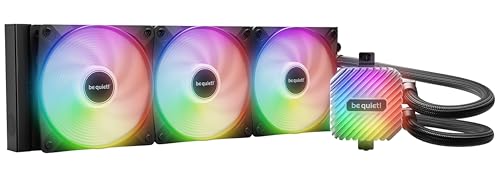
The be quiet! Light Loop 360mm earns its reputation through a metal jet plate that increases coolant flow velocity across the cold plate, allowing it to keep a Ryzen 9 9800X3D under 65°C during extended gaming sessions. The 2100 RPM Light Wings LX fans deliver 61.8 CFM per fan while staying noticeably quieter than most competitors at equivalent static pressures.
Its ARGB-PWM hub consolidates up to six fans and six ARGB components into a single motherboard header, which simplifies internal wiring dramatically. The 3-year warranty and included coolant bottle for the refill port extend the usable lifespan beyond typical sealed-loop designs—a feature rarely seen outside boutique custom loops.
The pump produces only 15 dBA at idle thanks to a progressive IC that reduces switching noise, making this the best choice for quiet-focused builds. Users report that custom BIOS fan curves keep noise imperceptible during desktop use while the cooler handles all-core stress tests without the 9800X3D exceeding 84°C.
Why it’s great
- Refreshable coolant via refill port extends loop life
- Exceptionally quiet pump and fan operation at idle
- Included ARGB-PWM hub reduces cable clutter
Good to know
- Hub requires SATA power, limiting placement options
- Metal jet plate adds weight over standard designs
2. NZXT Kraken Elite 360 RGB 2024

The Kraken Elite 360 RGB 2024 centers on a custom Turbine pump that achieves 10% better thermal performance than its predecessor while operating at lower noise. The 2.72-inch IPS LCD runs at 640×640 resolution with 690 cd/m² brightness, making GIFs and system monitoring readable even in brightly lit rooms with wide viewing angles.
Installation is quick due to pre-applied thermal paste in an optimized spread pattern and tool-free mounting brackets for both Intel LGA 1851 and AMD AM5 sockets. The single breakout cable replaces the usual tangle of wires, though the RGB Core fans are mounted as a single 3-fan unit using four corner screws, which simplifies radiator attachment.
Users running a Ryzen 7 7800X3D report idle temperatures around 40°C and gaming loads staying under 70°C with near-silent fan operation. The NZXT Cam software lets you sync the screen with Google Photos and Spotify, though the premium price positions this cooler squarely at enthusiastswho prioritize display quality and ecosystem integration.
Why it’s great
- High-brightness LCD readable in direct light
- Tool-free bracket swap for Intel and AMD sockets
- Single breakout cable simplifies installation
Good to know
- Pump becomes slightly audible at full load
- Premium price targets display-focused builders
3. TRYX Panorama SE 360 ARGB
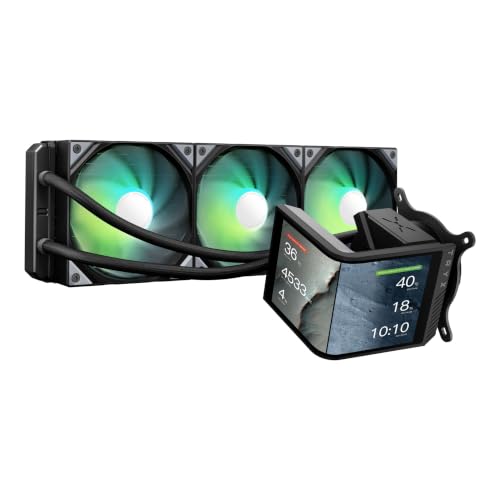
The TRYX Panorama SE 360 ARGB redefines the AIO display category with a rotatable 6.67-inch AMOLED curved screen at 2K resolution and 372 PPI pixel density. The 1,000,000:1 contrast ratio transforms system monitoring data and 3D anamorphic effects into a visual centerpiece, with preloaded “Waterfall” animations that leverage the G2 Curvature design for depth.
Under the screen, the Asetek Adela pump handles up to 280W TDP, making it capable of cooling a Ryzen 9 9950X3D during video encoding or AI workloads. The 27mm high-density fin radiator and three ROTA ARGB fans with FDB bearings keep noise at 27.86 dBA under full load, which is quieter than many competitors’ idle fan profiles.
The KANALI software supports split-screen display and custom media uploads up to 1080P, but the software requires auto-launch for the screen to activate. Early users note that fan and pump control are not handled within the software, so motherboard BIOS tuning is still necessary for complete thermal management.
Why it’s great
- Curved AMOLED display with stunning contrast ratio
- High-quality Asetek pump for up to 280W TDP
- Rotatable screen for flexible case orientation
Good to know
- Software must run at startup for screen to function
- Pure cooling performance lags behind some alternatives
4. Lian Li Hydroshift II-S LCD 360TL
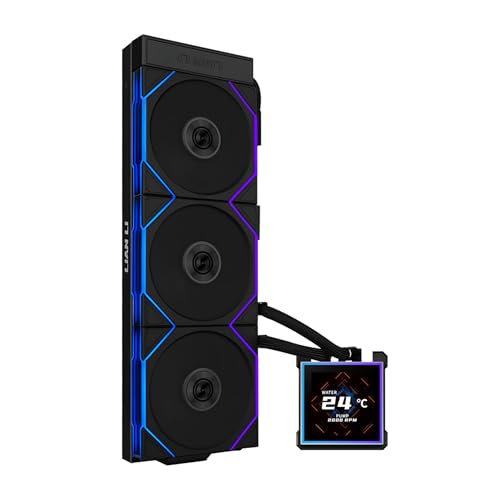
The Hydroshift II-S LCD 360TL packs a 3.4-inch IPS LCD with 480×480 resolution and 500 nits brightness into a slim 24mm radiator, saving valuable case clearance for top-mounted installations. The hot-swappable pogo-pin screen connection lets you remove the display without shutting down the system, while the magnetic guidance ensures proper alignment every time.
Three pre-installed TL120 ARGB fans spin between 0 and 2600 RPM, producing 90.1 CFM of airflow and 3.97 mmH₂O static pressure. The daisy-chain design leaves only three cables visible, and the adjustable tube routing clamp lets you align hoses precisely for the cleanest possible aesthetic.
Users running an overclocked Ryzen 7 9800X3D at 5.425 GHz report Cinebench R23 temperatures maxing at 79°C with low noise. The L-Connect 3 software provides solid customization but lags behind NZXT’s Cam in third-party integrations. The thinner radiator means raw thermal capacity is slightly lower than 27mm competitors, but the build quality and cable management are unmatched.
Why it’s great
- Hot-swappable magnetic screen with pogo-pin connection
- Slim radiator improves wide case compatibility
- Hidden tube and wire routing for pristine build
Good to know
- 24mm rad slightly reduces thermal headroom
- No motherboard RGB sync option available
5. GIGABYTE AORUS WATERFORCE II 360 ICE

GIGABYTE’s WATERFORCE II 360 ICE introduces a slide-in interlocking fan mechanism that eliminates separate fan screws—each 120mm fan clicks into the next and locks to the radiator. This design cuts installation time in half while ensuring perfect fan alignment for reduced turbulence noise.
The 330-degree rotatable water block accommodates any tube routing direction, and the new fan blade geometry increases both static pressure and airflow while lowering noise to 36.9 dBA. The copper cold plate with high-density fins handles the Intel Core Ultra 9 285K, keeping idle temperatures around 30°C and gaming loads under 60°C.
Power and RGB cables are on the shorter side, so larger cases may require extension cables. The GCC software can conflict with Windows 11 security settings, but once configured, the pump’s 2700 RPM speed is virtually inaudible. Users report that fan speed adjustments have minimal impact on CPU temperature—pump speed is the dominant factor.
Why it’s great
- Tool-free slide-in fan interlocking system
- Rotatable block fits any radiator orientation
- Silent pump operation at 2700 RPM
Good to know
- Short power/RGB cables may need extenders
- Software can conflict with Windows 11 security
6. CORSAIR Nautilus 360 RS

The Nautilus 360 RS stands out with a slightly convex cold plate designed to maximize contact with the CPU’s integrated heat spreader—critical for achieving lower junction temperatures on AM5 platforms where the IHS is thicker. The pre-applied thermal paste is optimized for this geometry, though replacing it with a quality compound can drop temperatures by an additional 10°C.
The RS120 fans use CORSAIR AirGuide technology and Magnetic Dome bearings to deliver strong static pressure at just 36 dBA maximum. Daisy-chaining the fans to a single 4-pin header reduces cable congestion, and the pump operates at a whisper-quiet 20 dBA while maintaining a high flow rate for adequate coolant circulation.
Users with a Ryzen 9 9950X report near-silent operation at low loads and acceptable noise under full Cinebench loads, with temperatures staying under 71°C. The lack of integrated RGB on the pump block makes it ideal for builders who want strong performance without lighting. The no-frills approach delivers excellent value for noise-sensitive users.
Why it’s great
- Convex cold plate improves IHS contact
- Exceptionally quiet pump at 20 dBA
- Simple daisy-chain reduces wiring
Good to know
- No RGB on pump block for lighting fans
- Replacing pre-applied paste is recommended
7. MSI MAG Coreliquid A13 360

MSI’s MAG Coreliquid A13 360 uses a split-flow radiator with an integrated three-phase pump operating at 3800 RPM, creating a balanced pressure gradient that reduces motor resonance. The pump uses ceramic bearings rated for long-term durability, and the 390mm reinforced mesh tubing resists coolant evaporation better than standard braided hoses.
Out-of-box compatibility with Intel LGA 1851 and AMD AM5 makes it a natural choice for the newest platforms. The pre-installed fans feature a daisy-chain system that simplifies wiring to a single 4-pin connection, and the included thermal paste eliminates the need for an additional purchase.
Users upgrading from air coolers on a Ryzen 7 5800X3D report eliminating thermal throttling in games, with maximum temperatures of 75°C under load and quiet operation. The only minor complaint is that the MSI logo orientation on the pump cannot be rotated, so the logo may appear sideways depending on your mounting orientation.
Why it’s great
- Native support for LGA 1851 and AM5
- Evaporation-proof tubing with reinforced mesh
- Three-phase pump lowers vibration noise
Good to know
- Fixed logo orientation may not align with all builds
- Plastic and aluminum construction feels less premium
8. Thermalright FW360 SE ARGB V2
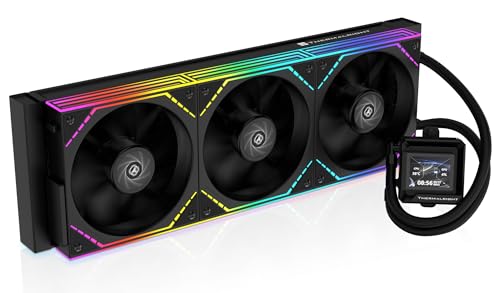
Thermalright’s FW360 SE ARGB V2 brings a 2-inch LCD screen to the budget-friendly segment, allowing real-time system monitoring and custom image display at a fraction of the cost of premium display coolers. The 3000 RPM pump and aluminum radiator provide the essential thermal capacity for mid-range builds without cutting corners on basic function.
The three TL-M12Q fans operate at 2000 RPM with 68.9 CFM airflow and 2.21 mmH₂O static pressure, daisy-chained to reduce cable clutter. The 28.2 dBA noise rating is competitive for this tier, and the included mounting hardware covers both Intel LGA 1851 and AMD AM5 platforms with clear instructions.
Users report that installation is straightforward for first-time AIO users, with the manual covering screen setup and fan replacement. The LCD software offers many display options, though some units have experienced USB-C connection issues that required Amazon replacement. For the price, it delivers LCD functionality and adequate cooling for a Ryzen 7 7800X3D.
Why it’s great
- LCD screen at an entry-level price point
- Daisy-chain fans reduce cable management effort
- Wide socket support including LGA 1851
Good to know
- LCD software has occasional stability issues
- Daisy-chain durability uncertain long-term
9. PCCOOLER CPS DC360
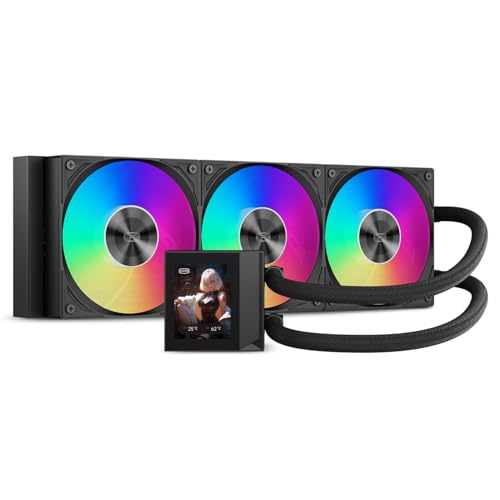
PCCOOLER’s DC360 delivers a 2.4-inch IPS display and three 2500 RPM F5 fans producing 90.56 CFM and 4.07 mmH₂O static pressure at a price that undercuts most competitors without displays. The next-generation pump runs at 2600 RPM while generating only 15 dBA, making it one of the quietest pumps in the budget segment.
The copper cold plate and CNC aluminum waterblock housing provide durability that surpasses the price point. The display supports custom GIFs and CPU temperature readouts via downloadable software, and the ARGB on both the waterblock and fans syncs with ASUS Aura Sync and MSI Mystic Light. Installation is straightforward with universal mounting brackets for Intel and AMD sockets.
Users running a Ryzen 9 7950X3D report temperatures staying under 73°C at 100% load with fans at 2200 RPM, though those fan speeds push noise to 39.8 dBA. Fans are quiet at 800 RPM idle. The software can be finicky to locate and configure, but once running, the display adds significant visual value. For budget-limited builders, this offers the best display-to-dollar ratio.
Why it’s great
- Large IPS display at extremely competitive price
- High 90.56 CFM airflow for 360mm rad cooling
- Copper cold plate and aluminum housing build quality
Good to know
- Fans become loud above 2000 RPM
- Software is difficult to locate and occasionally glitchy
FAQ
Can a 360mm AIO cooler fit in a mid-tower case?
How often should I replace thermal paste on a 360mm AIO?
Does a 360mm AIO with a display perform worse than one without?
Final Thoughts: The Verdict
For most users, the best aio cooler 360mm winner is the be quiet! Light Loop 360mm because it pairs industry-leading acoustic performance with a refill port for extended longevity and 64 ARGB LEDs for subtle style. If you want a stunning curved AMOLED display as a case centerpiece, grab the TRYX Panorama SE 360 ARGB. And for noise-sensitive daily drivers where raw cooling efficiency meets a reasonable price, nothing beats the CORSAIR Nautilus 360 RS.