
An Algebra 1 calculator needs to handle linear equations, quadratic functions, and systems of inequalities without forcing you through a maze of nested menus. The problem is that most budget-tier models hide the functions you actually need behind clumsy key presses, wasting time during exams and homework. A well-chosen device turns abstract problems into visual graphs you can manipulate on the fly, making the difference between frustration and fluency.
I’m Rikta — the co-founder and writer behind Gadgets Feed. I’ve spent years dissecting calculator specifications, comparing processor speeds, display resolutions, and function libraries to separate true academic tools from overpriced distractions. (And Homer 🐱 quality-checked each model by sitting squarely on the instruction manuals.)
Whether you’re solving for x in a two-step equation or analyzing the vertex of a parabola, the right tool changes everything. This guide breaks down the best options available so you can confidently choose the algebra 1 calculator that matches your coursework and exam requirements.
How To Choose The Best Algebra 1 Calculator
A calculator built for Algebra 1 must cover linear functions, quadratic equations, exponential expressions, and basic statistics. Many models advertise hundreds of functions, but what matters is how quickly you can access the ones you actually use. Look for a device that keeps graphing, table generation, and variable solving within one or two key presses.
Function Coverage vs. Menu Depth
Algebra 1 demands specific capabilities: graphing parabolas, solving systems of equations, performing linear regression, and working with fractions. A calculator with 300+ functions sounds impressive, but if those functions are buried three menus deep, you lose precious time. Prioritize models with dedicated keys for graph, table, and solve operations rather than generic multi-function keys that require mode switching.
Display Quality and Screen Size
A screen that measures at least 2.5 inches diagonally gives you room to see plotted lines and their intersection points simultaneously. High-contrast LCD panels prevent eye strain during long study sessions, and models with natural textbook-style displays show fractions, exponents, and square roots exactly as they appear in your textbook — reducing transcription errors.
Power Source and Battery Life
Dual-power calculators that combine solar cells with battery backup ensure you never lose work mid-exam. Rechargeable models with USB-C charging are convenient for home use, but check whether they last through a full school day. Standard AAA-powered devices are reliable but require you to carry spares. For Algebra 1, any of these approaches works — just match the power source to your daily routine.
Exam Approval Status
Before you commit, verify the calculator is permitted on major standardized tests. The SAT, ACT, AP, and IB exams all maintain specific approved lists. Graphing calculators with computer algebra system (CAS) functionality are often banned, so stick with non-CAS models that still offer robust graph plotting and statistical analysis for Algebra 1 coursework.
Quick Comparison
On smaller screens, swipe sideways to see the full table.
| Model | Category | Best For | Key Spec | Amazon |
|---|---|---|---|---|
| Casio fx-9750GIII | Graphing | Pre-Algebra to AP Stats | Natural Textbook Display | Amazon |
| TI-84 Plus Silver Edition | Graphing | High school throughout college | 21 preloaded apps | Amazon |
| TI-83 Plus | Graphing | Algebra classroom standard | Pull-down display menus | Amazon |
| Nadex Scientific w/ Graph (Black) | Scientific w/ Graph | Formula visualization | 360+ functions | Amazon |
| CATIGA CS-229 | Scientific w/ Graph | Budget graphing alternative | 3.25x larger display | Amazon |
| Nadex Scientific w/ Graph (Pink) | Scientific w/ Graph | Middle and high school | Graph and table modes | Amazon |
| NEWYES 991ES MAX | Scientific | Scratchwork and notes | Built-in writing pad | Amazon |
In‑Depth Reviews
1. Casio fx-9750GIII Graphing Calculator

The Casio fx-9750GIII delivers a Natural Textbook Display that shows fractions, exponents, and square roots exactly as they appear in your Algebra 1 workbook — no more decoding linear strings of characters. With Python programming built in, this model also serves as an introduction to coding concepts, making it a dual-purpose tool for STEM-minded students. Its graph plotting supports up to 10 functions simultaneously, so you can compare linear, quadratic, and exponential models side by side.
This calculator is approved for AP, SAT, ACT, and IB exams, removing any worry about test-day disqualification. USB connectivity lets you transfer files to and from a computer, which is helpful when teachers distribute calculator programs for class. Weighing only 7.5 ounces with dimensions of 6.6 by 3.25 inches, it fits comfortably in a standard pencil case.
The four AAA batteries provide long service life — reviewers report months of daily classroom use without needing a replacement. The display includes brightness and zoom adjustments, making it easy to read in different lighting conditions. For students moving from Pre-Algebra through AP Statistics, this Casio offers a clear upgrade path without forcing a second purchase later.
Why it’s great
- Natural textbook display reduces input errors
- Python programming extends use beyond math class
- Exam-approved for SAT, ACT, AP, and IB
Good to know
- Lacks a built-in writing pad for scratch work
- Vector calculations are limited for advanced physics
2. Texas Instruments TI-84 Plus Silver Edition

The TI-84 Plus Silver Edition is the gold standard for high school mathematics, packing 21 preloaded apps that cover everything from quadratic equation solvers to probability simulations. Its split-screen mode lets you view a graph and its corresponding table of values simultaneously — essential for understanding how changing coefficients shift a parabola on the coordinate plane. USB on-the-go technology enables file sharing between calculators and direct connection to a PC for software updates.
With a 3.05 by 3.94 inch screen and a large readable LCD, this unit handles calculus, engineering, and trigonometric functions alongside Algebra 1 topics, so it grows with your coursework. The silver casing is durable enough to survive a four-year high school career, and the four AAA batteries deliver reliable power. The 1-year warranty provides peace of mind against manufacturing defects.
Students report that after a short learning curve, the menu system becomes intuitive, and the device feels natural for rapid graph analysis. Refurbished units often arrive looking like new and function perfectly, making this a long-term investment. Teachers frequently recommend this model because its function set aligns directly with standard Algebra 1, Geometry, and Algebra 2 curricula.
Why it’s great
- 21 preloaded apps eliminate extra downloads
- Split-screen mode shows graph and table together
- USB file sharing between calculators
Good to know
- Refurbished units may not include original manuals
- Larger than basic scientific models
3. Texas Instruments TI-83 Plus Programmable Graphing Calculator

The TI-83 Plus remains a staple in Algebra 1 classrooms because it lets students graph and compare functions without overwhelming them with features they won’t use yet. Its horizontal and vertical split-screen options allow side-by-side comparison of two graphs — perfect for analyzing how the slope changes between linear equations. The pull-down display menus organize advanced functions logically, reducing the cognitive load during timed tests.
This model includes built-in tools for finance, which extends its utility into Algebra 1 word problems involving interest rates and investment growth. The 10-digit LCD provides clear numeric readouts, and the programmable nature lets teachers load specific problem sets onto classroom sets. Powered by four AAA batteries, the TI-83 Plus is known for enduring an entire school year on a single set.
While it lacks the color display and USB connectivity of newer models, its simplicity is an advantage for students who are still building foundational skills. Refurbished units are widely available at budget-friendly prices, often with only cosmetic wear. If your school curriculum is built around TI technology, this calculator integrates seamlessly with textbooks and online resources.
Why it’s great
- Pull-down menus simplify function navigation
- Split-screen for comparing two graphs
- Programmable for custom problem sets
Good to know
- No USB connectivity for file transfers
- Older model lacking modern display tech
4. Nadex Scientific Calculator with Graph Functions (Black)

The Nadex Scientific Calculator with Graph Functions (Black) offers 360+ functions covering Algebra 1, Geometry, Trigonometry, Calculus, and Statistics, making it a versatile choice for students who plan to continue through higher math levels. Its 2.5-inch LCD screen displays equations and graph visuals simultaneously, with three operating modes — Calculation, Angular Measurement, and Display — that let you switch contexts quickly. The solar-powered design includes a secondary replacement battery already installed in the chamber, so you never have to hunt for spares.
This unit is perfectly suited for PSAT/NMSQT, SAT, ACT, and AP exam prep, with function sets that include complex numbers, fractions, linear regression, standard deviation, permutations, and variable solving. The included carrying case doubles as a pencil holder, keeping everything organized. The graph function is designed for formula visualization rather than full graphing calculator capabilities, which makes it ideal for seeing how an equation behaves without the complexity of a dedicated graphing OS.
Students appreciate the clear manual that explains how to access each function, and the responsive buttons make data entry feel precise. Parents note that the budget-friendly price and exam-readiness make this an easy recommendation for Algebra 1 courses. The one-year warranty provides a safety net for daily classroom wear.
Why it’s great
- 360+ functions cover all Algebra 1 topics
- Solar powered with backup battery included
- Comes with a protective carrying case
Good to know
- Graph function is for visualization, not full graphing
- Screen is smaller than dedicated graphing models
5. CATIGA Scientific Calculator with Graphic Functions CS-229

The CATIGA CS-229 stands out with a signature high-definition display that is 3.25 times larger than standard scientific calculators, giving you plenty of screen real estate to view multi-line calculations and plotted graphs without constant scrolling. Its 360+ built-in functions include fractions, complex numbers, linear regression, and variable solving — all the essentials for Algebra 1 along with headroom for later coursework. The dedicated reset button on the back allows quick troubleshooting when you need to clear an error state.
Three specialized operating modes — Angle, Calculation, and Display — help you adapt the interface to the specific problem you’re solving. The ergonomic body is designed for long study sessions, with tactile buttons that provide positive feedback with each press. This model supports plotting functions and analyzing intersections, which is critical for understanding where two linear equations cross on a graph.
The 365-day limited warranty and 24-hour responsive customer support add a layer of safety for parents buying a calculator for the first time. Reviewers report that after a year of use, the buttons remain crisp and the screen stays clear. For students moving into AP Calculus and Statistics, the CS-229 delivers graphing capability without forcing an upgrade to a full graphing calculator budget.
Why it’s great
- Extra-large display reduces eye strain
- 360+ functions for long-term academic use
- Dedicated reset button for quick fixes
Good to know
- Instruction manual could be more detailed
- No USB connectivity for program transfers
6. Nadex Scientific Calculator with Graph Functions (Pink)

The Nadex Scientific Calculator with Graph Functions in Pink brings over 360 functions to a solar-powered body designed for high school and college students alike. Its 2.5-inch LCD screen supports simultaneous equation and graphic display, making it straightforward to see how changing coefficients in a quadratic formula shifts the plotted curve. Three operating modes — Calculation, Angular Measurement, and Display — let you pivot between algebra problems and geometry angle work without restarting a problem.
This model is tailored for AP courses including Pre-Algebra, Algebra I, Algebra II, Geometry, Trigonometry, and Calculus, with a secondary battery already waiting in the chamber for backup. Students report that the included manual is accurate and that accessing functions like linear regression and variable solving feels intuitive. The protective cover snaps on tightly and prevents screen scratches during transport.
Although this is not a full graphing calculator, the graph function serves Algebra 1 needs perfectly — plotting parabolas, lines, and intersections for visual learners. The pink color option adds a personal touch that younger students appreciate. For parents looking for an entry-level calculator that handles the entire Algebra 1 curriculum, this Nadex delivers reliable performance.
Why it’s great
- 360+ functions with dedicated graph modes
- Solar powered plus backup battery included
- Attractive color options for personalization
Good to know
- Not a full graphing calculator
- Small screen may feel cramped for complex graphs
7. NEWYES Rechargeable Scientific Calculator 991ES MAX
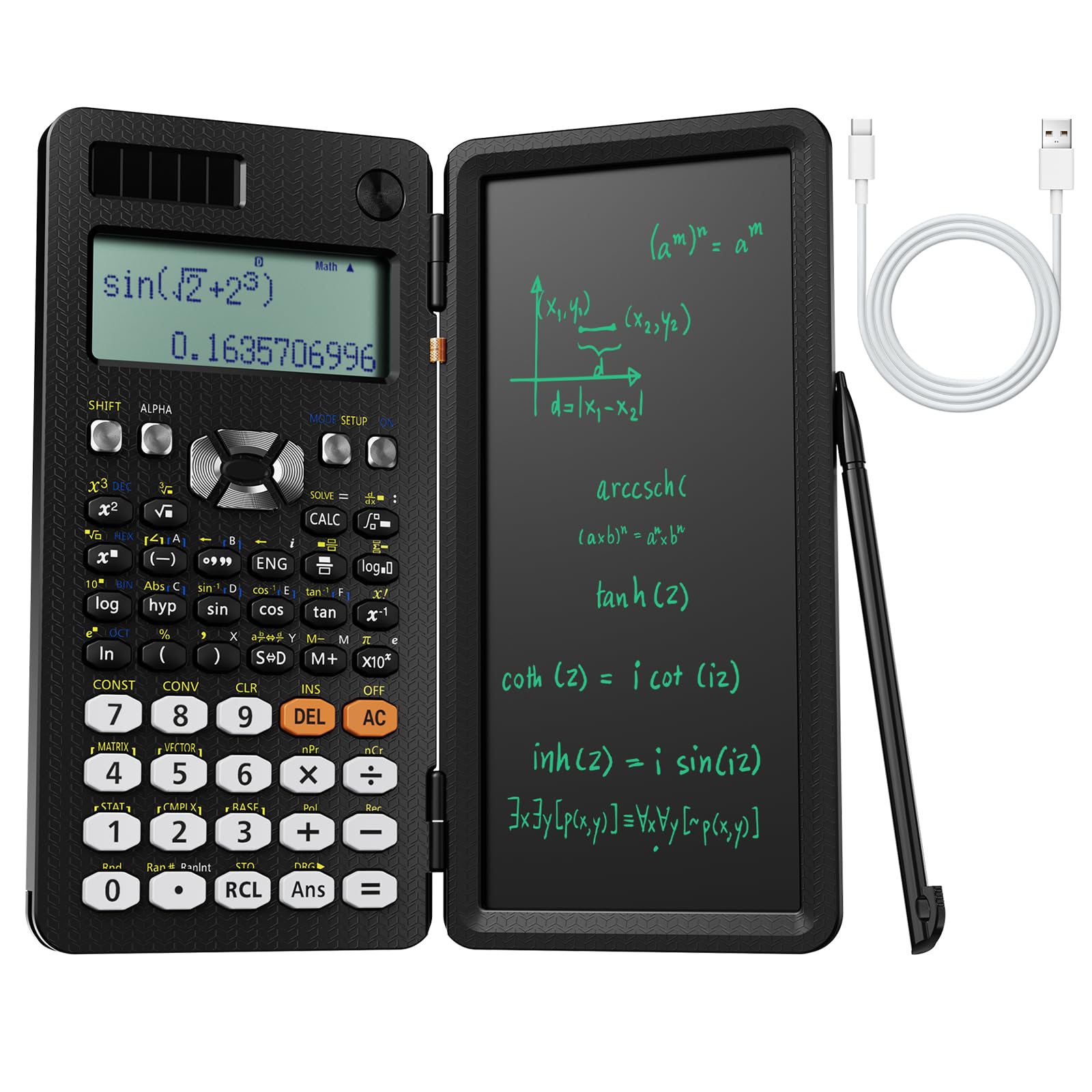
The NEWYES 991ES MAX packs 417 calculation functions into a body that includes a detachable LCD writing pad — eliminating the need for separate scratch paper. You can jot down formula derivations, work through multi-step algebra problems, or note important data points directly on the pad, then erase with the press of a button. The 4-line written display shows your input, the result, and relevant context without constant scrolling.
Dual power comes from Type-C USB charging and a solar panel, so you can charge it overnight at home and rely on solar energy during classroom use. The foldable design collapses to a compact 12 by 2 inches, making it easy to slide into a crowded backpack. The ABS enclosure feels sturdy, and responsive key travel prevents accidental double-presses during fast calculations.
This calculator is especially useful for middle school and high school students who are building their Algebra 1 skills, because the writing pad lets them show work — a requirement for many teachers. The foldable hard case protects the screen when not in use. For students who need to document their problem-solving process, the NEWYES 991ES MAX combines calculation and notation in a single device.
Why it’s great
- Built-in writing pad replaces scratch paper
- 417 functions cover all Algebra 1 needs
- Type-C charging plus solar power
Good to know
- Writing pad lid interferes with two-handed typing
- No graphing capability for visual analysis
FAQ
Do I need a graphing calculator for Algebra 1?
What function count is enough for Algebra 1?
Can I use a graphing calculator on the SAT?
Final Thoughts: The Verdict
For most users, the algebra 1 calculator winner is the Casio fx-9750GIII because its Natural Textbook Display, Python programming support, and full exam approval make it a single device that carries students from Pre-Algebra through AP Statistics. If you want a built-in writing pad for showing work, grab the NEWYES 991ES MAX. And for budget-conscious families who still need 360+ functions and graph visualization, nothing beats the CATIGA CS-229.