
Choosing a cooler for the AM3+ socket means navigating a market that has largely moved on. The mounting requirement narrows your options to a specific set of coolers that still include the brackets for AMD’s legacy platform. A poor choice here can mean a loud PC, thermal throttling on demanding workloads like the FX-9590, or even physical clearance issues with your case side panel.
I’m Min — the co-founder and writer behind Gadgets Feed. I’ve spent hundreds of hours analyzing thermal performance data, cross-referencing customer feedback on fin density and noise profiles, and comparing compatibility lists to separate the coolers that genuinely work on AM3+ from those that just claim to.
This guide evaluates seven air and liquid coolers that physically support the socket, helping you find the best am3+ cpu cooler for your specific build and budget constraints.
How To Choose The Best AM3+ CPU Cooler
Selecting a cooler for the AM3+ platform requires a focus on three main areas: physical bracket support, the CPU’s thermal design power, and the physical dimensions within your PC case. Many modern coolers dropped AM3+ support years ago, so verification is the first step.
Bracket Compatibility & Socket Support
The AM3+ socket uses the same mounting hole pattern as AM2, AM2+, and AM3. A cooler explicitly listing “AM3+” in its specifications is guaranteed to work. Models that only mention AM4 or newer often lack the necessary backplate or clips, so always check the included components list before purchasing.
Thermal Design Power (TDP) Capacity
AMD’s FX-8000 series chips have a TDP of 125W, while the flagship FX-9590 can consume up to 220W. A cooler rated for at least 200W is essential for maintaining boost clocks. Air coolers with six or more heat pipes in a dual-tower configuration offer the best price-to-performance ratio for these high-wattage chips.
Quick Comparison
On smaller screens, swipe sideways to see the full table.
| Model | Category | Best For | Key Spec | Amazon |
|---|---|---|---|---|
| upHere UE2 Elite TC8C | Dual-Tower Air | High-airflow builds | 8 Heat Pipes, 280W TDP | Amazon |
| upHere 2KC8 | Dual-Tower Air | Budget silence seekers | 8 x 6mm Pipes, 26 dBA | Amazon |
| be quiet! Pure Rock Pro 3 | Dual-Tower Air | Near-silent operation | 6 HDT Pipes, 34.8 dBA | Amazon |
| Thermalright FW360 | 360mm AIO Liquid | Extreme overclocking | 320×240 LCD, 3000 RPM Pump | Amazon |
| Montech HyperFlow ARGB 360 | 360mm AIO Liquid | Long-term reliability | 3100 RPM Pump, 6-Yr Warranty | Amazon |
| ARCTIC Liquid Freezer III Pro 420 | 420mm AIO Liquid | Thermal ceiling for 220W CPUs | 38mm Radiator, 110 CFM | Amazon |
| Noctua NH-U12S chromax.Black | Single-Tower Air | Compact, high-compatibility builds | 158mm Height, 6-Yr Warranty | Amazon |
In‑Depth Reviews
1. upHere UE2 Elite TC8C
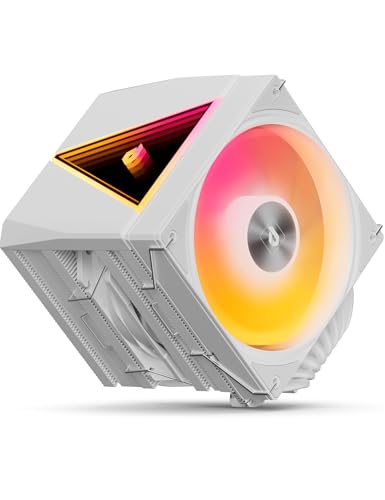
The upHere UE2 Elite TC8C brings eight direct-touch copper heat pipes to the AM3+ platform, pushing its cooling capacity to a rated 280W TDP. This is more than enough headroom for an FX-9590 under sustained all-core load. The dual-tower fin array, measuring 454,200mm² of surface area, moves heat quickly from the base to the airflow path of the two 120mm ARGB PWM fans.
Noise performance stays tight at a rated 27 dBA during normal operation, thanks to the hydraulic bearing fans spinning between 600 and 1650 RPM. The magnetic MagCover system shaves significant time off the installation process, a welcome feature for those swapping coolers on a cramped AM3+ motherboard inside an older case. A single screwdriver and thirty seconds are all that is needed to mount it securely.
The 100 percent RAM clearance guarantee means no DDR3 or DDR4 kit will be blocked by the cooler’s bulk, even on motherboards with slots closest to the CPU socket. While some users report this cooler performs best on mid-tier chips like the i7-12700K, it handles the heat output of an FX-8350 or FX-9590 without breaking a sweat, making it a top-tier air solution for the AM3+ generation.
Why it’s great
- Eight heat pipes provide massive thermal headroom for the hottest AM3+ chips
- Magnetic cover enables rapid installation without fan removal
- Full RAM clearance eliminates compatibility guesswork
Good to know
- The large tower may block the first PCIe slot on some compact Micro-ATX boards
- ARGB lighting requires a 5V header, which some older AM3+ motherboards lack
2. upHere 2KC8

The upHere 2KC8 is the budget-friendly twin of the UE2 Elite, sharing the same eight 6mm heat pipe architecture and dual 120mm fan layout. The cooler’s total height of just under 158mm ensures it slides into most mid-tower cases without side panel interference, a common issue with larger dual-stack designs. Its 68.2 CFM airflow rating per fan creates excellent static pressure across the aluminum fin stack.
Noise levels are rated at a low 26 dBA, quieter than its sibling due to the capped 1650 RPM fan speed limit. Several user reports on the AMD AM4 platform (Ryzen 9600X) show idle temperatures dropping to around 37°C, with peak loads staying under 65°C. For an FX-8350 at 125W, the delta from stock cooling is substantial, eliminating the thermal throttle that plagues the AMD Wraith cooler.
The non-disassembly fan installation is a practical convenience for upgrades. You can mount the fans after the heatsink is secured to the motherboard, avoiding the frustration of routing screws through tight gaps. The included thermal paste is thick and slightly difficult to spread evenly, so a high-performance third-party paste might yield slightly better results for a maxed-out FX-9590 system.
Why it’s great
- Excellent price-to-heat-pipe ratio for the AM3+ platform
- Compact enough to fit most standard ATX cases
- Very quiet under normal loads with 26 dBA rating
Good to know
- Included thermal paste is thick and can be tricky to apply
- No backplate is included for AMD installation, using the stock AM3+ backplate instead
3. be quiet! Pure Rock Pro 3
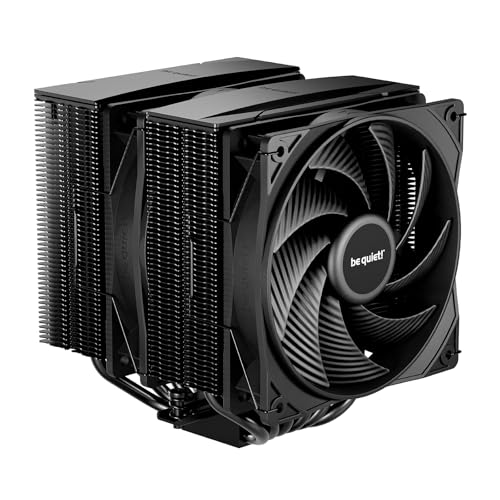
The be quiet! Pure Rock Pro 3 balances its six heat pipe design (with nickel-plated HDT base) against an extremely controlled noise profile. The included Pure Wings 3 120mm PWM fan operates up to 2000 RPM, generating significant airflow for the dual-tower heatsink. The rated noise level of 34.8 dBA is higher than the upHere alternatives at top speed, but the PWM curve keeps it near-silent during idle and light tasks.
A compact offset design improves compatibility with RAM slots and VRM heatsinks, a frequent pain point on AM3+ boards where the CPU socket sits close to memory banks. The front fan height is adjustable, allowing the cooler to clear taller DDR3 heatsinks like those on G.Skill Trident Z kits. Users on an Intel LGA1700 platform report idle temperatures as low as 27°C, but for a 125W FX-8350, the thermal margin is still generous enough to maintain boost clocks without fan ramp-up.
The mounting kit is straightforward and self-explanatory, with pre-applied thermal paste on the copper base. Be aware that the plastic cover on the pre-applied paste is known to be fragile, and the paste itself is conductive, so any spillover onto motherboard components requires careful cleanup. The all-black design fits naturally into any build color scheme without RGB lighting.
Why it’s great
- Excellent build quality with nickel-plated heat pipes and aluminum fins
- Adjustable front fan height clears tall RAM modules
- Pre-applied paste simplifies first-time installation
Good to know
- Thermal paste is conductive and requires careful application
- At 2000 RPM the fan is audible compared to slower-spinning alternatives
4. Thermalright FW360

The Thermalright FW360 represents the liquid cooling path for the AM3+ socket, using a 360mm radiator that provides extreme thermal capacity for space heaters like the FX-9590. The pump operates at a high 3000 RPM, and the three TL-P12-S fans spin up to 2000 RPM using S-FDB bearings that reduce vibration in horizontal mounting positions. The 320×240 resolution IPS LCD screen on the pump head allows for customizable system monitoring directly on the cooler.
Noise levels are rated at an impressively low 23 dBA for the pump assembly, though the three 120mm fans will produce noticeable airflow noise at full tilt. For a 220W FX-9590, this cooler can maintain temperatures well below the 60°C mark during intense workloads, a feat that is difficult for even the largest dual-tower air coolers to match. The included mounting kit covers the AM3+ socket via the AM4/AM5 bracket backward compatibility.
The polymer protective tubing and the nano-painted aluminum fins are both practical and aesthetically pleasing. The main caveat is the LCD screen software, which relies on a USB 9-pin header and a third-party utility downloaded from Thermalright’s website. Some users report minor software configuration hurdles. For pure performance on an AM3+ chip, this is the coolest running option in the lineup.
Why it’s great
- Massive 360mm radiator dissipates heat quickly on high-TDP CPUs
- IPS LCD screen adds real-time readouts and customization
- Pump is rated at a whisper-quiet 23 dBA
Good to know
- LCD software setup can be finicky and requires a 9-pin USB header
- Large radiator may not fit in compact or older ATX cases
5. Montech HyperFlow ARGB 360

The Montech HyperFlow ARGB 360 uses a 3100 RPM water pump inside a gemstone-inspired housing, driving coolant through a slim 27mm radiator with a high-density 20 FPI fin array. The three Metal Pro 12 ARGB fans spin up to 2200 RPM and are 28mm thick, generating more static pressure than standard 25mm fan designs. This setup is specifically engineered for high heat loads, making it a strong match for the 220W thermal output of an FX-9590.
User reports note that this cooler dropped CPU temperatures by 20°C on an Intel 13700KF compared to a 240mm AIO, completely eliminating thermal throttling at 253W. On an AM3+ FX-8350, the headroom is so high that the fans rarely need to go above 50 percent speed, keeping the system near silent during gaming. The included six-year warranty covers pump failure and leakage, providing long-term peace of mind for a platform that may not be upgraded for several more years.
Installation is slightly more involved than on some competitors, as the fan-to-radiator mounting requires a few extra steps. The pre-installed fans on the radiator do simplify the initial setup, and the included thermal compound is of acceptable quality. The ARGB lighting syncs with the Montech ecosystem and standard 5V headers, but older AM3+ motherboards may not have a 5V ARGB header, limiting the lighting to default patterns.
Why it’s great
- Industry-leading 6-year warranty covers potential unit failures
- 28mm thick fans provide superior static pressure for dense radiators
- Extreme thermal capacity keeps even 220W chips below throttle temperatures
Good to know
- Installation requires more steps than some competing AIO coolers
- ARGB on older AM3+ boards may default to a static lighting pattern
6. ARCTIC Liquid Freezer III Pro 420

The ARCTIC Liquid Freezer III Pro 420 represents the absolute thermal ceiling for consumer AIO cooling, featuring a massive 420mm radiator (three 140mm fan positions) that is 38mm thick. The three P14 PRO fans push up to 110 CFM of air each, which translates into raw cooling power that is unmatched by any 360mm or dual-tower air cooler in this lineup. For an FX-9590, this cooler will run at such a low thermal load that the fans may never need to spin audibly.
An integrated PWM-controlled VRM fan on the pump head actively cools the voltage regulator modules on the motherboard. On older AM3+ boards that often lack robust VRM heatsinks, this feature directly extends the life of the motherboard. The pump speed is not specified in the product data, but user teardowns confirm it operates at a high static pressure, keeping coolant flow strong even through the thick radiator. The included MX-6 thermal paste is thick and requires firm pressure to spread evenly.
One notable user experience is with an Intel i9-14900K, where the Liquid Freezer III dropped peak temperatures from 100°C to 70°C under all-core load. The native offset mounting for AMD CPUs centers the cold plate directly over the hotspot of the chip, which for an FX-series CPU means more efficient heat extraction from the concentrated die location. The integrated cable management routes all fan cables through the hose sleeving, leaving only a single cable to the motherboard.
Why it’s great
- 420mm radiator offers the highest thermal capacity in this comparison
- Integrated VRM fan actively cools the motherboard’s power delivery
- Integrated cable management reduces visible wiring
Good to know
- 420mm radiator requires a very large case and may not fit mid-towers
- MX-6 included paste is thick and can be difficult to spread evenly
7. Noctua NH-U12S chromax.Black
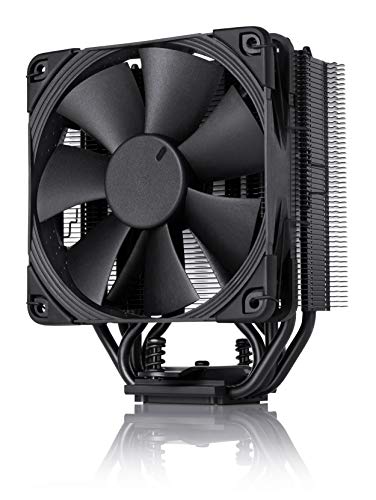
The Noctua NH-U12S chromax.Black is the only single-tower air cooler on this list, but its reputation for reliability and quiet operation is unmatched. Standing at 158mm tall, it fits in most ATX and Micro-ATX cases without clearance issues, and its slim 120mm profile means it never overhangs the RAM slots or blocks the top PCIe slot. The NF-F12 Focused Flow fan operates with a Low-Noise Adaptor to keep the system whisper quiet during idle and light usage.
User reports from the AM3+ platform show a dramatic improvement over the stock AMD cooler. One user on an FX-6350 (125W TDP) saw idle temperatures drop from 50°C to 24°C, with peak loads staying at 50°C rather than 95°C. The thermal paste included (NT-H1) is widely considered one of the best non-conductive pastes on the market. The SecuFirm2 mounting system uses a straightforward tool-free backplate, making installation on the AM3+ socket a breeze even for first-time builders.
The single fan configuration means the cooler cannot match the thermal capacity of a dual-tower design for a 220W FX-9590. It is ideal for the 95W-125W segment of the AM3+ lineup (FX-6100, FX-6300, FX-8320E). The all-black design and the option to add a second push-pull fan (sold separately) give it some upgrade flexibility. The 6-year warranty is a vote of confidence in the product’s longevity and build quality.
Why it’s great
- Renowned build quality backed by a 6-year manufacturer warranty
- Slim 120mm design offers wide case and RAM compatibility
- NT-H1 thermal paste is excellent and non-conductive
Good to know
- Single fan design limits suitability for 220W TDP CPUs
- Spring clips on the fan are slightly finicky during installation
FAQ
Will a modern AM5 cooler physically work on the AM3+ socket?
Is a liquid AIO necessary for the FX-9590 220W CPU?
Final Thoughts: The Verdict
For most users, the best am3+ cpu cooler winner is the upHere UE2 Elite TC8C because its eight heat pipe dual-tower design offers the best balance of thermal capacity, noise levels, and RAM compatibility for the vast majority of FX-series processors. If you want a compact cooler that prioritizes case clearance and near-silent operation, grab the Noctua NH-U12S chromax.Black. And for absolute thermal dominance on a 220W FX-9590, nothing beats the ARCTIC Liquid Freezer III Pro 420.