
Manually writing care instructions, sizing, and branding onto fabric tags is a slow, inconsistent bottleneck that costs apparel businesses time and credibility. A dedicated label maker eliminates smudged handwriting, misprinted sizes, and the daily frustration of lining up tiny tags.
I’m Min — the co-founder and writer behind Gadgets Feed. This guide is the result of comparing print resolution, adhesive durability, thermal vs. transfer technology, and connectivity across nine dedicated units built for fabric and garment labeling.
Whether you run a small clothing line, manage a laundry service, or organize a wardrobe, finding the right best apparel label maker means matching print speed and label material to your specific volume and fabric types.
How To Choose The Best Apparel Label Maker
Printing labels for apparel is not the same as labeling a warehouse bin. Fabric care tags must survive wash cycles, resist peeling, and stay legible after repeated friction. Choose a machine that prioritizes durable media and consistent print quality over raw speed.
Print Technology and Label Longevity
Thermal transfer technology uses a ribbon to bond ink into the label material. The resulting labels resist fading, smudging, and moisture far better than direct thermal labels, which darken under heat or sunlight. For apparel care labels that must survive washing and drying, thermal transfer is the standard.
Label Width and Material Versatility
Apparel labels typically range from 6mm for small neck tags up to 24mm for detailed care instructions. A machine that accepts multiple roll widths lets you switch between tiny sizing labels and larger brand hang tags. Check whether the machine supports nylon, polyester, or satin tapes designed for fabric application.
Connectivity and Software Ecosystem
Standalone keyboards work for basic text, but apparel labeling often requires logos, barcodes, and QR codes. Bluetooth-enabled units paired with a mobile app simplify importing design elements and storing templates. PC software support adds advanced layout options for batch printing multiple size variants.
Quick Comparison
On smaller screens, swipe sideways to see the full table.
| Model | Category | Best For | Key Spec | Amazon |
|---|---|---|---|---|
| Makeid D50 | Industrial Desktop | High-volume apparel production | 300 DPI, 2” print head, auto cutter | Amazon |
| Brother QL-820NWB | Professional Network | Multi-device office & studio | 300 DPI, Wi-Fi, Ethernet, 110 labels/min | Amazon |
| Brother PT-D610BT | Connected Desktop | Standalone + mobile labeling | Bluetooth, 24mm tapes, QWERTY keyboard | Amazon |
| Rollo USB | Commercial Thermal | Shipping & product labels | 203 DPI, 150mm/s, 4.1” max width | Amazon |
| Arkscan 2054A | Shipping Label Printer | Small business & marketplace | Direct thermal, 5 ips, 4.25” width | Amazon |
| DYMO Twin Turbo | Dual-Roll Desktop | Frequent label type switching | Direct thermal, twin rolls, USB | Amazon |
| LABELWORKS Epson LW-PX700 | Rugged Industrial | Job sites & harsh environments | 24mm width, heat shrink, lifetime warranty | Amazon |
| Makeid P31 | Portable Industrial | On-site cable & asset labeling | 2000mAh, 60 labels/min, 300 DPI | Amazon |
| Phomemo M220 | Budget Thermal | General organization & craft | 2200mAh, 3.14” width, direct thermal | Amazon |
In‑Depth Reviews
1. Makeid D50 Industrial Label Printer
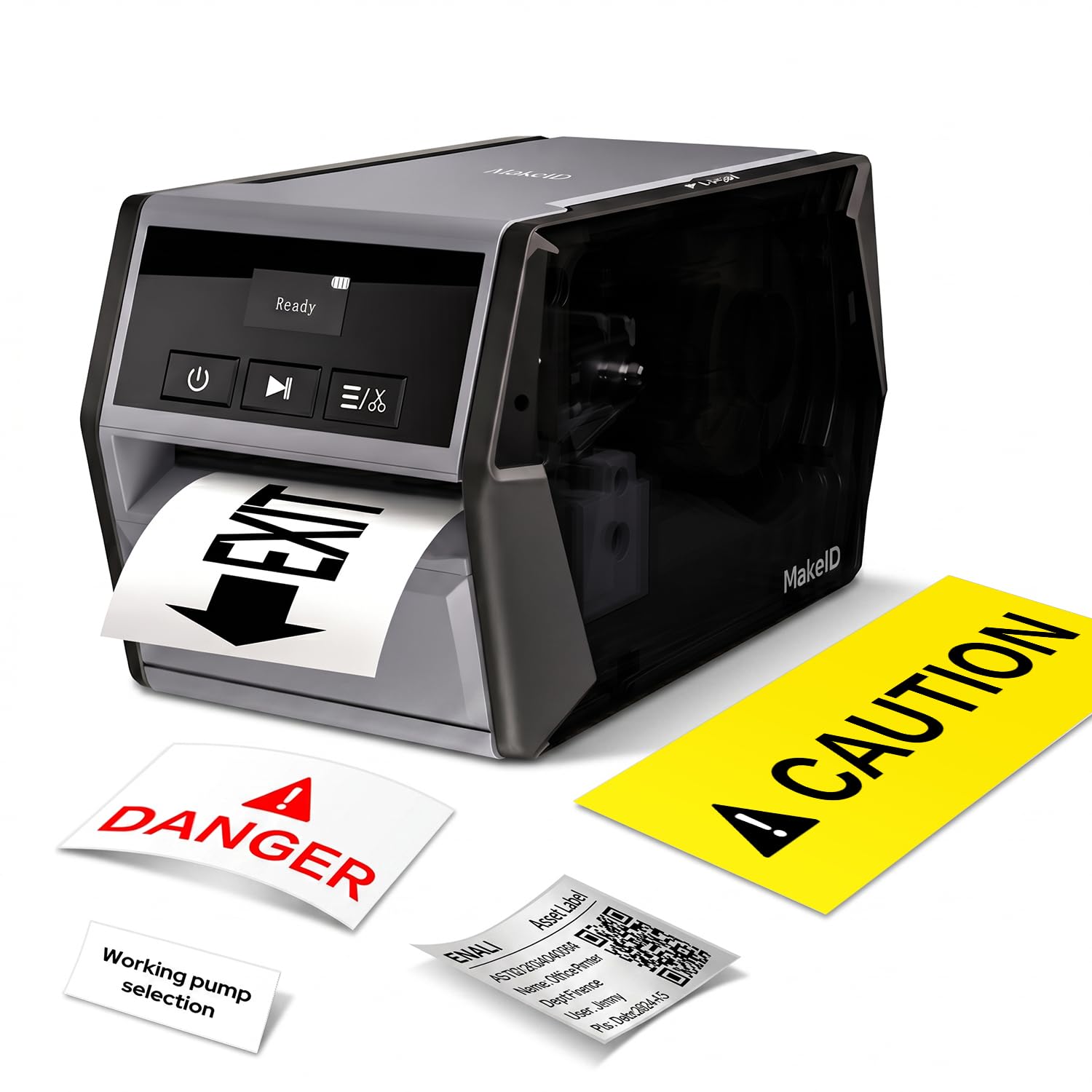
The Makeid D50 brings a 2-inch print head and 300 DPI thermal transfer printing to apparel labeling, meaning care tags and brand labels emerge razor-sharp even at small font sizes. The 2600mAh battery offers up to 90 days of standby, making it feasible to move between cutting tables without hunting for an outlet. Its integrated cartridge system swaps consumables in roughly five seconds, reducing downtime during batch production runs.
Mobile app and PC software both support templates, barcodes, and QR codes, which is valuable for printing size variants or lot numbers directly onto fabric-compatible media. The auto cutter handles bulk label separation cleanly, and the acrylic adhesive tested for oil and low-temperature resistance suggests the labels will stay attached through multiple wash cycles. Some users note the software interface can feel restrictive for advanced layouts.
For the price, it delivers a rare combination of desktop-grade power and portable battery operation.
Why it’s great
- 300 DPI thermal transfer for wash-resistant fabric labels
- Fast cartridge swap with auto-detection
- 2600mAh battery supports true mobile workflow
Good to know
- PC software can be finicky with advanced formatting
- Does not support Bluetooth from a laptop
2. Brother QL-820NWB Label Printer

The Brother QL-820NWB distinguishes itself with three connectivity options — Bluetooth, Wi-Fi, and Ethernet — allowing multiple users in a studio or warehouse to send labels from their own devices without cable swapping. It churns out 110 standard address labels per minute at 300 DPI, which translates to fast generation of size stickers, care tags, and barcode labels for inventory management.
The monochrome LCD screen supports standalone use, so you can print a quick batch without connecting a phone or computer. It also supports black-and-red printing using the DK-2251 tape, which is useful for highlighting care warnings or sale pricing on hang tags. The maximum label length of three feet accommodates continuous strips for multi-line care instructions.
Setup can be tedious on mesh networks, and the screen brightness is mediocre in direct light. However, once configured, the QL-820NWB becomes the most flexible network label printer in this class for apparel operations where multiple staff need access.
Why it’s great
- Triple connectivity (Wi-Fi, Ethernet, Bluetooth) for shared access
- Standalone LCD operation for quick batches
- Black-and-red tape option for branded care labels
Good to know
- Bluetooth connection can drop after laptop sleep
- No USB-C cable included
3. Brother P-Touch PT-D610BT Label Maker

The PT-D610BT bridges standalone keyboard operation with Bluetooth mobile connectivity, making it suitable for apparel labeling environments where you want to type a quick size label without pulling out a phone, but still need the ability to design branded templates from an app. The backlit display and full QWERTY keyboard reduce editing friction compared to multi-tap phone interfaces.
It accepts TZe tapes up to 24mm wide, giving you enough real estate for four to five lines of care instructions or a logo plus barcode. The laminated TZe tapes resist abrasion, moisture, and UV exposure, which aligns well with fabric care labels that must endure laundering. Many users find the smartphone apps intuitive for importing graphics and storing size presets.
The interface requires multiple menu presses for common symbols, and the price sits higher than simpler standalone models. But for an apparel business that wants both standalone speed and app-driven design, the D610BT offers the most balanced hybrid approach in the Brother lineup.
Why it’s great
- Full QWERTY keyboard for fast standalone text entry
- Bluetooth connectivity for mobile app design
- Laminated TZe tape resists wash-and-wear abrasion
Good to know
- UI navigation feels clunky for special characters
- Runs on 6 AA batteries if not plugged in
4. Rollo USB Shipping Label Printer

The Rollo USB is a direct thermal printer optimized for shipping labels, but its label width range of 1.57 to 4.1 inches also accommodates larger hang tags and product stickers for apparel packaging. The 150mm per second print speed means a standard 4×6 care or shipping label prints in under one second, which is critical for e-commerce apparel brands fulfilling multiple orders daily.
Setup is famously straightforward on both Windows and macOS — plug in via USB, install the driver, and the printer is recognized by most major shipping and listing platforms. The Rollo Ship app also supports barcode, QR code, and sticker label creation, though it lacks the template depth of dedicated apparel label software. Direct thermal labels are not ideal for washable care tags, so this unit works best for hang tags, price stickers, and shipping labels.
The durable build and zero ink cost keep long-term operating expenses low. For apparel businesses that need fast, reliable thermal printing for packaging and retail tags, the Rollo USB is a proven choice.
Why it’s great
- Extremely fast 150mm/s print speed
- Plug-and-play setup with Windows and Mac
- Works with generic labels to reduce ongoing costs
Good to know
- Direct thermal labels not wash-durable
- No app-based design; relies on Rollo Ship or third-party software
5. Arkscan 2054A Shipping Label Printer

The Arkscan 2054A is a direct thermal printer built around shipping label workflows, supporting roll and fanfold paper from 0.75 to 4.25 inches wide. For apparel businesses selling on Amazon, Etsy, or Shopify, this unit integrates with major carriers and marketplaces without requiring a subscription software tier. The free BarTender UltraLite software (Windows) adds basic barcode and label design capability.
Print speed sits at 5 inches per second, which is adequate for moderate shipping volumes. The printer supports both roll paper loaded internally and fanfold paper fed from the rear, giving flexibility for different label formats. While not designed for washable fabric care tags, it handles product barcode labels, price stickers, and address labels cleanly at 203 DPI.
Customer support is frequently praised for being responsive and U.S.-based. The main drawback is the lack of Bluetooth or Wi-Fi; it connects only via USB. For a dedicated shipping and product label station, the 2054A offers reliable performance at a mid-range investment.
Why it’s great
- Works with BarTender UltraLite for free label design
- Supports roll and fanfold media for flexibility
- Strong U.S.-based tech support
Good to know
- USB-only connection; no wireless option
- Direct thermal only; not for washable care labels
6. DYMO LabelWriter 450 Twin Turbo

The DYMO LabelWriter 450 Twin Turbo solves a specific apparel workflow problem: switching between label types without physically swapping rolls. With two label rolls loaded simultaneously, you can print a batch of size stickers from one roll and then immediately print shipping labels from the other. This is a genuine time saver for small brands handling both retail tagging and fulfillment.
Direct thermal printing eliminates ink and toner costs, and the printer integrates directly with Microsoft Word, Excel, Outlook, and Google Contacts for simple address or barcode label generation. DYMO’s own LabelWriter labels come in multiple sizes, though the printer works best with authentic DYMO media. The compact footprint sits neatly on a desk without dominating the workspace.
The most persistent complaint involves the DYMO software, which some users report as unstable across Windows updates. For apparel labeling that mixes care tags and shipping labels, the Twin Turbo’s dual-roll convenience is compelling, but the software dependency requires careful version management.
Why it’s great
- Two rolls loaded simultaneously for fast format switching
- Compact desktop footprint
- Integrates with Office apps for direct label printing
Good to know
- Software can be buggy across OS updates
- Best performance requires authentic DYMO labels
7. LABELWORKS Epson LW-PX700

The LW-PX700 is built for industrial environments: a rugged plastic shell, onboard monochrome display, and a full keyboard for standalone operation. It prints up to 24mm wide on a wide range of LABELWORKS PX tapes including heat shrink tubing, self-laminating wrap, vinyl, and specialty industrial tapes — not the soft satin tapes typical of apparel, but the extreme-durability media needed for workwear and safety gear labeling.
The print preview screen reduces wasted tape by showing exactly how the label will look before printing. The kit includes an AC adapter and a starter cartridge of standard industrial tape. The defining feature is the lifetime warranty — if you break it, Epson replaces it no questions asked, which is rare in this category.
Some users report the label adhesive can struggle on rough textured surfaces like certain plastic bins. For apparel applications, this unit suits labeling durable equipment, storage bins, and hard hats rather than soft fabric care tags. It is a specialist tool for labeling the infrastructure around apparel operations.
Why it’s great
- Unmatched lifetime replacement warranty
- Rugged build for job sites and warehouses
- Print preview screen eliminates tape waste
Good to know
- Adhesive may not bond to all rough surfaces
- Not designed for soft fabric care label media
8. Makeid P31 Industrial Label Maker

The Makeid P31 is a portable Bluetooth label printer with a 2000mAh battery that lasts up to 90 days on standby, making it ideal for apparel businesses that need to print labels at pop-up markets, sample rooms, or sewing stations away from a desk. It prints up to 60 labels per minute at 300 DPI, and the 1-inch print head handles up to eight lines of text — enough for detailed care instructions on a single tag.
The smart tape system auto-detects label type and positions prints precisely, and the anti-jam design keeps label feeding reliable during batch runs. The MakeID Label Pro app offers 48 templates, 200+ icons, and 20+ fonts, so you can quickly produce size labels, care instructions, and QR codes without PC software. Thermal transfer technology ensures the labels resist fading and moisture.
Some users report inconsistent print density, requiring manual adjustment to bold settings to avoid bare spots. Bluetooth range can also be short. However, for its compact size and battery life, the P31 is a capable mobile companion for apparel labeling on the go.
Why it’s great
- True portable operation with 90-day standby battery
- Smart tape auto-detection reduces setup errors
- 300 DPI thermal transfer for durable fabric labels
Good to know
- Print density may need manual adjustment
- Bluetooth range can be inconsistent
9. Phomemo M220 Label Maker

The Phomemo M220 is a direct thermal Bluetooth label printer that prints up to 3.14 inches wide, suitable for smaller apparel tags, size stickers, and shipping labels. It comes with three starter rolls, so you can begin printing immediately out of the box. The 2200mAh battery supports up to 36 rolls of continuous printing, and the auto-sleep mode extends usage by up to three hours.
The Print Master app offers text, pictures, barcodes, QR codes, OCR, and hundreds of pre-made templates, giving it versatility beyond simple text labels. It connects via Bluetooth to iOS and Android devices, and via USB to Windows and Mac computers. Direct thermal means no ink or toner replacement, keeping operational costs very low.
Because it uses direct thermal technology, labels are not suitable for washable care tags — they will darken and degrade over time. Small font sizes can also appear less sharp compared to 300 DPI thermal transfer units. For budget-conscious apparel startups needing non-washable hang tags and shipping labels, the M220 delivers strong value.
Why it’s great
- No ink or toner needed, reducing operating cost
- Large battery with auto-sleep for long sessions
- Versatile app with barcode, OCR, and template support
Good to know
- Direct thermal labels not wash-durable
- Small fonts can lose sharpness
FAQ
Can I print washable care labels with a direct thermal printer?
What is the ideal label width for clothing care tags?
Do I need a computer to operate an apparel label maker?
Final Thoughts: The Verdict
For most users, the best apparel label maker winner is the Makeid D50 because its 300 DPI thermal transfer output, auto cutter, and 2600mAh battery handle everything from fabric care tags to barcode labels without compromise. If you need network sharing across a studio, grab the Brother QL-820NWB. And for true portable use at markets or sample rooms, nothing beats the Makeid P31.