
For artists, photographers, and illustrators, the gap between a digital file and a physical print that captures every intended brushstroke, shadow, and highlight can feel insurmountable. A consumer-grade office printer will crush fine details into muddy approximations, leaving you with prints that betray the original vision. The right machine, however, reproduces color with surgical precision, handles fine-art papers without jamming, and produces archival-quality results that last generations.
I’m Min — the co-founder and writer behind Gadgets Feed. To build this guide, I spent countless hours cross-referencing technical specifications, analyzing printhead technologies, ink gamut data, and media compatibility charts across a to price spectrum to isolate the models that genuinely serve artistic output rather than general office work.
Whether you need pigment-based archival prints for a gallery, vibrant reproductions of digital paintings, or large-format posters for a client presentation, this guide cuts through the marketing to deliver the clearest recommendations for the best art printer.
How To Choose The Best Art Printer
Selecting an art printer involves more than just checking resolution. You need to evaluate the ink chemistry, the number of color channels, the maximum media width, and the printhead technology. These factors determine whether your prints will be exhibition-ready or merely adequate.
Ink System: Pigment vs. Dye
Pigment inks suspend solid color particles in a carrier fluid, bonding with the paper surface to create prints resistant to fading, moisture, and UV light for over a century in some cases. Dye inks, while often more vibrant initially, are water-soluble and degrade much faster. For any print intended for sale, display, or gifting, pigment ink is the standard. Look for printers using Epson UltraChrome or Canon LUCIA PRO ink systems.
Color Channels and Gamut
A printer with more ink channels (8, 10, or even 11 colors plus a Chroma Optimizer) can reproduce a wider color gamut with smoother transitions. Dedicated channels for Photo Black and Matte Black eliminate the need to swap cartridges mid-roll, saving ink and time. A printer like the Canon imagePROGRAF PRO-1100 with an 11-color system delivers superior tonal gradation essential for fine art photography and reproduction.
Maximum Media Width
Consider the largest print size you will regularly need. A 13-inch wide printer covers A3+ and 13×19-inch sheets, sufficient for many portfolios and matted prints. A 17-inch model like the Epson SureColor P900 unlocks up to 17×22-inch prints without tiling. A 24-inch model, such as the HP DesignJet T210 or Canon imagePROGRAF TC-21, allows for poster-sized output and roll-fed panoramas, crucial for architects, mapmakers, and artists selling large canvases.
Quick Comparison
On smaller screens, swipe sideways to see the full table.
| Model | Category | Best For | Key Spec | Amazon |
|---|---|---|---|---|
| Epson SureColor P900 | Photo | Gallery Prints | 10-channel, 17-inch, UltraChrome PRO10 | Amazon |
| Canon PRO-1100 | Photo | Archival Art | 11-color+CO, 17-inch, LUCIA PRO II | Amazon |
| Epson Stylus R2000 | Photo | Disc & Art Prints | 8-color, 13-inch, UltraChrome Hi-Gloss 2 | Amazon |
| Epson XP-980 | All-in-One | Versatile Studio Use | 6-color, 11×17-inch, Claria Ink | Amazon |
| Canon TC-21 | Plotter | Posters & CAD | 4-color, 24-inch, 280ml ink | Amazon |
| HP DesignJet T210 | Plotter | Architectural Plans | 4-color, 24-inch, 45 sec/A1 | Amazon |
| Epson ET-16650 | Supertank | High-Volume Office | Pigment, 13×19-inch, 7500 pg | Amazon |
| HP DesignJet T630 | Plotter | CAD & Maps | 4-color, 24-inch, Auto Sheet Feeder | Amazon |
| Epson Artisan 1430 | Photo | Scrapbooking | 6-color, 13×19-inch, Claria Ink | Amazon |
| Lancelot M1630 Pro | DTF | Garment Decoration | White ink, A3, Auto-Cut | Amazon |
| DSV X13 | DTF | Custom T-Shirt Business | 2-year ink, 13-inch, Self-Cleaning | Amazon |
In‑Depth Reviews
1. Epson SureColor P900 17-Inch Printer

The Epson SureColor P900 stands as a benchmark for fine-art printing in a compact footprint, 23 percent smaller than its predecessor, without sacrificing the 17-inch width that allows for stunning 17×22-inch gallery prints. Its UltraChrome PRO10 ink set adds a Violet channel, expanding the color gamut into deep purples and blues that other printers mute, while dedicated nozzles for Photo Black and Matte Black eliminate the wasteful ink-swapping routine that plagues earlier models.
Print longevity ratings of up to 200 years in color and 400 years in black-and-white place this squarely in archival territory, making it a reliable investment for artists selling original prints. The new Carbon Black Driver mode boosts Dmax significantly on glossy papers, delivering the deepest, richest blacks without banding—a critical requirement for high-contrast photography and reproduction of dark oil paintings.
The 4.3-inch customizable touchscreen and wireless iOS printing simplify workflow, but the initial ink set is only partially full, and a full replacement set runs steep. Users note that while the print quality is phenomenal, the printer can be sensitive to media type alignment and occasional head clogs if left idle for long periods, making consistent use essential on this tier.
Why it’s great
- Exceptional color gamut with Violet ink for superior purple/blue reproduction.
- Dual black ink channels eliminate manual switching, saving ink and time.
- Compact 17-inch design fits smaller studios without sacrificing output quality.
Good to know
- High cost of replacement ink cartridges (~ for a full set).
- Initial ink cartridges are only partially filled, requiring early replacement.
- Roll feeder requires careful alignment to avoid misprints.
2. Canon imagePROGRAF PRO-1100 17-Inch Printer

The Canon imagePROGRAF PRO-1100 is the latest evolution of Canon’s professional photo printer line, debuting an 11-pigment LUCIA PRO II ink system that adds a Chroma Optimizer to combat bronzing and gloss differential on glossy media. This combination delivers extraordinarily smooth gradients and a color gamut that faithfully reproduces subtle tonal shifts in fine-art photography and digital paintings, with a 48-bit color depth processing pipeline that retains every nuance.
Its FINE printhead uses microscopic nozzles to eject precisely controlled ink droplets, enabling anti-clogging technology that keeps the head functional during periods of lower use—a genuine consideration for artists who print in irregular bursts. The Air Feeding System prevents paper skewing even on heavier fine-art papers up to 1.5mm thick, ensuring accurate ink placement border-to-border on sheet media up to 17×22 inches.
On the downside, the PRO-1100 is a substantial machine at roughly 80 pounds, requiring a dedicated sturdy table. The ink consumption for initial setup and periodic maintenance cycles is noticeable, and the antiquated control panel feels out of place at this price point. However, for artists seeking gallery-quality output with the industry’s best gloss uniformity, this printer is a formidable choice.
Why it’s great
- 11-color LUCIA PRO II ink system with Chroma Optimizer for superior gloss uniformity.
- FINE printhead with anti-clogging technology for reliable intermittent use.
- Air Feeding System prevents paper skew on heavyweight fine-art media.
Good to know
- Very heavy at 80 pounds; requires ample dedicated desk space.
- High ink consumption during initial setup and maintenance cleaning cycles.
- Relatively slow print speeds; not ideal for high-volume production runs.
3. Epson Stylus Photo R2000 Wireless Printer

The Epson Stylus Photo R2000 remains a favorite among artists who need a versatile 13-inch wide printer that handles both fine-art paper and inkjet-printable CD/DVDs. Its UltraChrome Hi-Gloss 2 pigment ink system uses eight individual color cartridges—including Red and Orange—to extend the gamut into warm tones that are notoriously difficult for CMYK-only printers to reproduce accurately.
An automatic black ink switching system detects whether you’ve loaded glossy or matte paper and selects the corresponding Photo Black or Matte Black cartridge, preventing the muddy blacks that result from using the wrong black on the wrong surface. This, combined with the ability to handle 1.3mm thick board and canvas media, makes the R2000 a true multi-media workhorse for artists who create mixed-media prints.
The print driver offers extensive control but is easy to misconfigure, and the gloss optimizer cartridge empties relatively quickly when printing on glossy media frequently. While the R2000 lacks a dedicated roll paper feeder and automatic duplexing, its print quality on Ilford Galerie and Red River papers rivals printers costing significantly more, making it a high-value choice for the artist who wants pigment durability without sacrificing vibrant color.
Why it’s great
- Excellent skin tone and warm color reproduction thanks to Red and Orange inks.
- Auto-switching between Photo Black and Matte Black prevents waste.
- Handles up to 1.3mm thick board and printable CD/DVDs for unique art projects.
Good to know
- Gloss Optimizer cartridge empties quickly; sold in twin packs.
- Driver interface is complex and easy to misconfigure.
- No roll paper feeder or automatic duplex printing.
4. Epson Expression Photo XP-980

The Epson Expression Photo XP-980 is a do-everything machine for the artist who needs a scanner, copier, and wide-format printer in one chassis, yet refuses to compromise on print quality for standard art reproductions. Its six-color Claria Photo HD ink system, while dye-based and less archival than pigment alternatives, produces vivid, high-gloss borderless prints up to 11×17 inches at an impressive 5760 x 1440 dpi resolution, with 4×6-inch photos outputting in as fast as 11 seconds.
The 4.3-inch color touchscreen and dual paper trays—one for plain paper, one for photo paper, plus a rear specialty feed—make switching between a proof print and a final output painless. Built-in Wi-Fi, Wi-Fi Direct, and the Epson Smart Panel app allow the artist to send files directly from a tablet or smartphone without touching a USB cable, streamlining the proofing loop during a studio session.
The XP-980 uses the smaller 279 cartridge family, meaning running costs are higher per print compared to larger cartridge systems, and the ink dries on the printhead if left idle for a week, requiring a cleaning cycle that consumes significant ink volume. While it is not an archival printer, for vibrant, fast prints for portfolios, proofs, or client mock-ups, it delivers exceptional convenience and color accuracy at a mid-range investment.
Why it’s great
- Includes scanner and copier for a complete studio workflow.
- Fast 4×6-inch print speed helps with rapid proofing.
- Easy wireless printing and setup via the Epson Smart Panel app.
Good to know
- High ink consumption per cleaning cycle if printer is not used daily.
- Small ink cartridges lead to higher cost per page.
- 11×17-inch prints require single-sheet rear feed, which is slow.
5. Canon imagePROGRAF TC-21 24-Inch Printer

The Canon imagePROGRAF TC-21 delivers the most generous ink bundle in its class, shipping with a full 280 ml set—70 ml per color—which translates into immediate production capacity for artists and architects who need large posters and technical drawings without an immediate reinvestment in consumables. Its 24-inch roll-fed design handles both continuous media and cut sheets through the automatic sheet feeder, making it equally adept at wide panoramas and standard tabloid-size prints.
Print speeds reaching 20 ppm for monochrome and 15 ppm for color on A4-size media, combined with a straightforward tiltable touchscreen, make the TC-21 a very accessible large-format entry point. The 4-color pigment ink system delivers crisp text and vibrant, if not archival, color results on a wide variety of media types from glossy photo paper to matte bond.
Some US architectural users have noted driver limitations around ARCH B sheet sizes, requiring a manual workaround for exact 12×18-inch prints. The printer is also quite large at 44 inches deep, demanding significant floor space. Yet for an artist seeking a dedicated wide-format printer for posters and large proofs, the TC-21’s ink volume out-of-the-box and ease of operation make it a compelling value proposition.
Why it’s great
- Ships with 280 ml of ink, the most in its class for immediate production.
- Automatic roll and cut-sheet feeder for flexible media handling.
- Intuitive tiltable touchscreen with animated setup guides.
Good to know
- Driver does not natively support ARCH B (12×18-inch) sheet sizes.
- Physical footprint of 44 inches deep requires dedicated floor space.
- 4-color ink system may not meet fine-art archival standards.
6. HP DesignJet T210 24-Inch Plotter

The HP DesignJet T210 is purpose-built for crisp technical line-drawings, blueprints, maps, and sewing patterns, making it the go-to for architects, engineers, and artists working in precision vector-heavy formats. Its 24-inch roll-fed design, paired with an automatic horizontal cutter and included two-year HP Care Pack with onsite support, reduces downtime risk for professionals who rely on consistent output for client deadlines.
HP Claim software streamlines the printing of PDFs, JPEGs, TIFFs, and CAD files by auto-nesting multi-page jobs and checking for PDF errors before committing ink. The printer outputs an A1/D-size page in as little as 45 seconds, which translates to approximately 59 prints per hour, keeping production queues moving. Its 500MB of onboard memory buffers large architectural files without choking.
The T210 uses HP 712 pigment inks which are resistant to smudging, a practical advantage for drawings that will be annotated in the field. The lack of automatic duplexing is a limitation for double-sided printing, and the maximum print speed is modest at 1.3 ppm. But for the artist or professional whose primary business is large, monochrome or color line work, the T210’s reliability and support package are hard to beat in this segment.
Why it’s great
- Includes 2-year HP Care Pack with onsite support for professional peace of mind.
- Fast 45-second A1/D prints with HP Click software for workflow automation.
- Automatic roll-to-sheet cutter and media management.
Good to know
- No automatic duplex printing for double-sided output.
- Print speed is slow for normal document output at 1.3 ppm.
- Starter ink cartridges are supplied; budget for full replacements.
7. Epson EcoTank Pro ET-16650
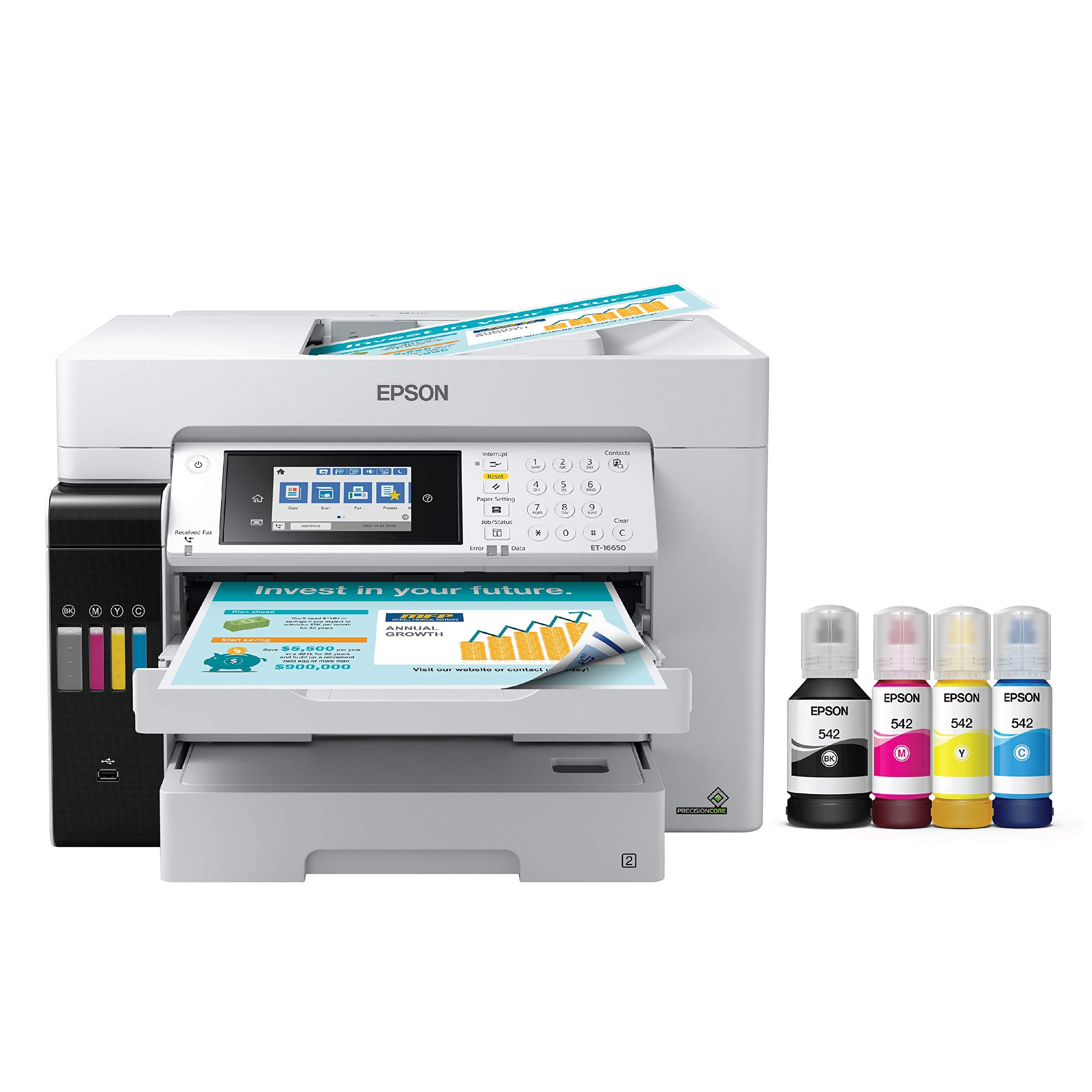
The Epson EcoTank Pro ET-16650 is a wide-format all-in-one that breaks the cartridge cost cycle with refillable ink tanks using high-yield DURABrite pigment ink bottles. With a single set of included bottles printing up to 7,500 black pages or 6,000 color pages, the ET-16650 dramatically lowers the per-print cost compared to cartridge-based competitors, making it an economical engine for a bustling studio that also prints invoices, contracts, and proofs.
Its PrecisionCore Heat-Free printhead delivers print-shop quality at speeds up to 25 ppm for both color and black, with borderless tabloid-size prints at 13×19 inches. The integrated scanner and copier handle up to 11×17-inch originals, and the 500-sheet capacity across two front trays plus a rear specialty feed keeps media changes infrequent during a production run.
The printer is built as a production tool, but initial setup requires careful attention to the ink filling process. Some users have reported printhead failures after a year of heavy use, and the pigment ink, while waterproof and smudge-resistant, does not offer the same archival gamut as dedicated photo-ink systems like UltraChrome. It is a pragmatic choice for the artist who needs fast, low-cost color output on a wide range of media without sacrificing professional print quality.
Why it’s great
- Extremely low cost per page thanks to supertank ink bottle system.
- Fast print speed at 25 ppm with PrecisionCore Heat-Free technology.
- Wide-format scanning and copying up to 11×17 inches integrated.
Good to know
- Pigment ink gamut is narrower than dedicated photo-ink systems.
- Some users report printhead failures after extended heavy use.
- Setup manual lacks comprehensive usage instructions.
8. HP DesignJet T630 24-Inch Plotter

The HP DesignJet T630 upgrades the T210 formula with an integrated automatic sheet feeder, media bin, and stand, creating a more complete turnkey package for the artist or small firm that needs to produce large-format posters, maps, and technical drawings directly out of the box. Its Wi-Fi 802.11 b/g/n and Gigabit Ethernet options provide flexible network integration, and the HP Click software supports error checking and auto-nesting without manual file rearrangement.
Print quality on the T630 is crisp and color-accurate, handling both fine line art and full-color renders with equal precision. The automatic sheet/roll switch allows the printer to draw from either media source without operator intervention, a genuine time-saver when switching between small proofs and large final prints. The integrated stand and media bin keep the workspace tidy and organized.
Setup and maintenance are straightforward, with the HP Smart app providing remote monitoring and job submission. However, the printer is designed purely for print output—no scanning or copying—and the included starter ink cartridges will need replacement sooner than full-size cartridges. While the T630 is a reliable and well-supported plotter for everyday use, artist-buyers should confirm that the color gamut meets their specific needs for vibrant poster work.
Why it’s great
- Includes automatic sheet feeder, media bin, and stand for a complete setup.
- Flexible Wi-Fi and Gigabit Ethernet connectivity options.
- HP Click software auto-nests and error-checks PDFs before printing.
Good to know
- Starter ink cartridges have limited capacity, requiring early replacement.
- Print-only unit; no scanner or copier functionality.
- Some units reported reliability issues requiring replacement under warranty.
9. Epson Artisan 1430 Wireless Printer

The Epson Artisan 1430 has been a stalwart in the scrapbooking and DIY art community for years, offering 13×19-inch borderless printing with a six-color Claria dye ink system that produces vivid, high-gloss results. Its ability to print directly onto inkjet-printable CD/DVDs makes it uniquely suited for artists who produce limited-edition disc media or custom packaging alongside their prints.
Wireless printing from smartphones, iPhones, and tablets adds modern convenience, though initial setup requires a USB cable, and some users report the need for patience when configuring Wi-Fi for the first time. The printer is reported to produce excellent color accuracy, especially when paired with the correct ICC profile and media type, and many users successfully run a Continuous Ink Supply System (CISS) to dramatically lower operating costs.
The Artisan 1430 lacks automatic duplex printing, and the rear paper feed can occasionally misfeed when multi-page jobs are attempted. OEM ink cartridges are expensive and small, but third-party alternatives and CISS kits are widely available and effective. For the budget-conscious artist who needs wide-format color output and disc printing, and is willing to manage a third-party ink solution, the Artisan 1430 remains a surprisingly capable workhorse.
Why it’s great
- Prints directly onto CD/DVD for unique art and packaging projects.
- Produces vibrant 13×19-inch borderless prints with good color accuracy.
- Widely compatible with third-party CISS systems for low-cost printing.
Good to know
- No automatic duplex printing; manual double-sided printing is required.
- OEM ink is expensive; third-party solutions void the warranty.
- Wireless setup can be finicky; initial configuration requires a USB cable.
10. Lancelot M1630 Pro DTF Bundle

The Lancelot M1630 Pro DTF Bundle is a specialized Direct-to-Film printing system designed exclusively for garment decoration, delivering double the speed of the classic L1800/R1390 models. Its patented Holiday Mode auto-cleaning function prevents nozzle clogs during downtime, while the white ink circulation system extends the printhead lifespan by up to 40 percent compared to standard DTG machines—a critical factor for maintaining consistent white ink flow in textile work.
This bundle includes the printer, a curing oven, a laptop preloaded with drivers and RIP software, and a starter set of consumables, creating a complete turnkey setup for small business owners and DIY enthusiasts who want to start printing custom T-shirts without a long technical onboarding. The upgraded film feeding system handles both sheets and rolls, and the auto-cut feature streamlines post-print processing.
The DTF workflow requires a learning curve, especially for color calibration and achieving perfect white ink opacity. The included laptop is pre-configured for the printer, but the lack of a printed manual means beginners rely heavily on the Lancelot tech support team, which users report as responsive and helpful. For the artist looking to build a garment business, this bundle removes the guesswork from sourcing individual components.
Why it’s great
- Complete bundle with printer, oven, laptop, and consumables for immediate use.
- Holiday Mode auto-cleaning prevents clogs, ideal for intermittent use.
- White ink circulation system extends printhead life significantly.
Good to know
- DTF process has a moderate learning curve for color calibration.
- No printed manual included; support is via phone app and remote.
- Not compatible with Mac; Windows 7/10/11 only.
11. DSV A3 F1080 DTF Printer
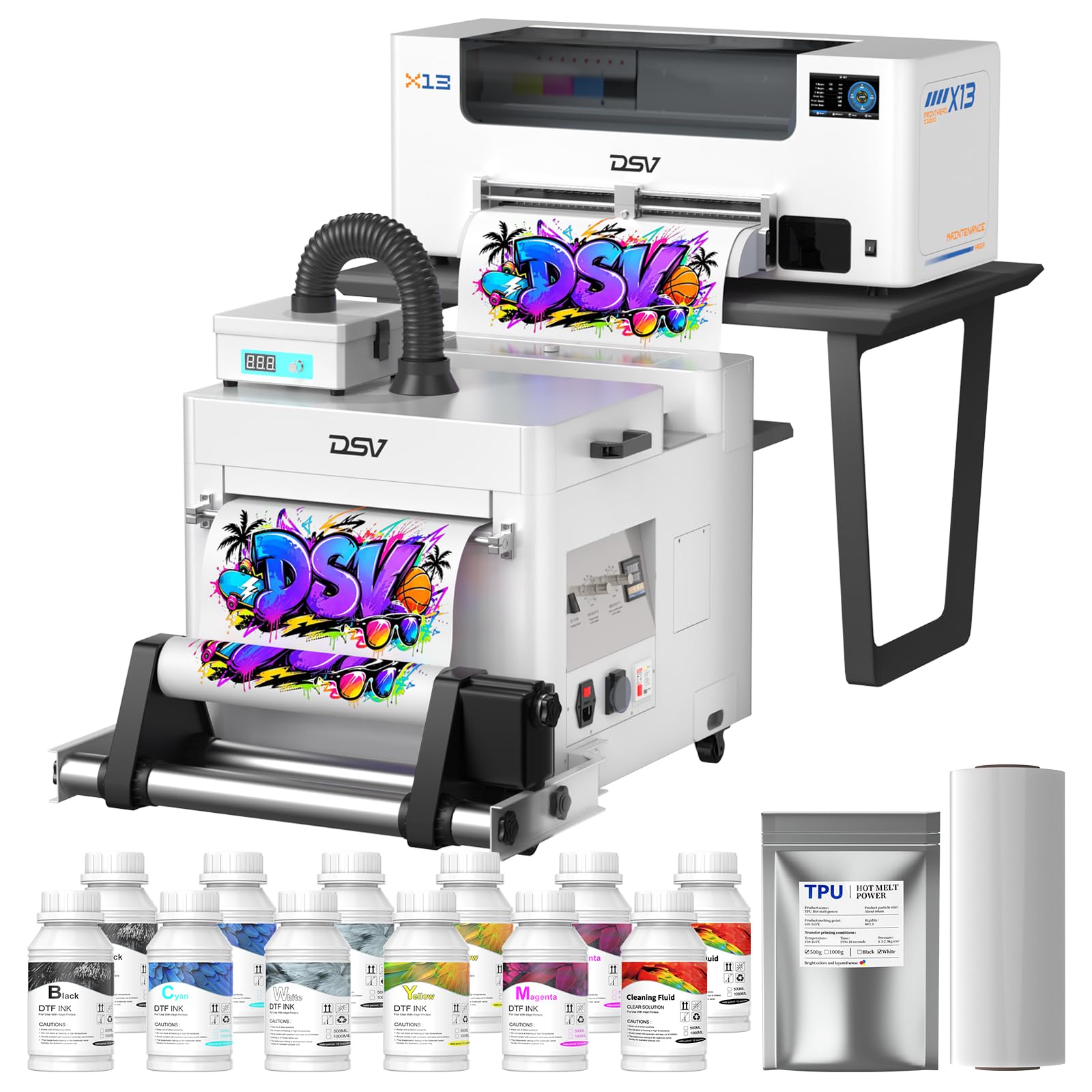
The DSV X13 DTF printer offers a unique value proposition for the serious garment printing startup: a two-year ink supply delivered in installments, with new ink bottles and powder arriving every two months at only the cost of shipping. This eliminates one of the biggest operational uncertainties for a new small business and allows the artist to focus on design and production rather than consumable budget planning.
Powered by a high-performance F1080 printhead, the X13 completes an A3 print in three minutes, doubling the speed of the L1800/XP600 architecture. Its smart timed printhead self-cleaning function, adjustable via a 5-inch LED touch panel, keeps the nozzles functioning during idle periods, and the dual alarm system alerts the user to low ink and waste ink overflow before they cause production stops.
The 2880 x 1440 dpi resolution produces vibrant colors and crisp details on DTF film, with a 13-inch (33cm) printing area that handles larger garment designs. The build is solid, and the included powder shaker, dryer, and purifier complete the workflow. Some technical support is required for initial setup, but the DSV team is reported to be responsive via WhatsApp. The main risk is the niche nature of DTF itself—this printer is for garment decoration exclusively, not general art printing.
Why it’s great
- Two-year ink and powder supply subscription with minimal shipping cost.
- Electrically operated paper pressing roller for quick and secure film loading.
- Dual alarm system for low ink and waste ink overflow prevention.
Good to know
- Exclusively for DTF garment transfer; not suitable for paper or photo printing.
- Requires one-on-one tech support for initial setup via WhatsApp.
- The ink subscription locks the user into the DSV consumable ecosystem.
FAQ
Can I use any ink brand in an art printer, or do I need the manufacturer’s original cartridges?
What is the difference between dye-based and pigment-based ink in the context of fine art prints?
Is a printer with six colors enough, or do I need ten or more for professional work?
How often should I run maintenance cycles on a pigment ink art printer to prevent clogging?
What type of paper should I buy for an art printer to get gallery-quality output?
Final Thoughts: The Verdict
For most users, the best art printer winner is the Epson SureColor P900 because it delivers 17-inch wide archival prints with a 10-channel ink system that eliminates black switching, all within a compact studio-friendly chassis. If you want the widest color gamut and best gloss uniformity for fine art and photography, grab the Canon imagePROGRAF PRO-1100. And for large-format posters, technical drawings, or sewing patterns with minimal hassle, nothing beats the value of the Canon imagePROGRAF TC-21.