
The right choice means your system stays cool under sustained load, accommodates oversized radiators and GPUs, and offers a straightforward building experience without cable management headaches.
I’m Min — the co-founder and writer behind Gadgets Feed. With hundreds of hours invested in analyzing PC chassis designs, airflow engineering, and thermal test data, I’ve broken down what separates a capable full tower from a cramped compromise.
This guide walks through nine of the strongest contenders for the best atx full tower case, covering real-world thermal performance, build quality, and cable management to match your next workstation or gaming rig.
How To Choose The Best ATX Full Tower Case
A full tower’s defining advantage over mid-towers is internal volume — more room for longer GPUs, thicker radiators, and multiple drive arrays. But raw size alone doesn’t guarantee good thermals or an easy build. Focus on three areas: cooling capacity, motherboard and GPU clearance, and cable management provisions. The case’s airflow path matters more than fan count — look for unobstructed front-to-rear paths and dust-filtered intakes. Radiator support should match your cooling ambitions: a 360mm or 420mm front or top mount is standard for high-end full towers.
Cooling and Radiator Compatibility
Full towers typically support 360mm or 420mm radiators in multiple locations — front, top, and sometimes side or bottom. This flexibility is critical if you plan a custom water loop or a large AIO cooler. The case’s fan hub or PWM repeater simplifies cable management for multiple fans. Check clearance for thick radiators (up to 60mm) alongside push-pull fan configurations, which can clash with tall RAM or motherboard VRM heatsinks.
Motherboard Form Factor and GPU Clearance
While the keyword focuses on ATX, many full towers accommodate E-ATX and SSI-EEB boards. Ensure the case’s motherboard tray cutout aligns with your board’s mounting holes — some E-ATX boards overhang cable routing grommets. GPU clearance of 400mm or more is standard, but vertical GPU mounts and anti-sag brackets vary by case. If you use a vertical mount, verify the included riser cable and its PCIe generation support.
Cable Management Depth and Drive Bays
A full tower should offer at least 25mm of space behind the motherboard tray for cable routing. Hinged or tool-less side panels greatly improve access. Drive bay counts vary: some cases prioritize 3.5-inch HDD cages for storage, while others focus on 2.5-inch SSD mounts. Removable drive cages free up space for large PSUs and simplify cable routing. Built-in velcro straps and pre-routed channels are hallmarks of a well-designed chassis.
Quick Comparison
On smaller screens, swipe sideways to see the full table.
| Model | Category | Best For | Key Spec | Amazon |
|---|---|---|---|---|
| Antec Performance 1 FT | Full Tower | Beginner-friendly building | Included Storm T3 140mm PWM fans | Amazon |
| ASUS TUF Gaming GT502 | Dual Chamber | Showcase builds and airflow separation | Dual-chamber design with 13+ fan support | Amazon |
| Thermaltake CTE C750 Air | Full Tower | Massive airflow and 420mm rad support | 14x 140mm fan capacity | Amazon |
| Fractal Design Meshify 2 XL | Full Tower | High airflow with dual-layout interior | 480mm radiator support | Amazon |
| Fractal Design Define 7 XL | Silent Tower | Noise-dampened NAS or workstation | Brushed aluminum front with 18 HDD support | Amazon |
| be quiet! Light Base 900 FX | Showcase Tower | Invertible dual-chamber with ARGB | 4x Light Wings 140mm PWM fans | Amazon |
| CORSAIR 7000D Airflow | Full Tower | Extreme cooling with RapidRoute cable mgmt | 3x simultaneous 360mm radiators | Amazon |
| ASUS ProArt PA602 | Workstation Tower | Creator builds with dust monitoring | Dual 200x38mm front fans | Amazon |
| Cooler Master HAF 700 | Performance Tower | Maximum air cooling and tool-less design | Dual 200mm Sickleflow ARGB fans | Amazon |
In‑Depth Reviews
1. Antec Performance 1 FT

The Antec Performance 1 FT strikes an excellent balance between features and cost, making it a standout choice for first-time builders and experienced enthusiasts alike. Included are four Storm T3 140mm PWM fans, which deliver strong airflow out of the box — no need to immediately swap fans for decent thermals. The case also features a built-in temperature display on the front panel and dual 4mm tempered glass side panels for showcasing components.
Cable management is well-addressed with rubber-grommeted routing holes and two included cable covers that neatly hide wiring behind the motherboard tray. The case supports top-mounted 360mm AIOs without clearance issues, and GPU clearance of 370mm accommodates the largest current cards. Owners report GPU temperature drops of 10 degrees Celsius or more compared to previous mid-tower cases, thanks to the unrestricted mesh front panel and 140mm intake fans.
The included iUnity software requires Windows for the LED display — Linux users will need community workarounds. The magnetic front grille feels slightly loose, and the pre-installed fans lack RGB, which may be a downside for RGB-focused builders. But for pure thermal performance and build ease at this tier, the Performance 1 FT is hard to beat.
Why it’s great
- Excellent out-of-box cooling with 140mm PWM fans
- Easy cable management with cover plates and velcro ties
- Temperature display and 10Gbps USB-C front port
Good to know
- LED display software is Windows-only
- Included fans are non-RGB
- Magnetic front grille lacks a firm latch
2. ASUS TUF Gaming GT502

The ASUS TUF Gaming GT502 adopts a dual-chamber layout that separates the motherboard and GPU zone from the PSU and drive area, enabling independent cooling paths and a cleaner front chamber. The case supports up to 13 fans total — with room for 10 standard case fans plus three on the AIO — making it one of the most fan-capable mid/full tower hybrids available. The included vertical GPU mount and anti-sag bracket add versatility for showcase-oriented builds.
Build quality is robust, with thick steel panels and a tinted tempered glass front and side that creates a panoramic view of the main chamber. Tool-free side panels release via a hidden button on the rear, simplifying access during assembly. Heavy-duty velcro straps on the chassis double as carry handles — a practical touch for LAN party attendees or frequent system movers. The front panel I/O includes USB 3.2 Gen 2 Type-C and an RGB control button for Aura Sync-compatible components.
While the GT502 is marketed as a mid tower, its footprint rivals many full towers. Cable management is generally clean thanks to the dual-chamber separation, though the rear chamber can get cramped with all fan wiring. The case lacks a built-in fan hub, so a separate PWM hub is recommended for builds with more than six fans. Owners with large air coolers above 165mm should double-check clearance against the glass side panel.
Why it’s great
- Dual-chamber design with tool-free glass panels
- Supports vertical or horizontal GPU mounting
- Velcro carry handles for transport
Good to know
- No included fan hub
- Rear chamber gets tight with many cables
- Large air coolers may contact side glass
3. Thermaltake CTE C750 Air
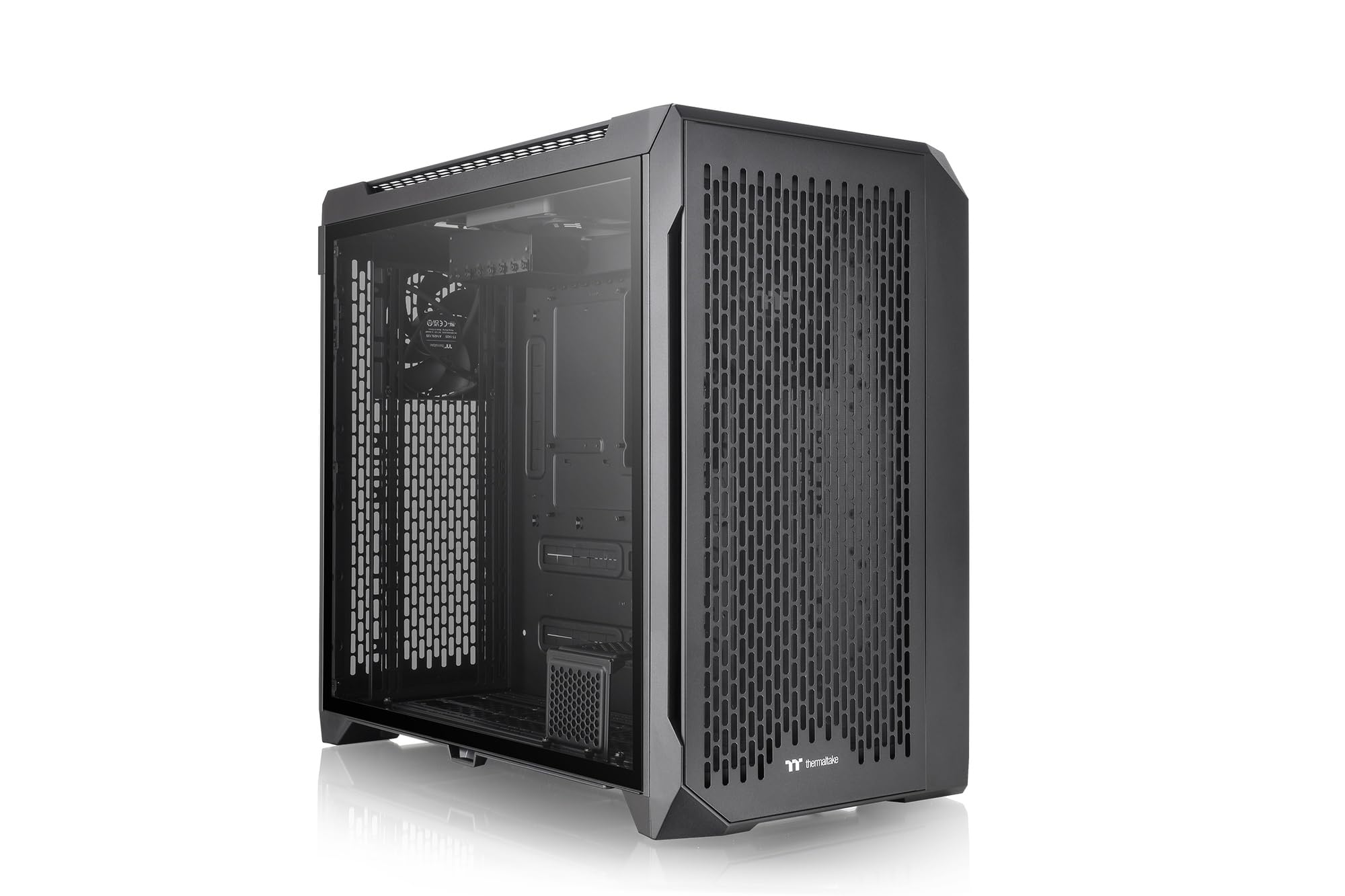
Thermaltake’s CTE (Centralized Thermal Efficiency) form factor reorients the motherboard tray and component layout to maximize airflow across critical parts. The CTE C750 Air is the largest chassis in this series, supporting up to fourteen 140mm fans and 420mm radiators in multiple positions. The case ships with three CT140 PWM fans, which Thermaltake claims are their best-performing case fans to date.
Dust filtration is comprehensive — fine removable mesh covers the top, front, bottom, rear, and right side panels — making it easy to maintain clean internals. The rotational PCI-E slots allow horizontal or vertical GPU mounting without an additional bracket. For high-air builds, the C750 Air keeps CPU and GPU temperatures under 50 degrees Celsius during extended gaming sessions, as verified by owners running top-tier hardware like the AMD 7800X3D and RTX 4080 Super.
The sheer size of the C750 Air is its main trade-off: at over 20 inches deep and tall, it demands a spacious desk or floor area. The case does not include a PCIe riser cable for vertical GPU mounting, which is a notable omission given that the feature is promoted in marketing. Owners report that GPU installation can require patience due to tight clearance near the rotational bracket mechanism.
Why it’s great
- Unmatched fan capacity: 14x 140mm fans
- Full dust filter coverage on all intake sides
- Rotational PCI-E slots for flexible GPU orientation
Good to know
- Very large footprint requires ample space
- No PCIe riser cable included for vertical mount
- Rotational bracket can complicate GPU installation
4. Fractal Design Meshify 2 XL

The Meshify 2 XL from Fractal Design builds on the iconic angular mesh aesthetic while delivering a dual-layout interior. In its default Storage Layout, the case accommodates up to 18 HDDs and 5 SSDs — ideal for NAS or media server builds. Switching to the Open Layout removes the drive cage structure to free up space for custom water loops with radiators up to 480mm in the front or top, supporting 140mm fans in nine positions or 120mm fans in eleven positions.
Build quality is a hallmark of Fractal Design, with thick steel panels, a clear tempered glass side panel, and integrated dust filters on all intakes. The case opens on three sides — both side panels and the top — allowing full access during assembly. Cable management is well-planned with ample routing channels, velcro straps, and a hinged PSU cover. GPU clearance is generous, easily swallowing RTX 4090-class cards with room to spare for front radiators.
The included GP-14 fans are 3-pin non-PWM models, which limits fine-grained speed control. The drive cage must be removed for PSU cable routing in the default layout. Some owners note noise levels can be a bit high with the stock fans, though swapping to Noctua or Arctic fans resolves this. The Meshify 2 XL remains one of the most flexible full towers for those who want both massive storage and high airflow.
Why it’s great
- Dual-layout interior: storage or open water cooling
- Supports 480mm radiators and up to 18 HDDs
- Excellent build quality with tool-less panels
Good to know
- Stock fans are 3-pin, non-PWM
- Drive cage must be removed for PSU access
- Noise levels higher with stock configuration
5. Fractal Design Define 7 XL
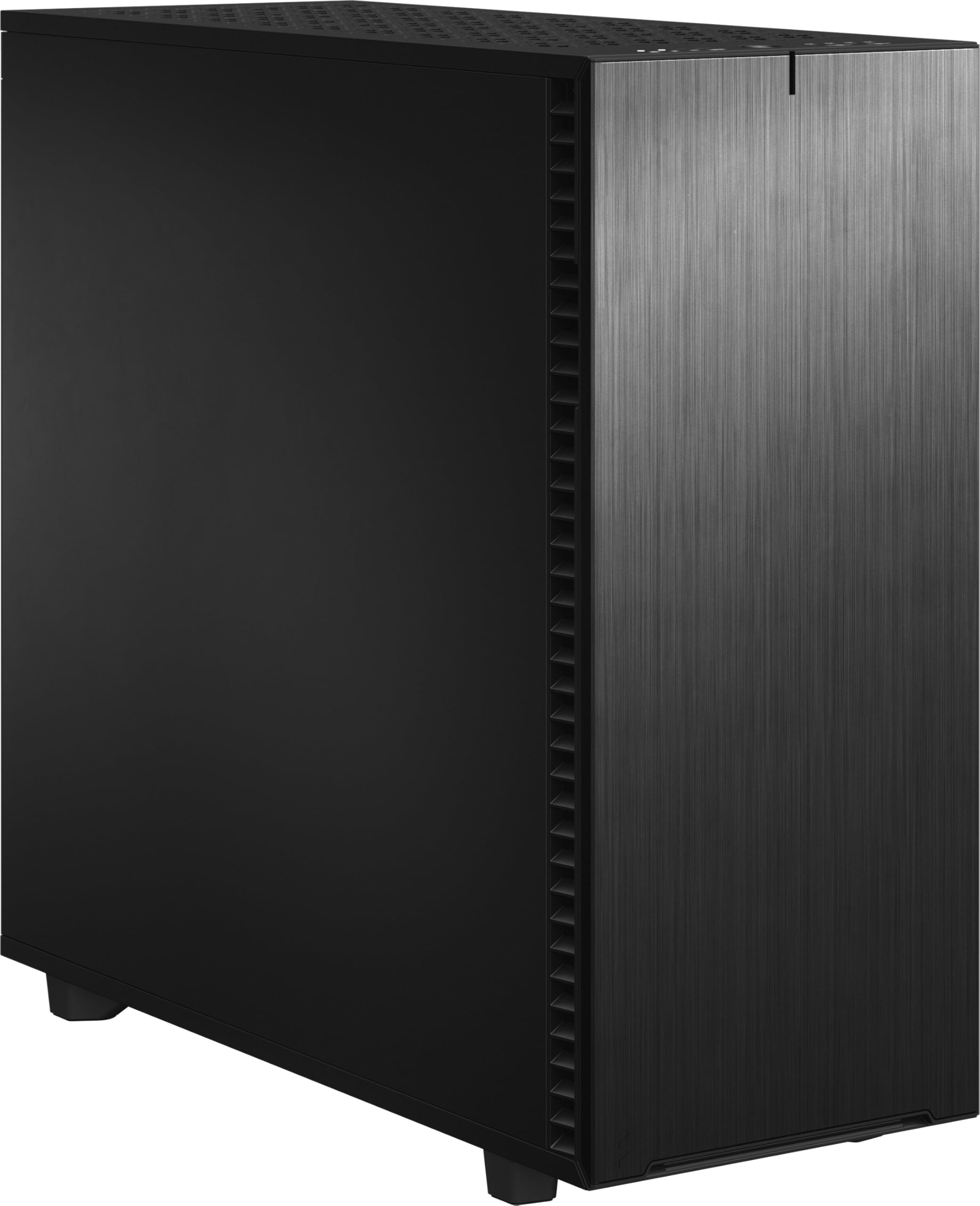
The Define 7 XL is Fractal Design’s flagship silent-capable full tower, featuring a brushed aluminum front panel and sound-dampening material on the side panels and top cover. It supports up to E-ATX and SSI-EEB motherboards, making it suitable for dual-socket workstation builds. The case ships with three 140mm Dynamic X2 fans that run quietly while pushing sufficient airflow for most configurations.
Storage capacity is extraordinary: in the default Storage Layout, the case holds up to 18 HDDs and 5 SSDs, supported by versatile multi-brackets that convert unused fan positions into drive or pump mounts. The interior is highly modular — the entire motherboard tray, PSU shroud, and drive cage structure can be reconfigured between Storage and Open layouts. Cable management is facilitated by rubber-grommeted channels, velcro ties, and over 25mm of routing depth behind the tray.
The Define 7 XL’s emphasis on silence comes with a minor trade-off in maximum airflow compared to fully mesh cases like the Meshify 2 XL. The top panel can be swapped between a solid cover and a ventilated mesh cover depending on your cooling needs. Owners building servers and NAS units appreciate the tool-less HDD mounts and well-labeled mounting points, though the case is very heavy at over 22 pounds empty. One front fan has been reported to fail after extended use in some units.
Why it’s great
- Exceptional noise dampening for quiet operation
- Massive storage capacity: 18 HDDs + 5 SSDs
- Modular interior with brushed aluminum front finish
Good to know
- Heavy — over 22 pounds empty
- Slightly restricted airflow vs. full mesh cases
- Top radiator clearance tight with tall motherboard components
6. be quiet! Light Base 900 FX
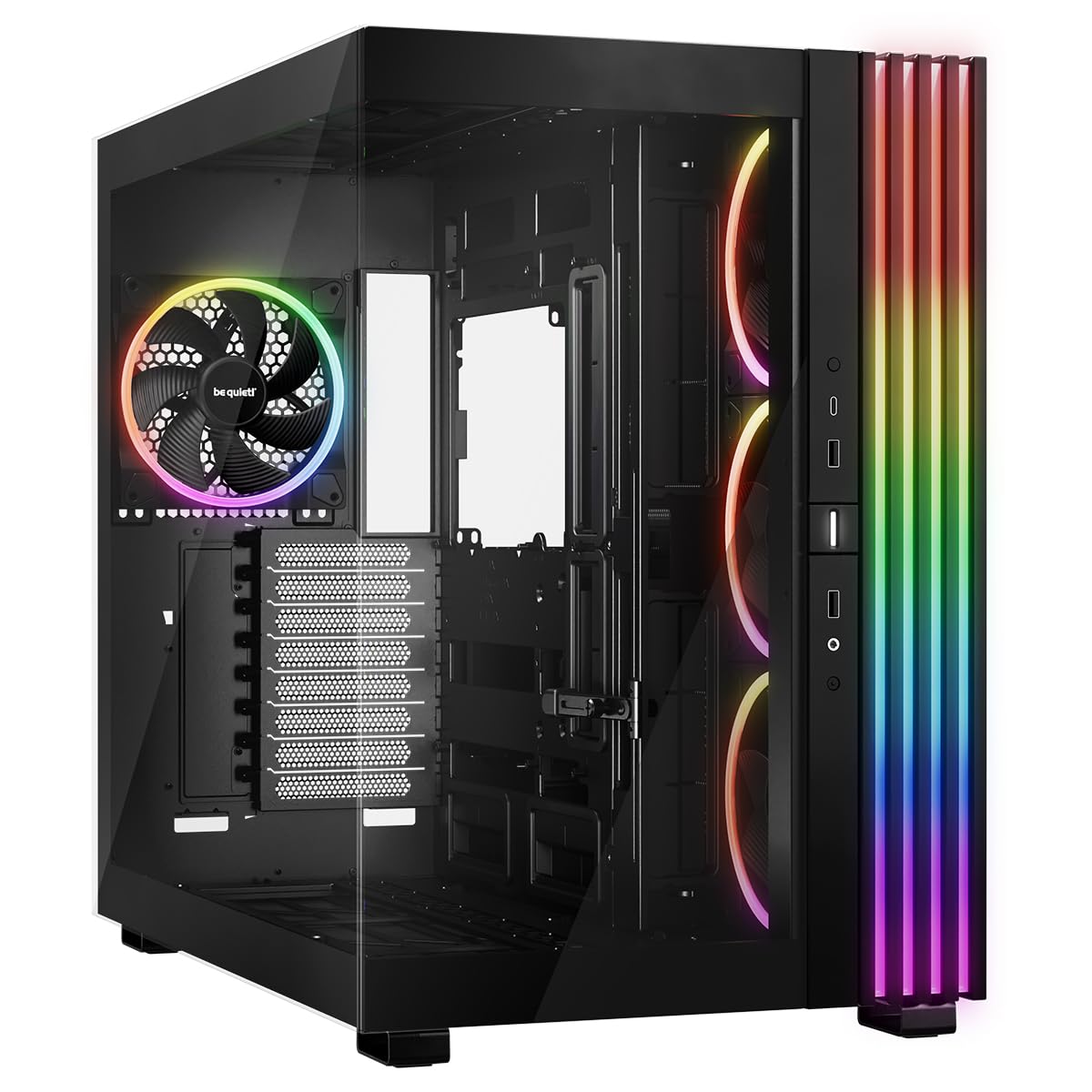
be quiet! enters the showcase case segment with the Light Base 900 FX, a dual-chamber full tower that can be inverted or placed horizontally by repositioning its removable feet. The front and side panels are fully windowed, providing a panoramic view of the main chamber. Four Light Wings 140mm PWM fans are pre-installed — three on the side with inverted blades for improved airflow, and one rear exhaust — all featuring ARGB lighting controlled via a built-in hub with 12 ports.
The dual-chamber layout separates the motherboard and GPU from the PSU and drives, enabling clean builds with strong airflow. The case supports up to 10 fans total, two 420mm radiators, and a side 360mm radiator simultaneously. Backside connector motherboard compatibility is included for ASUS BTF, MSI Project Zero, and Gigabyte Project Stealth designs. A flexible GPU holder works in both horizontal and vertical orientations, preventing sag on heavy cards.
While the Light Base 900 FX offers unmatched layout flexibility, its cable management space is more limited than some competitors due to the dual-chamber design — routing all fan and hub cables in the rear chamber can be tight. The bottom dust filter requires tilting this heavy case for cleaning, which is inconvenient. The massive ARGB LED strip around the perimeter is visually impressive but may be too flashy for users seeking a subdued look.
Why it’s great
- Invertible and horizontal layout support
- Fully windowed front and side for showcase builds
- Supports dual 420mm radiators and backside connector motherboards
Good to know
- Cable management space in rear chamber is limited
- Bottom filter hard to clean without tilting
- Large ARGB strip may appear gaudy to some
7. CORSAIR 7000D Airflow

The CORSAIR 7000D Airflow is engineered for extreme cooling configurations, supporting up to three simultaneous 360mm radiators or two 420mm radiators. The high-airflow steel front panel offers maximum porosity for unrestricted intake, and three included 140mm AirGuide fans utilize anti-vortex vanes to direct airflow precisely. A built-in PWM fan repeater simplifies fan management for multiple cooling devices.
The CORSAIR RapidRoute cable management system is a standout feature — a hinged door on the motherboard side hides a single wide channel for routing all major cables, and the case provides 30mm of clearance behind the tray. The interior accommodates up to 12x 120mm or 7x 140mm fans, giving builders immense flexibility for custom loops. GPU clearance is generous for the longest cards, and the hinged tempered glass side panel offers easy access without tools.
The 7000D Airflow is massive and heavy at over 41 pounds, requiring careful planning for desk or floor placement. The cable channel, while spacious, can become cramped when using multiple GPU power cables alongside thick fan wire bundles. Some owners note that the SSD mounting trays on the back of the motherboard tray may interfere with side fan installation. The price positions it firmly in the premium segment, but the thermal headroom and build quality justify the investment for high-performance systems.
Why it’s great
- Remarkable radiator support: 3x 360mm or 2x 420mm
- RapidRoute cable channel with 30mm clearance
- PWM repeater and high-airflow front panel
Good to know
- Very heavy — over 41 pounds empty
- SSD mounts may interfere with side fans
- Premium price point
8. ASUS ProArt PA602

The ASUS ProArt PA602 is uniquely tailored for creative professionals who need a powerful workstation without flashy RGB. The front panel grill achieves 45% porosity, and the case ships with two extra-thick 200x38mm front fans and a 140mm rear exhaust — delivering massive airflow at low noise levels. Two internal deflectors direct incoming air toward the motherboard and GPU for optimized temperatures. A front panel IR dust indicator provides timely reminders to clean the filter.
The case supports 420mm radiators and offers ample room for the largest E-ATX motherboards and multi-GPU configurations. The PCIe mounting is tool-less, and a built-in GPU holder prevents sag. The front I/O includes a USB Type-C 20Gbps port, and the Power Lock latch secures the panel. Build quality is excellent, with a mix of alloy steel and tempered glass, and the case includes integrated handles and casters for easy movement — a practical touch for heavy workstation builds.
The PA602’s professional aesthetic may be too plain for gamers seeking RGB showcases. The 2.5-inch drive bays require reverse 90-degree SATA cables due to tight clearance — a minor but notable inconvenience. The large front fans, while quiet and powerful, may not be replaceable with standard 120mm or 140mm fans if they fail. Owners report that installing top radiator fans is best done before mounting the CPU cooler due to space constraints near the motherboard VRM area.
Why it’s great
- Dual thick 200mm fans for quiet, powerful airflow
- IR dust indicator and tool-less PCIe mounting
- Integrated handles and casters for workstation mobility
Good to know
- 2.5″ bays need reverse 90-degree SATA cables
- Large front fans are non-standard size
- Plan top radiator installation before CPU mounting
9. Cooler Master HAF 700

The Cooler Master HAF 700 is the latest iteration of the legendary High Air Flow series, designed to maximize cooling efficiency through brute-force airflow and extensive tool-less access. The case supports up to eighteen 120mm fans or a combination of dual 360mm and 480mm radiators. It ships with dual 200mm Sickleflow ARGB fans in the front and a 120mm rear fan, with ARGB Gen 2 support for independent LED control per fan.
The tool-less design philosophy extends to every major panel — side panels, front mesh, top cover, and drive bays can all be removed without tools. The front mesh panel is easily detachable for fan cleaning. Cable management is well-organized with multiple channels and compartments for hiding wires, though the sheer number of fan cables in a high-fan-count build requires careful planning. Thermals are exceptional: owners report Ryzen 9 5900X idle temperatures around 35-40 degrees Celsius and full-load under 60 degrees Celsius with adequate cooling.
The HAF 700’s front LCD screen can display system stats or custom GIFs, but it is prone to glitching — reports of the screen going black requiring a software reset (via Cooler Master Master Plus) are common. The GPU clearance is spacious but very thick cards may still have clearance issues near the front 200mm fans. The PSU mounting area hides the power supply’s built-in display (common on premium units like the ASUS ROG Thor 1200W) behind a divider, which is a design oversight for showcase builds.
Why it’s great
- Extreme fan support: 18x 120mm fans
- Tool-less panel and drive bay access
- ARGB Gen 2 with independent LED control
Good to know
- Front LCD screen has glitching issues
- PSU divider hides premium PSU displays
- Very thick GPUs may still have clearance concerns
FAQ
What GPU length can a full tower case typically accommodate?
Do all full tower cases support E-ATX motherboards?
What is the difference between a dual-chamber and a traditional full tower?
Final Thoughts: The Verdict
For most users, the best atx full tower case winner is the Antec Performance 1 FT because it delivers strong out-of-box cooling, intuitive cable management, and solid build quality at a competitive price point. If you want a silent workstation with massive storage capacity, grab the Fractal Design Define 7 XL. And for extreme air cooling with tool-less design and brute-force airflow, nothing beats the Cooler Master HAF 700.