
That persistent background hiss, the crackling static when you move your mouse, and the thin, lifeless sound from your laptop’s headphone jack are not just annoying — they are clear signs your internal audio circuitry is letting electrical noise corrupt your listening experience. A dedicated USB audio interface bypasses that noisy motherboard path entirely, giving you clean, isolated conversion.
I’m Min — the co-founder and writer behind Gadgets Feed. I’ve spent countless hours breaking down the real-world performance of USB audio interfaces by cross-referencing core technical specs like sample rate, bit depth, preamp SNR, and driver stability against verified user experiences to separate genuine upgrades from mere dongles.
Whether you are hunting for cleaner output for studio monitors, a reliable way to drive high-impedance headphones, or a simple method to add optical output to your PC, this guide to the best audio usb sound card options will help you make an informed decision based on what actually matters for your setup.
How To Choose The Best Audio USB Sound Card
Your choice depends entirely on what you are trying to connect. A simple USB dongle with a 3.5mm jack is fine for desktop speakers, but it will fail to power a Shure SM57 or deliver line-level output to studio monitors. Match the interface to your gear, not the other way around.
Input and Output Requirements
The biggest mistake buyers make is ignoring the type of microphone or instrument they own. Dynamic microphones (like an SM58) require a lot of clean gain, typically 50 dB or more from the preamp. Condenser microphones need 48V phantom power. Electric guitars need a Hi-Z instrument input with a 1/4-inch jack. If your USB sound card lacks any of these, it simply will not work with that gear.
Sample Rate and Bit Depth
Almost every modern USB sound card handles 24-bit audio at 96 kHz or 192 kHz. These specs look impressive on paper, but 24-bit/44.1 kHz already exceeds the resolving power of human hearing. The real bottleneck is the DAC chip’s dynamic range and the preamp’s noise floor, not whether the converter can hit 192 kHz. A high sample rate matters mostly for pitch-shifting post-production, not for listening to Spotify.
Driver Ecosystem and Latency
Windows users must prioritize ASIO (Audio Stream Input/Output) driver support. Without ASIO, you will experience noticeable lag — 20 to 40 milliseconds — between playing a note and hearing it through your DAW. Mac users can rely on Core Audio’s class-compliant drivers, which are generally rock-solid with zero-configuration. Always check recent Windows 11 user reviews for driver stability on any interface you consider.
Quick Comparison
On smaller screens, swipe sideways to see the full table.
| Model | Category | Best For | Key Spec | Amazon |
|---|---|---|---|---|
| Focusrite Scarlett Solo 3rd Gen | Premium Interface | Prosumer Recording & Playback | 24-bit / 192 kHz; Air mode on preamp | Amazon |
| Universal Audio Volt 1 | Premium Interface | Vintage Tone Emulation | 24-bit / 192 kHz; 610 tube preamp mode | Amazon |
| MAONO PS22 Lite | Mid-Range Interface | Streaming & Podcasting | 24-bit / 192 kHz; LOOPBACK routing | Amazon |
| Mackie Onyx Artist 1X2 | Mid-Range Interface | MIDI & Studio Monitoring | 24-bit / 192 kHz; Onyx mic preamp | Amazon |
| IK Multimedia iRig USB | Specialist Interface | Portable Guitar Practice | 24-bit / 48 kHz; Amp Out with FX/THRU | Amazon |
| StarTech.com USB Sound Card | Budget Adapter | SPDIF Output & Stereo Mic | 24-bit / 96 kHz; SPDIF with AC3 pass-through | Amazon |
| Vantec USB 7.1 Adapter | Budget Adapter | Surround Sound via SPDIF | 48 / 44.1 kHz; SPDIF optical I/O | Amazon |
In‑Depth Reviews
1. Focusrite Scarlett Solo 3rd Gen

The Scarlett Solo 3rd Gen is the benchmark against which all other budget-friendly interfaces are measured, and for good reason. Its proprietary mic preamp delivers +56 dB of clean gain with switchable Air mode, which engages an analog EQ shelf to add clarity to dynamic and ribbon microphones. The 24-bit/192 kHz converters provide more headroom than any home studio strictly needs, but the real-world benefit is low-noise playback free from onboard motherboard interference.
The Gain Halo metering system around the input knob changes color as your signal approaches 0 dBFS, making it nearly impossible to clip accidentally. Both the instrument input and the XLR input handle high-headroom signals without distortion, and the two balanced line outputs are genuinely quiet — ideal for driving active studio monitors like the KRK Rokit series. Focusrite includes a generous software bundle with Ableton Live Lite, Pro Tools First, and the Hitmaker Expansion.
Its all-metal chassis has survived verified three-year daily-use reports without degradation. The USB-C connection is bus-powered, though you may want a powered hub if connecting to an older USB-A port on a desktop. If you need a single XLR and a single instrument input with professional-grade conversion, this remains the safest recommendation.
Why it’s great
- Switchable Air mode adds noticeable top-end clarity to mics
- Gain Halo LEDs prevent clipping without a dedicated app
- Balanced TRS outputs eliminate ground-loop noise
Good to know
- Only one XLR input limits stereo mic recording
- Requires Focusrite Control app for advanced routing on Windows
2. Universal Audio Volt 1

The Volt 1 distinguishes itself with a Vintage mode that emulates UA’s iconic 610 tube preamp circuit, adding pleasant harmonic saturation rather than harsh digital clipping when you push the gain. This is not a gimmick — it genuinely softens transients on vocals and acoustic guitars, producing a recorded sound that feels warmer than the Scarlett’s clinical transparency. The 24-bit/192 kHz converters are crystal clear, and the signal-to-noise ratio on the preamp measures competitively against interfaces costing double.
Full-size MIDI I/O on the back panel is a rare find at this price range, making the Volt 1 a practical hub for connecting keyboard controllers or drum machines alongside your mic. The built-in LUNA DAW integration is deep: the interface can control LUNA’s transport and monitoring functions directly, which speeds up workflow for users inside the UA ecosystem. Real-time zero-latency monitoring is handled by a dedicated blend knob on the front panel.
Note that the Volt 1 requires external power via USB-C for full operation with iPhones and iPads, though most desktop USB ports supply enough current. The bundled software stack — Ableton Live Lite, Melodyne Essential, and UAD Spark plugins — adds genuine value for beginners. For musicians who want character in their recordings from the conversion stage itself, the Volt 1 is the pick.
Why it’s great
- Vintage 610 mode adds tube-like saturation without external hardware
- MIDI I/O included, rare for this interface tier
- LUNA DAW integration for tape-style workflow
Good to know
- Gain knob needs to be turned high for low-output dynamic mics
- No software mixer for DSP effects in real-time
3. MAONO PS22 Lite

The PS22 Lite punches well above its class by including ProStudio Routing Software with LOOPBACK functionality — a feature normally reserved for interfaces twice its price. This allows streamers and podcasters to mix computer audio (game sounds, system notifications) with their microphone feed into a single virtual channel for OBS or Zoom. The unit handles 24-bit/192 kHz recording with a 106 dB dynamic range, which translates to a noise floor low enough for spoken-word content and acoustic instrument capture.
The dual input section includes a balanced XLR/TRS combo jack with +48V phantom power delivering up to 56 dB of gain, plus a dedicated 1/4-inch instrument input with adjustable impedance. Users report consistent, crackle-free performance when connecting directly via USB-C to a powered port, though some initial units required driver reinstallation to eliminate pops. The dynamic light ring on the front gives visual feedback of signal presence and clip warnings.
Build quality is lightweight plastic rather than metal, which keeps the weight under half a kilogram but does not inspire the same confidence as the Focusrite or UA chassis. The side-mounted headphone output and direct monitoring switch keep cable clutter off the front panel. For streamers who need internal routing without paying for a GoXLR, this is the most practical entry point.
Why it’s great
- LOOPBACK routing built into free software for streamers
- 48V phantom power with 56 dB clean gain
- USB-C connection works with iPad and Android devices
Good to know
- Plastic enclosure feels less durable than metal alternatives
- ASIO driver may need manual reinstall after OS updates
4. Mackie Onyx Artist 1X2
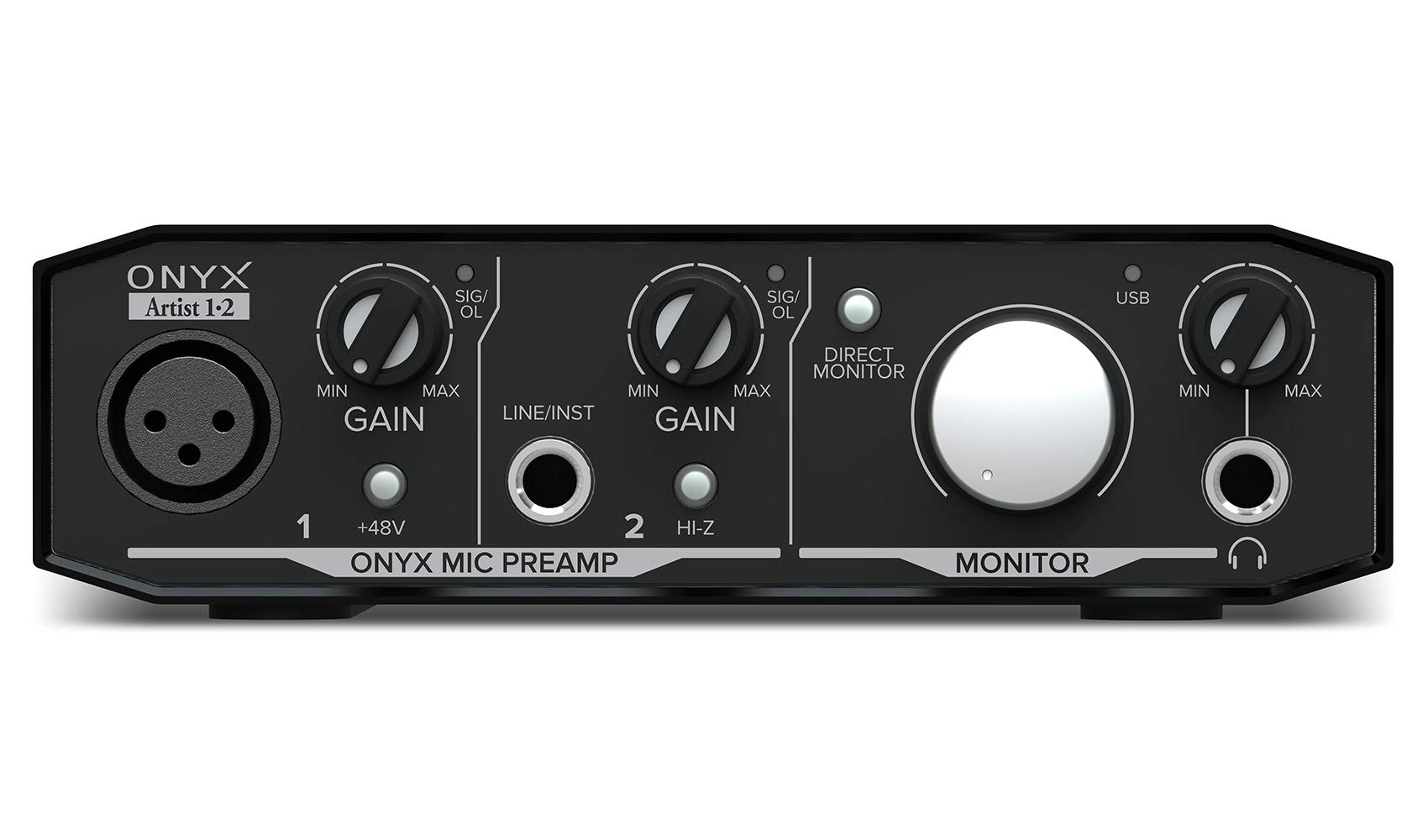
Mackie’s Onyx preamp architecture is the defining feature of the Artist 1X2, delivering extremely low noise and high headroom that competes with units costing more. At 24-bit/192 kHz resolution, the ADC captures transients with clarity that reveals microphone detail previously masked by cheaper converters. The aluminum casing and metal knobs give it a weight and rigidity that survive the kind of drops common in mobile recording bags.
The unit includes full-size MIDI I/O — matching the UA Volt 1 — which is critical for users connecting hardware synthesizers or drum machines without a separate MIDI interface. The direct monitoring switch allows zero-latency monitoring of the analog input, while the dedicated headphone output is powered by a separate amplifier circuit that drives 32-ohm headphones like the Beyerdynamic DT 770 with authority. Users consistently praise the stability of the ASIO drivers on Windows 10 and 11.
One quirk: the gain knob ramps volume very sharply in the last 20% of its rotation, making fine adjustments near the top tricky. The bundled Pro Tools First software is a nice addition, but most users will gravitate toward Reaper or Ableton. For studio recording with a single XLR mic and a MIDI controller, the Mackie Onyx offers preamp quality that punches far above its placement in the lineup.
Why it’s great
- Onyx preamp offers excellent noise floor and dynamic range
- MIDI I/O included for synthesizer integration
- Rugged metal build withstands daily travel
Good to know
- Gain taper is non-linear with a steep climb at the end
- Headphone output is labeled but not color-coded on the front
5. IK Multimedia iRig USB

The iRig USB is laser-focused on electric guitar and bass players who need a USB-C bridge to their computer, iPad, or iPhone 15 for real-time amp simulation. Its single 1/4-inch instrument input captures at 24-bit/48 kHz — lower than the 192 kHz competitors, but entirely sufficient for guitar recording where the tone-shaping occurs in the software, not the conversion rate. The key differentiator is the Amp Out jack: a dedicated 1/4-inch output that can be set to FX (processed signal from AmpliTube) or THRU (direct dry signal) to feed a physical pedalboard or stage amp.
The bundled AmpliTube 5 software provides a massive library of amp models and effects that run at near-zero latency thanks to the ASIO driver optimization. Users report reliable plug-and-play behavior with GarageBand, Logic Pro, and Ableton Live on both Mac and Windows. The compact plastic housing weighs just 1.9 ounces and fits into a guitar case accessory pocket without adding noticeable bulk.
This is not a general-purpose interface — it has no XLR input, no phantom power, and no line-level outputs for studio monitors. It is designed strictly for instrument-to-computer connectivity. If your goal is silent practice with backing tracks or direct recording of DI guitar signals, the iRig USB is purpose-built and does that one job better than any multi-purpose interface in its weight class.
Why it’s great
- Amp Out jack with FX/THRU switching for hybrid analog-digital setups
- Bundled AmpliTube 5 with premium amp models
- Ultra-portable at 1.9 ounces with USB-C cable included
Good to know
- Limited to 24-bit/48 kHz sample rate
- No XLR input or phantom power for microphones
6. StarTech.com USB Sound Card

If your goal is to route digital audio from a PC to an AVR receiver or DAC without touching the analog domain, the StarTech ICUSBAUDIO2D is the most reliable bridge at this price point. It features a full optical SPDIF output with AC3 (Dolby Digital) and DTS pass-through, meaning your receiver handles all decoding. The unit also includes a stereo 3.5mm microphone input that records at 24-bit/44.1 kHz — good enough for voice calls and basic dictation.
An unusual inclusion is the physical three-way EQ switch with Bass, Direct, and Treble modes. Users consistently report that the Direct setting sounds the most neutral, while Bass and Treble boost frequencies in a way that can be useful for compensating for poor headphones. The hardware volume wheel on the side is convenient for quick adjustments without opening Windows sound settings. The compact form factor is roughly the size of a Zippo lighter.
The microphone preamp lacks sufficient gain for unamplified dynamic mics, and the analog output has been noted to carry a slight hiss compared to dedicated audio interfaces. However, if you are using the SPDIF output exclusively, the analog quality is irrelevant. For connecting a PC to a home theater system or adding optical output to a device that lacks it, this is a cost-effective and proven solution.
Why it’s great
- SPDIF output with AC3/DTS pass-through for surround sound
- Physical EQ switch and volume wheel for instant tone control
- Class-compliant plug-and-play on Windows, Mac, and Linux
Good to know
- Microphone preamp lacks enough gain for demanding dynamic mics
- Analog headphone output has slight background hiss
7. Vantec USB 7.1 Channel Audio Adapter

The Vantec NBA-200U is the cheapest way to add both optical SPDIF input and output to any PC via USB, supporting 48 kHz and 44.1 kHz sample rates. Its primary use case is bridging a computer to an older AVR receiver that lacks USB input but has optical Toslink. Users running Linux report genuine plug-and-play detection, while Windows 11 users need to install the specific driver from Vantec’s site to enable 5.1 and 7.1 virtual surround output.
A unique feature for this price tier is the separate left and right microphone inputs (not stereo combined), which enables true stereo recording from a matched pair of mono microphones. The SPDIF output passes Dolby Digital and DTS encoded streams, though it does not support multichannel PCM or lossless codecs like Dolby TrueHD. The analog 3.5mm outputs are functional but not recommended for critical monitoring — the noise floor is higher than the StarTech’s analog path.
Users report a bright blue front-panel LED that may need covering in dark home theater environments. The driver installation process requires renaming a folder in the Windows 10/11 installer, which is a minor inconvenience for a one-time setup. For buyers needing the absolute cheapest USB-to-SPDIF bridge for a secondary system, the Vantec works reliably once configured correctly.
Why it’s great
- Optical SPDIF input and output for digital audio routing
- True stereo recording with dual microphone inputs
- Cost-effective solution for adding optical to older PCs
Good to know
- Driver installation requires manual folder renaming for Windows 10/11
- Bright blue front LED may be distracting in dark rooms
FAQ
Can I use a USB sound card with a dynamic microphone like the Shure SM58?
Does a higher sample rate like 192 kHz actually sound better than 96 kHz?
Why does my USB sound card produce static or crackling sounds?
Final Thoughts: The Verdict
For most users, the best audio usb sound card winner is the Focusrite Scarlett Solo 3rd Gen because it delivers studio-grade preamp quality, robust build, and effortless driver stability without overshooting your needs. If you want vintage analog character and MIDI connectivity for a synth-focused studio, grab the Universal Audio Volt 1. And for streaming with LOOPBACK routing on a strict budget, nothing beats the MAONO PS22 Lite.