
Finding a keyboard and mouse set that lets you type in a dark room without waking the entire house requires combing through dozens of battery claims, lighting modes, and wireless standards to separate the quality combos from the disposable ones. The backlit wireless keyboard and mouse combo market has exploded with options, but the real differentiators come down to battery capacity measured in milliamp-hours (mAh), the precision of the backlighting effects, and the reliability of the shared 2.4 GHz receiver connection.
I’m Min — the co-founder and writer behind Gadgets Feed. I’ve cross-referenced specifications across seven product tiers, analyzed customer durability reports spanning thousands of usage hours, and isolated the key metrics—from 4000mAh battery thresholds to keystroke lifespan ratings—that actually predict whether a combo will serve you for years or fail within months.
This guide breaks down the six strongest contenders on the market to help you pick the right best backlit wireless keyboard and mouse combo for your specific workflow, gaming demands, or ergonomic needs without wasting money on underpowered units.
How To Choose The Best Backlit Wireless Keyboard And Mouse Combo
Backlit wireless combos bridge the gap between a clean desk aesthetic and the practicality of seeing your keys in low light, but balancing battery life, lighting quality, and ergonomic comfort requires understanding a few key specs before you buy.
Battery Capacity and Rechargeability
The battery capacity measured in mAh (milliamp-hours) directly determines how often you will need to plug in. Budget-tier combos often ship with 500mAh to 800mAh keyboards that require weekly charging with the backlight on, while premium mid-range units with 2500mAh to 4000mAh batteries can last several weeks under normal use. Rechargeable batteries also free you from constantly buying disposable AA or AAA cells.
Backlight Quality and Modes
Not all backlights are created equal. A simple white or single-color LED adds visibility but offers no personalization. Multi-color combos with 6 to 10 preset colors and adjustable brightness levels provide meaningful visibility and aesthetic flexibility. True RGB combos offer dynamic effects like breathing, wave, or rainbow flow modes that respond to typing or mouse clicks. Be aware that running dynamic backlight effects drains the battery significantly faster than static or low-brightness modes.
Wireless Connectivity and Receiver Type
The vast majority of combos in this category use a single 2.4 GHz USB receiver that controls both the keyboard and mouse simultaneously—convenient for desktop use but limited to one device. Tri-mode combos that add Bluetooth and wired USB-C connections allow you to switch between a laptop, tablet, and desktop without unplugging anything. A 2.4 GHz connection is adequate for most users, while Bluetooth is essential for cable-free mobile setups.
Ergonomics and Key Feel
Full-size layouts with a dedicated number pad are standard, but the key feel varies widely from membrane to mechanical-feel scissor-switch mechanisms. Ergonomic wave-shaped keyboards with integrated palm rests are superior for long typing sessions, reducing wrist strain and maintaining neutral hand posture. Quiet key actuation is critical for shared workspaces or late-night use, so look for combos described as silent or whisper-quiet if noise is a concern.
Quick Comparison
On smaller screens, swipe sideways to see the full table.
| Model | Category | Best For | Key Spec | Amazon |
|---|---|---|---|---|
| EDJO MK228 Pro | Mid-Range | All-day office work | 4000mAh keyboard battery & wrist rest | Amazon |
| Redragon S101M-KS | Premium | Multi-device gaming | 4800 DPI & tri-mode wireless | Amazon |
| SABLUTE Wave | Premium | Ergonomic heavy typists | Wave key layout & leather palm rest | Amazon |
| EDJO Backlit 6-Color | Mid-Range | Rich RGB effects | 4000mAh & 6-color backlight modes | Amazon |
| KOPJIPPOM Large Print | Budget | Low-vision users | Large print keycaps & auto-sleep | Amazon |
| CHONCHOW Gaming | Budget | Entry-level RGB gaming | 2500mAh keyboard & 3600 DPI | Amazon |
In‑Depth Reviews
1. EDJO Wireless Keyboard and Mouse Combo (MK228 Pro)
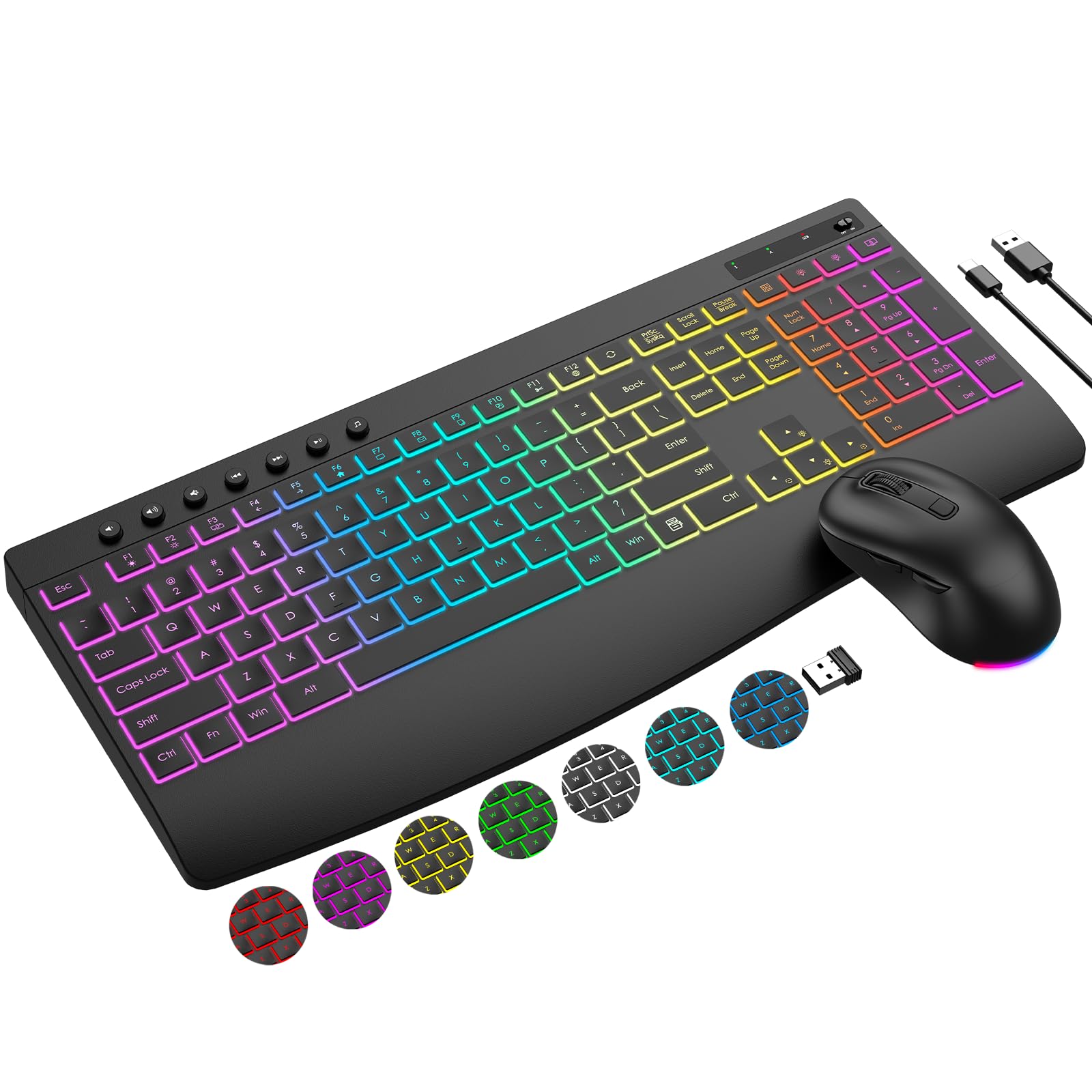
The EDJO MK228 Pro strikes the cleanest balance between battery endurance, ergonomic comfort, and backlight versatility in this entire category. Its 4000mAh onboard battery completely removes charging anxiety for anyone who types through a standard work week, and the stain-resistant wrist rest provides genuine palm support that fabric rests cannot match. The shared 2.4 GHz receiver delivers instant pairing with zero software setup, and the low-profile membrane keys produce quiet keystrokes that will not disturb focused colleagues or sleeping household members.
The 7 switchable backlight colors and 5-level brightness control cover every mood from subtle cyan for eye-strain-free spreadsheets to bold red for gaming sessions. The 800mAh battery in the mouse lasts roughly 50 percent longer than typical wireless mice in this tier, and the three adjustable DPI levels (1000/1600/2400) handle both precise document work and faster cursor movements without skipping. The 19 dedicated hotkeys for browser, calculator, and media shortcuts shave seconds off repetitive tasks across every session.
Some users report occasional mouse unresponsiveness for the first second after waking from deep sleep, and the printed user guide lacks detail on charging times and DPI function mapping. Those small quirks aside, this combo delivers premium features—including the ergonomic wrist rest and massive battery—at a mid-range price that undercuts similarly equipped competitors by a comfortable margin.
Why it’s great
- 4000mAh battery lasts weeks with backlight on
- Comfortable integrated wrist rest for long typing sessions
- 19 shortcut keys boost daily productivity
Good to know
- Mouse can lag briefly when waking from sleep
- User manual lacks full configuration details
2. Redragon S101M-KS Wireless Gaming Combo

Redragon’s S101M-KS eliminates the single-computer limitation by supporting tri-mode wireless—2.4 GHz for gaming latency, Bluetooth for tablet or laptop hopping, and wired USB-C for uninterrupted charging during use. The 4800 DPI optical mouse offers five adjustable sensitivity levels through the DPI button, and its 7-button layout includes forward and back navigation that speeds up web browsing and file management. The keyboard features 10 dedicated multimedia keys plus 12 combination shortcut keys, giving you direct control over media playback, volume, and application switching without memorizing obscure Fn-layer commands.
The RGB lighting system offers 8 different backlight patterns with adjustable speed and brightness, and the rechargeable keyboard battery lasts up to 300 hours with the backlight turned off. The mouse houses the 2-in-1 USB receiver inside its body, preventing the common problem of losing the small dongle during transport. Software-level customization through Redragon’s downloadable app unlocks macro programming for both keyboard keys and mouse buttons, along with polling rate adjustments from 125 to 1000 Hz.
The mouse backlighting is monochrome red rather than RGB, which creates a visual mismatch if you are expecting the keyboard’s multi-color effects to be mirrored on the pointer. The keyboard also takes 5 to 10 seconds to reconnect after waking from sleep, which can be mildly annoying during quick breaks. For gamers or power users who need device-switching flexibility and granular control, this Redragon combo justifies its premium position through sheer customization depth.
Why it’s great
- Tri-mode wireless works with PC, tablet, and laptop
- 4800 DPI mouse with 5 selectable sensitivity levels
- Full macro programming via downloadable software
Good to know
- Mouse uses monochrome red backlight, not RGB
- Keyboard takes several seconds to reconnect after sleep
3. SABLUTE Ergonomic Wireless Keyboard and Mouse Combo

The SABLUTE combo is the only entry in this roundup designed from the ground up for wrist health rather than gaming flash. Its wave-shaped key layout mirrors the natural curvature of your fingertips and reduces ulnar deviation, making it a compelling alternative to traditional flat keyboards for anyone logging eight-hour typing days. The faux lambskin leather palm rest resists sweat staining and wipes clean with a damp cloth, unlike porous fabric rests that trap oils and debris over time.
Beneath the ergonomic profile, the keyboard packs a 4000mAh battery rated for weeks of mixed use, and the company claims a 10-million-keystroke durability rating that doubles the standard 5-million-cycle membrane keyboard lifespan. The 6-button mouse houses a 700mAh battery and offers three DPI levels (800/1200/1600) with 6 fixed backlight colors or 5 cycle modes. The radio frequency range extends to a full 33 feet, and the single USB receiver that ships with both USB-A and USB-C adapters guarantees compatibility with nearly any modern device.
The aggressive auto-sleep timer causes a brief wake-up delay on the first keystroke, which can interrupt fast-paced workflow rhythm. The mouse surface feels slightly slippery according to several long-term users, and the Enter key has an unusual tactile response compared to standard membrane keyboards. For users battling existing wrist pain or seeking preventative ergonomics, the SABLUTE wave layout delivers relief that no flat keyboard in this category can match.
Why it’s great
- Wave-shaped layout reduces wrist strain during long typing sessions
- Leather palm rest is sweat-resistant and easy to clean
- 4000mAh battery lasts weeks on a single charge
Good to know
- Auto-sleep causes brief delay on first keystroke after idle
- Mouse surface can feel slippery for some users
4. EDJO Backlit Wireless Keyboard and Mouse Combo (6-Color)
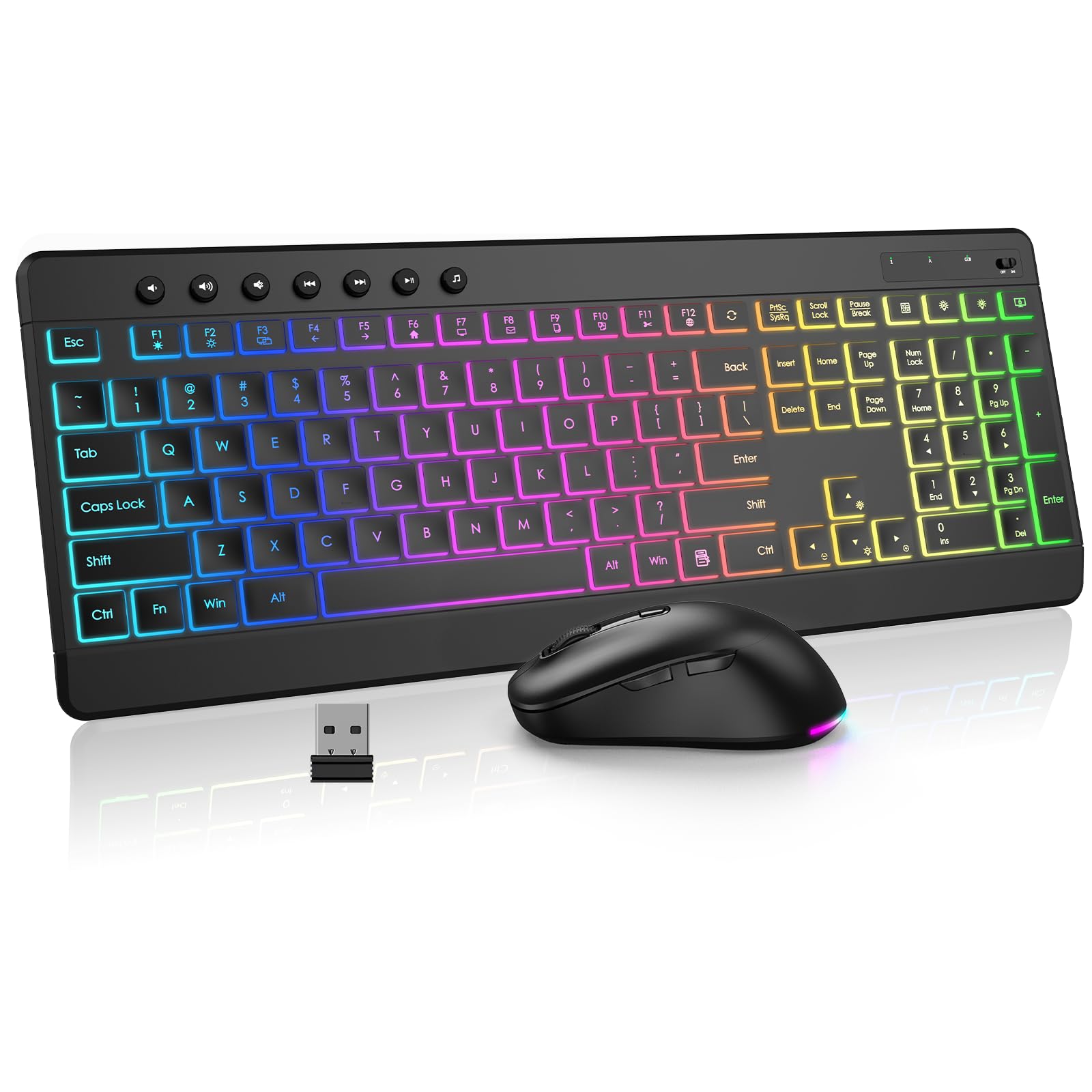
This second EDJO entry leans harder into visual customization without sacrificing the core 4000mAh battery advantage. The keyboard supports 6 vibrant color options paired with 5 dynamic lighting modes—Comet Trail, Rainbow Flow, 6-Color Breathing, 6-Color Flow, and Monochrome—all switchable through dedicated hotkeys without opening any software. The matching mouse automatically cycles through synchronized flowing RGB colors, creating a cohesive desktop light show that stands out in a category where mice often ship with plain single-color LEDs.
The keyboard layout expands to 114 keys including 12 multimedia function keys and 10 independent shortcut keys covering refresh, calculator, lock screen, and email access. The optical mouse tracks precisely on smooth surfaces and offers three DPI levels (1000/1600/2400) with forward and back buttons for rapid browser navigation. The standby battery life is rated at 365 days with the backlight off, and the smart auto-sleep feature turns off the keyboard backlight after 2 minutes of inactivity and sends the mouse to sleep after 15 minutes.
The twelve keyboard shortcut keys are not fully compatible with macOS, limiting its appeal for mixed-platform users running MacBooks alongside Windows desktops. The keycap legends appear slightly dull at the lowest brightness setting, requiring at least medium brightness for comfortable low-light typing. For Windows and Chrome OS users who prioritize backlight customization and extended standby longevity, this EDJO variant delivers an impressive lighting feature set at a mid-range price.
Why it’s great
- 5 dynamic backlight modes with 6 color options
- 10 independent shortcut keys for common tasks
- 365-day standby with auto-sleep power management
Good to know
- Shortcut keys are not fully compatible with macOS
- Keycap letters require medium brightness for clarity
5. KOPJIPPOM Large Print Backlit Wireless Combo

KOPJIPPOM’s large print combo addresses a specific and underserved audience: users with low vision, seniors, or anyone who struggles with the microscopic font sizes on standard keycaps. Each key features oversized characters printed in high-contrast white, and the bright white backlight offers three adjustable brightness levels to ensure readability across different ambient light conditions. The mouse also includes a large scroll wheel with pronounced ridges for easier page navigation without looking down.
The full-size 104-key layout includes a dedicated number pad and 12 multimedia hotkeys covering internet, email, play/pause, and volume control. The 2.4 GHz connection reaches up to 33 feet with no noticeable delay, and both devices connect through the same USB nano receiver stored conveniently on the underside of the keyboard. The built-in rechargeable batteries charge via USB-C, and the 10-minute auto-sleep timer preserves power during breaks while waking instantly on key press without the multi-second delay common in some competitors.
The keyboard and mouse charge one at a time through separate USB-C cables, which adds minor cable management friction compared to a single-charge solution. The keys require a wall adapter for charging since the battery draw exceeds standard USB-A port output on some older computers. For its intended audience of low-vision users and senior computer operators, this combo solves the fundamental visibility problem that standard backlit keyboards fail to address with their tiny, low-contrast lettering.
Why it’s great
- Large, high-contrast keycaps improve visibility for low-vision users
- 12 multimedia hotkeys for quick system control
- Instant wake from sleep with no reconnection delay
Good to know
- Keyboard and mouse charge separately via two USB-C cables
- Wall adapter recommended for optimal charging speed
6. CHONCHOW USB Wireless Gaming Keyboard and Mouse Combo

The CHONCHOW combo delivers an aggressive gaming aesthetic with a rainbow LED backlight covering all 104 keys, customizable through 3 brightness levels and 3 breathing speeds. The 2500mAh keyboard battery and 500mAh mouse battery offer roughly 10 hours of continuous use with the backlight turned on, which is reasonable for budget-tier hardware but falls short of the multi-week endurance seen in the 4000mAh competitors. The 7D mouse houses a 3600 DPI sensor with three adjustable levels (1600/2400/3200) and a symmetric design that accommodates left-handed users without special ordering.
Compatibility extends beyond standard Windows and macOS to include PS3, PS4, PS5, and Xbox consoles, making this one of the few combos that works natively with modern gaming systems. The anti-ghosting keyboard supports simultaneous key presses for basic gaming inputs, and the mechanical-feel membrane switches provide tactile feedback that mimics a clicky mechanical board without the full noise or weight. The single USB receiver lives inside the mouse body and connects both devices instantly with plug-and-play simplicity.
Multiple customer reports indicate that the keyboard stops charging entirely after one to two months of use, and the manufacturer’s after-sales response has been inconsistent in resolving these failures. The volcano-shaped ABS keycaps show shine and wear relatively quickly under daily typing compared to laser-etched or doubleshot alternatives. For a first-time RGB wireless combo on a tight budget, the short-term performance and console compatibility are appealing, but the durability concerns make it a risky choice for anyone expecting year-round reliability.
Why it’s great
- Rainbow LED backlight with adjustable brightness and breathing speeds
- Works with PS4, PS5, Xbox, and PC without additional adapters
- Anti-ghosting keyboard handles basic multi-key gaming inputs
Good to know
- Reports of keyboard charging failure after 1-2 months
- ABS keycaps wear faster than laser-etched or doubleshot keys
FAQ
How long does a 4000mAh backlit keyboard battery last with the lights on?
Can I use a backlit wireless combo with a PlayStation or Xbox console?
What is the actual difference between single-color and RGB backlighting on a keyboard?
Final Thoughts: The Verdict
For most users, the best backlit wireless keyboard and mouse combo winner is the EDJO MK228 Pro because its 4000mAh battery, integrated wrist rest, and 19 hotkeys cover office productivity, quiet late-night work, and light gaming without compromising on any front. If you want tri-mode connectivity with Bluetooth for hopping between devices, grab the Redragon S101M-KS. And for ergonomic wrist relief during eight-hour typing shifts, nothing beats the SABLUTE wave-shaped combo.