
The market for a capable graphics card is crowded with inflated specs and confusing model numbers. The actual challenge isn’t finding a GPU with the most stream processors or the highest boost clock—it’s finding one that delivers real, playable frame rates at 1080p without forcing you to overextend on price. A bargain video card should solve one problem: letting you game, create, or multitask with reliable performance per watt and per dollar, not just a low sticker price.
I’m Min — the co-founder and writer behind Gadgets Feed. I’ve spent hundreds of hours analyzing the GPU market, from the budget RX 580 to the latest Blackwell RTX 50-series, to find the real value diamonds buried in the discount bin. This guide focuses on what actually matters in a bargain card: VRAM capacity, memory bandwidth, driver stability, and thermal design.
After sorting through dozens of models and thousands of real user reviews, I’ve compiled the definitive list of the best bargain video card options that deliver genuine performance without the premium markup.
How To Choose The Best Bargain Video Card
Buying a budget GPU is a minefield of cut-down dies, misleading memory interfaces, and cards that look like a deal until you actually try to run a modern AAA title. The key is knowing which specs to trust and which to ignore.
VRAM Capacity and Memory Bandwidth
The single biggest mistake in the bargain GPU category is buying a card with 4GB of VRAM. 8GB is the absolute floor for modern gaming at 1080p with medium textures, and 6GB cards like the RTX 3050 6GB will start hitting memory limits in heavier titles. More important than raw capacity is the memory interface: a 256-bit bus (found on RX 580 8GB cards) delivers significantly more bandwidth than a 128-bit bus, even if the clock speed is lower. This bandwidth determines how fast textures can stream in and out, directly impacting 1% low frame rates and stutter.
Power Connectors and PSU Requirements
A surprising number of budget GPU buyers discover their existing power supply lacks the necessary PCIe power cables. Cards like the RTX 3050 LP 6G OC draw power entirely from the PCIe slot, making them drop-in upgrades for older office PCs and slim desktops. Meanwhile, the RX 580 and RX 7600 require a single 6-pin or 8-pin connector. Always check your power supply’s wattage capacity and available cables before purchasing—a 620W PSU might not cut it for an RX 580 build, as some user reports confirm.
Cooling Design and Form Factor
Bargain cards often cut costs on the cooler, leading to loud fans and high junction temperatures. A dual-fan design with heat pipes is the minimum for any card drawing over 100W. If you are building in a small form factor (SFF) case like a Dell Optiplex or HP EliteDesk, you must look for half-height or low-profile cards specifically—a standard dual-slot card simply won’t fit. The Maxsun and MSI RTX 3050 low-profile options are purpose-built for these enclosures, but they run hotter and louder than their full-height counterparts, requiring a case fan upgrade or fan curve adjustment via MSI Afterburner.
Architecture Generation and Driver Support
Older architectures like AMD’s Polaris (RX 500 series) are still viable for entry-level gaming, but they lack support for modern features like hardware ray tracing, mesh shaders, and DLSS. NVIDIA’s Ampere and Blackwell architectures offer DLSS 4 and Reflex, which can dramatically boost frame rates in supported titles without costing extra silicon. For Linux users, AMD’s open-source drivers (Mesa, Vulkan) often provide better plug-and-play compatibility than NVIDIA’s proprietary drivers, though NVIDIA’s Linux support has improved significantly. Choose your architecture based on your OS and whether you care about upscaling technologies.
Quick Comparison
On smaller screens, swipe sideways to see the full table.
| Model | Category | Best For | Key Spec | Amazon |
|---|---|---|---|---|
| ASUS Dual RTX 5060 OC | Premium | Highest 1080p/1440p FPS | 8GB GDDR7, 2565 MHz OC | Amazon |
| PNY RTX 5060 Ti OC Dual Fan | Premium | Best AI & DLSS 4 performance | 8GB GDDR7, 2692 MHz Boost | Amazon |
| GIGABYTE RTX 5060 WINDFORCE OC | Premium | DLSS 4 & Blackwell features | 8GB GDDR7, PCIe 5.0 | Amazon |
| XFX Speedster SWFT210 RX 7600 | Mid-Range | VR and 1080p ultra gaming | 8GB GDDR6, 2655 MHz Boost | Amazon |
| ASRock RX 7600 Challenger OC | Mid-Range | Silent 1080p gaming | 8GB GDDR6, 2695 MHz Boost | Amazon |
| maxsun RTX 3050 6GB Low Profile | Mid-Range | SFF and Optiplex builds | 6GB GDDR6, 1470 MHz Boost | Amazon |
| MSI RTX 3050 LP 6G OC | Mid-Range | Quiet low-profile performance | 6GB GDDR6, 1492 MHz Boost | Amazon |
| maxsun RX 580 2048SP (White) | Budget | White theme builds on a budget | 8GB GDDR5, 256-bit bus | Amazon |
| MOUGOL RX 580 8GB | Budget | Lowest cost entry-level 1080p | 8GB GDDR5, 1206 MHz Core | Amazon |
In‑Depth Reviews
1. ASUS Dual NVIDIA GeForce RTX 5060 8GB GDDR7 OC Edition

The ASUS Dual RTX 5060 OC represents the best balance of price, performance, and modern features in the bargain GPU space. With 8GB of GDDR7 memory on a 128-bit bus, PCIe 5.0 support, and the Blackwell architecture with DLSS 4, this card delivers frame rates that rival last-generation mid-range cards while consuming just 150W TDP. The OC mode pushes the boost clock to 2565 MHz, and the 623 AI TOPS makes this a legitimate card for local AI inference as well as gaming.
In real-world use, users report strong 1080p performance with 140+ FPS in Fortnite and smooth gameplay in Cyberpunk 2077 with DLSS Quality mode. The Axial-tech fan design with 0dB technology keeps the card silent during desktop use, and the 2.5-slot form factor fits most modern cases without clearance issues. The card runs cool and efficient on a 500W power supply, making it an easy upgrade for existing systems without a full PSU swap.
The real value here is the feature set: DLSS 4, Reflex, and NVIDIA Broadcast support mean this card does more than just game—it handles streaming, video editing, and creative workloads with hardware acceleration. The 3-year warranty from ASUS adds peace of mind that you rarely get in the bargain segment. For anyone looking for a single card that will last through several years of 1080p and light 1440p gaming, this is the one.
Why it’s great
- GDDR7 memory and PCIe 5.0 deliver massive bandwidth for future titles
- DLSS 4 dramatically boosts frame rates in supported games at no cost
- 0dB fan mode and efficient 150W TDP mean near-silent operation
- 3-year ASUS warranty is industry-leading for budget-tier cards
Good to know
- 8GB VRAM may limit ultra texture settings in some 2025+ titles
- No RGB lighting if that matters for your build
- Requires a DisplayPort 2.1b monitor for full bandwidth support
2. PNY NVIDIA GeForce RTX 5060 Ti OC Dual Fan
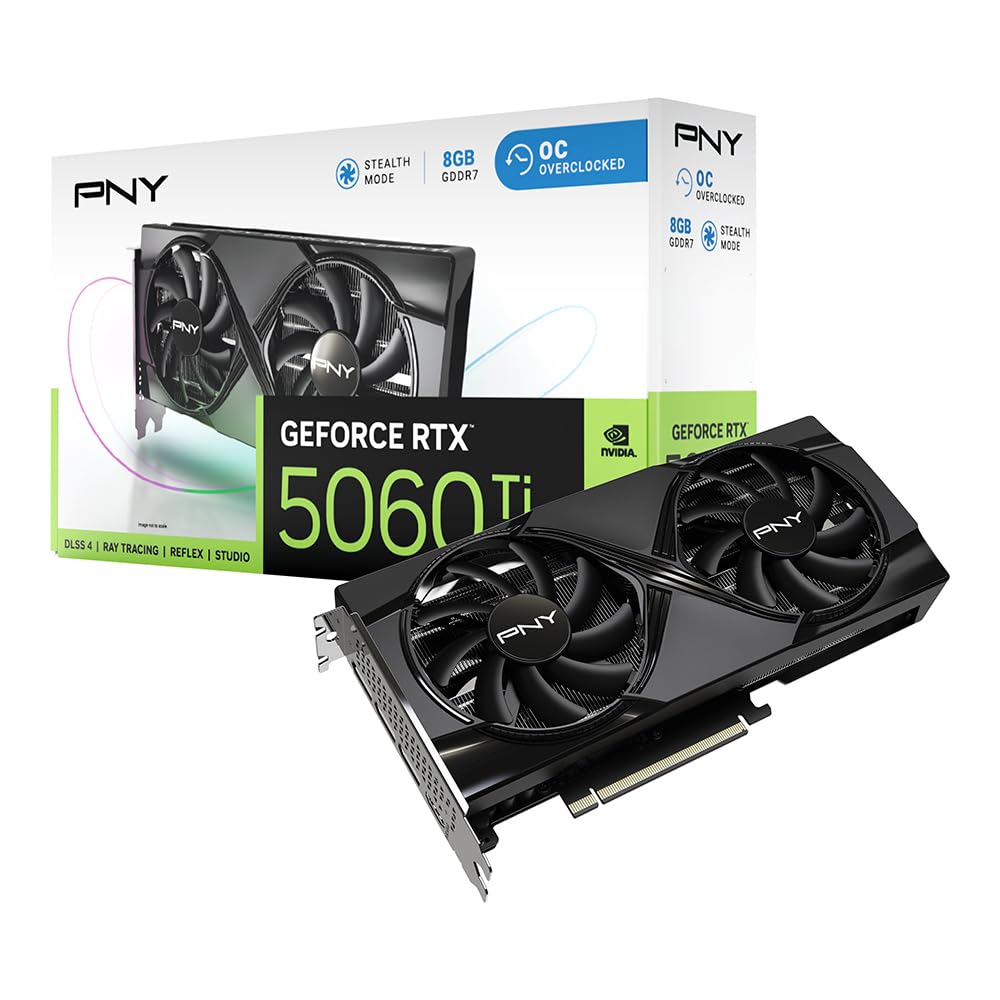
The PNY RTX 5060 Ti OC is the card for buyers who want the absolute best AI and upscaling features in the bargain category. With 2692 MHz boost clock and 8GB GDDR7, this card is equipped with 5th-Gen Tensor Cores and 4th-Gen Ray Tracing Cores specifically designed to leverage DLSS 4’s multi-frame generation. The SFF-Ready certification means it fits in compact cases without sacrificing performance, making it a versatile choice for everything from mini-ITX gaming rigs to NUC-like enclosures.
User feedback highlights the card’s excellent price-to-performance ratio, with one reviewer noting it is significantly cheaper than 12GB models while not being 30% slower. At 1440p, VRAM saturation is not an issue for titles like Forza, Minecraft, and Plants vs. Zombies. The PNY build quality is solid, and the dual-fan cooler keeps temperatures manageable even under sustained load. The non-recessed power plug design is a tight fit in compact setups, but it’s a minor quibble for the performance delivered.
For creators, the NVIDIA Studio driver support and AI-accelerated workflows make this card a productive workhorse for video editing and 3D rendering. The Reflex technologies reduce system latency for competitive shooters, giving a tangible advantage in games like Valorant and Apex Legends. If you want the most advanced bargain card available today with room to grow into 1440p, the PNY 5060 Ti is the sensible pick.
Why it’s great
- 5th-Gen Tensor Cores unlock full DLSS 4 multi-frame generation
- SFF-Ready design fits in compact and office PC cases without modification
- Outstanding price-to-performance ratio compared to higher-VRAM alternatives
- NVIDIA Studio drivers ensure stability for creative and professional apps
Good to know
- 8GB VRAM may be a limitation for 4K or heavy texture mods
- Non-recessed power plug can be tight in very small cases
- Single-fan models run louder under sustained gaming loads
3. GIGABYTE GeForce RTX 5060 WINDFORCE OC 8G

The GIGABYTE RTX 5060 WINDFORCE OC brings the Blackwell architecture and DLSS 4 to the bargain segment with GIGABYTE’s proven WINDFORCE cooling system. With 8GB of GDDR7 memory on a 128-bit bus and PCIe 5.0 interface, this card is built for high-bandwidth gaming and creative work. The boost clock of 2512 MHz may be slightly lower than the ASUS or PNY variants, but the WINDFORCE dual-fan cooler is exceptionally quiet and efficient, keeping the card cool during extended sessions.
Real-world user reports confirm over 250 FPS in many games, with smooth performance in demanding titles like Cyberpunk 2077 and DOOM. The card works well with a 750W PSU and Ryzen 5700, and the sleek design fits standard ATX cases without clearance issues. One user emphasizes the importance of running DDU (Display Driver Uninstaller) before swapping GPUs to avoid installation problems—good advice for any budget GPU upgrade. The card is also noted to be a significant upgrade from older cards like the GTX 1660, offering roughly double the capability.
For photo and video editing workloads, the RTX 5060 provides excellent acceleration in Adobe Premiere and DaVinci Resolve. The DLSS 4 feature set is a major upgrade, allowing older CPUs to push higher frame rates without bottle-necking. The combination of performance, quiet cooling, and modern features makes this GIGABYTE card a strong contender for anyone building a new bargain gaming PC.
Why it’s great
- WINDFORCE dual-fan cooling is whisper-quiet even under maximum load
- DLSS 4 delivers multi-frame generation for a massive FPS boost
- PCIe 5.0 ensures forward compatibility with future motherboards
- Easy physical installation with standard 8-pin power connector
Good to know
- 8GB VRAM may require texture quality compromises in heavy titles
- Some users reported needing to run DDU for clean driver installation
- Not suitable for 4K gaming at high settings
4. XFX Speedster SWFT210 Radeon RX 7600 8GB

The XFX Speedster SWFT210 RX 7600 is the best all-around bargain GPU for gamers who need solid VR performance and high-quality 1080p gaming on a mid-range budget. Built on the RDNA 3 architecture, this card features 8GB of GDDR6 memory on a 128-bit bus and a boost clock of up to 2655 MHz. The SWFT dual-fan cooling solution is effective and quiet, keeping the GPU cool even after hours of gaming. The card is surprisingly compact at 9.49 x 5.16 inches, fitting most standard ATX and micro-ATX cases without trouble.
User reviews highlight its VR readiness, with one user reporting flawless performance in Assetto Corsa, Project Cars 2, Half-Life Alyx, and Kayak VR Mirage at the highest settings. For standard gaming, the card handles 1080p and 1440p at 60 FPS with ease, and it pairs well with emulators and indie titles. Linux users report excellent plug-and-play compatibility with the open-source Mesa and Vulkan drivers, making this a strong choice for open-source enthusiasts upgrading from older Nvidia cards. The low power draw and quiet operation are additional advantages for the bargain segment.
The main consideration is driver updates: some users experienced initial crashes and high temperatures (80s Celsius) that were resolved by a clean driver install. After that, the card runs in the upper 70s at 60% fan speed with no issues. For buyers who want the best value in the mid-range without needing NVIDIA’s DLSS feature set, the RX 7600 is a smart, reliable choice.
Why it’s great
- Excellent VR performance across major titles at highest settings
- Compact size and low power draw fit most builds without PSU upgrade
- Plug-and-play on Linux with open-source drivers
- Quiet dual-fan cooling with efficient thermal design
Good to know
- Initial driver updates may be needed for stability and temperature control
- 128-bit memory bus means less bandwidth than 256-bit RX 580 alternatives
- No hardware DLSS equivalent—relies on FSR for upscaling
5. ASRock Radeon RX 7600 Challenger 8GB OC

The ASRock RX 7600 Challenger OC is the card for buyers who prioritize a silent computing experience. The 0dB Silent fan technology stops the fans completely when the GPU temperature is low, making this card completely inaudible during desktop use, video playback, and light gaming. When the fans do spin up under load, the striped axial fan design with ultra-fit heatpipe keeps noise levels impressively low. The card features 8GB GDDR6 memory running at 18 Gbps on a 128-bit bus, with a factory overclocked boost clock of 2695 MHz.
User feedback is overwhelmingly positive, with reports of plug-and-play installation on both Windows and Linux (Ubuntu 24.04). The card resolves VRAM bottlenecks in demanding titles like Star Wars Survivor and NBA 2K26, and enables smooth 1440p gaming in many titles. One reviewer upgraded from a 6500 to the 7600 on a 600W PSU without needing to change power supplies, noting a massive improvement in framerates in Arma Reforger—from unplayable to 60 FPS at high settings. The Super Alloy components and metal backplate add structural rigidity and improve cooling over standard reference designs.
The dual-fan ASRock cooler is one of the best in the bargain segment, keeping the card cool even during extended gaming sessions. The PCIe 4.0 x8 interface is perfectly fine for this GPU tier, and the inclusion of 3x DisplayPort 1.4a and 1x HDMI 2.1 VRR supports up to four monitors. For a mid-range card that prioritizes silence and build quality, the ASRock Challenger OC is hard to beat.
Why it’s great
- 0dB Silent fan mode makes this the quietest bargain GPU available
- Factory OC at 2695 MHz delivers class-leading performance per dollar
- Excellent Linux compatibility with plug-and-play Mesa drivers
- Metal backplate and Super Alloy components ensure long-term durability
Good to know
- Single 8-pin power connector may be inconvenient in some cable-management setups
- 128-bit bus limits high-res texture streaming compared to 256-bit alternatives
- Requires 550W PSU minimum for stable operation
6. maxsun GeForce RTX 3050 6GB Low Profile

The maxsun GeForce RTX 3050 Low Profile is the definitive solution for small form factor (SFF) upgrades. Measuring just 6.65 x 2.71 inches and fitting a single slot, this card is designed specifically for Dell Optiplex, HP EliteDesk, and other compact office PCs with limited clearance. It features 6GB of GDDR6 memory running at 14000 MHz on a 96-bit bus, with a boost clock of 1470 MHz. The card draws all its power from the PCIe slot, requiring no additional power cables, which is a massive advantage for older office systems with limited PSU capacity.
User reviews confirm this card works flawlessly in Optiplex 3060 and 5050 SFF systems, though it runs hot and loud under load—a common tradeoff in low-profile cards. One reviewer successfully used it in a 3D printer build with a very small PSU, while another uses it for dual 4K monitors in a Dell Precision 3440, noting that an added case fan was necessary to keep temperatures manageable. For gaming, the card handles 1080p without issues, delivering smooth performance in Fortnite, Warzone, and Arc Raiders. The Furmark score of over 3000 at a max of 77W confirms its efficiency.
The key limitation here is the 6GB VRAM, which can be a bottleneck in modern titles at higher resolutions—one user reported running out of memory in Borderlands 4 at high resolution, requiring a drop to medium settings. The card also makes audible fan noise under sustained load, though MSI Afterburner can be used to configure a custom fan curve. For anyone with an old office PC or a compact ITX build who needs a drop-in GPU upgrade that just works, this maxsun RTX 3050 is the ideal choice.
Why it’s great
- True low-profile single-slot design fits nearly every SFF office PC
- No external power cables required—draws power from PCIe slot
- Supports 8K output via HDMI 2.1 and DisplayPort 1.4a
- Good 1080p gaming performance on a budget
Good to know
- 6GB VRAM can be a bottleneck in demanding modern titles
- Runs hot and loud under load; case fan upgrade recommended
- Some users reported memory issues in Borderlands 4 at high res
7. MSI Gaming RTX 3050 LP 6G OC

The MSI Gaming RTX 3050 LP 6G OC is the quietest low-profile graphics card in the bargain segment, thanks to MSI’s Twin Frozr cooling technology. With a boost clock of 1492 MHz and 6GB GDDR6 memory on a 96-bit bus, this card is purpose-built for small form factor builds that need a balance of performance and acoustic comfort. The card measures just 6.9 x 2.7 inches and includes a low-profile bracket for SFF cases. Like the maxsun variant, it draws all power from the PCIe slot—no external cables needed.
User reviews consistently praise the card’s near-silent operation at idle, with one user noting it fits perfectly in a Dell Inspiron 3471 SFF and runs at 78°C under load. DLSS Quality mode provides a noticeable boost to 1080p performance, and features like Ray Tracing and NVIDIA Reflex work as expected. One reviewer uses it in an HTPC wooden case and reports excellent results, though a small fraction of users experienced a brief fan clatter on cold startup that resolved after a few seconds. The card is also noted as an excellent value for non-gamers needing GPU acceleration for photo and video editing.
The main tradeoff is the 96-bit memory interface, which limits memory bandwidth compared to the 128-bit or 256-bit alternatives. This means the card can hit VRAM bottlenecks in heavy texture scenarios, and the 6GB capacity will require some settings adjustments in newer AAA titles. However, for a drop-in upgrade to an old HP or Dell office PC where noise is a primary concern, the MSI RTX 3050 LP is the most comfortable choice available at this price point.
Why it’s great
- Twin Frozr cooling is the quietest low-profile cooler on the market
- No extra power cables required; perfect for office PC upgrades
- DLSS 3 support boosts 1080p gaming performance significantly
- Includes low-profile bracket for SFF and HTPC builds
Good to know
- 96-bit memory bus limits bandwidth for high-res textures
- 6GB VRAM requires settings compromises in demanding games
- Some units may have brief fan noise on cold startup
8. maxsun AMD Radeon RX 580 2048SP (White)

The maxsun RX 580 2048SP in white is a budget champion with a very specific niche: white-themed PC builds. Built on the older Polaris architecture, this card features 8GB of GDDR5 memory on a full 256-bit bus, giving it significantly more memory bandwidth than most cards in its price range. The 2048SP variant has slightly fewer shader units than the standard RX 580, but the 8GB VRAM and 256-bit interface make it a strong performer for 1080p gaming on a tight budget. The white PCB and cooler fit seamlessly into all-white or pastel-themed builds.
User reviews are mixed on this card. Positive feedback highlights its ability to maintain 144 FPS in competitive titles like Fortnite, VALORANT, and CS:GO, and 60 FPS in AAA games with lowered settings. The plastic dual-fan cooler feels somewhat cheap, but it keeps the GPU under 65°C at maximum load, which is impressive for a passive entry-level cooler. However, there are complaints about false advertising: one user reported the power port was missing two overclocking slots (only 6 pins instead of the advertised 8), which is a significant discrepancy. Another user emphasizes the need for a 750W power supply, as a 620W unit failed to boot the system.
For buyers who prioritize budget and aesthetics over raw performance, this RX 580 offers the best memory bandwidth in its price tier. The 8GB VRAM and 256-bit bus make it more capable in texture-heavy games than the RTX 3050 6GB cards, especially at 1080p. But the older architecture means no ray tracing, no DLSS, and higher power consumption. It’s a solid entry-level card for the right build, but proceed with caution regarding the advertised specs.
Why it’s great
- 8GB VRAM on a 256-bit bus delivers exceptional memory bandwidth for the price
- White design is rare and desirable for themed PC builds
- Handles 144 FPS in competitive shooters without issue
- Low thermals under load despite budget cooler
Good to know
- May require a 750W power supply—620W may not boot
- Some units have missing power pin slots (false advertising reported)
- No ray tracing, DLSS, or modern feature support
- Lower performance than standard RX 580 due to 2048SP cut-down
9. MOUGOL AMD Radeon RX 580 8GB
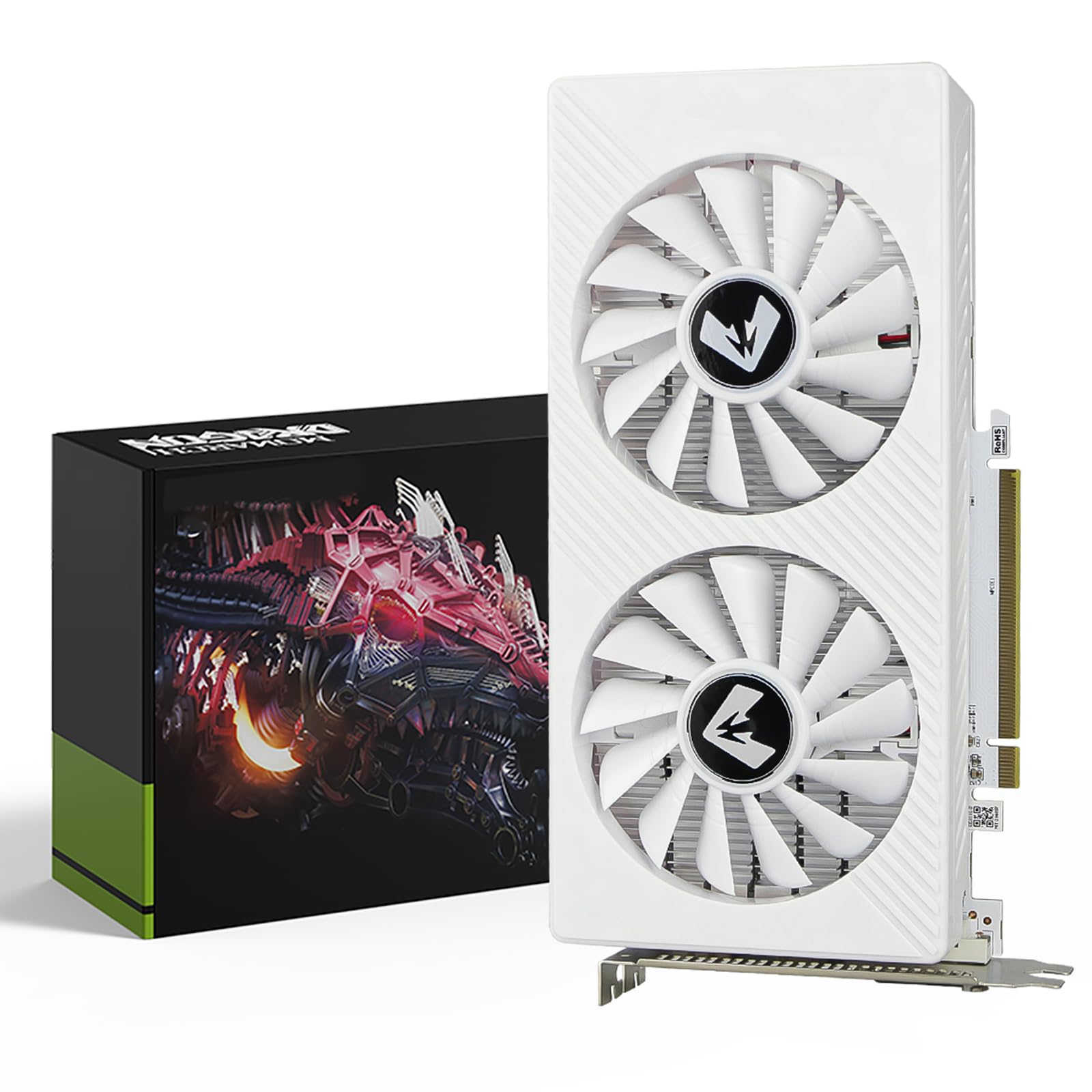
The MOUGOL AMD Radeon RX 580 8GB is the absolute floor for entry-level 1080p gaming, and it does its job surprisingly well. Featuring 8GB of Samsung GDDR5 memory on a massive 256-bit bus, this card offers memory bandwidth that rivals cards costing twice as much. With 2048 Stream Processors and a 1206 MHz core clock, it delivers solid frame rates in Fortnite, GTA V, Apex Legends, and Valorant at 1080p. The dual-fan cooling system with high-efficiency heat pipes keeps noise manageable, and the compact size (240x135x45mm) fits standard ATX and micro-ATX cases.
User reviews are overwhelmingly positive for this price point. One user reports excellent performance pairing it with a 7600X for Linux gaming via KVM, noting it runs quiet, cool, and looks great in their build. Another user replaced an old RX 580 with this MOUGOL variant and confirmed it works silently with good video quality on both Linux and Windows. Some limitations include a rear release mechanism covered by the shell that makes removal difficult on some motherboards, and the card cannot drive a 3440×1440 240Hz OLED at full refresh rate. But for standard 1080p 60Hz gaming, these are non-issues.
For content creation, the card supports DirectX 12, Vulkan, and OpenGL 4.6, providing hardware acceleration for Premiere Pro and Blender. The AMD Adrenaline software offers game optimization and driver updates. At this price point, the MOUGOL RX 580 is the ultimate entry point for gaming on a tight budget. It won’t run Cyberpunk at high settings, but it will get you playing modern titles at playable frame rates with zero stutter from VRAM limitations. That is the definition of a bargain video card.
Why it’s great
- 8GB VRAM on a 256-bit bus is unmatched bandwidth in the budget tier
- Quiet dual-fan cooling with heat pipes for stable thermal performance
- Excellent Linux compatibility with AMD open-source drivers
- Supports triple-monitor setups for productivity
Good to know
- Cannot drive 3440×1440 240Hz OLED at full refresh rate
- Shell design can make physical removal difficult on some motherboards
- No ray tracing, DLSS, or modern upscaling support
- Requires 6-pin power connector
FAQ
Is an RX 580 8GB still good for gaming in 2025?
Should I buy a 6GB RTX 3050 or an 8GB RX 580?
What power supply do I need for an RTX 5060?
Can I use a low-profile RTX 3050 in a Dell Optiplex?
Does the RX 7600 support AV1 encoding?
Final Thoughts: The Verdict
For most users, the best bargain video card winner is the ASUS Dual RTX 5060 OC because it delivers modern Blackwell architecture, GDDR7 memory, and DLSS 4 support at a price that competes with last-generation cards. If you need a silent 1080p gaming experience with the best Linux compatibility, grab the ASRock RX 7600 Challenger OC. And for the absolute lowest entry point into 8GB GPU gaming that still handles modern titles, nothing beats the MOUGOL RX 580 8GB.