
The daily grind of typing and mousing through endless spreadsheets, emails, and documents takes a real toll on your wrists and fingers. A poorly matched keyboard and mouse set isn’t just annoying — it can lead to repetitive strain injuries that derail your productivity for weeks.
I’m Min — the co-founder and writer behind Gadgets Feed. I’ve spent hundreds of hours combing through technical specifications, user reviews, and market data on ergonomic peripherals to find the combos that genuinely deliver on comfort and reliability without forcing you to overspend.
After evaluating dozens of options based on keystroke feel, connectivity stability, wrist support design, and battery life, I’ve narrowed it down to the seven sets that represent the best value today. This guide to the best keyboard and mouse combos will help you find the perfect match for your workspace and budget.
How To Choose The Best Keyboard And Mouse
Selecting a keyboard and mouse combo isn’t just about looks or brand recognition. The right set hinges on ergonomics that match your typing style, a connection that never drops, and battery endurance that matches your workflow. Here are the critical factors to weigh before clicking “buy.”
Ergonomic Design and Wrist Support
The shape of the keyframe determines how naturally your hands rest while typing. Flat keyboards force your wrists to bend outward, while wave-shaped or split keyframes keep your forearms and hands in a neutral straight line. A cushioned palm rest made of leather or memory foam absorbs pressure far better than hard plastic. If you type for more than four hours daily, an ergonomic wave layout with a soft wrist pad is non-negotiable.
Connectivity and Multi-Device Flexibility
Most combos use a single 2.4GHz USB receiver that pairs both devices simultaneously — clean and simple for a dedicated desktop. If you switch between a work laptop and a personal computer, Bluetooth support with multi-device pairing saves you from constantly unplugging dongles. For security-conscious offices, Logitech’s Logi Bolt protocol adds encrypted connections that standard Bluetooth cannot match.
Typing Noise and Keystroke Feel
Membrane switches dominate this category because they deliver a quiet typing experience that won’t disturb coworkers or family members. Key travel depth, actuation force, and overall smoothness vary widely — some budget sets feel mushy while premium combos use scissor-switch mechanisms for a crisp laptop-like response. For open-plan offices or late-night work, a decibel rating around 30dB is the sweet spot for silent operation.
Quick Comparison
On smaller screens, swipe sideways to see the full table.
| Model | Category | Best For | Key Spec | Amazon |
|---|---|---|---|---|
| Logitech Signature MK650 | Business | Enterprise security & comfort | 36-month keyboard battery life | Amazon |
| Logitech MK955 Signature Slim | Premium Slim | Larger hands & multi-device | 90% less click noise (SilentTouch) | Amazon |
| ProtoArc EKM01 Plus | Split Ergonomic | Severe wrist pain relief | 500mAh rechargeable battery | Amazon |
| SABLUTE MA41 | Quiet Comfort | Shared office silence | 30dB ultra-quiet typing | Amazon |
| SABLUTE Backlit Combo | RGB Charging | Backlit customization & battery | 4000mAh keyboard battery | Amazon |
| MEETION Wave Keys | Ergonomic Basic | Budget-friendly wave typing | 4 adjustable DPI levels | Amazon |
| Lomiluskr Split Ergo | Colorful Split | Compact budget split layout | 3-level DPI (1200/1600/2400) | Amazon |
In‑Depth Reviews
1. Logitech Signature MK650 Combo for Business

Logitech’s MK650 is built for IT departments that demand enterprise-grade security without compromising on daily comfort. The Logi Bolt receiver uses Bluetooth Low Energy Security Mode 1, Level 4 encryption, making it the only combo in this roundup that meets strict enterprise protocols. Beyond security, the keyboard delivers a tight, responsive keystroke that touch typists praise for its precision and near-silent operation.
The mouse features Logitech’s SmartWheel, which automatically switches between ratcheted line-by-line scrolling and hyper-fast free-spinning — a genuine productivity boost when scanning long documents or spreadsheets. The contoured mouse shape and integrated keyboard palm rest support all-day comfort, and the battery situation is exceptional: the mouse runs up to 24 months on one AA battery while the keyboard lasts up to 36 months on two AAs.
Connectivity offers dual flexibility via Logi Bolt USB receiver or Bluetooth Low Energy, and it works seamlessly across Windows, macOS, Linux, Chrome OS, iPadOS, and Android. The only trade-offs are the lack of backlighting and a keyboard layout that some users find has low contrast between letters and charcoal keys in dim lighting. For a secure, comfortable, and worry-free office setup, this is the defining standard.
Why it’s great
- Enterprise-grade Logi Bolt encrypted wireless
- SmartWheel mouse adapts scroll speed automatically
- Extraordinary multi-year battery life on disposables
Good to know
- No backlighting on the keyboard
- Lettering on charcoal keys can be hard to read in low light
- Requires a USB port for Logi Bolt receiver
2. Logitech MK955 Signature Slim

Logitech’s MK955 redefines the slim-combo category with a full-size keyboard that mimics the feel of a premium laptop scissor-switch mechanism — shallow travel, crisp feedback, and whisper-quiet acoustics. The M750 L mouse is specifically designed for larger hands, with a pronounced contour that fills the palm and SilentTouch technology that cuts click noise by 90 percent. In an open-plan office, this set is practically inaudible.
Multi-device switching is effortless: tap a dedicated key on the K950 keyboard to toggle between three paired devices via Bluetooth or Logi Bolt. The SmartWheel on the mouse adds that same adaptive scrolling found on the MK650, letting you fly through long web pages or stop precisely on individual lines. Customization via the Logi Options+ app unlocks programmable shortcuts for both keyboard function keys and mouse buttons, tailored to Windows or macOS.
Build quality is excellent, with 48 percent post-consumer recycled plastic in the keyboard and 25 percent in the mouse. The smooth graphite finish resists fingerprints, and the wireless range remains solid at 33 feet. The only catch is the price point, which approaches the triple-digit mark — but for those who value ultra-quiet operation, a laptop-style typing feel, and seamless cross-device workflows, the MK955 justifies every penny.
Why it’s great
- Nearly silent typing and clicking ideal for shared workspaces
- Effortless switching between three devices
- SmartWheel adaptive scrolling for efficiency
Good to know
- Premium pricing pushes the budget
- Keyboard uses AA batteries, not rechargeable
- Setup instructions for multi-device connection could be clearer
3. ProtoArc EKM01 Plus

The ProtoArc EKM01 Plus takes ergonomics seriously with a full-size split keyframe that angles your forearms and wrists into a neutral, straight position. Unlike standard wave keyboards, this split layout physically separates the left and right key clusters, which can dramatically reduce ulnar deviation for users with carpal tunnel syndrome or chronic wrist pain. The cushioned palm rest uses memory foam beneath a soft fabric top — noticeably more forgiving than the hard plastic found on many competitors.
This combo supports up to three simultaneous connections via Bluetooth or the included USB receiver, with a dedicated button to switch instantly between devices. The scissor-switch keys provide a crisp, quiet typing response that feels faster than typical membrane boards, and the contoured mouse includes a thumb rest and programmable forward/backward buttons for efficient web browsing. Battery life is strong: the 500mAh built-in cells in both keyboard and mouse deliver up to 250 hours of standby after a two-hour USB-C charge.
One minor annoyance — some users report the right space bar produces a squeaking noise with repeated presses, and the forward/backward buttons on the mouse sit directly above the thumb, making accidental presses common during intense typing sessions. The keyboard is also quite wide at 20.75 inches, so measure your desk before committing. For serious wrist relief and multi-device flexibility, this is the most capable split-ergo option at a reasonable mid-range price.
Why it’s great
- Split keyframe reduces wrist strain more effectively than wave designs
- Memory foam palm rest with soft fabric cover
- Rechargeable via USB-C with strong standby time
Good to know
- Space bar squeak reported on some units
- Mouse thumb buttons are prone to accidental presses
- Large footprint requires ample desk space
4. SABLUTE Ergonomic Wireless Combo (MA41)
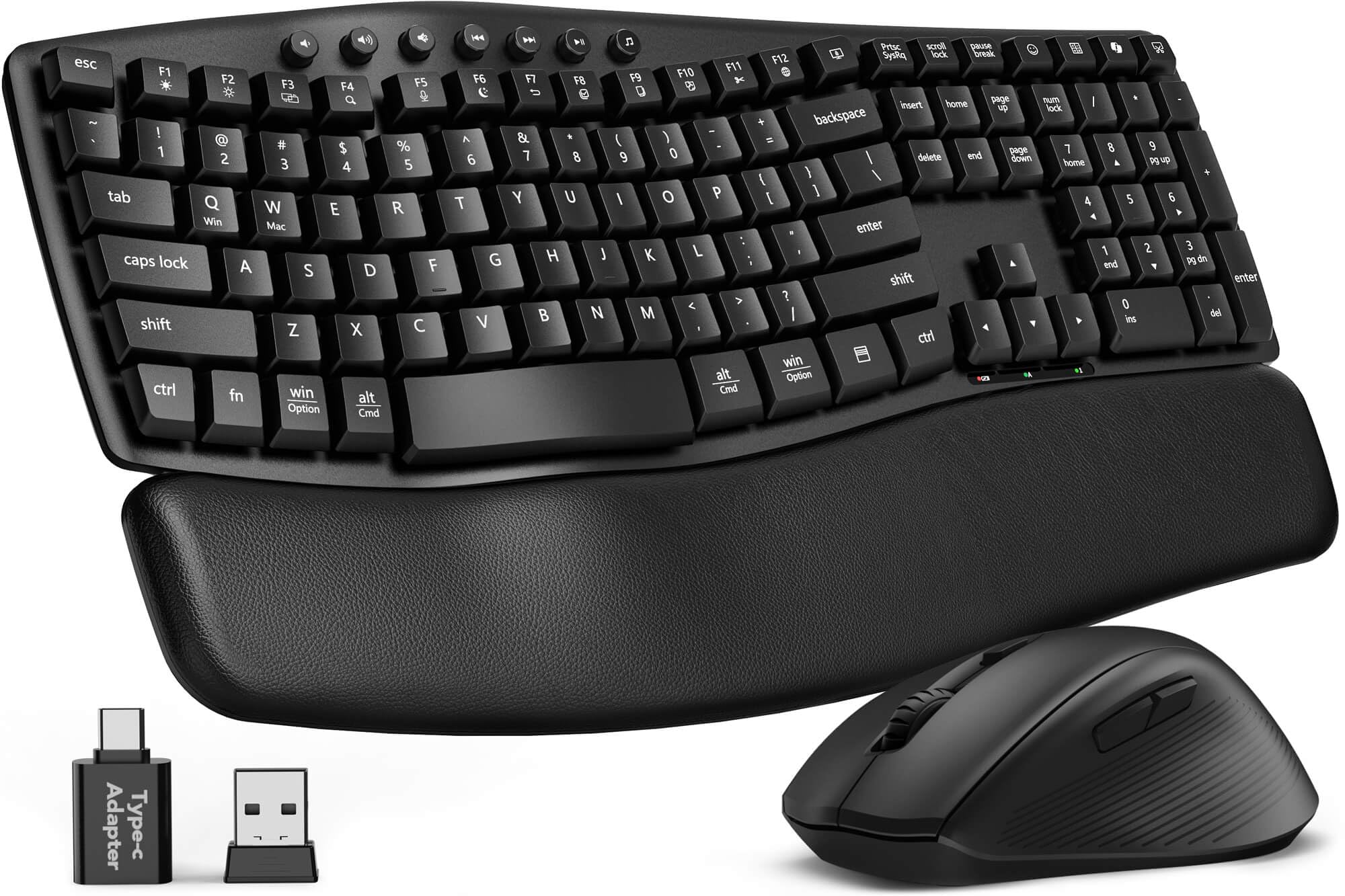
Sabute’s MA41 hits the sweet spot between affordability and genuine ergonomic innovation. The wave-shaped keyframe is paired with a soft faux leather palm rest — a welcome upgrade over the hard plastic paddings found on similarly priced combos. The cushioned surface provides stable wrist support without the sweaty stickiness that fabric covers sometimes develop over long workdays. At roughly 30dB, both keyboard and mouse clicks are quiet enough for late-night typing without disturbing anyone nearby.
Durability is a strong selling point here: the laser-etched keycaps are rated for 10 million keystrokes with fade-resistant legends, and the combo comes with a two-year replacement warranty for peace of mind. Twelve dedicated productivity shortcut keys give you instant access to screenshots, media controls, calculator, and AI tools — though the AI Assistant and Music App shortcuts are unavailable on macOS. The single 2.4GHz receiver handles both devices with a range of up to 33 feet, and a USB-C adapter is included for modern laptops.
Battery life runs six to twelve months on two AAA batteries for the keyboard and one AA for the mouse, depending on usage patterns. Some users report connectivity hiccups during gaming sessions, but for office work, browsing, and general productivity, the connection is rock-solid. The auto-sleep feature kicks in after a few minutes of inactivity, and a quick tap wakes both devices instantly. For a mid-range price, this combo delivers an impressive balance of silent operation, wrist comfort, and long-term value.
Why it’s great
- Soft leather palm rest beats hard plastic alternatives
- Ultra-quiet 30dB operation for shared spaces
- Two-year replacement warranty adds confidence
Good to know
- Not ideal for gaming due to occasional lag
- AI shortcut keys don’t work on macOS
- Batteries not included in the package
5. SABLUTE Ergonomic Wireless Combo (Backlit 4000mAh)

Sabute’s backlit variant addresses a common pain point in ergonomic combos: the lack of ambient visibility. This set features a full RGB backlight on the keyboard with eight color options — blue, cyan, white, red, green, purple, and yellow — plus multiple lighting modes. The 4000mAh rechargeable battery inside the keyboard is a standout spec, offering roughly double the capacity of typical backlit competitors, which translates to weeks of normal use before needing a USB-C recharge.
The faux lambskin leather palm rest is silky-smooth to the touch and resistant to sweat and staining, making it a practical upgrade for humid environments or long shifts. The wave keyframe mirrors the same comfortable curve found in the MA41, and the 10-million-keystroke durability rating suggests this unit will outlast cheaper alternatives. The RGB mouse adds its own flair with six fixed colors and five cycle modes, plus three DPI levels (800/1200/1600) and a 700mAh rechargeable battery.
Connectivity uses the same single 2.4GHz receiver with USB-A and USB-C adapters, supporting Windows, macOS, Chrome OS, Linux, and Android. The auto-sleep function is aggressive — it engages after just a few minutes of inactivity — which saves power but introduces a brief wake-up delay that some users find annoying. The mouse’s surface can also feel slightly slippery during extended use. For anyone who works in dimly lit spaces and wants both ergonomic support and stylistic flair, this combo delivers unmatched value at a mid-range price point.
Why it’s great
- Massive 4000mAh battery lasts weeks per charge
- Full RGB backlighting with eight color options
- Silky faux lambskin palm rest resists sweat
Good to know
- Aggressive auto-sleep causes brief wake-up delay
- Mouse surface can feel slippery during long sessions
- Slightly heavier than non-backlit alternatives
6. MEETION Ergonomic Wireless Combo
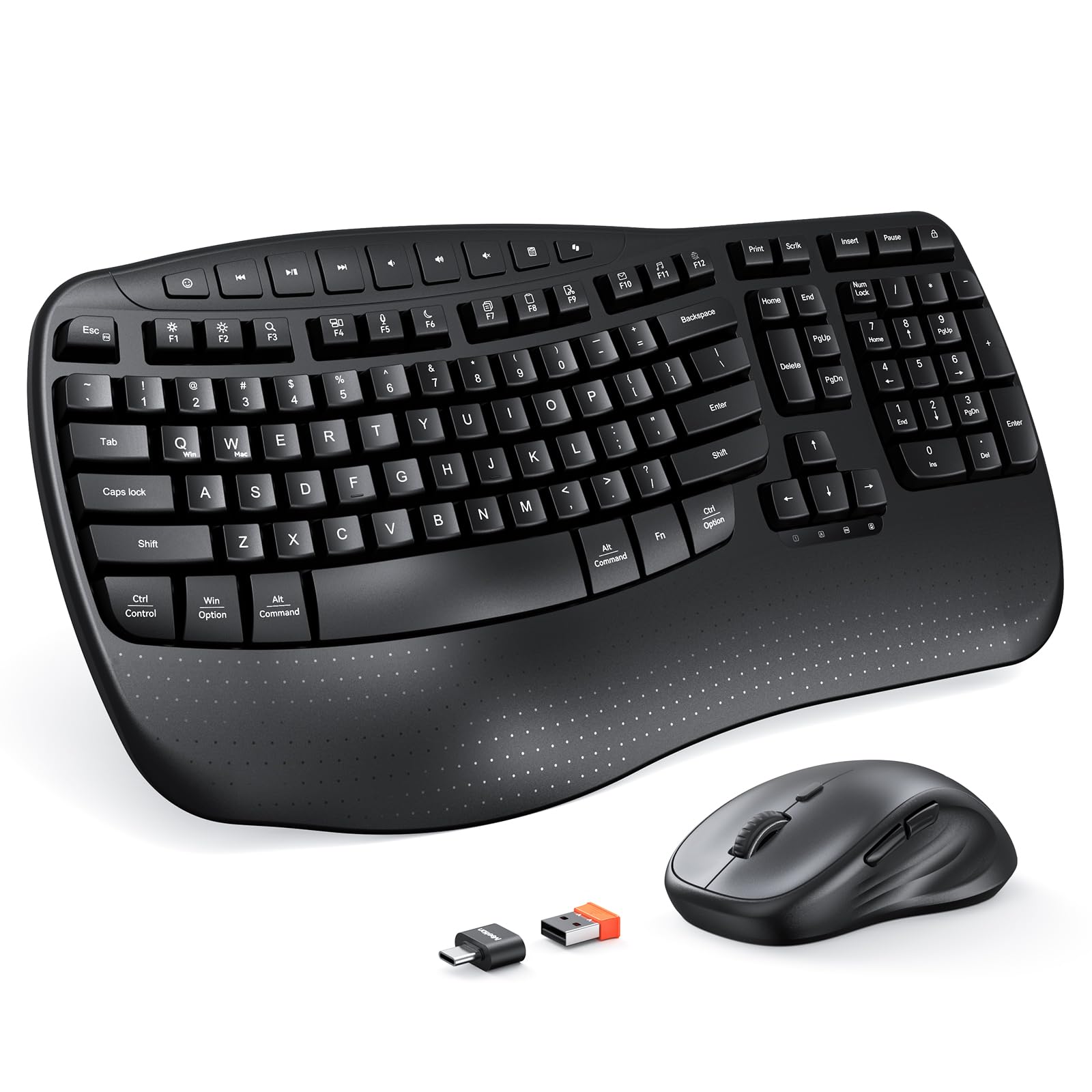
MEETION’s entry-level combo proves that wave-shaped ergonomics don’t have to break the bank. The Director-D model features a pronounced wave keyframe that aligns fingers naturally, reducing the stretch and bend that cause fatigue over long typing sessions. The hard plastic wrist rest is molded with a matching wave contour — it’s not cushioned like leather pads, but the rigid support keeps wrists in a stable position without the sag that low-density foam can develop over time.
The mouse offers four adjustable DPI levels (specific values not published, but spanning a useful range from slow precision to fast cursor movement) controlled by a top-mounted button. The 2.4GHz wireless connection uses a single USB-A receiver and includes a USB-C adapter for modern laptops, with a range of up to 33 feet. Battery life is respectable: the keyboard runs on two AAA batteries and the mouse on one AA, with auto-sleep engaging after 3–5 minutes of inactivity to preserve power.
Typing feel is smooth and quiet, with several reviewers noting that the keys produce minimal audible chatter compared to standard office keyboards. A few users have reported occasional key sensitivity quirks — double letters or slight lag on the first keystroke after wake-up — which seems to affect a minority of units. The dedicated multimedia shortcut keys at the top row are a nice productivity touch at this price tier. For budget-conscious shoppers who refuse to sacrifice an ergonomic keyframe, this is the smartest pick in the affordable zone.
Why it’s great
- Wave-shaped keyframe at an entry-level price point
- Four adjustable DPI levels for cursor customization
- Includes USB-C adapter for modern laptops
Good to know
- Hard plastic wrist rest lacks cushioned padding
- Occasional key sensitivity issues reported
- Not compatible with Windows 8.1 or older macOS
7. Lomiluskr Split Ergonomic Combo

Lomiluskr’s split ergonomic combo brings a vibrant purple aesthetic to the ergonomic desk, offering a split keyframe design that angles your hands more naturally than flat keyboards. The membrane keys require a light press to actuate, reducing the strain of bottoming out on every stroke. An integrated PU leather wrist rest — soft and squishy rather than firm — provides comfortable cushioning for the palms throughout the workday.
Connectivity is 2.4GHz wireless with a shared USB receiver, covering a range of up to 10 meters. The mouse features three DPI levels (1200/1600/2400) switchable via a top button, and its palm area is wrapped in the same PU leather for a non-slip grip. Auto-sleep kicks in after 3–5 minutes of inactivity, and a single click wakes both devices — though the mouse sometimes requires pressing the top button instead of a regular click to resume.
Customer feedback is mixed but leans positive: many users praise the comfortable layout and quiet operation, while a few report connectivity issues or inaccurate key registration on macOS. The keyboard also requires holding the Fn key to access function row actions, which some find inconvenient for tasks like adjusting volume or brightness. The included ten-key numpad is a practical bonus for spreadsheet work. For shoppers who want a colorful, split-layout ergonomic set at an accessible price, this is a compelling but slightly inconsistent option.
Why it’s great
- Split keyframe promotes natural wrist alignment
- PU leather wrist rest and mouse surface for comfort
- Three DPI levels cover most daily tasks
Good to know
- Occasional macOS compatibility issues reported
- Mouse wake-up requires pressing top button
- F-key shortcuts require holding Fn modifier
FAQ
Can I use an ergonomic wave keyboard if I have carpal tunnel syndrome?
How important is the DPI range on an ergonomic mouse for office work?
Do all wireless keyboard and mouse combos use the same USB receiver?
What does “membrane switch” mean in an ergonomic keyboard?
Final Thoughts: The Verdict
For most users, the best keyboard and mouse combo is the Logitech Signature MK650 because it combines enterprise-grade wireless security, exceptional battery life measured in years, and a comfortable, quiet typing experience that satisfies both IT departments and everyday office workers. If you need multi-device switching and a slim laptop-style feel, grab the Logitech MK955 Signature Slim. And for severe wrist pain relief where a split keyframe makes a measurable difference, nothing beats the ProtoArc EKM01 Plus.