
The moment you unbox a 3D printer, the clock starts ticking on your patience. The wrong machine will ask you to level a bed by hand, troubleshoot a jam, or tweak slicer profiles before you ever see a single layer go down. For a first-time buyer, that friction is the fastest way to kill the hobby. The right printer, on the other hand, hides all that complexity behind automation and lets you focus on what matters: designing, downloading, and watching your ideas take physical shape layer by layer.
I’m Min — the co-founder and writer behind Gadgets Feed. I’ve combed through months of user feedback and spec sheets across dozens of FDM printers to identify which models genuinely deliver a frustration-free experience for someone who has never printed a Benchy. (And Homer 🐱 quality-checked the filament spools by sitting in their cardboard boxes).
The best beginner 3d printer must balance speed, reliability, and easy setup without demanding a manual or YouTube crash course. After looking at the latest models across every price tier, one machine stands out for delivering that promise straight out of the box.
How To Choose The Best Beginner 3D Printer
Buying your first FDM printer comes down to three main factors: how much you value out-of-box automation, the size of objects you plan to make, and whether you want the option of more advanced materials later. The 3D printing industry has moved past the era where tinkering was mandatory — several printers today handle bed leveling, nozzle Z-offset, and input shaping automatically, drastically lowering the learning curve.
Auto Leveling and First Layer Success
A printer with auto bed leveling (not manual) is non-negotiable for a beginner. This sensor-driven calibration compensates for an uneven build plate, ensuring the first layer sticks without the user needing to turn knobs or shim corners. Look for 16-point or 49-point calibration systems — the more measurement points, the flatter the virtual plane the printer creates before the nozzle starts moving.
Build Volume and Nozzle Temperature
A common beginner trap is choosing a machine with a tiny build plate (under 150mm³) and then realizing you can’t print a helmet, a vase, or anything larger than a keychain. A sweet spot is 220mm³ (roughly 8.6 inches per side), which fits on most desktops while supporting full-sized functional prints. Nozzle temperature matters if you ever want to graduate from PLA to PETG or TPU — 260°C is the safe floor; 300°C unlocks engineering-grade filaments.
Speed vs. Noise Trade-Off
High-speed CoreXY printers now print at 500mm/s, cutting a Benchy from 60 minutes to under 18 minutes. The trade-off is noise: fans on high-speed machines can hit 50–55 dB during a fast print. If the printer will live in a bedroom or shared space, look for models with a dedicated night mode, enclosed chassis, or 45 dB ratings. A quiet printer means you can leave overnight prints running without disturbing anyone.
Quick Comparison
On smaller screens, swipe sideways to see the full table.
| Model | Category | Best For | Key Spec | Amazon |
|---|---|---|---|---|
| Anycubic Kobra X | Premium | Multicolor printing | 600mm/s, 49-point auto leveling | Amazon |
| Bambu Lab P1S | High-End | Enclosed performance | 500mm/s, CoreXY, 16‑color AMS | Amazon |
| ELEGOO Centauri Carbon | Premium | High‑temp filaments | 500mm/s, 320°C nozzle, enclosed | Amazon |
| Creality Ender-3 V3 KE | Mid-Range | Speed + community mods | 500mm/s, 300°C Sprite extruder | Amazon |
| FLASHFORGE Adventurer 5M | Mid-Range | CoreXY speed in compact size | 600mm/s, 10‑minute unbox | Amazon |
| Entina Tina2 Plus | Mid-Range | Kids & classroom | 250mm/s, ceramic 40‑sec hotend | Amazon |
| Creality SPARKX i7 | Mid-Range | Multicolor entry | 500mm/s, AI camera, auto leveling | Amazon |
| Geeetech M1S | Budget | Smallest footprint | 250mm/s, 16‑point auto leveling | Amazon |
| Entina Tina2C | Budget | First-time kid printer | 3.9in³ volume, 8‑min setup | Amazon |
In‑Depth Reviews
1. Anycubic Kobra X

The Anycubic Kobra X is the only printer on this list that ships with native 4-color capability right in the box — no separate AMS unit required. The built-in ACE system lets a beginner print a multicolor Benchy without manual filament swaps. The 600mm/s top speed and LeviQ 3.0 49-point auto leveling turn the first print into a genuinely smooth experience: you unbox, select a model from the 10,000-model library in the app, and the bed calibrates itself in under two minutes.
Beyond color, the hardened steel nozzle handles up to 300°C, opening the door to TPU, PETG, and even ASA when you outgrow PLA. The top-mount spool holder frees up desk space, and the AI camera detects spaghetti failures and foreign objects in real time — a feature that saved me from wasting filament during an overnight test run. Noise sits around 45 dB during a standard PLA print, quiet enough to keep in a bedroom.
The app ecosystem (Anycubic Slicer and phone monitoring) ties everything together. Beginners note that the desktop slicer integrates seamlessly with cloud printing, while the phone app gives live camera feeds. The only real trade-off is that expanding to 19 colors requires four ACE Pro units that aren’t cross-compatible with the older ACE Pro — something to plan for if you decide to go deep into multi-material prints.
Why it’s great
- Native 4-color printing without extra hardware
- 49-point auto leveling eliminates first-layer frustration
- AI camera detects failures during long prints
- Quiet 45 dB operation for overnight use
Good to know
- Expanding beyond 4 colors requires separate ACE Pro units
- Phone app could use more polish on the UI side
- Initial unit quality control can be hit-or-miss
2. Bambu Lab P1S

The Bambu Lab P1S sets the benchmark for turnkey reliability in the enclosed printer segment. Its CoreXY architecture hits 500mm/s and 20000 mm/s² acceleration while the fully enclosed chassis maintains chamber temperature for ABS and ASA prints — something open-frame machines simply cannot do. Auto bed leveling is baked in, so a beginner can open the box, run the calibration wizard in about 15 minutes, and print a benchy that rivals injection-molded quality.
Users consistently report that the P1S “just works” compared to earlier generation printers. The Bambu Studio slicer and MakerWorld community streamline finding and slicing models — you click print in the slicer, and the machine handles filament runout, power-loss recovery, and first-layer adhesion without intervention. The enclosure also drops noise to a tolerable level during high-speed prints, making it a strong candidate for shared spaces.
The real draw for beginners who plan to grow is the AMS compatibility. Add the Bambu AMS unit and you unlock up to 16 colors or four different materials in a single print. The trade-off is the premium entry point, which is the highest on this list, and the fact that carbon-fiber reinforced filaments are not recommended — so if engineering-grade composites are your goal, look at a machine with a hardened nozzle and higher hotend temperature.
Why it’s great
- Genuine out-of-box experience with zero calibration struggles
- Enclosed chamber supports ABS, ASA out the gate
- Bambu Studio and MakerWorld mesh seamlessly for beginners
- AMS expands to 16 colors with no manual swaps
Good to know
- Highest price on this list
- Not recommended for carbon-fiber reinforced filaments
- AMS is sold separately for multi-color use
3. ELEGOO Centauri Carbon

The Centauri Carbon from ELEGOO targets the beginner who already knows they want to print functional parts rather than just desk toys. The 320°C brass-hardened steel nozzle and enclosed chamber are ready out of the box for carbon-fiber reinforced filaments — a capability that usually demands an expensive upgrade on other machines. The 256mm³ build volume (10 inches per side) is the largest in this guide among the enclosed models, letting you print full-sized cosplay helmets or mechanical brackets in one piece.
The CoreXY structure reaches 500mm/s with 20000 mm/s² acceleration, and the integrated die-cast aluminum frame keeps vibrations in check. Beginners report that the printer arrives fully assembled and pre-calibrated — you level it one time (auto) and start printing. The built-in camera and dual LED lights let you monitor from a phone via WiFi, which is helpful for overnight runs with high-temp materials.
The Centauri Carbon also runs its own slicer with a clean interface, and WiFi connectivity sends files wirelessly. The biggest caution from long-term users is that the first unit can sometimes arrive with a faulty hotend communication error — ELEGOO support resolves it under warranty, but it adds a small risk for a beginner expecting absolute perfection on day one.
Why it’s great
- 320°C nozzle is ready for carbon fiber and advanced filaments
- Largest printable volume in the enclosed category (256mm³)
- Pre-assembled and pre-calibrated out of the box
- Built-in camera with time-lapse and remote monitoring
Good to know
- First-unit defect rate is higher than ideal
- Heavy shaking during high-speed prints may need a sturdy desk
- Slicer can struggle with very complex STL files on older PCs
4. Creality Ender-3 V3 KE

The Creality Ender-3 V3 KE fixes almost everything frustrating about earlier Ender models. The Sprite direct-drive extruder with a 60W ceramic heater reaches 300°C, which covers PLA, PETG, ABS, and even TPU (95A) without modification. The 500mm/s top speed and 8000 mm/s² acceleration are driven by a CoreXY-like motion system with an upgraded X-axis carriage slide that uses ball bearings for smoother travel. CR Touch auto leveling handles bed calibration, and an intuitive touchscreen with model preview is a welcome upgrade.
Assembly time is roughly 10 minutes — far better than the old Ender 3 that took an hour of frame building. Users note that print quality out of the box is sharp, with fine layer resolution on detailed models. The dual fans cool the print rapidly, which helps with overhangs and bridges. The open frame also makes it easy to spot issues and perform maintenance, which is helpful for a beginner learning the mechanics of extrusion.
The biggest gotcha is noise. The cooling fans run loud enough that several users recommend printing a fan duct mod or moving the printer to a garage. Some units arrive with the gantry out of square, requiring manual adjustment. That said, the Ender community is enormous — any problem you run into has been solved in a forum, tutorial, or printable mod, which is both a strength and a sign that this printer still demands a bit of tinkering.
Why it’s great
- Sprite direct-drive handles flexible filaments without jams
- Fast 500mm/s speed with quiet-enough idle
- Enormous community mod library for upgrades
- Takes just 10 minutes to assemble out of the box
Good to know
- Cooling fans are loud during full-speed prints
- Some units arrive with gantry alignment issues
- Max Y-axis acceleration may be capped below advertised spec
5. FLASHFORGE Adventurer 5M

The Adventurer 5M from FLASHFORGE is a compact CoreXY machine that prioritizes speed without letting print quality slip. The 600mm/s top speed with 20000 mm/s² acceleration and vibration compensation means even fast prints have minimal ghosting on edges. The one-click auto leveling uses a full calibration that compensates for the bed surface, so the first layer goes down perfectly every time. From opening the box to starting the first print takes about 10 minutes.
The 220mm³ build volume is enough for masks, brackets, and most common prints. The direct-drive extruder and 280°C nozzle handle PLA, PETG, and TPU reliably — though high-temp materials like ABS or polycarbonate are beyond this machine’s range. The PEI-coated spring steel bed provides strong adhesion during printing and releases models easily when flexed. A filament run-out sensor pauses prints automatically when a spool runs dry.
Users with experience note that the Adventurer 5M competes well against machines that cost more, especially for print clarity and adhesion. The main downsides are the relatively small build plate for anyone wanting to print larger models, and a few firmware freezes reported when using complex multi-part prints. The WiFi download feature works well for sending files from a computer, though some early users found the touchscreen interface slightly unresponsive until a firmware update.
Why it’s great
- Vibration compensation eliminates ghosting at high speeds
- 10-minute unbox-to-print process
- Small footprint fits on any desk
- Flexible PEI bed makes model removal effortless
Good to know
- 280°C nozzle limits advanced engineering filaments
- Firmware freezes reported during complex multi-part prints
- No auto shut-off after print completes
6. Entina Tina2 Plus

The Entina Tina2 Plus is designed for the youngest users in the house. Fully assembled out of the box with a pre-installed TF card loaded with models, kids can start their first print within minutes. The Poloprint Cloud app gives access to over 1,500 models with AI-powered search and 20+ creative modules — kids can upload a photo and convert it into a 3D model without touching a slicer. The partially enclosed frame keeps moving parts and the hotend away from small fingers.
The ceramic hotend heats up in just 40 seconds, which is almost 4x faster than traditional aluminum blocks. At 250mm/s, prints come fast enough to keep a child’s attention, and the quiet operation (below 45 dB) means it won’t be disruptive in a bedroom or classroom. The PEI spring steel bed gives strong adhesion, and the magnetic surface pops off for easy cleaning. Dual Z-axis stabilization keeps the print head steady across the 110mm³ build area.
The most common frustration among parents is the Poloprint app itself. After a few prints, some units disconnect from WiFi with a registration error that isn’t easy to troubleshoot. Customer support for Entina can be slow, relying on a voicemail number rather than live chat. That said, when the app works — which it does for most users — the experience is as frictionless as any printer in this category for a child.
Why it’s great
- Fully assembled with preloaded models for instant printing
- 40-second ceramic hotend reduces wait time
- Partially enclosed frame safer for kids
- Quiet enough for classroom or bedroom use
Good to know
- App can drop WiFi registration after a few prints
- Small 110mm³ build volume limits project size
- Customer support is slow to respond
7. Creality SPARKX i7
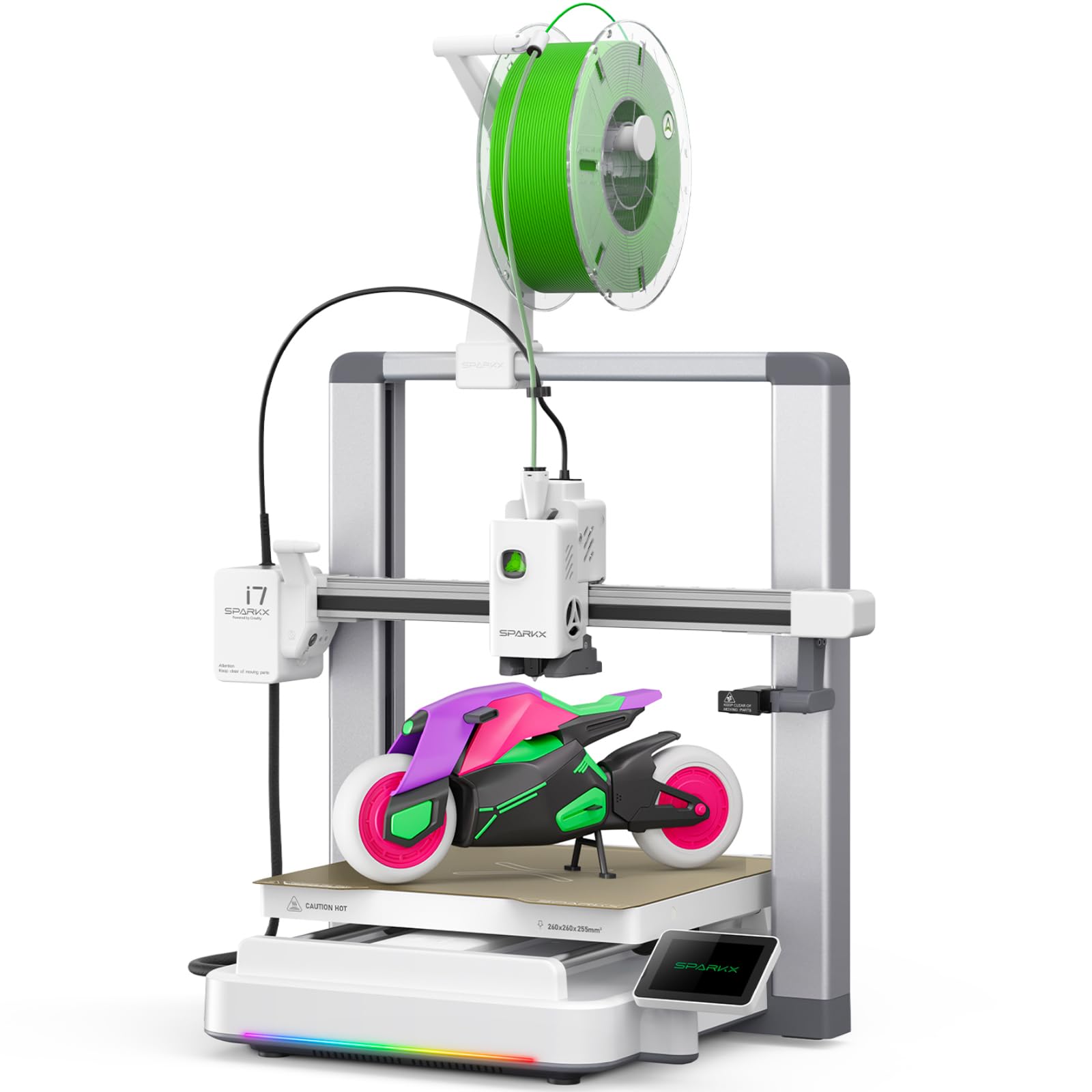
The Creality SPARKX i7 introduces the CubeMe AI, which turns photos into printable 3D models — a standout feature for beginners who want to print personalized gifts without learning CAD. The machine handles bed leveling, Z-offset, and input shaping automatically, and the 500mm/s speed with vibration compensation keeps quality high. The RGB light bar changes color based on print status, which is both decorative and functionally useful for spotting paused prints from across the room.
The build volume is generous at 260mm³, making it one of the larger mid-range options. The integrated AI camera detects spaghetti failures and filament tangles, sending alerts to your phone. Multicolor printing is available via the CFS unit (sold separately) and the machine cuts purging waste by roughly 50% compared to older multi-material systems. Night mode silences fans and kills all lights, making overnight prints practical.
User feedback is split. Many praise the build quality, easy setup, and quiet enclosed design. Others report that the UI is unintuitive, the slicer has bugs, and the company’s customer support is slow to resolve issues. Creality’s reputation for early failures — plastic gears, firmware quirks — still haunts a subset of units. For a beginner, the risk is manageable if you buy from a retailer with a generous return policy.
Why it’s great
- CubeMe AI turns photos into 3D models instantly
- Intelligent monitoring detects spaghetti and tangles
- Night mode makes overnight printing silent
- Large 260mm³ build volume for mid-sized projects
Good to know
- Slicer and UI still have rough edges
- Customer support can be slow and unhelpful
- Some units arrive with plastic gear failures early on
8. Geeetech Smart M1S

The Geeetech M1S is the smallest full-featured printer in this guide, with a build volume of just 100mm³ (roughly 4 inches per side). It targets absolute beginners — specifically kids and first-time users — who want to print small toys and educational models without occupying a full desktop. The machine is fully assembled, and the 16-point auto leveling combined with a direct-drive dual-gear extruder gives reliable first layers even on the small plate.
Print speeds hit 250mm/s, which is respectable for a machine this size, and the 50W hotend heats up quickly. The PEI-coated magnetic plate peels off for easy model removal. Users find the Geeetech app simple enough for a child to operate, and the 2.4-inch LCD screen provides clear feedback. A filament holder profile is available to print yourself if you want to use full 1kg spools instead of the smaller samples that ship with the printer.
Where the M1S falls short is reliability out of the gate. Several buyers report that the first unit arrives with a dead auto-leveling sensor or a disconnected wiring harness — the customer service team resolves it by sending a replacement, but it’s a hassle for a product that claims to be ready right away. The build volume also rules out anything beyond keychains, name tags, and very small bits.
Why it’s great
- Smallest footprint: fits on a nightstand
- Fully assembled with 16-point auto leveling
- PEI magnetic plate makes removal simple
- Very affordable entry point into the hobby
Good to know
- 100mm³ build volume limits project size severely
- Higher than average DOA rate on first unit
- WiFi can disconnect and require hours to reconnect
- Only small sample filament included
9. Entina Tina2C

The Entina Tina2C is the simplest, cheapest entry point into FDM printing. It arrives fully assembled, and the Poloprint Cloud app guides a child through setup to the first print in about 8 minutes. The 100mm³ build volume (3.9 inches per side) is tiny — think chess pieces, phone stands, and fidget toys — but for a 10-year-old’s first exposure to additive manufacturing, the volume is less important than the success rate. The auto-leveling and power-loss recovery system keeps that rate high.
The self-cleaning nozzle and quick-swap printhead simplify maintenance for first-time users. The machine supports both 2.4G WiFi and TF card printing, and the mobile app includes AI-powered photo-to-print and STEM learning modules with regularly updated courses. The compact footprint, rounded edges, and low-noise operation make it safe for a bedroom or classroom setting without feeling like industrial equipment.
Where the Tina2C shows its limitations is speed (no official high-speed rating, estimated at around 100mm/s) and material range — PLA is the only reliable filament. Users who outgrow its capabilities within a month or two will need to upgrade. The app, while beginner-friendly, also lacks the depth of Orca Slicer or Cura, so there’s no room to grow into advanced settings. For a first-ever 3D printer for a young child, it works perfectly within its limits.
Why it’s great
- 8-minute unbox-to-print for the youngest users
- Self-cleaning nozzle reduces maintenance
- AI photo-to-print and STEM modules built into the app
- Quiet, safe, compact for a child’s bedroom
Good to know
- 100mm³ volume limits to very small models
- Slow print speeds compared to modern machines
- Only reliable with PLA filament
- App ecosystem cannot grow with an advancing user
FAQ
Do I need a slicer to use a beginner 3D printer?
What is the practical lifespan of a beginner 3D printer?
Can I print ABS or TPU on a sub‑ printer?
How do I choose between a mini printer and a full‑sized printer?
Why does my first printer need auto leveling but not a second one?
Final Thoughts: The Verdict
For most users, the beginner 3d printer winner is the Anycubic Kobra X because it combines native multicolor capability, 600mm/s speed, and 49-point auto leveling in a quiet package that works straight out of the box. If you want fully enclosed performance for ABS and the largest communal ecosystem, grab the Bambu Lab P1S. And for a budget-minded entry for young children, nothing beats the small footprint and kid-focused app of the Entina Tina2C.