
That sharp, distinctive click with every keystroke is the sound of tactile certainty. Blue switch keyboards deliver an unmistakable audible and physical feedback that no other switch type can replicate, making them the weapon of choice for typists who demand confirmation with each press and gamers who need precise actuation points. The tactile bump at the actuation point followed by a crisp click creates a rhythm that transforms typing from a mundane task into a satisfying, metronomic flow.
I’m Min — the co-founder and writer behind Gadgets Feed. I’ve spent countless hours analyzing the mechanical switch landscape, comparing actuation forces, sound profiles, and build quality across dozens of boards to separate the true typist’s tools from the also-rans. This guide focuses on the boards that deliver that authentic clicky experience without cutting corners on construction or longevity.
Whether you’re banging out code in a late-night session or fragging opponents between emails, finding the right best blue switch keyboard comes down to understanding layout, connectivity, and the quality of the plate and keycaps that house those switches.
How To Choose The Best Blue Switch Keyboard
A blue switch keyboard is a personal commitment to a specific sensory experience. The right choice balances layout, construction, and connectivity against your daily routine. These are the critical factors that separate a board you’ll love for years from one you’ll replace in months.
Layout and Your Desk Real Estate
The physical footprint of your keyboard dictates how much mouse space you have and how far your hands need to travel. Full-size 104-key boards offer dedicated navigation and number pad zones, ideal for data entry and spreadsheet work. Compact 96% layouts like the Keychron K4 retain the numpad in a tighter chassis, while 60% boards like the Redragon K630 eliminate the number row and arrow keys entirely for a ultra-portable, left-hand-dominant gaming setup. Measure your desk before you buy—there is no compromise for a layout that forces awkward hand angles.
Switch Authenticity and Sound Profile
Not all blue switches sound or feel the same. Cherry MX Blue switches set the original standard with a 50g actuation force and a clean, sharp click. Gateron G Pro Blue switches (found in the Keychron K4) have a slightly smoother feel with the same audible profile. Low-profile clicky switches, like the ones in the Perixx PERIBOARD-535BL, reduce the total travel distance to 3.2mm, giving a faster reset but a less pronounced tactile bump. Listen to sound tests when possible—a switch that sounds crisp in a plastic case can sound muted or hollow in an aluminum frame.
Wireless Freedom vs. Zero-Latency Connection
A wired connection guarantees the lowest latency and eliminates battery anxiety, making it the safe choice for competitive gaming. Wireless options like Bluetooth (Keychron K4, Logitech MX Mechanical) offer desk decluttering and multi-device switching, but introduce potential pairing delays and a few milliseconds of Bluetooth input lag. The Logitech Alta Keys K98M and MX Mechanical use a Logi Bolt USB receiver for a stronger, lower-latency wireless signal than standard Bluetooth. If you split your time between a desktop and a laptop, wireless convenience usually outweighs the tiny latency penalty for all but the most twitch-sensitive shooters.
Build Materials and Keycap Quality
The plate material (plastic vs. aluminum vs. steel) determines the board’s weight, rigidity, and sound resonance. An aluminum frame, as seen on the Keychron K4 and ASUS ROG Strix Scope II X, reduces flex and adds a thockier bottom-out sound compared to an all-plastic chassis. Keycaps are equally important: double-shot PBT keycaps (found on the Ducky Origin and ASUS board) resist shine and legend fading years longer than standard ABS keycaps. A keyboard with hot-swappable switch sockets, like the Redragon K630 and the ASUS ROG Strix Scope II X, future-proofs your investment by letting you swap in different switch types without soldering.
Quick Comparison
On smaller screens, swipe sideways to see the full table.
| Model | Category | Best For | Key Spec | Amazon |
|---|---|---|---|---|
| Logitech MX Mechanical | Premium | Multi-device productivity | 15 days battery with backlight | Amazon |
| ASUS ROG Strix Scope II X | Premium | Competitive gaming | Wired USB-C, NKRO | Amazon |
| Keychron K4 | Mid-Range | Compact office with numpad | 4000 mAh battery | Amazon |
| Logitech Alta Keys K98M | Mid-Range | Quiet clicky typing | 12 months battery (BT LE) | Amazon |
| Ducky Origin | Mid-Range | Classic full-size feel | Cherry MX Blue switches | Amazon |
| Perixx PERIBOARD-535BL | Mid-Range | Ergonomic split layout | Low-profile blue switches | Amazon |
| Redragon K630 Dragonborn | Budget | Ultra-compact gaming | Hot-swappable switches | Amazon |
In‑Depth Reviews
1. Logitech MX Mechanical Wireless Illuminated Performance Keyboard

The Logitech MX Mechanical delivers a premium clicky experience in a low-profile form factor that doesn’t compromise on key travel. The tactile bump is precise and the audible click is satisfying without being obtrusive, making it one of the few mechanical keyboards that works well in open-office environments. The smart illumination backlighting activates only when your hands approach, conserving battery life while remaining functional in dim lighting.
Multi-device pairing via Bluetooth or the Logi Bolt receiver supports up to three devices across Windows, macOS, Linux, and even iOS and Android. The Logi Options+ software allows deep customization of Fn keys, backlighting effects, and Flow cross-computer control. With a 15-day battery life with backlighting on and up to 10 months with it off, this board outlasts most wireless mechanical rivals by a significant margin.
The full-size layout includes a dedicated number pad and navigation cluster, but the compact bezel keeps the footprint manageable. The metal top plate provides rigidity and a premium weight, though the keycaps are prone to showing fingerprints over time. For professionals who type across multiple devices and demand a tactile, clicky response, this is the most well-rounded blue switch keyboard on the market.
Why it’s great
- Smart hands-approach backlighting saves battery and looks clean
- Seamless three-device switching with Logi Bolt or Bluetooth
- Low-profile clicky switches maintain great tactile feel with shorter travel
Good to know
- Keycaps show fingerprints and oils from regular use
- Switches and keycaps are not hot-swappable
- Premium price reflects the Logitech ecosystem and build quality
2. ASUS ROG Strix Scope II X Wired USB Mechanical Gaming Keyboard

The ASUS ROG Strix Scope II X is built for competitive gamers who refuse to compromise on response time. The wired USB-C connection guarantees zero wireless latency and NKRO for every keystroke, a non-negotiable combination for fast-paced shooters and MOBAs. The aluminum top plate and double-shot PBT keycaps deliver a weighty, durable feel that stays planted on the desk no matter how aggressive your gameplay gets.
The hot-swappable ROG NX V2 switches allow you to swap between linear ROG NX Snow or clicky ROG NX Storm switches without soldering, giving you the flexibility to change your switch feel for different games or typing tasks. Integrated sound-dampening foam and switch-dampening pads absorb pinging echoes, making the keystroke acoustics cleaner than most gaming-focused mechanical keyboards. Pre-programmed hotkeys for Xbox Game Bar and a multi-function wheel for media control streamline your streaming and recording workflow.
The detachable wrist rest with three angle adjustments ensures ergonomic comfort during extended sessions, though the wrist pad itself is slightly firm. The 2-in-1 ROG keycap and switch puller is a thoughtful inclusion that makes customization easy. For gamers who want a premium, zero-compromise clicky board with future-proofing through hot-swap sockets, this ASUS board is a compelling wired choice.
Why it’s great
- Hot-swappable ROG NX V2 switches for easy customization
- Sound-dampening foam reduces pinging for cleaner acoustics
- Wired USB-C with NKRO ensures zero latency in competitive play
Good to know
- Requires ASUS software for full RGB lighting control
- Wrist rest is firm and may not suit all preferences
- No wireless connectivity; purely a wired board
3. Keychron K4 Wireless Bluetooth/USB Wired Gaming Mechanical Keyboard

The Keychron K4 packs a full number pad into a 96% layout that saves significant desk space without sacrificing productivity. The Gateron G Pro Blue switches deliver the classic clicky response with a slightly smoother feel than Cherry MX counterparts, making them ideal for prolonged typing sessions. The aluminum frame adds rigidity and a professional aesthetic that blends into both office and home setups without looking overly aggressive.
Wireless connectivity via Bluetooth supports up to three devices, with seamless switching between your PC, laptop, and tablet. The 4000 mAh battery is among the largest in its class, delivering up to 72 hours of continuous typing with RGB on or roughly a full work week of moderate use. On wired mode via USB-C, the K4 supports NKRO for gaming, but switches to 6KRO in wireless mode—a reasonable trade-off for desktop convenience.
The Mac layout with included Windows keycaps makes it a dual-OS workhorse out of the box, and the 15+ RGB backlight modes provide ample customization. The Bluetooth sleep delay has been a minor complaint among some users, but a firmware update or switching to wired usage resolves this entirely. For anyone who needs a numpad but refuses to clutter their desk with a full-size board, the K4 is the most practical option available.
Why it’s great
- 96% layout retains numpad in a compact footprint
- 4000 mAh battery provides exceptional wireless run time
- Aluminum frame adds weight and reduces deck flex
Good to know
- Bluetooth sleep delay can interrupt initial keystrokes
- 6KRO on wireless vs. NKRO on wired
- Multimedia keys require function key combos
4. Logitech Alto Keys K98M Wireless Mechanical Clicky Keyboard
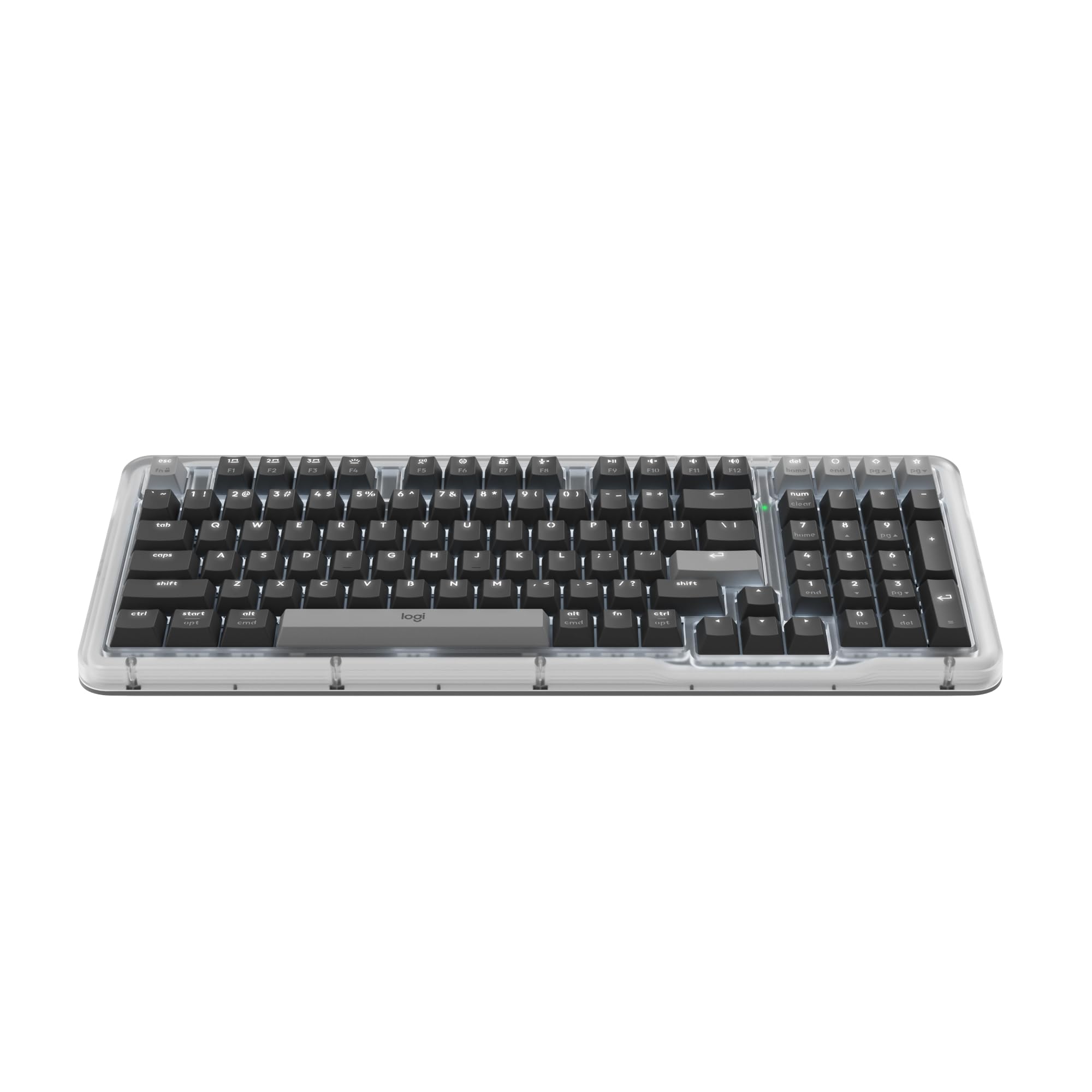
The Logitech Alto Keys K98M introduces the UniCushion gasket mount system, which absorbs vibrations and produces a softer, more refined click than traditional tray-mounted blue switch keyboards. The Marble Switches (hot-swappable, pre-lubed) deliver a smooth, stable keystroke with the characteristic audible click but without the harsh bottom-out that can fatigue fingers during long writing sessions. The compact 1800-style layout includes a numpad in a 98-key format that shaves inches off the width of a traditional full-size board.
Wireless connectivity offers both Bluetooth Low Energy and Logi Bolt USB receiver, both with impressive range and stability. The white backlighting is non-RGB, which may disappoint enthusiasts, but it provides clean, functional illumination for late-night typing without the distraction of rainbow animations. Battery life is rated at up to 12 months with Bluetooth LE, making it one of the longest-lasting wireless mechanical keyboards on the market.
The transparent top case and vibrant color options give the K98M a distinctive, modern aesthetic that stands out from the sea of black and gray mechanical boards. The concave keycaps provide a comfortable finger scoop that guides your fingers into the correct position. For those who want a clicky keyboard that feels premium and looks unique without the gamer aesthetic, the K98M is a refreshing alternative.
Why it’s great
- UniCushion gasket mount dampens vibration for a softer click
- Hot-swappable Marble Switches with pre-lubed stems
- 12-month battery life with Bluetooth LE is industry-leading
Good to know
- White backlighting only; no RGB customization
- No included wrist rest despite tall profile
- Not a true full-size layout; missing some standard keys
5. Ducky Origin Vintage Double Shot PBT Mechanical Keyboard
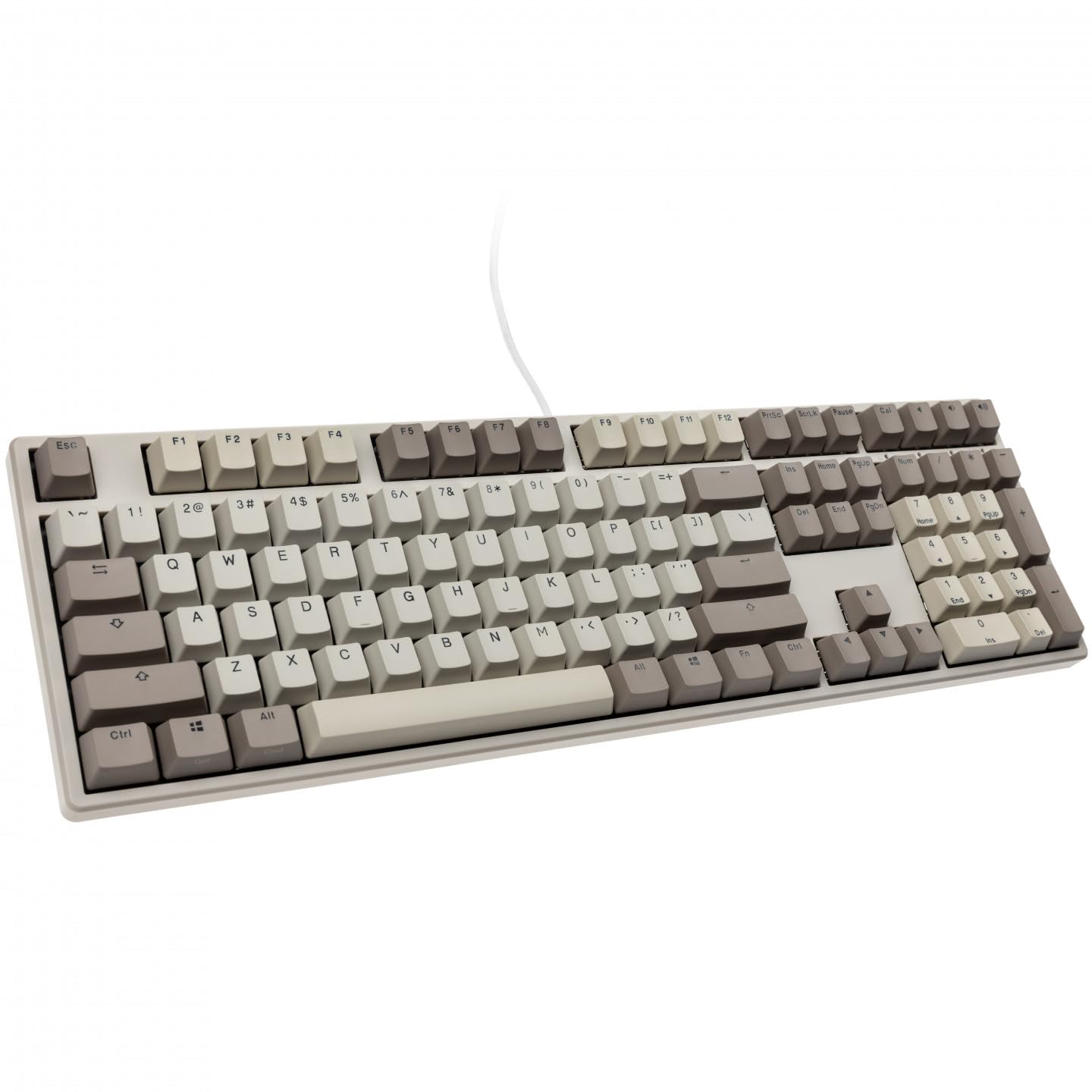
The Ducky Origin pays homage to the classic Model M aesthetic while integrating modern construction. The Cherry MX Blue switches provide the gold-standard clicky experience—a sharp tactile bump at 50g actuation followed by a crisp, unmistakable click that has defined mechanical keyboards for decades. The double-shot PBT keycaps in an OEM profile resist shine and legend fading far better than ABS alternatives, ensuring the vintage look remains pristine for years.
The exceptionally slim and narrow bezel design gives the full-size board a sleek profile on the desk, while the weight (1.25 kg) provides stability that prevents sliding during intense typing sessions. Kailh yellow hotswap sockets on stabilizer keys (ESC, Back Space, Enter, left Shift, right Shift, Space Bar, and numpad keys) allow easy replacement of the most heavily used stabilizers without soldering. The detachable braided USB-C cable adds convenience for transport and cable management.
The south-facing switch orientation improves compatibility with Cherry-profile keycap sets if you choose to customize later. A bonus enter key in a random color adds a touch of personality. The “Cal” key that opens the calculator is a thoughtful productivity feature. For purists who want an authentic Cherry MX Blue typing experience in a well-built, no-nonsense package, the Ducky Origin delivers exactly what it promises.
Why it’s great
- Authentic Cherry MX Blue switches with reliable 50g actuation
- Double-shot PBT keycaps resist shine and fading
- South-facing switches for broader keycap compatibility
Good to know
- Full-size layout may be too large for cramped desks
- No backlighting or RGB for low-light typing
- Stabilizer hotswap sockets only on select keys
6. Perixx PERIBOARD-535BL Wired Ergonomic Mechanical Keyboard
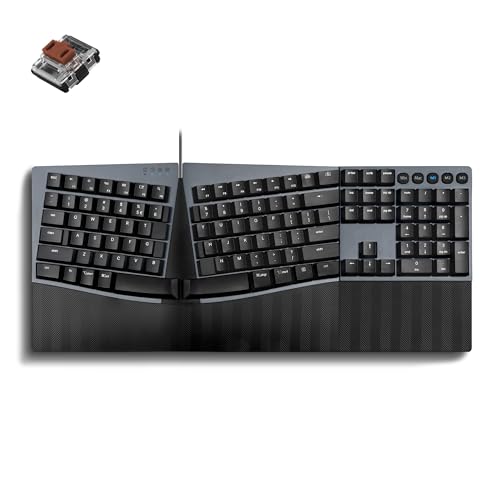
The Perixx PERIBOARD-535BL addresses the one major ergonomic weakness of traditional full-size keyboards: the forced inward wrist angle. The one-piece split layout separates the alphanumeric keys into left and right zones that angle your wrists into a more natural, neutral position. The low-profile blue clicky switches reduce total travel distance to approximately 3.2mm, delivering the familiar tactile bump and audible click with a faster reset that benefits both typing speed and accuracy.
The stepped, curved key rows and concave keycaps with flatter tops encourage a natural typing posture that reduces fatigue during marathon writing or coding sessions. Full NKRO ensures every keystroke is registered accurately, and programmable keys via the Perixx website offer customization without requiring bulky software installation. The board is compatible with Windows, macOS, and Linux out of the box, making it a versatile option for multi-OS users.
The natural learning curve of about one to two weeks is a real factor—the split layout requires an adjustment period, but users consistently report improved comfort and reduced wrist pressure after adapting. The lack of adjustable rear feet is a notable omission for those who prefer a negative tilt. For typists experiencing wrist strain from traditional straight keyboards who refuse to give up the clicky blue switch experience, the PERIBOARD-535BL is a specialized and effective solution.
Why it’s great
- True ergonomic split layout reduces wrist strain
- Low-profile blue switches with faster key reset
- Full NKRO with programmable keys via web tool
Good to know
- Split layout requires a one- to two-week adaptation period
- No adjustable rear feet for tilt customization
- Wired USB-A only; no wireless connectivity
7. Redragon K630 Dragonborn 60% Wired RGB Gaming Keyboard

The Redragon K630 Dragonborn proves that a satisfying clicky experience doesn’t require a triple-digit budget. The compact 60% layout (61 keys) eliminates the number row, function row, and navigation cluster to create a footprint that leaves maximum desk space for mouse movement, a critical advantage for FPS gamers. The tactile blue switches provide audible typing feedback with a 50 million keypress lifespan, and the hot-swappable design lets you swap them for Redragon’s other switch options without soldering.
The RGB backlighting offers 11 presets with adjustable brightness and speed, controllable directly from the keyboard without software. The Pro driver software expands customization with macro programming and custom lighting effects, though some users have reported instability issues with the software that Redragon’s customer support resolves via firmware updates. The metal-reinforced plastic case provides adequate rigidity for the price point, and the NKRO over USB ensures every keypress registers.
The wired-only design eliminates battery concerns and keeps the price low, while the 60% layout forces reliance on function layer combos for arrow keys and media controls—a trade-off that serious gamers accept readily but productivity users may find frustrating. The included keycap puller is a nice touch for a budget board. For , the K630 delivers genuine clicky blue switch performance with hot-swap capability, making it the most cost-effective entry into the mechanical keyboard hobby available today.
Why it’s great
- Hot-swappable blue switches at a budget price point
- 60% layout maximizes mouse space for FPS gaming
- 11 RGB presets with onboard control, no software required
Good to know
- Official software has been reported to cause device issues
- No arrow keys or dedicated navigation cluster
- Wired-only; no wireless or Bluetooth option
FAQ
Are blue switches too loud for an open office environment?
Can I replace the switches on a blue switch keyboard later?
What is NKRO and why does it matter for blue switch keyboards?
Why do some blue switches sound different from others?
Final Thoughts: The Verdict
For most users, the best blue switch keyboard winner is the Logitech MX Mechanical because it delivers that essential clicky tactility in a low-profile package that works beautifully across multiple devices and operating systems. If you want a hot-swappable gaming board with premium acoustics and zero wireless latency, grab the ASUS ROG Strix Scope II X. And for the compact desk warrior who needs a numpad without the footprint, nothing beats the Keychron K4.