
A budget-friendly monitor for working from home needs to deliver sharp text, reliable connectivity, and extended comfort features without breaking your setup budget. The difference between a productive day and a frustrating one often comes down to panel quality, refresh rate, and ergonomic adjustment range — specs that directly affect how long you can work before your eyes fatigue.
I’m Min — the co-founder and writer behind Gadgets Feed. I’ve spent countless hours analyzing the technical specifications, customer feedback, and real-world trade-offs in the sub- monitor space to separate genuine value from marketing noise.
After comparing dozens of models across resolution, refresh rate, color accuracy, and ergonomic features, I’ve curated this guide to help you find the absolute budget monitor for working from home that matches your specific workflow needs.
How To Choose The Best Budget Monitor For Working From Home
The right budget monitor for working from home balances resolution, refresh rate, panel technology, and ergonomic range — all while staying within a reasonable cost window. Not every affordable monitor is built for eight-hour sessions, so knowing which specs matter most for productivity helps you avoid the wrong purchase.
Panel Technology and Resolution
An IPS panel is the baseline for color consistency and wide viewing angles. TN panels wash out when you shift position, and VA panels can exhibit slower pixel response that makes text look soft during fast scrolling. For a 24-inch or 27-inch screen, Full HD (1920×1080) offers a pixel density around 82 PPI — adequate for documents, email, and video calls — while QHD (2560×1440) at 27 inches delivers noticeably sharper text that reduces eye strain during all-day reading.
Refresh Rate and Adaptive Sync
A standard 60Hz panel shows 60 distinct frames per second, but a 100Hz or 120Hz monitor updates the image more frequently, making cursor movement smoother and scrolling through long documents feel significantly more fluid. This reduces the perception of flicker and can lower visual fatigue over a full workday. Paired with FreeSync or Adaptive-Sync, the monitor matches its refresh rate to your graphics output, avoiding screen tearing during video playback or light creative work.
Ergonomic Adjustability and Eye Comfort
A monitor stand that offers height adjustment, tilt, swivel, and pivot (portrait mode) lets you align the screen to your natural eye level, reducing forward head posture and shoulder tension. Look for a VESA-compatible mount option if your desk setup uses an arm. Blue light reduction features like Low Blue Light, Flicker-Free backlighting, and TÜV Rheinland certification directly impact how long you can work before experiencing dry eyes or headaches — these are non-negotiable for a dedicated work-from-home monitor.
Quick Comparison
On smaller screens, swipe sideways to see the full table.
| Model | Category | Best For | Key Spec | Amazon |
|---|---|---|---|---|
| Dell 27 Plus QHD S2725DSM | Premium | Sharpest text & multitasking | 2560×1440 QHD / 144Hz | Amazon |
| LG 27US500-W Ultrafine 4K | Premium | Ultra-sharp 4K detail | 3840×2160 4K / HDR10 | Amazon |
| HP Series 3 327se | Mid-Range | Eyesafe-certified all-day comfort | Full HD / 100Hz / Eyesafe | Amazon |
| ViewSonic VG2448A | Mid-Range | Full ergonomic stand & USB hub | Full HD / 60Hz / USB hub | Amazon |
| BenQ GW2790T | Mid-Range | Brightness Intelligence eye care | Full HD / 100Hz / Height adj. | Amazon |
| Amazon Basics 27″ 120Hz | Mid-Range | Smooth scrolling & built-in speakers | Full HD / 120Hz / DisplayPort | Amazon |
| Dell SE2725HM | Mid-Range | Enterprise-grade panel at low cost | Full HD / 100Hz / ComfortView+ | Amazon |
| Acer KB242Y | Budget | Highest refresh for the price | Full HD / 120Hz / 1ms VRB | Amazon |
| KYY X90D Laptop Extender | Budget | Portable triple-screen laptop setup | 15.6″ FHD / 60Hz / USB-C | Amazon |
In‑Depth Reviews
1. Dell 27 Plus QHD Monitor – S2725DSM

The Dell S2725DSM delivers QHD resolution at 2560×1440 on a 27-inch IPS panel, giving you 109 PPI — noticeably sharper than Full HD for reading code, dense spreadsheets, or long documents. The 144Hz refresh rate and 1ms MPRT make cursor movement and window transitions fluid, even though this is clearly a productivity-first monitor, not a gaming-focused one.
The stand offers height, tilt, pivot, and swivel adjustments, so you can find a neutral neck position without buying a separate VESA arm. Dual 3W speakers handle video calls and system sounds adequately, and AMD FreeSync keeps the image tear-free during any video playback. TÜV 4-star certification confirms low blue light output.
The 1500:1 contrast ratio is above the typical 1000:1 for IPS panels, producing deeper blacks that help when reviewing dark-themed designs or code editors. The ash-white finish keeps the desk looking clean, and the integrated cable management reduces clutter.
Why it’s great
- QHD resolution shows significantly sharper text than 1080p monitors
- Full ergonomic stand with height, tilt, pivot, and swivel
- 144Hz refresh removes flicker perception during fast scrolling
Good to know
- No USB-C input — requires HDMI or DisplayPort for video
- Built-in speakers are adequate but lack bass for music
2. LG 27US500-W Ultrafine 4K Monitor

The LG 27US500-W brings 4K UHD resolution to the budget-friendly price tier — 3840×2160 on a 27-inch IPS panel delivers 163 PPI, making fonts razor-sharp and eliminating the need for subpixel rendering tweaks on macOS. The HDR10 support and 90% DCI-P3 color gamut coverage mean photo editing and video review look accurate, not washed out.
The borderless design maximizes the screen area, and the Reader Mode combined with Flicker Safe reduces blue light exposure without making the display look overly warm. Connectivity includes HDMI and DisplayPort, though the monitor lacks USB-C, so you will need a compatible cable for modern laptops.
The ergonomic stand offers tilt adjustment but no height or pivot range, limiting your ability to align the panel perfectly to eye level. This is a good candidate for a VESA arm if you need precise height control. The white finish and slender profile give it a modern aesthetic that fits well in home offices.
Why it’s great
- 4K resolution at 27 inches delivers superior text clarity for all-day reading
- 90% DCI-P3 color gamut suits photo and video work
- HDR10 support enhances contrast on compatible content
Good to know
- Stand only tilts — no height, pivot, or swivel adjustment
- No USB-C input; requires adapter for most modern laptops
3. HP Series 3 27 inch FHD Monitor 327se

The HP 327se stands out for its Eyesafe certification — a hardware-based low-blue-light filter that maintains color accuracy while reducing strain. The 27-inch IPS panel at 1920×1080 is sharp enough for document work, and the 100Hz refresh rate makes window dragging and web scrolling noticeably smoother than a standard 60Hz screen.
The 1300:1 contrast ratio gives it better black depth than typical 1000:1 IPS monitors, helping text stand out against dark backgrounds. The 4-way ergonomic stand offers height, tilt, swivel, and pivot adjustments, which is rare at this price tier and directly reduces neck fatigue during long work sessions.
Dual 2W speakers are built in — sufficient for video calls but thin for music. The monitor uses at least 90% post-consumer recycled plastics in the enclosure and 20% recycled glass in the panel, giving it a sustainability angle without raising the price. Connectivity includes VGA, HDMI 1.4, and DisplayPort 1.2.
Why it’s great
- Eyesafe certification reduces blue light without yellowing the screen
- Full ergonomic stand with height, tilt, swivel, and pivot
- 1300:1 contrast ratio improves text readability
Good to know
- Built-in speakers are adequate for voice only
- Resolution is 1080p — not as sharp as QHD for dense text
4. ViewSonic VG2448A 24 Inch IPS Monitor

The ViewSonic VG2448A focuses completely on productivity ergonomics — the stand offers 40 degrees of tilt, full swivel, 90-degree pivot for portrait mode, and 130mm height range. This range of adjustability makes it easy to transition between sitting and standing desks without buying aftermarket hardware.
The 24-inch Full HD IPS panel at 60Hz is more conservative than the 100Hz+ competition, but for email, spreadsheets, and video calls, the frame rate is perfectly adequate. The built-in USB hub with Type-A and Type-B ports lets you connect peripherals directly to the monitor, reducing cable mess on the desk.
Flicker-Free technology and a Blue Light Filter help reduce eye fatigue during extended sessions. The eco-friendly easy-open box simplifies setup without excessive packaging waste. At 24 inches, the pixel density is 92 PPI — slightly sharper than a 27-inch 1080p panel, making text look crisp at typical viewing distances.
Why it’s great
- Full ergonomic stand with 40-degree tilt, height, swivel, and pivot
- Built-in USB hub for connecting peripherals directly
- 24-inch size offers tighter pixel density than 27-inch 1080p
Good to know
- 60Hz refresh rate — no high-refresh benefit for scrolling
- No built-in speakers
5. BenQ GW2790T 27-Inch Monitor

BenQ’s GW2790T is built around the company’s Brightness Intelligence Technology (B.I. Tech), which automatically adjusts screen brightness and color temperature based on ambient lighting conditions. This adaptive feature reduces the need to manually tune the monitor as the sun moves across your room, maintaining consistent eye comfort throughout the day.
The 27-inch IPS panel runs at 100Hz and covers 99% sRGB, producing accurate colors for document review and light creative work. The anti-glare coating is particularly effective in bright rooms — it cuts reflections without softening text readability, a direct advantage over glossy competitors.
The stand offers height adjustment and tilt, though it lacks swivel and pivot features. The built-in speakers are functional for voice calls but quiet at lower volume settings. The overall build is sturdy, with a weighted base that stays planted during desk adjustments.
Why it’s great
- Adaptive Brightness Intelligence adjusts to ambient light automatically
- Excellent anti-glare coating for bright home offices
- 100Hz refresh smooths scrolling without gaming trade-offs
Good to know
- Stand only offers height and tilt — no swivel or pivot
- Built-in speakers are quiet at default settings
6. Amazon Basics 27-inch Computer Monitor
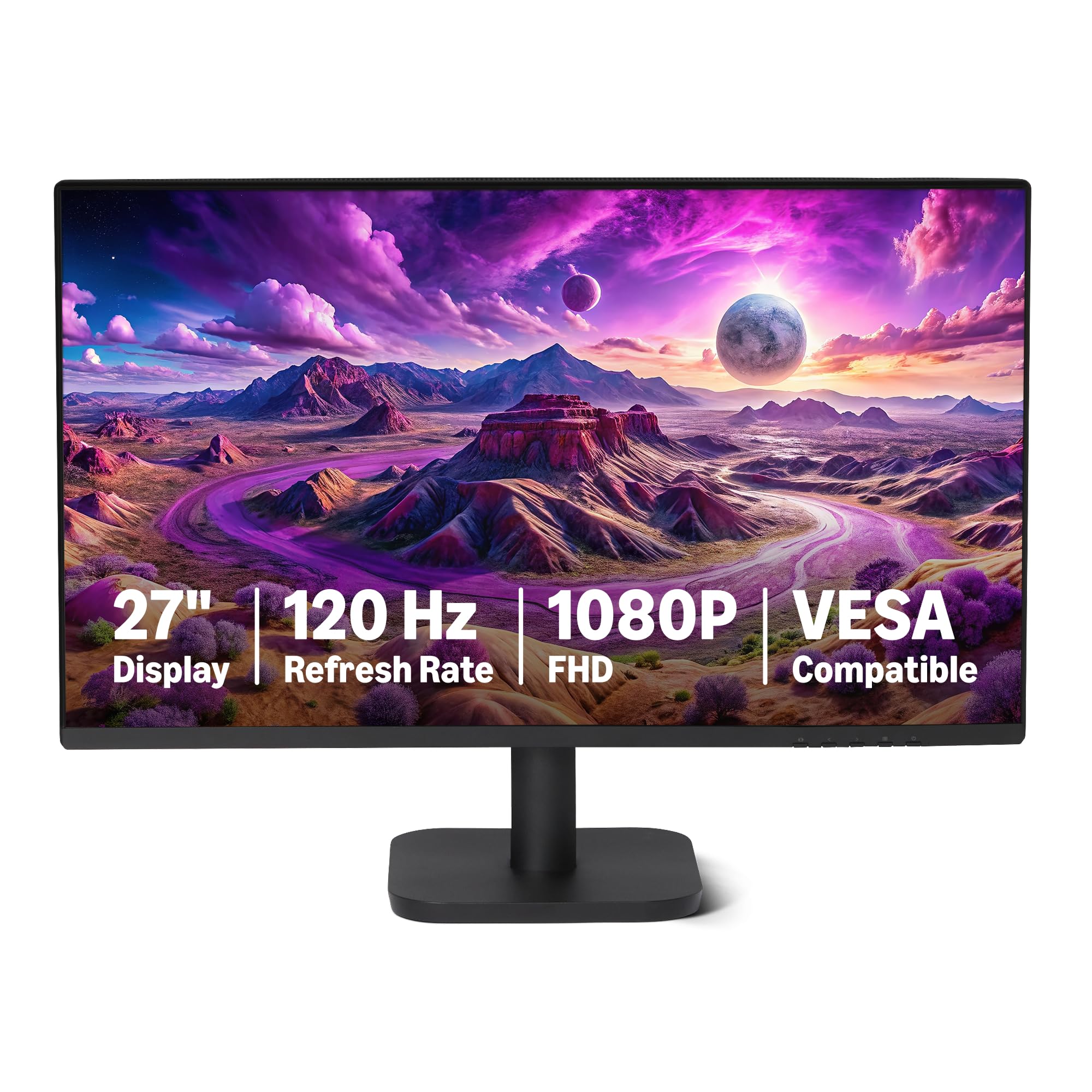
The Amazon Basics 27-inch monitor packs a 120Hz refresh rate and a 1500:1 contrast ratio into a remarkably simple package. The IPS panel covers 99% sRGB, producing vivid colors that feel punchier than typical budget monitors. The 4-sided narrow bezel makes it a strong candidate for dual-monitor setups.
Connectivity includes HDMI 1.4, DisplayPort 1.2, and a 3.5mm audio-out port, plus built-in 2W x2 speakers that handle system sounds and voice calls adequately. The monitor supports FreeSync Adaptive Sync, which keeps motion tear-free even if you occasionally use it for light gaming after work hours.
The stand offers tilt adjustment but no height or swivel range — this is the primary compromise to hit its price point. VESA 100x100mm compatibility means you can mount it on an arm for better ergonomics. macOS users should follow the included setup guide to optimize scaling and avoid HiDPI blur.
Why it’s great
- 120Hz refresh makes scrolling and cursor movement notably smoother
- 1500:1 contrast ratio provides deeper blacks than typical IPS panels
- Built-in speakers save desk space for voice calls
Good to know
- Stand only tilts — no height adjustment included
- macOS users need to configure display scaling for optimal sharpness
7. Dell SE2725HM 27-Inch Monitor

The Dell SE2725HM brings enterprise-grade panel consistency to a consumer price point. The 27-inch IPS panel runs at 100Hz with TÜV Rheinland 3-star certification and ComfortView Plus, which reduces harmful blue light without washing out the color accuracy. Multiple reviewers noted excellent panel uniformity and consistent color temperature across units — a sign of Dell’s quality control.
The built-in power supply unit and cable holder keep the desk tidy, and the VESA mount is placed dead-center, ensuring balanced weight distribution when using an arm. The monitor supports HDMI and VGA inputs, though it lacks DisplayPort and USB-C, so you may need an adapter for modern laptops.
The anti-glare matte coating handles overhead office lighting effectively, reducing reflections during video calls and document work. No built-in speakers are included, so you will need external speakers or headphones for audio output. The tilt-only stand is basic but functional.
Why it’s great
- Excellent panel uniformity and color consistency across units
- ComfortView Plus reduces blue light without color shift
- Dead-center VESA mount for easy arm installation
Good to know
- No DisplayPort or USB-C inputs
- No built-in speakers
8. Acer KB242Y 23.8-Inch Monitor

The Acer KB242Y delivers the highest refresh rate in its price class — up to 120Hz on a 23.8-inch Full HD IPS panel with 1ms VRB response time. The 99% sRGB coverage produces vibrant colors that look accurate for document work and presentation design.
The zero-frame design minimizes bezel width, making the screen feel larger than its 23.8-inch diagonal suggests. Adaptive-Sync support (FreeSync compatible) matches the refresh rate to your graphics output for tear-free motion. The monitor includes HDMI and VGA ports, but no DisplayPort or USB hub.
The stand offers tilt adjustment only, with no height or swivel adjustment. The 250-nit brightness is adequate for indoor use but may struggle in very bright rooms. There are no built-in speakers, so you will need external audio for calls or media.
Why it’s great
- 120Hz refresh and 1ms VRB response for exceptionally smooth motion
- 23.8-inch size hits a sweet spot for pixel density and desk fit
- Zero-frame bezel maximizes the screen-to-body ratio
Good to know
- No DisplayPort input
- No built-in speakers
- Stand only offers tilt adjustment
9. KYY Laptop Screen Extender X90D

The KYY X90D is a portable dual-monitor extender that clamps onto your laptop, giving you two extra 15.6-inch 1080p IPS screens via a single USB-C cable. The 300-nit brightness and 1200:1 contrast ratio produce clear, readable text for multitasking between email, chat apps, and documents.
The aluminum alloy body is lightweight and durable, folding flat for travel. Each screen can be rotated 360 degrees, allowing you to position them in landscape or portrait orientation. The 90-degree adjustable kickstand keeps the screens stable on a desk without wobbling during typing.
Compatibility requires a laptop with a Type-C port that supports video output. A driver installation is needed for Windows and macOS, and corporate laptops with strict IT policies may block the driver. The extender offers extended, mirror, and portrait modes, making it ideal for data analysts, programmers, or virtual teachers.
Why it’s great
- Adds two 15.6-inch screens to a laptop for a triple-monitor portable setup
- Single USB-C cable handles video and power
- Aluminum alloy build is lightweight and durable for travel
Good to know
- Requires driver installation — corporate laptops may block this
- No height adjustment on the included stand
- 60Hz refresh only — no high-refresh benefit
FAQ
Is 100Hz noticeably better than 60Hz for office work?
Does a budget monitor need a height-adjustable stand?
Final Thoughts: The Verdict
For most users, the budget monitor for working from home winner is the Dell 27 Plus QHD S2725DSM because it combines QHD resolution for sharp text, a 144Hz refresh for smooth scrolling, and a fully adjustable stand — all within a very reasonable price range. If you want 4K clarity for creative work, grab the LG 27US500-W Ultrafine. And for the best all-day comfort at 1080p, nothing beats the HP Series 3 327se with its Eyesafe certification and full ergonomic stand.