
Animation is the most brutal test of a desktop’s endurance. Rendering a single frame can tax every core, and scrubbing through a timeline demands instant data access. A PC that stutters during viewport playback destroys creative flow.
I’m Min — the co-founder and writer behind Gadgets Feed. This guide analyzes CPU core counts, GPU VRAM capacities, and memory bandwidth to find machines that won’t bottleneck your compositor or crash your renderer.
Building a workstation for frame-by-frame work requires balancing GPU compute units with CPU multi-thread performance. This guide breaks down the top contenders for the best pc for animation across every budget tier.
How To Choose The Best PC For Animation
Animation workstations have distinct requirements from gaming rigs. While both need powerful GPUs, animators prioritize multi-threaded CPU performance for rendering and large amounts of VRAM for texture-heavy scenes. These are the critical specifications to evaluate.
Graphics Card VRAM Capacity
VRAM is the most expensive bottleneck in animation. A scene with high-resolution textures, complex particle systems, or 3D models can easily exceed 8GB. When VRAM fills, the system swaps to system RAM, dropping viewport performance to single-digit frames per second. 12GB is a practical minimum for modern 3D work, with 16GB or more recommended for 4K texture sets.
CPU Core Count and Architecture
Rendering is a parallel workload that scales almost linearly with core count. A 16-core processor finishes a frame render in half the time of an 8-core chip at the same clock speed. However, many animation tools still rely on single-threaded viewport performance. A balanced chip like the AMD Ryzen 9 or Intel Core i9 with both high single-core boost and many cores offers the best compromise.
Memory Bandwidth and Capacity
Animation scenes with multiple high-res assets consume RAM quickly. 32GB is the baseline for professional use. DDR5 memory provides higher bandwidth than DDR4, which matters when the CPU loads geometry and textures into the GPU’s VRAM. For systems with integrated graphics that borrow system RAM, faster memory directly impacts 3D viewport performance.
Quick Comparison
On smaller screens, swipe sideways to see the full table.
| Model | Category | Best For | Key Spec | Amazon |
|---|---|---|---|---|
| Empowered PC Panorama XL | Premium Tower | 4K Animation & VR | RTX 5090 32GB VRAM | Amazon |
| Skytech King 95 | Premium Tower | Ultra Settings 3D | RTX 5080 16GB VRAM | Amazon |
| GMKtec EVO-X2 | Mini PC | Local AI & LLM Work | 128GB LPDDR5X RAM | Amazon |
| Thermaltake LCGS View i570-170 | Premium Tower | Intel-based Rendering | i9-14900KF 24 Cores | Amazon |
| Alienware Aurora ACT1250 | Premium Tower | Brand Recognition | RTX 5070 12GB VRAM | Amazon |
| KOTIN G60B | Premium Tower | Liquid Cooled 4K | 360mm AIO Cooler | Amazon |
| MSI Codex Z2 | Mid-Range Tower | RTX 5070 Value | RTX 5070 12GB VRAM | Amazon |
| CyberPowerPC Gamer Master | Mid-Range Tower | Entry 3D Animation | RTX 5060 Ti 8GB VRAM | Amazon |
| Dell Pro Tower Plus | Business Tower | Multi-Monitor Work | 32GB DDR5 RAM | Amazon |
| GEEKOM A9 Max | Mini PC | AI & 3D Rendering | Ryzen AI 9 HX 370 | Amazon |
| HP OmniDesk | All-in-One Tower | Everyday Production | Intel Core Ultra 7 | Amazon |
| ACEMAGIC M1A Pro | Mini PC | Space-Saving Workstation | Intel ARC A770 GPU | Amazon |
| Missyou 3D Hologram Fan | Specialty Display | Holographic Presentation | 3x 65cm Fan Array | Amazon |
In‑Depth Reviews
1. Empowered PC Panorama XL

The Empowered PC Panorama XL is built for animators who refuse to compromise. At its core, the NVIDIA RTX 5090 with 32GB of GDDR7 VRAM can hold entire 4K texture libraries without a single swap to system memory. This means viewport playback stays fluid even with heavy particle simulations or high-polygon assets.
The AMD Ryzen 7 7800X3D processor, with its 3D V-Cache technology, excels in tasks that rely on fast cache access — crucial for real-time physics calculations and cloth simulation in tools like Blender and Maya. The 2TB Gen4 NVMe SSD ensures your project files and cache directories load instantaneously.
With 32GB of DDR5 RAM and a 3-year warranty, this pre-built workstation is assembled in the USA and stress-tested before shipping. The 11 ARGB fans and panoramic glass case offer excellent airflow, keeping the RTX 5090 at 50-53°C under load, preventing thermal throttling during overnight renders.
Why it’s great
- 32GB VRAM handles the most demanding 3D scenes
- 3D V-Cache boosts viewport performance
- Excellent cooling keeps rendering stable
Good to know
- Motherboard specs are not listed in documentation
- High power draw raises ambient room temperature
2. Skytech Gaming King 95
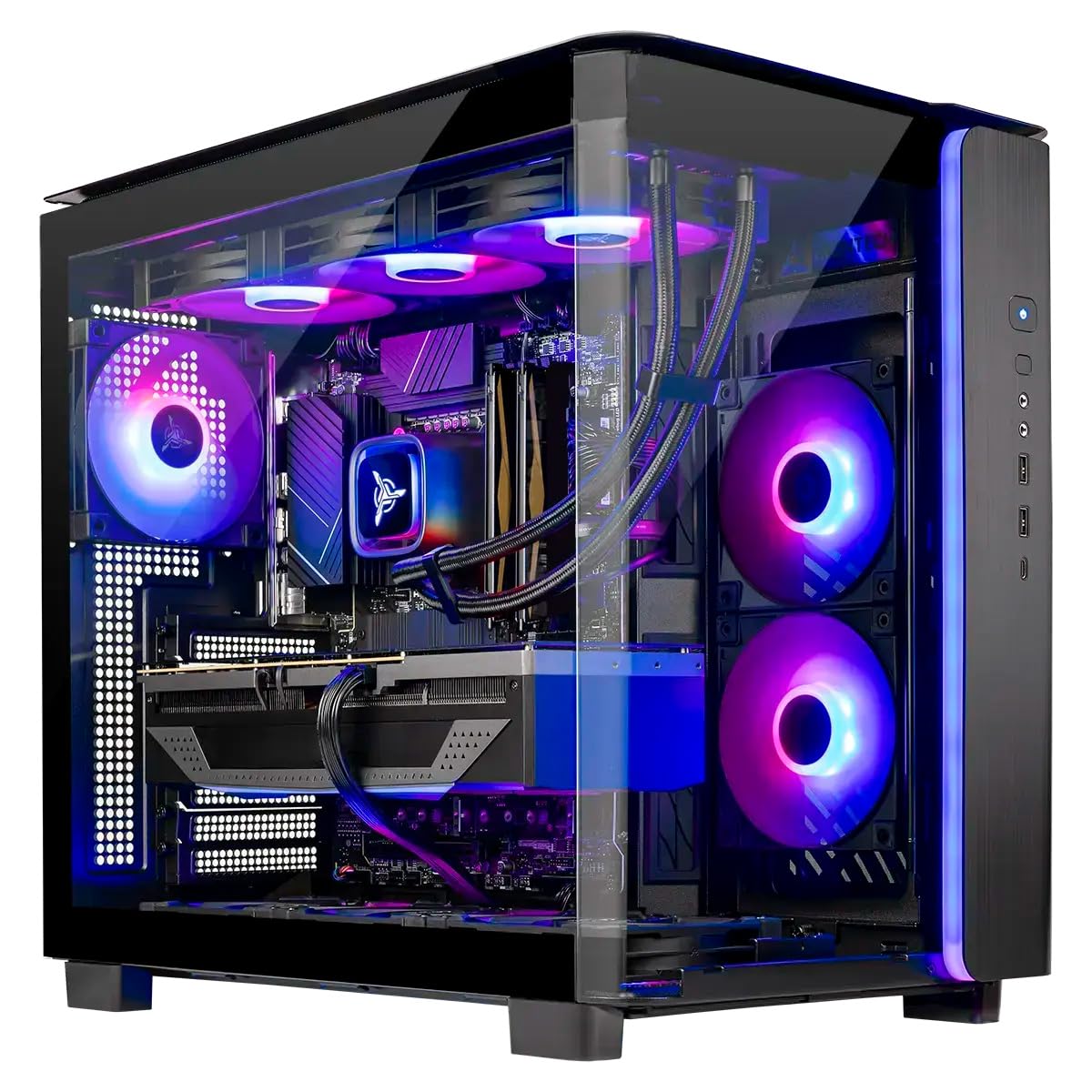
The Skytech King 95 pairs an AMD Ryzen 7 9850X3D processor with an NVIDIA RTX 5080 featuring 16GB of GDDR7 VRAM. The 16GB VRAM buffer is the sweet spot for 1440p animation projects with moderate texture sizes, providing enough headroom for most Blender and Cinema 4D scenes without hitting a memory wall.
The 360mm AIO liquid cooler ensures the 9850X3D maintains its boost clock during multi-hour rendering sessions. The 850W Gold ATX 3.0 power supply provides clean power delivery, which is critical for stability when the GPU is pulling peak wattage during frame renders.
Assembled in the USA with a 1-year warranty, the King 95 includes 32GB of DDR5 RAM clocked at 6000MHz. The King 95 case offers good airflow and cable management, making future upgrades straightforward when animation workloads scale up.
Why it’s great
- 16GB VRAM handles 1440p animation with ease
- 360mm AIO prevents thermal throttling
- Clean cable management for easy upgrades
Good to know
- Graphics card brand may vary
- RAM may require enabling XMP in BIOS
3. GMKtec EVO-X2 Mini PC

The GMKtec EVO-X2 is a compact workstation with extraordinary memory bandwidth. Its 128GB of LPDDR5X memory operates in an eight-channel configuration, providing 8000MT/s speeds. The AMD Radeon 8090S integrated GPU can allocate up to 96GB of that memory as VRAM, enabling it to run large-scale AI models locally for procedural animation generation.
The AMD Ryzen AI Max+ 395, with 16 Zen 5 cores and 32 threads, is a rendering beast in a small form factor. The triple-fan cooling system pushes 140W in performance mode, allowing sustained renders without the noise of a traditional tower. It supports quad 8K displays via HDMI 2.1 and USB4, ideal for a multi-monitor animation pipeline.
For animators working with AI-assisted tools like Stable Diffusion or local LLMs for scripting, the EVO-X2 eliminates the need for a separate AI accelerator. Its compact size makes it easy to integrate into a shared studio space or a home office with limited desk area.
Why it’s great
- 96GB VRAM allocation for huge AI models
- Eight-channel memory offers extreme bandwidth
- Compact size saves desk space
Good to know
- Heavier than expected for its size
- Some AI tools require workarounds for AMD GPU
4. Thermaltake LCGS View i570-170

The Thermaltake LCGS View i570-170 is built for users who rely on Intel’s architecture. The Intel Core i9-14900KF with 24 cores (8 Performance-cores + 16 Efficient-cores) delivers exceptional multi-threaded rendering performance. Applications like Cinebench and V-Ray that optimize for Intel’s thread scheduler see a direct benefit in render times.
The NVIDIA RTX 5070 with 12GB of GDDR7 memory provides enough VRAM for most 1080p and 1440p animation projects. The 240mm closed-loop liquid cooler keeps the i9 at sustained boost clocks during extended rendering sessions, preventing the performance degradation that air cooling can cause on high-core-count CPUs.
The system includes 32GB of DDR5 RAM clocked at 6000MT/s and a 1TB NVMe M.2 SSD. The Thermaltake View case features a filtered, ventilated side mount for the radiator, maintaining clean airflow. The build is free of bloatware, allowing the user to install only the animation tools they need.
Why it’s great
- 24-core CPU excels in threaded rendering
- Liquid cooling maintains peak CPU boost
- No bloatware pre-installed
Good to know
- Fans are slightly audible under load
- 12GB VRAM may limit high-resolution texture sets
5. Alienware Aurora ACT1250

The Alienware Aurora ACT1250 combines a recognizable brand with solid animation-grade hardware. The Intel Core Ultra 7 265F processor with 20 cores and the NVIDIA RTX 5070 with 12GB VRAM form a capable pair for Blender and Maya workflows. The 1000W Platinum-rated PSU provides a stable power foundation for sustained performance.
The Alienware Command Center allows users to monitor temperatures and adjust performance profiles, which is useful for switching between idle viewport work and full render loads. The basalt black finish and customizable AlienFX lighting zones give the tower a professional look suitable for a studio environment.
With 32GB of DDR5 RAM and a 1TB SSD, the Aurora is ready for project work out of the box. The 1-year Dell onsite service is a significant advantage for professional users who cannot afford downtime due to hardware failure.
Why it’s great
- Dell onsite service for minimal downtime
- 1000W Platinum PSU ensures clean power
- Professional, subdued design
Good to know
- Some units have defective USB-C ports
- Linux driver support is poor
6. KOTIN G60B

The KOTIN G60B focuses on thermal management, which directly benefits animation rendering. The 360mm liquid cooler with a digital temperature display keeps the AMD Ryzen 7 9700X running at its 5.5GHz boost clock. The case features an 11.3-inch smart display that shows CPU temperature, weather, and time — practical for monitoring render job status without opening software.
The NVIDIA RTX 5070 with 12GB GDDR7 memory handles 1440p animation and light 4K tasks. The 32GB of DDR5 RAM clocked at 6000MHz ensures the CPU doesn’t starve the GPU with data. The 850W 80 PLUS Gold PSU provides sufficient headroom for overclocking or future GPU upgrades.
KOTIN assembles these units in California, and the system boots directly into Windows 11 Home without requiring GPU installation. The 1-year parts and labor warranty, plus lifetime tech support, offers peace of mind for a pre-built workstation.
Why it’s great
- 360mm liquid cooling prevents thermal throttling
- Smart display shows render temps at a glance
- 850W PSU leaves room for upgrades
Good to know
- Some units have faulty smart displays
- Customer reports of intermittent boot issues
7. MSI Codex Z2

The MSI Codex Z2 delivers a well-balanced specification for animation at a competitive value point. The AMD Ryzen 7 8700F with 8 cores and 16 threads handles viewport tasks and renders efficiently. The NVIDIA RTX 5070 with 12GB VRAM is ample for most 3D animation projects, with headroom for moderate texture packs.
The system features four case fans — three front intake and one rear exhaust — creating positive pressure that keeps the components cool during long render sessions. The MSI Center software allows users to customize RGB lighting and monitor system performance, which is useful for tracking thermal trends over time.
With 32GB of DDR5 RAM and a 2TB NVMe SSD, the Codex Z2 has generous storage for project files and cache data. The tower design is upgrade-friendly, with a standard layout that allows easy access to RAM slots and storage bays.
Why it’s great
- Well-balanced CPU/GPU for animation
- 2TB SSD offers ample project storage
- Good airflow design prevents overheating
Good to know
- Some users report Bluetooth connectivity issues
- Fans become loud under sustained load
8. CyberPowerPC Gamer Master

The CyberPowerPC Gamer Master is an accessible entry point for animators learning 3D software. The AMD Ryzen 7 8700F processor delivers solid multi-threaded performance for rendering, while the NVIDIA RTX 5060 Ti with 8GB VRAM handles beginner to intermediate Blender scenes. The 8GB VRAM limit means users must manage texture sizes carefully.
The AMD B850 chipset motherboard supports the AM5 socket, providing a clear upgrade path to future Ryzen processors. The 16GB of DDR5 RAM is the minimum for animation work. Upgrading to 32GB should be a priority for users working with multiple applications open simultaneously.
The tempered glass side panel and custom RGB lighting give the tower a gaming aesthetic. The system includes a keyboard and mouse, reducing the initial investment needed for a new setup. The 1-year parts and labor warranty with lifetime tech support provides a safety net for beginners.
Why it’s great
- AM5 socket allows future CPU upgrades
- AM5 socket allows future CPU upgrades
- Includes keyboard and mouse for starter setups
Good to know
- 8GB VRAM limits high-res texture work
- 16GB RAM is the bare minimum for animation
9. Dell Pro Tower Plus
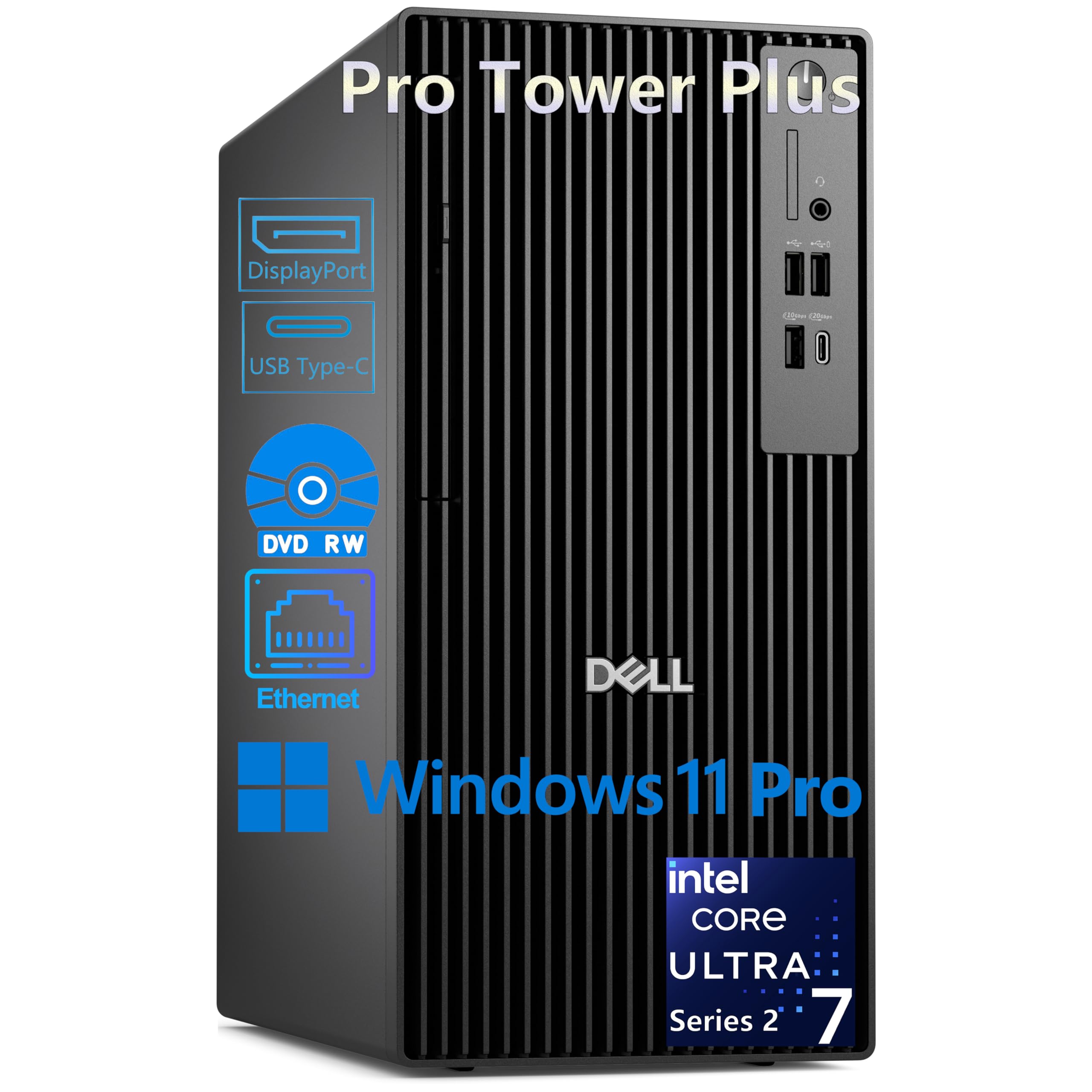
The Dell Pro Tower Plus is designed for professional environments that require reliability and multi-monitor productivity. The Intel Core Ultra 7 265 processor with 20 cores includes a 13 TOPS NPU for AI-accelerated tasks. This tower can drive three 4K displays simultaneously via its three DisplayPort 1.4a outputs, creating an expansive workspace for animation timelines.
The 32GB of DDR5 RAM is sufficient for multitasking across animation tools, video conferencing, and asset management. The 1TB PCIe NVMe SSD provides fast boot times and quick access to project files. The inclusion of a DVD-RW drive is useful for studios that still rely on physical media for archiving.
Windows 11 Pro includes BitLocker encryption and Remote Desktop, making this tower suitable for enterprise deployments. The 260W Bronze PSU is modest, however, meaning GPU upgrades will be limited. This is a workstation for 2D animation and light 3D work, not heavy rendering.
Why it’s great
- Triple 4K display support for timeline workflow
- NPU accelerates AI tasks locally
- Windows 11 Pro with enterprise security
Good to know
- No built-in WiFi (uses Ethernet only)
- Integrated graphics limit 3D rendering
10. GEEKOM A9 Max

The GEEKOM A9 Max is a compact AI-powered workstation that punches above its size. The AMD Ryzen AI 9 HX 370 with an XDNA 2 NPU delivers up to 80 TOPS of AI performance, accelerating tasks like Stable Diffusion image generation and local AI model inference. The Radeon 890M graphics with 16 RDNA 3.5 compute units handle 4K video editing and 3D rendering.
The all-metal chassis and IceBlast 2.0 cooling system maintain stable performance during AI and rendering workloads. The mini PC supports up to 128GB of DDR5 RAM and dual PCIe Gen4 SSDs up to 8TB. Its quad-display capability via USB4 and HDMI 2.1 ports enables a multi-monitor setup for animation pipelines.
GEEKOM backs the A9 Max with a 3-year limited warranty, significantly longer than the industry standard. The pre-installed Windows 11 Pro is ready for business use, making this a practical choice for animators who need a secondary workstation or a compact primary system.
Why it’s great
- 80 TOPS AI NPU accelerates generative tasks
- 3-year warranty provides long-term confidence
- Compact size fits in tight studio spaces
Good to know
- Integrated GPU cannot match dedicated cards
- Some users report thermal paste quality issues
11. HP OmniDesk M03-0060

The HP OmniDesk integrates a modern Intel Core Ultra 7 265 processor with AI capabilities into a uniquely designed chassis with a dark wood finish. The 20-core processor handles everyday animation tasks smoothly, while the Intel integrated graphics provide adequate performance for 2D animation and light 3D work. The 2TB SSD offers generous storage for project files.
The quad-display support is a highlight for animators who rely on multiple monitors for timeline, viewport, and asset browsers. The 32GB of DDR5 RAM ensures smooth multitasking across creative applications. Wi-Fi 6 and Bluetooth 5.4 keep the system connected without wired peripherals.
The OmniDesk is built with sustainability in mind, using post-consumer recycled plastic and recycled metal. It is EPEAT Gold and ENERGY STAR certified. The system includes 3 months of PC Game Pass, which is a minor bonus for users who also game.
Why it’s great
- 2TB SSD provides ample project storage
- Quad-display support for multi-monitor workflows
- Environmentally conscious manufacturing
Good to know
- Integrated graphics limit 3D rendering ability
- Some units have sleep/wake issues
12. ACEMAGIC M1A Pro

The ACEMAGIC M1A Pro is a mini PC that uses a discrete Intel ARC A770 GPU, making it one of the few compact systems with a dedicated graphics solution suitable for animation. The Intel Core i9-13900HK with 14 cores and 20 threads provides high single-core and multi-core performance. The ARC A770 supports AV1 encoding, which is beneficial for rendering final exports in the modern codec.
The system supports up to 96GB of DDR5 RAM and dual PCIe Gen4 NVMe SSDs. The 54W TDP sustained cooling ensures the CPU and GPU can maintain performance during extended rendering sessions without throttling. The M1A Pro can drive four displays with 8K output via USB4 and DisplayPort 2.0.
The compact chassis fits behind a monitor or on a desk without occupying much space. This makes the M1A Pro suitable for animators who need a dedicated render node that doesn’t take up floor space. The system is pre-loaded with Windows 11 Pro and is ready for professional software.
Why it’s great
- Discrete GPU in a mini form factor
- AV1 encoding for efficient renders
- Supports up to 96GB RAM and 4TB storage
Good to know
- Driver support can be problematic on Windows
- Not recommended for non-tech users
13. Missyou 71.3 Inch 3D Hologram Fan

The Missyou 3D Hologram Fan is not a rendering workstation but a display output device for animation. It uses three 65cm LED fans spliced vertically to create a 71.3-inch, naked-eye 3D display. The 768 premium LED beads per projector produce bright, sharp floating animations visible in commercial environments.
The system includes a synchronization router, wall brackets, and a portable tripod for immediate setup. Users can upload videos and generate 3D text through the dedicated smartphone app or Windows software. The built-in Bluetooth module syncs the visuals with external speakers for immersive presentations.
This device is best suited for animators who need to present their work in a retail or event setting. The silent bearings reduce operational noise, making it acceptable for quiet environments. It is not a replacement for a monitor or a rendering PC but a unique output medium for finished animation loops.
Why it’s great
- Creates a striking naked-eye 3D display
- Includes over 1500 free 3D video assets
- Quiet operation for commercial use
Good to know
- Requires external power bank for portable use
- Syncing multiple fans can be complex
FAQ
How much VRAM do I need for 3D animation?
Is an Intel or AMD CPU better for rendering?
Can I use a gaming PC for animation work?
Final Thoughts: The Verdict
For most animators, the undisputed winner of the best pc for animation is the Empowered PC Panorama XL because its 32GB RTX 5090 eliminates the most common bottleneck: VRAM exhaustion. If you need a compact AI powerhouse for procedural generation and local LLMs, grab the GMKtec EVO-X2. And for an excellent entry-level price-to-performance ratio in a traditional tower, nothing beats the CyberPowerPC Gamer Master.