
Connecting a retro console, arcade board, or older DVD player to a modern flat-panel TV shouldn’t feel like a research project. The gap between analog component, RGBS, or VGA signals and the digital HDMI input on today’s displays is a chasm that demands a reliable converter—one that preserves image stability, color accuracy, and the correct refresh rate without introducing lag or washed-out blacks.
I’m Min — the co-founder and writer behind Gadgets Feed. I’ve spent countless hours analyzing chipset specs, user-reported resolution compatibility, and real-world latency performance across dozens of these niche signal converters to separate the units that deliver clean 1080p conversion from the ones that produce artifacts, black crush, or unstable sync.
Whether you are resurrecting a PlayStation 2, integrating a retro arcade cabinet, or piping an old satellite box into a modern monitor, the best rgb to hdmi adapter must handle YPbPr, RGBS, and RGBHV input standards with a scaler that locks resolution without stutter.
How To Choose The Best RGB to HDMI Adapter
Not all RGB-to-HDMI converters are created equal. Some units lack a scaler and simply pass the native resolution without conversion, causing a black screen on a display that cannot handle 480i. Others include a scaler but apply aggressive black crush that destroys shadow detail in retro games. To pick the right adapter, you need to understand three things: the signal format your source outputs, the scaler’s resolution handling, and the build quality’s effect on signal integrity.
Signal Format Compatibility
Your source device outputs one of several analog video formats. PlayStation 1 and 2 output RGBS over the multi-AV port — four pins for red, green, blue, and sync. Many arcade boards output RGBHV, which separates horizontal and vertical sync into five signals. Component video (YPbPr) splits luminance from color difference and requires a different kind of processing. A universal adapter should explicitly list support for your specific signal type. Using a YPbPr-only converter with an RGBS source produces no image at all.
Scaler Engine and Resolution Management
The scaler is the brain of the adapter. A basic unit without a scaler can only output the native resolution of the source — 480i from a PS2 will just be passed through to HDMI. If your display rejects 480i over HDMI, you get a blank screen. A scaler-equipped adapter upscales or downscales to a standard HDMI-friendly resolution like 720p or 1080p. Look for models that support at least 720p and 1080p output, and check user reports for black crush or green push — cheap scalers alter color curves significantly.
Build Quality and Noise Shielding
Analog signals are susceptible to electrical interference. Adapters housed in metal enclosures offer superior shielding compared to bare plastic shells, reducing noise bars and unstable sync. The power supply matters too — some adapters are powered via USB and can introduce ground loop hum if plugged into a noisy USB port. External wall-wart adapters provide cleaner power for demanding arcade or console setups.
Quick Comparison
On smaller screens, swipe sideways to see the full table.
| Model | Category | Best For | Key Spec | Amazon |
|---|---|---|---|---|
| YITROX YT-YH01 | Upscaler | Wii, PS2, PS3 up to 1080p | 5 resolution options + 7 zoom modes | Amazon |
| EASYCEL Aluminum HDMI to YPbPr | HDMI to Component | Downscaling HDMI sources to retro displays | Aluminum housing, built-in scaler | Amazon |
| LEVELHIKE PS1/PS2 to HDMI | Console-Specific | PS1/PS2 RGB upscaling to 720p | True RGB signal, 4:3/16:9 switch | Amazon |
| Anber-Tech YPbPr to HDMI Scaler | Component to HDMI | DVD, PS2, Xbox 360 with scaler | 5-zone zoom, 1080p output | Amazon |
| Mcbazel Arcade VGA/RGBS to HDMI | Arcade/Upscaler | 15kHz arcade boards to HDMI | Auto-scan 15k/24k/31k signals | Amazon |
| Anber-Tech HDMI to YPbPr | HDMI to Component | HDMI sources to component-only displays | OSD mode, 1080p input | Amazon |
| WNNZVCC PS1/PS2 to HDMI | Console-Specific | Budget PS1/PS2 on modern TVs | RGBS/YPbPr switch, 4:3/16:9 | Amazon |
In‑Depth Reviews
1. YITROX YT-YH01 Component to HDMI Upscaler

The YITROX YT-YH01 distinguishes itself with an integrated scaler engine that supports five selectable output resolutions up to 1080P and seven zoom modes. This matters because many budget adapters simply pass the native 480i signal through, which can cause compatibility issues with modern displays. The YT-YH01 actively rescans and scales the incoming YPbPr video to a clean HDMI output, making it a genuine upgrade for PS2, Wii, and Xbox 360 users who want a sharper image without buying a dedicated upscaler like the RetroTINK.
Image quality compensation technology specifically optimizes for game console output, reducing jitter and motion trailing. Multiple verified buyers confirm the image on PS2 is dramatically improved—rivaling the clarity of component video on a CRT from twenty years ago. The three-dimensional color processing handles shadow detail better than most adapters at this tier, although some users report aggressive black crush on certain TV panels when the contrast is pushed too high.
The unit draws power via a standard DC adapter rather than USB, which isolates it from noisy USB ports that can introduce hum. The metal housing provides decent shielding, though it is not full aluminum like some premium competitors. For the price, the scaler quality and resolution flexibility make it the best all-around choice for component-to-HDMI conversion.
Why it’s great
- Integrated scaler with 1080P 60Hz output
- 7 zoom modes for adjusting aspect ratio
- Excellent PS2 image with minimal jitter
- Dedicated DC power — no USB noise issues
Good to know
- Black crush may appear on shadow details
- No RGBS support — YPbPr only
- Could use longer power cable
2. EASYCEL Aluminum 1080P HDMI to YPbPr Scaler Converter

The EASYCEL unit is one of the few adapters on this list built from aluminum rather than flimsy plastic. The metal chassis provides superior EMI shielding, which translates to a cleaner analog output with fewer static lines and less color noise. This is a HDMI-to-YPbPr converter—meaning it takes digital HDMI signals and downscales them to component video, perfect for feeding a PlayStation 4 or Roku into an older plasma or rear-projection TV that only accepts component input.
The scaler engine inside supports multiple input resolutions (480p/576p/720p/1080i/1080p) and outputs a selectable component signal. Verified users report flawless compatibility with devices like the Roku Streaming Stick+, PS3, and Xbox 360. One reviewer noted that after four years of 24/7 operation, the unit finally failed, an impressive lifespan for a sub-premium adapter. The aluminum body stays barely warm even under continuous load, unlike cheap plastic converters that can get uncomfortably hot.
The package is generous — includes both a component cable and an HDMI cable, along with the necessary power adapter. The device is HDMI 1.3 and HDCP 1.2 compliant, which means it may not work with the very latest 4K streaming boxes but remains fully compatible with most HD sources from the last decade. For retro gamers who want to play modern consoles on their Trinitron CRT, this is the adapter to buy.
Why it’s great
- Full aluminum housing for noise-free signal
- Includes both component and HDMI cables
- Scaler accepts 1080p input, downscales cleanly
- Stable 1080i output with no distortion
Good to know
- HDMI 1.3 — may not support newest 4K devices
- Not reversible (HDMI to component only)
- Occasional HDCP handshake issues on older TVs
3. LEVELHIKE PS1/PS2 to HDMI Adapter

The LEVELHIKE adapter is purpose-built for PS1 and PS2, capturing the console’s native RGB signal from the multi-AV port rather than falling back to composite video. This distinction matters because RGB carries separate luminance and sync signals, resulting in dramatically sharper text and fewer color bleeding artifacts compared to standard composite-to-HDMI converters. The included HDMI cable is detachable, allowing you to swap in a higher-gauge cable for longer runs.
Image quality is surprisingly good for the price. Users report clean 720p upscaling with no noticeable lag, and the 4:3/16:9 toggle switch makes it easy to play classics like Final Fantasy X in widescreen without image distortion. The adapter draws power from a micro USB cable, which is both a convenience (any phone charger works) and a potential liability—plugging into a noisy USB hub can introduce faint horizontal scrolling bars. Users with Samsung TVs report flawless performance, while some Sony TV owners experience stretched or unstable image output.
Build quality is solid for a plastic-cased adapter, and the connector fits snugly into the PS2’s multi-AV port without excessive force. The one-year replacement warranty from LevelHike is a good safety net, though some users report needing a replacement on the first unit due to a green tint—the second unit worked perfectly. For the price, this is the most cost-effective way to play PS1 and PS2 games on a modern HDTV without upgrading to a RetroTINK or OSSC.
Why it’s great
- Captures true RGB from PS1/PS2 multi-AV port
- Detachable HDMI cable for easy replacement
- 4:3/16:9 aspect ratio toggle
- Plug-and-play with no driver setup required
Good to know
- Micro USB power can introduce line noise
- Compatibility issues reported on some Sony TVs
- Occasional green tint on defective units
4. Anber-Tech YPbPr to HDMI Converter with Scaler
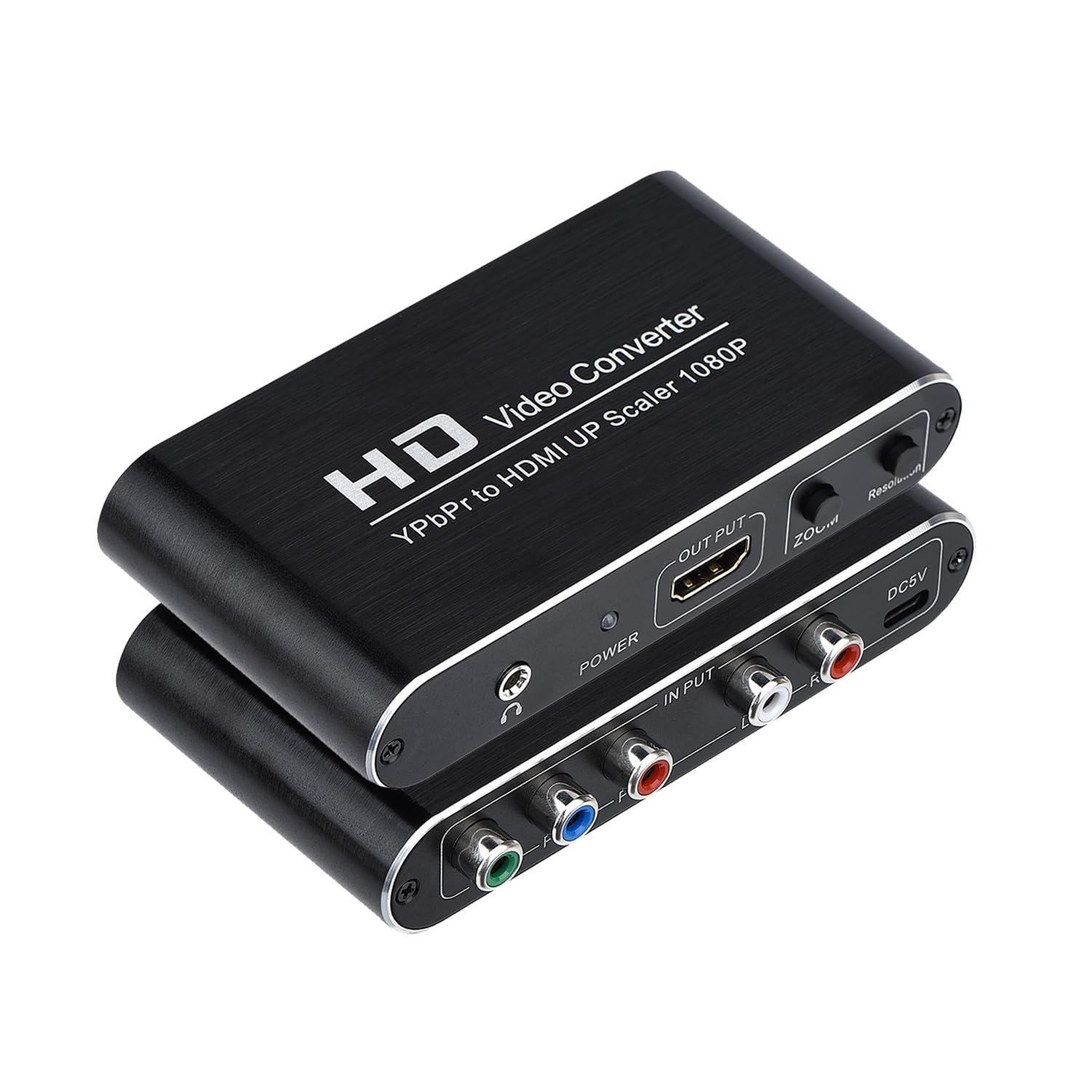
This Anber-Tech converter adds a genuine scaler engine to the standard YPbPr-to-HDMI formula, giving you five output resolutions (from 800×600 up to 1080p) and five picture zoom modes. For users with an older DVD player or satellite box that outputs 480i over component, the scaler eliminates the “blank screen” problem by upscaling to 720p or 1080p before sending the signal to a modern display. The device also includes a 3.5mm audio output, which is helpful if you want to route sound separately to a soundbar or AV receiver.
Users report excellent results with PS2 and Xbox 360 when output is set to 720p. The image is clear and stable, and the zoom function works primarily for picture size adjustment rather than scaling—do not expect it to fix resolution mismatch issues. One critical note: this adapter is component-to-HDMI only. If you plug an RGBS source into it, you will get no signal. The power adapter is a proprietary barrel jack rather than USB, which provides cleaner power but means you cannot charge it from your TV’s USB port.
A small number of users experienced issues with copyright-protected DVD discs, where the image would become unstable after a few seconds. This appears to be a HDCP handshake limitation of the scaler chip. For game consoles and non-encrypted video sources, performance is reliable. The device comes with a 24-hour response warranty from the seller, which adds some peace of mind.
Why it’s great
- Built-in scaler with 1080p output
- Separate 3.5mm audio output
- Proprietary DC power for clean signal
- 5 zoom modes for aspect ratio control
Good to know
- Can struggle with HDCP-protected DVDs
- Not compatible with RGBS sources
- Power supply is proprietary, not USB
5. Mcbazel Arcade VGA RGBS RGBSHV to HDMI Converter Board
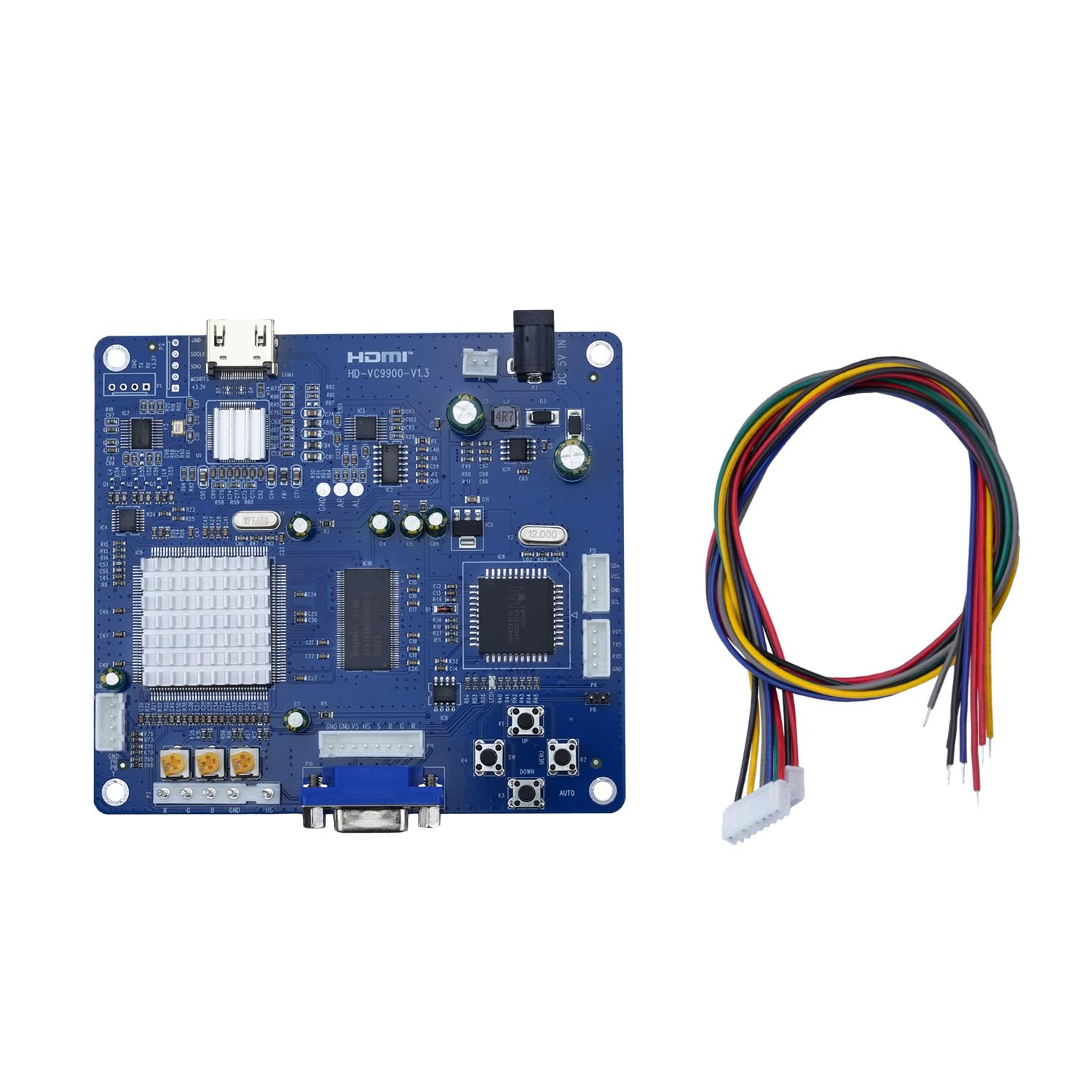
The Mcbazel board is designed for the arcade and MAME community, where video signals run at 15kHz, 24kHz, or 31kHz—frequencies that most consumer HDMI converters cannot handle. Its 24-bit video processing chip auto-detects the incoming sync rate and adjusts accordingly, making it one of the few sub-premium converters that can accept RGBS (with composite sync) and RGBHV (with separate H and V sync) from JAMMA arcade boards and old PC VGA outputs.
The board includes an on-screen display menu that lets you adjust image position, clock phase, and clamp levels—crucial for eliminating the purple/pink shift that some users initially report. After adjusting the two 500-ohm potentiometers and tweaking the clamp settings (set to 3 and 5 as per community guides), users have successfully converted Donkey Kong, Cruis’n World, and other classic arcade PCBs to HDMI with stable video and accurate colors. The menu supports both English and Chinese, but defaulting to Chinese can confuse first-time users.
The single biggest caveat is the learning curve: this is not a plug-and-play device for consoles. It requires manual calibration and proper termination resistors to avoid washed-out or distorted output. Some users received defective units that output useless artifacts or missing lines, though the replacement process is straightforward. For anyone refurbishing a retro arcade cabinet or connecting a CGA monitor replacement, this is the most affordable dedicated solution available.
Why it’s great
- Auto-scans 15k/24k/31k arcade signals
- Accepts RGBS, RGBHV, and YPbPr
- Adjustable clamp and potentiometer for color tuning
- OSD menu for fine image control
Good to know
- Requires manual calibration for best image
- Menu defaults to Chinese — must switch to English
- Some units arrive defective (artifacts, no sync)
6. Anber-Tech HDMI to Component YPbPr Converter

Anber-Tech’s HDMI-to-YPbPr solution is a straightforward direction-specific converter: it takes HDMI input and outputs component video and stereo R/L audio. It has no scaler — it simply passes the incoming resolution through to the component output. If your HDMI source outputs 1080p, the component output will be 1080p — provided your old TV supports it. If your display only accepts 480i, you must lower your source’s resolution manually or the screen remains blank.
The unit works reliably with devices that output standard HDMI resolutions up to 1080p/60Hz, including Xbox 360, Nintendo Switch, and Blu-ray players. Verified users report clean conversion with no added noise, though the plastic casing is lightweight and feels less durable than metal alternatives. The OSD menu lets you check the current input and output signal status, which is helpful for troubleshooting — not common in budget adapters at this price point.
One important limitation: this device does not support 4K HDMI sources. If you plug in a Fire Stick or Apple TV set to 4K output, you will get no signal. It also lacks any scaling or down-conversion, so it is rigid about resolution matching. For users who want to connect a PS4 or streaming stick to a component-only CRT monitor, this unit works. For anyone needing to connect a 480i console to a modern HDMI TV, you need the reverse direction and a scaler.
Why it’s great
- True plug-and-play with no driver install
- OSD menu for input/output status
- Clean conversion with no added artifacts
- Supports 1080p/60Hz input from consoles
Good to know
- No scaler — requires exact resolution matching
- Not compatible with 4K HDMI sources
- Plastic housing with average build quality
7. WNNZVCC PS1/PS2 to HDMI Converter

The WNNZVCC adapter is a direct competitor to the LEVELHIKE unit, offering similar functionality for a lower entry point. It captures the PS1 RGBS signal and PS2’s RGBS or YPbPr signal and converts them to HDMI output. The physical hardware toggle between RGBS and YPbPr signal modes is a practical differentiator — if you encounter a blank screen because the console is outputting the wrong format, you simply flip the switch until the image appears. No need to navigate software settings or guess which mode your game uses.
Image quality is acceptable for the price. The upscaler locks to 720p, which means 1080i sources from PS2 are scaled down slightly rather than maintained at their native interlaced resolution. Colors appear slightly less vibrant compared to the LEVELHIKE unit, likely due to a less aggressive color processor. Some users note the image is a bit dull or “drab,” especially in dark scenes where shadow detail crushes. For the budget-conscious retro gamer, however, the visual trade-off is tolerable — the image is far better than composite and serviceable for most PS1 RPGs.
Build quality is the weakest point: the adapter uses a micro USB port for power (should be USB-C at this price point), and the connector feels cheap. One user reported receiving a dead unit that required a replacement, after which the second unit worked fine. The 4:3/16:9 toggle is a welcome inclusion. If you are looking for the absolute cheapest way to get a PS1 or PS2 signal into a modern TV, this adapter works — just manage your expectations on color richness and build materials.
Why it’s great
- Physical RGBS/YPbPr format switch
- 4:3/16:9 aspect ratio toggle
- Plug-and-play with no configuration
- Works with all PS1 and PS2 models
Good to know
- Upscales to 720p — no 1080p option
- Colors can appear dull compared to rival adapters
- Micro USB power — should be USB-C
FAQ
Can I use a YPbPr to HDMI converter with an RGBS source like a PS1?
Why is my screen black when using an HDMI to component converter?
Will an RGB to HDMI adapter add input lag for fighting games or shooters?
Final Thoughts: The Verdict
For most users, the best rgb to hdmi adapter winner is the YITROX YT-YH01 because it combines a genuine scaler engine, multiple resolution options, and dedicated power delivery in a package that handles YPbPr consoles from PS2 to Xbox 360 without breaking the bank. If you need an aluminum-shielded adapter for feeding HDMI into a retro component display, grab the EASYCEL Aluminum HDMI to YPbPr. And for dedicated PS1 and PS2 use with true RGB capture at an entry-level price, nothing beats the LEVELHIKE PS1/PS2 to HDMI Adapter.