
Our readers keep the lights on and my morning glass full of iced black tea. As an Amazon Associate, I earn from qualifying purchases.
Specs are compiled from manufacturer listings and verified buyer reviews and can change over time — please confirm the key details on the product page before buying.
You no longer have to choose between a cordless desk and fast, competitive gaming performance. The best wireless gaming mice today are actually quicker than many wired ones — you just need to find the one that fits your hand and the games you play, not the one with the highest spec sheet.
I’m Min — the founder and writer behind Gadgets Feed. This guide is built by comparing the manufacturers’ published specifications and the patterns across verified customer reviews, so you get each pick’s real strengths and trade-offs instead of marketing spin.
These seven wireless gaming mouse picks cover ranked matches, single-player adventures, and a cleaner desk — everything a great mouse can do right now.
Quick Picks
- Razer DeathAdder V3 HyperSpeed Wireless Gaming Mouse — Best Overall
- ATTACK SHARK X3 Lightweight Wireless Gaming Mouse — Budget Radar
- Logitech G309 Lightspeed Wireless Gaming Mouse — Work & Play Hybrid
- Razer Cobra Pro Gaming Mouse — RGB Showpiece
- GravaStar Mercury X Pro Wireless Gaming Mouse — 8K Performance
- Sony INZONE Mouse-A Ultra-Lightweight 48g Wireless Gaming Mouse — Esports Precision
- Logitech G305 Lightspeed Wireless Gaming Mouse — Reliable Workhorse
How To Choose The Best Wireless Gaming Mouse
Five specs decide whether a wireless gaming mouse helps you win or just sits on your desk looking fancy. Here is what to look for.
Weight and Build
Weight is the single biggest factor in how a mouse feels during fast flicks. Competitive players often prefer mice under 60g for quick, fatigue-free movement, while a slightly heavier mouse around 80g can feel more stable for slower, precision-based games. The material matters too — a solid magnesium alloy frame is stiffer than plastic, but it costs more.
Sensor and DPI
DPI (dots per inch) measures how far your cursor moves for each inch you move the mouse — higher DPI means faster cursor movement with less physical hand movement. Almost any modern gaming sensor above 12,000 DPI is more accurate than you need. The more important spec is tracking consistency and whether the sensor has any built-in smoothing that can introduce input lag.
Switch Type and Durability
Mechanical switches give a traditional click feel but can develop a double-click issue over years of use. Optical switches use light to register a click, which eliminates that problem entirely and offers faster actuation — typically about 0.2 milliseconds instead of around 1-2 milliseconds for mechanical switches. Check the rated click lifespan: most good switches are rated for 80 million clicks or more.
Connectivity and Polling Rate
A standard 2.4 GHz wireless connection delivers a 1,000 Hz polling rate (meaning it reports its position to your computer every millisecond), which already beats many wired mice in responsiveness. Some premium models now offer 8,000 Hz polling (reporting every 0.125 milliseconds) for the absolute lowest latency, but that demands more CPU power. Bluetooth is fine for office work but adds noticeable lag in competitive gaming.
Battery Life and Charging
You do not want your mouse dying mid-round. A AA battery-powered mouse can run for 250 to 300 hours on a single cell — and you can swap in a fresh battery in seconds. Rechargeable mice with built-in batteries are more convenient for daily use but need to be plugged in for a few hours every week or two. USB-C charging is now standard, so you can use the same cable as your phone or laptop.
Quick Comparison
| Model | Best For | Weight | Max DPI | Battery Life | Amazon |
|---|---|---|---|---|---|
| Razer DeathAdder V3 HyperSpeed | Pro-Level Esports | 55g | 26,000 | 100 Hours | $69.99$99.99Amazon |
| ATTACK SHARK X3 | Budget Beast | 49g | 26,000 | Months (per charge) | $39.99$41.99Amazon |
| Logitech G309 Lightspeed | Versatile Daily Driver | 86g | 25,600 | 300+ Hours | $67.99$89.99Amazon |
| Logitech G305 Lightspeed | Reliable Budget Pick | 99g | 12,000 | 250 Hours | $39.99$49.95Amazon |
| Razer Cobra Pro | RGB Enthusiasts | ~76g | 30,000 | 170 Hours (BT) | $69.99$129.99Amazon |
| GravaStar Mercury X Pro | Unique Design & 8K Polling | 49g | 32,000 | ~3+ Days (Heavy Use) | $139.95Amazon |
| Sony INZONE Mouse-A | Esports Precision | 48g | 30,000 | 90 Hours | $148.00Amazon |
In‑Depth Reviews
1. Razer DeathAdder V3 HyperSpeed Wireless Gaming Mouse

The featherweight esports champion that trades gimmicks for pure speed and precision.
At just 55g, the DeathAdder V3 HyperSpeed is 31g lighter than the Logitech G309 Lightspeed (which weighs 86g), making a huge difference when you are flicking across your mousepad for hours. Its mass-centralized design — tested and validated by pro players — keeps the balance point right in the center, so your swipes feel predictable and stable rather than nose-heavy.
The Focus X 26K Optical Sensor tracks movements with 99.6% resolution accuracy, and the Gen-3 Optical Switches actuate in a blistering 0.2 milliseconds with zero debounce delay — so you will never experience the double-click issue that plagues mechanical switches. Battery life reaches up to 100 hours on a single USB-C charge, and you can upgrade to a true 8,000 Hz polling rate by buying the Razer HyperPolling Wireless Dongle separately. Buyers report the shape is slightly smaller than the wired DeathAdder, which some larger-handed users found a bit cramped for a full palm grip.
What Makes It a Winner
- Extremely light 55g frame for fatigue-free competitive play
- Focus X 26K optical sensor with 99.6% resolution accuracy
- Gen-3 optical switches eliminate double-click issues entirely
- USB-C rechargeable with up to 100 hours of battery life
What to Watch For
- Smaller profile may not suit large-handed palm grippers
- No on-board RGB lighting for those who want flair
Reach for this if: You want a pro-validated, ultra-light esports mouse with optical switches and a high-end sensor.
Look elsewhere if: You have large hands and want a fuller palm-filling shape, or you need a mouse for both gaming and office Bluetooth use.
2. ATTACK SHARK X3 Lightweight Wireless Gaming Mouse

A 49g featherweight with a flagship sensor that gives pricier mice a real scare.
The ATTACK SHARK X3 weighs just 49g — tied with the GravaStar Mercury X Pro and lighter than the 55g Razer DeathAdder V3 HyperSpeed — yet it packs the Pixart PAW3395 optical sensor, a component typically found in mice costing twice as much. This sensor delivers up to 26,000 DPI (a 2.2x gap over the Logitech G305’s 12,000 DPI), 650 IPS tracking speed, and a 1000Hz polling rate that keeps your cursor locked to your hand movements.
Owners mention the battery lasts months on a single charge, and the tri-mode connectivity (2.4G wireless, Bluetooth 5.2, and USB-C wired) lets you juggle between a gaming PC, a work laptop, and a tablet without re-pairing. The Kailh GM8.0 Black Mamba switches are rated for 80 million clicks and deliver a crisp, fast-rebound feel. One caveat: the shape is smaller than a Logitech G Pro X Superlight, so if you have large hands, you might find a full palm grip uncomfortable.
Sensor-for-Price King: The PAW3395 sensor at this price point is almost unheard of — it delivers pro-level tracking accuracy that can compete with mice more than double its price.
Size Caveat: The compact ergonomic shell is a great fit for claw and fingertip grips, but larger hands will struggle to palm it comfortably.
Grab it if: You want a premium sensor and an ultra-light frame without spending over.
skip it if: You need a full-size palm-filling shape or you prefer heavier, more stable mice for slow-paced aiming.
3. Logitech G309 Lightspeed Wireless Gaming Mouse

The all-day mouse that switches between gaming and office work without missing a beat.
At 86g with a AA battery, the G309 is noticeably heavier than the 55g Razer DeathAdder V3 HyperSpeed (a 56% weight gap) and sits on the heavier side of the modern gaming mouse spectrum. But that extra weight delivers a stable, planted feel that many gamers — especially those playing slower tactical shooters or MOBAs — actually prefer. The HERO 25K sensor tracks exactly to the sub-micron with zero smoothing, so your aim stays precise at any DPI setting.
The LIGHTFORCE hybrid switches combine the speed of an optical actuation with the tactile feel of a mechanical click, giving you the best of both worlds. It also supports Bluetooth multipoint connectivity, making it a smooth daily driver for work laptops and gaming rigs. One reviewer noted the G Hub software feels clunky and resource-heavy, which is a common complaint across Logitech’s ecosystem.
Battery-Life Champion: 300+ hours on a single AA battery means you recharge your mouse roughly once a year — not once a week.
Software Weakness: The G Hub customization software can be resource-heavy and unintuitive, which some users find frustrating for adjusting DPI and button profiles.
Best for: Gamers who want a reliable, do-it-all wireless mouse for both competitive play and daily office work, with minimal charging hassle.
Consider alternatives if: You are a weight-obsessed competitive player hunting for sub-60g performance, or you dislike Logitech’s G Hub software.
4. Razer Cobra Pro Gaming Mouse

A fully loaded ambidextrous mouse that drowns you in RGB but backs it up with serious specs.
The Cobra Pro is Razer’s feature-packed answer for players who want it all: 11 individually customizable Chroma RGB lighting zones (each with 16.8 million colors), a Focus Pro 30K Optical Sensor that tracks flawlessly even on glass, and Gen-3 Optical Switches rated for 90 million clicks with a 0.2ms actuation time. Unlike the right-handed DeathAdder V3, this mouse is ambidextrous, which is a rare find for high-end wireless gaming mice.
You get three connectivity modes — Bluetooth, 2.4 GHz HyperSpeed Wireless, and a wired USB-C Speedflex cable — plus 5 on-board memory profiles you can swap on the fly. Battery life reaches 170 hours on Bluetooth or 100 hours on 2.4 GHz, though running at a 4K Hz polling rate (which requires a separate HyperPolling dongle) drops that to about 33 hours. Reviewers praise the molded rubber side grips for extra control, but note that the RGB lighting settings do not save to on-board memory, so your lighting effects disappear when you unplug Synapse.
Feature Highlights
- 11-zone Chroma RGB with underglow for rich lighting
- Focus Pro 30K sensor tracks on glass surfaces
- Ambidextrous shape suits both left and right-handed users
- 5 on-board memory profiles for game-specific settings
Feature Downsides
- RGB settings don’t save to on-board memory
- Noticeably heavier than 49g-55g ultra-light alternatives (around 76g)
Ideal for: RGB enthusiasts and ambidextrous users who want a premium, feature-packed wireless mouse that also performs at a competitive level.
Pass if: You are an esports player chasing the lightest possible weight, or you dislike needing Razer Synapse software running for full functionality.
5. GravaStar Mercury X Pro Wireless Gaming Mouse

A hollow magnesium chassis that looks like a concept car and plays like a pro tool.
The GravaStar Mercury X Pro is a statement piece that earns its price tag with raw specs. It weighs just 49g — identical to the ATTACK SHARK X3 and a hair lighter than the 55g Razer DeathAdder V3 HyperSpeed — but achieves that featherweight status through a durable magnesium alloy hollow frame that maximizes airflow to keep your hand cool. The PAW 3950 sensor hits 32,000 DPI, the highest maximum DPI in this lineup, and comes with an 8K dongle included in the box for a native 8,000 Hz polling rate — no separate purchase needed.
Customers note that the ergonomic shape works well for both small and large hands (one buyer called it an excellent upgrade from a Logitech G502 Pro Wireless), and the tri-mode connectivity (Bluetooth, 2.4G, and wired) adds flexibility. Battery life runs about 3+ days of heavy use with lighting on — shorter than AA-powered alternatives, but reasonable for a rechargeable mouse. The hollow design does collect dust in its crevices, so you will need to clean it more often than a solid-shell mouse.
Design and Build: The magnesium alloy hollow frame looks unlike any other mouse on the market and delivers rigidity without adding weight, which is a rare engineering feat at this price.
Performance Ceiling: With a 32K DPI sensor and included 8K dongle, this mouse is technically overkill for 99% of players, but for those who want zero-latency headroom, it delivers.
Choose this if: You want a visually unique, ultra-light mouse with a magnesium frame and 8K polling right from the start.
Think twice if: You prefer a solid-shell aesthetic or you need the simplest possible cleaning routine.
6. Sony INZONE Mouse-A Ultra-Lightweight 48g Wireless Gaming Mouse
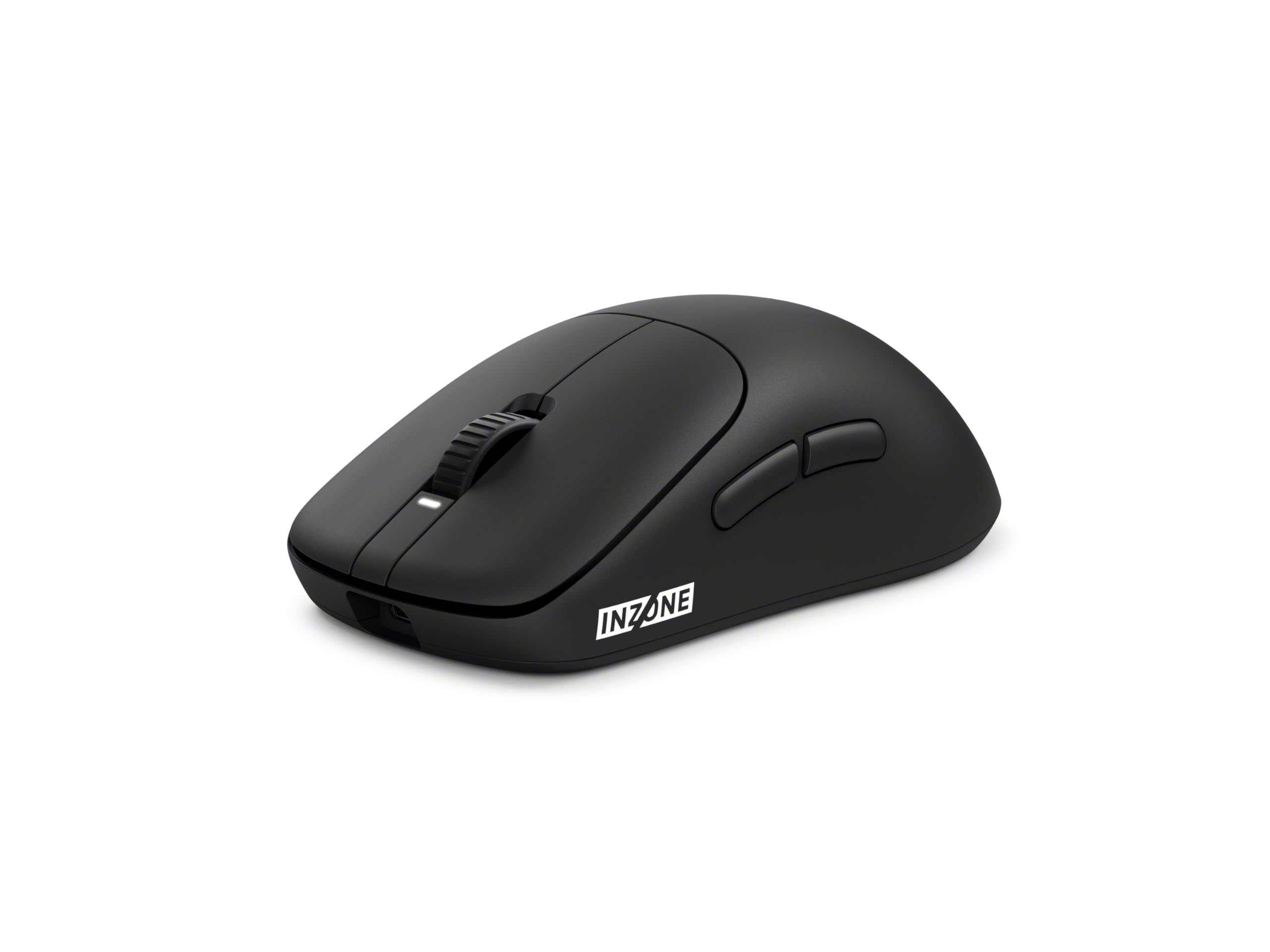
The lightest mouse in this lineup, engineered with Fnatic pros for pinpoint esports accuracy.
At 48.4g, the Sony INZONE Mouse-A shaves off every possible gram to deliver the lightest weight in this entire list — 6.6g lighter than the 55g Razer DeathAdder V3 HyperSpeed. Its internal frame uses a durable polyamide reinforced with hollow glass microspheres, providing 360-degree lateral support that prevents flex during intense play. The custom 3950IZ sensor tracks up to 30,000 DPI with acceleration of up to 70G and 750 IPS, so your cursor stays glued to your hand at any speed.
The optical switch is rated for 150 million clicks — the highest durability rating here — and uses light rather than friction to register, giving you faster input with no risk of double-clicking. An 8,000 Hz polling rate comes standard with the included USB dongle, delivering ultra-low latency input from the start. One unique feature is the back button that lets you toggle power with a 3-second press and rotate to switch between up to four on-board profiles. Reviewers love the web-based INZONE Hub software that avoids clumsy desktop apps, though some noted the mouse wheel is very sensitive and can accidentally register middle-click while scrolling.
Esports Engineering
- Lightest weight in the lineup at 48.4g for maximum fatigue-free play
- Optical switches rated for 150 million clicks
- 8,000 Hz polling rate included with the dongle
- Browser-based INZONE Hub software — no resource-heavy app needed
Small Annoyances
- Scroll wheel can register accidental middle-clicks during scrolling
- Fingerprint-prone coating that shows smudges
Ideal for: Competitive esports players who want the absolute lightest weight, highest polling rate, and most durable optical switches available.
Consider alternatives if: You need a scroll wheel with defined, low-sensitivity steps or you prefer a matte, smudge-resistant coating.
7. Logitech G305 Lightspeed Wireless Gaming Mouse

A proven, affordable wireless classic that trades flashy weight cuts for rock-solid reliability.
The G305 has been a staple of the budget wireless gaming mouse market for years, and for good reason. Its 12,000 DPI HERO optical sensor delivers excellent tracking accuracy and power efficiency, while the Lightspeed wireless technology provides a super-fast 1-millisecond response time that feels indistinguishable from a wired connection. At 250 hours of continuous gaming on a single AA battery, you will recharge your mouse roughly once a year — and when it dies, you swap the battery instead of waiting for a charge.
Buyers consistently praise its comfortable shape for large hands and the six programmable buttons that integrate with Logitech’s G Hub software. The compact design even has a built-in storage slot for the USB receiver inside the battery compartment, so you never lose it during travel. One honest catch: several long-term users report that the left mouse button can stop working after about a year of heavy use, which points to a mechanical switch durability issue that Logitech’s pricier models (like the G309 with LIGHTFORCE switches) solve.
Why It Endures
- Exceptional 250-hour battery life on a single AA battery
- 1000Hz Lightspeed wireless that matches wired performance
- Comfortable shape that suits large hands well
- Built-in USB receiver storage for travel
Long-Term Concerns
- Mechanical switches may develop left-click failure after around a year of heavy use
- No USB-C charging — uses disposable AA batteries only
- Max 12,000 DPI is lower than other budget competitors
Best for: Budget-conscious gamers who prioritize battery life, a proven shape, and Logitech’s reliable wireless technology over ultra-light weight or the highest DPI.
Pass if: You want a rechargeable mouse, you need a sub-60g frame, or you are a heavy user who wants optical switches that will not double-click.
Understanding the Specs
DPI (Dots Per Inch)
DPI tells you how sensitive the mouse is — a higher DPI means your cursor moves further across the screen for the same physical hand movement. Most competitive players use between 400 and 1600 DPI, so a sensor that goes up to 26,000 or 30,000 DPI is massive overkill for gaming. The real quality comes from a sensor that tracks consistently at your chosen DPI without any smoothing or acceleration that could throw off your muscle memory.
Polling Rate (Hz)
This is how often the mouse reports its position to your computer. A 1,000 Hz polling rate means it reports every 1 millisecond, which is already faster than the human reaction time. An 8,000 Hz polling rate reports every 0.125 milliseconds — it reduces input lag further, but your CPU has to work harder to process all that data. Unless you are a pro player with a high-refresh-rate monitor, the difference between 1,000 Hz and 8,000 Hz is virtually imperceptible.
Switch Type and Lifespan
Mechanical switches use physical metal contacts to register a click, which can develop a dreaded “double-click” issue over time as the contacts wear down. Optical switches use a beam of light — no metal contacts, so no double-clicking ever. Switch lifespan is measured in millions of clicks; typical mechanical switches are rated for 50-80 million clicks, while optical switches can reach 90-150 million clicks. The trade-off is that optical switches often feel slightly different under the finger — less tactile feedback than a crisp mechanical click.
Weight and Balance
Weight is measured in grams and directly affects how fast you can flick and how fatigued your wrist gets over extended sessions. Ultra-light mice (under 60g) enable rapid, easy movement but can feel floaty and unstable for slow, precise aiming. Heavier mice (80g-100g) offer more stability and inertia, which some players prefer for tactical shooters. Good balance — where the mouse’s center of mass is right under your palm — matters just as much as total weight. A poorly balanced 55g mouse can feel worse than a well-balanced 80g mouse.
FAQ
Is a wireless gaming mouse actually faster than a wired one?
What is the best DPI setting for gaming?
How long do wireless gaming mouse batteries last?
Can I use a wireless gaming mouse for work?
What is the difference between Bluetooth and 2.4G wireless?
What does polling rate mean for my gaming?
Are lighter mice always better for gaming?
Why would I want an optical switch instead of a mechanical one?
Does an 8000Hz polling rate affect CPU performance?
Can I replace the switches on a wireless gaming mouse?
Final Thoughts: The Verdict
For the majority of shoppers, the wireless gaming mouse winner is the Razer DeathAdder V3 HyperSpeed because it delivers an unbeatable balance of ultra-light 55g weight, a pro-validated shape, a high-accuracy optical sensor, and reliable USB-C rechargeable battery life — all at a mid-range price. If you want a budget option that gives you a flagship PAW3395 sensor and tri-mode connectivity while staying affordable, grab the ATTACK SHARK X3. And for the absolute lightest weight with the highest polling rate from the start, the standout is the Sony INZONE Mouse-A.
How We Picked
We do not accept paid placement. Every pick is matched to a real buyer and a real use-case; we do not hands-on test units.
Sources & Methodology
Specifications: manufacturer listings and product documentation. Review insights: verified customer reviews, as of July 2026. Pricing: not shown on this page (it changes often); check the current price via the retailer link.
As an Amazon Associate, Gadgets Feed earns from qualifying purchases. This does not affect which products we feature.
Product prices and availability are accurate as of the date/time indicated and are subject to change. Any price and availability information displayed on Amazon at the time of purchase will apply to the purchase of this product. As an Amazon Associate I earn from qualifying purchases.
CERTAIN CONTENT THAT APPEARS ON THIS SITE COMES FROM AMAZON. THIS CONTENT IS PROVIDED "AS IS" AND IS SUBJECT TO CHANGE OR REMOVAL AT ANY TIME.
Amazon and the Amazon logo are trademarks of Amazon.com, Inc. or its affiliates.